
In the world of Linux, Arch Linux is known for its geekiness and high degree of freedom, but the installation and configuration process often deters newcomers.Archman Linux was created to allow more users to experience the power of Arch while enjoying a simpler and more intuitive desktop experience.
📌 Official Website: https://archman.org
🏞️ Interface Preview
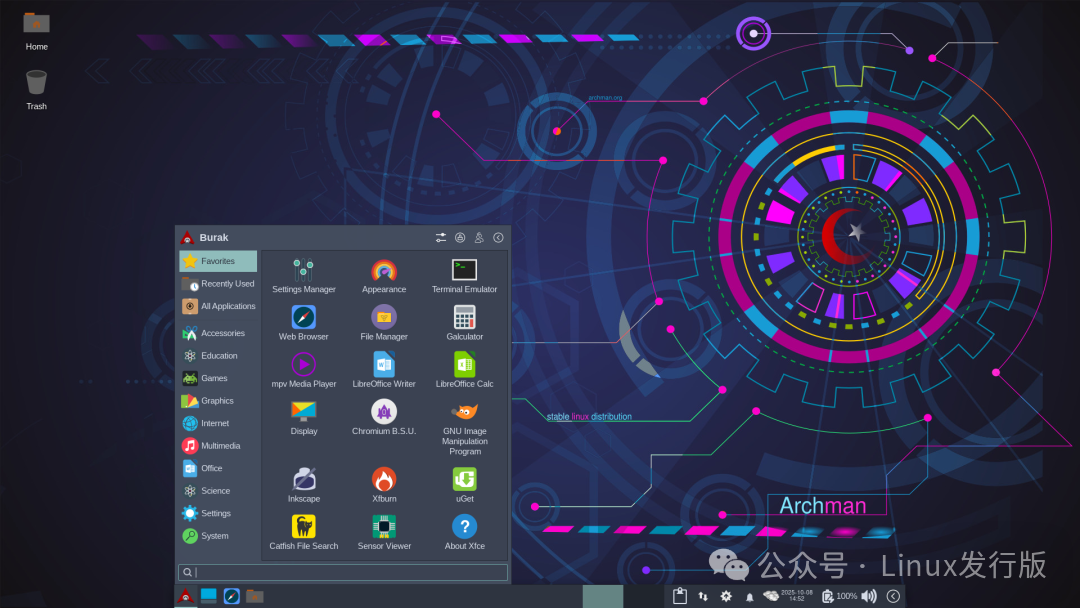
📜 Origin and Development
- • 🕰️ Origin: Archman Linux was initiated by the Turkish community, combining the names of Arch Linux and Pacman Package Manager.
- • 🔄 Development Philosophy: While maintaining Arch’s rolling updates and flexibility, it provides a more user-friendly installer and default configuration.
- • 🌍 Positioning: A lightweight, fast, stable, and visual Arch derivative system.
🎯 Core Features
- • ⚡ Rolling Updates: Inherits Arch’s continuous update model, keeping software always up to date.
- • 🖥️ Desktop Environment: Defaults to KDE Plasma, with options for GNOME, Xfce, etc.
- • 🎨 Visual Installer: Compared to the native Arch command-line installation, Archman offers a graphical installer, lowering the entry barrier.
- • 📦 Software Ecosystem: Compatible with Arch’s official repositories and AUR (Arch User Repository), offering a rich selection of applications.
- • 🔧 Lightweight and Fast: The system is designed to be simple and efficient, suitable for both new and old hardware.
- • 🌐 Community Driven: Maintained by Turkish developers and users worldwide.
🧩 Technical Features
| Category | Configuration Description |
|---|---|
| Base System | Arch Linux (Rolling Updates) |
| Desktop Environment | KDE Plasma (default), options for GNOME/Xfce |
| Package Management | pacman + AUR support |
| Kernel | Linux 6.12 (with rolling updates) |
| Special Features | Graphical installer, lightweight optimizations, aesthetic themes |
⚙️ Installation and Usage Guide
- 1. 💿 Download the Image: From the Archman official website[1]
- 2. 🔧 Create a Bootable Drive: Recommended tools are Ventoy or BalenaEtcher.
- 3. 🖱️ Installation Process:
- • Graphical installer with automatic partitioning support
- • Default desktop is KDE Plasma
- • Access the desktop after installation is complete
# Update the system
sudo pacman -Syu

# Install AUR applications (requires yay or paru)
yay -S google-chrome
👥 Target Audience and Typical Scenarios
- • 🧑💻 Geeks and Developers: Those who want to experience the cutting-edge of Arch but prefer a simpler installation.
- • 🖥️ Desktop Users: Seeking a lightweight, fast, and aesthetically pleasing desktop experience.
- • 🎨 Designers and Creators: The KDE Plasma desktop is suitable for users who prioritize visuals.
- • 🏫 Education/Laboratories: Researching the Arch ecosystem and rolling update model.
✅ Advantages and ⚠️ Considerations
Advantages:
- • ⚡ Retains Arch’s rolling updates and flexibility
- • 🎨 Aesthetically unified desktop experience
- • 📦 Compatible with AUR, offering a rich software selection
- • 🔧 Simplified installation, lowering the entry barrier
Considerations:
- • 📚 Limited Chinese resources
- • 🧱 Rolling updates may introduce instability
- • 🔧 Still requires some Linux knowledge, suitable for intermediate to advanced users
📌 Summary
Archman Linux is a modern desktop system that combines the power and usability of Arch Linux. It retains Arch’s flexibility and cutting-edge features while simplifying installation and optimizing aesthetics, allowing more users to easily experience it.
In summary:Archman Linux = Arch Rolling Updates + Graphical Installer + Lightweight Aesthetic Desktop.
Reference Links
<span>[1]</span> Archman Official Website: https://archman.org