Reading Tip: This article is approximately 4094 words, reading time is 5 minutes
1. Fault Phenomenon
When the client accesses the target website, it can normally access the external network and return a 200 status code during the initial connection establishment phase. However, subsequent client requests continuously encounter errors, receiving a 502 Bad Gateway error from the outbound proxy gateway device, and packet capture shows that the proxy device received RST packets sent by the server. The following packet capture analysis is based on the faulty communication session: 172.16.172.16:37297 accessing 100.100.100.100:80 (IP addresses are anonymized, focus on the port). The following analysis uses the traffic analysis device from Zhihui Data.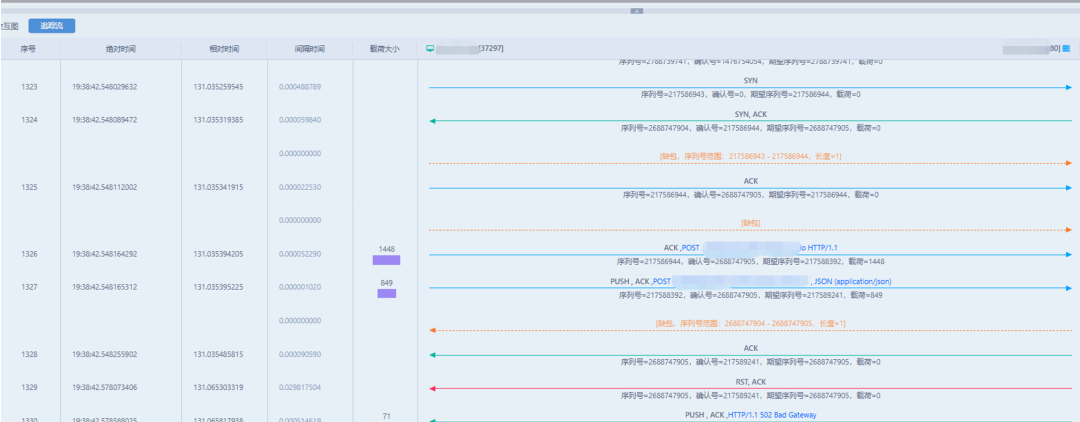
2. Packet Capture Analysis at Various Traffic Mirror Points
Before analyzing and locating the specific fault cause, we need to answer the following two questions:
- Who sent the RST packet?
- Why was the RST packet sent?
Based on the existing user’s network environment, we need to analyze multiple traffic mirror points to exclude segments and directly reach the root cause of the fault, mainly analyzing the following four traffic points:
- Traffic from the outermost internet dedicated line of the data center
- Traffic from the security resource pool area
- Outbound proxy gateway device
- Client
3. Who Sent the RST Packet
3.1 Analysis of Traffic from the Outermost Internet Dedicated Line of the Data Center
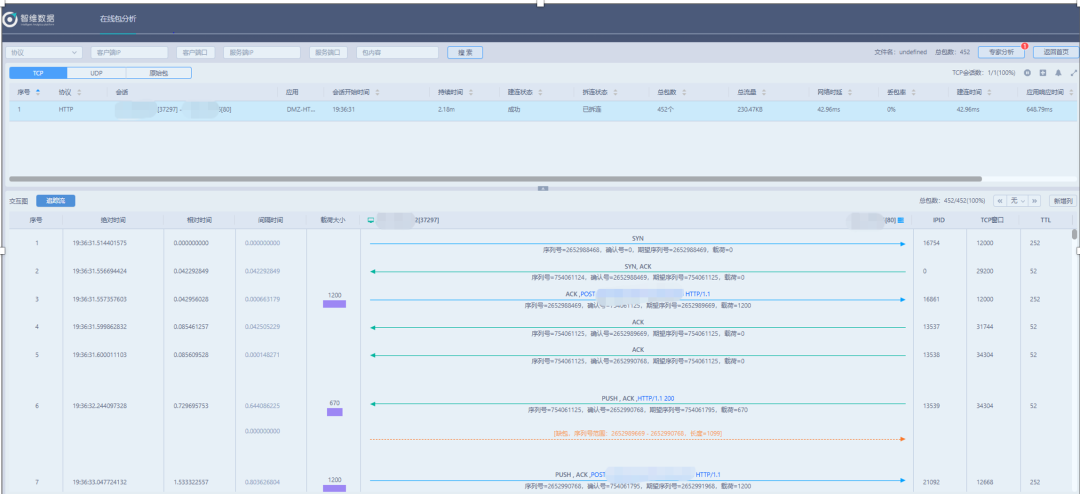
- 19:36:31.514401 Initial packet interaction during connection establishment is normal (consistent with the packet data collected between the F5 link load and the internet firewall), where 203.188.6.125 is the NAT address of 172.16.172.16 and the session is stitched through port 37297.
 2. 19:38:41.85571 The client tests 203.188.6.125:27297 and sends a FIN request to disconnect the connection, with no evidence of the server actively sending an RST connection action.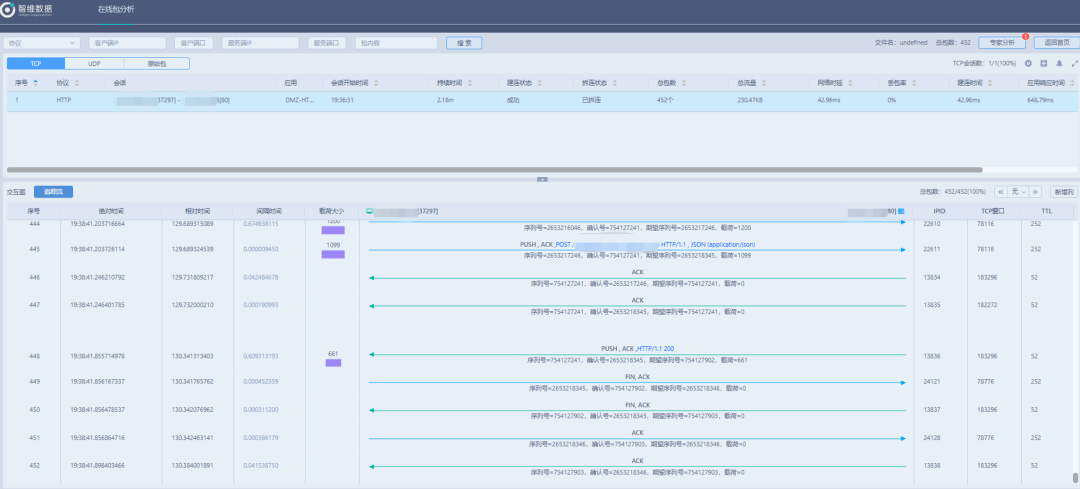
3.2 Traffic Analysis Between F5 Link Load and Internet Firewall
- 19:36:31.514008 Initial packet interaction during connection establishment is normal
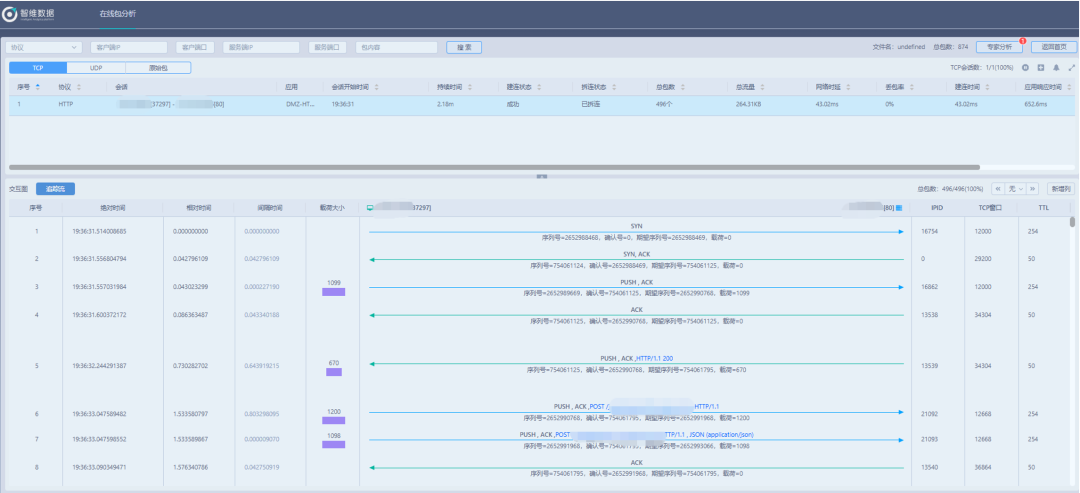 2. 19:38:41.856083 On the client side, 172.16.172.16 sends a TCP FIN request to disconnect the connection, with no evidence of the server actively sending an RST connection action.
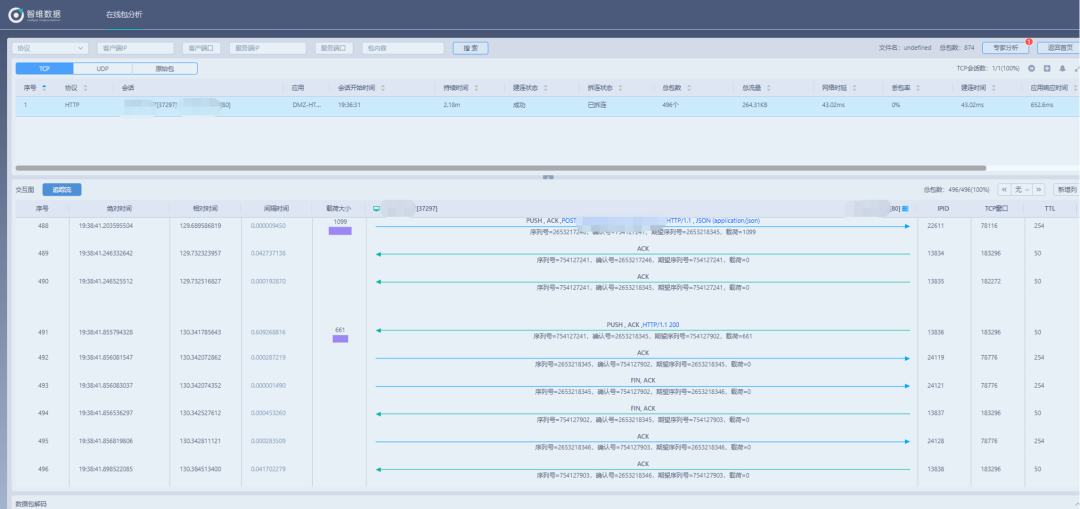
3.3 Traffic Capture in the Security Resource Pool Area
- 19:38:41.855951 The outbound gateway device received the FIN packet sent by the server, namely F5 SSLO, and normally interacted in the TCP four-way handshake process, entering the connection disconnection process.
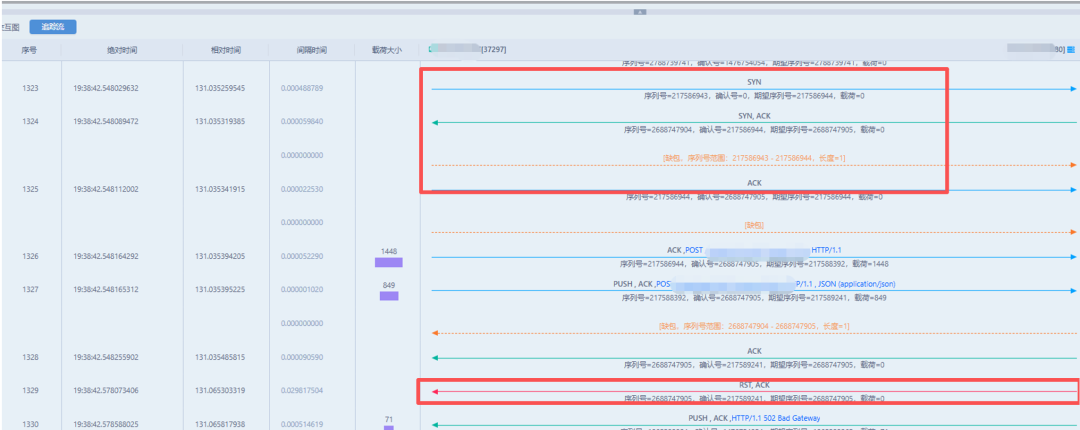
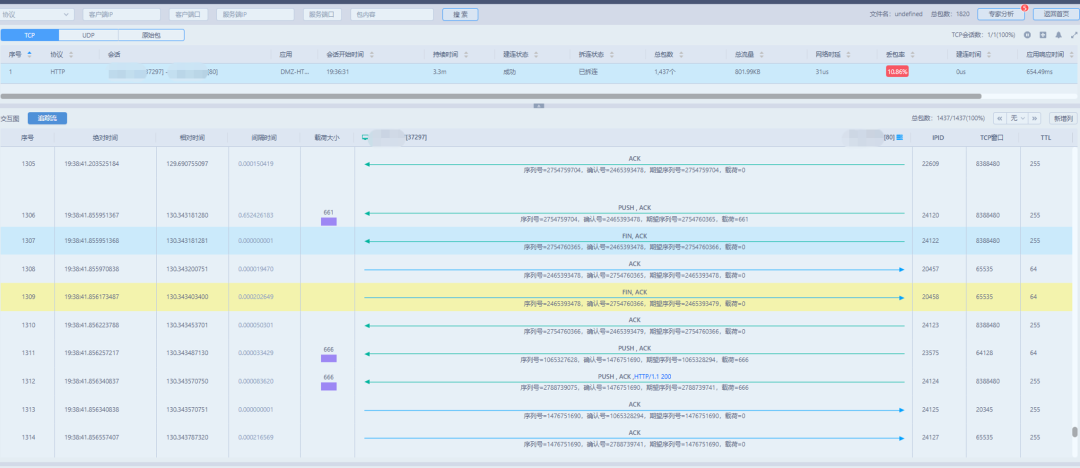 2. 19:38:42.548029 A new TCP connection is re-initiated (port reuse still uses 37297), after the connection is established, the outbound gateway forwards the client’s HTTP request, at 19:38:42.578073, the F5 side sends an RST to disconnect the connection, and the outbound gateway returns a 502 Bad Gateway to the client.
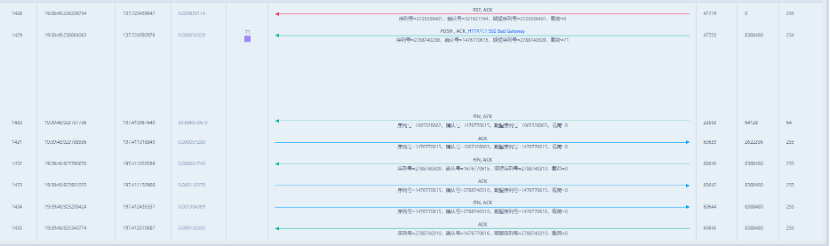 3. During this period, the outbound gateway continuously initiates new sessions and sends HTTP requests, all of which are RST by F5.
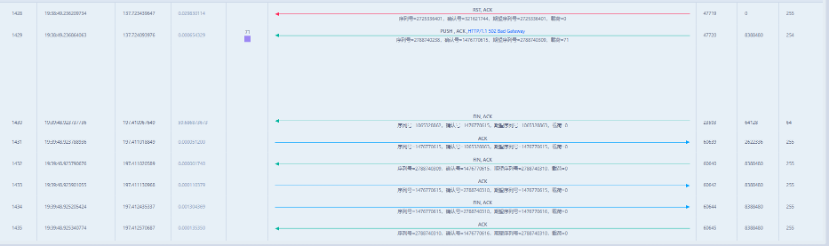 4. One minute later, at 19:39:48.923737 (with no data transmission, the outbound gateway actively sends a FIN to the client 172.16.172.16:37297 to actively disconnect the TCP connection).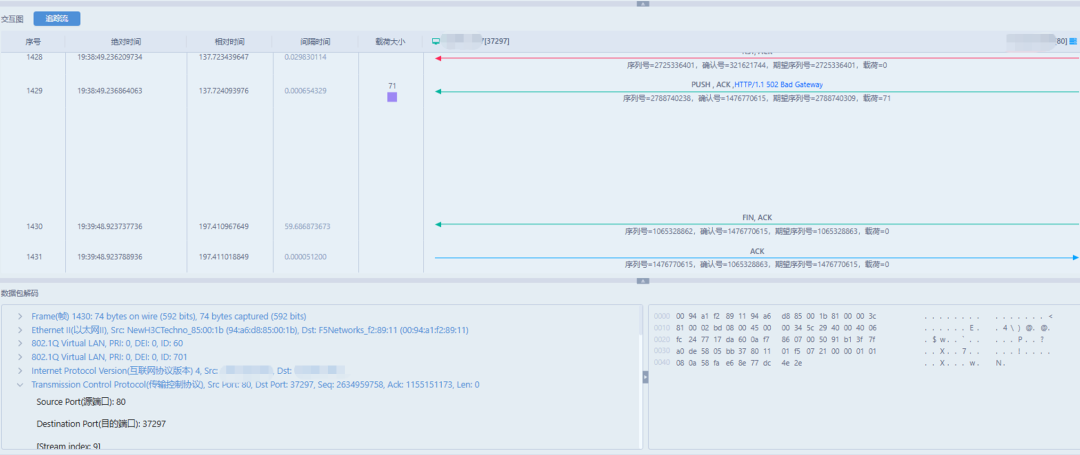
3.4 Who Sent the RST?
Now we can answer the first question: the RST packet was sent by F5 SSLO. Next, we continue to analyze why F5 SSLO sent the RST packet.
4. Why Did F5 SSLO Send the RST Packet?
Let’s look at the last two normal HTTP interactions before the exception occurred (with requests and responses).
4.1 The Penultimate Normal HTTP Interaction
This packet is a normal HTTP response, with no exceptions, where Connection: keep-alive indicates that it can continue to process subsequent requests.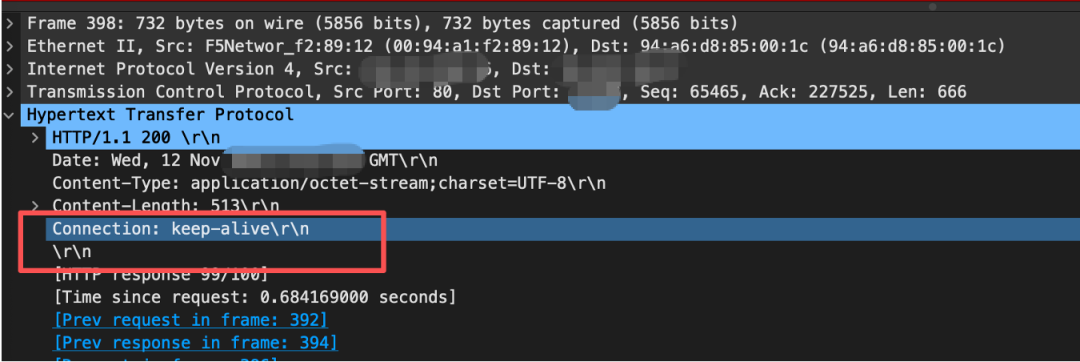
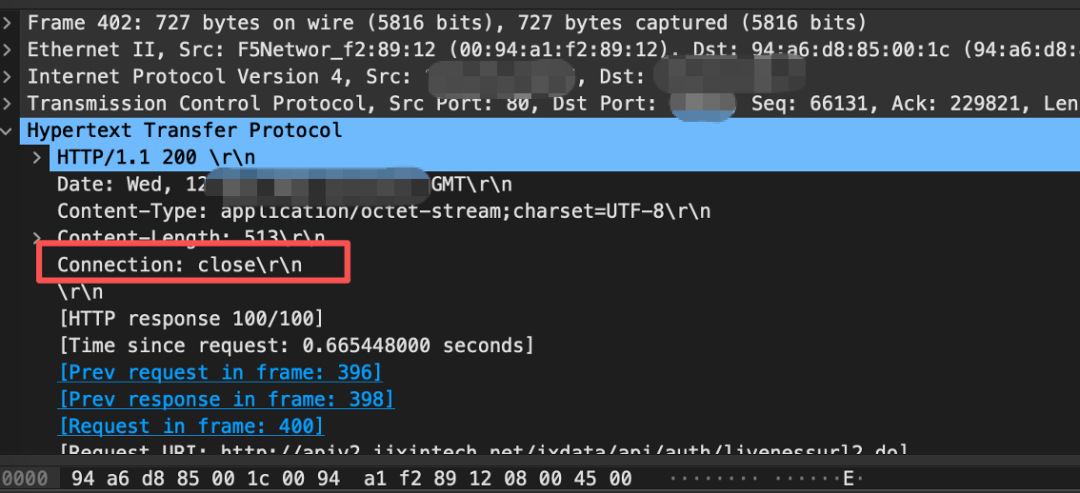
4.2 The Last Normal HTTP Interaction
This packet is a normal HTTP response, with no exceptions, where Connection: close indicates that it will not continue to process subsequent requests and responses, and the session will be disconnected.
4.3 F5 SSLO Enters TCP Disconnection Four-Way Handshake Phase
F5 SSLO sends a FIN to the client, performing a normal TCP four-way handshake.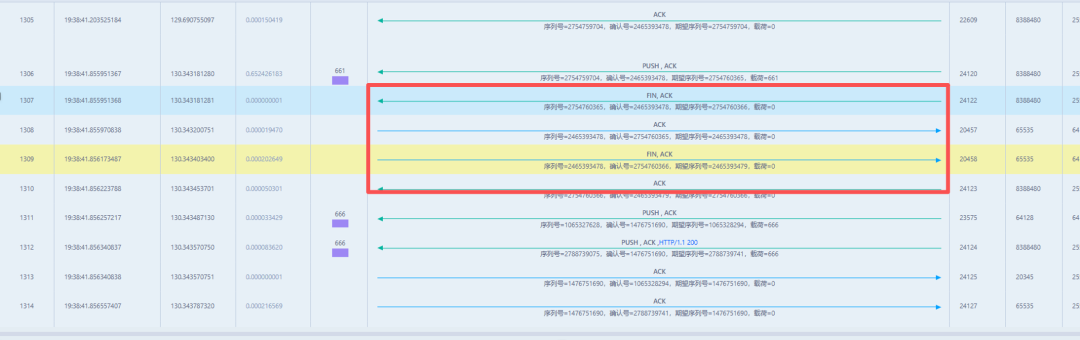 F5 SSLO sends a FIN to the server, performing a normal TCP four-way handshake.

4.4 F5 SSLO RSTs the Client
Note the time in section 4.3:
- 19:38:41.855951 F5 SSLO and the client completed the TCP four-way handshake and entered the time wait state, and there was still continuous data interaction until the next new session initiated by the client.
- 19:38:42.548029, the client initiated a new session to the target address using the same source port, and when the HTTP request was initiated, it was RST by F5 SSLO.
Conclusion
Supplementary Knowledge: HTTP Protocol Behavior (Refer to RFC https://www.rfc-editor.org/rfc/rfc2616#section-8.1.4)
- Connection Semantics: HTTP (specifically HTTP/1.1 as described in RFC 2616) is an application layer protocol that typically runs over TCP. HTTP defines its own connection management semantics, including the use of persistent connections (keep-alive) and the proper handling of connection closures.
- Server-Initiated FIN: When an HTTP server sends a FIN (usually after a keep-alive timeout or after sending a response with the “Connection: close” header), it indicates that it will not process any further HTTP requests on that connection. Any subsequent HTTP requests sent by the client after receiving the server’s FIN will not be processed by the server application, although the underlying TCP stack may accept these data.
Careful readers may notice that the traffic analysis from the outermost operator’s dedicated line did not reveal the server actively sending a FIN packet, but rather showed that the FIN packet was actively sent by the client side. Based on the packet capture analysis at various points, I speculate that the F5 SSLO device, upon receiving the last HTTP packet with Connection: close from the server, found that it did not receive a subsequent FIN packet, and thus F5 SSLO actively sent a FIN packet to the server.
Therefore, I modified a description obtained from F5’s official documentation: As a full proxy, BIG-IP understands the semantics of the HTTP protocol. When the backend server sends a FIN (HTTP Connection: close) packet, BIG-IP knows that the server will not process any more HTTP requests on that connection. Therefore, if the client sends a new HTTP request after the server’s FIN, BIG-IP will not forward this request to the backend server, as it is futile—the server application will not respond.
Final Thoughts
After troubleshooting this fault, I thought of several questions, and I welcome discussions in the comments section:
- Since the server did not actively send a FIN packet, could F5 not actively send this FIN packet? (Because according to the RFC description, after Connection: close, the server needs to actively send a FIN)
- Why did the server not actively send a FIN?
- If F5 is not deployed in the middle or if F5 does not actively send a FIN packet, can this application still function normally?
In fact, from F5’s handling of protocol details and adherence to the RFC, it is evident that as a long-standing leader in the application delivery field, you cannot deny its capabilities.
Recommended Reading Click the title to jump
1. Stress Testing Quick Guide|A Record of a Port Reuse Stress Testing Fault Scenario
2. Observability | Small pipy, great potential
3. Security Visualization | Data-Driven Security Operations
4. HOP-BY-HOP Mechanism | A CVE Vulnerability in Apache that Evokes Old Memories
5. Rancher Server Automatic Distribution of F5 Load Balancing Strategies Practice | Layer 7 Load Balancing
6. Observability | Achieving Global Observability in Container Overlay Network Environments Using Splunk Forwarders