
Introduction to HTTP
1. HTTP Versions
Since the invention of the HTTP protocol, it has undergone several version modifications, namely <span><span>HTTP/0.9</span></span>,<span><span>HTTP/1</span></span><span><span>.0</span></span>,<span><span>HTTP/1.1</span></span> and <span><span>HTTP/2</span></span>。Currently, the most widely used version is <span><span>HTTP/1.1</span></span>,which is the focus of this article.
2. TCP/IP Protocol
Before learning about the HTTP protocol, let’s first understand the TCP/IP protocol. It serves as the foundation for HTTP; a solid foundation ensures a sturdy structure!
In your work, you may often hear about the OSI seven-layer network model and the TCP/IP four-layer network model, but what are they? Have you ever been confused by them in your daily work?
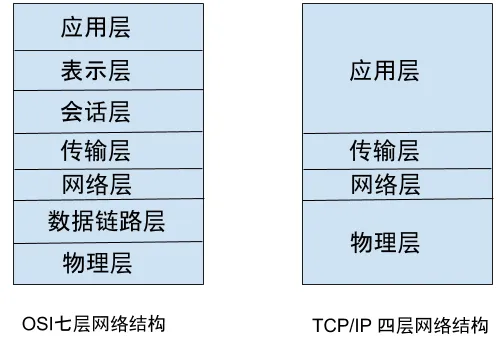
On the left is the renowned network structure model specified by the International Organization for Standardization (ISO),but in practice, we primarily use the right side, which is the TCP/IP four-layer network structure.
<span><span>When the ISO specified the network standards,</span></span>the<span><span>TCP/IP</span></span>had already become the de facto standard, leading to a peculiar phenomenon where the international association set a standard that no one actually uses~~
Next, let’s briefly discuss the role of each layer in the TCP/IP four-layer structure.
Application Layer: This layer consists of protocols used by upper-layer applications, such as the <span><span>HTTP</span></span> protocol, <span><span>FTP</span></span> protocol, <span><span>SMTP</span></span> protocol, etc.
Transport Layer: The first three layers, from the physical layer to the transport layer, are responsible for establishing network connections and sending data. They do not concern themselves with the protocols used by the application layer. The transport layer uses <span><span>TCP</span></span> and <span><span>UDP</span></span> protocols.
Network Layer: This layer is responsible for selecting the <span><span>routing path</span></span>。There are many paths from the same source to the same destination,and the network layer is responsible for choosing a path for data transmission.
Physical Layer: This layer is responsible for data transmission. It is the lowest layer, managed by the network card, which converts data into high/low voltage levels and sends it through the network cable.
Now, let’s illustrate this process with a practical example:
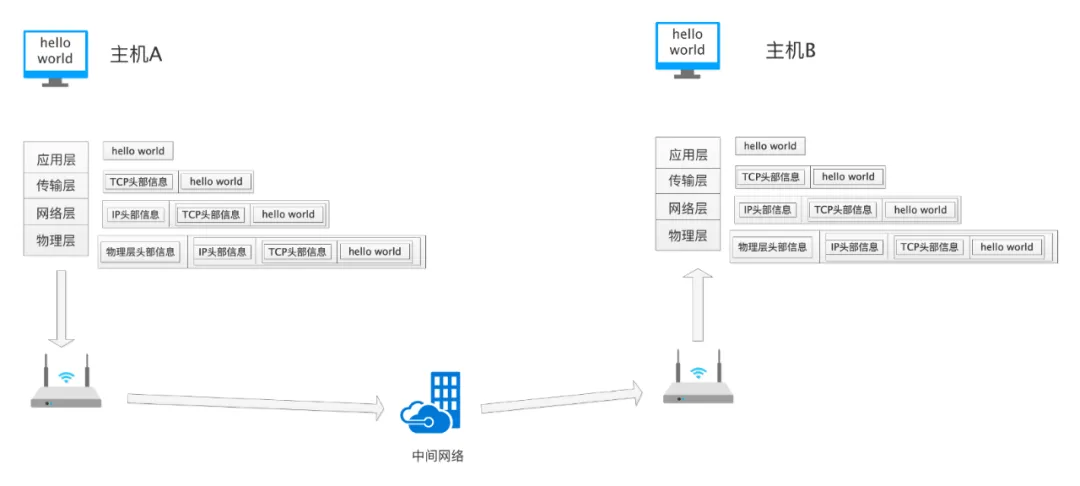
The image above shows the process of Host A sending “hello world” to Host B. After the user makes a request, starting from the application layer to the physical layer, each layer adds its own additional information; at the receiving end, each layer removes the additional information of that layer before passing it to the upper layer for processing.
Isn’t it similar to an onion, with layers upon layers…
The application layer encapsulates the information “hello world” using its own protocol, then calls the transport layer’s interface, and so on, until the data is passed to the physical layer. Each layer adds its own unique identifying information. The physical layer finally converts the data to be sent (including the actual “hello world” that the application layer wants to send and the identifying information added by each layer) into high and low voltage levels for transmission. The receiving end then performs a reverse parsing process, and finally, Host B receives “hello world”.
This is a simple description, but the overall principle is like this~ Don’t be confused by the concepts of each layer. These layers are artificially defined concepts, created for convenience in coding implementation. You only need to define the interface for each layer, and the upper layer calls the interface of the next layer without needing to care about the specific implementation. This is also a design philosophy in software development.
3. HTTP Protocol
We have briefly discussed the structure of the network, which is the foundation for HTTP operation. Now, let’s discuss the main focus of this article: the HTTP protocol.
3.1 Overview of the HTTP Protocol
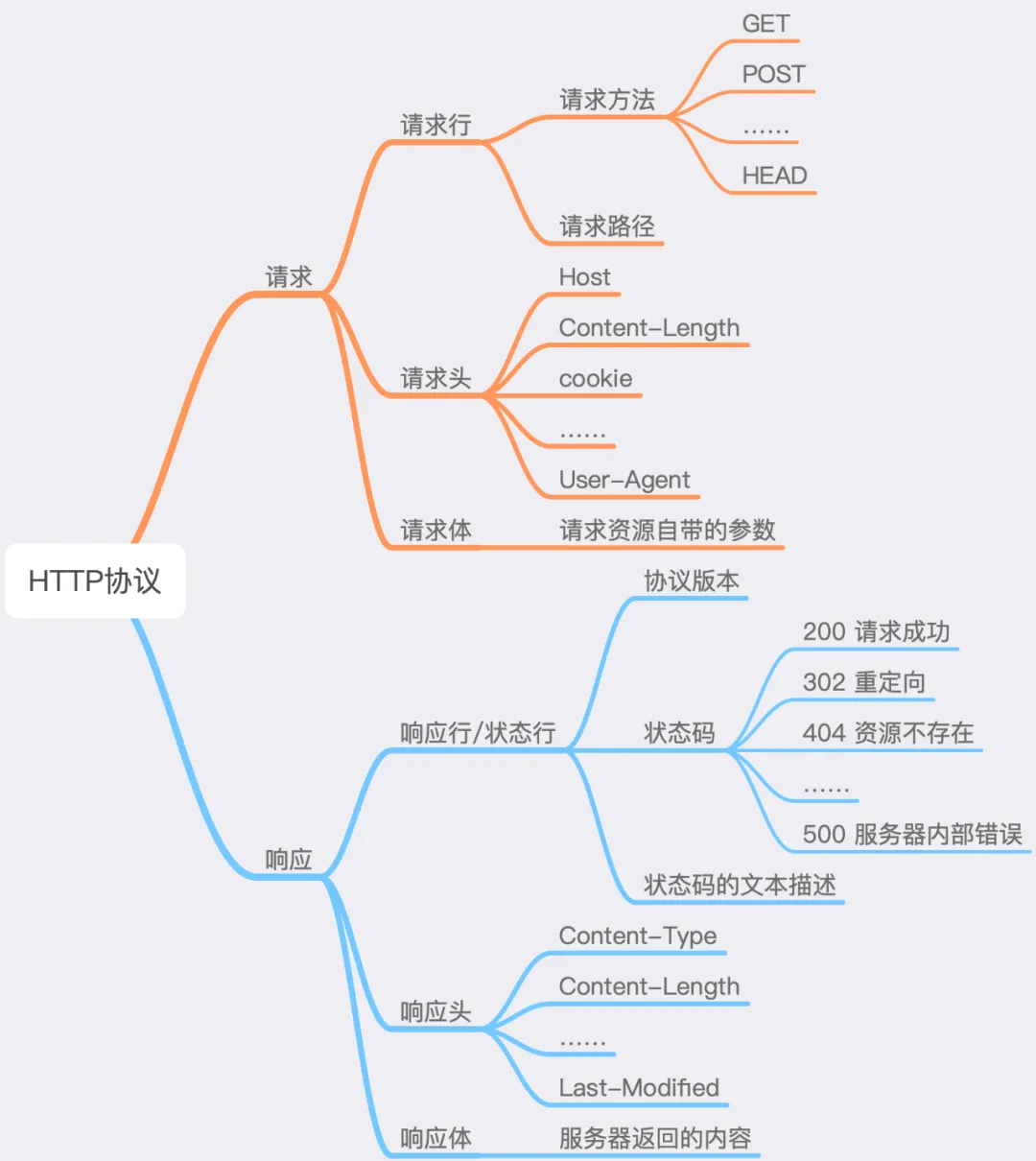
Let’s first look at an overview diagram of the HTTP protocol:
3.2 Structure of the HTTP Protocol
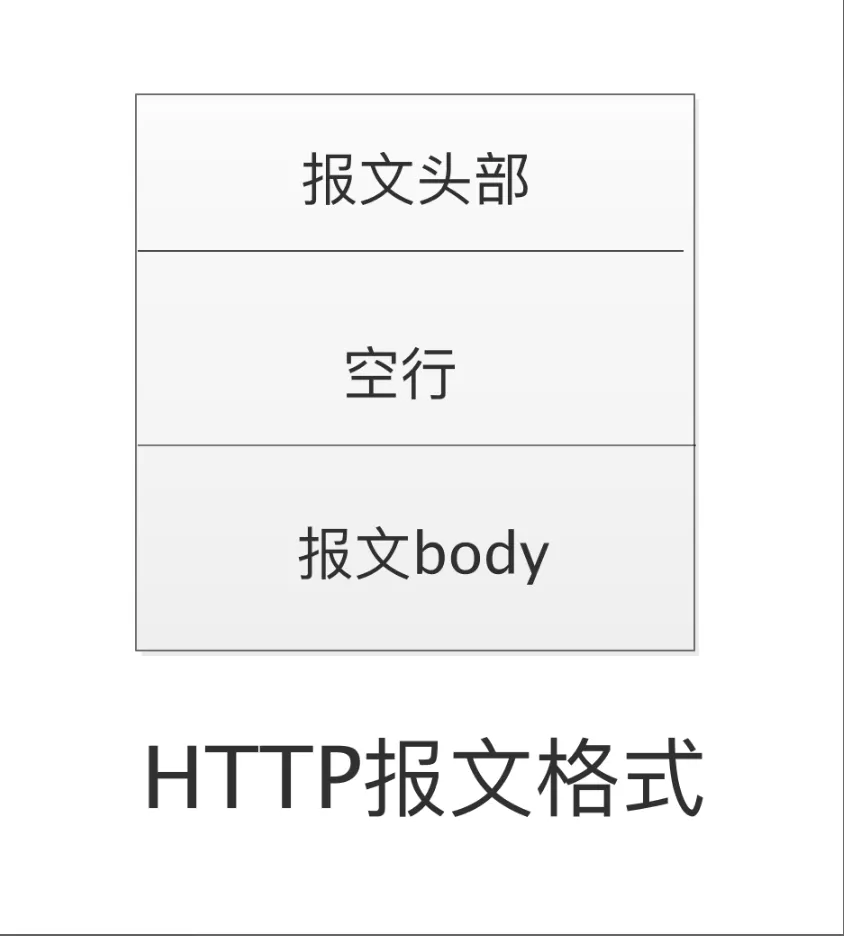
In the diagram, the <span><span>HTTP</span></span> protocol is divided into three parts, with a blank line separating the message header and the message body.
HTTP is a <span><span>Request-Response</span></span> protocol.
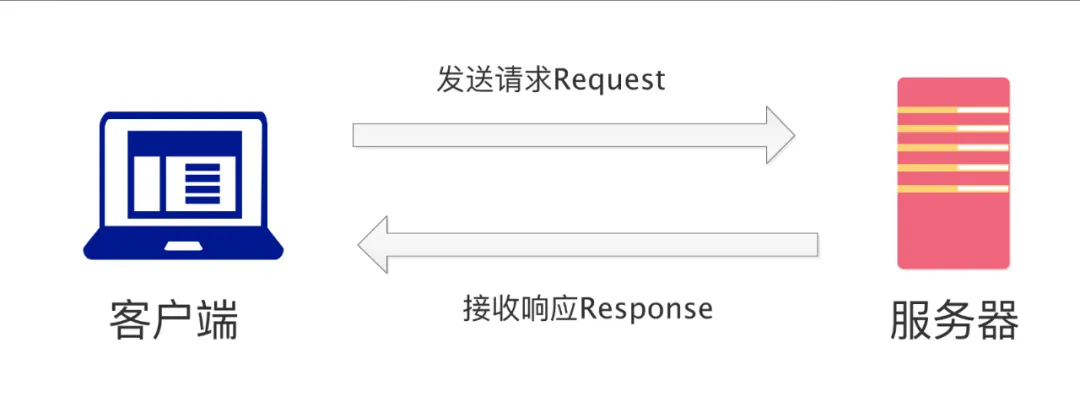
- The client sends an HTTP request (request);
- The server receives the request, processes it, and then returns a response (response);
- The client receives the response and performs other processing.
Next, we will learn about the message structure of the <span><span>HTTP</span></span> request and response.
3.3 HTTP Request Message
We can see that the <span><span>HTTP</span></span> request message is divided into three parts:
- Request Line
- Request Header
- Request Body
3.3.1 Request Line
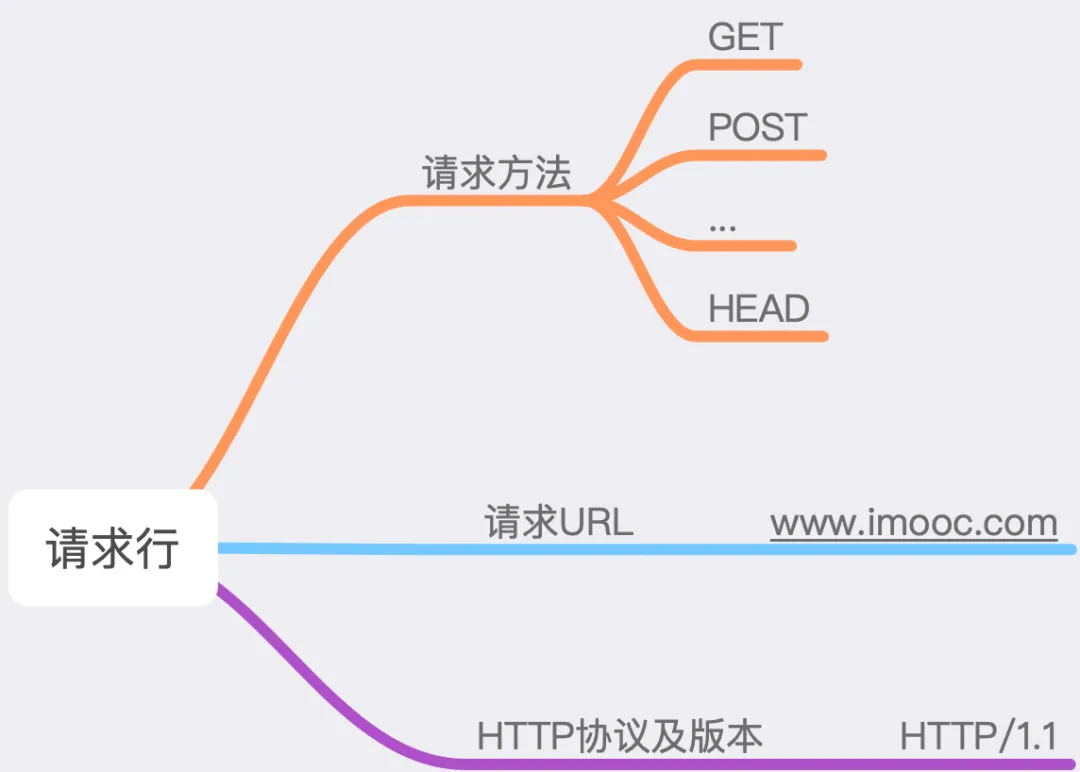
The request line consists of three parts: the request method, the requested <span><span>URL</span></span> and the request body.
3.3.2 Request Methods
<span><span>HTTP/1.1</span></span> supports multiple request methods (<span><span>method</span></span>), as shown in the figure below:
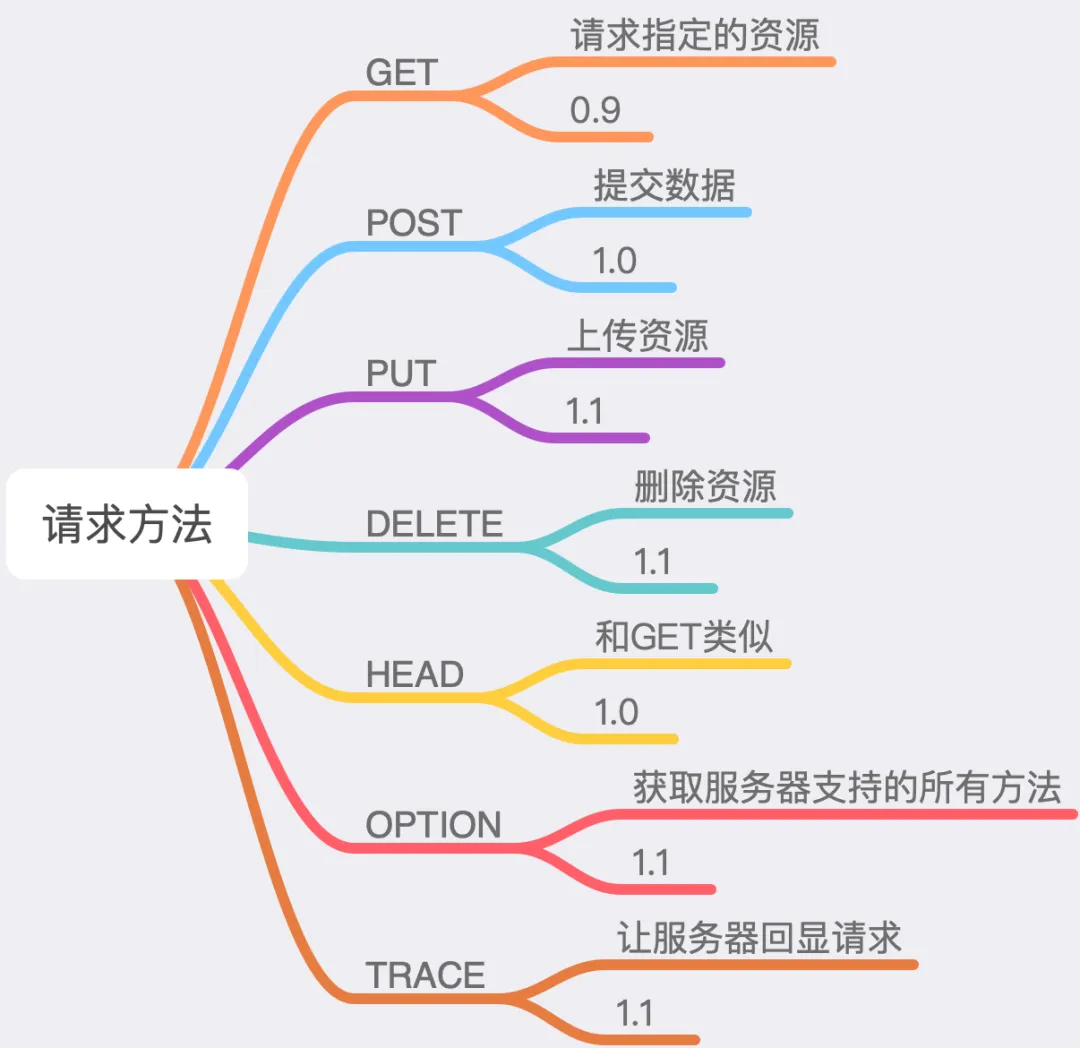
The numbers in the figure indicate the minimum HTTP protocol version that supports that method. For example, we can see from the figure that <span><span>HTTP/0.9</span></span> only supports the <span><span>GET</span></span> method. In practice, the most commonly used methods are <span><span>GET</span></span> and <span><span>POST</span></span> methods. Let’s briefly discuss the differences between these two methods.
3.4 GET Method and POST Method
3.4.1 GET: Retrieve Resource
Generally, GET requests are used only to retrieve data. For example, we retrieve information from a specified page and return a response.
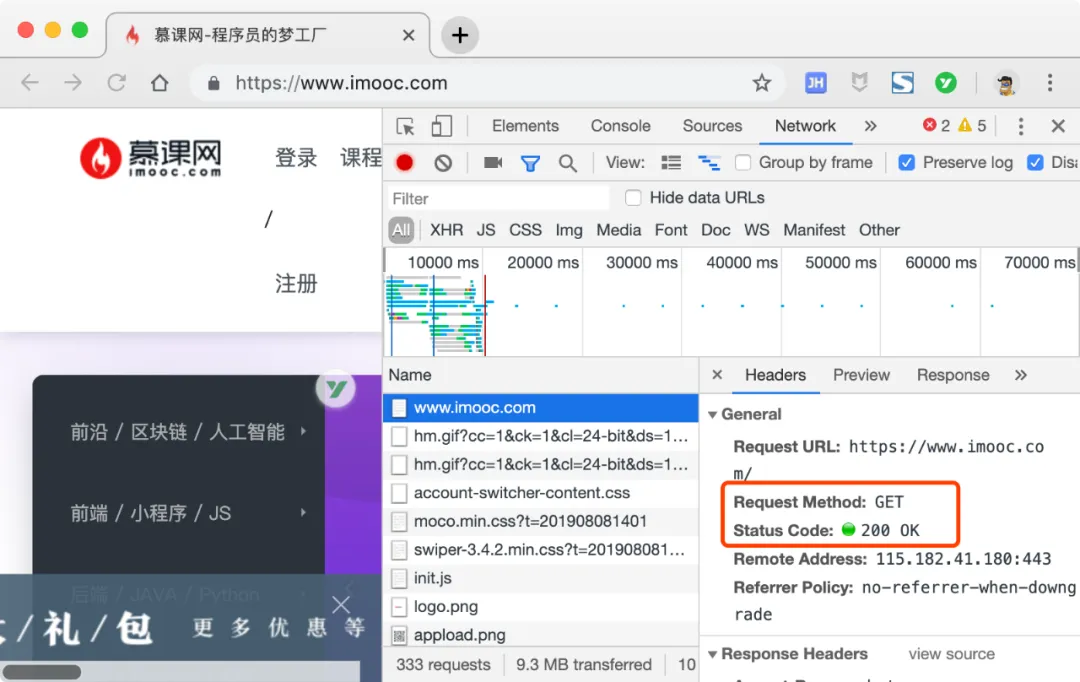
The image above shows our access to the homepage of the Mooc website, where we can see that the <span><span>GET</span></span> method is used.
3.4.2 POST: Request Resource
POST requests are primarily used to submit data to a specified resource, and the server processes the received data. For example, when we fill in personal information on a registration page and submit it, a <span><span>POST</span></span> request is sent to the server, with the information placed in the request body for processing.
Although there are many request methods in the HTTP protocol, in most cases, the GET and POST methods suffice for our needs. These are the two methods I use most frequently in my work, and I rarely use others…
3.4.3 Differences Between GET and POST
Having discussed so much, what are the actual differences between the GET and POST methods? This is an unavoidable topic, and it is often asked in interviews. Perhaps when we are asked this question, we can mention a couple of points, such as:
<span><span>GET</span></span>request parameters are passed through the<span><span>URL</span></span>, while<span><span>POST</span></span>request parameters are passed through the<span><span>Request Body</span></span>;<span><span>GET</span></span>allows for fewer parameters than<span><span>POST</span></span>in terms of length.
There are many similar answers, but is that really the case? I must tell you a harsh truth:<span><span>GET</span></span> and <span><span>POST</span></span> are actually the same~
HTTP is an application layer protocol that uses <span><span>TCP/IP</span></span> at its core, so the underlying mechanisms of <span><span>GET</span></span> and <span><span>POST</span></span> are identical, and they can perform the same tasks. Let’s refute the above points one by one.
- If you want, a
<span><span>GET</span></span>request can also have a<span><span>Request body</span></span>, and you can place request parameters in the<span><span>Request body</span></span>if you wish. Similarly, you can also include request parameters in the<span><span>URL</span></span>of a<span><span>POST</span></span>request. When I first joined Weibo, I found that many<span><span>POST</span></span>requests had many parameters in their<span><span>URL</span></span><span><span>, which puzzled me. After researching, I realized I had misunderstood it all along, which was quite embarrassing~</span></span> <span><span>GET</span></span>and<span><span>POST</span></span>parameter length issues are not dictated by HTTP, but rather by the browser and server themselves, and have nothing to do with the HTTP protocol.
Browsers and servers limit the size of parameters to save memory. In
<span><span>Nginx</span></span>, you can limit the length of request headers using<span><span>large_client_header_buffers</span></span>~
So, if both methods are essentially the same, why do we have two methods?
Let’s highlight the key point: Some clients, such as the <span><span>CURL</span></span> command, when the <span><span>POST</span></span> data exceeds <span><span>1024</span></span> bytes, will first perform two steps:
- Send a request to the server containing
<span><span>Expect: 100-continue</span></span>, asking the server if it is willing to accept the data. - The server returns
<span><span>100 continue</span></span><span><span>, and then </span></span><code><span><span>curl</span></span>sends the actual<span><span>POST</span></span>data to the server.
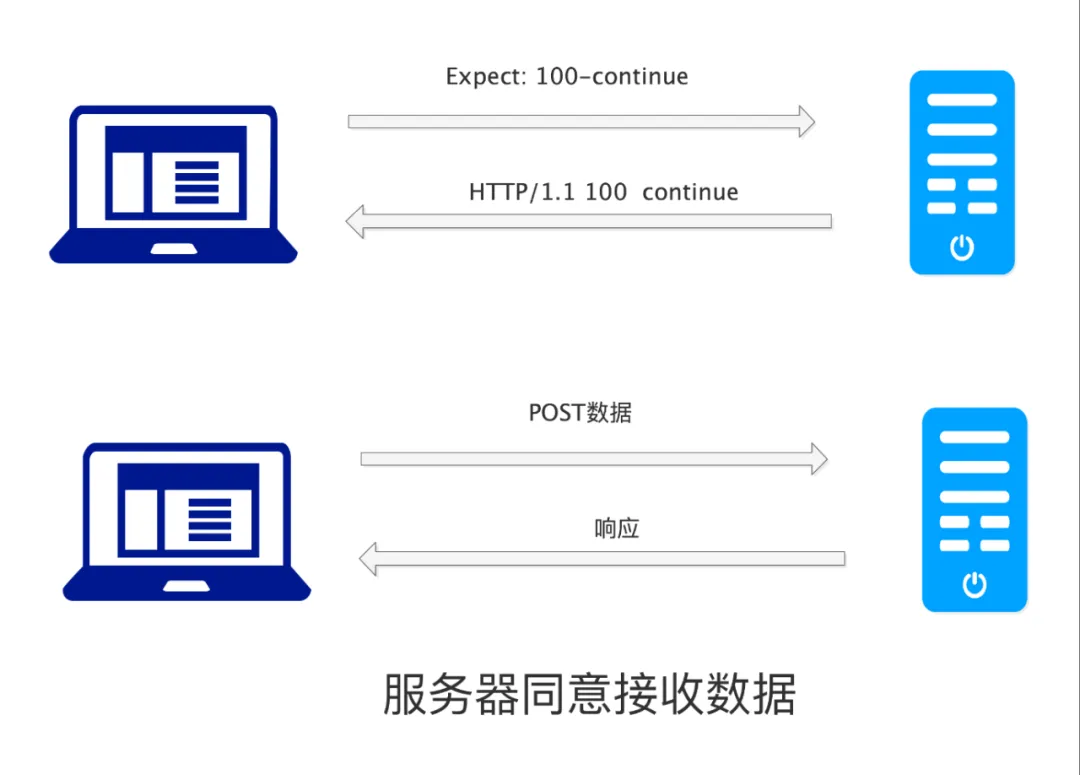
Of course, not all servers will return <span><span>100-continue</span></span>; some may return <span><span>417 Expectation Failed</span></span>, in which case the <span><span>POST</span></span> cannot continue.
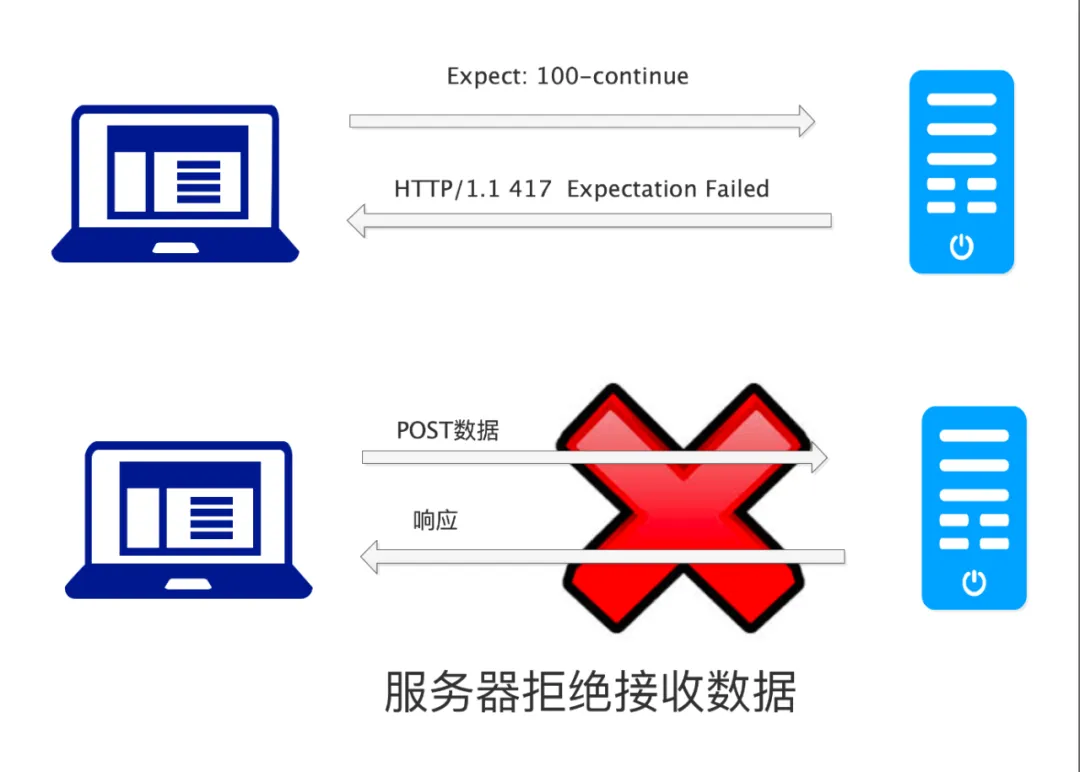
At this point, do you understand the differences between
<span><span>GET</span></span>and<span><span>POST</span></span>?
3.5 Request URL
This part is the address of the resource we are requesting, which works in conjunction with the <span><span>Host</span></span> attribute in the request header.
3.6 Protocol Version
This part indicates the version of the <span><span>HTTP</span></span> protocol being used for the current request. As mentioned earlier, different <span><span>HTTP</span></span> versions have different functionalities, so we need to specify which version is being used for the current request.
3.7 Request Header
What is a request header? Let’s illustrate with an example:
After school, Teacher Wang said to Xiao Ming, “Xiao Ming, tomorrow morning at eight o’clock, go to the west gate of the school to welcome a new student, Xiao Li, who is wearing a white T-shirt and is 180 cm tall…”
In this case, welcoming Xiao Li is the HTTP message while tomorrow morning at eight o’clock, the west gate of the school, wearing a white T-shirt, height 180 cm are the additional details, which correspond to the HTTP request header. These details are extra information added to complete the task.
Both HTTP requests and responses contain headers, which can be categorized as follows:
- General Header Fields
- Request Header Fields
- Response Header Fields
- Entity Header Fields
We will first introduce the first two types of headers, and the remaining two will be covered when we learn about <span><span>response messages</span></span>.
3.8 General Header
General headers can be used in both <span><span>Request</span></span> and <span><span>Response</span></span>. The commonly used ones include:
| Header Field | Function |
|---|---|
| Date | Date related to the message |
| Cache-Control | Control caching |
| Connection | Manage connections |
Here, we will focus on the <span><span>Connection</span></span> option, which is used to manage <span><span>HTTP</span></span> connections, formatted as follows:
<span><span>Connection: keep-alive</span><span>Connection: close</span></span>
3.9 Keep-Alive
HTTP is based on a <span><span>Request-Response</span></span> model, where the client waits for the server’s response after sending a request, and then disconnects from the server, ending the request. Since HTTP is transmitted over <span><span>TCP/IP</span></span><span><span>, establishing a connection requires a </span><strong><span>three-way handshake</span></strong><span><span>, and disconnecting requires a </span><strong><span>four-way handshake</span></strong><span><span>. If there are many HTTP requests, going through the </span></span><code><span><span>three-way handshake</span></span><span><span> and </span></span><code><span><span>four-way handshake</span></span><span><span> each time can be very time-consuming.</span></span>
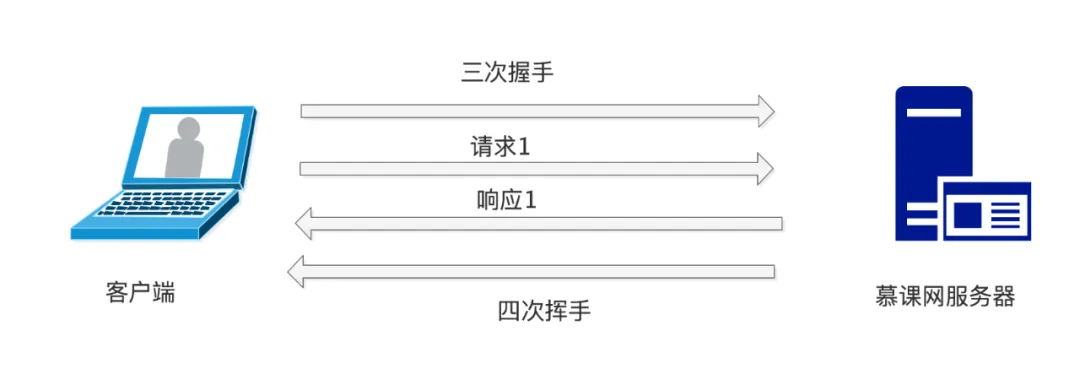
To solve this problem, HTTP introduced the <span><span>keep-alive</span></span> mechanism. The so-called <span><span>keep-alive</span></span> allows multiple requests to be sent after the client and server establish a connection through a three-way handshake, and then perform a four-way handshake to disconnect.
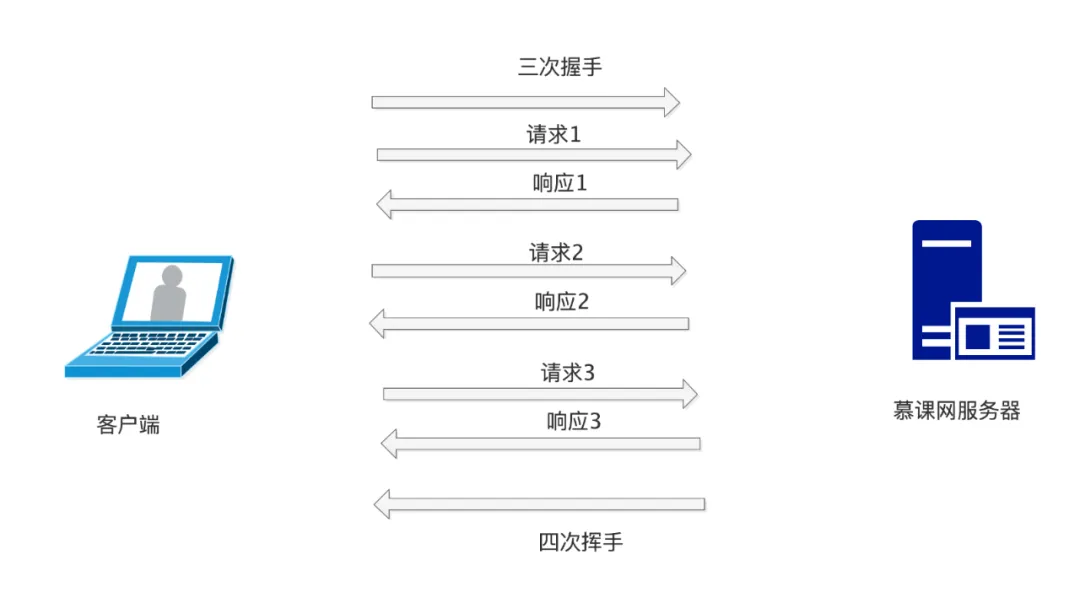
This way, we can save many handshake and disconnection steps, improving server performance.
The <span><span>connection</span></span> in the HTTP header is responsible for this function. When we set <span><span>Connection: keep-alive</span></span>, the connection will be maintained until a request with <span><span>Connection: close</span></span> is made. This can significantly enhance HTTP performance.
3.10 Request Header Fields
Request header fields are the fields used when sending an HTTP request, providing additional information to help the server understand the content of the request. There are many request header fields, and we will learn a few common ones:
| Field Name | Function |
|---|---|
| Host | The server where the requested resource is located |
| If-Match | Flag used to determine if the resource meets the requirements |
| If-Modified-Since | Send the resource when it is updated compared to this field |
| If-Unmodified-Since | Opposite function of <span><span>If-Modified-Since</span></span>. |
| Referer | The address of the source of the current request |
| User-Agent | The type of client, such as <span><span>Chrome</span></span> browser, <span><span>IE</span></span> browser, <span><span>CURL</span></span> program, etc. |
| Cookie | Information sent to the server during the request |
3.10.1 Host Field
This field indicates the domain name of the server for the current request. For example, when we access the homepage of the Mooc website, we can see that the <span><span>Host</span></span> field is set to <span><span>www.imooc.com</span></span>.
<span><span>Host: www.imooc.com</span></span>
3.10.2 If Series
We have listed three <span><span>If</span></span> series header fields. The HTTP protocol has several other <span><span>If</span></span> fields, which generally serve similar functions. From their names, we can see that these headers have a conditional nature, meaning they will only perform actions if certain conditions are met. These three options are designed to make HTTP more efficient and save network bandwidth.
When the server sends a response, it may include an <span><span>ETag</span></span> marker. When the client retrieves that resource for the second time, it can include the <span><span>If-Match</span></span> field, with its value being the <span><span>ETag</span></span> returned by the server. If the server finds that the corresponding resource has changed, it will return the new resource and generate a new <span><span>ETag</span></span><span><span> to return to the client. If the resource has not changed, the server will return </span></span><code><span><span>304 Not Modified</span></span>, thus saving bandwidth.
<span><span>If-Modified-Since</span></span> and <span><span>If-Unmodified-Since</span></span> serve similar purposes, but they compare the timestamps of the returned content.
3.10.3 Referer Field
This field indicates where the current request is coming from. For example, when we jump from the homepage of the Mooc website to a free course, we can see the <span><span>Referer</span></span> as follows:
<span><span>Referer: https://www.imooc.com/</span></span>
This indicates that we came from the homepage of the Mooc website, and this field is very effective for preventing hotlinking of images.
3.10.4 Cookie
Cookie-related questions are often asked in interviews. So, what is a <span><span>Cookie</span></span>? Before explaining this, let’s understand a concept: the HTTP protocol is a stateless protocol. What does stateless protocol mean? Let’s look at the following image:
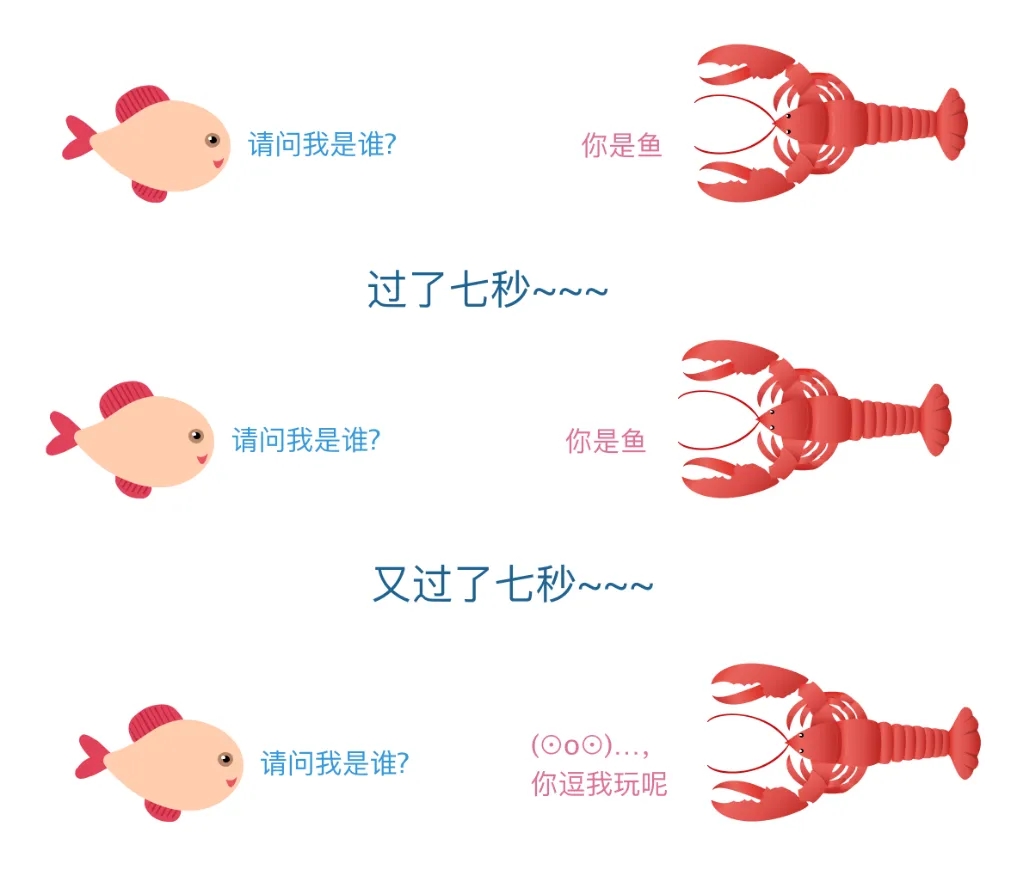
It is said that fish have a memory span of only seven seconds, allowing them to swim happily in the water every day.
If we compare fish to the HTTP protocol, it would be the happiest protocol in the world, as HTTP has no memory~~. The stateless nature of HTTP means it does not retain any state information; each request is independent and unrelated to other requests.
For example, if we log into the Mooc website on the first page, when we open the second Mooc webpage, HTTP will not remember that we are already logged in.
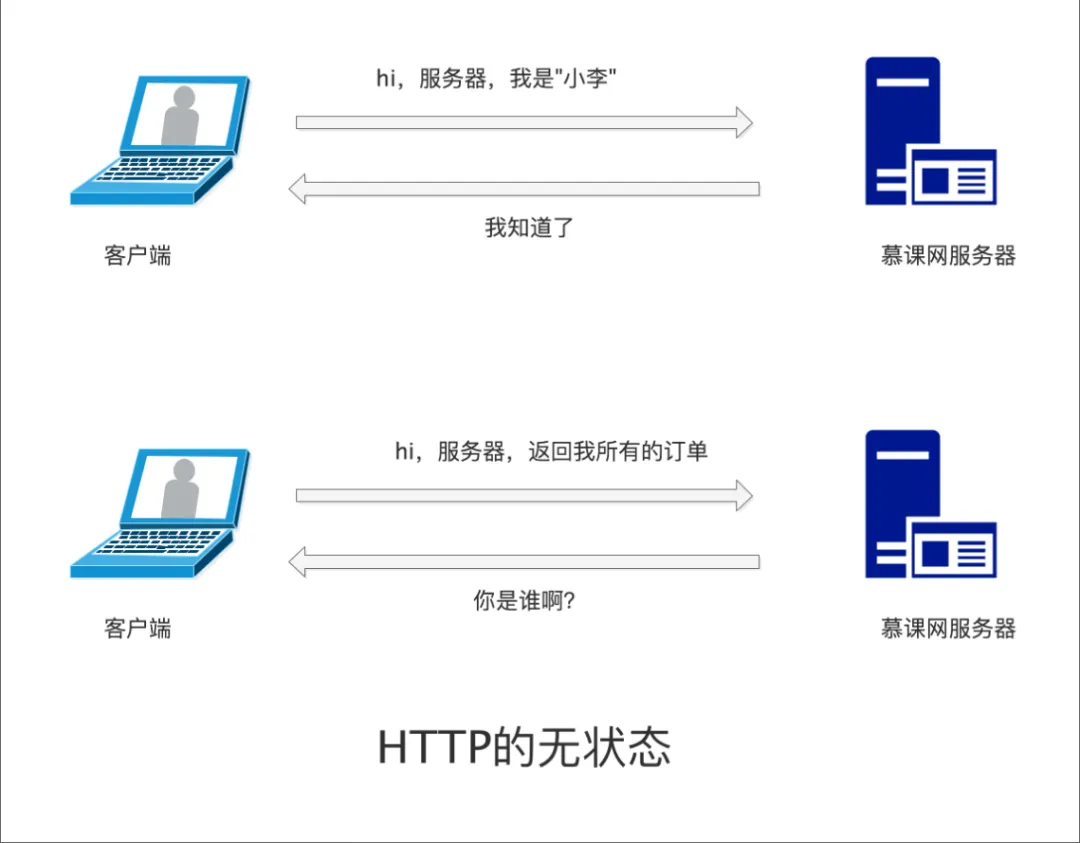
To solve this problem, HTTP introduced the <span><span>cookie</span></span> and <span><span>session</span></span> mechanisms. Each time an HTTP request is made, the <span><span>cookie</span></span> is sent along, allowing the server to identify the current user on the second request based on the state information.
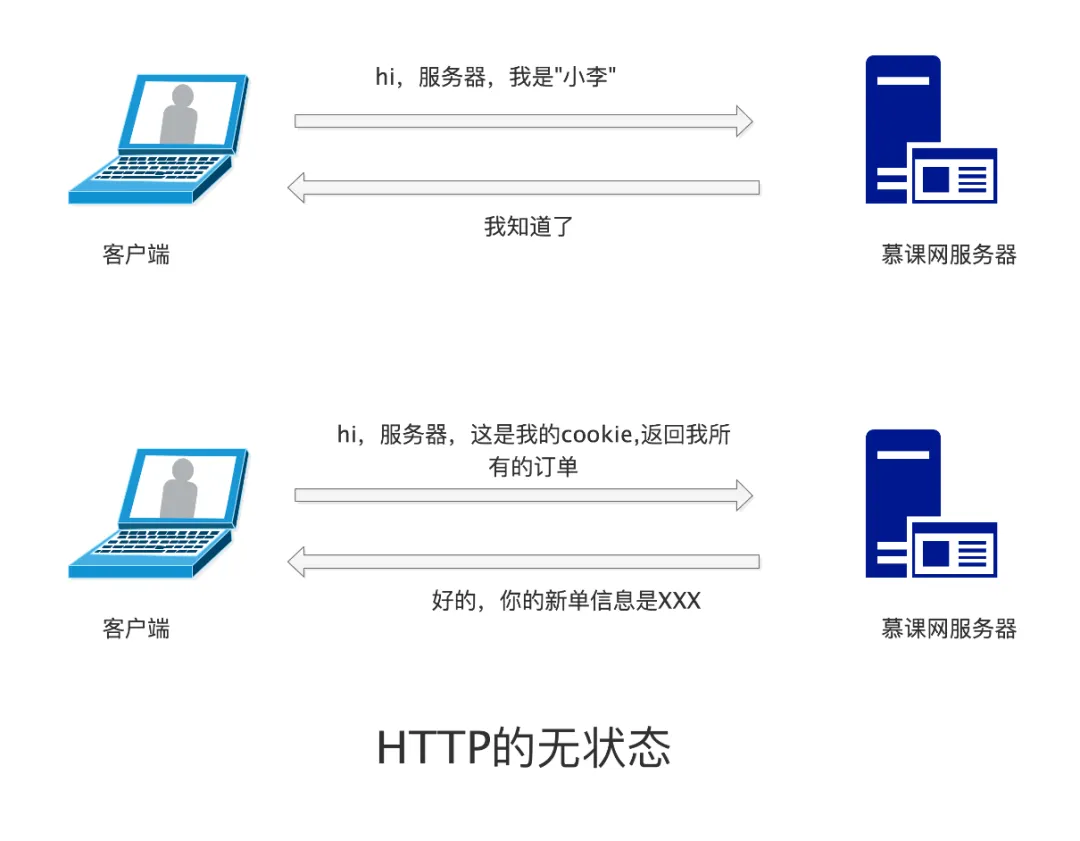
However, since <span><span>cookie</span></span> is information stored on the client side, it can be easily tampered with. Therefore, HTTP introduced the <span><span>session</span></span> mechanism. The <span><span>session</span></span> is information stored on the server side, serving a similar purpose to <span><span>cookie</span></span><span><span>, both used to retain state information.</span></span>
Now that we have explained the concept of <span><span>Cookie</span></span>, is it easier to understand?
An HTTP cookie (web cookie, browser cookie) is a small piece of data that a server sends to the user’s web browser. The browser may store it and send it back with the next request to the same server. Typically, it’s used to tell if two requests came from the same browser — keeping a user logged-in, for example. It remembers stateful information for the stateless HTTP protocol.
— This is the explanation of Cookie from MDN
Let me translate this with my limited English skills:
<span><span>Cookie is a piece of data sent from the server to the client. The client can store this data and send it back with subsequent requests. Typically, Cookie is used for user login and other operations. Cookie makes the stateless HTTP stateful.</span></span>
3.10.5 Request Body
This is where we actually perform our tasks; the content here is customized for each request~~. For example, when we register, typically when we click the register button, a <span><span>POST</span></span> request is sent, and the request body contains our filled-in name, password, email, and other personal information.
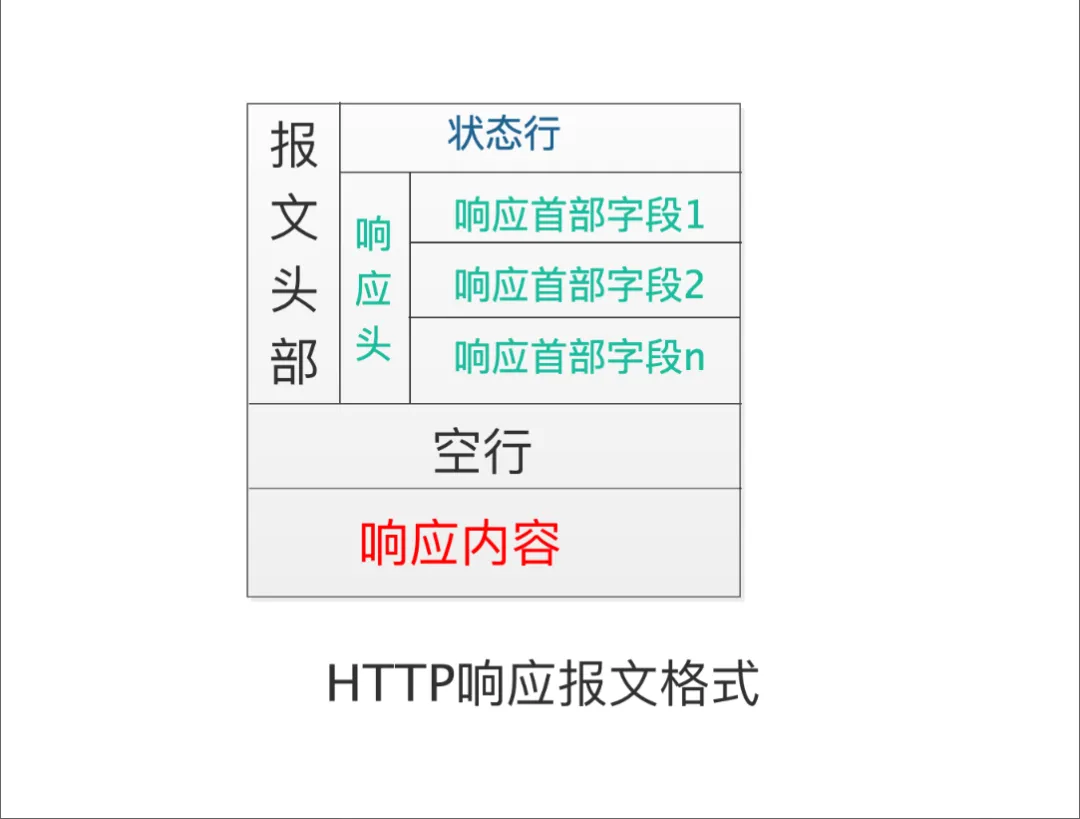
3.11 HTTP Response Message
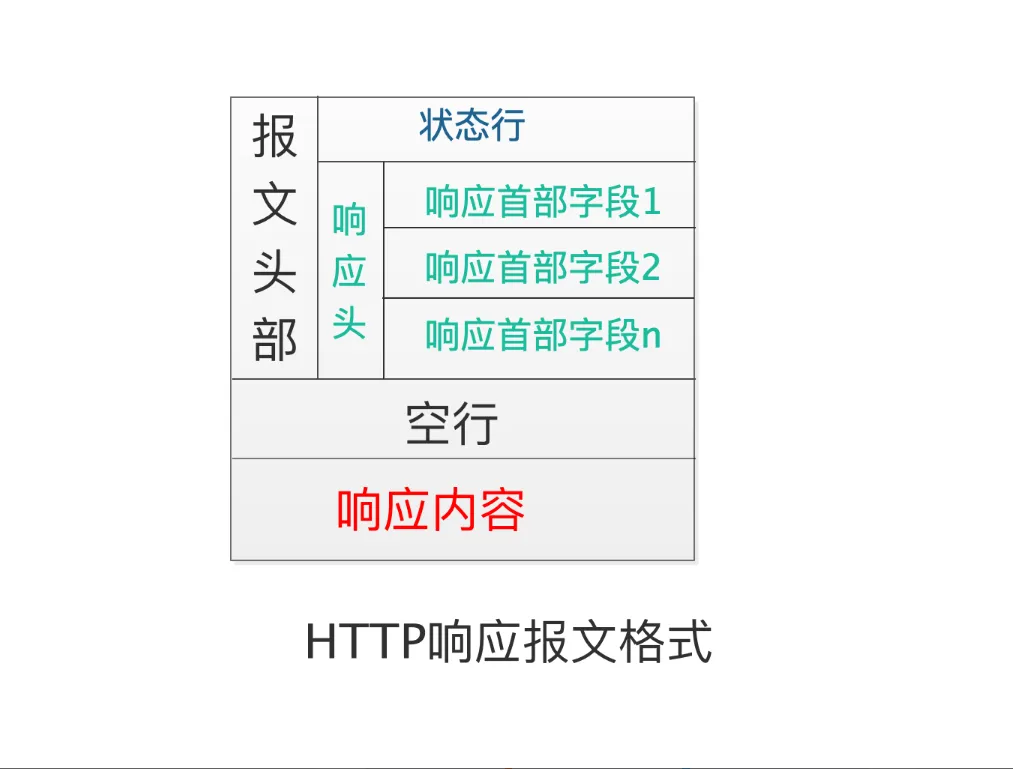
We can see that the response message is also divided into three parts:
- Status Line
- Response Header
- Response Content
3.11.2 Status Line
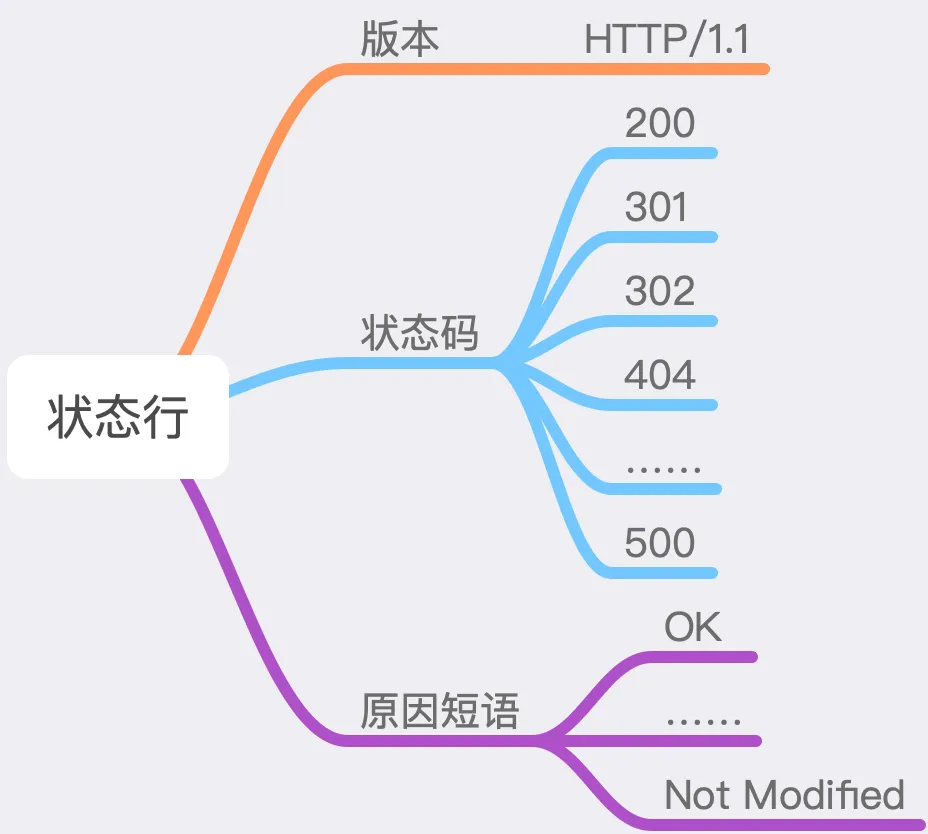
The status line consists of three parts: the <span><span>HTTP</span></span> version, the status code, and the reason phrase.
3.11.3 HTTP Version
The current HTTP version number, such as <span><span>HTTP/1.1</span></span>
3.11.4 Status Code and Reason Phrase
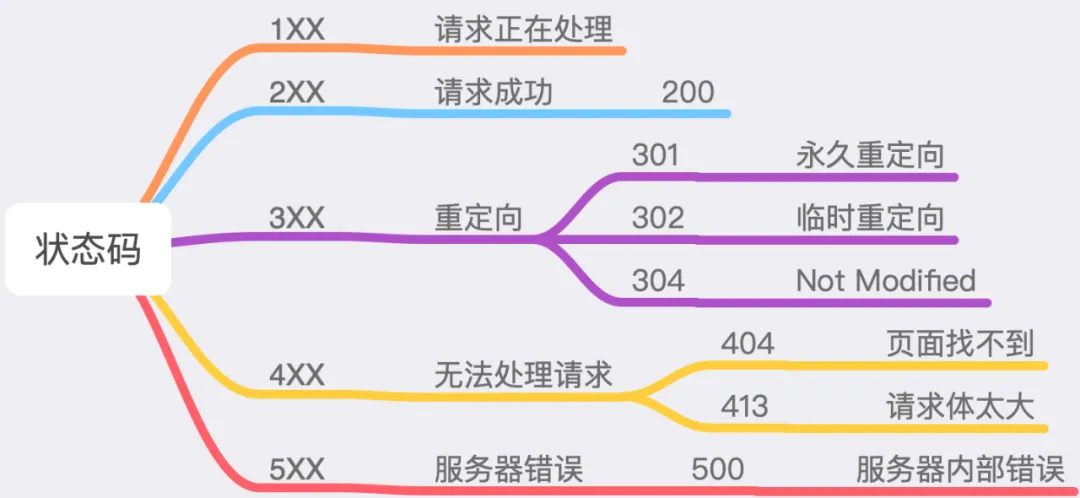
The status code is a number designed for computers, while the reason phrase is a human-readable text corresponding to the current status code. The status codes in the <span><span>HTTP</span></span> protocol are divided into five categories, totaling over 60 types. Below are a few commonly used ones:
- 200: This is commonly encountered, indicating that the current request was successful;
- 301: Indicates that the requested resource has been permanently moved to another location, and the response’s
<span><span>Location</span></span>header should contain the new address of the resource, and the client should go to the new address to retrieve this resource; - 302: Indicates that the requested resource has been temporarily moved to another location, and the response’s
<span><span>Location</span></span>header should contain the new address; - 304: If the request header contains options like
<span><span>If-Modified-Since</span></span>, and the server finds that the current requested resource does not meet the<span><span>If-Modified-Since</span></span>requirements, it will return<span><span>304</span></span>, indicating that the current resource has not changed and does not need to be requested again; - 404: This is probably the most familiar status code, indicating that the current resource does not exist;
- 413: When the
<span><span>POST</span></span>data is too large,<span><span>Nginx</span></span>will return this status code, with the reason phrase being<span><span>Request Entity Too Large</span></span>; - 500: This error indicates that there was an error on the server, such as a
<span><span>bug</span></span>in our code.
3.11.5 Response Header
We discussed general header fields and request header fields earlier; now let’s look at the remaining two types of header fields.
3.11.6 Response Header Fields
Response header fields are used in the messages returned by the server to the client, and there are many of them. We will discuss a few commonly used ones.
| Field Name | Function |
|---|---|
| Accept-Ranges | Indicates the range requests supported by the server |
| Location | Used with <span><span>301</span></span> and <span><span>302</span></span> status codes to indicate that the resource location has changed |
| Etag | Resource identifier |
3.11.6.1 Accept-Ranges
This field indicates whether the server supports range requests, and its value indicates the unit of range requests.
Format:
<span><span>1) Accept-Ranges: bytes</span><span>2) Accept-Ranges: none</span></span>none indicates that no range request units are supported. Since it is equivalent to not returning this header, it is rarely used. However, some browsers, such as IE9, will disable or remove the pause button in the download manager based on this header.bytes indicates that the unit of range requests is bytes.
3.11.6.2 Etag
The server calculates a value for the returned content, such as the <span><span>MD5</span></span> of the returned file, which identifies the current content. The client can use this value in conjunction with the <span><span>If-Match</span></span> request header to effectively reduce network bandwidth.
3.11.7 Entity Header Fields
Entity header fields can be used in both request and response messages to indicate certain characteristics of the entity.
| Field Name | Function |
|---|---|
| Content-Length | Indicates the size of the entity, measured in bytes |
| Content-Range | Used for range requests |
| Content-Type | Indicates the type of the entity |
| Last-Modified | Indicates the last modification time |
3.11.7.1 Content-Type
This indicates the type of the entity, which can vary widely.
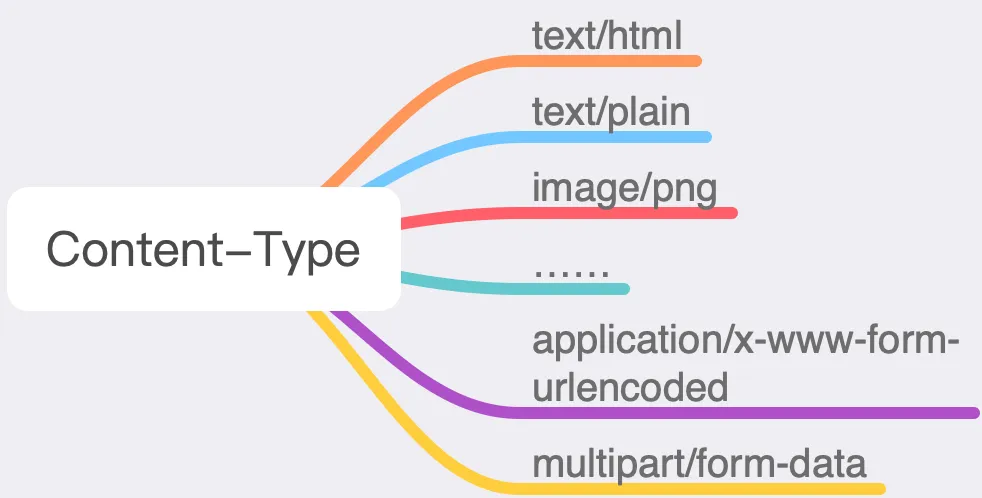
However, we commonly use only a few:
- application/x-www-form-urlencoded: The default encoding method for
<span><span>GET</span></span>and<span><span>POST</span></span>, where all data is converted into key-value pairs, such as<span><span>key1=value1&key2=value2</span></span>. - multipart/form-data: This format must be used when uploading resources.
3.11.7.2 Content-Length
The value of this field represents the length of the entity, measured in bytes.
3.11.7.3 Content-Range
This field is used with the <span><span>Range</span></span> request for features like resuming downloads. For example, during a download, multiple processes can be used to download parts of a file, which can then be merged into one file to speed up the download.
This
<span><span>entity</span></span>is quite confusing; in English, it is called<span><span>Entity</span></span><span><span>, and my personal understanding is that it refers to the </span></span><code><span><span>body</span></span><span><span> data of the request or response.</span></span>
3.11.8 Response Body
This part is the main body of the response~~


Screenshots of electronic books within the resource collection

Complete set of hardware resource collection