
Click the blue text for more exciting information
Single-chip solution, opening a new experience – W55MH32 high-performance Ethernet microcontroller
The W55MH32 is a high-performance Ethernet microcontroller launched by WIZnet, providing users with an unprecedented integrated experience. This chip integrates powerful components, specifically, a W55MH32 features a high-performance Arm® Cortex-M3 core with a maximum frequency of 216MHz; equipped with 1024KB FLASH and 96KB SRAM to meet storage and data processing needs; integrates a TOE engine, including WIZnet’s full hardware TCP/IP protocol stack, built-in MAC and PHY, and has an independent 32KB Ethernet transceiver buffer available for 8 independent hardware sockets. Such a configuration truly realizes an All-in-One solution, providing great convenience for developers.
In terms of packaging specifications, the W55MH32 offers two options: QFN100 and QFN68.
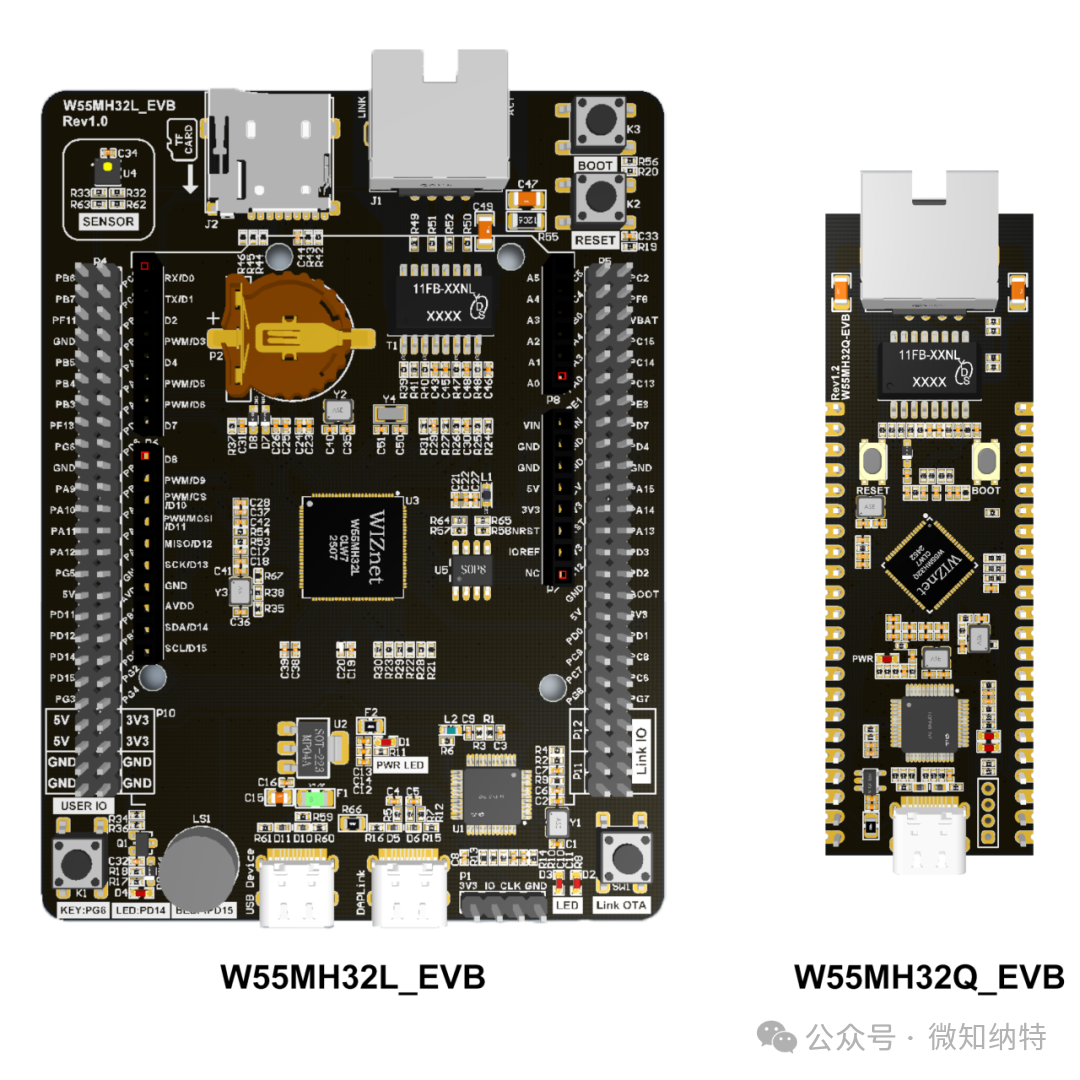
The W55MH32L uses the QFN100 package version, measuring 12x12mm, rich in resources, and designed for various complex industrial control scenarios. It has 66 GPIOs, 3 ADCs, 12-channel DMA, 17 timers, 2 I2Cs, 5 serial ports, 2 SPI interfaces (one of which is multiplexed with I2S), 1 CAN, 1 USB2.0, and 1 SDIO interface. Such a rich set of peripheral resources can easily meet the diverse connectivity needs in industrial control, whether for communication with various sensors and actuators or support for complex industrial protocols, making it an ideal choice in the complex industrial control field. The same series also includes the QFN68 packaged W55MH32Q version, which is smaller at only 8x8mm, lower in cost, and suitable for high-integration gateway module scenarios, with consistent software usage methods. For more information and materials, please visit http://www.w5500.com/ or contact us directly.
Additionally, the W55MH32 supports hardware encryption algorithm units, and WIZnet has also launched TOE+SSL applications, covering TCP SSL, HTTP SSL, and MQTT SSL, adding further security to network communications.
To assist developers in quickly getting started and delving into development, WIZnet has carefully crafted a supporting development board based on the W55MH32L chip. The development board integrates the WIZ-Link chip, allowing easy debugging, downloading, and serial printing of logs with just a USB-C data cable. The development board exposes all peripherals, significantly enhancing expansion capabilities, making it easier for developers to comprehensively evaluate chip performance.
If you want to obtain more detailed information about the chip and development board, including product features, technical parameters, and pricing, please visit the official webpage: http://www.w5500.com/, we look forward to exploring the infinite possibilities of the W55MH32 with you.

Chapter 8: W55MH32 HTTP Client Example
In this article, we will detail how to implement the HTTP Client functionality on the W55MH32 chip, and through practical examples, explain how to submit data to a specified website. For convenience, we have chosen a website specifically for testing the HTTP protocol: httpbin.org, and implemented the two common methods of GET and POST for submitting data, for your reference.
Other network protocols used in this example, such as DHCP and DNS, as well as the initialization process of the W55MH32, please refer to the relevant chapters, which will not be elaborated here.
1 Introduction to HTTP Protocol
HTTP (HyperText Transfer Protocol) is an application layer protocol used for distributed, collaborative, hypermedia information systems, based on the TCP/IP communication protocol to transmit data, and is the foundation of data communication on the World Wide Web (WWW). The original design of HTTP was to provide a method for publishing and receiving HTML pages, with resources requested via HTTP or HTTPS identified by Uniform Resource Identifiers (URIs).
The above is an introduction to the HTTP protocol. For a deeper understanding of this protocol, please refer to the introduction on the mozilla website: HTTP Overview – HTTP | MDN.
2 Characteristics of HTTP Protocol
-
Request-Response Model: The client initiates a request, and the server processes it and returns a response. For example, when a user enters a URL in the browser, the browser sends an HTTP request to the corresponding server, which returns the webpage content.
-
Statelessness: HTTP itself does not save the state between requests; each request is independent. However, state can be maintained through mechanisms such as Cookies and Sessions.
-
Connectionless: Connectionless means that each connection is limited to processing a single request. The server disconnects immediately after processing the client’s request and receiving the client’s response.
3 HTTP Application Scenarios
Next, let’s understand what operations and applications can be completed using the HTTP client mode on the W55MH32.
- Data Collection and Upload: Uploading data collected from sensors to the server.
- Remote Configuration and Management: Achieving remote management and control by requesting configuration files or management commands from the server. For example, industrial control devices can obtain the latest operating strategies or commands.
- Firmware Updates (OTA): Requesting to download the latest firmware package from the server to achieve remote firmware upgrades.
- Log and Error Report Upload: Regularly uploading system operation logs for analyzing device status, or uploading error reports in case of anomalies for quick problem identification and resolution.
- User Authentication and Authorization Management: Interacting with the server to verify the identity of users or devices.
4 Basic Workflow of HTTP Protocol
The request-response model of HTTP typically consists of the following steps:
-
Establishing Connection: A connection is established between the client and server based on the TCP/IP protocol.
-
Sending Request: The client sends a request to the server, which includes the URL of the resource to be accessed, the request method (GET, POST, PUT, DELETE, etc.), request headers (e.g., Accept, User-Agent), and an optional request body (for POST or PUT requests).
-
Processing Request: After receiving the request, the server finds the corresponding resource based on the information in the request and performs the corresponding processing operation. This may involve retrieving data from a database, generating dynamic content, or simply returning static files.
-
Sending Response: The server encapsulates the processed result in the response and sends it back to the client. The response includes a status code (to indicate the success or failure of the request), response headers (e.g., Content-Type, Content-Length), and an optional response body (e.g., HTML page content, image data).
-
Closing Connection: After completing the request-response cycle, the connection between the client and server will be closed, unless a persistent connection is used (such as keep-alive in HTTP/1.1).
5 HTTP Request Methods
In the HTTP protocol, GET and POST are two commonly used request methods for sending data from the client to the server and retrieving resources.
GET Method
The GET method is typically used to retrieve resources from the server. It has the following characteristics:
- Parameter Passing: Request parameters are passed through the query string in the URL, in the form of ?key1=value1&key2=value2.
- Data Size Limitation: Since parameters are appended to the URL, the length may be subject to the URL length limit (depending on browser and server settings).
- Security: Data is displayed in plain text in the URL, making it unsuitable for transmitting sensitive information.
Request Format:
|
GET <Request-URI> HTTP/<Version> <Headers> <Blank Line> |
- Request-URI: Represents the path to the target resource, which may include parameters.
- Version:HTTP Protocol version.
- Headers: Contains metadata, such as client attributes, supported formats, etc.
- Blank Line: Empty line.
POST Method
The POST method is typically used to submit data to the server. It has the following characteristics:
- Parameter Passing: Data is placed in the request body rather than in the URL.
- Data Size Limitation: There is no significant limit on the size of the POST request body, allowing for the transmission of large amounts of data.
- Security: Data is transmitted in the request body, making it relatively more secure.
Request Format:
|
POST <Request-URI> HTTP/<Version> <Headers> <Blank Line> <Body> |
-
Request-URI: The path to the target resource, usually the endpoint of an API.
-
Headers: Metadata, such as content type and length.
-
Blank Line: Empty line, separating the header and body.
-
Body: The body of the data, containing the length sent from the client to the server.
6 HTTP Protocol Response Content
The HTTP protocol response content consists of three parts: the status line, response headers, and response body.Status Line: The HTTP status line includes the HTTP protocol version, status code, and status description. The status code consists of three decimal digits, with the first digit defining the type of status code.Status codes are divided into five categories:
- 1xx (Informational Status Code): Indicates that the received request is being processed.
- 2xx (Success Status Code): Indicates that the request has been successfully processed.
- 3xx (Redirection Status Code): Indicates that further action is needed to complete this request.
- 4xx (Client Error Status Code): Indicates that the request contains syntax errors or cannot be completed.
- 5xx (Server Error Status Code): Indicates that an error occurred on the server while processing the request.
Example:
| HTTP/1.1 200 OK |
Response Headers The response headers will contain information such as content type, length, encoding, etc. Common response header fields include:
-
Content-Type: The MIME type of the response content, such as text/html, application/json.
-
Content-Length: The byte length of the response content.
-
Server: Server information.
-
Set-Cookie: Sets the client’s Cookie.
Example:
| Content-Type: text/html; charset=UTF-8Content-Length: 3495Server: Apache/2.4.41 (Ubuntu) |
Response Body: The response body contains the actual data content, which can take various forms depending on the type of response and request content. For example: HTML page content, JSON data, binary data of files, etc. If the status code is 204 No Content or 304 Not Modified, there is usually no body. Note: A blank line is added between the response body and response headers to separate the content.
7 HTTP Request and Response Examples
GET request example is as follows://Request
|
GET /get?username=admin&password=admin HTTP/1.1 Host:httpbin.org |
//Response
|
HTTP/1.1 200 OK Date: Tue, 10 Dec 2024 10:41:13 GMT Content-Type: application/json Content-Length: 278 Connection: keep-alive Server: gunicorn/19.9.0 Access-Control-Allow-Origin: * Access-Control-Allow-Credentials: true { “args”: { “password”: “admin”, “username”: “admin” }, “headers”: { “Host”: “httpbin.org”, “X-Amzn-Trace-Id”: “Root=1-67581ac9-236349c67cb21dcc24c54215” }, “origin”: “118.99.2.9”, “url”: “http://httpbin.org/get?username=admin&password=admin” } |
POST request example is as follows://Request
|
POST /post HTTP/1.1 Host:httpbin.org Content-Type:application/x-www-form-urlencode Content-Length:29 username=admin&password=admin |
//Response
|
HTTP/1.1 200 OK Date: Tue, 10 Dec 2024 10:44:52 GMT Content-Type: application/json Content-Length: 374 Connection: keep-alive Server: gunicorn/19.9.0 Access-Control-Allow-Origin: * Access-Control-Allow-Credentials: true { “args”: {}, “data”: “username=admin&password=admin”, “files”: {}, “form”: {}, “headers”: { “Content-Length”: “29”, “Content-Type”: “application/x-www-form-urlencode”, “Host”: “httpbin.org”, “X-Amzn-Trace-Id”: “Root=1-67581ba4-744fdecf1da1bcf3180f9fa3” }, “json”: null, “origin”: “118.99.2.9”, “url”: “http://httpbin.org/post” } |
8 Implementation Process
Next, let’s see how to implement the HTTP client mode on the W55MH32 to send GET and POST request examples.
Note: Since this example requires internet access, please ensure that the W55MH32 network environment and configuration can access the internet normally.
The example uses the server of httpbin.org, whose GET request path is httpbin.org/get, and the POST request path is httpbin.org/post.
After sending a request to httpbin.org, it will reflect the parameters submitted during our request in the response content.
Step 1: Resolve the HTTP Server Domain Name via DNS Protocol
When using HTTP to submit data to the httpbin.org server, the first step is to establish a TCP connection with that server. It is important to note that establishing a TCP connection must be based on the IP address. The task of do_dns() is to resolve the domain name using the DNS protocol to obtain the corresponding IP address.
if (do_dns(ethernet_buf, org_server_name, org_server_ip)) {printf("DNS request failed.\r\n");while (1) { } }Step 2: Package HTTP GET and POST Requests
Next, we need to package according to the specifications of the HTTP protocol introduced earlier.
In this example, we define two functions to generate the HTTP GET Header() and HTTP POST Header(). The detailed code is as follows:
/** * @brief HTTP GET : Request package combination package. * @param pkt: Array cache for grouping packages * @return pkt: Package length */uint32_t http_get_pkt(uint8_t *pkt){ *pkt = 0;// request type URL HTTP protocol versionstrcat((char *)pkt, "GET /get?username=admin&password=admin HTTP/1.1\r\n"); // Host address, which can be a domain name or a specific IP address.strcat((char *)pkt, "Host: httpbin.org\r\n"); // endstrcat((char *)pkt, "\r\n"); returnstrlen((char *)pkt); } /** * @brief HTTP POST : Request package combination package. * @param pkt: Array cache for grouping packages * @return pkt: Package length */uint32_t http_post_pkt(uint8_t *pkt) { *pkt = 0;// request type URL HTTP protocol versionstrcat((char *)pkt, "POST /post HTTP/1.1\r\n"); // Host address, which can be a domain name or a specific IP address.strcat((char *)pkt, "Host: httpbin.org\r\n"); // Main content formatstrcat((char *)pkt, "Content-Type:application/x-www-form-urlencode\r\n"); // Main content lengthstrcat((char *)pkt, "Content-Length:29\r\n"); // separatorstrcat((char *)pkt, "\r\n"); // main contentstrcat((char *)pkt, "username=admin&password=admin");returnstrlen((char *)pkt); }The content of http_get_pkt() packaging is as follows:
|
GET /get?username=admin&password=admin HTTP/1.1 Host: httpbin.org |
The content of http_post_pkt() packaging is as follows:
|
POST /post HTTP/1.1 Host: httpbin.org Content-Type:application/x-www-form-urlencode Content-Length:29 username=admin&password=admin |
Step 3: Send HTTP Requests and Handle Timeouts and Response Content
len = http_get_pkt(ethernet_buf); do_http_request(SOCKET_ID, ethernet_buf, len, org_server_ip, org_port); // Send a POST request.len = http_post_pkt(ethernet_buf); do_http_request(SOCKET_ID, ethernet_buf, len, org_server_ip, org_port);The do_http_request() function is responsible for sending the HTTP request and listening for responses, with the specific content as follows:
/** * @brief HTTP Client get data stream test. * @param sn: socket number * @param buf: request message content * @param len request message length * @param destip: destination ip * @param destport: destination port * @return 0:timeout,1:Received response.. */uint8_t do_http_request(uint8_t sn, uint8_t *buf, uint16_t len, uint8_t *destip, uint16_t destport) {uint16_t local_port = 50000;uint16_t recv_timeout = 0;uint8_t send_flag = 0;while (1) {switch (getSn_SR(sn)) {case SOCK_INIT:// Connect to http server. connect(sn, destip, destport);break;case SOCK_ESTABLISHED:if (send_flag == 0) {// send request send(sn, buf, len); send_flag = 1;printf("send request:\r\n");for (uint16_t i = 0; i < len; i++) {printf("%c", *(buf + i)); }printf("\r\n"); }// Response content processing len = getSn_RX_RSR(sn);if (len > 0) {printf("Receive response:\r\n");while (len > 0) { len = recv(sn, buf, len);for (uint16_t i = 0; i < len; i++) {printf("%c", *(buf + i)); } len = getSn_RX_RSR(sn); }printf("\r\n"); disconnect(sn); close(sn);return1; }else { recv_timeout++; delay_ms(1000); }// timeout handlingif (recv_timeout > 10) {printf("request fail!\r\n"); disconnect(sn); close(sn);return0; }break;case SOCK_CLOSE_WAIT:// If there is a request error, the server will immediately send a close request,// so the error response content needs to be processed here. len = getSn_RX_RSR(sn);if (len > 0) {printf("Receive response:\r\n");while (len > 0) { len = recv(sn, buf, len);for (uint16_t i = 0; i < len; i++) {printf("%c", *(buf + i)); } len = getSn_RX_RSR(sn); }printf("\r\n"); disconnect(sn); close(sn);return1; } close(sn);break;case SOCK_CLOSED:// close socket close(sn);// open socket socket(sn, Sn_MR_TCP, local_port, 0x00);break;default:. break;. }. }. }In this function, the program executes a state machine in TCP Client mode. For detailed explanations, please refer to the TCP Client example chapter. When the program is in the SOCK_ESTABLISHED state, it will send the request content to the server once. Then it listens for server response data and handles timeouts.
If the server returns an abnormal response, the connection will be closed immediately, so we need to handle the server’s abnormal response content in the SOCK_CLOSE_WAIT state.
9 Running Results
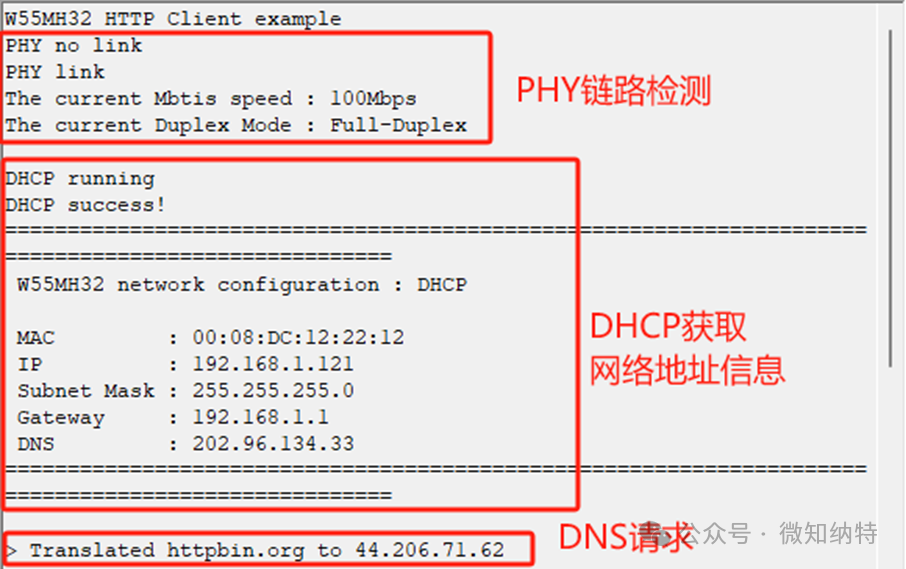
After programming the example, the first thing we can see is the printed PHY link detection and DHCP obtaining network information, followed by the DNS resolution results for the HTTP server domain name, as shown in the following figure:
Next, we sent a GET request message, and then the HTTP server returned a response message.
Both the request and response texts were printed via the serial port, as shown in the following figure: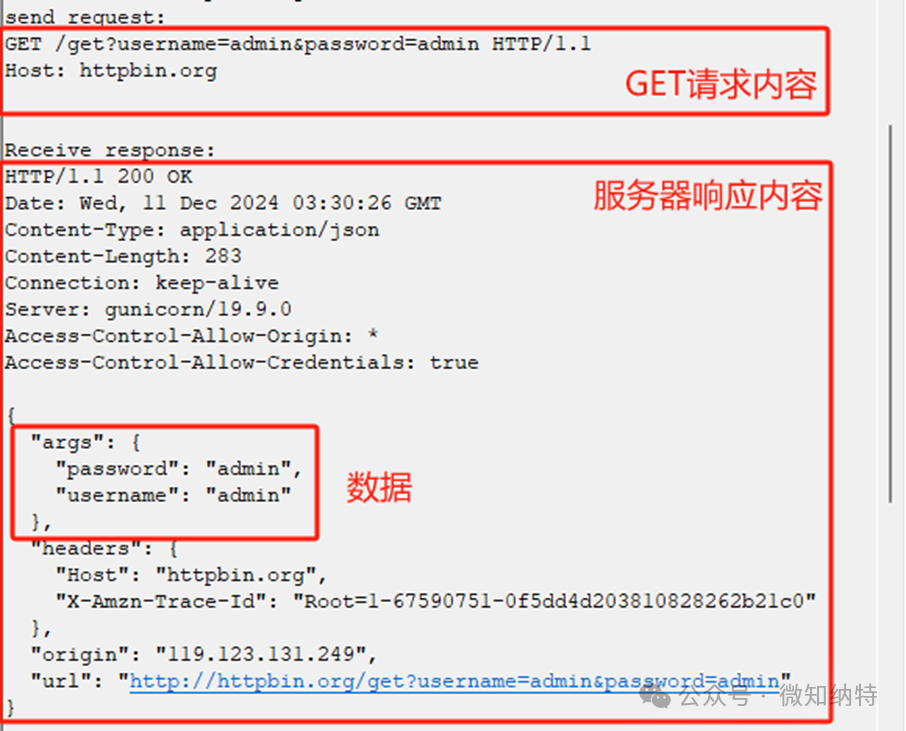
Finally, we sent a POST request message, and then the HTTP server returned a response message.
Both the request and response texts were printed via the serial port, as shown in the following figure: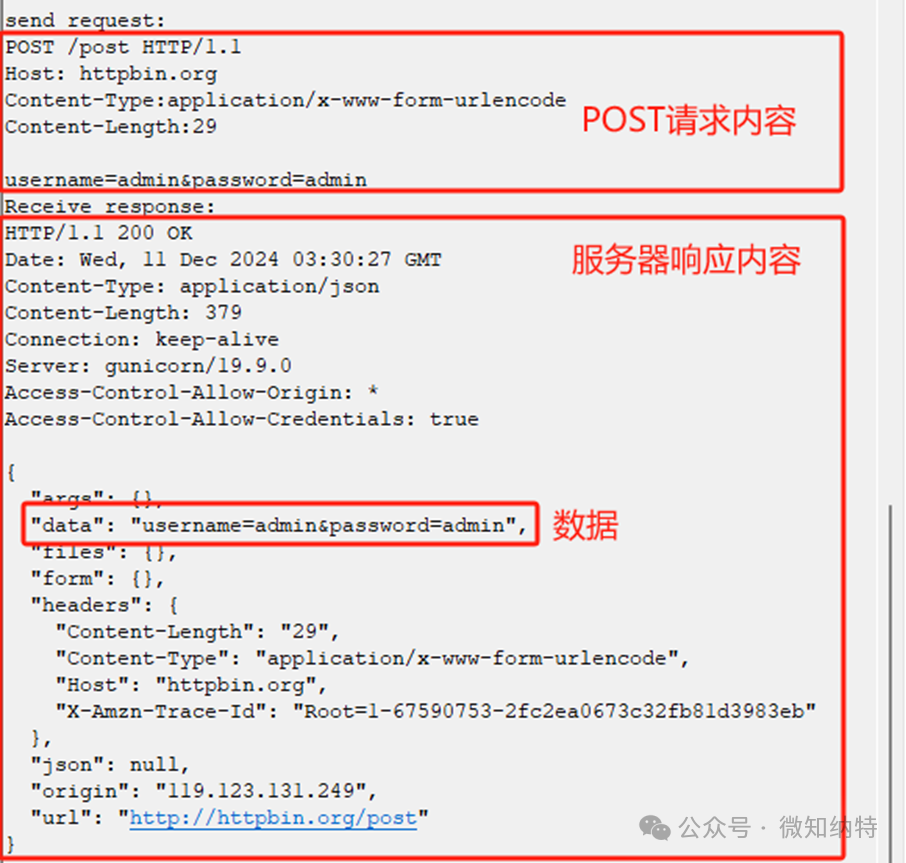
10 Conclusion
This article introduced the method of implementing the HTTP Client functionality on the W55MH32 chip, achieving data retrieval from the httpbin.org website. It explained the concepts, characteristics, application scenarios, workflow, request methods, and response content of the HTTP protocol, and provided request and response examples. It also demonstrated the implementation process on the W55MH32. The next article will explain how to implement the HTTP Server functionality on this chip, introducing the principles and implementation steps for modifying the W55MH32 network address information via a browser. Stay tuned!
WIZnet is a fabless semiconductor company established in 1998. Its products include the internet processor iMCU™, which uses TOE (TCP/IP Offload Engine) technology based on a unique patented hardwired TCP/IP. iMCU™ is aimed at embedded internet devices in various applications.
WIZnet has over 70 distributors worldwide and has offices in Hong Kong, South Korea, and the United States, providing technical support and product marketing.
The Hong Kong office manages regions including Australia, India, Turkey, and Asia (excluding South Korea and Japan).