Technical experience sharing, welcome to follow and provide guidance.
This article introduces MQTT based on the Internet of Things.
What is MQTT?
MQTT: Message Queuing Telemetry Transport, a lightweight messaging protocol. It is particularly useful for establishing connections in remote locations where small code footprint and/or network bandwidth are precious. MQTT is a distributed soft bus, where messages are implemented through three roles: subscribers, publishers, and message brokers. It can exist on all smart devices, achieving the interconnection of all things. Of course, there are many protocols for implementing the Internet of Things, such as CoAP, HTTP, UPnP, XMPP, etc., but MQTT has the advantages of being simpler and lighter.
Terminology of MQTT
- Subscriber is the message receiver; devices that need messages obtain them from the message broker, which pushes messages from the publisher.
- Publisher is the message sender; it provides messages with specific meanings to the message broker.
- Broker is the entity that receives requests and messages from subscribers and publishers, and forwards messages based on those requests.
- Topic is used by publishers to identify what type of message to publish and by subscribers to identify what type of message to subscribe to.
- QoS is used to determine the level of message delivery by the publisher, mainly including three levels:QoS 0: indicates an unknown service, meaning the message is sent at most once, with no guarantee of successful receipt by the subscriber.QoS 1: indicates a known service, meaning the message must receive a confirmation from at least one subscriber after being published; otherwise, the message will be resent.QoS 2: indicates guaranteed service, meaning the message must receive a reply from the subscriber, and after receiving the subscriber’s reply, a confirmation message is sent back to the subscriber to ensure the message is completely stable and reliable.
- Last Will and Testament is a preset message that the broker will send according to the publisher’s last will when the connection is unexpectedly disconnected.
- Retained Message determines whether to send the last message to the subscriber immediately when the subscriber subscribes to a message.
- Tree Structure refers to the classification of topics in a tree structure, such as the structure for bedroom temperature messages being “home/houseroom/temperature”.
- Wildcard (+/#) allows finding all topics that match a regular expression, such as “home/houseroom/#” indicating subscription to all bedroom messages, and “home/+/temperature” indicating subscription to temperature messages from all rooms.
- Clean Session if set to 0, the disconnected server must restore the new client connection based on the current session state; if set to 1, it must discard any previous sessions and start a new session.
- Client includes both subscribers and publishers, which will always connect to the MQTT server. Clients can:
- (1) Publish information that other clients may subscribe to.
- (2) Subscribe to messages published by other clients.
- (3) Unsubscribe or delete application messages.
- (4) Disconnect from the server.
- MQTT Server is the message broker, which can be an application or a device. It is located between publishers and subscribers. The server can:
- (1) Accept network connections from clients;
- (2) Accept application information published by clients;
- (3) Process subscription and unsubscription requests from clients;
- (4) Forward application messages to subscribed clients.
- Keep Alive refers to the maximum allowed time interval between the completion of one control message transmission by the client and the sending of the next message. The client must ensure that the control message sending time does not exceed this value.
Message Sending
Message Sending in QoS 0 Mode
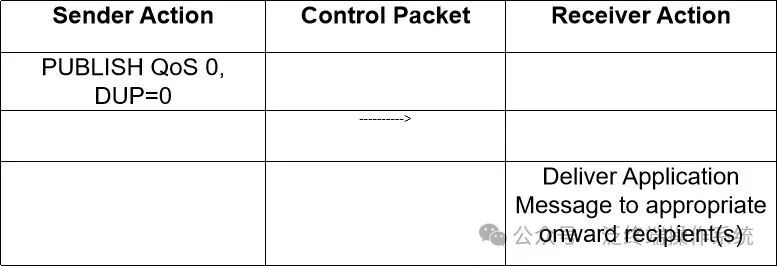
Sending a message at QoS 0 level means that the receiver will not respond to the message, and the sender will not perform retry checks, so the message may be delivered at most once, but it may also fail to be delivered.Sender: Sends this PUBLISH message.Receiver: Receives this PUBLISH message.
Message Sending in QoS 1 Mode
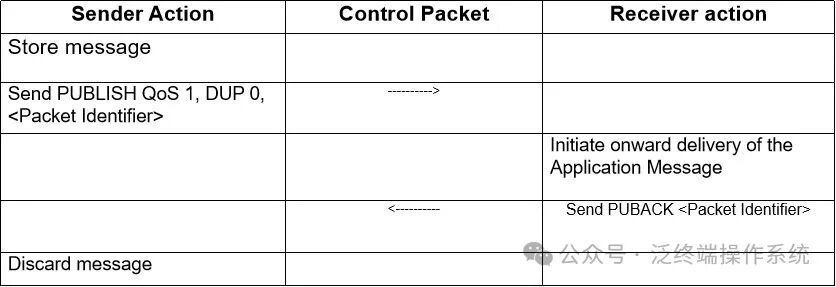
Sending a message at QoS 1 level means that the message is sent at least once and confirmed to be delivered at least once.Sender: Must assign a message identifier for each new message, the sent PUBLISH message must be marked as QoS=1, DUP=0, and must treat this message as unacknowledged until receiving the corresponding response message.Receiver: The response PUBACK message must contain a message identifier that matches the received PUBLISH message.After sending the PUBACK message, the receiver must treat any subsequent PUBLISH messages with the same message identifier as a new message, ensuring normal reception next time.
Message Sending in QoS 2 Mode
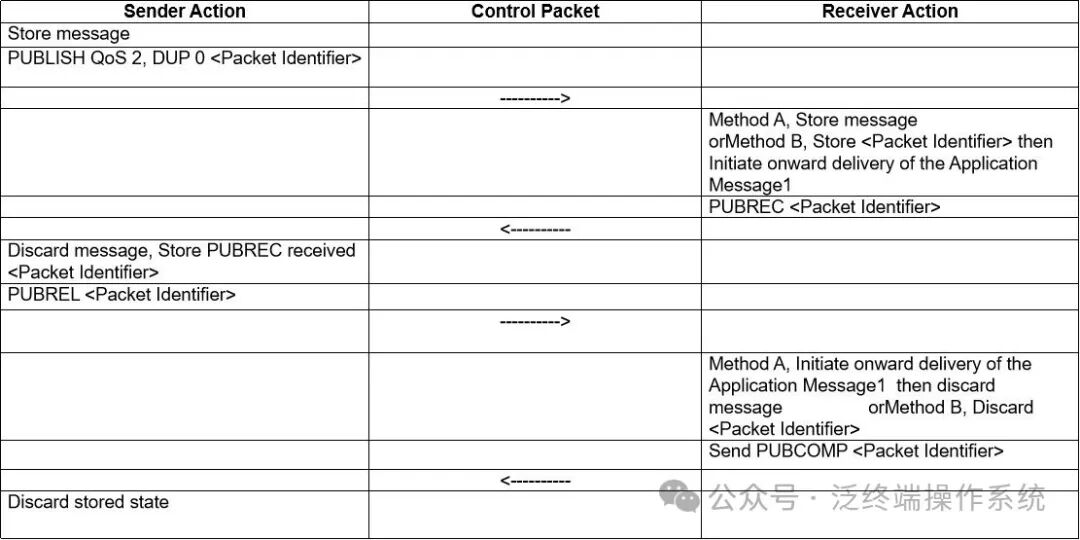
QoS 2 is the highest level of sending, ensuring that messages are not lost and also ensuring that messages are not duplicated.Sender: 1. Assign an unused message identifier for the message, then set the PUBLISH message identifier to QoS 2 DUP=0.2. When sending the PUBLISH message, treat it as unacknowledged until receiving the PUBREC message. After receiving the PUBREC message, a PUBREL message must be sent, which must have the same message identifier as the PUBLISH message.3. The PUBREL message must also be treated as unacknowledged until receiving the corresponding PUBCOMP message from the receiver.4. Finally, once the PUBREL message is sent, the PUBLISH message cannot be resent.
Receiver: 1. The responding PUBREC message must contain a message identifier that comes from the received PUBLISH message that has accepted ownership.2. Before receiving the corresponding PUBREL message, the receiver must send the PUBREC message to confirm any subsequent PUBLISH messages with the same identifier. In this case, it cannot redistribute the message to any subsequent receivers.3. The PUBCOMP message responding to the PUBREL message must contain the same identifier as the PUBREL message.4. After sending the PUBCOMP message, the receiver must treat any subsequent PUBLISH messages with the same message identifier as a new publication.
Testing and Verification
Experience MQTT in a Linux Environment
- Install mosquitto
<span>apt update && apt install mosquitto mosquitto-clients</span>
- Create an authentication file
touch /etc/mosquitto/pwfile
Create a user and password
mosquitto_passwd /etc/mosquitto/pwfile kylin
Password: qwe123
- Set ACL rules
vim /etc/mosquitto/aclfile
user kylin
topic write test/#
topic read test/#
- Start the message broker
mosquitto -c /etc/mosquitto/mosquitto.conf -d
- Subscribe to a topic
mosquitto_sub -h localhost -t "test/a" -u kylin -P qwe123 -i "c1"
-h specifies the MQTT host address
t specifies the MQTT topic
-u is the user
-P is the password
-i is the process id
- Publish a topic
mosquitto_pub -h localhost -V mqttv311 -t 'test/a' -u kylin -P qwe123 -i "c3" -m "Hello World" -M 0
Where -h, -t, -u, -i, -P have the same meanings as above
-V specifies the version of the message being published (mqttv311/mqttv31)
-m is the message string being published
-M specifies the QoS level
Using tcpdump to Capture Packets

As shown in the figure above, the subscriber will block polling for messages until the publisher sends a message, at which point the subscriber can receive the message “Hello World”.
This raises a question: after discussing so many concepts, how is this actually implemented?To explore how this is achieved, we need to use tcpdump.TCP packet capture:
tcpdump -i lo tcp port 1883 -X
-i: represents the network interfacetcp: MQTT is based on TCP transmissionport 1883: the default transmission port for MQTT is 1883-X: prints the data of each packet in hexadecimal and ASCII during the capture
The above is the complete packet content. Given that TCP has a three-way handshake, we will take the fourth packet to briefly analyze the MQTT packet. As follows:

Since this is a complete TCP packet, we need to remove some TCP protocol-related data, including:
4500 0053899840004006 b30a 7f00 00017f00 0001  : TCP header. Not analyzed in detail.
ae80 075b 6e6a c507 dded ec9e 80180200 fe47 00000101080a 265c 053f265c 053f : Transmission Control Protocol message information. Not analyzed in detail.
101d00044d51 545404c2 003c 0002633300056b79 6c69 6e0006717765313233  : The actual TCP data packet, which is the MQTT data packet. This part will be analyzed in detail.
Analyzing the MQTT Packet
101d: 0x10 can be found in the protocol table: 2.2.1, corresponding to CONNECT, 0x1d is the byte length, calculated here as 29 bytes.

0004 4d51 5454 04c2 003c:0004: The protocol name length is 4.4d51 5454: The name is MQTT (ASCII code) (if it is protocol 3.1, the string would be MQIsdp (4d51 4973 6470), length 6).04: Version number: 3.1.1 version number is 4, 3.1 version number is 3.c2: Connection flags, including: name, password, QoS 0, clean session. (Chapter 3.1.2.3)

003c: Keep alive time, default is 60 seconds. In case of timeout, a PINGREQ message will be sent to probe whether the broker and client (publisher and subscriber) are still online (Chapter 3.1.2.10).

0002 6333: 0002 is the Client ID length of 2, 6333 is the string ID c3 (which is the process ID I specified with the -i parameter when publishing).0005 6b79 6c69 6e00 0671 7765 3132 33: This is the plaintext string for account kylin and password qwe123.
Conclusion
Thus, a complete connect packet has been parsed. After the connect, there are still many packets that can be parsed.