In modern application development, interacting with Web APIs is a fundamental skill. This article will introduce how to use the HttpClient class in C# to send POST and GET requests to call external API services.

Introduction to HttpClient
HttpClient is a class in the .NET Framework and .NET Core used for sending HTTP requests and receiving HTTP responses. It supports asynchronous operations and can efficiently handle web requests, making it the preferred way for modern C# applications to interact with web services.
1. Preparation
1. Prepare anAPI request URL: https://api.qqsuu.cn/api/dm-caipuRequest method: Both GET and POST are acceptable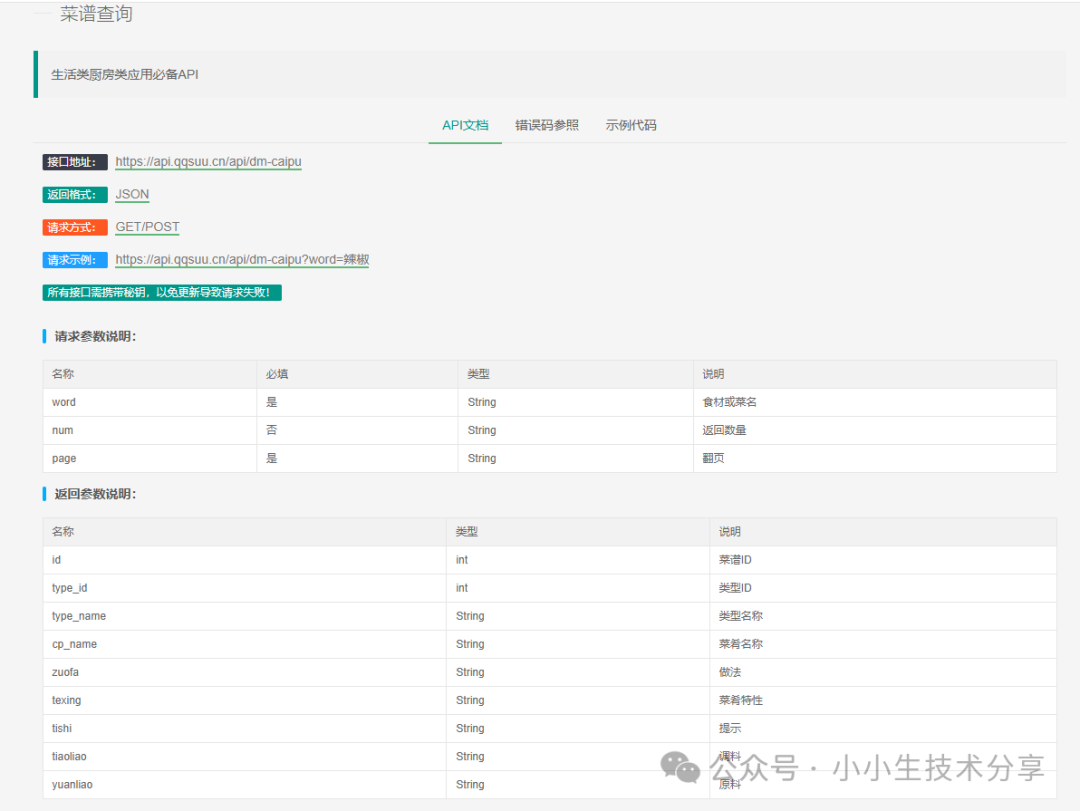 2. Create a Windows Forms application project. In Visual Studio 2019:
-
Create a new Windows Forms App (.NET Framework) project
-
Name it “WindowsFormsHttpClient“
-
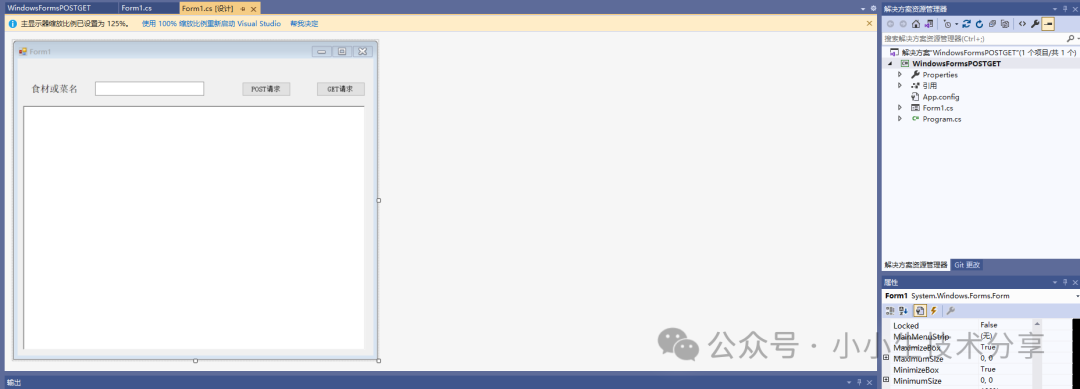
Design a simple interface that includes:
-
A text box (textBox1) for entering query parameters
-
Two buttons (button1 and button2) to trigger POST and GET requests respectively
-
A rich text box (richTextBox1) to display the API response results
2. Implementation of GET Request
The GET request is used to retrieve data from the server. In our example, the <span><span>Get</span></span> method implements the basic functionality of a GET request:
-
Create an instance of HttpClient (using the using statement to ensure resource release)
-
Call the
<span><span>GetAsync</span></span>method to send the request -
Use
<span><span>EnsureSuccessStatusCode</span></span>to check the response status code -
Read the response content
public async Task<string> Get(string strUrl) { string str_Output = ""; try { using (HttpClient client = new HttpClient()) { HttpResponseMessage response = await client.GetAsync(strUrl); response.EnsureSuccessStatusCode(); // If the status code is not successful, an exception will be thrown str_Output = await response.Content.ReadAsStringAsync(); return str_Output; } } catch (Exception ex) { return ex.Message.ToString(); } }3. Implementation of POST Request
The POST request is typically used to submit data to the server. Our <span><span>Post</span></span> method implements the basic functionality of a POST request:
public async Task<string> Post(string strUrl) { string str_Output = ""; try { using (HttpClient client = new HttpClient()) { HttpResponseMessage response = await client.PostAsync(strUrl, null); response.EnsureSuccessStatusCode(); str_Output = await response.Content.ReadAsStringAsync(); return str_Output; } } catch (Exception ex) { return ex.Message.ToString(); } }Note that in this simple example, we passed <span><span>null</span></span> as the POST content. In practical applications, you may need to send JSON, form data, or other formats of content.
4. Complete Code
private async void button1_Click(object sender, EventArgs e) { string strUrl = "https://api.qqsuu.cn/api/dm-caipu?word=" + textBox1.Text.Trim(); string strReturn = await Post(strUrl); richTextBox1.Text = strReturn; } private async void button2_Click(object sender, EventArgs e) { string strUrl = "https://api.qqsuu.cn/api/dm-caipu?word=" + textBox1.Text.Trim(); string strReturn = await Get(strUrl); richTextBox1.Text = strReturn; } public async Task<string> Post(string strUrl) { string str_Output = ""; try { using (HttpClient client = new HttpClient()) { HttpResponseMessage response = await client.PostAsync(strUrl, null); response.EnsureSuccessStatusCode(); str_Output = await response.Content.ReadAsStringAsync(); return str_Output; } } catch (Exception ex) { return ex.Message.ToString(); } } public async Task<string> Get(string strUrl) { string str_Output = ""; try { using (HttpClient client = new HttpClient()) { HttpResponseMessage response = await client.GetAsync(strUrl); response.EnsureSuccessStatusCode(); // If the status code is not successful, an exception will be thrown str_Output = await response.Content.ReadAsStringAsync(); return str_Output; } } catch (Exception ex) { return ex.Message.ToString(); } }Effect: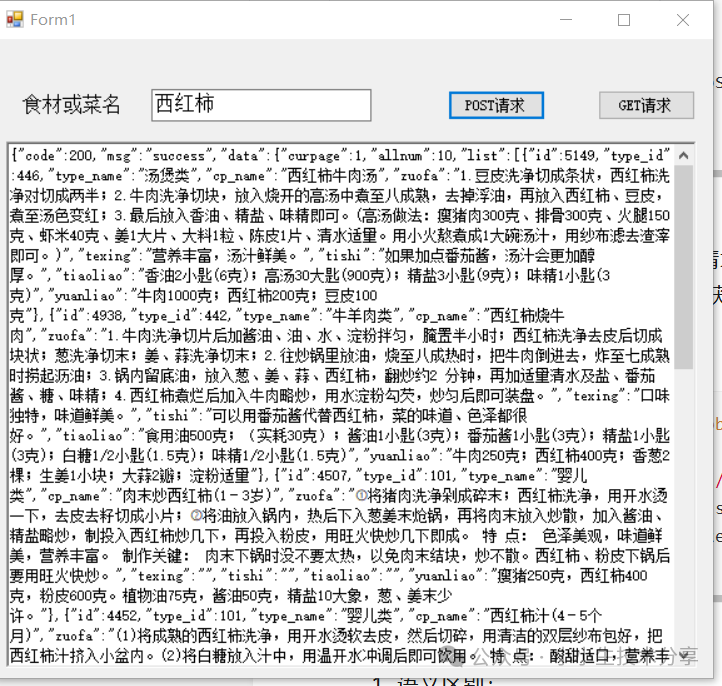
4. Best Practices
-
Reuse HttpClient instances: Reusing HttpClient instances throughout the application lifecycle, rather than creating a new instance for each request, can improve performance.
-
Set request timeouts: Set reasonable timeout periods for HttpClient:
client.Timeout = TimeSpan.FromSeconds(30);3. Add request headers: Many APIs require specific request headers:
client.DefaultRequestHeaders.Add("Authorization", "Bearer your_token");4. Handle JSON responses: Use Newtonsoft.Json or System.Text.Json to handle JSON responses:
var result = JsonConvert.DeserializeObject<MyModel>(responseContent);5.Send JSON content:
var content = new StringContent(JsonConvert.SerializeObject(data), Encoding.UTF8, "application/json");var response = await client.PostAsync(url, content);5. Extensions
1. Send a POST request with parameters
public async Task<string> PostJson(string strUrl, string jsonInput) { string str_Output = ""; try { using (HttpClient client = new HttpClient()) { var content = new StringContent(jsonInput, Encoding.UTF8, "application/json"); HttpResponseMessage response = await client.PostAsync(strUrl, content); response.EnsureSuccessStatusCode(); str_Output = await response.Content.ReadAsStringAsync(); return str_Output; } } catch (Exception ex) { return ex.Message.ToString(); } }2. Send a DELETE request with parameters
public async Task<bool> DeleteJson(string strUrl, string jsonInput) { try { using (HttpClient client = new HttpClient()) { var request = new HttpRequestMessage { Method = HttpMethod.Delete, RequestUri = new Uri(strUrl), Content = new StringContent(jsonInput, Encoding.UTF8, "application/json") }; HttpResponseMessage response = await client.SendAsync(request); response.EnsureSuccessStatusCode(); return true; } } catch (Exception ex) { return false; } }3. Send a GET request with headers
public async Task<string> GetHeaders(string url) { using (HttpClient client = new HttpClient()) { client.DefaultRequestHeaders.Add("Authorization", "Bearer your_token_here"); client.DefaultRequestHeaders.Add("Custom-Header", "Value"); HttpResponseMessage response = await client.GetAsync(url); response.EnsureSuccessStatusCode(); return await response.Content.ReadAsStringAsync(); } }Conclusion
This article introduced the basic methods of using HttpClient in C# to send POST and GET requests. Key points include:
-
Using the
<span><span>HttpClient</span></span>class to send HTTP requests -
Asynchronous programming model (async/await)
-
Basic error handling
-
Response status code checking
-
Reading response content
Previous highlights:Using HttpWebRequest in C# to send POST and GET requests to call APIsIn-depth comparison of JSON handling solutions in C#: System.Text.Json vs Newtonsoft.JsonUsing the third-party library Newtonsoft.Json to manipulate JSON in C#Efficiently manipulating JSON data in C# using System.Text.JsonIn-depth comparison of logging frameworks in C#: Technical selection guide for Serilog, NLog, and log4netImplementing efficient logging in C# using NLogPractical guide to structured logging in C# using SerilogLogging in C# using log4netLogging in C# using NotepadTwo ways to manipulate XML in C#: Comprehensive comparison of XDocument and XmlDocumentManipulating XML format data in C# using XDocumentManipulating XML in C#Creating WebService interfaces in C#Exporting DataTable data to Excel in C# Windows Forms applicationsSending SMS using Alibaba Cloud SMS package in C#Follow the public account and enter 20250811 to getUsing HttpWebRequest in C# to send POST and GET requests to call APIs Demo
Follow the public account and enter 20250813 to getUsing HttpClient in C# to send POST and GET requests to call APIs Demo