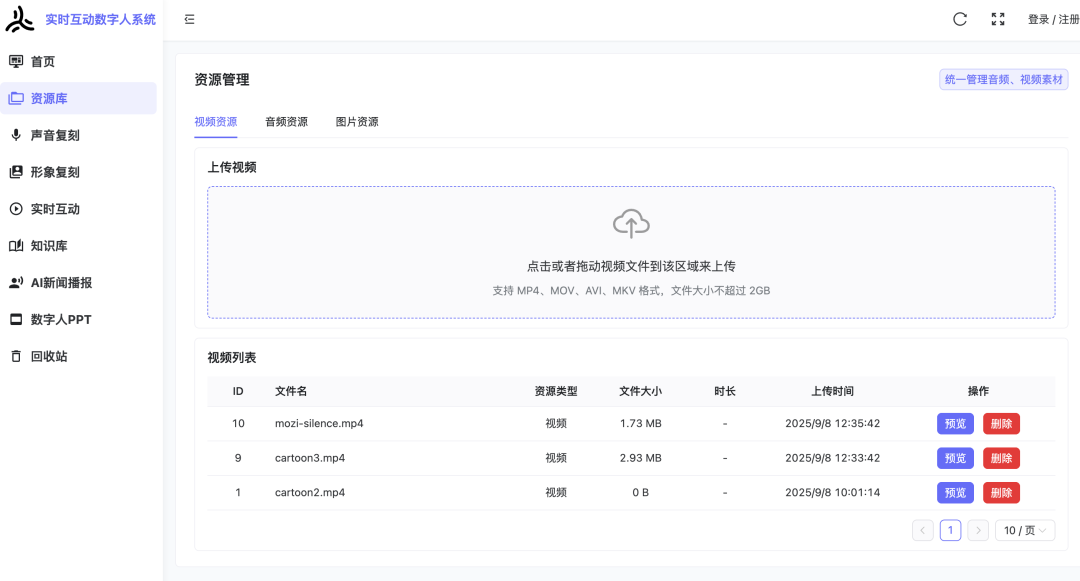
In modern web application development, file uploads are a common functional requirement. Especially in digital human live streaming systems like Avatar Stream, users need to upload media files such as videos, audio, and images. In Python’s aiohttp framework, there are various ways to handle file uploads, but the details of handling differ among these methods. This article will introduce how to correctly handle file uploads by analyzing a practical case from the Avatar Stream project.
Background of the Problem
In the Avatar Stream project, we found that when using <span>await request.multipart()</span> to handle file uploads, the content of the read file was empty, while using <span>await request.post()</span> worked normally. Why is that?
Comparison of Two File Upload Handling Methods
1. Using <span>await request.post()</span>
This method is a simplified handling approach provided by aiohttp, suitable for standard form data:
async def clone_voice(self, request):
    if request.content_type == 'multipart/form-data':
        # Handle form data
        data = await request.post()
        user_id = data.get('user_id', 0)
        voice_name = data.get('voice_name')
        media_id = data.get('media_id')
        # ... other field handling

        # Get the uploaded audio file
        audio_file = data.get('audio_file')
        if audio_file:
            # Save the uploaded file
            audio_path = f'{self.voice_dir}/{voice_name}_{int(time.time())}{os.path.splitext(audio_file.filename)[1]}'
            os.makedirs(os.path.dirname(audio_path), exist_ok=True)
            with open(audio_path, 'wb') as f:
                f.write(audio_file.file.read())
            audio_url = audio_path
Advantages of this method:
- Simple to use, automatically handles all fields
- For file fields, temporary files are created automatically
- Less prone to errors
2. Using <span>await request.multipart()</span>
This method provides finer control but requires manual handling of each field:
async def upload_media(self, request):
    # Parse multipart/form-data
    reader = await request.multipart()

    file_field = None
    user_id = '0'
    task_id = 0
    media_type = 'image'

    # Read form fields
    async for field in reader:
        if field.name == 'file':
            file_field = field
        elif field.name == 'user_id':
            user_id = await field.text()
        elif field.name == 'task_id':
            task_id_text = await field.text()
            task_id = int(task_id_text or 0)
        elif field.name == 'type':
            media_type = await field.text()

    # Read file content - key point: use decode=False
    file_content = await file_field.read(decode=False)
    file_size = len(file_content)
Advantages of this method:
- Provides finer control
- Can handle fields one by one, suitable for complex scenarios
- More flexible but requires correct handling of details
Key Issues and Solutions
When using <span>await request.multipart()</span>, the main issue we encountered was that the file content read was empty. After analysis, we found that the problem lay in the way the file content was read:
# Incorrect way - will lead to empty file content
file_content = await file_field.read()

# Correct way - get raw byte data
file_content = await file_field.read(decode=False)
This is because aiohttp’s <span>read()</span> method attempts to decode the content by default, and for binary files (such as images, videos, audio), we should use the <span>decode=False</span> parameter to get the raw byte data.
Best Practice Recommendations
-
Select the appropriate handling method:
- For simple file upload scenarios, it is recommended to use
<span>await request.post()</span> - For scenarios requiring finer control, you can use
<span>await request.multipart()</span>
Correctly handle binary files:
- Use
<span>read(decode=False)</span>to read binary file content - Ensure correct saving of file content to disk
Add error handling and logging:
- Check if file content is empty
- Log detailed information for debugging
- Handle possible exceptions
Validate file information:
- Check if the file name is empty
- Validate file size
- Confirm MIME type
Conclusion
In the Avatar Stream project, we solved the issue of empty content during file uploads through analysis and practice. The key is to correctly use the <span>read(decode=False)</span> method to handle binary file content. Regardless of which handling method is chosen, careful handling of file content reading and saving is necessary to ensure that files can be uploaded and processed correctly.
By following these best practices, we can build a more stable and reliable file upload functionality, providing users with a better experience.
If you are interested in our project, feel free to refer to the link below:
https://df58aaahqa.feishu.cn/docx/EDfZdJRcNod1EFxwgn5cynOXnpf