Introduction
This article continues the “Wireshark Practical Case Study” series, delving into an “epoch-making” “efficiency revolution” in the world of web performance. It concerns the “loading speed” of every modern website you open, the fundamental transformation in the “dialogue” between “browsers” and “servers”, and a great “traffic” revolution initiated to end the “old” and “inefficient” “queuing” nightmare of “HTTP/1.1”. The topic is: HTTP/2.
The goal of this article is to unveil the mystery of HTTP/2 for web developers and operations engineers who are still puzzled by “why my website loads dozens of small images so slowly like a snail”.
We will break the naive illusion that “HTTP version = minor upgrade” and use a vivid metaphor of a “supermarket checkout” to let you witness, under Wireshark’s “side-by-side comparison”, how HTTP/2, through its two major “black technologies” of “multiplexing” and “header compression”, takes us from the “Stone Age” of “one by one checkout” to the “smart” era of “parallel scanning of all products”.
(The technical principles in this article reference the core document RFC 7540 from IETF regarding HTTP/2, Google’s design white paper on its SPDY protocol (the predecessor of HTTP/2), and technical blogs from mainstream CDN providers like Cloudflare and Akamai on HTTP/2 performance optimization.)
Wireshark Case Study (25): Where Does HTTP/2 ‘Speed’ Outperform HTTP/1.1?
Original: 51 Learning Communication
In our digital lives, we have long been accustomed to the “dazzling” “complexity” of modern web pages.
When you open any mainstream e-commerce or news website, your browser may need to download dozens or even hundreds of “small components”—CSS style files, JS scripts, various sizes of images, font files… before it can “stitch” together a “complete” page and present it to you.
Now, a fundamental, efficiency-related “soul-searching question” is posed to the “universal language” of the web, HTTP:
How can I retrieve these hundreds of “small components” in the “most efficient” way?
Many people achieve nothing because they always try to solve “new” problems with “outdated” tools. Similarly, many websites are “slow” because their servers are still using that “antique”—HTTP/1.1, which was born in 1999 and is full of “limitations of the times”.
HTTP/1.1’s solution to this “multi-component” problem is extremely “clumsy” and “inefficient”.
Knowledge Point 1: The Nightmare of “Queuing Checkout”—HTTP/1.1’s “Head-of-Line Blocking”
To understand the “revolutionary” nature of HTTP/2, we must first comprehend how “despairing” HTTP/1.1 is.
You can imagine the communication mode of HTTP/1.1 as an “old-fashioned supermarket checkout counter”.
TCP connection: is the only “checkout channel”. Each “component” (image/CSS): is a product waiting to be checked out.
HTTP/1.1 has an “iron rule”: “In one checkout channel, products must queue up one by one! If the previous one is not finished, the next one cannot move!”
This “iron rule” is technically known as “Head-of-Line Blocking”.
If the “product” at the front of the queue (for example, a large JS file) gets stuck at the checkout due to network issues or slow server processing, then the dozens of “small products” (like some small icons) behind it, even if they are ready, can only wait helplessly in line.
To alleviate this “nightmare”, browsers have come up with a “side door” workaround: opening several “checkout channels” at once (browsers typically establish 6 TCP connections concurrently for a single domain). However, this greatly wastes server and network resources.
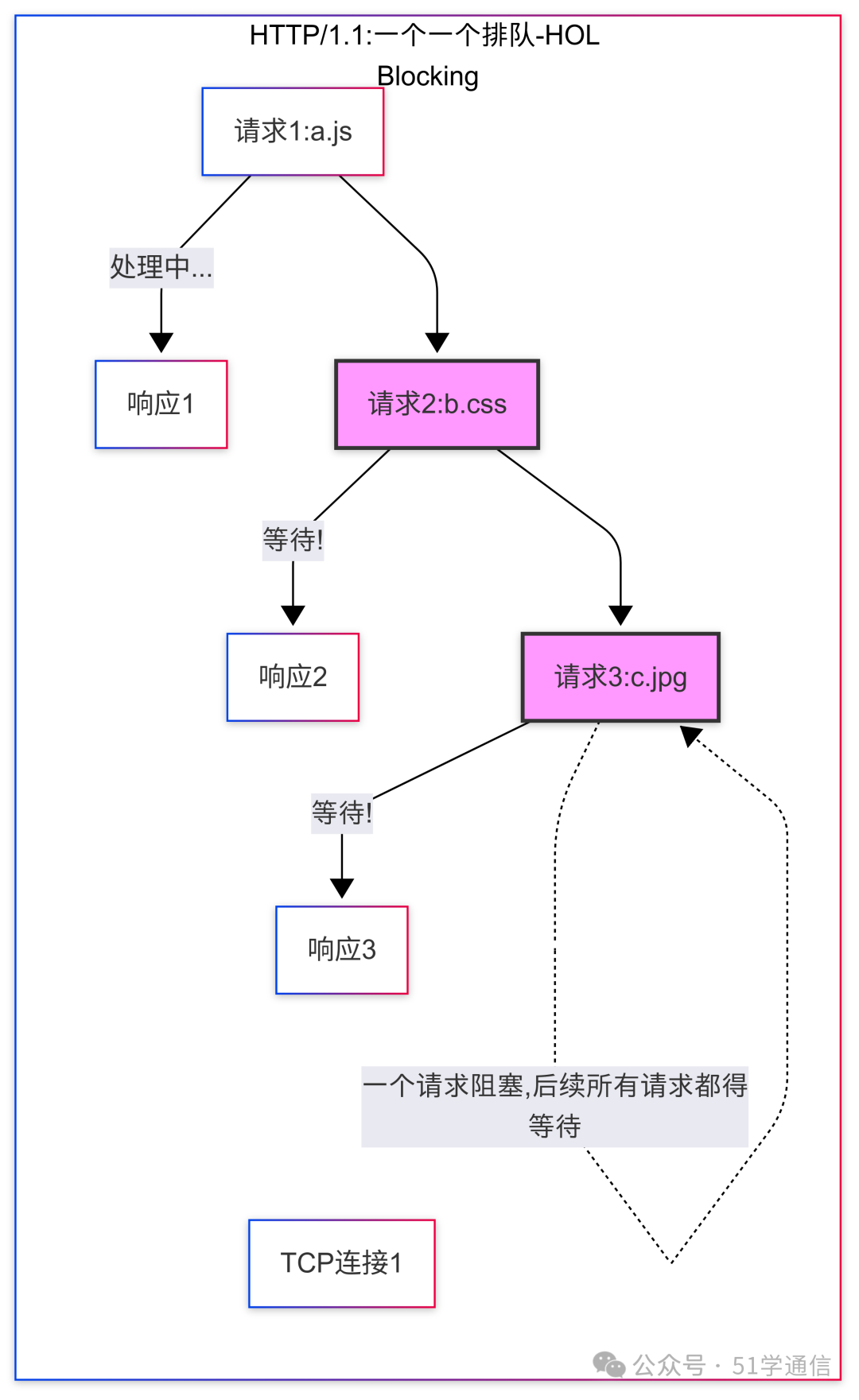
Figure 1: HTTP/1.1’s “Head-of-Line Blocking”
Illustration: The HTTP/1.1 protocol works in a “request-response” mode, where on a single TCP connection, the next request cannot be sent until the previous request’s response is fully returned. This serialization mechanism leads to severe “head-of-line blocking” issues, greatly affecting the loading performance of modern complex web pages.
Knowledge Point 2: The Revolution of the “Smart Shopping Cart”—HTTP/2’s “Multiplexing”
Now, the revolutionary HTTP/2 has arrived.
It says: “Queuing? Too stupid! From today, we introduce the ‘smart shopping cart’!”
HTTP/2’s “Multiplexing” is this “smart shopping cart”. Its working mode completely overturns the rules of “queuing”:
- “One-time” packaging: The browser will put all the “products” (dozens of requests) it wants to buy into this “smart shopping cart” at once and then push it to the checkout.
- “Parallel” scanning: The server, this “super cashier”, no longer needs to scan items one by one. It will break down all the products in the shopping cart into the smallest “components” (binary frames), and then, like an “octopus”, scan and process all components in parallel.
- “Labeling” and “reassembly”: During processing, it will label each “component” with a “belonging label” (Stream ID), for example, “this component belongs to ‘milk'”, “that component belongs to ‘bread'”.
- “Mixed” bagging: Finally, it will throw these processed components, each labeled differently, into the same “shopping bag” (a single TCP connection) in a random order and return it to you.
- Your browser will then reassemble them into complete “milk” and “bread” based on the labels on each “component”.
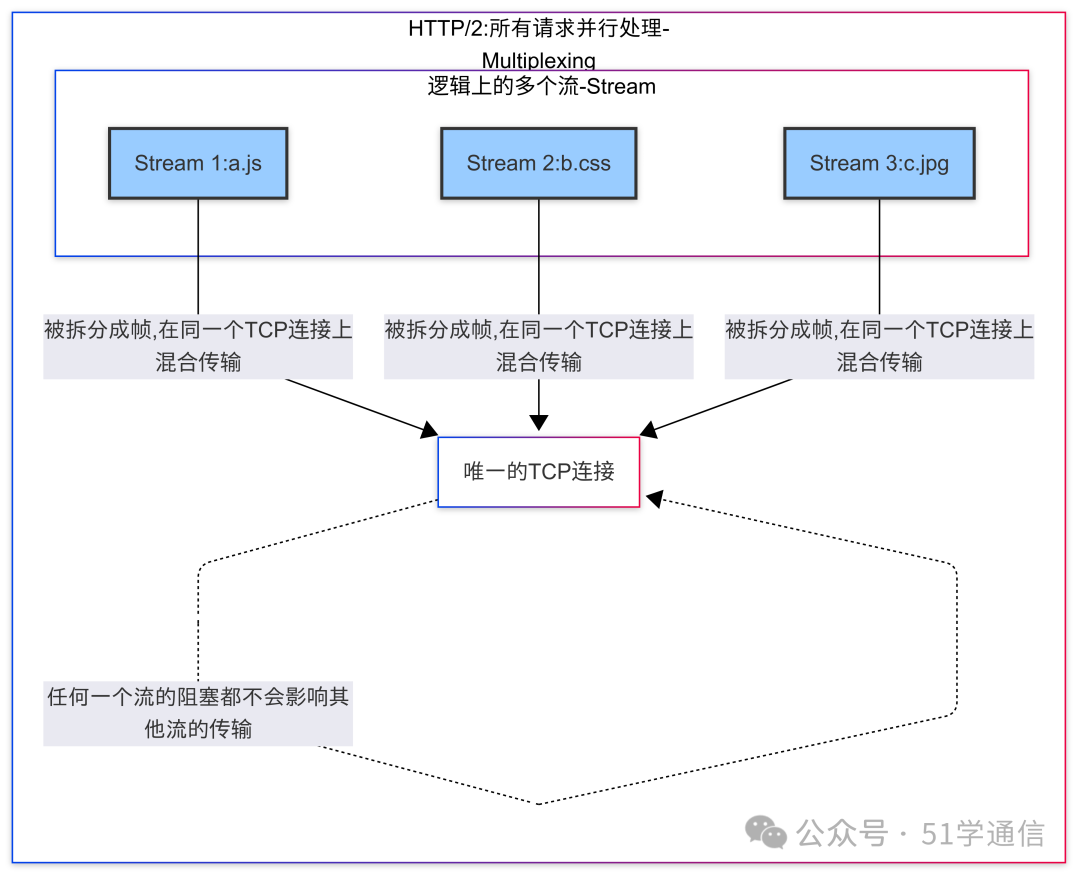
Figure 2: HTTP/2’s “Multiplexing”
Illustration:
HTTP/2 introduces a binary layering of “streams” and “frames”. All communication occurs over a single TCP connection. Multiple requests and responses can be split into independent frames with Stream IDs, which are then interleaved and transmitted in parallel over the same TCP connection, ultimately reassembled on the other end based on the Stream IDs. This completely resolves the head-of-line blocking issue of HTTP/1.1.
Knowledge Point 3: Wireshark “Case Solving”—Making the Differences Between “Parallel” and “Serial” Clear
Now, let’s use Wireshark to “compare live” the “match footage” of these two “contestants”.
Step 1: Capture HTTP/1.1 packets Find an “old” website that only supports HTTP/1.1, capture a packet, and input the filter<span>http</span>. You will see an extremely “neat” “queuing” picture:<span>GET -> 200 OK -> GET -> 200 OK -> GET -> 200 OK ...</span>One request, one response, strictly corresponding one to one, never overstepping.
Step 2: Capture HTTP/2 packets Find a modern website that supports HTTP/2 (for example, <span>www.taobao.com</span>), and capture a packet, input the filter<span>http2</span>.
You will see a “free market” picture that dazzles you:<span>HEADERS</span>, <span>HEADERS</span>, <span>DATA</span>, <span>DATA</span>, <span>HEADERS</span>, <span>DATA</span> … countless “request header frames” and “data frames” with different Stream IDs, interwoven together like “Tetris”, completely unordered, on the same timeline! This is the “ironclad evidence” of “multiplexing”!
Knowledge Point 4: The Art of “Compression”—HPACK, the “Stenographer” That Saves Your “Words”
The “efficiency revolution” of HTTP/2 does not stop there.
It also addresses a “verbose” issue of HTTP/1.1. In HTTP/1.1, for every product you buy, you have to report your “membership information” (HTTP headers, such as Cookie, User-Agent, etc.) completely and repeatedly to the cashier.
HTTP/2 introduces a “header compression” algorithm called HPACK. It acts like a “stenographer” with “super memory”.
The first time, you report a long string of “membership information”. The second time, you only need to say: “same as above”, and it understands completely.
HPACK creates an “index dictionary” for all header fields. For repeated, unchanged headers, it only needs to send a very small “index number” to replace that long string of text. This greatly reduces the size of requests, especially in mobile network environments, where the effect is remarkable.
Conclusion
From the “serial” of “queuing” to the “parallel” of “multiplexing”; from the “repetitive” of “verbosity” to the “compressed” of “conciseness”. The birth of HTTP/2 is not a simple “version number +1”, but a profound “efficiency revolution” initiated to “squeeze out” the “last drop of performance” from TCP.
It allows us to still enjoy a “smooth” loading experience when facing increasingly “bulky” modern web pages.
So, the next time you see that spectacular “waterfall chart” composed of dozens of “parallel” timelines in the network panel of the “developer tools”, remember that behind it, HTTP/2, this “smart traffic dispatcher”, is orchestrating an invisible “drama” of “order” and “efficiency” in “multiplexing”.