1 Commonly Used C Script Functions are as follows
| Variable Type | Data Type | Function to Get Variable Value | Function to Set Variable Value |
| Binary Variable | BIT | GetTagBit | SetTagBit |
| Signed 8-bit Integer | CHAR | GetTagSByte | SetTagSByte |
| Unsigned 8-bit Integer | BYTE | GetTagByte | SetTagByte |
| Signed 16-bit Integer | SHORT | GetTagSWord | SetTagSWord |
| Unsigned 16-bit Integer | WORD | GetTagWord | SetTagWord |
| Signed 32-bit Integer | LONG | GetTagSDWord | SetTagSDWord |
| Unsigned 32-bit Integer | DWORD | GetTagDWord | SetTagDWord |
| 32-bit Floating Point IEEE 754 | FLOAT | GetTagFloat | SetTagFloat |
| 64-bit Floating Point IEEE 754 | DOUBLE | GetTagDouble | SetTagDouble |
| Text Variable, 8-bit Character Set | TEXT8 | GetTagChar | SetTagChar |
| Text Variable, 16-bit Character Set | TEXT16 | GetTagChar | SetTagChar |
| Text Reference (only for internal variables) | TEXTREF | GetTagChar | SetTagChar |
2 Common Set, Reset, Invert Operations
2.1 Binary Variable “TAG1_BOOL1” Perform set, reset, and invert operations
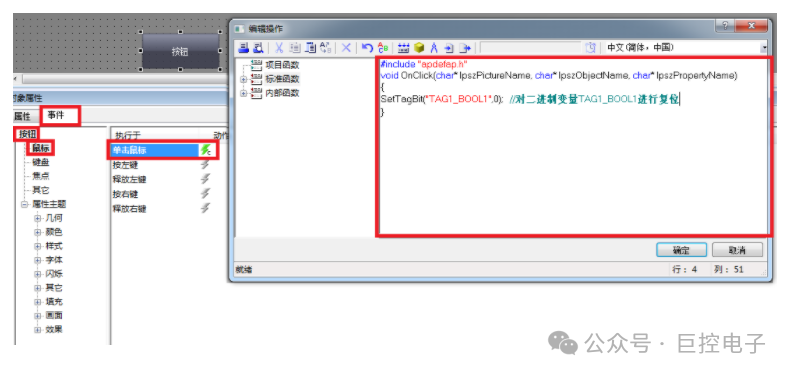
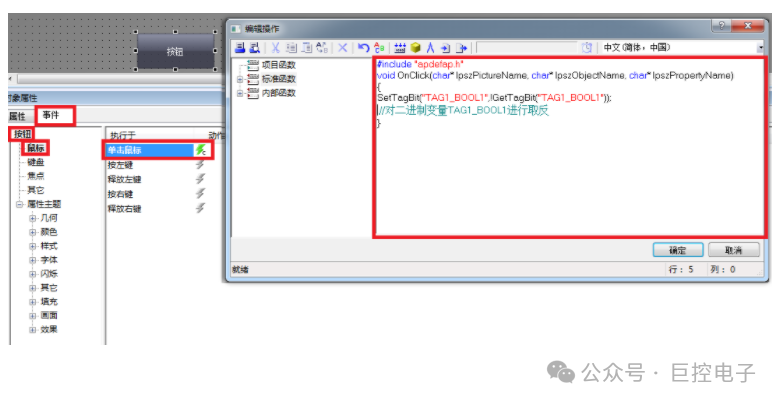
(1) Button –> Object Properties –> Events –> Mouse Click C Action fill in the code as follows
Set the binary variable (assign value 1)
Reset the binary variable (assign value 0)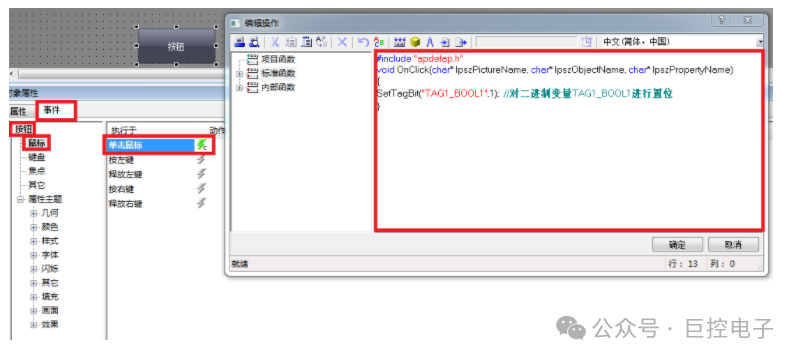 Reset the binary variable (assign value 0)
 Invert the binary variable
 Official Account: Giant Control Electronics(Scan to follow) Join the PLC Top Engineer WeChat Group
 Giant Control Xiao Zhou / Industrial Control Xiao Zhou
-
Siemens TIA Portal SCL Learning
-
1. A command block written in TIA Portal SCL language for Siemens PLC to generate random real numbers (Learning 1)
-
2. TIA Portal SCL Programming Learning 2_sin(x)
-
3. TIA Portal SCL Programming Learning 3_Calculator for Two Numbers
-
4. TIA Portal SCL Programming Learning 4_Selection Sort
-
5. TIA Portal SCL Programming Learning 5_Addition of a Series of Numbers
-
6.TIA Portal SCL Programming Learning 6_Array Reversal
-
7. Siemens TIA Portal S7-1200/1500 Learning 7_Using Indirect Addressing Instruction PEEK
-
8. TIA Portal SCL Programming Learning 8_Calculate the Date N Days Later
-
9. TIA Portal SCL Programming Learning 9_Hundred Chickens for Hundred Money
-
10. TIA Portal SCL Programming Learning 10_Convert String Date to DATE Data Type
-
11. TIA Portal SCL Programming Learning 11_Multiple Conditions AND Operation
-
12. TIA Portal SCL Programming Learning 12_Comparison of Two Algorithms for Array Summation
-
13. TIA Portal SCL Programming Learning 13_Motor Forward and Reverse with Point Movement
-
14. TIA Portal SCL Programming Learning 14_Filling Forms
-
15. TIA Portal SCL Programming Learning 15_Prime Number Judgment
-
16. TIA Portal SCL Programming Learning 16_Verification of Goldbach’s Conjecture
-
17. TIA Portal SCL Programming Learning 17_Selection Sort
-
18. TIA Portal SCL Programming Learning 19_Statistics of Number of People in Score Ranges
-
19. TIA Portal SCL Programming Learning 19_Statistics of Number of People in Score Ranges
-
20. TIA Portal SCL Programming Learning 20_Change Money
-
21. TIA Portal SCL Programming Learning 21_Permutation and Combination of 3 out of 4 Numbers
-
22. TIA Portal SCL Programming Learning 22_Bonus Calculation
-
23. TIA Portal SCL Programming Learning 23_Calculate GCD and LCM
-
24. TIA Portal SCL Programming Learning 24_Addition of a Series of Numbers
-
25. TIA Portal SCL Programming Learning 25_Find Perfect Numbers between 1-1000
-
26. TIA Portal SCL Programming Learning 26_Ball Rebound Height
-
27. TIA Portal SCL Programming Learning 27_Monkey Eating Peaches
-
28. TIA Portal SCL Programming Learning 28_Addition of a Fraction Sequence
-
29. TIA Portal SCL Programming Learning 29_Five-Digit Decomposition
-
30. TIA Portal SCL Programming Learning 30_Picking Eggs
-
31. TIA Portal SCL Programming Learning 31_HelloWorld
-
32. TIA Portal SCL Programming Learning 32_Power
-
33. TIA Portal SCL Programming Learning 33_Narcissistic Numbers
-
34. TIA Portal SCL Programming Learning 34_Perfect Numbers
-
35. TIA Portal SCL Programming Learning 35_Alternative Comparison
-
36. TIA Portal SCL Programming Learning 36_Natural Number Reversal
-
37. TIA Portal SCL Programming Learning 37_Number Encryption
-
38. TIA Portal SCL Programming Learning 38_Three Methods to Find GCD
-
39. TIA Portal SCL Programming Learning 39_Amicable Numbers
-
40. TIA Portal SCL Programming Learning 40_Square Palindrome Numbers
-
41. TIA Portal SCL Programming Learning 41_Large Number Multiplication
-
42. TIA Portal SCL Programming Learning 42_Three-Digit Combinations
-
43. TIA Portal SCL Programming Learning 43_Bride and Groom
-
44. TIA Portal SCL Programming Learning 44_Han Xin Pointing Soldiers
-
45. TIA Portal SCL Programming Learning 45_Bridge Problem
-
46. TIA Portal SCL Programming Learning 46_Fish Problem
-
47. TIA Portal SCL Programming Learning 47_Jumping Game
-
48. TIA Portal SCL Programming Learning 47_Wolf Chasing Rabbit
-
49. TIA Portal SCL Programming Learning 50_Judging Poker Sequence
-
50. TIA Portal SCL Programming Learning 51_Stamp Combinations
-
51. TIA Portal SCL Programming Example Pump Start/Stop State Machine
-
52. TIA Portal SCL Programming Learning 52_Stamp Combinations to Capture Traffic Offenders
-
53. TIA Portal SCL Programming Learning 53_Calculate Vehicle Speed
-
54. TIA Portal SCL Programming Learning 54_Formula Method to Calculate Pi (Approximation of Π)
-
Application Examples of Screen Templates in WinCC and Their Configuration Implementation Methods
-
Rockwell AB Software Learning Video Download
-
What to Do When the Required Predefined Output Format is Missing in WinCC Input/Output Domain?
-
How to Use VBS in WinCC to Read Variable Archive Data to EXCEL
-
Siemens S7-1500 as Smart Device Sharing Function
-
Usage of WinCC Redundancy Projects
-
Communication Method between Siemens WINCC and S7-1500R
-
WinCC Public Popup
-
Siemens WINCC Application C Script Mathematical Operations
Siemens S7-200 SMART Multi-Pump Switching Function Library Case Download
Siemens Simplified Panel and Smart Panel Time Synchronization Function with S7-1200/1500 PLC
Usage of Siemens Smart Panel Sm@rtServer Function
How to Implement Flow Accumulation Function in STEP 7 (TIA Portal)?
If You Know WINCC but Don’t Understand WinCC Audit Tracking
WINCC and PLCSIM Advanced Simulation Communication with S7-1500
WinCC Professional Using C Script to Read and Write Variables
Siemens WINCC 8.0 VBS Script Learning Explanation
Obtaining Communication Status in WinCC Professional (Script)
Siemens Standard CPU and S7-1500R/H Redundant System Communication with S7
Introduction to Siemens TIA Portal CEM Programming Language
Siemens S7-1200 Joining MRP Ring Network Usage
Seamless Switching of Siemens WINCC and 400H Communication
Communication between WinCC V7.5 and Allen-Bradley ControlLogix5500
MES Access to WinCC V7.5/8.0 REST API
Siemens TIA Portal WinCC Professional Script C Sound Alarm
Establishing SIMATIC NET OPC Server Connection with 200SMART
Changing Object Properties with VBS Script in WinCC Professional
Siemens TIA Portal WinCC Advanced Project Download
Siemens WINCC 8.0 Input/Output Domain with Confirmation
WINCC 8.0 Bar Graph Object (3D Bar Graph Object)
Siemens WinCC Professional Script Control Screen Layer Display/Hide
Differences between WinCC Advanced/Professional/Unified PC
Personal Experience: Communication Testing and Verification between Siemens WinCC and ModScan
SIMATIC WinCC Discrete Alarm Configuration
Backup of Siemens WINCC Variable Archives
WinCC Professional Communication with S7-1200/1500
How to Zero Data Blocks in TIA Portal?
Siemens TIA Portal Structured Data Types (Struct)
Installation of Siemens PCS7 Version V9.1 System
Displaying System Time in Siemens WINCC Screen
Join the PLC Industrial Automation Elite Community
Siemens WINCC Prompt Missing Audit RC/RT Authorization
Siemens S7-400H MODBUS Communication
Data Interaction between Classic WinCC, SQL Server Database, and Excel Sheets
Wireless Communication Solution Based on FactoryTalk View Studio and AB_CompactLogix Medium PLC
Giant Control GRM230 Built-in IO Liquid Level Remote Linkage Pump Industry Application
Remote Monitoring System for High-level Water Tank in Hotels Based on Giant Control GRM230
Sending Emails with Siemens 1200 PLC Based on Giant Control GRM560
Data Exchange Required between AB PLC and Siemens PLC
Based on INTOUCH and Giant ControlGRM530 PLC Wireless Communication Solution
Application of Giant Control GRM530 Module in Sewage Pump Station
WINCC Local Connection Giant Control GRM300 Gateway Connecting PLC and Instruments
Giant Control GRM530 Achieving Remote Download and Maintenance of PLC
Giant Control GRM530 Sterilization Information Cloud Storage and Cloud Inspection Technology Innovation Improvement
Application of Guangzhou Giant Control Remote Module in New Energy Production Projects
Record of a Giant Control GRM532 Cross-National Remote Debugging Case of Siemens 1200 PLC in Saudi Arabia
Rockwell AB PLC How to Achieve Remote Upload and Download via Mobile APP Remote Monitoring IOT Communication
AB1756PLC Reading Multiple MODBUS Instruments through Protocol Gateway Giant Control GRM300
Siemens S7-1500 Dual Redundancy Giant Control GRM530 Achieving Industrial Internet Communication
Siemens 1500 PLC Connecting 64 Instruments Giant Control GRM300 Gateway Data Interaction
Mitsubishi Q Series PLC How to Achieve Remote Upload and Download Mobile APP Remote Monitoring IOT Communication
Petrochemical Plant 100 485 Instruments 10KM Communication Upper Computer Configuration IFIX
Giant Control GRM600 Accessing WINCC7.5 OPCUA Server via OPCUA Client Protocol
Giant Control GRM600 Series Standard OPCUA Server Protocol Link UaExpert
Giant Control GRM560 Series Standard OPCUA Client Protocol Accessing Siemens 1200 PLC
Giant Control GRM230 Application in Liaoyou Work Area Electric Boiler Remote Platform
How to Send Alarms from Intouch to SMS/WeChat
Giant Control GRM530 Application in Quality Management of Pharmaceutical Enterprises
Join the PLC Industrial Automation Elite Community
Giant Control Technology NET400 Launches Multi-Segment Communication Protocol Gateway
Siemens WINCC8.1 Input/Output Domain with Confirmation
WINCC8.1 Gauge Control (GaugeControl)
Personal Experience: WINCC Alarm Control Learning Experience
Personal Experience: How to Display the Name of the Popup Dialog Box when Using Variable Prefix in WINCC
Data Communication between Siemens and Rockwell (AB) PLC without Programming in PLC
Experience of a PLC Engineer Taking Private Jobs and Not Getting Paid
Data Communication between Siemens PLC and Beckhoff (BECKHOFF) PLC without Programming in PLC
Siemens PCS7 Learning
Personal Experience: How to View Historical Curves of Analog Monitoring Blocks in PCS7
Reasons for Not Being Able to Search for Servers When Configuring ES and OS in PCS7
Personal Experience: Key Points for Using M580 System (Mainly Discussing Configuration and Setup)
Personal Experience: Communication between M580 System and Quantum System via MODBUS TCP (1)
Personal Experience: Detailed Documentation on M580 System DP Communication
Configuration and Usage of Schneider M340 on Control Expert
WINCC Display Trend Control Coordinate Value (RulerControl) and Reset Variable Archives
Personal Experience: Method for Fan Rotation Script in WINCC
Personal Experience: How to Force Points in PCS7SIMATIC WinCC Alarm Display Classification/Filtering/Time Period QueryWINCC VBS Script Mathematical Operations/Read/Write Batch ProcessingSIMATIC NET as OPC UA Server for S7-1200 Ethernet-based S7 CommunicationWinCC Professional Obtaining Communication Status (Script)S7-1500 Communication with IM60 via PROFINETS7-200 SMART Communication with IM60 via PROFINETHow to Quickly Develop 3D Effect Process Screens in Configuration KingHow to Achieve Sequential Control Function with Siemens TIA Portal CASE OF Instruction?Functions, Applicable Conditions, Syntax, and Usage Examples of PEEK and POKE in Siemens 1500 Series SCL.How to Achieve Redundant Connection between WinCC and S7-400H in a Virtual Environment via Ordinary Network Card?Adding Background Images to Buttons in Siemens WINCCDisplaying Yellow Exclamation Marks on WinCC Screen ObjectsWINCC8.1 Provides Checkbox ObjectsWINCC8.1 Provides Option Group Objects (Radio Buttons)Browsing PDF Files in Siemens WinCC 8.1 ScreensDynamic Selection Trend Display of Checkbox in Siemens WINCCSiemens WINCC Screen Size Adaptation to Display ResolutionSiemens WINCC Alarm Record Time/Size Settings
Personal Experience: Wiring Rules in PCS7
Personal Experience: Detailed Explanation of Manual and Automatic Mode Switching in PCS7 Control Templates
Personal Experience: Advanced Usage of SFC in PCS7
How to Use Hikvision Video Control (Hikvision Camera, Hikvision Control) in Configuration King