Author: GG Bond.ฺ
https://blog.csdn.net/2301_80220607/article/details/145694581
Introduction:
In modern operating systems, a thread is the smallest unit of execution flow in a program. Compared to processes, threads are more lightweight, with lower overhead for creation and destruction, and they can share memory space, making them widely used in multitasking and concurrent programming. As a multi-user, multi-tasking operating system, Linux provides robust thread support. This article will detail the basic concepts of threads in Linux and related knowledge of thread control, along with code examples to help readers better understand.
1. Basic Concepts of Threads
1.1 What is a Thread?
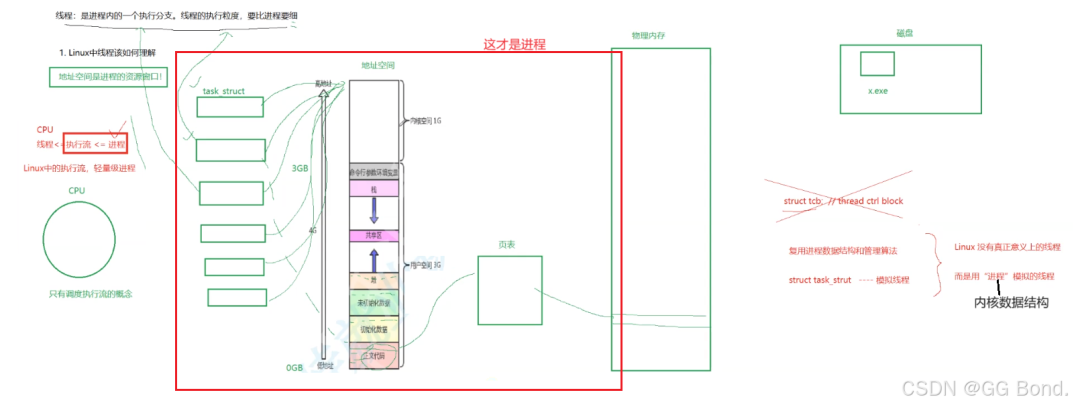
A thread (Thread) is the smallest unit of scheduling that the operating system can perform. It is contained within a process and is the actual unit of operation within the process. A process can contain multiple threads, which share the resources of the process (such as memory, file descriptors, etc.), but each thread has its own execution stack and program counter.
A thread is essentially an extension of what we previously discussed regarding processes. A process can consist of multiple execution flows, which are called threads. The processes we discussed earlier are actually a special case with only a single execution flow. A process can be viewed as an entity for resource allocation, while a thread is the basic unit of resource allocation.
1.2 Differences Between Threads and Processes
| Characteristic | Process | Thread |
|---|---|---|
| Definition | An execution of a program with its own memory space | An execution flow within a process that shares the process’s memory space |
| Resource Overhead | Relatively large, with high creation and destruction overhead | Relatively small, with low creation and destruction overhead |
| Communication Method | Inter-process communication (IPC) mechanisms are complex | Inter-thread communication is simple, directly sharing memory |
| Context Switching | High overhead | Low overhead |
| Independence | Independent, do not affect each other | Dependent on the process, threads can affect each other |
1.3 Advantages of Threads
Responsiveness: Multi-threaded programs can continue executing while one thread waits for I/O, thus improving program responsiveness.
Resource Sharing: Threads share the memory space of the process, making data sharing and communication between threads more convenient.
Economy: The overhead of creating and destroying threads is smaller than that of processes, and the overhead of thread switching is also smaller than that of processes.
Multi-core Utilization: Multi-threaded programs can fully utilize the parallel computing capabilities of multi-core CPUs.
1.4 Disadvantages of Threads
Synchronization Issues: Multiple threads sharing the same process resources can easily lead to race conditions and other issues.
Debugging Difficulty: Debugging multi-threaded programs is more complex than single-threaded programs because the execution order of threads is non-deterministic.
Resource Competition: When multiple threads compete for the same resource, it may lead to performance degradation.
We will address these issues in the following chapters, especially the synchronization and mutual exclusion problems of threads, which are very important and will be discussed later.
2. Thread Models in Linux
2.1 User-Level Threads vs. Kernel-Level Threads
In Linux, thread implementation can be divided into user-level threads and kernel-level threads.
User-Level Threads: Managed by a thread library in user space (such as the POSIX thread library), the kernel is unaware of these threads. Operations such as creation, scheduling, and synchronization of user-level threads are completed by the thread library in user space. The advantage is that thread switching overhead is low, but the disadvantage is that it cannot utilize the parallel capabilities of multi-core CPUs.
Kernel-Level Threads: Managed by the operating system kernel, which is aware of each thread’s existence and is responsible for scheduling them. Operations such as creation, scheduling, and synchronization of kernel-level threads require system calls. The advantage is that it can utilize the parallel capabilities of multi-core CPUs, but the disadvantage is that thread switching overhead is larger.
2.2 Thread Implementation in Linux
Linux implements threads through lightweight processes (Lightweight Process, LWP). Each thread has a corresponding lightweight process in the kernel, and these lightweight processes share the same address space and other resources. The Linux thread library (such as NPTL) provides support for the POSIX thread standard. We can understand that the thread implementation in Linux is user-level because there is no concept of threads in Linux; there is only the concept of lightweight processes, which is implemented through encapsulation at the user level.
3. Thread Control
3.1 Creating and Terminating Threads
In Linux, thread creation and termination are implemented through the POSIX thread library (pthread). Below, we will explain thread creation and termination through code examples.
3.1.1 Creating Threads
In the POSIX thread library, the <span>pthread_create</span> function is used to create threads. The prototype of this function is as follows:
#include <pthread.h>

int pthread_create(pthread_t *thread, const pthread_attr_t *attr,
                   void *(*start_routine) (void *), void *arg);
<span>thread</span>: A pointer to the thread identifier.
<span>attr</span>: Used to set thread attributes, usually<span>NULL</span>, indicating default attributes.
<span>start_routine</span>: The starting address of the thread function, which will be executed after the thread is created.
<span>arg</span>: The argument passed to the thread function.
Here is a simple example of thread creation:
#include <stdio.h>
#include <pthread.h>
#include <unistd.h>

void* thread_function(void* arg) {
    printf("Thread is running...\n");
    sleep(2);
    printf("Thread is exiting...\n");
    return NULL;
}

int main() {
    pthread_t thread_id;
    int ret = pthread_create(&thread_id, NULL, thread_function, NULL);
    if (ret != 0) {
        printf("Thread creation failed!\n");
        return 1;
    }
    printf("Main thread is running...\n");
    pthread_join(thread_id, NULL);  // Wait for the thread to finish
    printf("Main thread is exiting...\n");
    return 0;
}
Output:
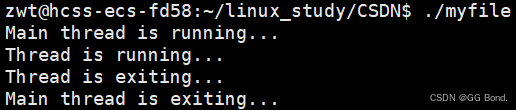
In this example, the main thread creates a new thread that executes the <span>thread_function</span> function. The main thread waits for the new thread to finish using the <span>pthread_join</span> function.
3.1.2 Terminating Threads
Threads can be terminated in the following ways:
Normal Return: The thread function completes execution and returns, causing the thread to terminate automatically.
Calling
<span>pthread_exit</span>: The thread can call the<span>pthread_exit</span>function to terminate itself actively.Being Canceled by Other Threads: Other threads can call the
<span>pthread_cancel</span>function to cancel a specified thread.
Here is an example of terminating a thread using <span>pthread_exit</span>:
#include <stdio.h>
#include <pthread.h>
#include <unistd.h>

void* thread_function(void* arg) {
    printf("Thread is running...\n");
    sleep(2);
    printf("Thread is exiting...\n");
    pthread_exit(NULL);  // Actively terminate the thread
}

int main() {
    pthread_t thread_id;
    int ret = pthread_create(&thread_id, NULL, thread_function, NULL);
    if (ret != 0) {
        printf("Thread creation failed!\n");
        return 1;
    }
    printf("Main thread is running...\n");
    pthread_join(thread_id, NULL);  // Wait for the thread to finish
    printf("Main thread is exiting...\n");
    return 0;
}
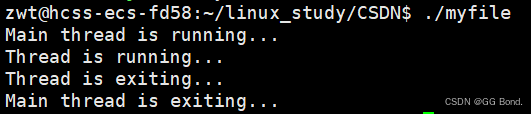
Output:
3.2 Thread Attributes
Thread attributes can be set using the <span>pthread_attr_t</span> structure. Common thread attributes include:
Thread Detach State: Threads can be joinable or detached. Joinable threads require other threads to call
<span>pthread_join</span>to reclaim resources after termination, while detached threads automatically release resources upon termination.Thread Stack Size: The stack size of the thread can be set.
Thread Scheduling Policy: The scheduling policy of the thread (such as FIFO, round-robin, etc.) can be set.
Here is an example of setting thread attributes:
#include <stdio.h>
#include <pthread.h>
#include <unistd.h>

void* thread_function(void* arg) {
    printf("Thread is running...\n");
    sleep(2);
    printf("Thread is exiting...\n");
    return NULL;
}

int main() {
    pthread_t thread_id;
    pthread_attr_t attr;
    pthread_attr_init(&attr);  // Initialize thread attributes
    pthread_attr_setdetachstate(&attr, PTHREAD_CREATE_DETACHED);  // Set thread to detached state

    int ret = pthread_create(&thread_id, &attr, thread_function, NULL);
    if (ret != 0) {
        printf("Thread creation failed!\n");
        return 1;
    }
    printf("Main thread is running...\n");
    sleep(3);  // Main thread waits for a while to ensure the child thread finishes
    printf("Main thread is exiting...\n");
    pthread_attr_destroy(&attr);  // Destroy thread attributes
    return 0;
}
Output:
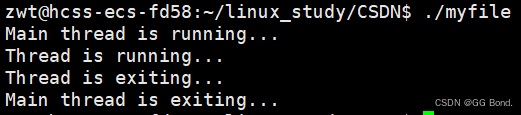
In this example, we set the thread to detached state using the <span>pthread_attr_setdetachstate</span> function, so that the thread automatically releases resources upon termination, and the main thread does not need to call <span>pthread_join</span> to wait for the thread to finish.
3.3 Thread Cancellation
Threads can be canceled using the <span>pthread_cancel</span> function. A canceled thread will terminate at the next cancellation point. Cancellation points are typically certain system calls or library functions, such as <span>sleep</span>, <span>read</span>, <span>write</span>, etc.
Here is an example of thread cancellation:
#include <stdio.h>
#include <pthread.h>
#include <unistd.h>

void* thread_function(void* arg) {
    printf("Thread is running...\n");
    while (1) {
        printf("Thread is working...\n");
        sleep(1);
    }
    return NULL;
}

int main() {
    pthread_t thread_id;
    int ret = pthread_create(&thread_id, NULL, thread_function, NULL);
    if (ret != 0) {
        printf("Thread creation failed!\n");
        return 1;
    }
    sleep(3);  // Main thread waits for 3 seconds
    pthread_cancel(thread_id);  // Cancel the thread
    printf("Thread has been canceled.\n");
    pthread_join(thread_id, NULL);  // Wait for the thread to finish
    printf("Main thread is exiting...\n");
    return 0;
}
Output:
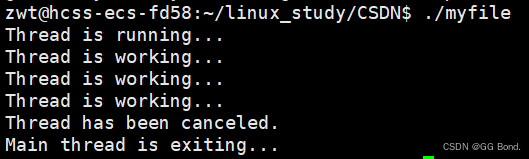
In this example, the main thread cancels the child thread after 3 seconds, and the child thread is canceled at the <span>sleep</span> function.
3.4 Thread Cleanup
Threads may need to perform some cleanup operations upon termination, such as releasing resources or closing files. The POSIX thread library provides the <span>pthread_cleanup_push</span> and <span>pthread_cleanup_pop</span> functions to register and unregister cleanup functions.
Here is an example of thread cleanup:
#include <stdio.h>
#include <pthread.h>
#include <unistd.h>

void cleanup_function(void* arg) {
    printf("Cleanup function is called: %s\n", (char*)arg);
}

void* thread_function(void* arg) {
    pthread_cleanup_push(cleanup_function, "Resource 1");
    pthread_cleanup_push(cleanup_function, "Resource 2");

    printf("Thread is running...\n");
    sleep(2);
    printf("Thread is exiting...\n");

    pthread_cleanup_pop(1);  // Execute cleanup function
    pthread_cleanup_pop(1);  // Execute cleanup function
    return NULL;
}

int main() {
    pthread_t thread_id;
    int ret = pthread_create(&thread_id, NULL, thread_function, NULL);
    if (ret != 0) {
        printf("Thread creation failed!\n");
        return 1;
    }
    pthread_join(thread_id, NULL);  // Wait for the thread to finish
    printf("Main thread is exiting...\n");
    return 0;
}
In this example, we registered two cleanup functions using <span>pthread_cleanup_push</span>, which will be automatically called when the thread terminates.
4. Thread Detachment
4.1 What is Thread Detachment?
Thread detachment (Detached Thread) means that the thread automatically releases its resources upon termination without requiring other threads to call <span>pthread_join</span> to reclaim resources. Detached threads are typically used in scenarios where no return result is needed.
4.2 Setting a Thread to Detached State
A thread can be set to detached state using the <span>pthread_detach</span> function. Here is an example of thread detachment:
#include <stdio.h>
#include <pthread.h>
#include <unistd.h>

void* thread_function(void* arg) {
    printf("Thread is running...\n");
    sleep(2);
    printf("Thread is exiting...\n");
    return NULL;
}

int main() {
    pthread_t thread_id;
    int ret = pthread_create(&thread_id, NULL, thread_function, NULL);
    if (ret != 0) {
        printf("Thread creation failed!\n");
        return 1;
    }
    pthread_detach(thread_id);  // Set the thread to detached state
    printf("Main thread is running...\n");
    sleep(3);  // Main thread waits for a while to ensure the child thread finishes
    printf("Main thread is exiting...\n");
    return 0;
}
In this example, we set the thread to detached state using the <span>pthread_detach</span> function. Detached threads automatically release resources upon termination, and the main thread does not need to call <span>pthread_join</span> to wait for the thread to finish.
4.3 Considerations for Thread Detachment
Resource Release: Detached threads automatically release resources upon termination, so there is no need to call
<span>pthread_join</span>to reclaim resources.Cannot Retrieve Return Value: The return value of detached threads cannot be retrieved by other threads because resources are released after the thread terminates.
Thread State: Once a thread is set to detached state, it cannot be waited on using
<span>pthread_join</span>.
5. Thread Scheduling
5.1 Thread Scheduling Policies
Thread scheduling policies in Linux mainly include the following:
SCHED_FIFO: First-in, first-out scheduling policy, where higher priority threads run continuously until they voluntarily yield the CPU.
SCHED_RR: Round-robin scheduling policy, where higher priority threads run for a time slice and then yield the CPU to other threads of the same priority.
SCHED_OTHER: The default scheduling policy, based on time-slice dynamic priority scheduling.
5.2 Setting Thread Scheduling Policy
The thread scheduling policy and priority can be set using the <span>pthread_setschedparam</span> function. Here is an example of setting thread scheduling policy:
#include <stdio.h>
#include <pthread.h>
#include <sched.h>
#include <unistd.h>
void* thread_function(void* arg) {
printf("Thread is running...\n");
sleep(2);
printf("Thread is exiting...\n");
return NULL;
}
int main() {
pthread_t thread_id;
pthread_attr_t attr;
struct sched_param param;
pthread_attr_init(&attr);
pthread_attr_setschedpolicy(&attr, SCHED_FIFO); // Set scheduling policy to FIFO
param.sched_priority = 50; // Set priority
pthread_attr_setschedparam(&attr, ¶m);
int ret = pthread_create(&thread_id, &attr, thread_function, NULL);
if (ret != 0) {
printf("Thread creation failed!\n");
return 1;
}
pthread_join(thread_id, NULL); // Wait for the thread to finish
printf("Main thread is exiting...\n");
pthread_attr_destroy(&attr); // Destroy thread attributes
return 0;
}
Output:

In this example, we set the thread’s scheduling policy to <span>SCHED_FIFO</span> using the <span>pthread_attr_setschedpolicy</span> function, and set the thread’s priority using the <span>pthread_attr_setschedparam</span> function.
6. Conclusion
This article provides a detailed introduction to the basic concepts of threads in Linux and related knowledge of thread control, including thread creation and termination, thread attributes, thread cancellation and cleanup, and thread scheduling. Through code examples, readers can better understand these concepts and apply this knowledge in practical programming.
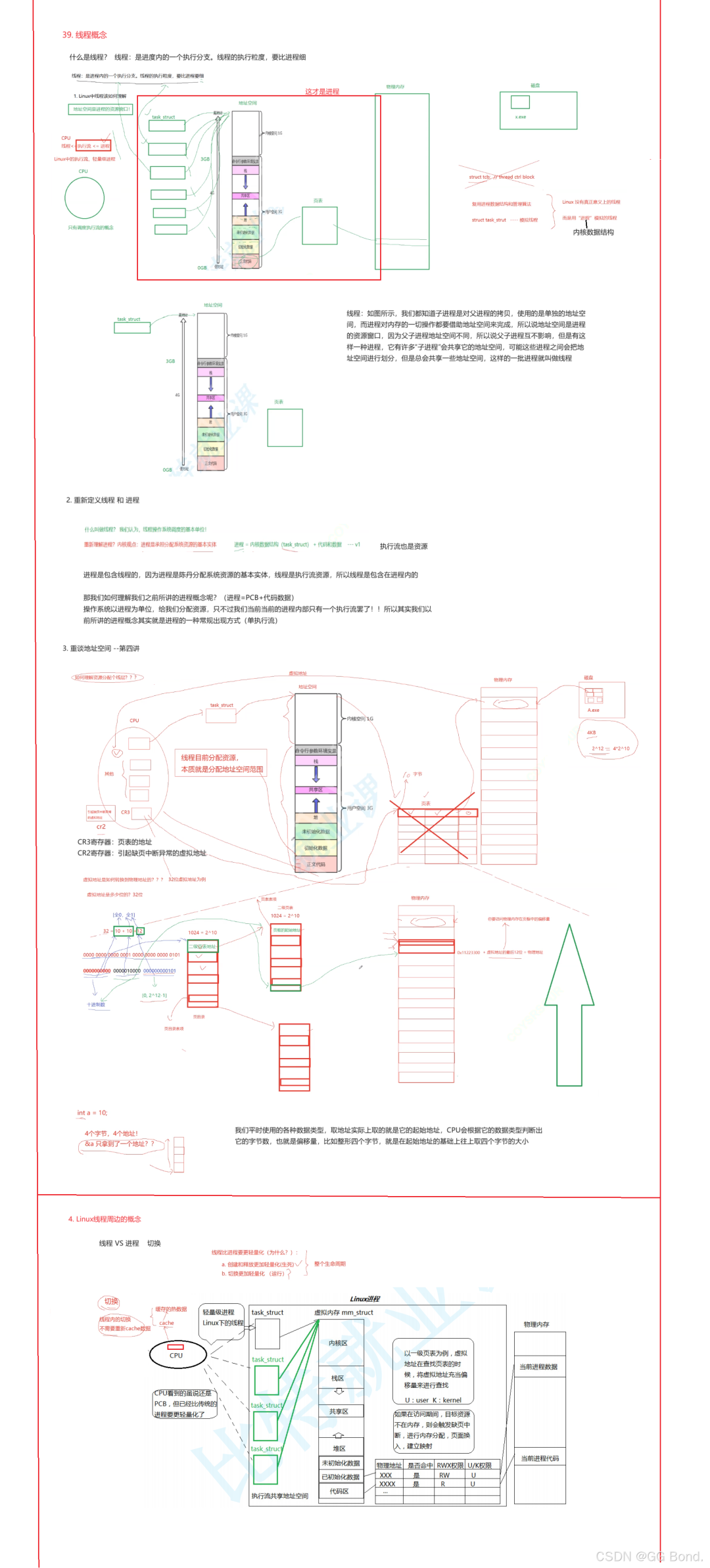
Some basic concepts regarding threads can be viewed through the images below, such as the address space allocation issues between threads and processes, and the independent stack areas that threads possess.
Recommended Reading Clicking the title will redirect
1. How to Use CPU Cache in Multi-threading?
2. Linux System – Comprehensive Analysis of Permissions
3. How Many Threads Can a Process Create at Most?