Previously, I wrote an article titled “Analyzing the Implementation Principles of Wine Starting from Windows Sample Code,” which discussed how a simple Windows application runs on a Linux system through Wine. This time, we will delve deeper by analyzing the source code of Wine to further dissect how a Windows application window is created in a Linux system.
Before we begin, let’s prepare a Windows window program that is simple enough, created solely using the Windows API without relying on frameworks like MFC or QT.
Below is the program code:
#include <windows.h>

LRESULT CALLBACK WndProc(HWND hwnd, UINT msg, WPARAM wParam, LPARAM lParam) {
    switch(msg) {
        case WM_CLOSE: PostQuitMessage(0); break;
        default: return DefWindowProc(hwnd, msg, wParam, lParam);
    }
    return 0;
}

int WINAPI WinMain(HINSTANCE hInstance, HINSTANCE hPrevInstance,
                   LPSTR lpCmdLine, int nCmdShow) {
    WNDCLASS wc = {0};
    wc.lpfnWndProc = WndProc;
    wc.hInstance = hInstance;
    wc.lpszClassName = "MyWindowClass";
    RegisterClass(&wc);

    HWND hwnd = CreateWindow("MyWindowClass", "Hello Wine", WS_OVERLAPPEDWINDOW,
                             CW_USEDEFAULT, CW_USEDEFAULT, 400, 300,
                             NULL, NULL, hInstance, NULL);

    ShowWindow(hwnd, nCmdShow);

    MSG msg;
    while(GetMessage(&msg, NULL, 0, 0)) {
        TranslateMessage(&msg);
        DispatchMessage(&msg);
    }
    return 0;
}
This code uses Windows APIs such as CreateWindow, ShowWindow, and GetMessage, and here we will only analyze the processing flow of CreateWindow.
Win32 API Layer
In fact, CreateWindow is not a real function but a macro that ultimately expands to CreateWindowEx.
In the official Windows SDK (winuser.h), there is a definition like this (Wine also maintains consistency, with the header file located at <span>include/winuser.h</span>):
#define CreateWindowA(lpClassName, lpWindowName, dwStyle, x, y, nWidth, nHeight, \
                      hWndParent, hMenu, hInstance, lpParam) \
    CreateWindowExA(0L, lpClassName, lpWindowName, dwStyle, \
                    x, y, nWidth, nHeight, hWndParent, hMenu, hInstance, lpParam)

#define CreateWindowW(lpClassName, lpWindowName, dwStyle, x, y, nWidth, nHeight, \
                      hWndParent, hMenu, hInstance, lpParam) \
    CreateWindowExW(0L, lpClassName, lpWindowName, dwStyle, \
                    x, y, nWidth, nHeight, hWndParent, hMenu, hInstance, lpParam)

#ifdef UNICODE
#define CreateWindow  CreateWindowW
#else
#define CreateWindow  CreateWindowA
#endif
Due to historical reasons, some Windows APIs have two versions: one is the ANSI version, ending with A, and the other is the Unicode version, ending with W. Depending on the macro definition (whether UNICODE is defined), it expands to the corresponding version.
The implementations of CreateWindowExA and CreateWindowExW are in Wine’s user32.dll module. By examining the source code in dlls/user32/win.c, we can see the implementation of CreateWindowExW:
HWND WINAPI DECLSPEC_HOTPATCH CreateWindowExW( DWORD exStyle, LPCWSTR className,
                                 LPCWSTR windowName, DWORD style, INT x,
                                 INT y, INT width, INT height,
                                 HWND parent, HMENU menu,
                                 HINSTANCE instance, LPVOID data )
{
    CREATESTRUCTW cs;

    cs.lpCreateParams = data;
    cs.hInstance      = instance;
    cs.hMenu          = menu;
    cs.hwndParent     = parent;
    cs.x              = x;
    cs.y              = y;
    cs.cx             = width;
    cs.cy             = height;
    cs.style          = style;
    cs.lpszName       = windowName;
    cs.lpszClass      = className;
    cs.dwExStyle      = exStyle;

    return wow_handlers.create_window( &cs, className, instance, TRUE );
}
It is worth mentioning that there is a user32.spec file that is crucial in the Wine project. It is not an ordinary source file but an export symbol table (DLL export specification).
In the Windows world, each DLL (for example, user32.dll) exports a set of API functions (such as CreateWindowExW, MessageBoxW).
Wine needs to fake a DLL that is the same as Windows so that Windows programs can link and call it. The user32.spec file tells the Wine build system:
-
Which functions (names, numbers, parameters) need to be exported from this DLL
-
Which implementation handles these functions in Wine
-
To be compatible with Windows calling conventions and symbol export rules
For example, in dlls/user32/user32.spec, there is a line like this:
@ stdcall CreateWindowExW(long wstr wstr long long long long long long long long ptr)The Wine build system reads the .spec file to generate the corresponding export table/stub, and the details do not need to be delved into here. Through this step, Windows applications redirect their Windows API calls to Wine’s implementation.
Continuing to analyze the above source code implementation, wow_handlers is actually a structure, which is also a global function table:
struct wow_handlers16 wow_handlers =
{
    ...
    WIN_CreateWindowEx,
    ...
};
Here, create_window points to the WIN_CreateWindowEx function, which is also defined in win.c.
HWND WIN_CreateWindowEx( CREATESTRUCTW *cs, LPCWSTR className, HINSTANCE module, BOOL unicode )
{
    WCHAR nameW[MAX_ATOM_LEN + 1];
    UNICODE_STRING class = RTL_CONSTANT_STRING(nameW), version, window_name = {0};
    HWND hwnd, top_child = 0;
    MDICREATESTRUCTW mdi_cs;
    WNDCLASSEXW info;
    WCHAR name_buf[8];
    HMENU menu;

    init_class_name( &class, className );
    get_class_version( &class, &version, TRUE );

    ...

    hwnd = NtUserCreateWindowEx( cs->dwExStyle, &class, NULL, &window_name, cs->style,
                                 cs->x, cs->y, cs->cx, cs->cy, cs->hwndParent, menu, module,
                                 cs->lpCreateParams, 0, cs->hInstance, 0, !unicode );
    if (!hwnd && menu && menu != cs->hMenu) NtUserDestroyMenu( menu );
    if (!unicode && window_name.Buffer != name_buf) RtlFreeUnicodeString( &window_name );
    return hwnd;
}
The key point in the above code is the call to the NtUserCreateWindowEx function. This NtUserCreateWindowEx is not an ordinary API; in Windows, it is a kernel-level interface (provided by Win32k.sys) and belongs to the NT kernel’s system call (syscall). Kernel-level system calls cannot be directly called by applications and can only be invoked through libraries like user32.dll / gdi32.dll.
In Linux, there is naturally no NT kernel mode, but Wine also simulates this behavior, which is similar to user32u.spec, and has the following definition:
@ stdcall -syscall NtUserCreateWindowEx(long ptr ptr ptr long long long long long long long long ptr long long long long)The header file <span>win32syscalls.h</span> defines the following entry:
#define ALL_SYSCALLS32 \
    ...
    SYSCALL_ENTRY( 0x136b, NtUserCreateWindowEx, 68 ) \
    ...
The implementation code of NtUserCreateWindowEx is located in <span>dlls/win32u/window.c</span>:
HWND WINAPI NtUserCreateWindowEx( DWORD ex_style, UNICODE_STRING *class_name,
                                  UNICODE_STRING *version, UNICODE_STRING *window_name,
                                  DWORD style, INT x, INT y, INT cx, INT cy,
                                  HWND parent, HMENU menu, HINSTANCE class_instance, void *params,
                                  DWORD flags, HINSTANCE instance, DWORD unk, BOOL ansi )
{
    ...
    if (!(win = create_window_handle( parent, owner, class_name, class_instance,
                                      cs.hInstance, ansi, style, ex_style )))
        return 0;
    hwnd = win->handle;

    ...

    /* call the driver */

    if (!user_driver->pCreateWindow( hwnd )) goto failed;

    NtUserNotifyWinEvent( EVENT_OBJECT_CREATE, hwnd, OBJID_WINDOW, 0 );

    ...
}
From here, we enter the window creation logic of the Linux system, which will be elaborated in the next section.
Let’s summarize the calling flow so far:
Application calls
   ↓
CreateWindow(...)    // Macro (include/winuser.h)
   ↓
CreateWindowEx(0, ...)   // Macro expansion
   ↓
CreateWindowExA / CreateWindowExW   // Function declaration (dlls/user32/user32.spec)
   ↓
CreateWindowExA/W implementation (dlls/user32/win.c)
   ↓
WIN_CreateWindowEx(...)   // Core logic (dlls/user32/win.c)
   ↓
NtUserCreateWindowEx(...) // Kernel call encapsulation (dlls/user32/syscall.c → win32u)
X11/Wayland Backend
In the NtUserCreateWindowEx function, there are two key calls, one of which is create_window_handle.
The create_window_handle function communicates with the wine server through Wine’s client-server protocol, creating a window object on the server side and returning the window handle.
This code primarily sends a create_window request to the Wine server using the SERVER_START_REQ / SERVER_END_REQ mechanism:
    SERVER_START_REQ( create_window )
    {
        req->parent    = wine_server_user_handle( parent );
        req->owner     = wine_server_user_handle( owner );
        req->instance  = wine_server_client_ptr( instance );
        req->dpi_context = dpi_context;
        req->style     = style;
        req->ex_style  = ex_style;
        if (!(req->atom = get_int_atom_value( name )) && name->Length)
            wine_server_add_data( req, name->Buffer, name->Length );
        if (!wine_server_call_err( req ))
        {
            handle      = wine_server_ptr_handle( reply->handle );
            full_parent = wine_server_ptr_handle( reply->parent );
            full_owner  = wine_server_ptr_handle( reply->owner );
            extra_bytes = reply->extra;
            dpi_context = reply->dpi_context;
            class       = wine_server_get_ptr( reply->class_ptr );
        }
    }
    SERVER_END_REQ;
The server protocol for window creation defines specific request and response structures, with the request containing:
-
Parent window and owner window handles
-
Window class information
-
Style and extended style flags
-
DPI context information
After successfully communicating with the server, the function performs the following actions:
- Allocate memory for the WND structure
- Handle special cases for desktop and message windows
- Initialize the WND structure
It is important to note that Wine starts a Wine server service to maintain the global window hierarchy and coordinate window management between different client processes. Since the Wine Server service is a rather complex component, we will not elaborate on it here and will analyze the Wine Server separately when the opportunity arises.
In Linux, there are two mainstream window protocols: X11 and Wayland. Although Wayland is the direction of future development, Wine’s support for Wayland is not yet complete, so it typically uses X11 for window management.
In the <span>include/wine/gdi_driver.h</span> header file, we can see the following definition:
struct user_driver_funcs
{
    ...
    BOOL    (*pCreateWindow)(HWND);
    ...
};
In the <span>dlls/winex11.drv/init.c</span> file, there is an assignment statement like this:
    .pChangeDisplaySettings = X11DRV_ChangeDisplaySettings,
    .pUpdateDisplayDevices = X11DRV_UpdateDisplayDevices,
    .pCreateDesktop = X11DRV_CreateDesktop,
    .pCreateWindow = X11DRV_CreateWindow,
    .pDesktopWindowProc = X11DRV_DesktopWindowProc,
    .pDestroyWindow = X11DRV_DestroyWindow,
    .pFlashWindowEx = X11DRV_FlashWindowEx,
Thus, the user_driver->pCreateWindow in the NtUserCreateWindowEx function ultimately points to X11DRV_CreateWindow. This function is defined in <span>dlls/winex11.drv/window.c</span>:
BOOL X11DRV_CreateWindow( HWND hwnd )
{
    if (hwnd == NtUserGetDesktopWindow())
    {
        struct x11drv_thread_data *data = x11drv_init_thread_data();
        XSetWindowAttributes attr;

        /* create the cursor clipping window */
        attr.override_redirect = TRUE;
        attr.event_mask = StructureNotifyMask | FocusChangeMask;
        data->clip_window = XCreateWindow( data->display, root_window, 0, 0, 1, 1, 0, 0,
                                           InputOnly, default_visual.visual,
                                           CWOverrideRedirect | CWEventMask, &attr );
        XFlush( data->display );
        NtUserSetProp( hwnd, clip_window_prop, (HANDLE)data->clip_window );
        X11DRV_DisplayDevices_RegisterEventHandlers();
    }
    return TRUE;
}
At this point, we enter the X11 window creation function XCreateWindow, completing the final window creation.
Thus, the entire process is closed.
Summary
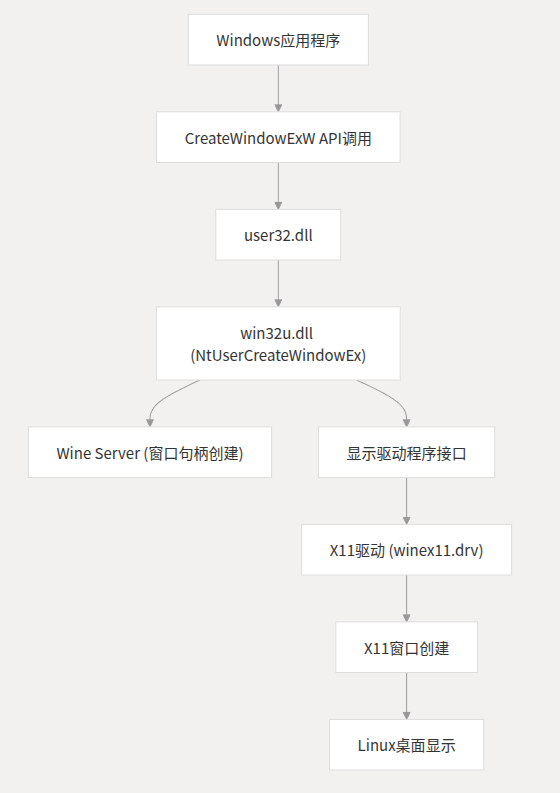
Looking at the entire process, it reflects the layered architectural design of Wine:
- User API layer: Provides Windows API compatibility
- System call layer: Implements core logic for window management
- Driver layer: Handles platform-specific display implementations
- Native API layer: Calls Linux/X11 native functions
Through this design, Windows applications can create and display windows normally in a Linux environment without modification, with Wine responsible for completing all API conversions and platform adaptations.
The overall architecture flowchart is summarized as follows:
If you find the article good, please give it a thumbs up!