“Crossing the vast sea of data in office automation”
@MoYu
Introduction

Hello everyone! I am your new friend MoYu. Over the past ten years of my daily work, I have accumulated many practical skills in Python office automation projects. Starting today, I will share them on the “Code Sea Listening to the Tide” public account! Packed with practical office tips, I hope to discuss ways to improve office efficiency with all of you and achieve the freedom of not working overtime.
Alright, without further ado, let’s get straight to the practical content.
From Collapse to Elegant Evolution
Office Demand Scenario
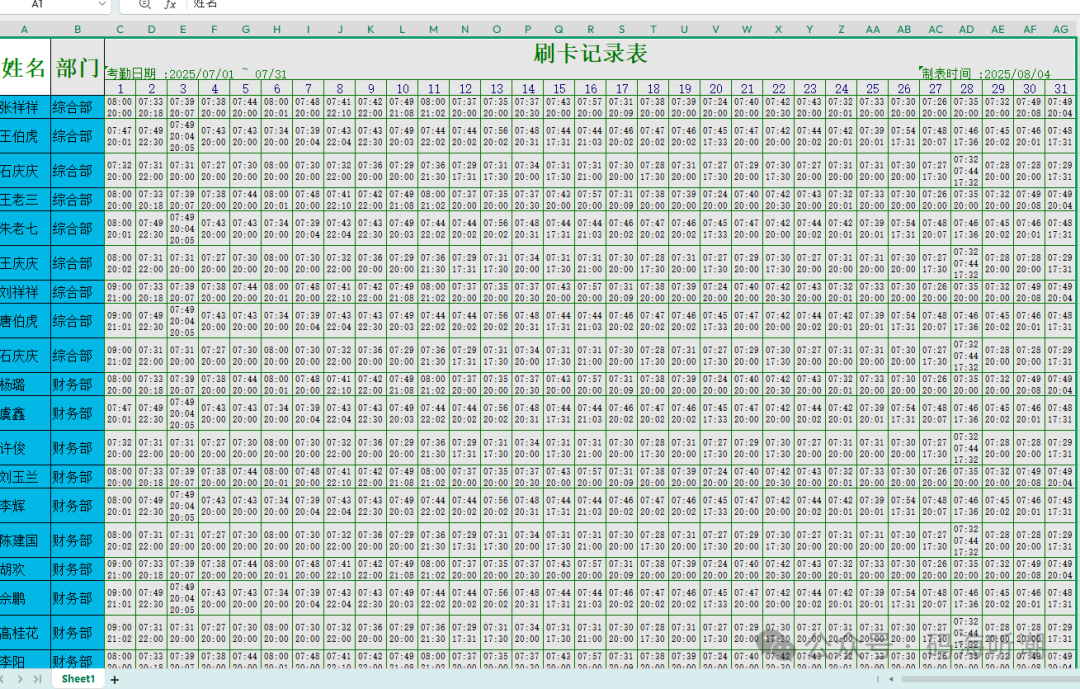
Scenario Description: There is a mysterious Excel workbook exported from the attendance machine containing the card swipe records of employees from various departments for the month. It includes the normal working hours (08:00-20:00) and overtime hours (after 20:00) of company employees, which will be used to verify and calculate each employee’s daily working hours and overtime hours, and summarize the total working hours and overtime hours for the month.
The required Excel workbook is shown in the figure below:
Pain Point: The amount of data to verify is large, and if we follow the traditional manual method of checking with a calculator, it would take forever. This is where Python comes to the rescue.
Problem Breakdown:
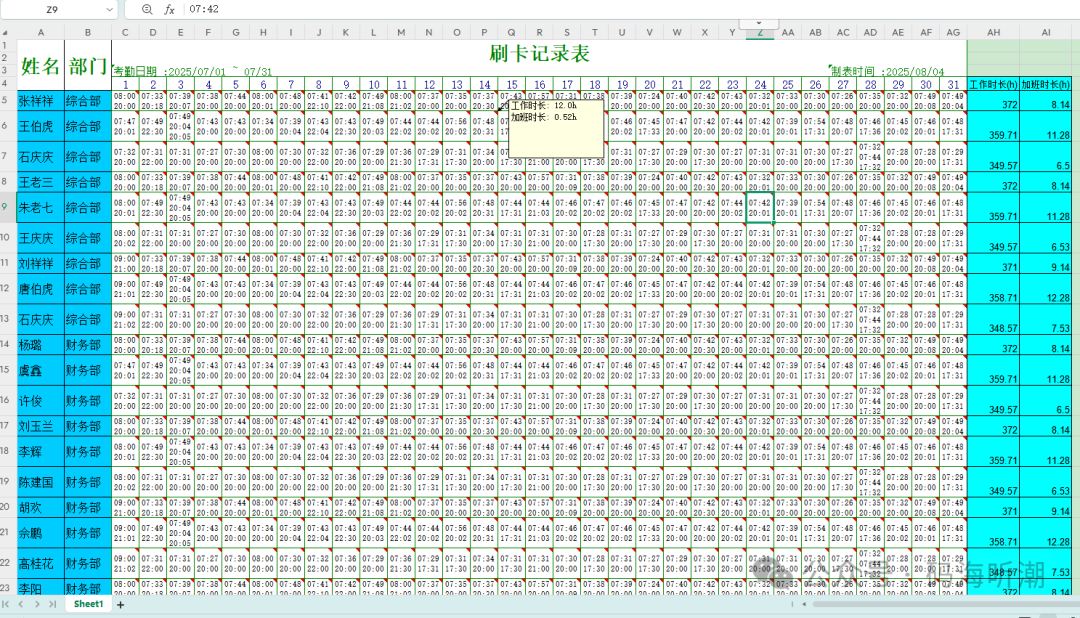
1. Based on the company’s normal working hours and overtime hours, use Python code to calculate the daily working hours and overtime hours from each card swipe record, and add them as comments in the cells for easy verification.
2. Summarize the daily working hours and overtime hours using Python code and add them to the last two columns of each row of work hour data.
Now, let’s use Python code to show Excel what it means when “traditional culture meets cyber efficiency”.
import re
import xlwings as xw
import os
from datetime import datetime, timedelta

def load_excel():
    app = xw.App(visible=True)
    return app

def get_cell_info(cell):
    if cell.merge_cells:
        merge_area = cell.merge_area
        merge_max_row = merge_area.last_cell.row
        merge_max_col = merge_area.last_cell.column
        value = merge_area[0, 0].value
    else:
        merge_max_row = cell.row
        merge_max_col = cell.column
        value = cell.value
    return merge_max_row, merge_max_col, value

def get_max_row_col(sheet):
    max_col = sheet.used_range.last_cell.column
    max_row = sheet.used_range.last_cell.row
    return max_row, max_col

def custom_region(sheet, start_cell, up_search_text=None, down_search_text=None, left_search_text=None, right_search_text=None):
    start_range = sheet.range(start_cell)
    first_row = start_range.row
    first_col = start_range.column
    # (1) Find the last row downwards
    last_row = first_row
    while last_row <= sheet.used_range.last_cell.row:
        cell_value = sheet.cells(last_row + 1, first_col).value
        if cell_value is None:
            break
        if down_search_text is not None and str(cell_value) == down_search_text:
            break
        last_row += 1
    # (2) Find the first row upwards
    first_row_temp = first_row
    while first_row_temp > 1:
        cell_value = sheet.cells(first_row_temp - 1, first_col).value
        if cell_value is None:
            break
        if up_search_text is not None and not re.search(up_search_text, str(cell_value)):
            break
        first_row_temp -= 1
    # (3) Find the last column to the right
    last_col = first_col
    while last_col <= sheet.used_range.last_cell.column:
        cell_value = sheet.cells(first_row, last_col + 1).value
        if cell_value is None:
            break
        last_col += 1
    # (4) Find the first column to the left
    first_col_temp = first_col
    while first_col_temp > 1:
        cell_value = sheet.cells(first_row, first_col_temp - 1).value
        if cell_value is None:
            break
        first_col_temp -= 1
    return sheet.range((first_row_temp, first_col_temp), (last_row, last_col))

def calculate_work_hours(start_time_str, end_time_str):
    start_time = datetime.strptime(start_time_str, "%H:%M")
    end_time = datetime.strptime(end_time_str, "%H:%M")
    work_start = datetime.strptime("08:00", "%H:%M")
    work_end = datetime.strptime("20:00", "%H:%M")
    if end_time < start_time:
        end_time += timedelta(days=1)
        work_end += timedelta(days=1)
    normal_start = max(start_time, work_start)
    normal_end = min(end_time, work_end)
    total_duration = max(normal_end - normal_start, timedelta(0))
    normal_duration = min(total_duration, work_end - work_start)
    overtime_duration = max(end_time - max(work_end, start_time), timedelta(0))
    def timedelta_to_hours(td):
        return round(td.total_seconds() / 3600, 2)
    normal_hours = timedelta_to_hours(normal_duration)
    overtime_hours = timedelta_to_hours(overtime_duration)
    return {"Working Hours": f"{normal_hours}", "Overtime Hours": f"{overtime_hours}"}

search_text = 'Name'
file_path = r'G:\Desktop\9999999\Attendance_Statistics.xlsx'
# Start Excel application
app = load_excel()
wb = app.books.open(os.path.abspath(file_path))
found_in_sheet = False

for sheet in wb.sheets:
    if not sheet.visible:
        continue
    found = sheet.used_range.api.Find(What=search_text,
                                       LookIn=xw.constants.FindLookIn.xlValues,
                                       LookAt=xw.constants.LookAt.xlPart,
                                       SearchOrder=xw.constants.SearchOrder.xlByRows,
                                       SearchDirection=xw.constants.SearchDirection.xlNext,
                                       MatchCase=False)
    if found is None:
        continue
    first_address = found.Address
    while found is not None:
        found_in_sheet = True
        # Get the xlwings Range object of the found cell
        found_cell = sheet.range(found.Address)
        if found_cell.merge_cells:
            merge_area = found_cell.merge_area
            merge_min_row = merge_area.row
            merge_max_row = merge_area.last_cell.row
            merge_min_col = merge_area.column
            merge_max_col = merge_area.last_cell.column
        else:
            merge_min_row = found_cell.row
            merge_max_row = found_cell.row
            merge_min_col = found_cell.column
            merge_max_col = found_cell.column
        start_row = merge_min_row + 1
        end_row = merge_max_row + 1
        start_col = merge_min_col
        end_col = merge_max_col + 2
        start_cell = sheet.cells(end_row, end_col).address
        data_range = custom_region(
            sheet,
            start_cell,
            up_search_text=r'\d+',
            down_search_text='Swipe Record Table',
            left_search_text=None,
            right_search_text=None
        )
        data_range.number_format = '@'
        # Add titles
        sheet.cells(data_range.row, data_range.columns.count + 1).value = 'Working Hours (h)'
        sheet.cells(data_range.row, data_range.columns.count + 2).value = 'Overtime Hours (h)'
        # Set format
        for col_offset in [data_range.columns.count + 1, data_range.columns.count + 2]:
            cell = sheet.cells(data_range.row, col_offset)
            cell.font.size = 10
            cell.api.Borders.LineStyle = 1  # xlContinuous
            cell.api.Borders.Weight = 2  # xlThin
            cell.color = (198, 224, 180)  # Light green
        # Process data
        for row_idx in range(data_range.row, data_range.row + data_range.rows.count):
            ls = []
            lt = []
            for col_idx in range(data_range.column, data_range.column + data_range.columns.count):
                cell = sheet.cells(row_idx, col_idx)
                if cell.value is not None and isinstance(cell.value, str):
                    if re.search(r'(\d{2}:\d{2})', cell.value):
                        times = re.findall(r'(\d{2}:\d{2})', cell.value)
                        times.sort()
                        start_time_str, end_time_str = times[0], times[-1]
                        dic = calculate_work_hours(start_time_str, end_time_str)
                        ls.append(dic['Working Hours'])
                        lt.append(dic['Overtime Hours'])
                        # Add comment
                        if cell.api.Comment is not None:  # Check if comment exists
                            cell.api.Comment.Delete()  # Delete existing comment
                        str_comment = "\n".join(f"{k}: {v} hours" for k, v in dic.items())
                        cell.api.AddComment(str_comment)  # Add new comment
            if ls:
                sum_worktime = sum(map(float, ls))
                sum_overtime = sum(map(float, lt))
                work_cell = sheet.cells(row_idx, data_range.column + data_range.columns.count)
                overtime_cell = sheet.cells(row_idx, data_range.column + data_range.columns.count + 1)
                work_cell.value = sum_worktime
                overtime_cell.value = sum_overtime
                for cell in [work_cell, overtime_cell]:
                    cell.font.size = 10
                    cell.api.Borders.LineStyle = 1  # xlContinuous
                    cell.api.Borders.Weight = 2  # xlThin
                    cell.color = (198, 224, 180)  # Light green
        # Find the next match
        found = sheet.used_range.api.FindNext(found)
        if found is None or found.Address == first_address:
            break
# Save and close
wb.save()
app.quit()
The final saved result Excel workbook is shown in the figure below:
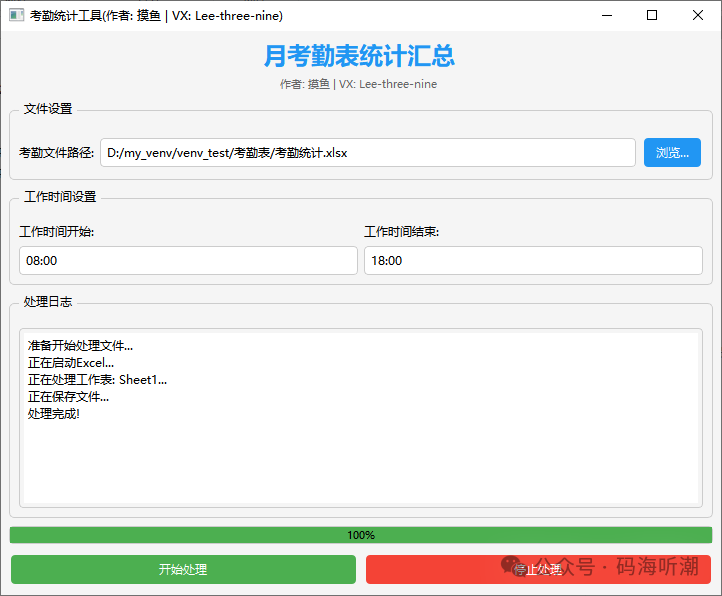
With the above Python automation script, the task that originally required hours of manual calculation can be completed in just 4 minutes. From the initial despair of manual operation to the efficient automation achieved with Python, work efficiency has increased exponentially, finally achieving the freedom of not working overtime! Everyone can draw parallels and adapt the code logic above to analyze specific problems based on their actual work situations. Additionally, the exe program has been packaged; if you need the packaged exe without a Python environment, feel free to ask MoYu. The exe program is shown in the figure below: