
Original link: http://www.hyspot.com.cn/article/view/1166
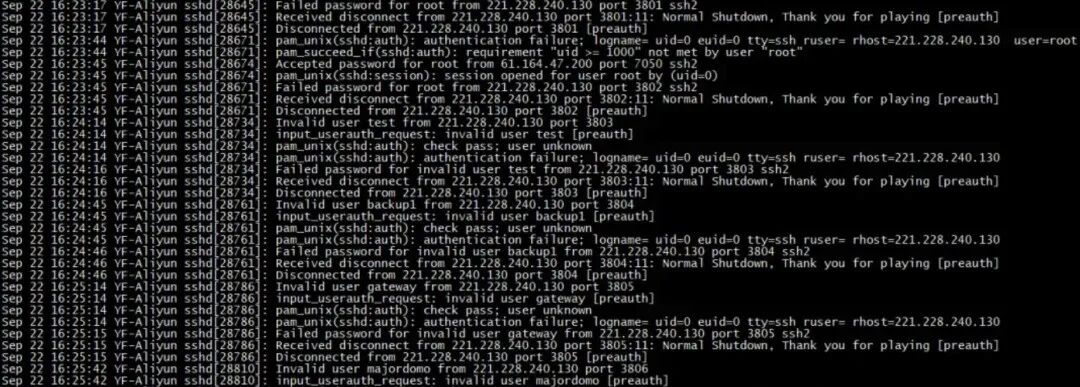
With the widespread use of Linux servers, SSH bruteforce attacks have become a common threat that operations and maintenance teams must face. Attackers attempt to illegally access servers by brute-forcing combinations of usernames and passwords. Once successful, all data and functionalities of the server are at serious risk. This article will explore efficient solutions to combat SSH bruteforce attacks from a technical perspective.
Change the Default SSH Port
By default, the SSH service runs on port 22. Attackers typically target this default port for attacks. By changing the default port of SSH, the probability of being scanned and attacked can be effectively reduced. Run the following command to change the port:
# Edit the SSH configuration file
vim /etc/ssh/sshd_config
# Change the Port configuration to any high port, for example
Port 2222
Note: After modification, the new port must be opened through the firewall, and the SSH service must be restarted:
# Restart the SSH service
systemctl restart sshd
Disable Root User Login
Disabling direct SSH login with the Root account can significantly enhance security, as if the Root account is compromised, the attacker can immediately gain the highest system privileges. Edit the <span>/etc/ssh/sshd_config</span> file:
# Disable Root login
PermitRootLogin no
Then, create a regular user and log in with that user:
# Create a new user
adduser username
passwd username
And grant necessary sudo privileges.
Implement Key-Based Login
Weak passwords are a vulnerability for bruteforce attacks, so it is recommended to completely disable password login and switch to SSH key authentication. This not only eliminates password attacks but also improves login efficiency. The command to generate an SSH key pair is as follows:
ssh-keygen -t rsa -b 4096
Copy the public key to the remote server:
ssh-copy-id user@server_ip
Then edit the SSH configuration file to disable password login:
PasswordAuthentication no
Deploy Automatic Blocking Tools
DenyHosts and Fail2Ban are two commonly used anti-bruteforce software. They monitor SSH logs and automatically block IP addresses that frequently attempt to log in. For example, to install and configure DenyHosts on CentOS:
# Install DenyHosts
yum install -y denyhosts
Edit its configuration file <span>/etc/denyhosts.conf</span>, and modify the key parameters:
SECURE_LOG = /var/log/secure
DENY_THRESHOLD_INVALID = 5
HOSTS_DENY = /etc/hosts.deny
Start the service:
systemctl start denyhosts
systemctl enable denyhosts
Set IP Access Whitelist
Restricting SSH access to only specific IPs can fundamentally eliminate most attacks. Configure firewall rules, for example, by using <span>iptables</span> to set a whitelist:
iptables -A INPUT -p tcp -s trusted_ip --dport 22 -j ACCEPT
iptables -A INPUT -p tcp --dport 22 -j DROP
Regularly Analyze Logs
Regularly checking SSH logs can help identify potential threats. Use the command to view failed login attempts:
grep "Failed password" /var/log/secure
If any suspicious IPs are found, they can be manually added to the blacklist or further optimize the protection strategy.
SSH bruteforce attacks are not terrifying, but without prevention, they can lead to disastrous consequences. By changing the port, disabling Root login, using key authentication, deploying blocking tools, and setting a whitelist, the server’s protection capabilities can be significantly enhanced. Operations and maintenance personnel should also maintain vigilance over server access, responding promptly to anomalies through log analysis to ensure system security.
END