1. Introduction: Why Learn scanf/printf?
In C++, the familiar input and output methods are cin and cout, but many experienced developers still prefer the C language legacy functions scanf and printf. The core reasons are twofold:
- Higher Efficiency Especially when handling large amounts of data, scanf/printf can be 3-5 times faster than cin/cout (no additional overhead for synchronizing streams).
- More Flexible Format Control Direct control over output precision, alignment, and data format makes the code more concise.
This article will help you master this “efficient input-output combination” comprehensively, from syntax to practical applications!
2. Core Syntax: scanf (Input Function)
1. Basic Format
scanf("format control string", variable address list);- Format Control String Specifies the type and format of the input data (e.g., %d for integers);
- Variable Address List Must pass the memory address of the variable (using the & symbol), with multiple variables separated by commas.
2. Common Format Specifiers
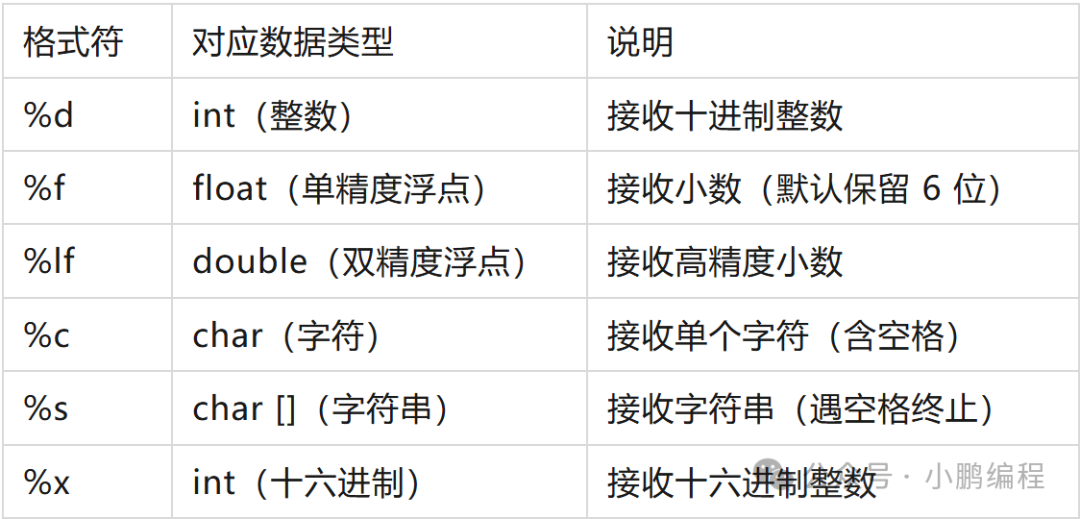
3. Practical Example: Basic Input
#include <cstdio>
using namespace std;

int main()
{
    int age;
    printf("Please enter your age (integer):");
    scanf("%d", &age);
    printf("Your entered age is: %d\n", age);

    float score1;
    double score2;
    printf("Please enter the scores of two subjects (decimal, separated by space):");
    scanf("%f %lf", &score1, &score2);
    printf("Score1 (float): %.2f, Score2 (double): %.2lf\n", score1, score2);

    char gender;
    printf("Please enter your gender (single character):");
    scanf(" %c", &gender);
    printf("Your entered gender is: %c\n", gender);

    char name[20];
    printf("Please enter your name (no spaces):");
    scanf("%s", name);
    printf("Your entered name is: %s\n", name);

    return 0;
}
Example Output:
Please enter your age (integer): 25
Your entered age is: 25
Please enter the scores of two subjects (decimal, separated by space): 92.5 88.95
Score1 (float): 92.50, Score2 (double): 88.95
Please enter your gender (single character): M
Your entered gender is: M
Please enter your name (no spaces): ZhangSan
Your entered name is: ZhangSan
4. Key Considerations
- ❌ Do not forget the & symbol for integer/character variables (except for string arrays);
- ⚠️ When inputting characters, scanf(“%c”) will read the leftover newline character from the buffer; solution: add a space before %c (” %c”);
- 📌 For string input, %s terminates at spaces/newlines; to read strings with spaces, use fgets() (to be expanded later).
3. Core Syntax: printf (Output Function)
1. Basic Format
printf("format control string", output data list);- Format Control String Contains ordinary characters (directly output) and format specifiers (corresponding to output data);
- Output Data List Can be variables, constants, or expressions, with multiple data separated by commas.
2. Extended Format Specifiers (Enhanced Output)
In addition to basic format specifiers, printf supports more flexible format control:
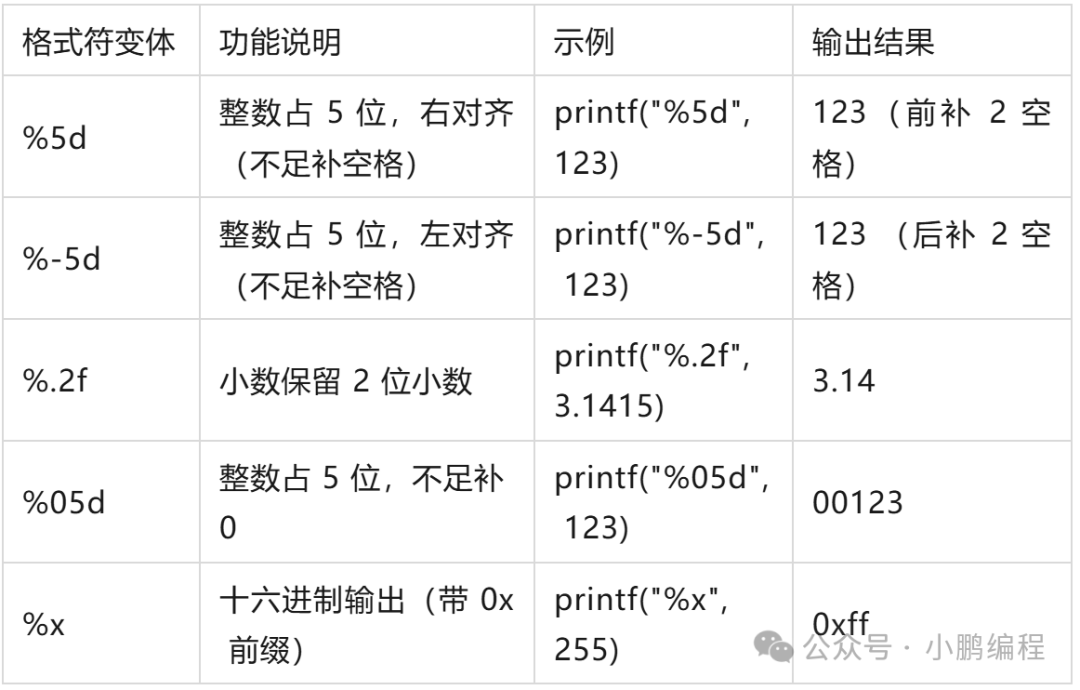
3. Practical Example: Formatted Output
#include <cstdio>
using namespace std;
int main() {
    int num = 123;
    float pi = 3.1415926f;
    double salary = 9876.54;
    // 1. Integer Formatting
    printf("Default integer: %d\n", num);
    printf("Right aligned in 5 spaces: %5d\n", num); // Pad with spaces if insufficient
    printf("Left aligned in 5 spaces: %-5d\n", num); // Pad with spaces if insufficient
    printf("Padded with 0 in 5 spaces: %05d\n", num); // Pad with 0 if insufficient
    // 2. Decimal Formatting
    printf("Default float: %f\n", pi); // Default retains 6 digits
    printf("Retain 2 decimal places: %.2f\n", pi);
    printf("Retain 4 decimal places: %.4f\n", pi);
    printf("In 8 spaces + retain 2 decimal places: %8.2f\n", salary); // Total width 8, including decimal point
    // 3. Direct output of expressions
    printf("10+20=%d\n", 10+20);
    printf("Square of pi: %.2f\n", pi*pi);
    return 0;
}
Output Results:
Default integer: 123
Right aligned in 5 spaces:  123
Left aligned in 5 spaces: 123
Padded with 0 in 5 spaces: 00123
Default float: 3.141593
Retain 2 decimal places: 3.14
Retain 4 decimal places: 3.1416
In 8 spaces + retain 2 decimal places:  9876.54
10+20=30
Square of pi: 9.87
4. scanf/printf vs cin/cout: Core Differences
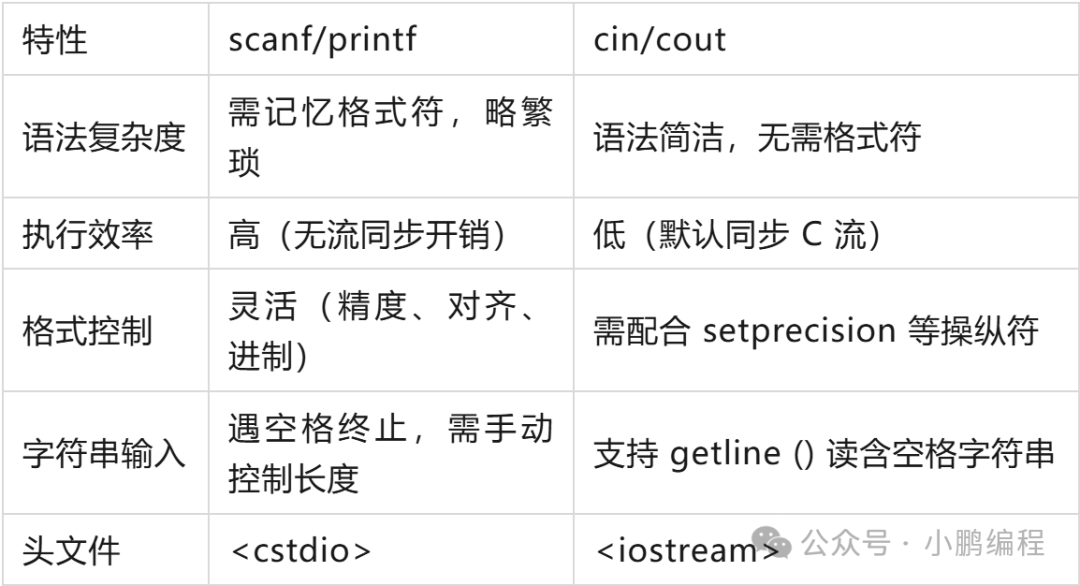
Efficiency Comparison Experiment:
When processing 1 million sets of integer input and output, scanf/printf takes about 0.1 seconds, while cin/cout takes about 0.5 seconds (if you disable synchronization with ios::sync_with_stdio(false); it can improve to 0.2 seconds, but still not as fast as the former).
5. Common Pitfalls and Solutions
1. Pitfall: scanf Reading String Out of Bounds
char name[5];
scanf("%s", name); // If input exceeds 4 characters, it will overflow (array length 5 = 4 characters + 1 null terminator)Solution: Limit input length (e.g., %4s means read at most 4 characters):
scanf("%4s", name); // Even if input is longer, only the first 4 will be taken, avoiding overflow2. Pitfall: Using %f for double Input Causes Data Errors
double num;
scanf("%f", &num); // Error! double must use %lf
printf("%lf", num);
Correct Usage:
scanf("%lf", &num); // Input using %lf
printf("%lf", num); // Output can use %lf or %f (printf is compatible)
3. Pitfall: Mixing cin/cout and scanf/printf Causes Input Confusion
// Error Example: Mixing causes buffer residue
int a;
char c;
cin >> a;
scanf("%c", &c); // Will read the newline character left by cinSolution:
- Option 1: Use one input method consistently;
- Option 2: Clear the buffer before mixing (fflush(stdin); or cin.ignore();).
6. Conclusion
scanf and printf are efficient and flexible input-output tools in C++, especially suitable for scenarios with high efficiency requirements such as algorithm competitions and big data processing.
Key Points:
- Remember common format specifiers (%d/%f/%lf/%c/%s);
- scanf requires passing the variable address (except for strings), while printf directly passes the variable;
- Flexibly use format control (width, alignment, precision) to enhance output readability;
- Avoid common errors such as out-of-bounds and mismatched format specifiers.