
Compiling C++ Programs with CMake on Linux
1. Compiling a Single .cpp File with g++
Use g++/gcc to compile a .cpp file and generate an executable file named .out
g++ main.cpp1. Create the file main.cpp
#include <iostream>using namespace std;
int main(){    cout<<"hello world"<<endl;    return 0;}
2. Compile the file to generate the executable file a.out
g++ main.cpp3. Run the executable file. After generating the a.out file, input ./a.out
./a.out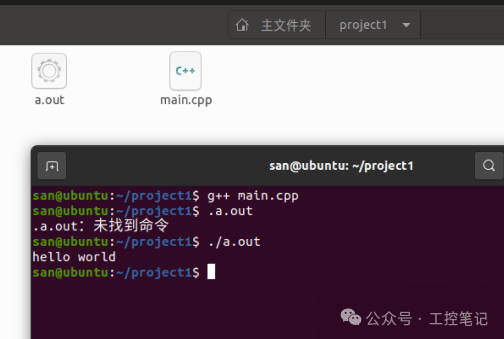
2. Compiling a Single .cpp File with CMake
Create a CMakeLists.txt file, use CMake to generate the project, and use make to generate the executable file.
1. Create the file
CMakeLists.txt
cmake_minimum_required(VERSION 3.10)
# Declare the project name
project(project2)
# Declare the target executable and the source code files
add_executable(main main.cpp)
In the project2 folder, there are two files: CMakeLists.txt and main.cpp
2. Create the project with CMake
cmake .This generates some makefile files. See the image below
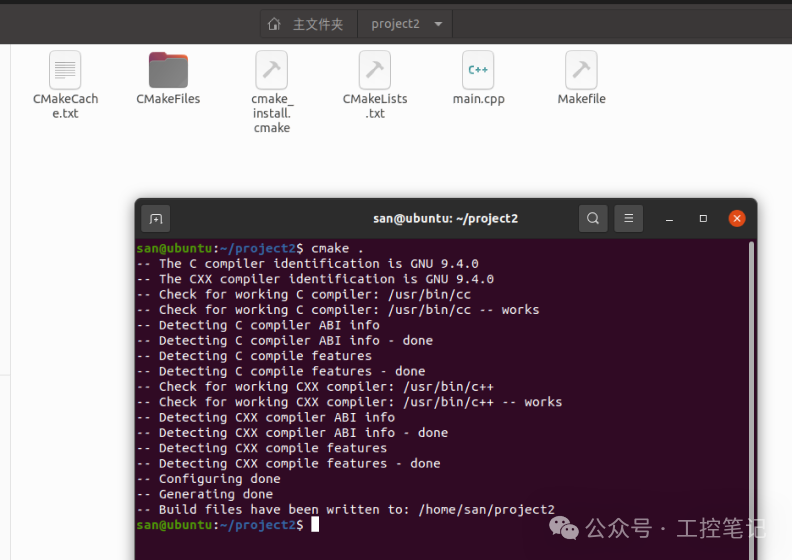
3. Use make to compile the project and generate the executable file
make4. Run the executable file
./mainThe process is as follows
san@ubuntu:~/project2$ cmake .
-- The C compiler identification is GNU 9.4.0
-- The CXX compiler identification is GNU 9.4.0
-- Check for working C compiler: /usr/bin/cc
-- Check for working C compiler: /usr/bin/cc -- works
-- Detecting C compiler ABI info
-- Detecting C compiler ABI info - done
-- Detecting C compile features
-- Detecting C compile features - done
-- Check for working CXX compiler: /usr/bin/c++
-- Check for working CXX compiler: /usr/bin/c++ -- works
-- Detecting CXX compiler ABI info
-- Detecting CXX compiler ABI info - done
-- Detecting CXX compile features
-- Detecting CXX compile features - done
-- Configuring done
-- Generating done
-- Build files have been written to: /home/san/project2
san@ubuntu:~/project2$ make
Scanning dependencies of target main
[ 50%] Building CXX object CMakeFiles/main.dir/main.cpp.o
[100%] Linking CXX executable main
[100%] Built target main

san@ubuntu:~/project2$ ./main
hello world
san@ubuntu:~/project2$
3. Multiple .h Header Files and .cpp Source Files
In the project2 folder
san@ubuntu:~/project2$ lsCMakeLists.txt main.cpp test1.cpp test1.h test2.cpp test2.h
main.cpp
#include <iostream>
#include "test1.h"
#include "test2.h"
using namespace std;
int main(){    cout<<"hello world"<<endl;    testfunc1();    testfunc2();    return 0;}
test1.cpp
#include "test1.h"
#include <iostream>
void testfunc1()    {      std::cout<<"this is testfunc1"<<std::endl;    }
test1.h
#ifndef _TEST1_H
#define _TEST1_H
#include <iostream>
void testfunc1();
#endif /*_TEST1_H*/
Create CMakeLists.txt
cmake_minimum_required(VERSION 3.10)
project(project2)
add_executable(main main.cpp test1.cpp test2.cpp)
Other steps are the same.
san@ubuntu:~/project2$ make
Scanning dependencies of target main
[ 25%] Building CXX object CMakeFiles/main.dir/main.cpp.o
[ 50%] Building CXX object CMakeFiles/main.dir/test1.cpp.o
[ 75%] Building CXX object CMakeFiles/main.dir/test2.cpp.o
[100%] Linking CXX executable main
[100%] Built target main
san@ubuntu:~/project2$ ./main
hello world
this is testfunc1
this is testfunc2
san@ubuntu:~/project2$
4. Organizing Header Files and Source Files in Different Directories
The include folder stores .h header files
The src folder stores .cpp source files
The build folder stores dependency files generated by the CMake command, such as makefile files.
The bin folder stores the generated executable files .out or main
Other files remain the same, but the CMakeLists.txt file is different.
CMakeLists.txt
cmake_minimum_required(VERSION 3.10)
project(project3)
set (EXECUTABLE_OUTPUT_PATH ${PROJECT_SOURCE_DIR}/bin)
aux_source_directory(src SRC_LIST)
include_directories(include)
add_executable(main3 ${SRC_LIST})
The result is as follows:
san@ubuntu:~/cmake_learn/project3$ tree -a.
├── bin
│   └── main3
├── build
│   ├── CMakeCache.txt
│   ├── CMakeFiles
│   │   ├── 3.16.3
│   │   │   ├── CMakeCCompiler.cmake
│   │   │   ├── CMakeCXXCompiler.cmake
│   │   │   ├── CMakeDetermineCompilerABI_C.bin
│   │   │   ├── CMakeDetermineCompilerABI_CXX.bin
│   │   │   ├── CMakeSystem.cmake
│   │   │   ├── CompilerIdC
│   │   │   │   ├── a.out
│   │   │   │   ├── CMakeCCompilerId.c
│   │   │   │   └── tmp
│   │   │   └── CompilerIdCXX
│   │   │       ├── a.out
│   │   │       ├── CMakeCXXCompilerId.cpp
│   │   │       └── tmp
│   │   ├── cmake.check_cache
│   │   ├── CMakeDirectoryInformation.cmake
│   │   ├── CMakeOutput.log
│   │   ├── CMakeTmp
│   │   ├── main3.dir
│   │   │   ├── build.make
│   │   │   ├── cmake_clean.cmake
│   │   │   ├── CXX.includecache
│   │   │   ├── DependInfo.cmake
│   │   │   ├── depend.internal
│   │   │   ├── depend.make
│   │   │   ├── flags.make
│   │   │   ├── link.txt
│   │   │   ├── progress.make
│   │   │   └── src
│   │   │       ├── main.cpp.o
│   │   │       ├── test1.cpp.o
│   │   │       └── test2.cpp.o
│   │   ├── Makefile2
│   │   ├── Makefile.cmake
│   │   ├── progress.marks
│   │   └── TargetDirectories.txt
│   ├── cmake_install.cmake
│   └── Makefile
├── CMakeLists.txt
├── include
│   ├── test1.h
│   └── test2.h
└── src
    ├── main.cpp
    ├── test1.cpp
    └── test2.cpp
13 directories, 38 files
CMake Commands
1. Declare the minimum version of CMake
cmake_minimum_required(VERSION 3.10)2. Set the project name
project(project2)3. Set the directory for the executable file
set (EXECUTABLE_OUTPUT_PATH ${PROJECT_SOURCE_DIR}/bin)4. Specify the directory for multiple source files (.cpp) and save it in the SRC_LIST variable
aux_source_directory(src SRC_LIST)5. Specify the directory for multiple header files
include_directories(include)6. Specify the executable file name and the folder containing multiple source files
add_executable(main3 ${SRC_LIST})7. Specify the executable file name and directly specify the source files
add_executable(main main.cpp test1.cpp test2.cpp)