▼Click the card below to follow our public account for more exciting content▼Since the launch of my course, I have received some doubts from people who do not understand AI models: the biggest doubt is that “microcontrollers cannot run AI at all.”In the live class, I have taught everyone how to deploy TinyML neural networks on the STM32N647 chip.Today, we took on a more challenging task and successfully deployed TinyML on the STM32F103 microcontroller. After following, contact me (WeChat: 593342536) to obtain the source code for this project.First, let’s take a look at the actual running effect Followed Follow Replay Share Like <!– –> Watch moreMastering Microcontrollers and Embedded Systems
0/0
00:00/02:46Progress bar, percentage 0Play00:00/02:4602:46 SpeedFull screen Playing at speed 0.5x 0.75x 1.0x 1.5x 2.0x Ultra clear Smooth
Continue watching
Who Says Microcontrollers Can’t Run AI Models? I Have Successfully Tested TinyML on STM32F103
Original, Who Says Microcontrollers Can’t Run AI Models? I Have Successfully Tested TinyML on STM32F103Mastering Microcontrollers and Embedded SystemsAdded to Top StoriesEnter comment Video Details To achieve the effect shown in the video, it is actually quite simple. Here are the actual steps:(1) Use STM32 CubeMX to create a project for STM32F103, and create the minimum running functionality, including LED indicators, serial port, and other configurations.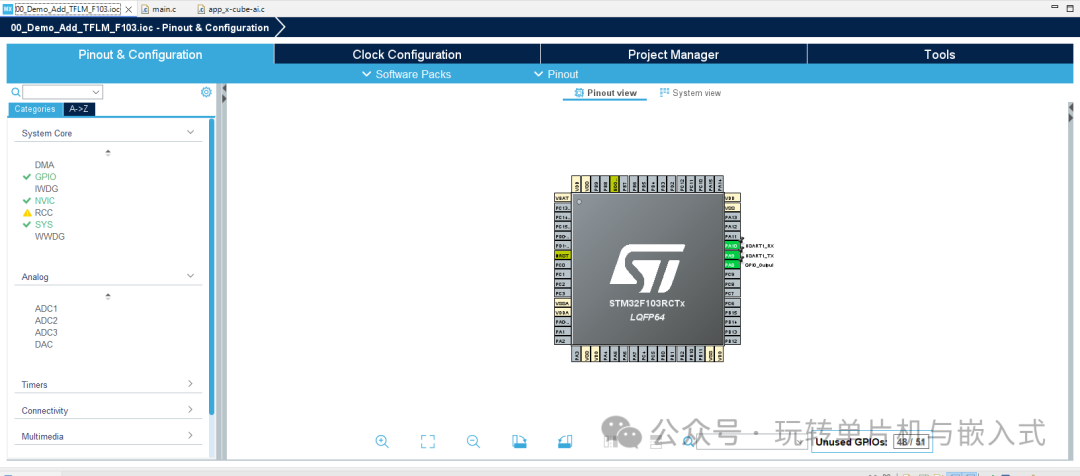 The serial port configuration is as follows:
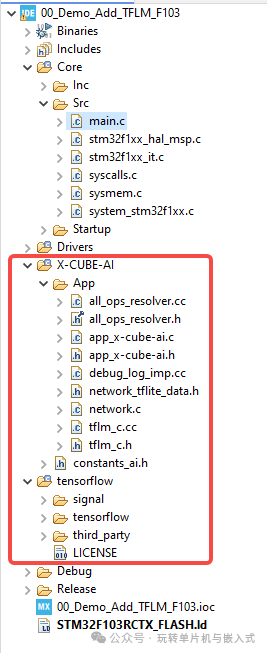
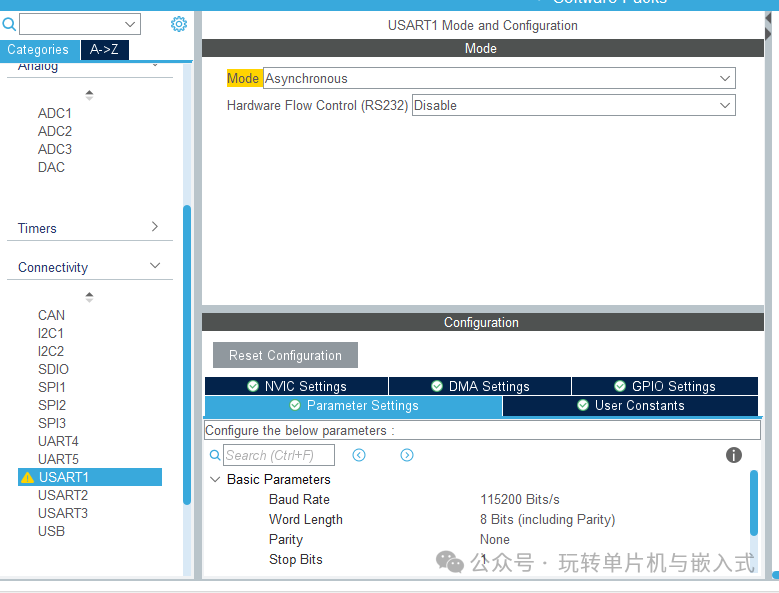 (2) Port the TensorFlow Lite source code into the STM32F103 project. The following image shows the architecture of the STM32F103 project after porting.
 (3) Write the source code for the large model testing part.The model initialization code is as follows:
static int ai_boostrap(const uint8_t *model, uint8_t *arena_addr, size_t arena_sz){ TfLiteStatus res; int32_t size_io; /* USER CODE BEGIN 1 */ printf("\r\nInstancing the network (TFLM)..\r\n"); /* USER CODE END 1 */ res = tflm_c_create(model, (uint8_t*)arena_addr, arena_sz, &model_hdl); if (res != kTfLiteOk) { return -1; } /* USER CODE BEGIN 2 */ /* Report the main model info */ printf(" Operator size : %d\r\n", (int)tflm_c_operators_size(model_hdl)); printf(" Tensor size : %d\r\n", (int)tflm_c_tensors_size(model_hdl)); /* Report the size of arena buffer which is really used during the set-up and run phases * - based on a debug service (see C++ interpreter i/f in tflm_c.cc file) * - after this step, no additional memory should be allocated from the arena buffer or * through another system heap allocator. * Note: This info is useful to refine/adjust the requested size of the arena buffer. */ printf(" Allocated size : %d / %d\r\n", (int)tflm_c_arena_used_bytes(model_hdl), (int)arena_sz); /* Report the description of the IO tensors */ size_io = tflm_c_inputs_size(model_hdl); printf(" Inputs size : %d\r\n", (int)size_io); size_io = tflm_c_outputs_size(model_hdl); printf(" Outputs size : %d\r\n", (int)size_io); if ((tflm_c_inputs_size(model_hdl) != 1) || (tflm_c_inputs_size(model_hdl) != 1)) { printf("WARNING - embedded TFL model is not compatible with the default template..\r\n"); } return 0;}The model testing code is as follows:
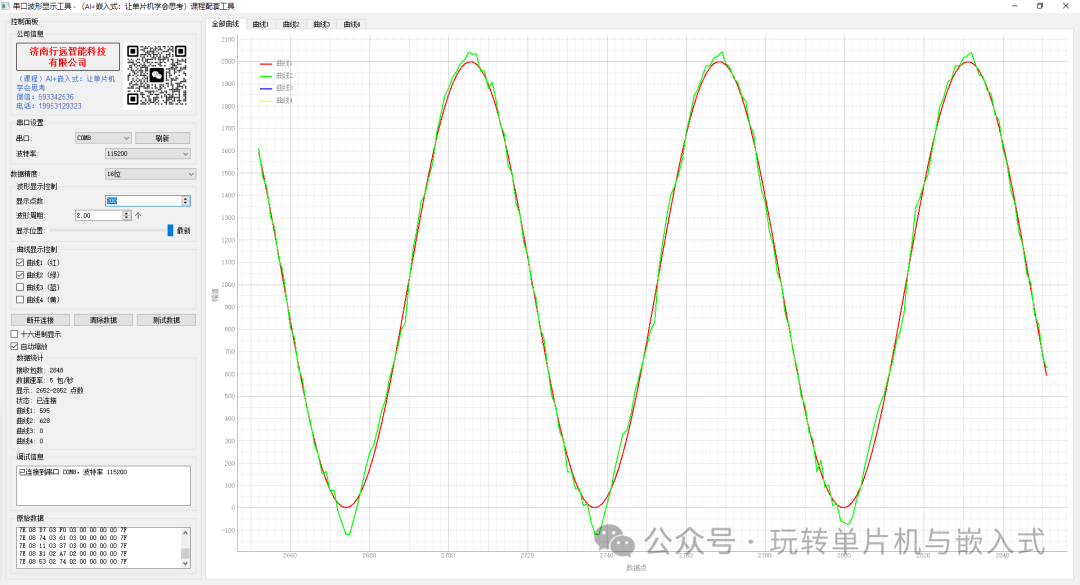
int acquire_and_process_data(void* data){ struct tflm_c_tensor_info in_info; tflm_c_input(model_hdl, 0, &in_info); // Degrees -> Radians // last_rad = angle_deg * (PI_F / 180.0f); // Feed the model x (according to the training standard) float x = (MODEL_INPUT_IS_RAD) ? last_rad : angle_deg; if (in_info.type == kTfLiteFloat32) { ((float*)data)[0] = x; } else if (in_info.type == kTfLiteInt8) { // int8 quantization: q = x/scale + zp float q = x / in_info.scale + (float)in_info.zero_point; if (q < -128.f) q = -128.f; if (q > 127.f) q = 127.f; ((int8_t*)data)[0] = (int8_t)lrintf(q); } else { // Other types not supported return -1; } return 0; // Continue to the next round return 0;}(4) Download and observe the running resultsAfter powering on, the output of the STM32 UID and the relevant parameters of the TFLM model are displayed.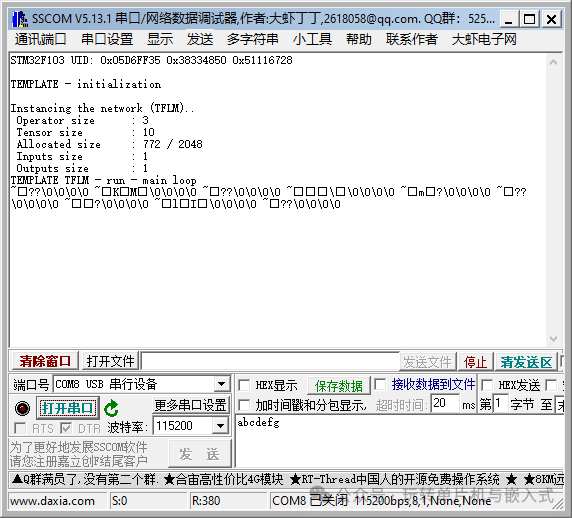 After normal operation, the sine wave calculated by inference is compared with the sine wave calculated mathematically as shown below.
 Welcome to my course, where I will guide you step by step to deploy large models onto microcontrollers. Learn to deploy large models onto microcontrollers in thirty minutes.