Cat Head Tiger AI Open Source Project Share: How to Build a Set of AI Glasses for the Visually Impaired, Capable of Navigation on Blind Paths, Crossing Assistance, Object Recognition, and Real-Time Voice Interaction, with an Open Source Solution
Hello everyone, I am Cat Head Tiger. Recently, due to market reasons, I have been busy and have not updated much, so feel free to urge me to update 😄. Today, I want to share a complete open-source AI glasses project that I recently discovered, which costs less than 150 yuan and is practically runnable: based on ESP32 and local AI models, it achieves navigation on blind paths, crossing assistance, object recognition, and real-time voice interaction.
The experience can be summarized in one sentence:
You say to the system, “Help me cross the road,” and the glasses’ camera starts working, with the system reporting in real-time: “There is a crosswalk 3 meters ahead, and the light is green; you can proceed.”
The functionality is extensible; for example, if you want to add a “find bus stop” feature: simply add logic in <span>workflow_blindpath.py</span>, and you can achieve integrated navigation for blind paths and buses.
More importantly: the solution is completely open source, allowing others to view the scene in real-time from a first-person perspective via a mobile phone or computer for remote assistance.
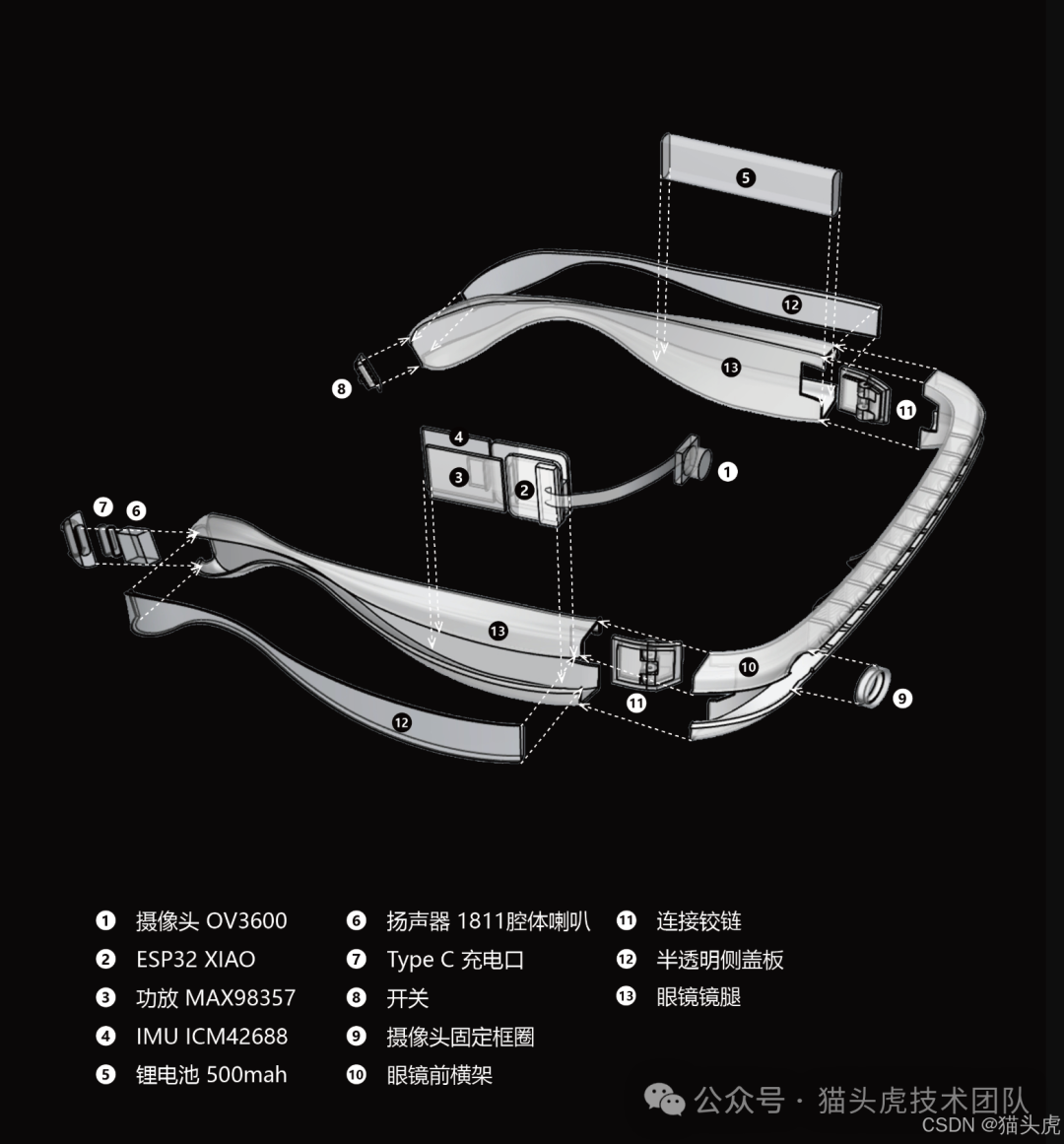
1️⃣ Project Overview: A Truly Functional “AI Glasses for the Visually Impaired”
This project is an intelligent navigation and assistance system for visually impaired individuals, integrating:
- Blind path navigation
- Crossing assistance
- Object recognition and searching
- Real-time voice interaction
- Video stream monitoring and remote assistance
The system is based on ESP32, a Python backend, and a combination of various AI models. Let me emphasize again:
⚠️ This project is for technical exchange and learning purposes only; please do not use it directly in real scenarios involving visually impaired users.
👉 Project code open-source address (remember to star it to support me): GitHub: https://github.com/MaoTouHU/OpenAIglasses_for_Navigation
👉 Model download address (after downloading, place it in the <span>model/</span> directory): ModelScope: https://www.modelscope.cn/models/archifancy/AIGlasses_for_navigation
2️⃣ Function Overview: From Blind Paths to Objects, from Crossing to Dialogue
🟡 Blind Path Navigation: Real-Time Recognition + Voice Guidance + Obstacle Avoidance
The blind path navigation capability mainly includes:
- Real-time blind path detection: Real-time identification of blind paths based on the YOLO segmentation model
- Intelligent voice guidance: Provides precise directional guidance (left turn, right turn, go straight, etc.)
- Obstacle detection and avoidance: Automatically identifies obstacles ahead and plans avoidance routes
- Turn detection: Automatically identifies sharp turns and provides early warnings
- Optical flow stabilization: Uses the Lucas-Kanade optical flow algorithm to stabilize the mask and reduce jitter
Structural interpretation:
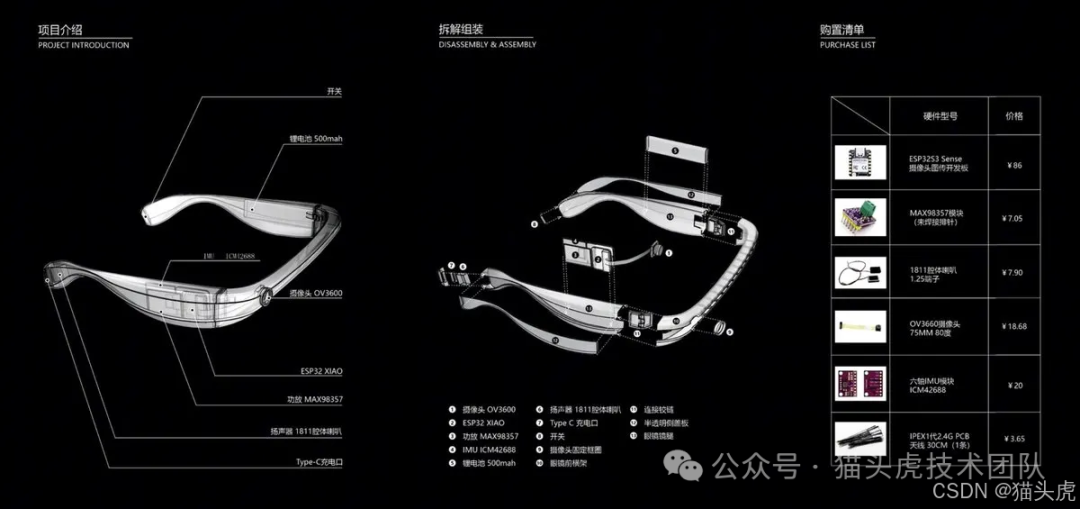
The core experience is: the system can not only see the blind path but also “understand directions” and “avoid obstacles,” and it tells you how to walk in real-time through voice.
🚦 Crossing Assistance: Integrated Guidance for Crosswalks + Traffic Lights
The crossing assistance mainly does three things:
-
Crosswalk recognition: Real-time detection of the position and direction of the crosswalk
-
Traffic light recognition: Detection of traffic light status based on color and shape
-
Alignment and crossing guidance:
- Guides the user to align with the center of the crosswalk
- Voice prompts when the light is green indicating it is safe to cross
All you need to say is: “Help me cross the road,” and the system will start helping you find the crosswalk → determine the traffic light → align direction → prompt when it is safe to cross.
🔍 Object Recognition and Searching: From “Help me find Red Bull” to “I have got it”
This part is more of a “lifestyle assistant,” with main capabilities including:
-
Intelligent object search: Supports voice commands, such as:
- “Help me find Red Bull”
- “Help me find AD calcium milk”
- “Help me find mineral water”
-
Real-time target tracking: Uses YOLO-E open vocabulary detection + ByteTrack tracking
-
Hand guidance: Combines MediaPipe hand detection to guide the user’s hand closer to the object
-
Grasp detection: Detects hand grasping actions to confirm the object has been picked up
-
Multimodal feedback: Visual labeling + voice guidance + object centering prompts
Effect demonstration (object recognition interface):
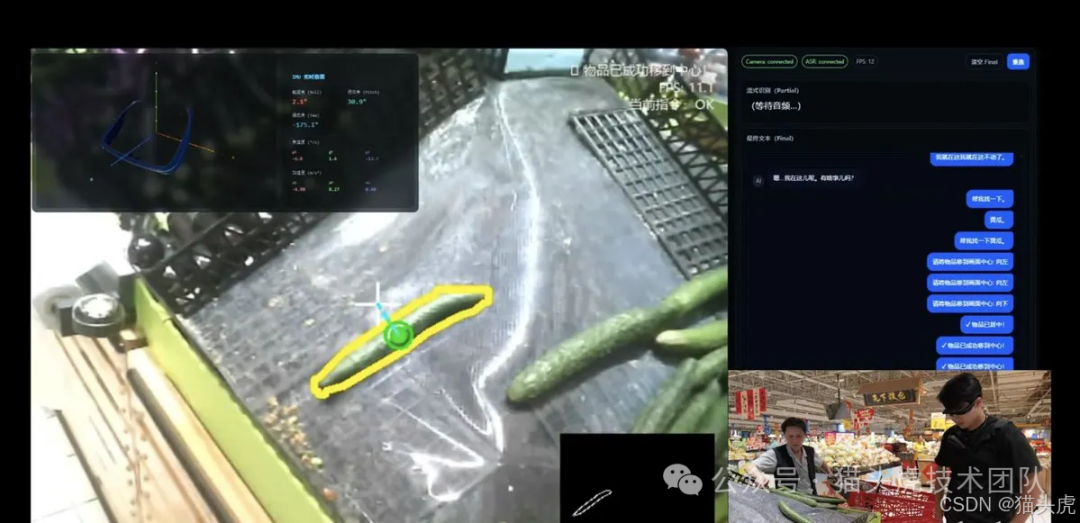
The overall experience flow is similar to this: you say “Help me find Red Bull” → the system marks Red Bull in the image → voice prompts you to adjust left/right → further guidance as your hand approaches → confirmation of “got it” upon detecting the grasping action.
🎙️ Real-Time Voice Interaction: Commands, Dialogue, Scene Understanding
The voice interaction module is based on the capabilities provided by Alibaba Cloud DashScope:
-
Voice recognition (ASR): Real-time voice recognition based on Paraformer
-
Multimodal dialogue: Uses Qwen-Omni-Turbo, supporting image + text input, voice output
-
Intelligent command parsing: Automatically determines whether you are:
- Issuing navigation commands
- Searching for objects
- Or engaging in casual conversation/inquiries
-
Context awareness: Automatically filters irrelevant commands in different modes (navigation/crossing/item search) to avoid false triggers
📹 Video and Audio Processing: Real-Time Streaming + Remote Assistance
This layer mainly addresses the “visualization and collaboration” issue:
- Real-time video stream: WebSocket streaming, supporting multiple clients to watch simultaneously (e.g., family, friends, volunteers for remote assistance)
- Audio and video synchronized recording: Automatically saves timestamped video and audio files for easy playback and debugging
- IMU data fusion: Receives IMU data from ESP32 for posture estimation
- Multi-channel audio mixing: Supports simultaneous playback of system voice, AI responses, and environmental sounds
🎨 Visualization and Interaction: Browser Panel + 3D Posture Visualization
The visualization part is aimed at development and remote assistance scenarios, including:
- Web real-time monitoring: Real-time viewing of processed video streams on the browser side
- IMU 3D visualization: Real-time rendering of device posture using Three.js
- Status panel: Displays navigation status, detection information, FPS, etc.
- Chinese-friendly: All interfaces and voices use Chinese, supporting custom fonts
The main effects on the web side are as follows:
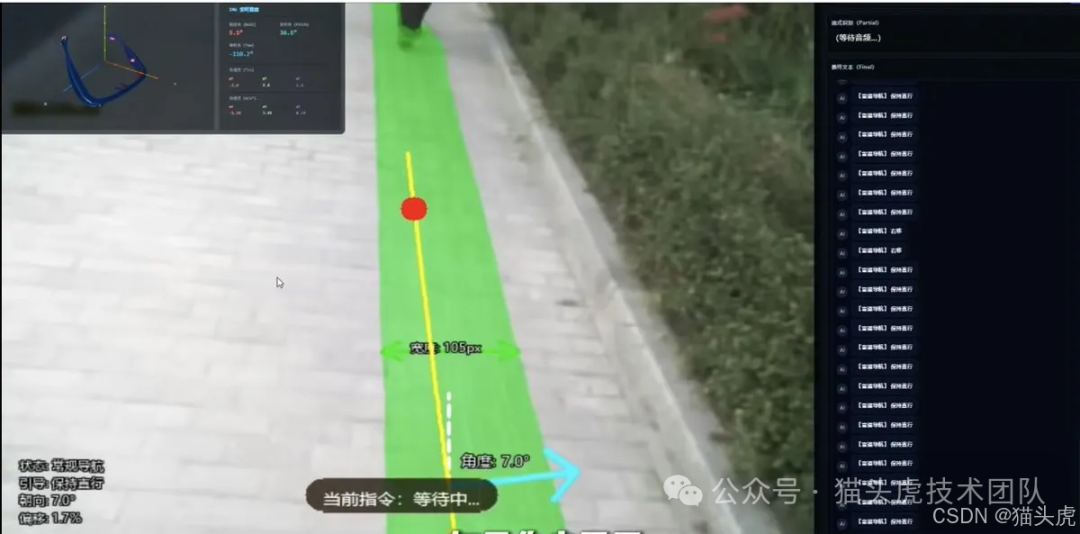
3️⃣ Overall System Positioning and Open Source Explanation
Let me emphasize the project positioning again:
An intelligent navigation and assistance system for visually impaired individuals, integrating functions such as blind path navigation, crossing assistance, object recognition, and real-time voice interaction.
However, ⚠️ it is very important to remind you:
- This project is for learning and communication purposes only
- Please do not use it directly for real visually impaired populations
- The project only contains code
- The model is provided separately (after downloading, place it in the
<span>/model</span>folder)
Model address (repeatedly attached): https://www.modelscope.cn/models/archifancy/AIGlasses_for_navigation
4️⃣ Environment and Hardware Requirements
💻 Development/Server Side (the machine running the model)
- CPU: Intel i5 or above (recommended i7/i9)
- GPU: NVIDIA (supports CUDA 11.8+, recommended RTX 3060 or above)
- Memory: 8GB RAM (recommended 16GB)
- Storage: 10GB of available space
🕶️ Client Device (optional)
- ESP32-CAM or other cameras that support WebSocket
- Microphone (for voice input)
- Speaker/Headphones (for voice output)
🧾 Software Requirements
- Operating System: Windows 10/11, Ubuntu 20.04+, macOS 10.15+
- Python: 3.9 – 3.11
- CUDA: 11.8 or higher (if GPU acceleration is needed)
- Browser: Chrome 90+/Firefox 88+/Edge 90+
🔑 API Key
You need to apply for an Alibaba Cloud DashScope API Key:
-
Purpose:
- Paraformer (ASR)
- Qwen-Omni dialogue
-
Application address: https://dashscope.console.aliyun.com/
5️⃣ Quick Start: From Cloning to Running
Below are the original commands and code blocks for you to copy and paste directly.
1. Clone the Project
git clone https://github.com/yourusername/aiglass.git
cd aiglass/rebuild1002
Here you can replace it with your own repository path or the above open-source link.
2. Install Dependencies
Create a Virtual Environment (recommended)
python -m venv venv
# Windows
venv\Scripts\activate
# Linux/macOS
source venv/bin/activate
Install Python Packages
pip install -r requirements.txt
Install CUDA and cuDNN (for GPU acceleration)
Please refer to the NVIDIA CUDA Toolkit installation guide
3. Download Model Files
Place the following model files in the <span>model/</span> directory:
| Model File | Purpose | Size | Download Link |
|---|---|---|---|
<span>yolo-seg.pt</span> |
Blind path segmentation | ~50MB | [To be supplemented] |
<span>yoloe-11l-seg.pt</span> |
Open vocabulary detection | ~80MB | [To be supplemented] |
<span>shoppingbest5.pt</span> |
Object recognition | ~30MB | [To be supplemented] |
<span>trafficlight.pt</span> |
Traffic light detection | ~20MB | [To be supplemented] |
<span>hand_landmarker.task</span> |
Hand detection | ~15MB | MediaPipe Models |
In actual use, you can refer to the model package provided by ModelScope.
4. Configure API Key
Create a <span>.env</span> file:
# .env
DASHSCOPE_API_KEY=your_api_key_here
Or if you prefer not to deal with environment variables, you can hard-code it directly in the code (not recommended):
# app_main.py, line 50
API_KEY = "your_api_key_here"
5. Start the System
python app_main.py
The system will start the service at <span>http://0.0.0.0:8081</span>; open it in a browser to see the real-time monitoring interface.
6. Connect Device (Optional ESP32)
If you are using ESP32-CAM:
- Burn
<span>compile/compile.ino</span>to ESP32 - Modify WiFi configuration to ensure it is on the same network as the server
- ESP32 will automatically connect to the WebSocket endpoint
6️⃣ System Architecture: From Device to Cloud, Back to Headphones
For ease of understanding, the complete architecture diagram is as follows:
┌─────────────────────────────────────────────────────────────┐
│                        Client Layer                          │
│  ┌──────────────┐  ┌──────────────┐  ┌──────────────┐      │
│  │  ESP32-CAM   │  │   Browser     │  │   Mobile      │      │
│  │  (Video/Audio) │  │  (Monitoring Interface) │  │  (Voice Control) │      │
│  └──────┬───────┘  └──────┬───────┘  └──────┬───────┘      │
└─────────┼──────────────────┼──────────────────┼─────────────┘
          │ WebSocket        │ HTTP/WS          │ WebSocket
┌─────────┼──────────────────┼──────────────────┼─────────────┐
│         │                  │                  │              │
│    ┌────▼──────────────────▼──────────────────▼────────┐    │
│    │         FastAPI Main Service (app_main.py)        │    │
│    │  - WebSocket Routing Management                      │    │
│    │  - Audio/Video Stream Distribution                    │    │
│    │  - Status Management and Coordination                 │    │
│    └────┬────────────────┬────────────────┬─────────────┘    │
│         │                │                │                  │
│  ┌──────▼──────┐  ┌──────▼──────┐  ┌──────▼──────┐         │
│  │ ASR Module   │  │ Omni Dialogue │  │ Audio Playback │         │
│  │ (asr_core)   │  │(omni_client) │  │(audio_player) │         │
│  └──────────────┘  └──────────────┘  └──────────────┘         │
│                                                               │
│         Application Layer                                      │
└───────────────────────────────────────────────────────────────┘
          │                  │                  │
┌─────────▼──────────────────▼──────────────────▼──────────────┐
│                     Navigation Master Layer                    │
│    ┌─────────────────────────────────────────────────┐       │
│    │  NavigationMaster (navigation_master.py)         │       │
│    │  - State Machine: IDLE/CHAT/BLINDPATH_NAV/      │       │
│    │            CROSSING/TRAFFIC_LIGHT/ITEM_SEARCH    │       │
│    │  - Mode Switching and Coordination                │       │
│    └───┬─────────────────────┬───────────────────┬───┘       │
│        │                     │                   │            │
│   ┌────▼────────┐   ┌────────▼────────┐   ┌─────▼──────┐   │
│   │ Blind Path   │   │  Crossing       │   │  Item Search │   │
│   │(blindpath)   │   │ (crossstreet)   │   │(yolomedia)  │   │
│   └──────────────┘   └──────────────────┘   └─────────────┘   │
└───────────────────────────────────────────────────────────────┘
          │                  │                  │
┌─────────▼──────────────────▼──────────────────▼──────────────┐
│                       Model Inference Layer                      │
│  ┌──────────────┐  ┌──────────────┐  ┌──────────────┐       │
│  │ YOLO Segmentation │  │  YOLO-E Detection │  │ MediaPipe    │       │
│  │ (Blind Path/Crosswalk) │  │ (Open Vocabulary)   │  │  (Hand Detection)   │       │
│  └──────────────┘  └──────────────┘  └──────────────┘       │
│  ┌──────────────┐  ┌──────────────┐                         │
│  │ Traffic Light Detection │  │ Optical Flow Stabilization │                         │
│  │(HSV+YOLO)     │  │(Lucas-Kanade)│                         │
│  └──────────────┘  └──────────────┘                         │
└───────────────────────────────────────────────────────────────┘
          │
┌─────────▼─────────────────────────────────────────────────────┐
│                    External Service Layer                        │
│  ┌──────────────────────────────────────────────┐            │
│  │  Alibaba Cloud DashScope API                 │            │
│  │  - Paraformer ASR (Real-Time Voice Recognition) │            │
│  │  - Qwen-Omni-Turbo (Multimodal Dialogue)     │            │
│  │  - Qwen-Turbo (Label Extraction)              │            │
│  └──────────────────────────────────────────────┘            │
└───────────────────────────────────────────────────────────────┘
Core Module Overview
| Module | File | Function |
|---|---|---|
| Main Application | <span>app_main.py</span> |
FastAPI service, WebSocket management, status coordination |
| Navigation Master | <span>navigation_master.py</span> |
State machine management, mode switching, voice throttling |
| Blind Path Navigation | <span>workflow_blindpath.py</span> |
Blind path detection, obstacle avoidance, turn guidance |
| Crossing Navigation | <span>workflow_crossstreet.py</span> |
Crosswalk detection, traffic light recognition, alignment guidance |
| Item Search | <span>yolomedia.py</span> |
Object detection, hand guidance, grasp confirmation |
| Voice Recognition | <span>asr_core.py</span> |
Real-time ASR, VAD, command parsing |
| Voice Synthesis | <span>omni_client.py</span> |
Qwen-Omni streaming voice generation |
| Audio Playback | <span>audio_player.py</span> |
Multi-channel mixing, TTS playback, volume control |
| Video Recording | <span>sync_recorder.py</span> |
Audio and video synchronized recording |
| Bridge IO | <span>bridge_io.py</span> |
Thread-safe frame buffering and distribution |
If you want to extend functionality, such as the previously mentioned “find bus stop,” you only need to add new logic in the corresponding workflow without rewriting the underlying architecture.
7️⃣ Usage Instructions: How to Talk to It
Voice Commands (No Wake Word, Speak Directly)
The system currently supports the following Chinese voice commands:
👉 Navigation Control
"Start Navigation" / "Blind Path Navigation"     → Start blind path navigation
"Stop Navigation" / "End Navigation"     → Stop blind path navigation
"Start Crossing" / "Help me cross the road"  → Start crossing mode
"End Crossing" / "Stop Crossing"  → Stop crossing mode
👉 Traffic Light Detection
"Detect Traffic Light" / "Look at Traffic Light"   → Start traffic light detection
"Stop Detection" / "Stop Traffic Light"   → Stop detection
👉 Object Search
"Help me find [object name]"       → Start object search
  Example:
  - "Help me find Red Bull"
  - "Find AD calcium milk"
  - "Help me find mineral water"
"Found it" / "I have it"         → Confirm finding the object
👉 Intelligent Dialogue
"Help me see what this is"          → Photo recognition
"Can this thing be eaten?"            → Object inquiry
Any other questions                 → AI dialogue
Navigation State Machine: System Behavior in Different Modes
The system has an internal state machine that automatically switches between multiple modes:
-
IDLE – Idle state
- Waiting for user commands
- Displaying raw video stream
CHAT – Dialogue mode
- Engaging in multimodal dialogue with AI
- Pausing navigation functionality
BLINDPATH_NAV – Blind path navigation
- Real-time directional correction
- Obstacle detection
<span>ROTATION</span>: Rotate to align with the blind path<span>TRANSLATION</span>: Move to the center of the blind path
-
ONBOARDING: Guiding onto the blind path
-
NAVIGATING: Walking along the blind path
-
MANEUVERING_TURN: Handling turns
-
AVOIDING_OBSTACLE: Obstacle avoidance
CROSSING – Crossing mode
<span>SEEKING_CROSSWALK</span>: Searching for the crosswalk<span>WAIT_TRAFFIC_LIGHT</span>: Waiting for the green light<span>CROSSING</span>: Crossing the road<span>SEEKING_NEXT_BLINDPATH</span>: Searching for the opposite blind path
ITEM_SEARCH – Object search
- Real-time detection of target objects
- Guiding the hand closer
- Confirming grasp
TRAFFIC_LIGHT_DETECTION – Traffic light detection
- Real-time detection of traffic light status
- Voice broadcasting of color changes
Web Monitoring Interface and WebSocket
Open <span>http://localhost:8081</span>, and you will see:
- Real-time video stream (with navigation annotations)
- Status panel (current mode, detection information, FPS)
- IMU 3D visualization
- Voice recognition results and AI responses
The corresponding WebSocket endpoints are as follows:
| Endpoint | Purpose | Data Format |
|---|---|---|
<span>/ws/camera</span> |
ESP32 camera streaming | Binary (JPEG) |
<span>/ws/viewer</span> |
Browser subscribing to video | Binary (JPEG) |
<span>/ws_audio</span> |
ESP32 audio upload | Binary (PCM16) |
<span>/ws_ui</span> |
UI status push | JSON |
<span>/ws</span> |
IMU data reception | JSON |
<span>/stream.wav</span> |
Audio download stream | Binary (WAV) |
8️⃣ Configuration and Tuning: From Environment Variables to Performance Parameters
Environment Variables (<span>.env</span>)
# Alibaba Cloud API
DASHSCOPE_API_KEY=sk-xxxxx

# Model Paths (optional, can be left unconfigured if using default paths)
BLIND_PATH_MODEL=model/yolo-seg.pt
OBSTACLE_MODEL=model/yoloe-11l-seg.pt
YOLOE_MODEL_PATH=model/yoloe-11l-seg.pt

# Navigation Parameters
AIGLASS_MASK_MIN_AREA=1500      # Minimum mask area
AIGLASS_MASK_MORPH=3            # Morphological kernel size
AIGLASS_MASK_MISS_TTL=6         # Mask loss tolerance frame count
AIGLASS_PANEL_SCALE=0.65        # Data panel scaling

# Audio Configuration
TTS_INTERVAL_SEC=1.0            # Voice broadcast interval
ENABLE_TTS=true                 # Enable voice broadcast
Modify Model Paths
If you have customized the model storage path, you can modify it in the corresponding files, for example:
# workflow_blindpath.py
seg_model_path = "your/custom/path/yolo-seg.pt"

# yolomedia.py
YOLO_MODEL_PATH = "your/custom/path/shoppingbest5.pt"
HAND_TASK_PATH = "your/custom/path/hand_landmarker.task"
Performance Tuning Parameter Examples
Based on your machine’s performance, you can make some simplifications for acceleration:
# yolomedia.py
HAND_DOWNSCALE = 0.8    # Hand detection downsampling (smaller is faster, accuracy decreases)
HAND_FPS_DIV = 1        # Hand detection frame skipping (2=skip a frame, 3=every 3 frames)

# workflow_blindpath.py
FEATURE_PARAMS = dict(
    maxCorners=600,      # Optical flow feature point count (fewer is faster)
    qualityLevel=0.001,  # Feature point quality
    minDistance=5        # Minimum distance between feature points
)
9️⃣ Secondary Development and Debugging: For Those Who Want to Tinker
Add New Voice Commands
- Add logic in the
<span>app_main.py</span>function<span>start_ai_with_text_custom()</span>:
# Check for new command
if "new command keyword" in user_text:
    # Execute custom logic
    print("[CUSTOM] New command triggered")
    await ui_broadcast_final("[System] New feature has been activated")
    return
- If you want to modify “which statements are considered valid commands,” you can adjust:
# Modify allowed_keywords list
allowed_keywords = ["Help me see", "Help me find", "your new keyword"]
Extend Navigation Functionality
For example, if you want to add a new navigation mode, you can:
- Add state variables and processing logic in
<span>workflow_blindpath.py</span>:
# Initialize in BlindPathNavigator.__init__()
self.your_new_state_var = False

# Process in process_frame()
def process_frame(self, image):
    if self.your_new_state_var:
        # Custom processing logic
        guidance_text = "New state guidance"
    # ...
- Add an entry to the state machine in
<span>navigation_master.py</span>:
class NavigationMaster:
    def start_your_new_mode(self):
        self.state = "YOUR_NEW_MODE"
        # Initialization logic
Integrate New Models
- Write a model wrapper class:
# your_model_wrapper.py
class YourModelWrapper:
    def __init__(self, model_path):
        self.model = load_your_model(model_path)

    def detect(self, image):
        # Inference logic
        return results
- Load it in
<span>app_main.py</span>:
your_model = YourModelWrapper("model/your_model.pt")
- Call it in the corresponding workflow:
results = your_model.detect(image)
Debugging Tips
- Enable detailed logging:
# Top of app_main.py
import logging
logging.basicConfig(level=logging.DEBUG)
- Check frame rates and bottlenecks:
# yolomedia.py
PERF_DEBUG = True  # Print processing time
- Test by module:
# Test blind path navigation
python test_cross_street_blindpath.py

# Test traffic light detection
python test_traffic_light.py

# Test recording functionality
python test_recorder.py
🔚 Summary & Easter Eggs
This AI glasses project can be summarized in three core highlights:
-
Cost Control: Overall hardware cost is controlled at around 150 yuan, suitable for individual developers and students to tinker with.
-
Complete Solution: From data collection on the ESP32 side → backend AI inference → navigation logic → voice interaction → web visualization → remote assistance, a complete chain is established.
-
Highly Extensible: You can easily add:
- “Find bus stop”
- “Help me recognize door numbers”
- “Count the number of a certain type of product on the shelf”
- ……
If you have read this far, I strongly recommend:
- ⭐ Star the repository to support it
- 🍵 Fork it and run it locally
- 🛠️ Modify a small feature, such as adding your own navigation prompt logic in
<span>workflow_blindpath.py</span>
AI Open Source Share GitHub:https://github.com/MaoTouHU/OpenAIglasses_for_Navigation