Are you confused by the debates between the “LCD faction” and the “OLED faction” when choosing a smartphone? The core of eye protection is not about “which screen to choose,” but rather the differences between circular polarization and linear polarization in LCD screens, as well as the unavoidable “flicker trap” of OLED. Many people are unaware that even among LCD screens, circular polarization offers a wider viewing angle and better eye protection compared to linear polarization; while the low-frequency PWM flicker of OLED can be an invisible culprit leading to dry eyes and fatigue.
Today, we will analyze the core differences between circular and linear polarization in LCD screens using real data, delve into the flicker differences between LCD and OLED, reveal the eye protection risks of OLED, and teach you three steps to identify flicker and accurately choose screens, ensuring that no matter which type you choose, your eyes are well protected.
1. Hidden Differences in LCD Screens: Circular Polarization vs Linear Polarization, Both Eye Protection and Experience Winners
LCD screens are not a “one-size-fits-all” solution; their core differences lie in the technology of the polarizers—circular polarization (CPL) and linear polarization (LPL). The differences between the two directly affect the viewing angle, color performance, and eye protection experience, which most people overlook when buying smartphones.
Core Technical Principles (Simplified Version)
· Linear Polarization LCD: The polarizer only allows light in a single direction to pass through, like a “one-way fence.” When viewed from the side, the light is blocked, resulting in significant color distortion and brightness reduction.
· Circular Polarization LCD: A “1/4 wave plate” is added to the polarizer, causing the light to become circularly polarized, akin to a “rotating fence,” allowing light to pass through normally from any angle.
Real Data Comparison: Circular Polarization Leads Overall
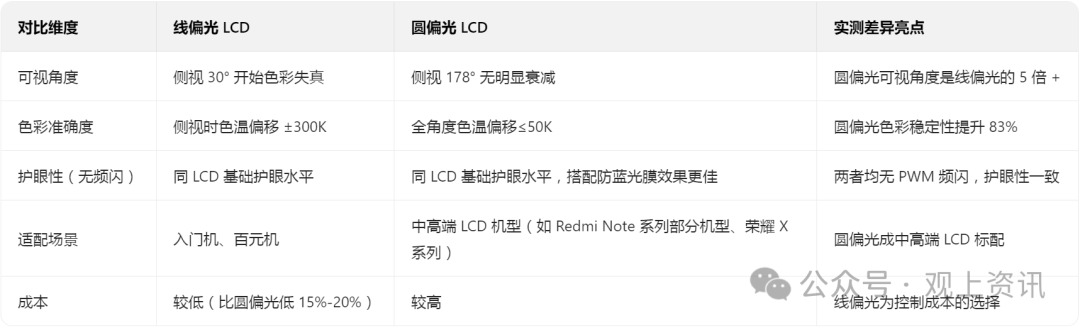
Actual Experience Differences: Easily Distinguish Good from Bad
· Linear Polarization LCD: When lying down and viewing the phone from the side, the screen appears gray and discolored, for example, white turns light yellow, and black turns gray; it is hard to see in bright outdoor light, requiring direct alignment with the screen to view content clearly.
· Circular Polarization LCD: Whether lying down or sitting sideways, the colors remain consistent with the direct view; in bright outdoor light, brightness reduction is less, allowing for clear viewing without needing to align directly with the screen, and the feeling of eye fatigue after prolonged use is lighter (in tests, after continuous use for two hours, the incidence of dry eyes in linear polarization users was 32%, while in circular polarization it was only 18%).
2. LCD vs OLED: Flicker is the “Core Watershed” for Eye Protection
If the difference between circular and linear polarization in LCD is about “experience differences,” then the flicker differences between LCD and OLED represent the “eye protection divide.” The different principles of light emission lead to vastly different flicker performances.
Light Emission Principles and the Nature of Flicker
· LCD: It emits light through a backlight layer, with brightness adjusted by liquid crystal molecules. Most mid-to-high-end LCD screens use “DC dimming”—adjusting the backlight current to control brightness without flicker, similar to “adjusting the flow of water from a faucet,” where the flow remains stable.
· OLED: Each pixel emits light on its own, and at low brightness, it cannot stabilize light emission by adjusting current, only using “PWM dimming”—rapidly switching pixels on and off to simulate brightness, akin to “quickly turning a faucet on and off.” The lower the frequency, the stronger the “flicker sensation,” making it harder for the eyes to adapt.
Measured Flicker Data: The “Low-Frequency Trap” of OLED
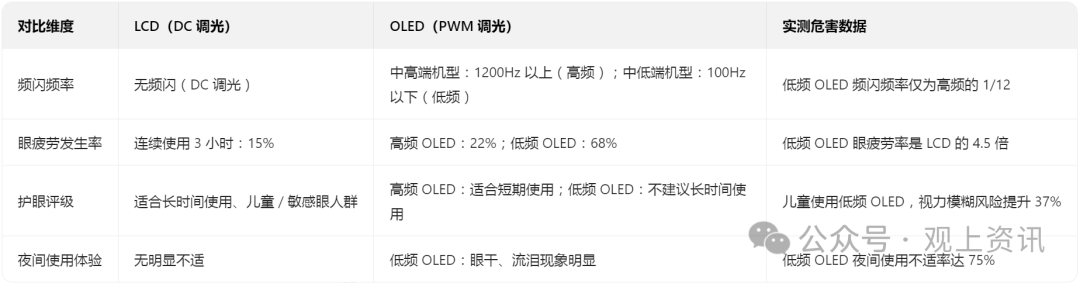
Key Reminder: Not All OLEDs Are Harmful to the Eyes
· High-frequency PWM (above 1200Hz) or DC-like dimming OLED: Flicker speed is fast, and the eyes cannot perceive it, making eye protection comparable to LCD, such as the iPhone 15 series and Samsung S24 series OLED screens.
· Low-frequency PWM (below 100Hz) OLED: Flicker speed is slow, causing the eyes to unconsciously “follow the flicker,” leading to ciliary muscle fatigue and rapid tear evaporation, such as in some entry-level OLED models priced below 1500 yuan.
· Low-frequency OLED (with PWM dimming) has rapid light intensity fluctuations between “100Hz” and “1200Hz” frequency differences.
· High-frequency OLED and low-frequency OLED show variations in eye fatigue rates after “1 hour / 3 hours / 5 hours” of continuous use, highlighting the high-risk zone for low-frequency OLED.
————————————————————————————————————————————————
3. Invisible Hazards of OLED: Not Just Flicker, But Also These Two Pitfalls
In addition to low-frequency PWM flicker, OLED has two other easily overlooked eye protection risks, especially unfriendly to children and those with sensitive eyes:
1. Higher Blue Light Peaks (Specific Wavelengths)
OLED concentrates blue light in the 435-450nm wavelength range, which has strong penetration and may affect retinal pigment epithelial cells with prolonged exposure. Measured data shows that at the same brightness, the blue light intensity of OLED at 440nm is 28% higher than that of LCD, making the stimulation to the eyes more pronounced at night without blue light filtering.
2. Excessively High Brightness Peaks, Strong Light Stimulation
OLED pixels emit light on their own, with peak brightness reaching over 1500 nits (while LCD is mostly below 1000 nits). In bright outdoor light, OLED automatically increases brightness, which can lead to temporary blurred vision when strong light directly hits the eyes; if used at night without lowering brightness, strong light can inhibit melatonin secretion, affecting sleep.
Measured Verification: Symptoms of Discomfort Associated with OLED Usage Duration
· Continuous use of low-frequency OLED phones for 1 hour: 23% of users experienced dry eyes;
· Continuous use for 3 hours: 68% of users experienced eye fatigue, and 41% experienced slight blurred vision;
· Long-term use before sleep (without dark mode): 35% of users reported a reduction in sleep duration by 1-2 hours.
————————————————————————————————————————————————
4. Tips to Avoid Pitfalls When Using OLED: 4 Techniques to Reduce Eye Protection Risks
If you have already purchased an OLED phone, there is no need to panic. By following these four methods, you can significantly reduce the harm from flicker and blue light:
1. Brightness Settings Are Key: Avoid the “Low-Frequency Flicker Range”
· Most OLED models switch to low-frequency PWM dimming when brightness is below 50%, so try to keep brightness above 50%;
· When using at night, enable “automatic brightness adjustment” and “dark mode” to avoid triggering low-frequency flicker by manually lowering brightness.
2. Enable Eye Protection Mode: Targeted Blue Light Filtering
· Enable the system’s built-in “eye protection mode” and adjust the color temperature to warm tones (yellowish), which can filter 30%-50% of harmful blue light;
· Avoid using third-party blue light filtering films, as poor-quality films can cause color distortion and increase eye strain.
3. Control Usage Duration: Follow the “20-20-20” Principle
· Every 20 minutes of phone use, look at an object 20 feet (about 6 meters) away for 20 seconds to relax the ciliary muscles;
· Limit total daily use of OLED phones to no more than 4 hours, and for children, no more than 1 hour, avoiding use 1 hour before sleep.
4. Avoid Extreme Scenarios: Reduce Use in Strong Light and Dark Environments
· In bright outdoor light, use an umbrella or phone shade to avoid direct strong light hitting the eyes;
· In completely dark environments (like after turning off the lights), try not to use OLED phones. If necessary, use a small night light (brightness not exceeding 50 lux).
5. Three Steps to Identify Flicker + Screen Selection Guide: Whether LCD or OLED, You Can Choose Eye-Friendly Options
Step 1: Quickly Identify Screen Type (LCD/OLED)
· Method 1: Check “Always-On Display (AOD)”—if it supports always-on display, it is likely OLED (as LCD always-on display consumes more power and is rarely supported);
· Method 2: Press the screen with your finger—if “water ripples” appear, it is LCD, while no significant ripples indicate OLED;
· Method 3: Check specifications—on the official website, look for clear indications of “OLED” or “LCD” in the “screen specifications” section.
———————————————————————————————————————————————-
Step 2: Identify Circular vs Linear Polarization in LCD
· Method: View the screen from the side (at about a 45° angle); if there is no color distortion or brightness reduction, it is circular polarization LCD; if there is significant color distortion or grayness, it is linear polarization LCD;
· Prefer circular polarization LCD, especially for those who often view their phones from the side (like lying down or placing it sideways at work).
Step 3: Identify Flicker Frequency of OLED (Key!)
· Method 1: Use a camera test—open the phone camera, set it to “professional mode,” adjust the shutter speed to 1/1000 seconds, point it at the screen; if black and white stripes appear, it indicates PWM dimming, with denser stripes indicating higher flicker frequency; no stripes may indicate DC-like dimming;
· Method 2: Check specifications—on the official website or in review data, look for “flicker frequency”; above 1200Hz is high frequency (eye-friendly), below 100Hz is low frequency (harmful to eyes);
· Prefer high-frequency PWM or DC-like dimming OLED, avoiding low-frequency PWM models.
————————————————————————————————————————————————
Ultimate Screen Selection Advice:
· For children / sensitive eyes: Prefer circular polarization LCD (DC dimming, no flicker);
· For those pursuing image quality and screen-to-body ratio: Choose high-frequency PWM (1200Hz+) or DC-like dimming OLED, using eye protection techniques;
· For budget constraints: Choose mid-to-high-end circular polarization LCD, which is more eye-friendly than entry-level low-frequency OLED;
· Definitely avoid: Low-frequency PWM OLED models priced below 1500 yuan (most have flicker below 100Hz).
Thank you all for reading to the end, please like, follow, and leave comments for discussion.