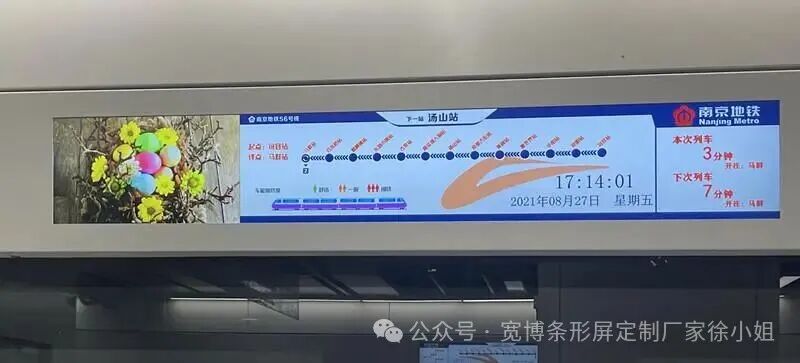
In the rail transit scenario,LCD rail transit display screens are widely used in information display systems due to their advantages of high brightness, low power consumption, and long lifespan. However, some users have reported a phenomenon known as “screen flicker,” where the image exhibits periodic brightness changes or shaking. Is this issue solely caused by defects in the screen itself? The answer is no. Screen flicker can be triggered by multiple factors and requires a comprehensive diagnosis that considers hardware, software, and environmental conditions.
1. Core Causes of Screen Flicker Analysis
1. Screen Issues
Frequency Mismatch: If the refresh rate of the LCD rail transit display screen does not match the driving signal (e.g., below 60Hz), it may cause visible flickering. However, rail transit equipment is usually designed for standard frequencies, and such issues often stem from equipment aging or incorrect parameter settings.
Backlight Module Failure: If the LED backlight using PWM dimming operates at a frequency below 200Hz, it may be captured by the naked eye due to low-frequency flicker. However, industrial-grade LCD rail transit display screens typically use high-frequency PWM or DC dimming to avoid this issue.
Damage to the Liquid Crystal Layer or Driver Chip: Long-term vibration or high temperatures may cause disordered alignment of liquid crystal molecules, while abnormal driver chips may lead to signal transmission errors.
2. External Interference and Environmental Factors
Power Fluctuations: Rail transit equipment often faces unstable voltage, and ripple or transient interference from power adapters may directly reflect on the screen.
Electromagnetic Interference (EMI): Strong electromagnetic sources such as motors and signaling devices inside the train may couple through cables to the LCD rail transit display screen, causing image shaking.
Environmental Light Source Interference: If the screen’s refresh rate is close to the frequency of fluorescent lights or LED lighting, it may produce a “beat” effect, exacerbating the perception of flicker.
3. Software and Settings Issues
Resolution and Refresh Rate Mismatch: Forcing the use of non-standard resolutions or low refresh rates (e.g., below 60Hz) may trigger compatibility issues.
Outdated Drivers and Firmware: If the graphics card driver or LCD rail transit display screen control board firmware is not updated, it may not adapt to new hardware or optimize display algorithms.
2. Diagnosis and Solution Process
1. Preliminary Inspection
Check Physical Connections: Ensure that the power cable and data cables (such as HDMI/VGA) are properly connected and that the shielding is intact.
Environmental Testing: Move the LCD rail transit display screen to an area with no strong electromagnetic interference and observe if the flicker decreases.
Power Monitoring: Use an oscilloscope to detect power output ripple; if it exceeds 50mV, the adapter needs to be replaced.
2. Software Adjustments
Update Drivers and Firmware: Download the latest graphics card drivers and control board firmware from the device’s official website.
Optimize Display Settings: Adjust the screen refresh rate to the recommended value (usually 60Hz or higher), and disable dynamic contrast and other display enhancement features that may cause conflicts.
Hardware Maintenance
Backlight Inspection: Use an infrared thermometer to check the temperature distribution of the LED backlight; if certain areas are overheating, the bulbs may need to be replaced.
Driver Chip Reset: Perform a ground short test on the PWM controller pins of the LCD rail transit display screen control board (requires professional technicians), to check for feedback circuit faults.
Liquid Crystal Layer Testing: Use a microscope to observe if there is any liquid crystal leakage or yellow spots at the edges of the screen; such issues require replacing the screen module.
3. Long-term Preventive Measures
Select Industrial-grade Components: Rail transit equipment should prioritize industrial-grade screens and power supplies that are wide-temperature, shock-resistant, and interference-resistant.
Regular Maintenance: Inspect cable aging every quarter, clean dust from ventilation holes, and avoid high temperatures that may degrade component performance.
3. Conclusion: Comprehensive Strategies for Screen Flicker
LCD rail transit display screen flicker issues cannot be simply attributed to screen quality. From power stability and electromagnetic environment to software settings, any oversight in these areas may lead to anomalies. Users are advised to prioritize checking for external interference and settings issues; if hardware faults are confirmed, they should contact the supplier for professional repairs. In the future, with the popularization of Mini-LED and Micro-LED technologies, higher refresh rates and more stable dimming solutions may further reduce flicker problems.