In the article “Practical Implementation of Embedded AI: Let Ethos-U NPU Run Your Model,” we attempted to load models and invoke the NPU for hardware acceleration of inference using the M33 core of the i.MX 93 MPU. This MPU also has two A55 cores, and this article utilizes the A55 running Linux to achieve similar functionality.Although the Ethos-U65 NPU is a dedicated IP module for the M33, the A55 does not have direct access to this NPU. However, it can indirectly invoke NPU resources through inter-core communication. The software drivers for this part are well-developed, allowing users to treat it as if the A55 is directly calling the NPU, while the M33 is simultaneously handling model task forwarding, which users do not need to concern themselves with.
1. Check for the Operating Environment
We will not introduce how to flash a fully functional image onto the development board. It is assumed that you can access the Linux kernel command line and have successfully logged in. The simplest way to check is to see if the following two files exist.
/usr/bin/vela /usr/lib/libethosu.so.1.0.0 /usr/lib/libethosu_delegate.so2. Enter the Demo Folder
To keep it simple, we will not use the handwritten digit recognition demo based on the MNIST dataset that we have been testing previously. Instead, we will directly use the demo from the i.MX 93 BSP release, which can serve as a reference for future demo development. We should easily find the following file:
usr/bin/eiq-examples-git/Of course, you can also obtain the same code from the following GitHub repository. Make sure to use the branch that matches your local Linux kernel version:https://github.com/nxp-imx/eiq-example
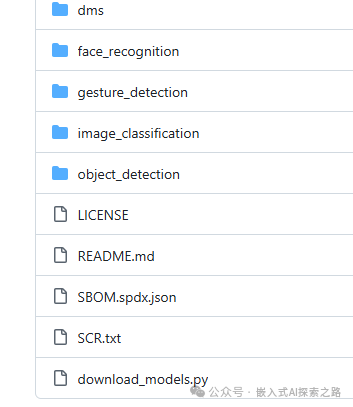
The above is the directory structure of the repository. There are no models here, so you need to run download_models.py to download the tflite models, which will be stored in the models folder. This script will also perform the vela conversion, and the converted models will be stored in the vela_models folder.
python3 download_models.py3. Run the Inference Script
We will test using the image_classification subproject. The reason for this choice is that other subprojects require input from a camera feed, while the image_classification subproject only needs an input image. The label_image.py script implements the functionality to recognize the category of bmp images, and from the subsequent log, it can be seen that it recognized the image with an 87% probability as a naval uniform.
3.1 CPU Inference
If the delegate dynamic library is not specified, all operators in the model will run on the CPU. The following command does not specify the delegate dynamic library and uses the model before the vela conversion. The inference for classifying one image took nearly 135ms:
python3 label_image.py -m ../models/mobilenet_v1_1.0_224_quant.tflite
3.2 NPU Inference
If the delegate dynamic library is specified and the model converted by vela is used, the inference for classifying one image takes no more than 4ms:
python3 label_image.py -m ../vela_models/mobilenet_v1_1.0_224_quant_vela.tflite -d /usr/lib/libethosu_delegate.so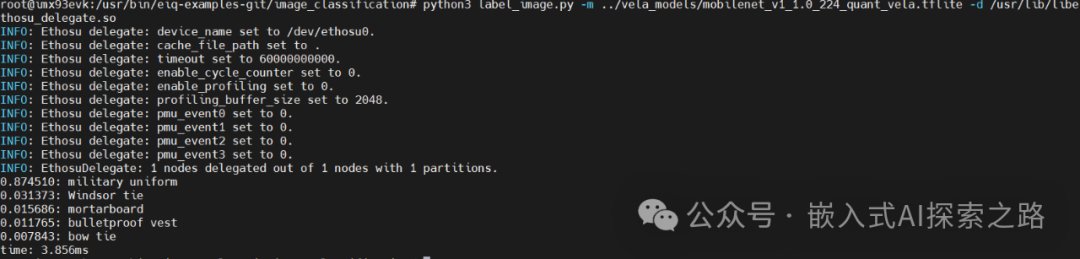
4. Enhance Understanding
The directory structure in image_classification is relatively simple, but it is worth delving into the implementation of this small project to guide future embedded AI development in a Linux environment.
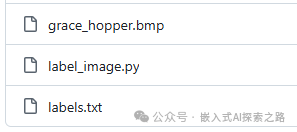
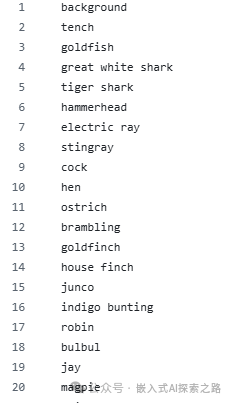
grace_hopper.bmp is an image, which serves as a test sample. The labels.txt file contains a large number of labels, of which only a small portion is shown below:
label_image.py is the core script for loading the model and invoking inference. The source code has been provided, and it is not complicated. I have added some additional comments to help those who are seeing this type of code for the first time to better understand it.
"""label_image for tflite."""
# __future__ is a special module in Python that allows borrowing future features, enabling rules from future versions to be used in older versions for smoother upgrades.
from __future__ import absolute_import
from __future__ import division
from __future__ import print_function

# The argparse module provides an efficient command-line interface for parsing command-line strings.
import argparse
# Time measurement
import time
import numpy as np
# PIL stands for Python Image Library
from PIL import Image
# Core module, TensorFlow Lite runtime
import tflite_runtime.interpreter as tflite

# Open the label file and return the list of labels
def load_labels(filename):
    with open(filename, 'r') as f:
        return [line.strip() for line in f.readlines()]

# Create a command-line argument parser, add parameter definitions, and parse command-line arguments
if __name__ == '__main__':
    parser = argparse.ArgumentParser()
    parser.add_argument(      '-i',      '--image',      default='grace_hopper.bmp',      help='image to be classified')
    parser.add_argument(      '-m',      '--model_file',      default='../models/mobilenet_v1_1.0_224_quant.tflite',      help='.tflite model to be executed')
    parser.add_argument(      '-l',      '--label_file',      default='labels.txt',      help='name of file containing labels')
    parser.add_argument(      '-d',      '--delegate',      default='',      help='delegate path')
    parser.add_argument(      '--input_mean',      default=127.5, type=float,      help='input_mean')
    parser.add_argument(      '--input_std',      default=127.5, type=float,      help='input standard deviation')
    parser.add_argument(      '--num_threads', default=None, type=int, help='number of threads')
    args = parser.parse_args()

  # Choose whether to load the delegate dynamic library. If specified, load the external delegate (hardware acceleration); otherwise, pure CPU inference is allowed.
  if(args.delegate):
      ext_delegate = [tflite.load_delegate(args.delegate)]
      interpreter = tflite.Interpreter(model_path=args.model_file, experimental_delegates=ext_delegate)
  else:
      interpreter = tflite.Interpreter(model_path=args.model_file)
  # Allocate memory tensors for the model
  interpreter.allocate_tensors()

  # Get detailed information about the model's input and output tensors
  input_details = interpreter.get_input_details()
  output_details = interpreter.get_output_details()

  # Check the type of the input tensor
  floating_model = input_details[0]['dtype'] == np.float32

  # NHWC is a common structure, tensor shape is [N, H, W, C] format (batch, height, width, channel), H and W are the height and width of the input image, while the batch for BMP files is always 1, and the number of channels for RGB images is 3, and for ARGB images is 4.
  # NxHxWxC, H:1, W:2
  height = input_details[0]['shape'][1]
  width = input_details[0]['shape'][2]
  img = Image.open(args.image).resize((width, height))

  # Although the batch is 1, we also need to expand the three-dimensional data into four-dimensional data
  # Add N dimension
  input_data = np.expand_dims(img, axis=0)
  if floating_model:
      # If it is a floating-point model, perform data normalization using the formula: (pixel_value - mean) / std
      input_data = (np.float32(input_data) - args.input_mean) / args.input_std
  # Set the preprocessed image data to the input tensor
  interpreter.set_tensor(input_details[0]['index'], input_data)
  start_time = time.time()
  # Execute model inference
  interpreter.invoke()
  stop_time = time.time()
  # Get output tensor data
  output_data = interpreter.get_tensor(output_details[0]['index'])
  # Remove single dimensions (from [1,num_classes] to [num_classes])
  results = np.squeeze(output_data)
  # `argsort()`: returns sorted indices, only take the top five categories with the highest probabilities and print them out
  top_k = results.argsort()[-5:][::-1]
  labels = load_labels(args.label_file)
  for i in top_k:
      if floating_model:
          print('{:08.6f}: {}'.format(float(results[i]), labels[i]))
      else:
          print('{:08.6f}: {}'.format(float(results[i] / 255.0), labels[i]))
  # Output inference time (milliseconds)
  print('time: {:.3f}ms'.format((stop_time - start_time) * 1000))
References:
https://github.com/nxp-imx/eiq-example