In Linux systems, file encryption is an important means of ensuring data security. Whether for local storage or remote transmission, a reasonable encryption strategy can effectively prevent the leakage of sensitive information. This article will detail file encryption methods on Linux based on OpenSSL 3.5, covering scenarios such as file packaging encryption, single file encryption, and transmission encryption.
I. Basic Encryption Tool: Flexible Application of OpenSSL
OpenSSL is a powerful encryption tool that comes with Linux systems, supporting various encryption algorithms suitable for file and data stream encryption, making it one of the preferred tools for daily encryption operations.
1.1. Single File Encryption
For encrypting a single file, the openssl enc command can be used, commonly with the AES-256-CBC algorithm (high security and good compatibility):
openssl enc -e -aes-256-cbc -salt -in original_filename -out encrypted_filename -pass pass:password -pbkdf2-e: indicates the encryption operation (can be omitted, as encryption is the default action).
-aes-256-cbc: specifies the encryption algorithm as AES (Advanced Encryption Standard) with a 256-bit key, using CBC (Cipher Block Chaining) mode. AES-256-CBC is currently a widely used and compatible symmetric encryption algorithm.
-salt: adds a random salt value during encryption to prevent the same password from producing the same ciphertext when encrypting the same content, enhancing security. It is recommended to always use this.
-in: specifies the original filename to be encrypted
-out: specifies the output filename after encryption
Alternatively, a simpler and recommended method (interactive password input)
openssl enc -e -aes-256-cbc -salt -in test.txt -out 112.txt.encAfter executing the command, the system will prompt for the encryption password (to avoid plaintext exposure). It is recommended to use a strong password that includes uppercase and lowercase letters, numbers, and special symbols.

🔐Security Tip: Do not write the password in plaintext in command line parameters (e.g., -pass pass:password) to prevent the password from being viewed in history or processes. It is recommended to input the password interactively after executing the command.
Warning Reason: Older versions of openssl enc use a simple key derivation method, which is less secure. New versions recommend using the PBKDF2 algorithm (enabled by the -pbkdf2 parameter) and specifying the iteration count with -iter (the higher the count, the more difficult it is to brute-force), enhancing the security of the password to key conversion.
Example:
openssl enc -aes-256-cbc -salt -pbkdf2 -iter 100000 -in test.txt -out test.txt.enc-pbkdf2
Enables the PBKDF2 (Password-Based Key Derivation Function 2) key derivation function. Compared to traditional MD5 derivation, PBKDF2 is more secure and effectively resists brute-force and dictionary attacks.
-iter 100000
Sets the iteration count for PBKDF2 to 100,000. The higher the iteration count, the more time-consuming the key derivation process, making it harder to crack, but the encryption and decryption speed will be slightly slower. It is recommended to set it to at least 100,000.
1.2. File Decryption Operation
Use the same algorithm and password for decryption:
openssl enc -d -aes-256-cbc -iter 100000 -in encrypted_filename.txt.enc -out decrypted_filename.txt-d: indicates the decryption operation.
Note: Other parameters must remain consistent with those used during encryption to ensure correct decryption.
1.3. View Supported Encryption Algorithms
You can use the following command to view the list of supported encryption algorithms in OpenSSL:
openssl list -cipher-algorithms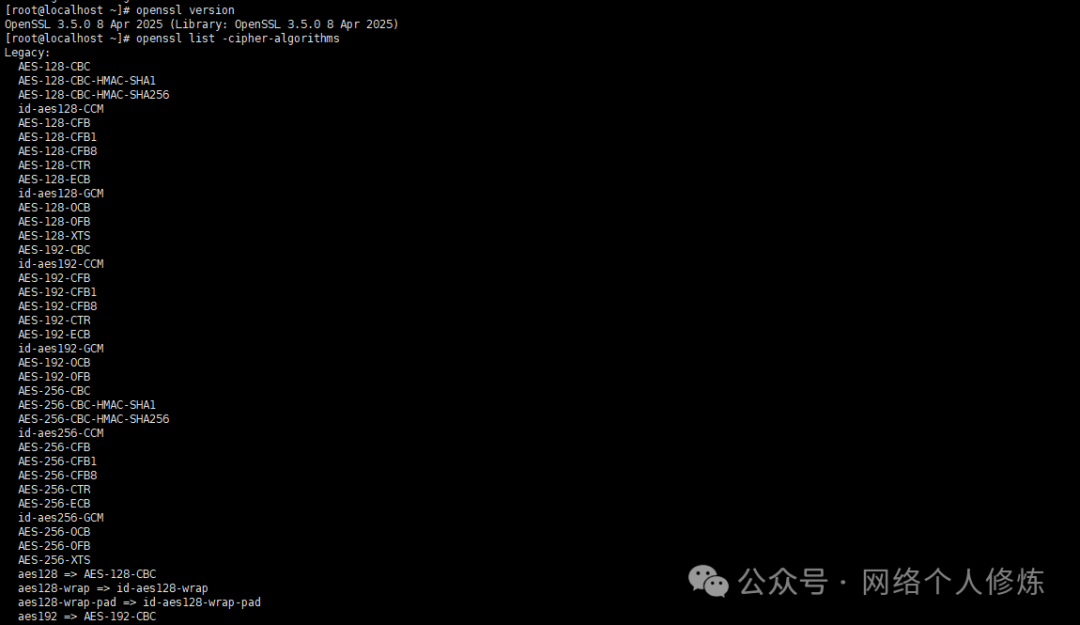
II. File Packaging Encryption: Combining Tar and Encryption Tools
When multiple files or directories need to be encrypted, it is efficient to first package them using the tar command and then encrypt them. This method maintains the directory structure while achieving batch encryption.
2.1. Package and Encrypt
Package the directory into a tar.gz format and immediately encrypt it:
tar -cvf data.tar.gz /home/dataopenssl enc -aes-256-cbc -salt -in data.tar.gz -out data.tar.gz.enc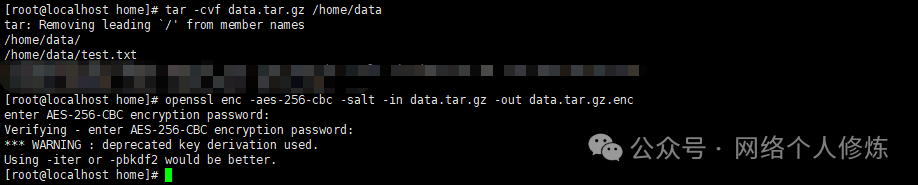
2.2 Decrypt and Extract
After receiving the encrypted package, it must be decrypted before extraction:
# Decryptopenssl enc -d -aes-256-cbc -in encrypted_package.tar.gz.enc -out decrypted_package.tar.gz# Then extracttar -xzvf decrypted_package.tar.gzIII. Remote Transmission Encryption: Ensuring Data Transmission Security
During remote file transmission, in addition to encrypting the file itself, encrypting the transmission channel is also crucial. Commonly used SSH protocol tools provide a complete transmission encryption solution.
3.1 SCP Transmission of Encrypted Files
Combine file encryption and SCP transmission:
# First encrypt the file and then transmitopenssl enc -aes-256-cbc -salt -in sensitive_file.tar.gz -out sensitive_file.tar.gz.enc# Use SCP to transmit the encrypted filescp sensitive_file.tar.gz.enc username@remoteIP:/target_path3.2 Direct Transmission of Encrypted Stream via Pipe
Without saving the local encrypted file, directly transmit the encrypted data stream via pipe:
tar -czvf - local_directory | openssl enc -aes-256-cbc -salt -pass file:password_file | ssh username@remoteIP "cat > /target_path/encrypted_package.tar.gz.enc"This method saves local space while ensuring that the entire transmission is encrypted.

IV. File Integrity Check and Security Recommendations
4.1. Generate File Hash to Ensure File Has Not Been Tampered With
Encrypted files may be damaged or tampered with during transmission or storage. It is recommended to generate a SHA256 checksum to ensure file integrity.
Generate hash:
sha256sum filename > filename.sha256Receiver verification:
sha256sum -c filename.sha256Reference Links
https://wiki.openssl.org/index.php/Enc
Previous Readings
What are the highly active and valuable communities and blogs in domestic network security?
Starting from the pronunciation dispute of ‘null’: Technical terms mispronounced by Chinese programmers
Practical Guide to Nginx Proxy Security Protection: From Basic Configuration to Risk Avoidance
-End-
If you find my sharing useful
[Like +Share+Follow
 ]
]