Introduction
Recently, the OpenCloudOS RISC-V SIG successfully adapted the Milk-V Megrez development board, and the adaptation results have been synchronized to the OpenCloudOS image official website. We welcome you to download and experience it [1].
This work was completed by Malachite, an intern from the PLCT laboratory of the Institute of Software, Chinese Academy of Sciences, under the mentorship of engineer Sun Min from Kuya Technology. This is part of the “Jiachen Project Open Source Intern Joint Recruitment and Training” for the OpenCloudOS community.
About OpenCloudOS Stream
OpenCloudOS Stream (hereinafter referred to as OC) is an autonomous and controllable upstream distribution jointly created by the OpenCloudOS community and its partners. Through full-stack optimization of the kernel and user-space components, it provides an advanced high-performance foundational environment that can effectively address risks similar to the discontinuation of CentOS. It also includes a series of proprietary kernel patches and features, such as allowing non-privileged processes to bind to low ports, process and mount point protection, system call and socket auditing, making it very suitable for cloud-native and containerized applications.
Introduction to Milk-V Megrez Development Board
Milk-V Megrez is a RISC-V development board focused on AI and virtualization, equipped with a 4-core SiFive P550 CPU (ESWIN EIC7700X SoC), supporting the 64-bit RV64GBCH standard instruction set, with a maximum frequency of up to 1.8 GHz and supporting a maximum of 32 GB LPDDR5 memory (6400MT/s). The Megrez instruction set supports the H extension, which can effectively enhance the RISC-V native virtualization performance.
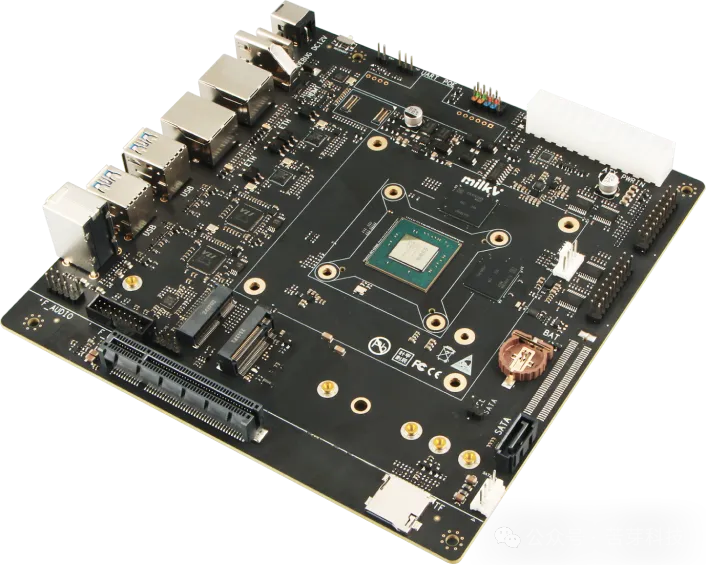
Megrez Development Board
Adaptation Results Display
Currently, OpenCloudOS Stream has been preliminarily adapted to the Milk-V Megrez, completing the kernel compilation and boot process, able to start the Wayland minimal desktop environment, and various functions have been verified. The latest source code is located at [2], welcome to check it out..
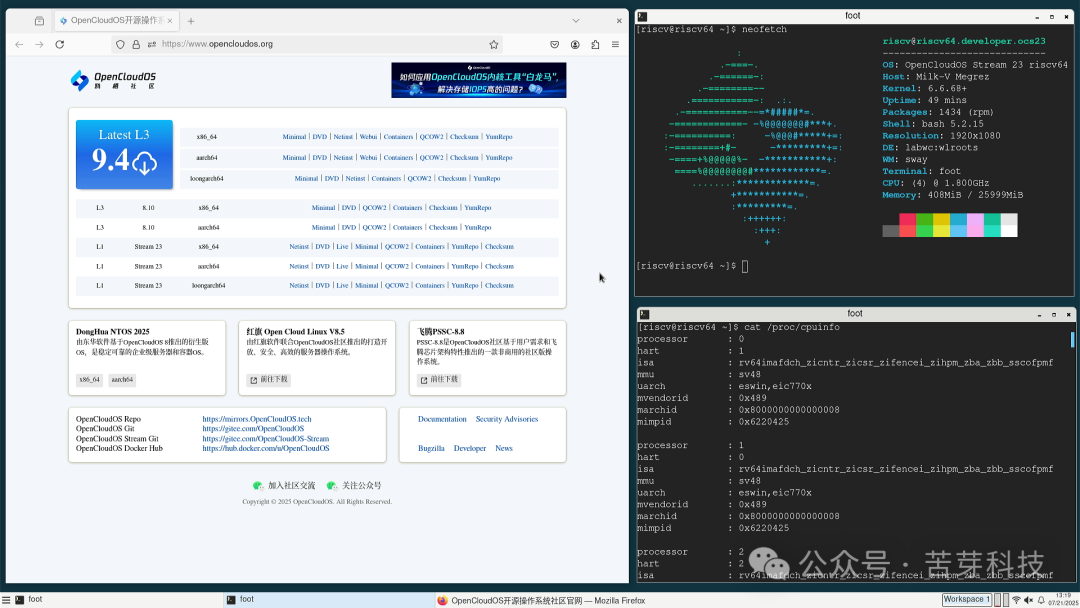 Browser Support | Wayland Environment (Optional) | H Extension
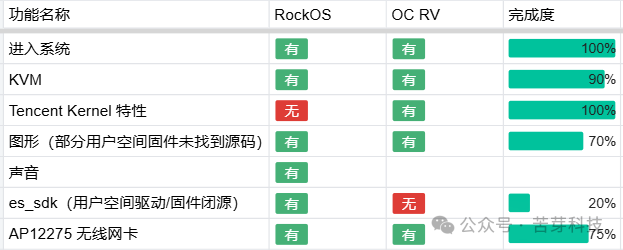 Function Adaptation Progress (Benchmarking RockOS)
Just three steps to quickly experience the adaptation results
-
Obtain the distribution / Burn the image
Download the image file from the OpenCloudOS official website [1], decompress it, and write it to EMMC or SD card storage. It is recommended to use tools like Etcher to perform the image burning operation.
wget https://mirrors.opencloudos.tech/opencloudos-stream/releases/23/images/riscv64/sdcard/ocs_developer_sdcard-megrez.img.xz-
Power on
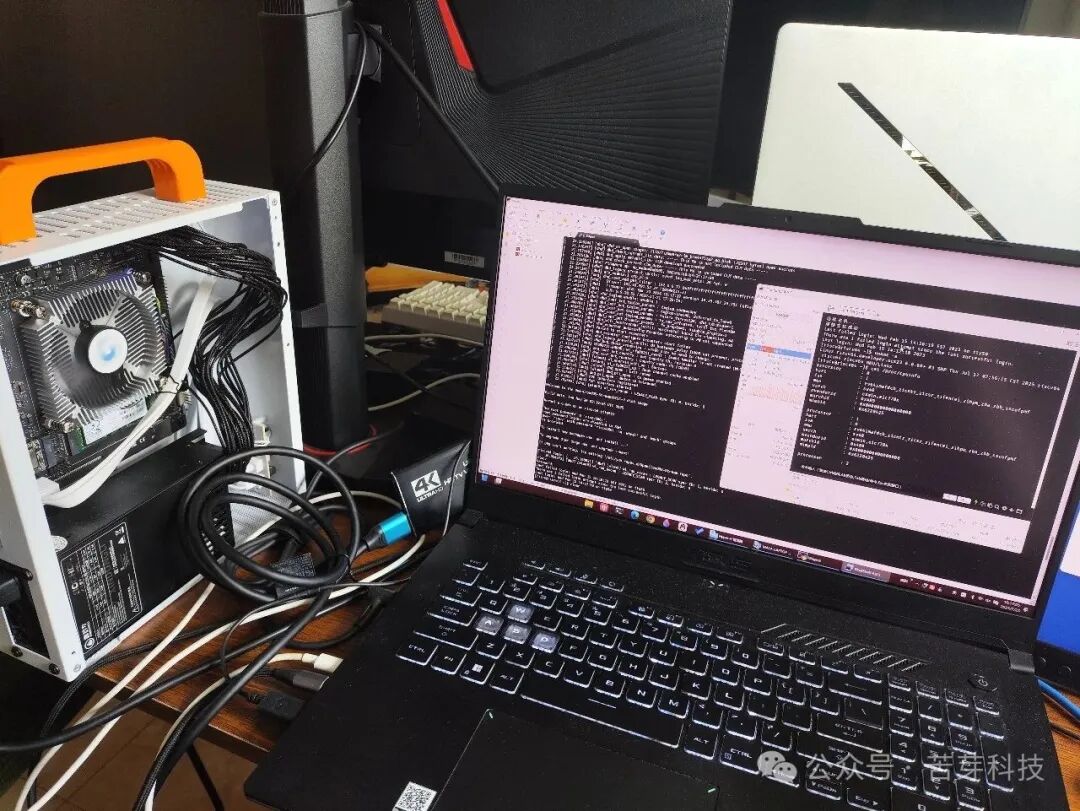
Note: Before powering on, the development board needs to be connected to the development machine via a serial cable (USB Type-C data cable)!
When writing the OpenCloudOS Stream image to the disk (SD card) and powering on, u-boot may not automatically recognize the grub bootloader, so you need to open a uboot command line. To tell u-boot where to boot from, you can choose the following statements based on the installed storage medium and paste them into the u-boot command line for execution.
# For SATA hard drive
setenv bootcmd 'load sata 0:1 0x84000000 EFI/BOOT/BOOTRISCV64.EFI; bootefi 0x84000000'; saveenv
# For eMMC module
setenv bootcmd 'load mmc 0:1 0x84000000 EFI/BOOT/BOOTRISCV64.EFI; bootefi 0x84000000'; saveenv
# For SD card
setenv bootcmd 'load mmc 1:1 0x84000000 EFI/BOOT/BOOTRISCV64.EFI; bootefi 0x84000000'; saveenv
After successfully saving the environment, you can try executing the boot command to boot into OpenCloudOS Stream.
-
Connect to the Internet
You can successfully connect to the specified WiFi via the command line.
## Scan nearby WiFi list
nmcli device wifi scan
## Connect to hotspot
nmcli device wifi connect 'SSID of the WiFi you want to connect' password 'password'
This is a dividing line, the following adaptation process is narrated byMalachite.
Introduction to the Megrez Development Board in my hands
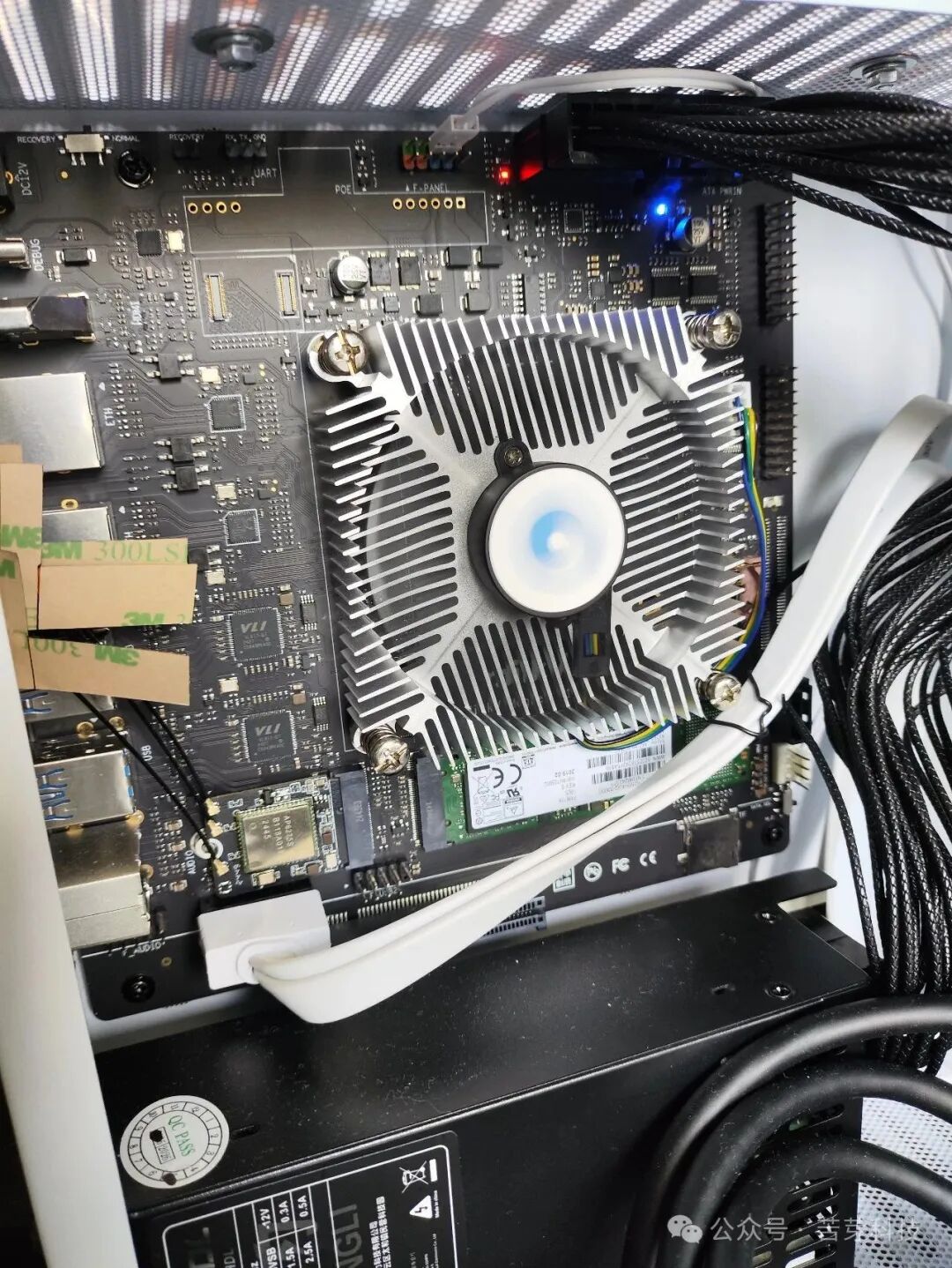
Megrez Assembly Diagram
I plan to adapt it this way
Before adapting OpenCloudOS, two operating systems had already been adapted to Megrez, namely Fedora and RockOS. The adaptation approach for the OpenCloudOS kernel is as follows: Porting hardware-related source code such as drivers and device trees from the currently most compatibleRockOS kernel. Below are the difficulties I encountered during the kernel porting process and the solutions.
It seems necessary to merge kernel patches
The baseline kernel version for OpenCloudOS is 6.6.68 and contains many custom patches, while RockOS has not released this version, resulting in “merge conflicts” between the two. To prevent incomplete driver porting and unexpected situations such as OpenCloudOS’s proprietary patches being overwritten, I need to read the source code and summarize the file characteristics related to the EIC7700 SoC, and then perform batch searches. For example, placing both kernel source trees in the $HOME directory (~) and using the following command to identify the driver code related to the SoC:
for i in $(grep -ril -e 'eswin' -e 'eic7' -e 'win2030' -e 'sifive' .); do
  if cmp -s $i ~/OpenCloudOS-Kernel/$i; then
      echo $i
  fi
done
Then use the meld tool to compare the two folders, copying files that do not exist in OpenCloudOS over, and for files that exist on both sides, perform specific line-level comparisons and selections to “resolve merge conflicts”.
Difficult-to-understand UAPI header files
During the porting process, several UAPI header files could not pass HDRTEST, but they compiled successfully in RockOS and the reasons for failure in OpenCloudOS were “C++ style comments present, not compliant with the ANSI C standard” and “size_t not defined”. After judgment, these files are necessary for compiling the driver, and these errors generally do not occur during user usage, so I added these header files to the usr/include/Makefile no-header-test list.
From 6.6.73 to 6.6.88
At the beginning of the adaptation work, I mistakenly thought that to facilitate porting, I should select the version number as close as possible and with the least number of differential patches, which was the 6.6.73 version of the RockOS kernel for porting. However, after porting to the point of being able to boot, I found that there were several boot dmesg errors that could not be resolved no matter how I modified the config or provided user-space firmware, such as USB_DWC3 and mailbox hardware not initializing properly.
Upon inspection, it was found that the 6.6.73 version of the RockOS device tree was not complete, and changing the device tree required synchronizing changes to the driver, so I had to switch to the current latest 6.6.88 version of the RockOS kernel source and start over. After initially completing the code porting, the kernel compilation config also needed to be adjusted.
NUMA configuration options confused me
Initially, I tried to export from OpenCloudOS Stream 23 QEMU in /proc/config.gz and then
make oldconfigAfter compilation, I found that many options related to EIC7700 were not enabled by default, causing the directly compiled kernel to fail to boot normally. Adjusting it against the RockOS eic7700_defconfig was very troublesome. In contrast, the options related to OpenCloudOS were quite clear in menuconfig. Therefore, I ultimately chose to create a config from the eic7700_defconfig template and then adjust specific options (such as NUMA, Tencent Kernel features, etc.) in menuconfig. This way, compiling a kernel that can boot and properly drive various hardware should become much easier.
However, if I follow the RockOS configuration and do not set NUMA, the compilation of mm/memcontrol.c will fail; if I enable NUMA, there will be two warnings about NUMA during the early boot dmesg :
[    0.000000] NUMA:Warning: invalid memblk node 8[mem 0x0000000480000000-0x000000087ffccfff]
[    0.000000] NUMA:Faking a node at [mem 0x0000000080000000-0x00000010003fffff]
This is due to a mismatch between the memory layout information obtained from the device tree and the expected NUMA node configuration, falling back to UMA. Since RockOS does not set NUMA, and the EIC7700X only has four cores, it is speculated that “the device tree does not support it”. To fully adapt to this hardware, the NUMA option should be turned off, but the compilation cannot pass.
Discovered a BUG in the OCS kernel patch
After reading the source code for troubleshooting, I found that this was a problem introduced by a proprietary patch of the OpenCloudOS kernel [3]. When enabling MEMCG but disabling NUMA, some functions in mm/memcontrol.c would call functions that would not be compiled under that condition, leading to compilation errors. This fault can also be reproduced on x86_64.
After managing to fix this defect, enabling MEMCG but disabling NUMA allows the compilation to pass. The patch to fix this defect has been pushed to the latest development branch of OpenCloudOS-Kernel [4].
Joy of Success
At this point, the kernel can compile normally, generate initramfs based on kernel modules through dracut, and boot into the system. After booting, a win2030-noc error will appear (the same issue exists in the other two distributions adapted to Megrez), which is speculated to be caused by the RTC not having a battery, leading to an error in writing to the clock’s register, and the DSP, NPU, etc. lack user-space closed-source firmware causing driver loading errors, but there are basically no other errors, and functional verification can begin.
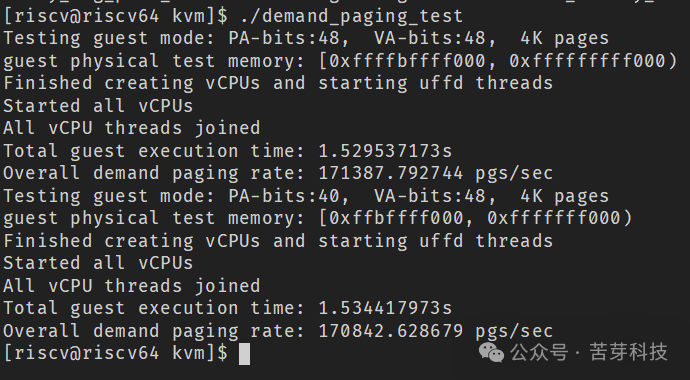
By the way, verifying KVM functionality
-
Read CPU information
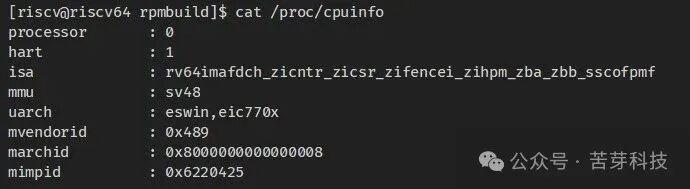
-
Compile KVM test items in the kernel and run successfully
-
Using KVM and large memory, successfully booting an ubuntu image in snapshot mode
After downloading the u-boot-qemu deb from the RockOS software source and extracting the S-mode ELF format uboot (not present in the OpenCloudOS Stream software source), execute
qemu-system-riscv64 --enable-kvm -M virt \
-cpu host -m 16384 -smp 4 -nographic \
-kernel ./uboot.elf \
-drive file=ubuntu-25.04-preinstalled-server-riscv64.img,format=raw,if=virtio,snapshot=on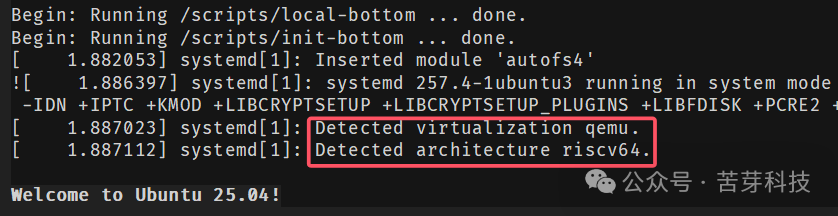
This method will not write changes to the disk image, and can be promoted to the software package testing and development process of OpenCloudOS, bringing a clean environment that is not polluted by build dependencies while simplifying deployment and minimizing performance loss.
Can’t wait to verify Tencent Kernel features
-
Allow non-privileged users to bind to specific low-numbered ports

-
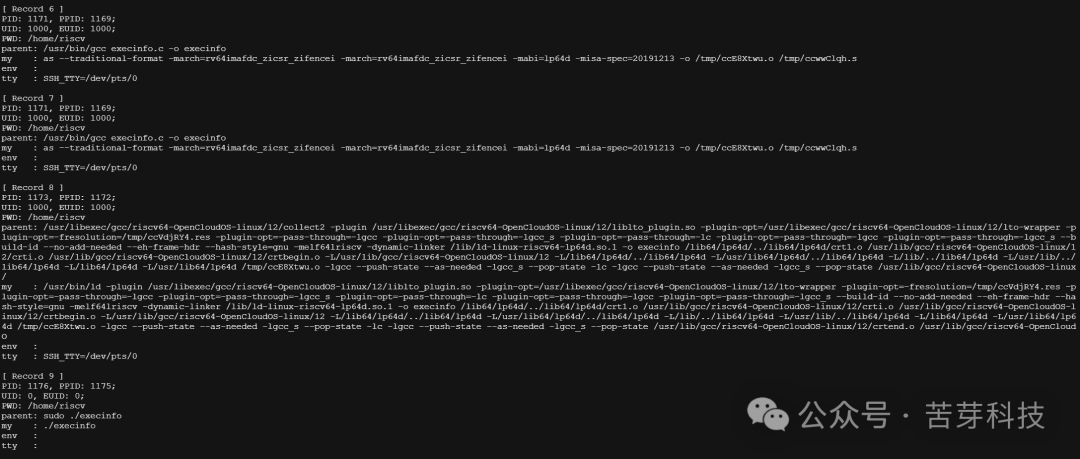
Load aegis kernel module, read execve system call audit report
-
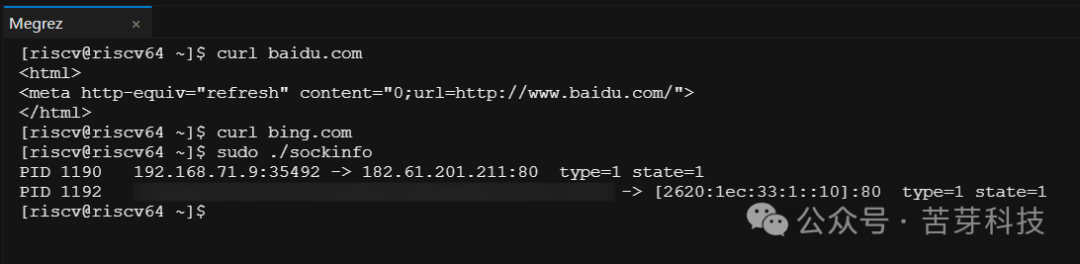
Using the same kernel module to read socket audit report
Some final words
Currently, the OpenCloudOS Stream kernel adapted for the Milk-V Megrez platform has completed adaptation for most hardware functions, including KVM , and retains proprietary features such as Enhanced MM, Tencent Kernel , etc. The current OpenCloudOS Stream image is not complete, lacking a usable desktop environment. We still need to integrate user space without additional configuration for rootfs, firmware and drivers, and improve the boot process suitable for ordinary users.
The road ahead is long and winding
-
Function adaptation direction:ESWIN SDK, NPU kernel drivers, user-space GPU drivers, and graphics stack issues that require ESWIN official support and cooperation
-
Performance optimization direction: targeted optimization work based on the kernel features of OpenCloudOS and cloud-native business scenarios.
About Intern Malachite
“Likes to play with Linux development boards, proficient in shell and VBA“

Reference Links
[1] https://mirrors.opencloudos.tech/opencloudos-stream/releases/23/images/riscv64/sdcard/ocs_developer_sdcard-megrez.img.xz
[2] https://gitee.com/malachite/OpenCloudOS-Kernel/tree/p550-dev/
[3] https://gitee.com/OpenCloudOS/OpenCloudOS-Kernel/commit/321e018e4b3fa18cbcc73a97f9cba48a8f911624
[4] https://gitee.com/OpenCloudOS/OpenCloudOS-Kernel/pulls/438
About Shanghai Kuya Technology Co., Ltd.
Kuya Technology is committed to providing global customers with full-stack software services based on RISC-V and open-source technology, covering chip simulation, toolchain development, operating system adaptation, and AI acceleration optimization. The company aims to “drive innovation and achieve win-win through open source,” serving customers across the semiconductor, smart hardware, and cloud computing fields.
Learn More
-
Official Website: kubuds.io
-
Business Inquiries: [email protected]
-
Technical Cooperation: GitHub: github.com/kubuds