Hello, everyone! I am Xiiiia.
For those who have just learned the basic syntax rules of Python and are stepping into the world of computational linguistics, mastering the use of spaCy largely determines whether you can become an independent text analyst.
This series mainly focuses on the knowledge related to the Python library spaCy, including installation, simple applications in text analysis, how to link it with other Python libraries, and how to combine spaCy with machine learning. The entire sharing process is based on my own learning journey and insights. If there are any inaccuracies or areas for improvement, I hope the experts can point them out, and we can learn and progress together in this process.
I still remember during my first year of graduate school in my computational linguistics course, when my professor, Professor Tang, mentioned the spaCy library, he casually remarked, “This library is not easy to install; many students from previous years got stuck at the installation step.” At that time, I thought to myself, how hard can it be to install a library? My PyCharm can do anything; it should be simple to just click install in the extension section. However, reality often hits hard. I indeed encountered difficulties during the installation process, facing compatibility issues here and missing packages there. After struggling for a while, the 30-day free trial provided by PyCharm had already expired. I am not someone who likes to use pirated software, and it felt quite troublesome. (Those who empathize with this, please give a thumbs up!) So, I sought help from my professor, who advised me not to use PyCharm and provided three reasons:
1️⃣Although PyCharm has a user-friendly interface initially, making it easy for beginners to get started, it is not conducive to developing the skills of beginners and can foster a dependency habit.
2️⃣If you plan to pursue a career in computational linguistics, PyCharm is not very compatible with many tools, or at least its adaptability is not that high.
3️⃣PyCharm is paid software (which is undoubtedly the most important point, and the cost is not cheap).
The conclusion is that you should use Visual Studio Code, which perfectly addresses the three shortcomings mentioned above.
Additionally, I want to mention that when installing Python, you can choose to install it directly from the official website and use its built-in pip for subsequent package installations. A better method would be to download Anaconda for package and library management, allowing the two processes to run independently without causing confusion. Interestingly, we usually understand that the word “python” refers to a “python snake” (although I found out during my research that this programming language was not named for this reason), while Anaconda (the “green anaconda” in the python family) is a giant snake.
Considering the functionality of Anaconda, its name carries a metaphor: Anaconda, as a “super-sized package/enhanced version” of Python, is as inclusive and powerful as a giant python.
Alright. With that, we have addressed some common pain points for beginners. Now, let’s get to the main topic: the installation and basic use of spaCy.
1. Installation of spaCy
If you have installed VS Code and Anaconda as described above, the installation of spaCy will become very simple.
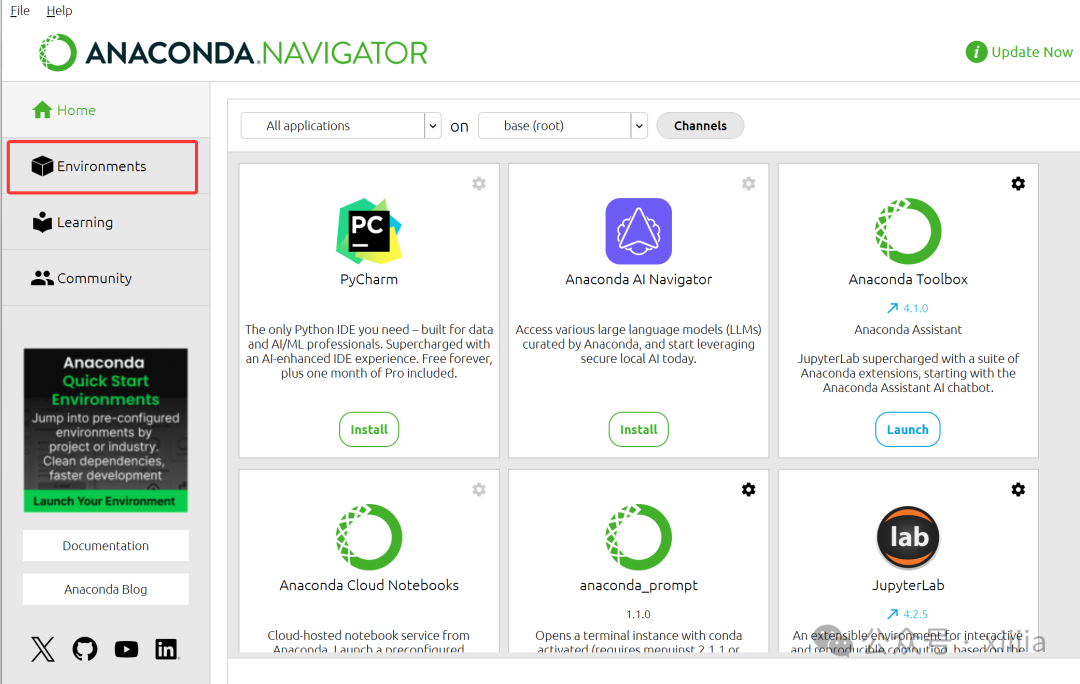
As shown in the figure, this is the page opened by Anaconda. We just need to find the Environments section. The environment here is actually a small space where we can combine existing libraries and tasks to do what we want.
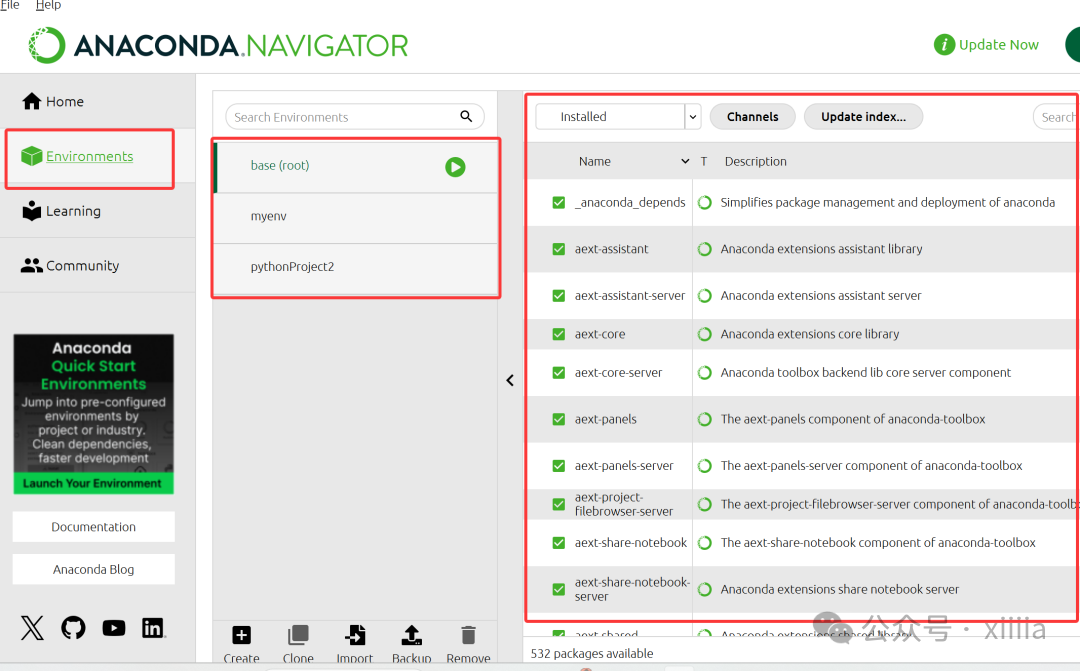
Each environment here is independent and does not interfere with each other. As shown in the figure, I have three independent environments, which are the three small spaces mentioned above. You can install various libraries on the far right (by searching directly), and they will be installed into your chosen environment. For me, I have installed all the libraries I need for my studies into the myenv virtual environment. I just need to connect my VS Code to this environment to call the libraries already available for programming and running programs.
Now, we just need to enter “spaCy” in the Search box and click install. You can choose the version number according to your specific needs, for example, here it is version 3.7.5.
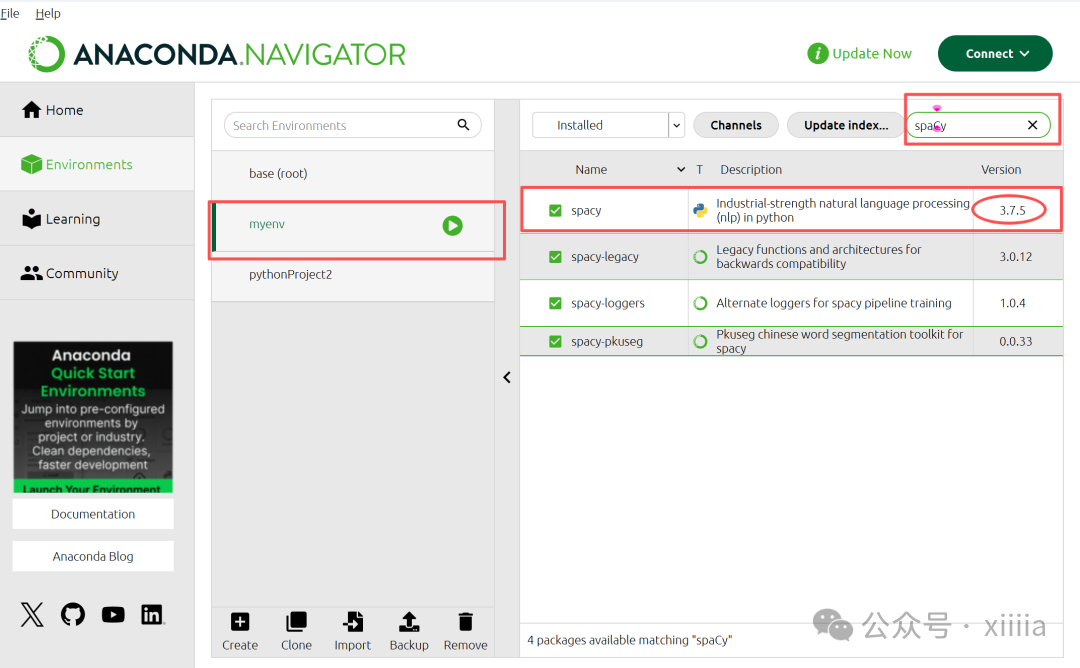
Thus, we have completed the installation of spaCy! Next, let’s move on to the application phase.
2. Basic Applications of spaCy
Before we officially use it, we must download a language model, which is used to train spaCy. It is equivalent to providing it with a large amount of language data to let it know what kind of language text we are processing, essentially giving it a certain amount of Background Information. This step is quite simple; just type the following in the command prompt:
python -m spacy download en_core_web_sm
The meanings of the various symbols are as follows: en: English language; core: core; web: some corpus from the web; sm: indicates that this corpus is relatively small. Correspondingly, we also have medium and large language models, which can be achieved by simply changing the last “sm” to “md” or “lg”.
Tips: It is important to note that the model installed in the command prompt must also be in the same virtual environment where you installed the spaCy library!
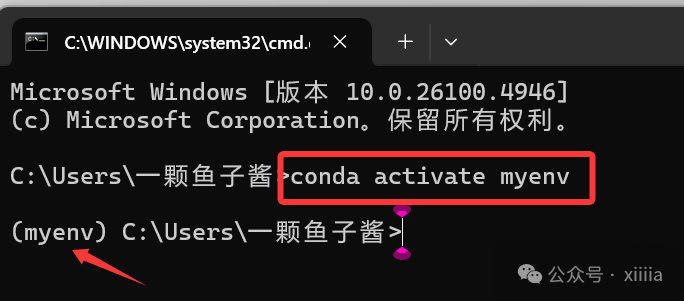
Next, create a new Python file to use the spaCy that we have “obtained” with great effort.
Below is a simple Python script using spaCy for text processing:
1 import spacy
2
3 # Load the English language model
4 nlp = spacy.load(“en_core_web_sm”)
5
6 text = “””
7 Deep in the Pacific Ocean, an octopus shifted its color from a dull brown to an electric blue,
8 blending seamlessly with the coral. It was a survival instinct honed over millennia. Nearby,
9 a robotic submersible whirred softly as it recorded data, its cameras scanning for signs of
10 bioluminescent creatures. ‘These depths hold more mysteries than we can imagine,’ Dr. Patel
11 murmured into her headset, jotting down observations. Above, aboard the research vessel, a
12 team of marine biologists analyzed real-time footage, debating whether they had just discovered
13 a new species. The ocean, vast and unpredictable, whispered its secrets in waves, waiting for
14 those patient enough to listen.
15
16 doc = nlp(text)
17 print([token.text for token in doc])
The main functions of this code are as follows:
1.Import the spaCy library to utilize its natural language processing capabilities.
2.Load a small, pre-trained English language model that contains rules and statistical algorithms for tokenization, part-of-speech tagging, named entity recognition, etc.
3.Define a simple text string to be processed.
4.Pass the text into the spaCy processing pipeline, which will split the text into tokens and apply language analysis (such as part-of-speech tagging). The result returned is a Doc object, which is the main container used by spaCy to store processed text and its annotations.
5.Iterate through each token in the Doc object and output their text, displaying the words or tokens recognized by spaCy in the sentence as a list.
In simpler terms:
spaCy is like a language teacher who understands English. You give it a sentence, and it will first break the sentence into individual words, then determine the part of speech for each word, and can even recognize names, places, and other information.
Finally, you can clearly see the organized results, just like handing it a complete sentence, and it will help you cut, classify, and neatly display it.
Of course, there are corresponding language models available for other languages as well!
If you successfully run the code, the expected output should look like this:
1 [‘\n’, ‘Deep’, ‘in’, ‘the’, ‘Pacific’, ‘Ocean’, ‘,’, ‘an’, ‘octopus’, ‘shifted’, ‘its’, ‘color’,
2 ‘from’, ‘a’, ‘dull’, ‘brown’, ‘to’, ‘an’, ‘electric’, ‘blue’, ‘,’, ‘\n’, ‘blending’, ‘seamlessly’,
3 ‘with’, ‘the’, ‘coral’, ‘.’, ‘It’, ‘was’, ‘a’, ‘survival’, ‘instinct’, ‘honed’, ‘over’, ‘millennia’,
4 ‘.’, ‘Nearby’, ‘,’, ‘\n’, ‘a’, ‘robotic’, ‘submersible’, ‘whirred’, ‘softly’, ‘as’, ‘it’, ‘recorded’,
5 ‘data’, ‘,’, ‘its’, ‘cameras’, ‘scanning’, ‘for’, ‘signs’, ‘of’, ‘\n’, ‘bioluminescent’, ‘creatures’,
6 ‘.’, ‘‘’, ‘These’, ‘depths’, ‘hold’, ‘more’, ‘mysteries’, ‘than’, ‘we’, ‘can’, ‘imagine’, ‘,’, ‘’’,
7 ‘Dr.’, ‘Patel’, ‘\n’, ‘murmured’, ‘into’, ‘her’, ‘headset’, ‘,’, ‘jotting’, ‘down’, ‘observations’,
8 ‘.’, ‘Above’, ‘,’, ‘aboard’, ‘the’, ‘research’, ‘vessel’, ‘,’, ‘a’, ‘\n’, ‘team’, ‘of’, ‘marine’,
9 ‘biologists’, ‘analyzed’, ‘real’, ‘-‘, ‘time’, ‘footage’, ‘,’, ‘debating’, ‘whether’, ‘they’, ‘had’,
10 ‘just’, ‘discovered’, ‘\n’, ‘a’, ‘new’, ‘species’, ‘.’, ‘The’, ‘ocean’, ‘,’, ‘vast’, ‘and’,
11 ‘unpredictable’, ‘,’, ‘whispered’, ‘its’, ‘secrets’, ‘in’, ‘waves’, ‘,’, ‘waiting’, ‘for’,
12 ‘\n’, ‘those’, ‘patient’, ‘enough’, ‘to’, ‘listen’, ‘.’, ‘\n’]
At this point, we have learned how to install and use spaCy for basic text analysis. In the future, I will introduce related concepts and deeper applications. I look forward to your attention and support!
Stay tuned!