Word count: 3443, reading time approximately 18 minutes

The Model Context Protocol (MCP) utilizes streamable HTTP to transmit data in real-time over the web, enabling AI agents to interact with web services. It employs a single endpoint and Server-Sent Events (SSE), simplifying implementation while maintaining compatibility with existing web infrastructure, thereby enhancing reliability and efficiency.
Translated from:How MCP Uses Streamable HTTP for Real-Time AI Tool Interaction[1]
Author: Janakiram MSV
The Model Context Protocol[2] (MCP) is an open standard for connecting AI models (clients) with external tools and data sources (servers). For local integration, MCP can use simple STDIO (standard input/output) transmission, but for networked (remote) tools, it relies on HTTP-based communication.
Streamable HTTP[3] is a modern HTTP transport introduced in MCP for handling streaming interactions between clients and servers. Released in early 2025, it is an evolution of the earlier HTTP+SSE approach, addressing its shortcomings. Essentially, streamable HTTP allows MCP to send and receive data over the web in a continuous real-time stream, rather than just a single request followed by a response. This new transport method supports remote MCP servers (sometimes referred to as “remote” tools) and enables AI agents to interact with web services in a fluid manner.
In this article, we will delve deeper into streamable HTTP through a practical example. We will build a simple MCP server and client to analyze the communication between the two.
What is Streamable HTTP?
Streamable HTTP is an HTTP-based communication mechanism that supports streaming responses and bidirectional interactions over a single HTTP connection.
In simple terms, the MCP client sends a request to the server via HTTP POST, and the server can respond with a normal single JSON message or can send multiple messages back in a timely manner by initiating a real-time event stream (using Server-Sent Events, SSE). The server exposes a unified HTTP endpoint (e.g., <span>https://example.com/mcp</span>), which accepts POST requests (for sending commands) and GET requests (for establishing a listening stream).
This single endpoint design is a core feature – all communication occurs through one URL – simplifying implementation compared to older multi-endpoint schemes.
Under the hood, streamable HTTP still uses standard HTTP protocols (POST, GET) and SSE, ensuring compatibility with existing web infrastructure (proxies, load balancers, etc.) while supporting long-lived data streams.
In summary, streamable HTTP is a mechanism that allows MCP to transmit data streams over HTTP in a controlled manner and use SSE to deliver continuous server messages when needed.
Sequential Analysis of Client-Server Interaction
To fully understand the mechanism of streamable HTTP transmission, we must shift from theoretical concepts to a practical sequential analysis of the communication session. The following sections provide a step-by-step breakdown of actual client-server interactions, illustrating the entire protocol lifecycle from session establishment to termination. Each stage is examined through the server’s HTTP-level responses, clarifying the role and significance of each request.
Below is a simple MCP server that exposes a Python list as a tool:
from fastmcp import FastMCP


mcp = FastMCP("Employee Server")


@mcp.tool()
def get_employees() -> list:
    return [
        {"id": 1, "name": "Alice", "role": "Engineer"},
        {"id": 2, "name": "Bob", "role": "Designer"},
        {"id": 3, "name": "Charlie", "role": "Manager"},
        {"id": 4, "name": "Diana", "role": "Analyst"},
        {"id": 5, "name": "Eve", "role": "Intern"},
    ]


if __name__ == "__main__":
    mcp.run(transport="streamable-http", host="127.0.0.1", port=8080, path="/mcp/")
We will call this server from a client that uses Google Gemini’s native support for MCP. The code is as follows:
import os
import asyncio
from google import genai
from mcp import ClientSession
from mcp.client.streamable_http import streamablehttp_client


import warnings
warnings.filterwarnings("ignore")


MCP_SERVER_URL = "http://127.0.0.1:8080/mcp/"
client = genai.Client()


async def main():
    async with streamablehttp_client(MCP_SERVER_URL) as (read, write, _):
        async with ClientSession(read, write) as session:
            await session.initialize()
            prompt = "Who is the Intern in the company?"
            response = await client.aio.models.generate_content(
                model="gemini-2.5-flash",
                contents=prompt,
                config=genai.types.GenerateContentConfig(
                    temperature=0,
                    tools=[session],  # Pass the MCP session as a tool
                ),
            )
            print(response.text)


if __name__ == "__main__":
    asyncio.run(main())
Note how we pass the client session as a tool to the Gemini API.
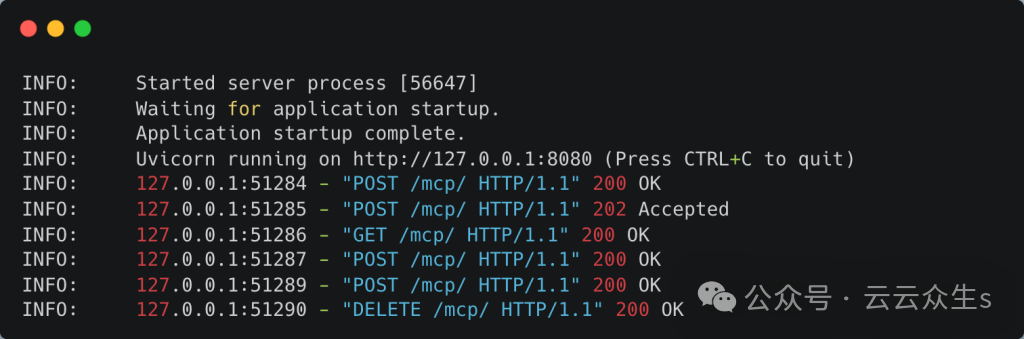
When we run the server and client, we see the following logs on the server console.
[4]
Let’s examine each request sent by the client to the server.
Stage 1: Initialization and Session Establishment
The entire lifecycle of the MCP session begins with a single foundational request from the client. This is the initialization phase, where the client and server establish a shared context, negotiate protocol capabilities, and create a session identifier that will be used for all subsequent communications.
Log entry:<span>POST /mcp HTTP/1.1 200 OK</span>
The process is initiated when the client sends an HTTP POST request to the specified MCP endpoint, which we will assume is /mcp. The body of this POST request contains a JSON-RPC message with the method initialize. This message carries information about the client’s capabilities and the desired protocol version.
After receiving and successfully processing this request, the server responds with an HTTP 200 OK status code. The Content-Type header of this response is application/json, as the result of the initialization is a single synchronous object. However, the most critical part of this response is not in the body but in the headers. The server includes a new header Mcp-Session-Id, which contains a unique value (e.g., Mcp-Session-Id: session-a4b1-c8d3-e5f6). This identifier is the foundation of the entire session state. The client must capture this ID and include it in all future requests to maintain the context of the session.
A lightweight confirmation is sent with a 202 Accepted response with an empty body. This confirms to the client that the server has received and accepted the notification for processing. This is more efficient than sending a 200 OK with a full JSON response body, which is reserved for requests that produce results.
The body of the response contains an InitializeResult JSON-RPC object. This object confirms successful setup and details the capabilities of the server, such as the tools and resources it provides, and confirms the protocol version that will be used for the session. After this exchange, a stateful session has been successfully established.
Stage 2: Establishing the Announcement Channel
Now that the session is activated, the client may choose to open a secondary communication channel for server-initiated messages. This step is optional but is typically performed by fully functional clients to enable more interactive and dynamic workflows.
Log entry:<span>GET /mcp HTTP/1.1 200 OK</span>
After successful initialization, the client immediately sends an HTTP GET request to the same /mcp endpoint. This is not an anonymous request; to associate this new, long-lived connection with the session just created, the client must include the Mcp-Session-Id: session-a4b1-c8d3-e5f6 header received in the previous step. This request must also include the Accept: text/event-stream header to indicate its purpose.
The server recognizes the valid session ID and responds with HTTP 200 OK and Content-Type: text/event-stream headers. This response does not terminate. The TCP connection remains open indefinitely, establishing a persistent announcement channel. From this point on, the server can push JSON-RPC requests or notifications to the client at any time using this open connection, completely independent of the client’s own operations on the command channel.
Stage 3: Client-Initiated Request with Streamed Response
This stage demonstrates the core advantage of streamable HTTP transmission: handling long-running tasks and providing real-time progress updates, all within a single transaction scope.
Log entry 1:<span>POST /mcp HTTP/1.1 200 OK</span> (with <span>Content-Type: text/event-stream</span> response)
The client now wishes to perform a task, such as running a data analysis script. It sends a new HTTP POST request to the /mcp endpoint. The body contains the relevant JSON-RPC request, such as {“jsonrpc”: “2.0”, “id”: 1, “method”: “tools/execute”, “params”: {…}}. Crucially, this request includes the Mcp-Session-Id header to maintain session context.
The server receives this request and recognizes it as a long-running operation. It does not wait for the entire task to complete but instead responds immediately with an HTTP 200 OK status code and Content-Type: text/event-stream header. This action keeps the connection for this specific POST request open, converting its response body into a dedicated SSE stream.
Once the script completes execution, the server constructs the final JSON-RPC response object, which includes the original request ID (e.g., {“jsonrpc”: “2.0”, “id”: 1, “result”: {…}}). This final result is sent as the last SSE event on the POST response stream. After sending this end message, the server should immediately close this specific SSE stream. This action completes the HTTP transaction for this POST request. The client has now received all progress updates and the final result, all neatly contained within the scope of the request that initiated the task.
Stage 4: Server-Initiated Notifications
This stage illustrates the independence of the two channels. While the long-running POST transaction from Stage 3 is ongoing, the server can still communicate with the client regarding unrelated matters.
Log entry (conceptual): The server sends SSE data on the long-lived GET connection: block.
Assuming that during the data analysis run, a new tool was added by the system administrator to the server. The server may decide to notify all connected clients of this update. It constructs a JSON-RPC notification (e.g., {“jsonrpc”: “2.0”, “method”: “tools/didChange”, “params”: {…}}) and sends it as an SSE event. However, it does not send this notification from the active POST response stream in Stage 3. Instead, it sends it through the persistent GET connection established in Stage 2. This demonstrates the practical operation of the “announcement channel,” delivering a general notification within the session scope that is completely independent of any specific client-initiated command.
Stage 5: Connection Recovery (Hypothetical Scenario)
Robustness against network failures is a key design goal of this protocol. This hypothetical scenario demonstrates the built-in mechanism for connection recovery.
Due to a transient network issue, the client’s long-lived GET connection (announcement channel) disconnects. The last event ID successfully processed from that stream is event-id-42.
Log entry:<span>GET /mcp HTTP/1.1 200 OK</span> (with Last-Event-ID header)
The client’s network library detects the disconnection of the GET stream. To recover, it immediately sends a new HTTP GET request to the /mcp endpoint. This request includes two important headers: the Mcp-Session-Id header to re-associate with the correct session, and the Last-Event-ID: event-id-42 header.
The Last-Event-ID header is crucial for lossless recovery. The server receives this request, looks up the session state and message history using the session ID, and uses the event ID as a cursor. It then replays any messages that the client may have missed that were sent after event-id-42 on the old stream. Once the client catches up, the server resumes sending real-time messages, seamlessly restoring the announcement channel without losing any data. This precise mechanism can also be applied to recoverable POST response streams.
This layered state approach is the reason for achieving this resilience. HTTP itself is stateless, but the protocol enforces state through two layers. The Mcp-Session-Id header creates a persistent logical session state at the application layer, linking otherwise independent HTTP requests into a coherent dialogue. The open HTTP connection for GET streams or streamed POST responses provides transient transport-level stream state. The robustness of the protocol directly stems from its ability to rebuild transient transport state using persistent application state in the event of interruptions.
Stage 6: Session Termination
The final stage of the lifecycle is a clean and explicit session termination, allowing the server to release any resources it is holding.
Log entry:<span>DELETE /mcp HTTP/1.1 200 OK</span>
After completing all tasks, the client sends an HTTP DELETE request to the /mcp endpoint. To specify which session to terminate, this request must include the Mcp-Session-Id: session-a4b1-c8d3-e5f6 header.
The server receives this request, validates the session ID, and then begins to close the session. This includes clearing any session state stored in memory, closing the persistent GET connection for the announcement channel, and invalidating the session ID. To confirm the operation was successful, the server responds with an HTTP 200 OK status code, formally ending the communication lifecycle.
Conclusion
Streamable HTTP is a foundational component of MCP that enables AI agents to connect to tools over the internet in a rich and interactive manner. By extending HTTP to be stream-friendly and using SSE for continuous updates, it provides the necessary flexibility for AI systems that require streaming output, handle long-running tasks, and maintain real-time synchronization.
Unlike traditional HTTP request-response models, streamable HTTP keeps the conversation alive: AI agents can request tools to perform certain actions and immediately start receiving answers or updates, and the tool can even ask questions or send alerts back over the same communication line. This approach significantly enhances the reliability (session recovery on disconnection) and efficiency (no unnecessary persistent online connections) of MCP while maintaining compatibility with web standards.
In practice, streamable HTTP allows coding assistants to run remote build tools and stream real-time logs, or data analysis agents to query databases and return results incrementally as they arrive. It combines the simplicity of HTTP with the powerful capabilities of streaming, fulfilling MCP’s promise of being the “USB-C for AI tools” by providing a unified, powerful interface for streaming context and data between AI and the world.
Reference Links
<span>[1]</span> How MCP Uses Streamable HTTP for Real-Time AI Tool Interaction: https://thenewstack.io/how-mcp-uses-streamable-http-for-real-time-ai-tool-interaction/<span>[2]</span> Model Context Protocol: https://thenewstack.io/model-context-protocol-a-primer-for-the-developers/<span>[3]</span> Streamable HTTP: https://modelcontextprotocol.io/specification/2025-03-26/basic/transports#streamable-http<span>[4]</span> : https://cdn.thenewstack.io/media/2025/08/5fec1c98-mcp_server_logs-1024×339.png