1.Introduction
Milk-V Megrez is a RISC-V Mini-ITX development board equipped with the ESWIN EIC7700X, featuring a built-in quad-core SiFive P550 CPU designed specifically for RISC-V native development (supporting the 64-bit RV64GBCH standard instruction set, which provides hardware virtualization). Megrez is equipped with a high-performance GPU, delivering a smooth desktop experience; it also includes a 19.95 TOPS NPU, providing powerful local AI processing capabilities.
Recently, the OpenCloudOS RISC-V SIG successfully adapted the Milk-V Megrez development board, initially verifying the operating system’s boot, minimal Wayland graphical desktop, KVM virtualization, and AP12275 wireless network card functionalities, with the relevant adaptation results synchronized to the OpenCloudOS image official website, welcome to download and experience [1].
This work was completed by Malachite, an intern from the PLCT laboratory of the Institute of Software, Chinese Academy of Sciences, with mentorship from engineer Sun Min from Kuya Technology, entrusted to cultivate the community for the OpenCloudOS community, as part of the “Jiachen Project Open Source Intern Joint Recruitment and Training“.
2. Quick Experience with Megrez Image
(1) Download the image file and burn it
You can download the image file from the OpenCloudOS official website [1]. This image can be written to eMMC modules, TF cards, SATA hard drives, M.2 SATA hard drives, and other storage media for booting. It is recommended to use tools like Etcher to write the image to the storage medium.
(2) Power on and boot the system
After connecting the storage medium to the development board, simply power it on to boot the operating system.
(Optional: Before powering on, the development board can be connected to the development machine via a serial cable; it can also be operated directly through a monitor and keyboard/mouse.)
(3) Handling certain exceptional cases
The system bootloader u-boot may not automatically recognize the boot firmware, so it is necessary to type commands in u-boot to specify where the system should boot from, based on the installed storage medium, you can choose one of the following commands to execute.
#SATA hard drive
setenv bootcmd 'load sata 0:1 0x84000000 EFI/BOOT/BOOTRISCV64.EFI; bootefi 0x84000000'; saveenv
#eMMC module
setenv bootcmd 'load mmc 0:1 0x84000000 EFI/BOOT/BOOTRISCV64.EFI; bootefi 0x84000000'; saveenv
#SD card
setenv bootcmd 'load mmc 1:1 0x84000000 EFI/BOOT/BOOTRISCV64.EFI; bootefi 0x84000000'; saveenv
After the saveenv command is successfully executed, you can continue to boot OpenCloudOS Stream using the boot command through uefi/grub2.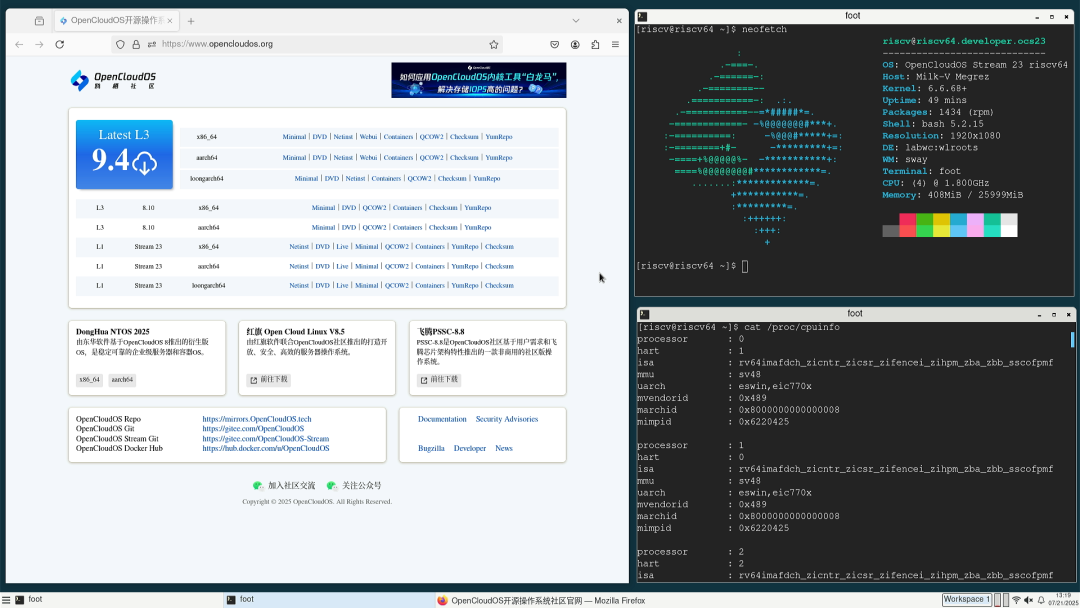
3. Enable the network card and connect to the internet
You can connect to the network through the AP6275S wireless network card (available through official Milk-V channels) and wired Ethernet.If connecting to the network via the wireless network card, you can use the nmcli network management tool to connect to the specified encrypted WiFi.
# Scan nearby WiFi list
nmcli device wifi scan
# Connect to hotspot
nmcli device wifi connect 'SSID of the WiFi you want to connect' password 'password'
4. Virtualization verification
The Megrez instruction set supports the H extension, which can effectively enhance the RISC-V native virtualization performance:
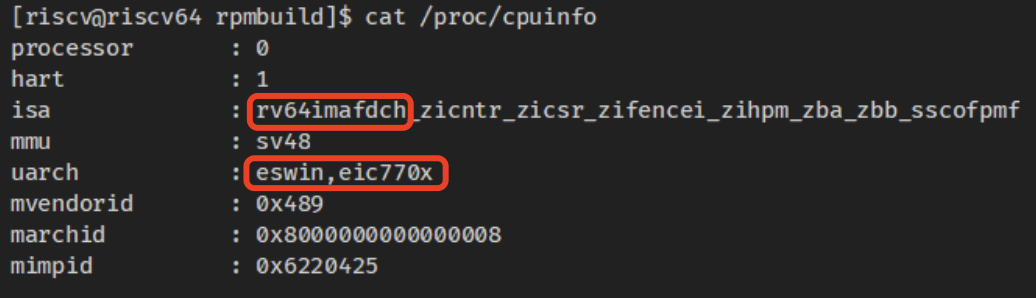
Using the S-mode ELF format boot firmware provided by uboot-tools for KVM booting, the following is an example of starting an Ubuntu image using snapshot + kvm:
qemu-system-riscv64 --enable-kvm -M virt \
-cpu host -m 4G -smp 4 -nographic \
-kernel ./uboot.elf \
-drive file=ubuntu-25.04-preinstalled-server-riscv64.img,format=raw,if=virtio,snapshot=on
The qemu kvm startup result is as follows:
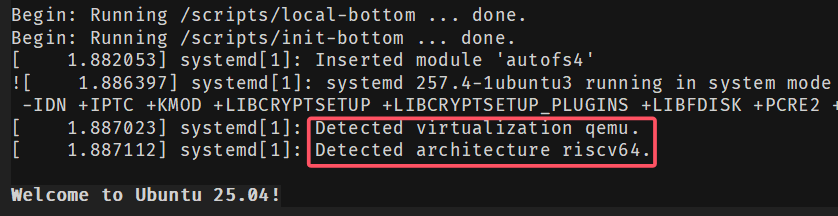
Subsequently, this article tested the virtualization performance under different compilation parameters, using CoreMark scores as performance evaluation metrics.Different compilation parameters include O2/O3, loop unrolling, single-core, and multi-core combinations of 8 sets of parameters; the hardware platform is Megrez, with both Host OS and VM being OpenCloudOS RISC-V [1,2].
The specific data of CoreMark under different compilation parameters is as follows:
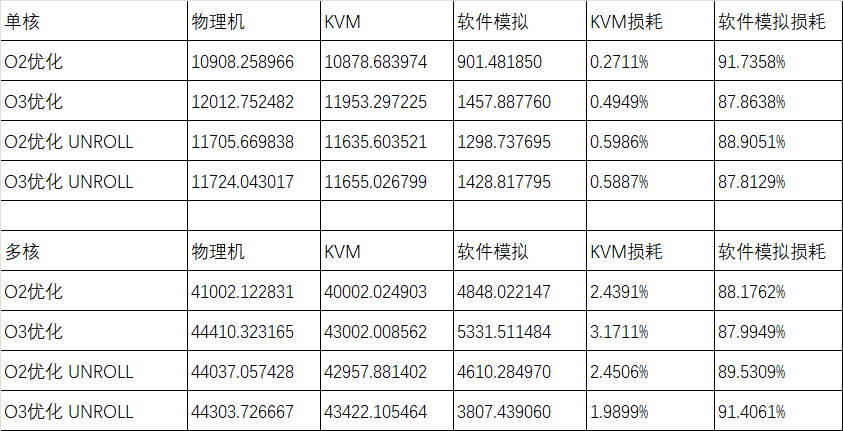
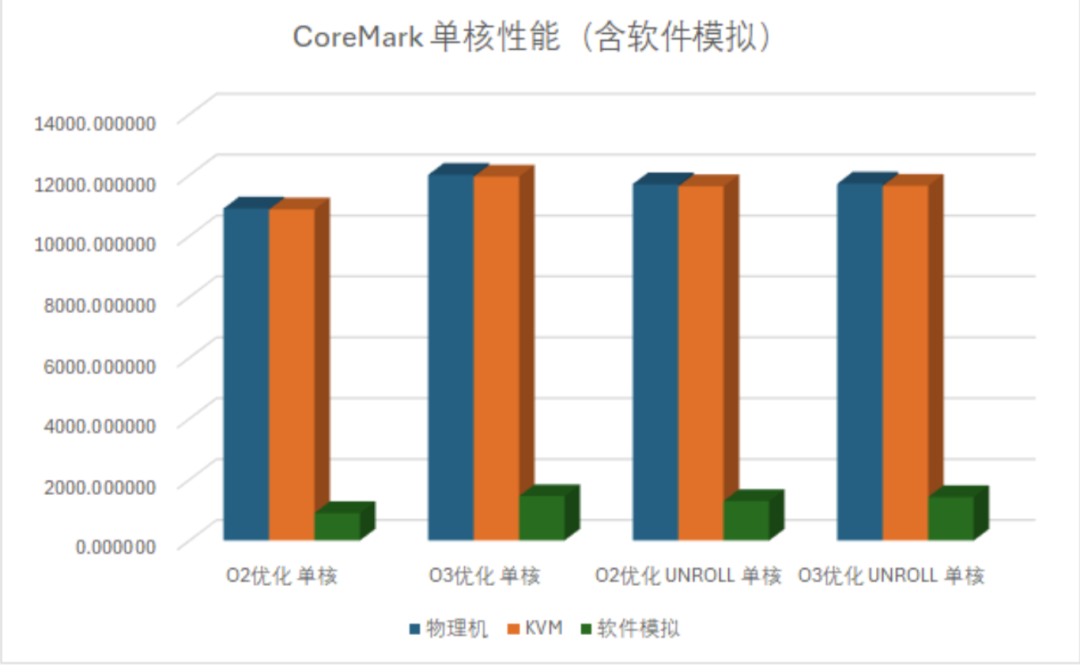
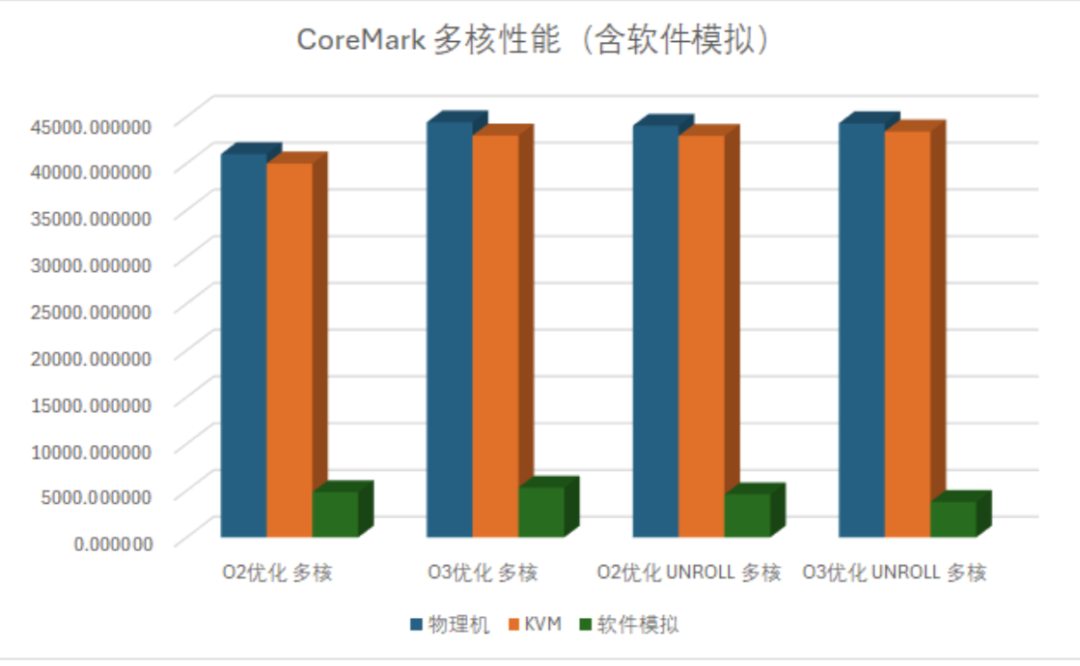
The above data can be visualized as follows in two graphs, showing that the KVM overhead under single-core is between 0.27% and 0.60%, compared to pure software qemu virtualization (approximately 87.8% to 91.7%), the performance gap is significant.Under multi-core, the KVM overhead is higher than single-core, reaching 1.99% to 3.17%, but compared to pure software qemu virtualization, it still has a significant advantage.The above results also indicate that the H extension has a significant effect on improving virtualization performance.
5. References Links
[1]https://mirrors.opencloudos.tech/opencloudos-stream/releases/23/images/riscv64/sdcard/ocs_developer_sdcard-megrez.img.xz
[2] https://mirrors.opencloudos.tech/opencloudos-stream/releases/23/images/riscv64/img/ocs23-riscv64-developer-23-1-sda.qcow2
Welcome to join the “Jiachen Project – J155 OpenCloudOS RISC-V Testing and Development Intern Training Program” https://github.com/lazyparser/weloveinterns/blob/master/open-internships.md, to jointly build a prosperous RISC-V operating system ecosystem in the OC community.We welcome more open-source forces to join the OpenCloudOS community, regardless of your industry, company size, or open-source experience, as long as you are willing to promote the development of domestic open-source operating systems, the OpenCloudOS community welcomes your participation.
Click the image below to learn about joining community rights and methods ↓