In-Depth Analysis of OpenWrt UCI Technology: Core Mechanisms and Implementation Principles of the Unified Configuration Interface
1 UCI Design Philosophy and System Positioning
In the field of embedded Linux, OpenWrt, as a highly modular router operating system, owes much of its success to its Unified Configuration Interface design philosophy. Before the advent of UCI, OpenWrt (and its predecessors) faced severe challenges in configuration management: Each service had its own configuration file, with formats varying widely and locations scattered throughout the file system. Network administrators needed to be familiar with the configuration syntax of each service, such as <span>netifd</span>, <span>firewall</span>, <span>dhcp</span>, etc., which greatly increased the complexity of system management and maintenance.
1.1 The Birth and Design Goals of UCI
The design philosophy of UCI stems from the pursuit of configuration uniformity and operational consistency. As its full name “Unified Configuration Interface” suggests, UCI aims to provide a centralized configuration management system for the entire OpenWrt system. This design philosophy is primarily reflected in the following aspects:
- • Abstraction: Encapsulating the specific configuration details of underlying services to provide a unified configuration interface for upper-layer applications.
- • Standardization: Defining a simple and consistent configuration syntax to eliminate configuration differences between different services.
- • Modularity: Each configuration package is relatively independent, ensuring both the isolation of configurations and the overall uniformity.
- • Simplified Operations: Providing command-line tools and APIs to reduce the complexity of configuration operations.
1.2 UCI’s Position in the OpenWrt Architecture
In the overall system architecture of OpenWrt, UCI occupies a core position that bridges upper and lower layers. As shown in the diagram below, it connects the upper-layer web management interface (LuCI) and various lower-layer system services:
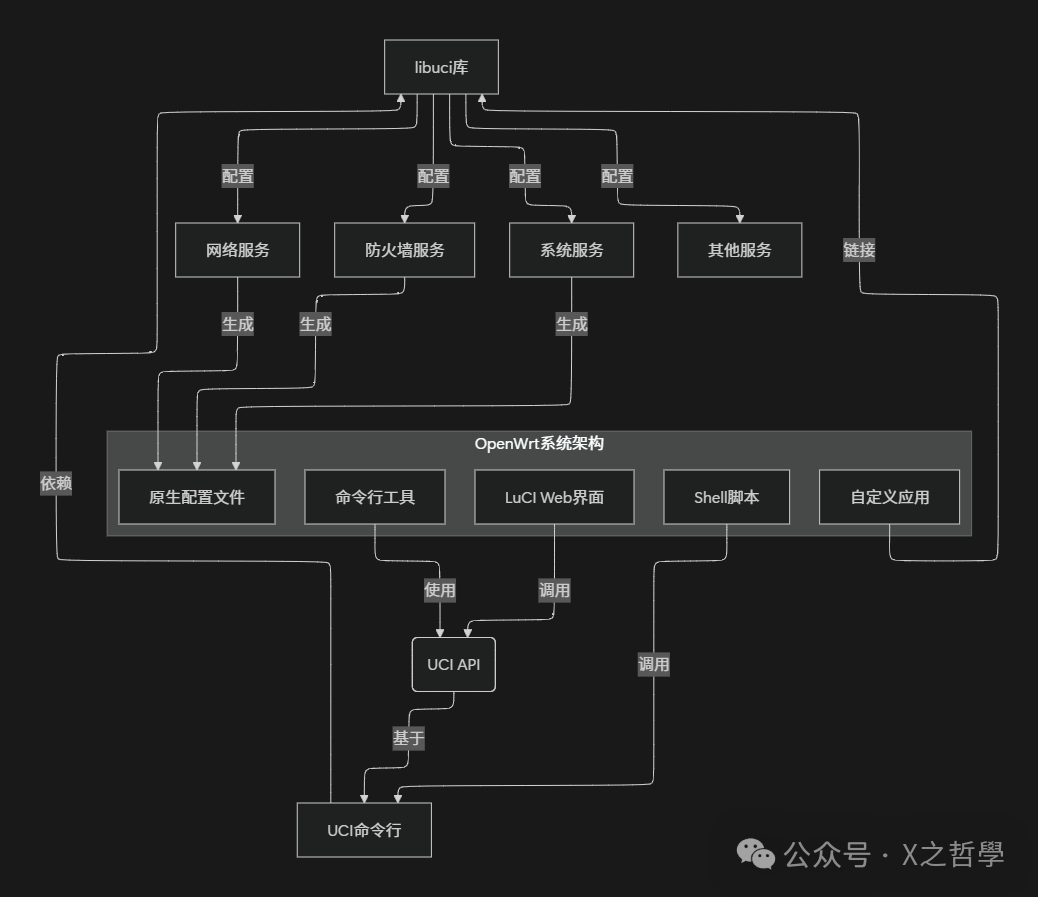
From the architecture diagram, it can be seen that UCI, as the configuration management center, provides a unified configuration interface for various management tools above and is responsible for generating the native configuration files required by each service below. This design greatly simplifies the complexity of configuration management, allowing system administrators to focus less on the configuration details of underlying services.
1.3 A Metaphor from Everyday Life: Libraries and Book Management Systems
To better understand the value of UCI, we can use a metaphor from everyday life: comparing the OpenWrt system to a large library, where the configuration files of various services are like various books
Before UCI, the situation was similar to a disorganized library:
- • Each type of book (configuration file) has its own unique cataloging rules (configuration format).
- • Readers (administrators) need to understand the rules of each type of book to find the content they need.
- • Books are scattered in different rooms (file paths), making them hard to find.
- • Modifying book information (configuration changes) is complex and prone to errors.
The introduction of UCI is like installing a smart book management system in the library:
- • All books (configurations) are cataloged and stored according to a unified standard.
- • Readers (administrators) can search for and modify information through a unified retrieval system (UCI interface).
- • The system automatically handles the differences between different types of books, making it transparent to users.
- • Ensures that all changes comply with standards, avoiding errors.
This system greatly improves the management efficiency of the library (OpenWrt system) and lowers the entry barrier for use.
2 Core Concepts of UCI
To deeply understand how UCI works, one must first grasp its core conceptual system. UCI constructs a complete configuration management system through several simple yet powerful abstract concepts.
2.1 Configuration File Structure
UCI configuration files are typically stored in the <span>/etc/config</span> directory, with each file corresponding to a specific system functional module. For example, network configurations are stored in <span>/etc/config/network</span>, and firewall configurations are stored in <span>/etc/config/firewall</span>. These configuration files follow a unified structural hierarchy, consisting of several basic elements:
- • Configuration File: Corresponds to a complete configuration module, such as
<span>network</span>,<span>firewall</span>,<span>system</span>, etc. - • Configuration Section: The main partition within the configuration file, representing a logical entity or functional unit.
- • Configuration Option: Specific parameter key-value pairs within the section that define actual configuration values.
- • Configuration List: A special option type that supports multiple values, used in scenarios requiring multiple values.
Below is a typical example of a network configuration file, demonstrating the specific application of these concepts:
# /etc/config/network Example

config 'interface' 'lan'
    option 'ifname' 'eth0'
    option 'proto' 'static'
    option 'ipaddr' '192.168.1.1'
    option 'netmask' '255.255.255.0'
    option 'gateway' '192.168.1.254'
    list 'dns' '8.8.8.8'
    list 'dns' '8.8.4.4'

config 'interface' 'wan'
    option 'ifname' 'eth1'
    option 'proto' 'dhcp'

config 'switch' 'eth0'
    option 'enable' '1'
    option 'reset' '1'
In this example, the file contains multiple <span>config</span> sections, each with a type name and an instance name (such as <span>'interface' 'lan'</span>), and each section contains multiple <span>option</span> and <span>list</span> entries. This structure ensures both flexibility and readability.
2.2 Configuration Data Types and Access Methods
UCI supports various configuration data types, but all are stored and represented in string form. In practical use, applications convert strings to the corresponding data types as needed. The table below summarizes the main data types and access methods in UCI:
| Data Type | Storage Format | Example | Application Conversion Type |
|---|---|---|---|
| String | String | <span>'OpenWrt'</span> |
<span>char*</span> |
| Integer | String | <span>'42'</span> |
<span>int</span> |
| Boolean | String | <span>'1'</span>, <span>'0'</span> or <span>'on'</span>, <span>'off'</span> |
<span>bool</span> |
| IP Address | String | <span>'192.168.1.1'</span> |
<span>struct in_addr</span> |
| List | Multiple Strings | <span>list 'dns' '8.8.8.8'</span> |
<span>struct list_head</span> |
UCI provides various configuration access methods to meet the needs of different scenarios:
- 1. Command Line Tool: Directly operate configurations through the
<span>uci</span>command, suitable for interactive use and script programming. - 2. C Language API: Programmatic access through the
<span>libuci</span>library, suitable for native application development. - 3. Shell Scripts: Combine
<span>uci</span>commands with Shell for configuration processing, suitable for simple integration. - 4. Other Language Bindings: Such as Lua, Python, etc., suitable for advanced application development.
2.3 The Relationship Between UCI and LuCI
LuCI, as the Web Management Interface of OpenWrt, has a close collaborative relationship with UCI. LuCI is built on top of UCI, reading and writing system configurations through the UCI interface while maintaining the MVC architecture design characteristics:
- • Model: Directly operates UCI configurations, handling the reading and writing of configuration data.
- • View: Presents the configuration interface, displaying the current configuration status.
- • Controller: Handles user requests, invoking the model to make configuration changes.
This relationship is similar to that of an online banking system and a core banking system: Users operate through a user-friendly web interface (LuCI), while all actual account changes (configuration modifications) are ultimately handled by the backend core system (UCI). This provides both user-friendliness and ensures the consistency and reliability of configurations.
2.4 Hierarchical Structure of UCI Configurations
To visually demonstrate the complete structure of UCI configuration files, the following Mermaid diagram illustrates the hierarchical organization of configuration files:
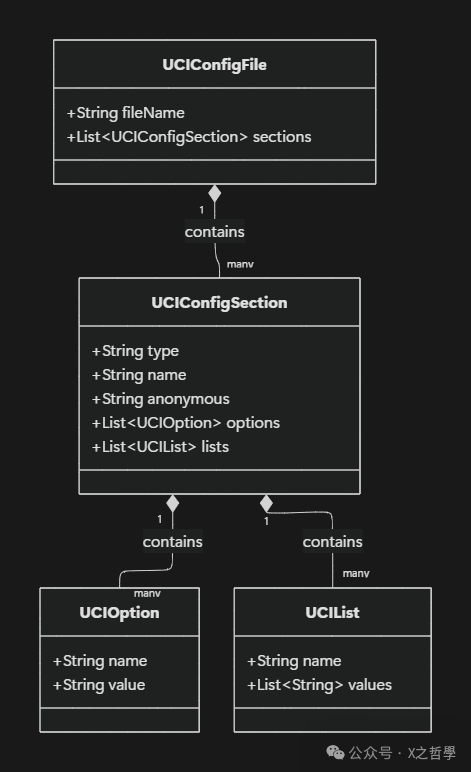
This hierarchical structure is the foundation of UCI’s flexibility and scalability. Each level has clear responsibilities, collectively building a configuration management system that is both simple and powerful.
3 UCI Code Framework and Data Structures
To delve into the implementation aspects of UCI, we need to analyze its core data structures and code framework. The code implementation of UCI primarily uses the C language, reflecting an efficient and streamlined design philosophy, which is very suitable for embedded environments.
3.1 Core Data Structure Analysis
The design of UCI’s core data structures reflects its configuration model, with main structures including <span>uci_context</span>, <span>uci_package</span>, <span>uci_section</span>, <span>uci_option</span>, etc. The following is a detailed analysis of these structures:
// UCI Context: Global context, contains runtime state
struct uci_context {
    struct uci_list      backends;    // Backend list
    struct uci_list      packages;    // Loaded package list
    struct uci_path      path;        // Search path
    struct uci_list      root;        // Configuration root directory
    char                 *confdir;    // Configuration directory
    bool                 locked;      // Lock status
    // ... other fields
};

// UCI Package: Corresponds to a configuration file
struct uci_package {
    struct uci_list      list;        // Linked list node
    char                 *name;       // Package name
    struct uci_list      sections;    // Section list
    struct uci_context   *ctx;        // Associated context
    bool                 has_changes; // Dirty flag
    // ... other fields
};

// UCI Section: Section of the configuration file
struct uci_section {
    struct uci_list      list;        // Linked list node
    char                 *type;       // Section type
    char                 *name;       // Section name
    struct uci_list      options;     // Option list
    struct uci_package   *package;    // Associated package
    bool                 anonymous;   // Anonymous section flag
};

// UCI Option: Basic option type
struct uci_option {
    struct uci_list      list;        // Linked list node
    char                 *name;       // Option name
    enum uci_option_type type;        // Option type
    union {
        char             *string;     // String value
        struct uci_list  list;        // List value
    } v;
};
These data structures are interconnected through linked lists, forming a complete configuration tree. This design ensures both flexibility and reduces memory overhead.
Option Type<span>uci_option_type</span> is an important enumeration definition:
enum uci_option_type {
    UCI_TYPE_STRING = 0,    // String type
    UCI_TYPE_LIST = 1       // List type
};
3.2 Configuration Loading and Processing Flow
The process of loading UCI configurations involves multiple steps, from file parsing to the construction of memory structures. The following Mermaid sequence diagram details this process:
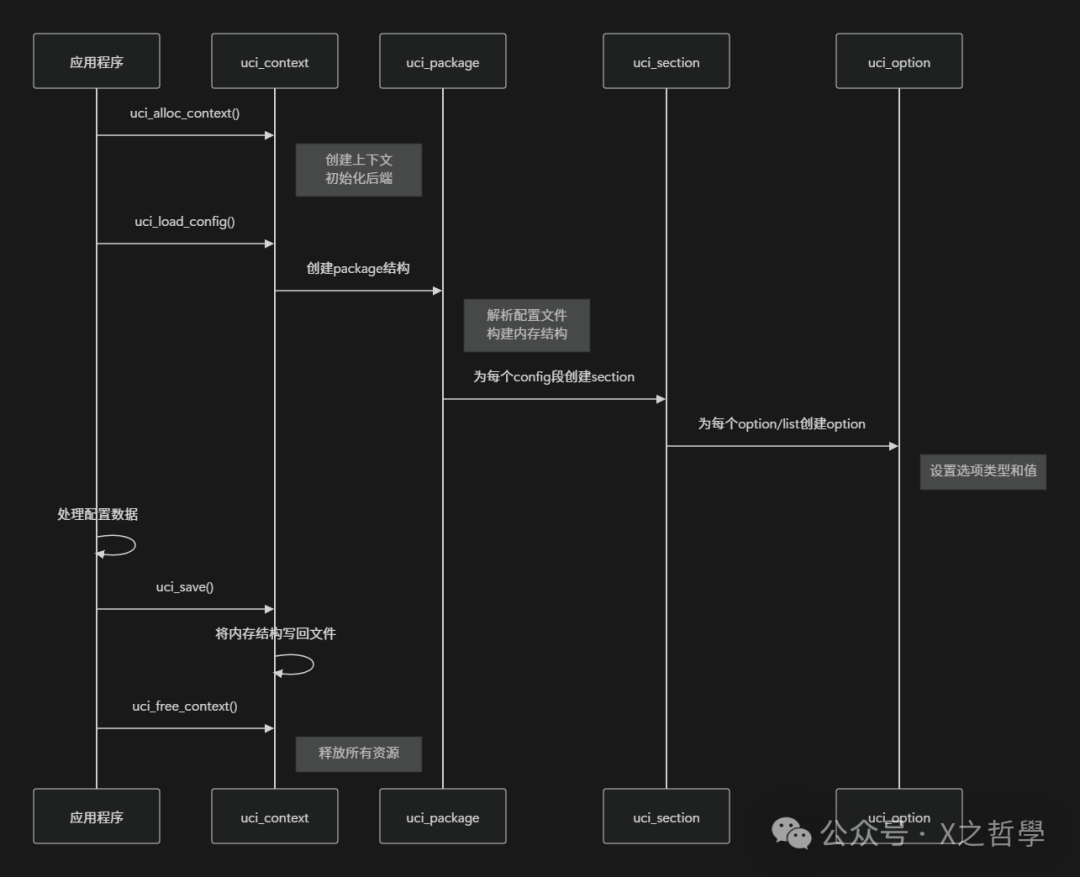
The core of configuration loading is the configuration file parser, which reads text-format configuration files and converts them into data structures in memory. The parsing process includes:
- 1. Lexical Analysis: Identifying keywords (config, option, list), strings, and comments.
- 2. Syntactic Analysis: Validating whether the configuration structure complies with UCI syntax rules.
- 3. Structure Construction: Creating corresponding memory data structures and establishing associations.
3.3 Organizational Relationships of Data Structures
The organizational relationships of UCI data structures can be visually represented by the following Mermaid diagram:
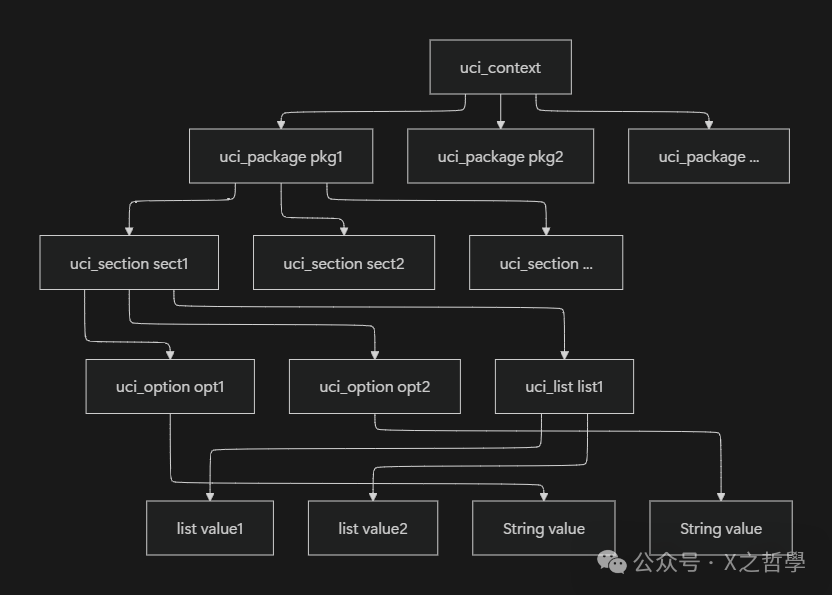
This hierarchical organization ensures efficient management and access of configuration data. Each level is connected through linked lists, supporting quick traversal and easy dynamic addition and deletion.
3.4 Memory Management and Error Handling
UCI implements a complete memory management mechanism, ensuring that all resources are correctly released when the context is destroyed. Key features include:
- • Reference Counting: Tracking the usage of resource configurations.
- • Error Codes: A unified error handling mechanism, such as
<span>UCI_OK</span>,<span>UCI_ERR_MEM</span>, etc. - • Backtracking Cleanup: Correctly rolling back allocated resources when an error occurs.
This rigorous memory management is particularly important for embedded systems, as it effectively prevents memory leaks and ensures the long-term stable operation of the system.
4 Detailed Explanation of UCI Configuration Mechanisms
The configuration management mechanism of UCI embodies its core value, and understanding these mechanisms is crucial for mastering UCI. This section will analyze key mechanisms such as configuration loading, validation, submission, and dependency handling.
4.1 Configuration Loading and Parsing Mechanism
The UCI configuration loading process begins with the <span>uci_load_config()</span> function, which is responsible for loading configuration files from disk into memory. The entire process can be divided into three stages:
- 1. File Location and Opening: Locating the corresponding configuration file based on the configuration directory and package name.
- 2. Syntactic Parsing and Validation: Parsing the contents of the configuration file and validating syntactic correctness.
- 3. Memory Structure Construction: Creating the corresponding data structure tree in memory.
File Parsing Algorithm employs a recursive descent parsing method, with the main parsing function as follows:
// Parsing state structure
struct uci_parse_context {
    struct uci_context *ctx;
    struct uci_package *pkg;
    char *path;
    int lineno;
    // ... other state fields
};

// Main parsing function
static int uci_parse(struct uci_parse_context *ctx) {
    while (!feof(ctx->file)) {
        token = uci_lex(ctx);
        switch (token) {
            case UCI_TOKEN_CONFIG:
                uci_parse_config(ctx);
                break;
            case UCI_TOKEN_OPTION:
                uci_parse_option(ctx);
                break;
            case UCI_TOKEN_LIST:
                uci_parse_list(ctx);
                break;
            // ... other cases
        }
    }
}
4.2 Configuration Validation and Submission Mechanism
UCI adopts a transactional submission mechanism, where all modifications are first made in memory, and only persist to disk when the submit function is explicitly called. This mechanism ensures the atomicity and consistency of configuration changes.
The configuration submission process involves the following steps:
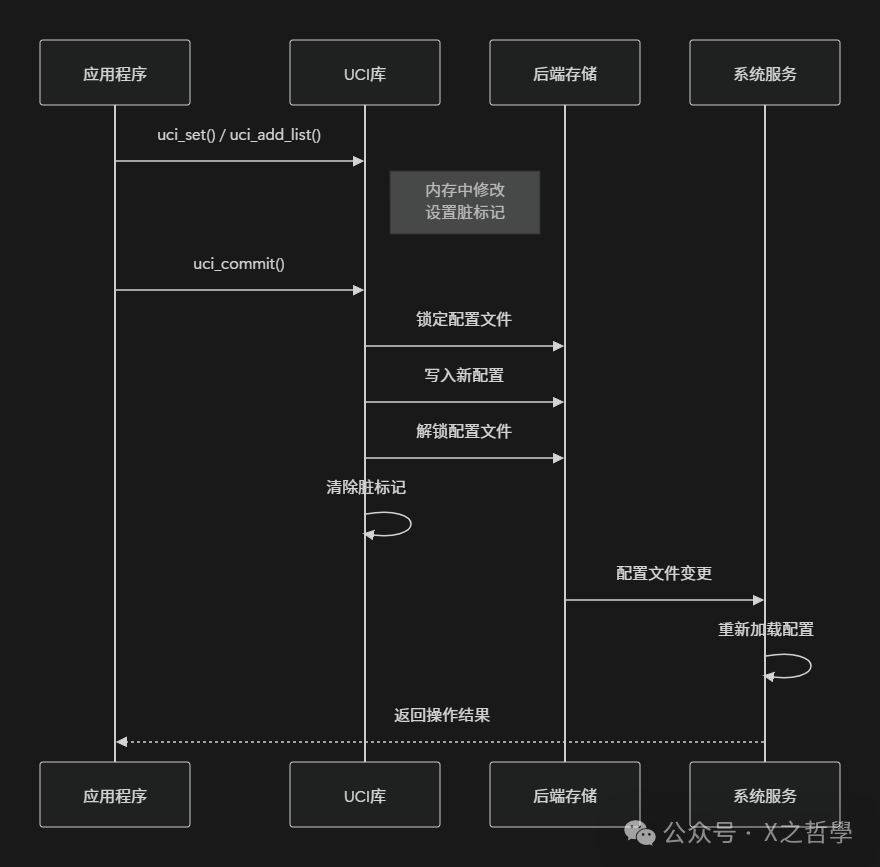
The Dirty Flag Mechanism is the core of UCI’s transaction management. Each <span>uci_package</span> has a <span>has_changes</span> flag, which is set when any modifications occur and is only cleared after a successful submission.
4.3 Configuration Backup and Rollback
UCI implements a simple configuration backup mechanism, which backs up the original configuration file before submitting changes. This provides basic rollback capability:
- • Backup file naming: Original file name plus the
<span>.orig</span>suffix. - • Multi-layer backup: Supports multiple backups, sequentially using
<span>.orig</span>,<span>.orig.1</span>, etc. suffixes. - • On-demand backup: Creates backups only when configurations are actually changed.
This mechanism, while simple, provides an important safety net in case of configuration errors.
4.4 Configuration Dependencies and Interactions
In complex system configurations, there may be dependencies between different configuration items. UCI itself does not manage configuration dependencies but handles them through collaboration with the init system and services.
For example, when network interface configurations change, related services need to be restarted:
// Typical handling script after network configuration changes
#!/bin/sh

# Submit network configuration changes
uci commit network

# Restart network service
/etc/init.d/network reload

# Services dependent on the network may also need to restart
/etc/init.d/firewall reload
/etc/init.d/dnsmasq reload
UCI interacts with other system components through a configuration change notification mechanism. Although UCI does not implement complex dependency resolution, it provides hooks to trigger these processes.
4.5 Configuration State Machine Model
The UCI configuration package undergoes a series of state changes throughout its lifecycle, which can be described by the following state machine:
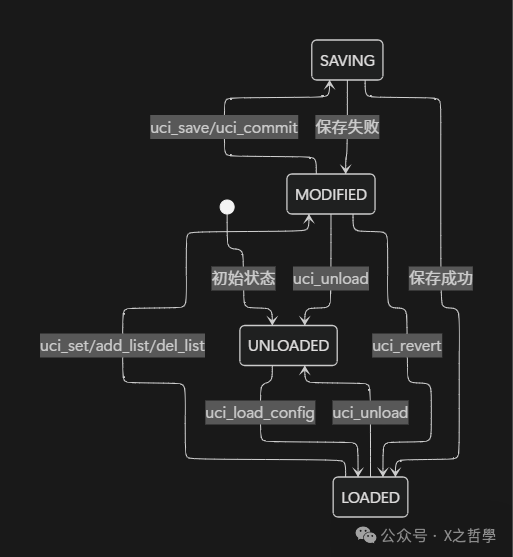
Understanding this state machine is crucial for correctly using the UCI API, especially in error handling, where appropriate recovery strategies need to be determined based on the state.
5 Complete Application Example of UCI
After theoretical analysis, we will demonstrate the application of UCI through a complete practical example. This section will implement a USB network sharing configuration function, detailing the entire process from requirement analysis to code implementation.
5.1 Requirement Analysis and Design
Scenario Description: On an OpenWrt router, connect a phone via USB and use the USB network sharing feature to provide internet access. Network interface, firewall rules, and DHCP options need to be configured.
Configuration Requirement Analysis:
- 1. Create USB network interface configuration.
- 2. Set the interface protocol to DHCP client.
- 3. Configure firewall zones and rules.
- 4. Set static leases for the DHCP server.
Design Approach:
- • Use the
<span>network</span>configuration package to manage the USB interface. - • Modify the
<span>firewall</span>configuration package to open necessary network access. - • Set static IP allocation through the
<span>dhcp</span>configuration package.
5.2 Complete Code Implementation
Below is the complete C language implementation demonstrating how to use the UCI API for configuration:
#include <stdio.h>
#include <stdlib.h>
#include <string.h>
#include <uci.h>

// Configure USB network sharing function
int configure_usb_tethering(void) {
    struct uci_context *ctx = NULL;
    struct uci_package *network_pkg = NULL;
    struct uci_package *firewall_pkg = NULL;
    struct uci_package *dhcp_pkg = NULL;
    int ret = 0;

    // Create UCI context
    ctx = uci_alloc_context();
    if (!ctx) {
        fprintf(stderr, "Failed to allocate UCI context\n");
        return -1;
    }

    // Load configuration packages
    if (uci_load(ctx, "network", &network_pkg) != UCI_OK ||
        uci_load(ctx, "firewall", &firewall_pkg) != UCI_OK ||
        uci_load(ctx, "dhcp", &dhcp_pkg) != UCI_OK) {
        fprintf(stderr, "Failed to load UCI packages\n");
        ret = -1;
        goto cleanup;
    }

    // Configure network interface
    struct uci_section *wan_section = NULL;
    uci_foreach_element(&network_pkg->sections, iter) {
        struct uci_section *s = uci_to_section(iter);
        if (strcmp(s->type, "interface") == 0) {
            const char *name = uci_lookup_option_string(ctx, s, "interface");
            if (name && strcmp(name, "wan") == 0) {
                wan_section = s;
                break;
            }
        }
    }

    if (!wan_section) {
        // Create new WAN interface configuration
        struct uci_ptr ptr = {
            .p = network_pkg,
            .section = "interface",
            .option = "wan",
            .value = "interface"
        };

        if (uci_add_section(ctx, network_pkg, "interface", &wan_section) != UCI_OK) {
            fprintf(stderr, "Failed to add WAN section\n");
            ret = -1;
            goto cleanup;
        }

        uci_set(ctx, &ptr);
    }

    // Set USB interface parameters
    uci_set_simple(ctx, network_pkg, wan_section->e.name, "ifname", "usb0");
    uci_set_simple(ctx, network_pkg, wan_section->e.name, "proto", "dhcp");
    uci_set_simple(ctx, network_pkg, wan_section->e.name, "device", "usb0");

    // Configure firewall (allow WAN zone forwarding)
    struct uci_section *wan_zone = NULL;
    uci_foreach_element(&firewall_pkg->sections, iter) {
        struct uci_section *s = uci_to_section(iter);
        if (strcmp(s->type, "zone") == 0) {
            const char *name = uci_lookup_option_string(ctx, s, "name");
            if (name && strcmp(name, "wan") == 0) {
                wan_zone = s;
                break;
            }
        }
    }

    if (wan_zone) {
        uci_set_simple(ctx, firewall_pkg, wan_zone->e.name, "input", "ACCEPT");
        uci_set_simple(ctx, firewall_pkg, wan_zone->e.name, "output", "ACCEPT");
        uci_set_simple(ctx, firewall_pkg, wan_zone->e.name, "forward", "ACCEPT");
        uci_set_simple(ctx, firewall_pkg, wan_zone->e.name, "masq", "1");
    }

    // Configure DHCP static lease (example)
    struct uci_section *dhcp_section = NULL;
    struct uci_ptr dhcp_ptr = {
        .p = dhcp_pkg,
        .section = "host",
        .option = "phone",
        .value = "host"
    };

    if (uci_add_section(ctx, dhcp_pkg, "host", &dhcp_section) == UCI_OK) {
        uci_set(ctx, &dhcp_ptr);
        uci_set_simple(ctx, dhcp_pkg, dhcp_section->e.name, "name", "myphone");
        uci_set_simple(ctx, dhcp_pkg, dhcp_section->e.name, "mac", "a1:b2:c3:d4:e5:f6");
        uci_set_simple(ctx, dhcp_pkg, dhcp_section->e.name, "ip", "192.168.1.100");
    }

    // Commit all changes
    if (uci_commit(ctx, &network_pkg, false) != UCI_OK ||
        uci_commit(ctx, &firewall_pkg, false) != UCI_OK ||
        uci_commit(ctx, &dhcp_pkg, false) != UCI_OK) {
        fprintf(stderr, "Failed to commit UCI changes\n");
        ret = -1;
        goto cleanup;
    }

    printf("USB tethering configuration completed successfully\n");

cleanup:
    // Clean up resources
    if (network_pkg) uci_unload(ctx, network_pkg);
    if (firewall_pkg) uci_unload(ctx, firewall_pkg);
    if (dhcp_pkg) uci_unload(ctx, dhcp_pkg);
    if (ctx) uci_free_context(ctx);

    return ret;
}

// Shell script implementation using UCI command line tool
void configure_usb_tethering_shell() {
    // Below is an example code to achieve the same functionality through Shell commands
    const char *script =
        "#!/bin/sh\n"
        "# Configure USB network interface\n"
        "uci del network.wan 2>/dev/null\n"
        "uci set network.wan=interface\n"
        "uci set network.wan.ifname=usb0\n"
        "uci set network.wan.proto=dhcp\n"
        "uci commit network\n"
        "\n"
        "# Enable firewall rules\n"
        "uci set firewall.@zone[1].input=ACCEPT\n"
        "uci set firewall.@zone[1].output=ACCEPT\n"
        "uci set firewall.@zone[1].forward=ACCEPT\n"
        "uci set firewall.@zone[1].masq=1\n"
        "uci commit firewall\n"
        "\n"
        "# Restart services\n"
        "/etc/init.d/network restart\n"
        "/etc/init.d/firewall reload\n";

    printf("Shell script alternative:\n%s", script);
}

// Configuration verification function
int verify_usb_tethering_config() {
    struct uci_context *ctx = uci_alloc_context();
    struct uci_package *pkg = NULL;
    int ret = 0;

    if (uci_load(ctx, "network", &pkg) != UCI_OK) {
        printf("Failed to load network config for verification\n");
        ret = -1;
        goto cleanup;
    }

    // Check WAN interface configuration
    const char *ifname = NULL;
    const char *proto = NULL;

    uci_foreach_element(&pkg->sections, iter) {
        struct uci_section *s = uci_to_section(iter);
        if (strcmp(s->type, "interface") == 0) {
            const char *name = uci_lookup_option_string(ctx, s, "interface");
            if (name && strcmp(name, "wan") == 0) {
                ifname = uci_lookup_option_string(ctx, s, "ifname");
                proto = uci_lookup_option_string(ctx, s, "proto");
                break;
            }
        }
    }

    if (!ifname || strcmp(ifname, "usb0") != 0) {
        printf("Verification failed: ifname not set correctly\n");
        ret = -1;
    } else if (!proto || strcmp(proto, "dhcp") != 0) {
        printf("Verification failed: proto not set correctly\n");
        ret = -1;
    } else {
        printf("USB tethering configuration verified successfully\n");
    }

cleanup:
    if (pkg) uci_unload(ctx, pkg);
    if (ctx) uci_free_context(ctx);
    return ret;
}
This complete example demonstrates the application of UCI in real projects, from configuration design to code implementation, and finally verification, reflecting UCI’s core role in OpenWrt system configuration.
6 UCI Tools and Debugging Methods
Mastering UCI command-line tools and debugging methods is crucial for OpenWrt development and maintenance. This section will detail the UCI toolset, common usage, and troubleshooting techniques.
6.1 Detailed Explanation of UCI Command-Line Tools
The UCI command-line tool is the most commonly used interface in daily management, providing a complete set of configuration management commands. Its basic syntax is:
uci [<options>] <command> [<arguments>]Common Command List:
| Command | Syntax | Function Description | Example |
|---|---|---|---|
<span>get</span> |
<span>uci get <config>.<section>[.<option>]</span> |
Get configuration value | <span>uci get network.lan.ipaddr</span> |
<span>set</span> |
<span>uci set <config>.<section>[.<option>]=<value></span> |
Set configuration value | <span>uci set network.lan.ipaddr=192.168.1.1</span> |
<span>add</span> |
<span>uci add <config> <section-type></span> |
Add configuration section | <span>uci add network interface</span> |
<span>delete</span> |
<span>uci delete <config>.<section>[.<option>]</span> |
Delete configuration | <span>uci delete network.wan6</span> |
<span>commit</span> |
<span>uci commit <config></span> |
Submit configuration changes | <span>uci commit network</span> |
<span>show</span> |
<span>uci show [<config>]</span> |
Display configuration | <span>uci show network</span> |
<span>changes</span> |
<span>uci changes <config></span> |
Display uncommitted changes | <span>uci changes system</span> |
<span>revert</span> |
<span>uci revert <config></span> |
Restore uncommitted changes | <span>uci revert firewall</span> |
Command Usage Examples:
# View all network configurations
uci show network

# Set LAN port IP address
uci set network.lan.ipaddr='192.168.1.1'
uci commit network

# Add a new DMZ interface
uci add network interface
uci set network.@interface[-1].name='dmz'
uci set network.@interface[-1].ifname='eth0.10'
uci set network.@interface[-1].proto='static'
uci set network.@interface[-1].ipaddr='192.168.2.1'
uci set network.@interface[-1].netmask='255.255.255.0'
uci commit network

# View and confirm changes
uci changes network
6.2 UCI Debugging Techniques and Troubleshooting
In practical use, various configuration issues may arise. Here are some common debugging methods and troubleshooting techniques:
Configuration Validation and Syntax Checking:
# Check configuration file syntax
uci -d validate network

# Detailed debugging mode to view configuration processing
uci -d get network.lan

# View configuration file parsing tree
uci -P /var/state show network
Common Issues and Solutions:
| Problem Phenomenon | Possible Cause | Solution |
|---|---|---|
<span>uci: Entry not found</span> |
Configuration path error | Use <span>uci show <config></span> to verify the path |
<span>uci: Parse error</span> |
Configuration file syntax error | Use <span>uci -d validate</span> to check syntax |
<span>uci: Config file is locked</span> |
Other processes are modifying the configuration | Wait or delete <span>/tmp/.uci/*.lock</span> |
| Configuration changes not taking effect | Not committed or service not restarted | Execute <span>uci commit</span> and restart related services |
| Permission error | Non-root user performing write operations | Use sudo or switch to the root user |
Debugging Script Example:
#!/bin/sh
# UCI Configuration Debugging Script

CONFIG="network"
LOCKFILE="/tmp/.uci/${CONFIG}.lock"

echo "=== UCI Configuration Debug ==="
echo "1. Checking config file existence..."
ls -la /etc/config/$CONFIG

echo "2. Checking for locks..."
if [ -f "$LOCKFILE" ]; then
    echo "Lock file exists: $LOCKFILE"
    ps | grep $(cat $LOCKFILE)
else
    echo "No lock file present"
fi

echo "3. Validating config syntax..."
uci -d validate $CONFIG

echo "4. Showing current config..."
uci show $CONFIG

echo "5. Showing pending changes..."
uci changes $CONFIG

echo "6. Checking service status..."
/etc/init.d/network status
6.3 Integration of UCI with Shell Scripts
UCI commands can be easily integrated into Shell scripts for automated configuration management:
#!/bin/sh
# Automated Network Configuration Script

# Function: Safely get configuration value
get_uci_value() {
    local config=$1
    local section=$2
    local option=$3
    local default=$4

    local value=$(uci -q get $config.$section.$option)
    if [ -z "$value" ]; then
        echo "$default"
    else
        echo "$value"
    fi
}

# Function: Set configuration value with validation
set_uci_value() {
    local config=$1
    local section=$2
    local option=$3
    local value=$4

    uci set $config.$section.$option="$value"
    if uci -q commit $config; then
        echo "Successfully set $config.$section.$option=$value"
        return 0
    else
        echo "Failed to set $config.$section.$option" >&2
        uci revert $config
        return 1
    fi
}

# Example: Configure LAN network
configure_lan() {
    local ipaddr=$(get_uci_value network lan ipaddr "192.168.1.1")
    local netmask=$(get_uci_value network lan netmask "255.255.255.0")

    echo "Current LAN IP: $ipaddr"
    echo "Current netmask: $netmask"

    # Set new IP address
    read -p "Enter new LAN IP [192.168.1.1]: " new_ip
    new_ip=${new_ip:-192.168.1.1}

    if set_uci_value network lan ipaddr "$new_ip"; then
        echo "LAN IP updated successfully"
        # Restart network service
        /etc/init.d/network restart
    fi
}

# Main program
case "$1" in
    lan)
        configure_lan
        ;;
    show)
        uci show network
        ;;
    *)
        echo "Usage: $0 {lan|show}"
        exit 1
        ;;
esac
6.4 UCI State Files and Runtime Management
UCI uses state files to track runtime configuration status, which are typically located in the <span>/var/state</span> directory:
# View UCI state information
ls -la /var/state/

# Compare configuration files and runtime states
diff -u /etc/config/network /var/state/network

# Clear UCI state cache
rm -f /var/state/*
/etc/init.d/network reload
Understanding the UCI state management mechanism is crucial for debugging complex configuration issues, especially when configuration changes do not take effect as expected.
7 Conclusion
UCI plays the role of a configuration hub in the OpenWrt ecosystem, with its core value primarily reflected in the following aspects:
- • Uniformity: By providing a unified configuration interface and syntax, it eliminates configuration differences between different services, greatly reducing system management complexity.
- • Simplicity: Concise configuration files and command syntax make configuration management intuitive and easy to understand, lowering the learning curve.
- • Flexibility: Supporting dynamic configuration modifications and various access methods, suitable for both manual configuration and automated management.
- • Reliability: The transactional submission mechanism and configuration validation ensure the safety and consistency of configuration changes.
- • Scalability: The modular design allows for easy addition of new configuration packages and functionalities, adapting to the evolving needs of the system.