1. Introduction
Since the AI box needs to have the capability to search for network cameras within the local area network and obtain the RTSP address of the network camera to pull streams for AI-related applications, it is necessary to integrate the ONVIF protocol and implement related functions.
The author also started from scratch, searching for information online and exploring implementations. Although there is a lot of information available online now, one still encounters various issues and pitfalls when trying to do it oneself. After successfully running the application, this article summarizes the previously convoluted operations.
If readers need a beginner’s operational guide, following the process below should allow for a smooth implementation of the commonly used ONVIF device search and RTSP address retrieval functions.
Once the application is running, if you want to delve deeper into ONVIF, you can modify and enhance your understanding.
2. Preparation
2.1 Background Knowledge Related to ONVIF
ONVIF involves concepts such as gSOAP, Web Services, WSDL, SOAP, HTTP, XML, etc. It is recommended to read articles by experts on CSDN to learn and understand these concepts. Link: https://blog.csdn.net/benkaoya/article/details/72424335
2.2 Hardware Environment Preparation
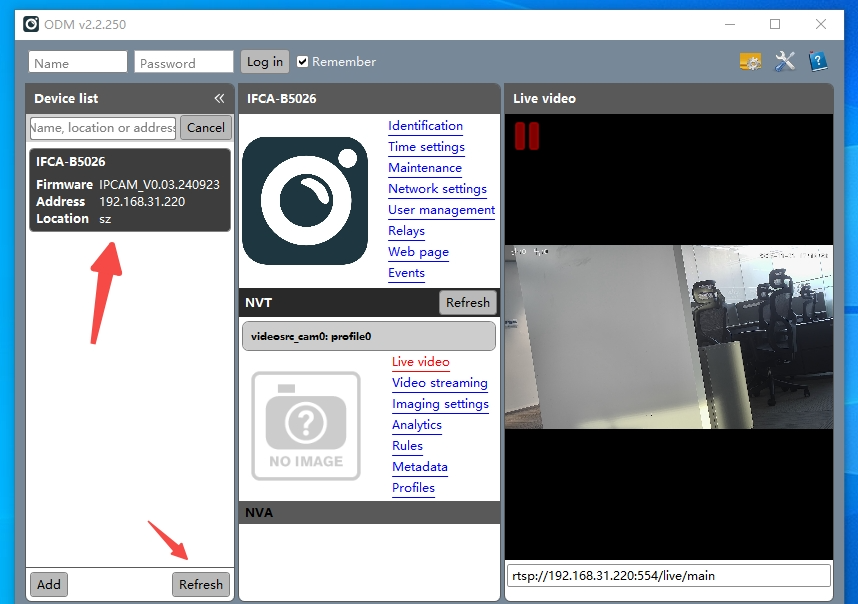
The RV1126 AI box must be on the same local area network as the ONVIF-supported IPC. You can download and run the ONVIF client tool, ONVIF Device Manager, to verify if the IPC can be found. PS: Download link for ONVIF Device Manager: https://sourceforge.net/projects/onvifdm/, click the green “Download” button on the page. As shown in the figure below, if the IPC can be found, the hardware environment is prepared correctly.
2.3 Development Environment Preparation
The author uses an x86 Linux server as the development environment. To avoid affecting the host machine’s environment configuration, a Docker container is used as the development environment, where tools are installed and environment variables are set without affecting the host machine. Here, the official Ubuntu 20.04 Docker image is used to run the Docker container, starting from scratch to install and configure various required software tools.
# Enter the x86 Linux host and create a working directory, e.g., /data1/work/
mkdir -p /data1/work/

# Pull the ubuntu:20.04 Docker image
docker pull ubuntu:20.04

# Run the Docker image
# Note: The host-mounted directory /data1/work/ can be modified according to the reader's actual situation, but do not change the mounted directory /work inside the container, as it will be used in later steps
docker run  -dit --name onvif_test --network=host -v /data1/work/:/work ubuntu:20.04 /bin/bash

# Enter the container
docker exec -it onvif_test /bin/bash

# Create the onvif/ directory and enter it
mkdir -p /work/onvif/
cd /work/onvif/
3. Compile the Host Version of gSOAP
Since the subsequent cross-compilation of gSOAP and the generation of ONVIF source files require the host version of the gSOAP tools wsdl2h and soapcpp2, it is necessary to compile the host version of gSOAP first.
3.1 Download Source Code
To make it easier to find solutions online when issues arise, the historical version 2.8.133 is downloaded here.
# gSOAP open-source version download URL (historical version):
https://sourceforge.net/projects/gsoap2/files/gSOAP/

# Create a directory gsoap_x86/ and place the gSOAP compressed package in the newly created directory ./onvif/gsoap_x86/
mkdir gsoap_x86
cd gsoap_x86

# Install unzip
apt update
apt install unzip

# Unzip gsoap_2.8.133.zip
unzip gsoap_2.8.133.zip

# Enter the directory gsoap-2.8
cd gsoap-2.8
3.2 Install Dependencies
apt-get update
apt-get install build-essential libssl-dev openssl bison flex zlib1g-dev cmake gcc g++ build-essential autoconf
3.3 Compile and Install
# Current directory /work/onvif/gsoap_x86/gsoap-2.8

# Configure compilation options
./configure --prefix=/work/onvif/gsoap_x86/gsoap-2.8/host-build --enable-ipv6 -enable-c-locale --with-openssl CFLAGS="-O2 -fPIC" CXXFLAGS="-O2 -fPIC"

# Compile
make -j$(nproc)

# Install to the system
make install

# Update dynamic library cache
ldconfig
3.4 Verify Installation
# Check if the tools are available
./host-build/bin/wsdl2h -v
./host-build/bin/soapcpp2 -v
4. Cross-Compile gSOAP
4.1 Install Cross-Compilation Toolchain
- • Note: Different embedded hardware platforms use different cross-compilation toolchains. Here, the RV1126 board used by the author is taken as an example.
# Return to the working root directory
cd /work/onvif/

# Create a directory crosscompilation/toolchain and enter it
mkdir -p crosscompilation/toolchain
cd crosscompilation/toolchain

# Copy the entire cross-compilation tool directory gcc-arm-8.3-2019.03-x86_64-arm-linux-gnueabihf to the current directory
# At this point, the absolute path of the cross toolchain is /work/onvif/crosscompilation/toolchain/gcc-arm-8.3-2019.03-x86_64-arm-linux-gnueabihf

# Verify
/work/onvif/crosscompilation/toolchain/gcc-arm-8.3-2019.03-x86_64-arm-linux-gnueabihf/bin/arm-linux-gnueabihf-g++ -v
4.2 Prepare Dependencies – Manually Cross-Compile OpenSSL
4.2.1 Download OpenSSL Source Code
The openssl-1.1.1w version is the most compatible with gSOAP 2.8, so download openssl-1.1.1w.
# Create a directory OpenSSL under crosscompilation and enter it
cd /work/onvif/crosscompilation/
mkdir OpenSSL
cd OpenSSL

# Install wget
apt update
apt install wget

# Download openssl-1.1.1w source code
wget https://github.com/openssl/openssl/releases/download/OpenSSL_1_1_1w/openssl-1.1.1w.tar.gz

# Unzip and enter the directory
 tar xvzf openssl-1.1.1w.tar.gz
cd openssl-1.1.1w
4.2.2 Configure Cross-Compilation Toolchain
# Set environment variables
export TOOLCHAIN_PATH="/work/onvif/crosscompilation/toolchain/gcc-arm-8.3-2019.03-x86_64-arm-linux-gnueabihf"
export CROSS_COMPILE="${TOOLCHAIN_PATH}/bin/arm-linux-gnueabihf-"
export CC=${CROSS_COMPILE}gcc
export CXX=${CROSS_COMPILE}g++
export AR=${CROSS_COMPILE}ar
export RANLIB=${CROSS_COMPILE}ranlib
export STRIP=${CROSS_COMPILE}strip

# Configure OpenSSL
./Configure linux-armv4 \
    --prefix=/opt/arm-openssl \
    --cross-compile-prefix= \
    -march=armv7-a -mfpu=neon -mfloat-abi=hard \
    no-asm shared \
    -DOPENSSL_NO_SSL3 \
    -DOPENSSL_NO_WEAK_SSL_CIPHERS
4.2.3 Compile and Install
make -j$(nproc)
make install
# Installed to the directory /opt/arm-openssl
4.2.4 Configure Environment Variables
# Use this path to compile gSOAP later
export OPENSSL_ROOT=/opt/arm-openssl
export CFLAGS="-I$OPENSSL_ROOT/include"
export LDFLAGS="-L$OPENSSL_ROOT/lib"
export PKG_CONFIG_PATH="$OPENSSL_ROOT/lib/pkgconfig:$PKG_CONFIG_PATH"
4.3 Prepare Dependencies – Manually Cross-Compile zlib
4.3.1 Download zlib Source Code
# Create a directory zlib under crosscompilation and enter it
cd /work/onvif/crosscompilation/
mkdir zlib
cd zlib

# Download zlib source code
wget https://zlib.net/fossils/zlib-1.2.13.tar.gz

# Unzip and enter the directory
tar xzf zlib-1.2.13.tar.gz
cd zlib-1.2.13
4.3.2 Configure Cross-Compilation Toolchain
# Set environment variables
export TOOLCHAIN_PATH="/work/onvif/crosscompilation/toolchain/gcc-arm-8.3-2019.03-x86_64-arm-linux-gnueabihf"
export CC="${TOOLCHAIN_PATH}/bin/arm-linux-gnueabihf-gcc"
export AR="${TOOLCHAIN_PATH}/bin/arm-linux-gnueabihf-ar"
export RANLIB="${TOOLCHAIN_PATH}/bin/arm-linux-gnueabihf-ranlib"
export STRIP="${TOOLCHAIN_PATH}/bin/arm-linux-gnueabihf-strip"
export PREFIX="/opt/zlib-arm"

# Configure
./configure --prefix=$PREFIX
4.3.3 Compile and Install
make -j$(nproc)
make install
# Installed to the directory /opt/zlib-arm
4.3.4 Configure Environment Variables
export ZLIB_ROOT=/opt/zlib-arm
export CFLAGS="-I$OPENSSL_ROOT/include -I$ZLIB_ROOT/include"
export LDFLAGS="-L$OPENSSL_ROOT/lib -L$ZLIB_ROOT/lib"
export PKG_CONFIG_PATH="$OPENSSL_ROOT/lib/pkgconfig:$ZLIB_ROOT/lib/pkgconfig:$PKG_CONFIG_PATH"
4.5 Cross-Compile gSOAP
- • Note: When cross-compiling gSOAP, it will default to trying to run the soapcpp2 tool compiled for the target platform on the host machine, which will cause failure. The simplest approach is to copy the host version of the gSOAP tool to overwrite the current gSOAP tool, allowing the compilation to complete. The ONVIF-related source code is generated by us using wsdl2h and soapcpp2, and the construction of the gSOAP library itself does not require these codes. Therefore, we focus more on cross-compiling the gSOAP library. The steps are summarized as follows:1. Compile the host version of the gSOAP tools (soapcpp2 and wsdl2h) and install them to the host-build directory.2. Use the host version of wsdl2h and soapcpp2 to generate ONVIF code (run on the host machine).3. Cross-compile the gSOAP library (excluding tools) and install it to the arm-build directory.4. Cross-compile our application, linking the gSOAP library from arm-build.
4.5.1 Download Source Code
Still using the gSOAP source code version 2.8.133 downloaded in section 3.1.
# Use wget to download, but it has issues, so download from the page: https://sourceforge.net/projects/gsoap2/files/gsoap_2.8.133.zip/download
# Return to the crosscompilation directory
cd /work/onvif/crosscompilation/

# Copy gsoap_2.8.133.zip to the current directory and unzip it
unzip gsoap_2.8.133.zip

# Enter the source directory
cd gsoap-2.8
4.5.2 Configure Cross-Compilation Environment
# Set environment variables
export TOOLCHAIN_PATH="/work/onvif/crosscompilation/toolchain/gcc-arm-8.3-2019.03-x86_64-arm-linux-gnueabihf"
export PATH="${TOOLCHAIN_PATH}/bin:$PATH"
export CC="arm-linux-gnueabihf-gcc"
export CXX="arm-linux-gnueabihf-g++"
export AR="arm-linux-gnueabihf-ar"
export RANLIB="arm-linux-gnueabihf-ranlib"
export STRIP="arm-linux-gnueabihf-strip"
export OPENSSL_ROOT=/opt/arm-openssl
export CFLAGS="-I$OPENSSL_ROOT/include"
export LDFLAGS="-L$OPENSSL_ROOT/lib"

# Configure
make distclean || true
./configure --host=arm-linux-gnueabihf --prefix=$(pwd)/arm-build --enable-openssl --enable-ipv6 --enable-c-locale --with-openssl=/opt/arm-openssl --with-zlib=/opt/zlib-arm CFLAGS="-O2 -fPIC" CXXFLAGS="-O2 -fPIC"
4.5.3 Compile and Install
# Compile
make -j$(nproc)
At this point, the compilation will report an error, as shown in the figure below, indicating that it attempts to run the executable compiled with the cross tool on the host environment, which is not allowed.
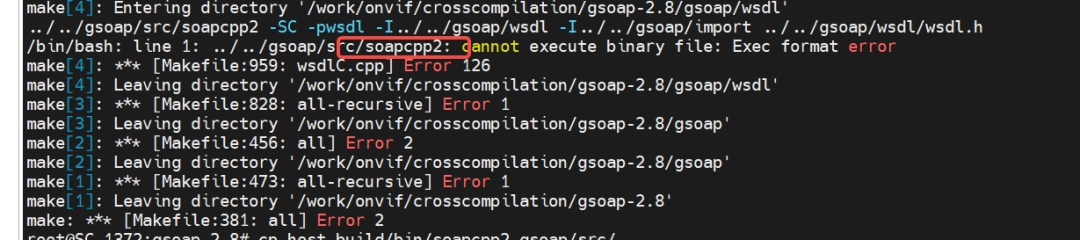
The simplest approach here is to copy the host version of the gSOAP tool to overwrite the current gSOAP tool, recompile, and let the compilation complete.
# Backup the target machine tool
cp gsoap/src/soapcpp2 gsoap/src/soapcpp2.bak

# Copy and replace with the tool that can run on the host machine
cp /work/onvif/gsoap_x86/gsoap-2.8/host-build/bin/soapcpp2 gsoap/src/

# Re-execute the compilation
make -j$(nproc)

# Restore the target machine tool
cp gsoap/src/soapcpp2.bak gsoap/src/soapcpp2

# Install to the directory ./arm-build
make install
5. Generate ONVIF Code and Compile Test Program
Return to the crosscompilation directory, create a directory onviftest, and enter it.
cd /work/onvif/crosscompilation/
mkdir onviftest
cd onviftest
5.1 Update System CA Certificates
- • Note: If the certificates are not updated, subsequent HTTPS errors may occur.
# Fix SSL issues with wsd2h
# Update system CA certificates
apt-get update
apt-get install ca-certificates

# Set environment variables to use system certificates
export SSL_CERT_FILE=/etc/ssl/certs/ca-certificates.crt
export SSL_CERT_DIR=/etc/ssl/certs
5.2 Use wsdl2h to Generate Header Files
- • Note: At this point, in the host environment, the host version of wsdl2h must be used to generate header files.
/work/onvif/gsoap_x86/gsoap-2.8/host-build/bin/wsdl2h -o onvif.h -s -d -x -Nname -t /work/onvif/gsoap_x86/gsoap-2.8/host-build/share/gsoap/WS/typemap.dat https://www.onvif.org/onvif/ver10/network/wsdl/remotediscovery.wsdl http://www.onvif.org/onvif/ver10/device/wsdl/devicemgmt.wsdl https://www.onvif.org/onvif/ver10/media/wsdl/media.wsdl5.3 Modify the Generated onvif.h
# Install vi tool
apt update
apt install vim

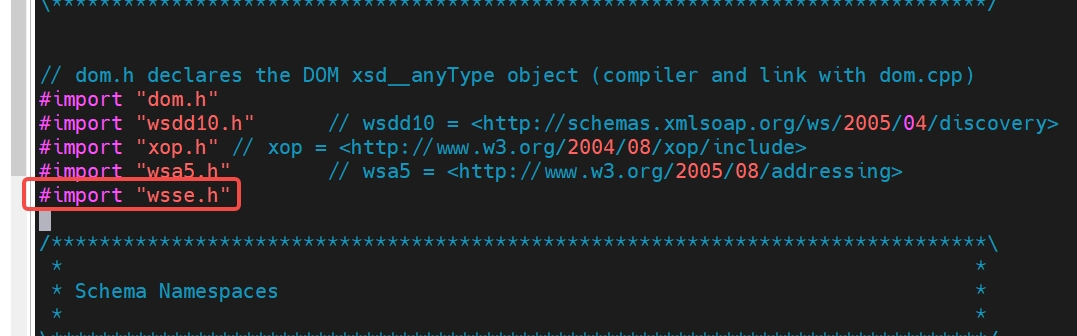
# To use the soap_wsse_add_UsernameTokenDigest function for authorization, add the following line at the beginning of the onvif.h header file before generating ONVIF code with soapcpp2:
#import "wsse.h"
The modified version is shown in the figure below:
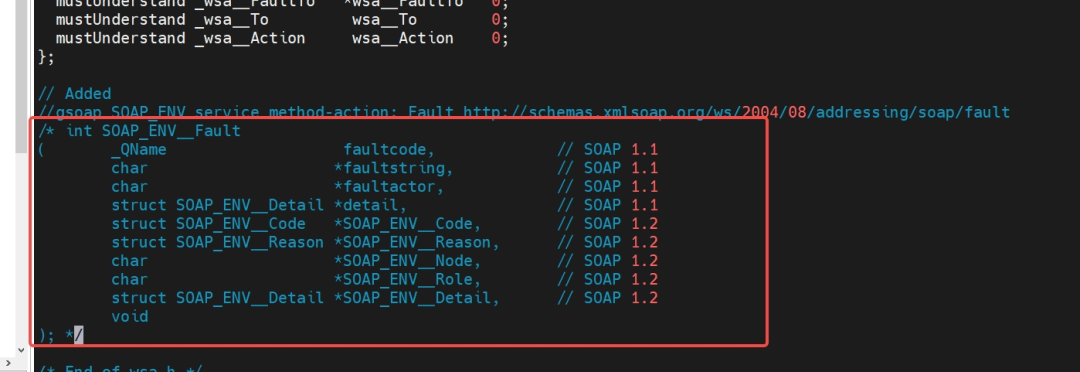
5.4 Modify wsa.h Header File to Prevent Macro Redefinition
# Open wsa.h
vi /work/onvif/gsoap_x86/gsoap-2.8/host-build/share/gsoap/import/wsa.h

# Comment out the definition of the SOAP_ENV__Fault structure at the end of the file
The modified version is shown in the figure below:
5.5 Generate C++ Code
- • Note: Here, C++ source code is generated, and there is no need to distinguish the running environment, so the host machine tool soapcpp2 can be used.
# Generate server and client code
# -C: indicates to generate only client code, not server code
# -x: indicates not to generate XML example files
# -L: indicates to disable default debug logs

/work/onvif/gsoap_x86/gsoap-2.8/host-build/bin/soapcpp2 -2 -C -L -x onvif.h -I/work/onvif/gsoap_x86/gsoap-2.8/host-build/share/gsoap/import/ -I/work/onvif/gsoap_x86/gsoap-2.8/host-build/include/ -I/work/onvif/gsoap_x86/gsoap-2.8/host-build/share/gsoap/
5.6 Copy Plugin Code to Avoid Compilation Issues
 cp ../gsoap-2.8/gsoap/plugin/wsseapi.* .
 cp ../gsoap-2.8/gsoap/plugin/wsaapi.* .
 cp ../gsoap-2.8/gsoap/plugin/threads.* .
 cp ../gsoap-2.8/gsoap/plugin/smdevp.* .
 cp ../gsoap-2.8/gsoap/plugin/mecevp.* .
 cp ../gsoap-2.8/gsoap/dom.cpp .
 cp ../gsoap-2.8/arm-build/share/gsoap/custom/struct_timeval.* .
 cp ../gsoap-2.8/gsoap/stdsoap2.cpp .
 cp ../gsoap-2.8/gsoap/stdsoap2.h .

 # Change all .c file extensions to .cpp
 for f in *.c; do mv "$f" "${f%.c}.cpp"; done
At this point, the files in the current directory are:

5.7 Create Test Program Source Code
Create a new file main.cpp with the following content:
- • Note: The following code is sourced from CSDN and has been modified.
// Copyright statement: This article is an original article by CSDN blogger "Xu Zhenping", following the CC 4.0 BY-SA copyright agreement. Please attach the original source link and this statement when reprinting.
// Original link: https://blog.csdn.net/benkaoya/article/details/72476787

#include <iostream>
#include <cstdio>
#include <cstdlib>
#include <cstring>
#include <cassert>
#include <vector>

#include <openssl/pem.h>
#include "soapH.h"
#include "soapStub.h"
#include "wsseapi.h"
#include "wsaapi.h"


using namespace std;

#define SOAP_ASSERT     assert
#define SOAP_DBGLOG     printf
#define SOAP_DBGERR     printf

#define SOAP_TO         "urn:schemas-xmlsoap-org:ws:2005:04:discovery"
#define SOAP_ACTION     "http://schemas.xmlsoap.org/ws/2005/04/discovery/Probe"

#define SOAP_MCAST_ADDR "soap.udp://239.255.255.250:3702"                       // ONVIF specified multicast address

#define SOAP_ITEM       ""                                                      // Device range to search
#define SOAP_TYPES      "dn:NetworkVideoTransmitter"                            // Device type to search

/* Socket timeout (in seconds) */
#define SOAP_SOCK_TIMEOUT    (10)

#define SOAP_CHECK_ERROR(result, soap, str) \
    do { \
        if (SOAP_OK != (result) || SOAP_OK != (soap)->error) { \
            soap_perror((soap), (str)); \
            if (SOAP_OK == (result)) { \
                (result) = (soap)->error; \
            } \
            goto EXIT; \
        } \
} while (0)

SOAP_NMAC struct Namespace namespaces[] = {
  { "SOAP-ENV", "http://www.w3.org/2003/05/soap-envelope", "http://schemas.xmlsoap.org/soap/envelope/", NULL },
  { "SOAP-ENC", "http://www.w3.org/2003/05/soap-encoding", "http://schemas.xmlsoap.org/soap/encoding/", NULL },
  { "xsi", "http://www.w3.org/2001/XMLSchema-instance", "http://www.w3.org/*/XMLSchema-instance", NULL },
  { "xsd", "http://www.w3.org/2001/XMLSchema", "http://www.w3.org/*/XMLSchema", NULL },
  { "c14n", "http://www.w3.org/2001/10/xml-exc-c14n#", NULL, NULL },
  { "ds", "http://www.w3.org/2000/09/xmldsig#", NULL, NULL },
  { "saml1", "urn:oasis:names:tc:SAML:1.0:assertion", NULL, NULL },
  { "saml2", "urn:oasis:names:tc:SAML:2.0:assertion", NULL, NULL },
  { "wsu", "http://docs.oasis-open.org/wss/2004/01/oasis-200401-wss-wssecurity-utility-1.0.xsd", NULL, NULL },
  { "xenc", "http://www.w3.org/2001/04/xmlenc#", NULL, NULL },
  { "wsc", "http://docs.oasis-open.org/ws-sx/ws-secureconversation/200512", "http://schemas.xmlsoap.org/ws/2005/02/sc", NULL },
  { "wsse", "http://docs.oasis-open.org/wss/2004/01/oasis-200401-wss-wssecurity-secext-1.0.xsd", "http://docs.oasis-open.org/wss/oasis-wss-wssecurity-secext-1.1.xsd", NULL },
  { "wsa", "http://schemas.xmlsoap.org/ws/2004/08/addressing", "http://www.w3.org/2005/08/addressing", NULL },
  { "wsdd", "http://schemas.xmlsoap.org/ws/2005/04/discovery", NULL, NULL },
  { "chan", "http://schemas.microsoft.com/ws/2005/02/duplex", NULL, NULL },
  { "wsa5", "http://www.w3.org/2005/08/addressing", "http://schemas.xmlsoap.org/ws/2004/08/addressing", NULL },
  { "xmime", "http://tempuri.org/xmime.xsd", NULL, NULL },
  { "xop", "http://www.w3.org/2004/08/xop/include", NULL, NULL },
  { "tt", "http://www.onvif.org/ver10/schema", NULL, NULL },
  { "wsrfbf", "http://docs.oasis-open.org/wsrf/bf-2", NULL, NULL },
  { "wsnt", "http://docs.oasis-open.org/wsn/b-2", NULL, NULL },
  { "wstop", "http://docs.oasis-open.org/wsn/t-1", NULL, NULL },
  { "tdn", "http://www.onvif.org/ver10/network/wsdl", NULL, NULL },
  { "tds", "http://www.onvif.org/ver10/device/wsdl", NULL, NULL },
  { "timg", "http://www.onvif.org/ver20/imaging/wsdl", NULL, NULL },
  { "tls", "http://www.onvif.org/ver10/display/wsdl", NULL, NULL },
  { "tptz", "http://www.onvif.org/ver20/ptz/wsdl", NULL, NULL },
  { "trt", "http://www.onvif.org/ver10/media/wsdl", NULL, NULL },
  { NULL, NULL, NULL, NULL } /* end of namespaces[] */
};

void soap_perror(struct soap *soap, const char *str)
{
    if (NULL == str) {
        SOAP_DBGERR("[soap] error: %d, %s, %s\n", soap->error, *soap_faultcode(soap), *soap_faultstring(soap));
    } else {
        SOAP_DBGERR("[soap] %s error: %d, %s, %s\n", str, soap->error, *soap_faultcode(soap), *soap_faultstring(soap));
    }
    return;
}

void* ONVIF_soap_malloc(struct soap *soap, unsigned int n)
{
    void *p = NULL;

    if (n > 0) {
        p = soap_malloc(soap, n);
        SOAP_ASSERT(NULL != p);
        memset(p, 0x00 ,n);
    }
    return p;
}

struct soap *ONVIF_soap_new(int timeout)
{
    struct soap *soap = NULL;                                                   // soap environment variable

    SOAP_ASSERT(NULL != (soap = soap_new()));

    soap_set_namespaces(soap, namespaces);                                      // Set soap namespaces
    soap->recv_timeout    = timeout;                                            // Set timeout (exit if no data after specified time)
    soap->send_timeout    = timeout;
    soap->connect_timeout = timeout;

#if defined(__linux__) || defined(__linux)                                      // Reference: https://www.genivia.com/dev.html#client-c modifications:
    soap->socket_flags = MSG_NOSIGNAL;                                          // To prevent connection reset errors
#endif

    soap_register_plugin(soap, soap_wsa);
    soap_register_plugin(soap, soap_wsse);
    soap_set_mode(soap, SOAP_C_UTFSTRING);                                      // Set to UTF-8 encoding, otherwise overlaying Chinese OSD will be garbled

    return soap;
}

void ONVIF_soap_delete(struct soap *soap)
{
    soap_destroy(soap);                                                         // remove deserialized class instances (C++ only)
    soap_end(soap);                                                             // Clean up deserialized data (except class instances) and temporary data
    soap_done(soap);                                                            // Reset, close communications, and remove callbacks
    soap_free(soap);                                                            // Reset and deallocate the context created with soap_new or soap_copy
}

/************************************************************************
** Function: ONVIF_init_header
** Functionality: Initialize soap description message header
** Parameters:
        [in] soap - soap environment variable
** Returns: None
** Remarks:
    1). The memory allocated through ONVIF_soap_malloc in this function will be released in ONVIF_soap_delete
************************************************************************/
void ONVIF_init_header(struct soap *soap)
{
    struct SOAP_ENV__Header *header = NULL;

    SOAP_ASSERT(NULL != soap);

    header = (struct SOAP_ENV__Header *)ONVIF_soap_malloc(soap, sizeof(struct SOAP_ENV__Header));
    soap_default_SOAP_ENV__Header(soap, header);
    header->wsa__MessageID = (char*)soap_wsa_rand_uuid(soap);
    header->wsa__To        = (char*)ONVIF_soap_malloc(soap, strlen(SOAP_TO) + 1);
    header->wsa__Action    = (char*)ONVIF_soap_malloc(soap, strlen(SOAP_ACTION) + 1);
    strcpy(header->wsa__To, SOAP_TO);
    strcpy(header->wsa__Action, SOAP_ACTION);
    soap->header = header;

    return;
}

/************************************************************************
** Function: ONVIF_init_ProbeType
** Functionality: Initialize the range and type of devices to probe
** Parameters:
        [in]  soap  - soap environment variable
        [out] probe - Fill in the range and type of devices to probe
** Returns:
        0 indicates detected, non-0 indicates not detected
** Remarks:
    1). The memory allocated through ONVIF_soap_malloc in this function will be released in ONVIF_soap_delete
************************************************************************/
void ONVIF_init_ProbeType(struct soap *soap, struct wsdd__ProbeType *probe)
{
    struct wsdd__ScopesType *scope = NULL;                                      // Used to describe which type of Web service to find

    SOAP_ASSERT(NULL != soap);
    SOAP_ASSERT(NULL != probe);

    scope = (struct wsdd__ScopesType *)ONVIF_soap_malloc(soap, sizeof(struct wsdd__ScopesType));
    soap_default_wsdd__ScopesType(soap, scope);                                 // Set the range of devices to find
    scope->__item = (char*)ONVIF_soap_malloc(soap, strlen(SOAP_ITEM) + 1);
    strcpy(scope->__item, SOAP_ITEM);

    memset(probe, 0x00, sizeof(struct wsdd__ProbeType));
    soap_default_wsdd__ProbeType(soap, probe);
    probe->Scopes = scope;
    probe->Types  = (char*)ONVIF_soap_malloc(soap, strlen(SOAP_TYPES) + 1);     // Set the type of devices to find
    strcpy(probe->Types, SOAP_TYPES);

    return;
}

void ONVIF_DetectDevice(void (*cb)(char *DeviceXAddr))
{
    int i;
    int result = 0;
    unsigned int count = 0;                                                     // Number of devices found
    struct soap *soap = NULL;                                                   // soap environment variable
    struct wsdd__ProbeType      req;                                            // Used to send Probe message
    struct __wsdd__ProbeMatches rep;                                            // Used to receive Probe response
    struct wsdd__ProbeMatchType *probeMatch;

    std::cout << "ONVIF Detect Device Start..." << std::endl;
    SOAP_ASSERT(NULL != (soap = ONVIF_soap_new(SOAP_SOCK_TIMEOUT)));

    ONVIF_init_header(soap);                                                    // Set message header description
    ONVIF_init_ProbeType(soap, &req);                                           // Set the range and type of devices to find

    std::cout << "Broadcasting Probe Message..." << std::endl;
    result = soap_send___wsdd__Probe(soap, SOAP_MCAST_ADDR, NULL, &req);        // Broadcast Probe message to multicast address
    while (SOAP_OK == result)                                                   // Start receiving messages sent by devices in a loop
    {
        memset(&rep, 0x00, sizeof(rep));
        result = soap_recv___wsdd__ProbeMatches(soap, &rep);
        if (SOAP_OK == result) {
            if (soap->error) {
                soap_perror(soap, "ProbeMatches");
            } else {                                                            // Successfully received device response message
               // dump__wsdd__ProbeMatches(&rep);

                if (NULL != rep.wsdd__ProbeMatches) {
                    count += rep.wsdd__ProbeMatches->__sizeProbeMatch;
                    for(i = 0; i < rep.wsdd__ProbeMatches->__sizeProbeMatch; i++) {
                        probeMatch = rep.wsdd__ProbeMatches->ProbeMatch + i;
                        if (NULL != cb) {
                            cb(probeMatch->XAddrs);                             // Use device service address to execute function callback
                        }
                    }
                }
            }
        } else if (soap->error) {
            break;
        }
    }

    SOAP_DBGLOG("\ndetect end! It has detected %d devices!\n", count);

    if (NULL != soap) {
        ONVIF_soap_delete(soap);
    }

    return ;
}

#define USERNAME    "admin"
#define PASSWORD    "admin"

/************************************************************************
** Function: ONVIF_SetAuthInfo
** Functionality: Set authentication information
** Parameters:
        [in] soap     - soap environment variable
        [in] username - username
        [in] password - password
** Returns:
        0 indicates success, non-0 indicates failure
** Remarks:
************************************************************************/
static int ONVIF_SetAuthInfo(struct soap *soap, const char *username, const char *password)
{
    int result = 0;

    SOAP_ASSERT(NULL != username);
    SOAP_ASSERT(NULL != password);

    //std::cout << "in ONVIF_SetAuthInfo, username:" << username << ",password:" << password << std::endl;;

    result = soap_wsse_add_UsernameTokenDigest(soap, NULL, username, password);
    SOAP_CHECK_ERROR(result, soap, "add_UsernameTokenDigest");

EXIT:

    return result;
}

/************************************************************************
** Function: ONVIF_GetDeviceInformation
** Functionality: Get basic device information
** Parameters:
        [in] DeviceXAddr - device service address
** Returns:
        0 indicates success, non-0 indicates failure
** Remarks:
************************************************************************/
int ONVIF_GetDeviceInformation(const char *DeviceXAddr)
{
    int result = 0;
    struct soap *soap = NULL;
    struct _tds__GetDeviceInformation           devinfo_req;
    struct _tds__GetDeviceInformationResponse   devinfo_resp;

    std::cout << "Get Device Information from " << DeviceXAddr << std::endl;

    SOAP_ASSERT(NULL != DeviceXAddr);
    SOAP_ASSERT(NULL != (soap = ONVIF_soap_new(SOAP_SOCK_TIMEOUT)));

    ONVIF_SetAuthInfo(soap, USERNAME, PASSWORD);

    std::cout << "to call GetDeviceInformation" << std::endl;
    try{
      result = soap_call___tds__GetDeviceInformation(soap, DeviceXAddr, NULL, &devinfo_req, devinfo_resp);
      SOAP_CHECK_ERROR(result, soap, "GetDeviceInformation");
    } catch(...){
        SOAP_DBGERR("Exception occurred in GetDeviceInformation\n");
        goto EXIT;
    }

    std::cout << "----------------------------------------" << std::endl;
    std::cout << "Manufacturer: " << ((!devinfo_resp.Manufacturer) ? "null" : devinfo_resp.Manufacturer) << std::endl;
    std::cout << "Model:        " << ((!devinfo_resp.Model) ? "null" : devinfo_resp.Model) << std::endl;
    std::cout << "FirmwareVer:  " << ((!devinfo_resp.FirmwareVersion) ? "null" : devinfo_resp.FirmwareVersion) << std::endl;
    std::cout << "SerialNumber: " << ((!devinfo_resp.SerialNumber) ? "null" : devinfo_resp.SerialNumber) << std::endl;
    std::cout << "HardwareId:   " << ((!devinfo_resp.HardwareId) ? "null" : devinfo_resp.HardwareId) << std::endl;
    std::cout << "----------------------------------------" << std::endl;

EXIT:

    if (NULL != soap) {
        ONVIF_soap_delete(soap);
    }
    return result;
}

/************************************************************************
** Function: ONVIF_GetCapabilities
** Functionality: Get device capability information
** Parameters:
        [in] DeviceXAddr - device service address
** Returns:
        0 indicates success, non-0 indicates failure
** Remarks:
    1). One of the main parameters is the media service address
************************************************************************/
int ONVIF_GetCapabilities(const char *DeviceXAddr, std::string &outXAddr)
{
    int result = 0;
    struct soap *soap = NULL;
    struct _tds__GetCapabilities            req;
    struct _tds__GetCapabilitiesResponse    rep;

    SOAP_ASSERT(NULL != DeviceXAddr);
    SOAP_ASSERT(NULL != (soap = ONVIF_soap_new(SOAP_SOCK_TIMEOUT)));

    ONVIF_SetAuthInfo(soap, USERNAME, PASSWORD);

    result = soap_call___tds__GetCapabilities(soap, DeviceXAddr, NULL, &req, rep);
    SOAP_CHECK_ERROR(result, soap, "GetCapabilities");

    if (rep.Capabilities->Media)
    {
        outXAddr = rep.Capabilities->Media->XAddr;
    }
    std::cout << "media xaddr:" << outXAddr << std::endl;

EXIT:

    if (NULL != soap) {
        ONVIF_soap_delete(soap);
    }
    return result;
}

struct OnvifVideoEncoderConfiguration{
    std::string token;
    std::string name;
    int         encoding;
    int         width;
    int         height;
    int         frame_rate;
};

struct OnvifMediaInfo{
    std::string token;
    std::string name;
    OnvifVideoEncoderConfiguration video_encode_config;
};

std::ostream& operator<<(std::ostream& os, const OnvifVideoEncoderConfiguration& config) {
    os << "VideoEncoderConfiguration{"
       << "token='" << config.token << "', "
       << "name='" << config.name << "', "
       << "encoding=" << config.encoding << ", "
       << "width=" << config.width << ", "
       << "height=" << config.height << ", "
       << "frame_rate=" << config.frame_rate
       << "}";
    return os;
}

std::ostream& operator<<(std::ostream& os, const OnvifMediaInfo& media_info) {
    os << "OnvifMediaInfo{"
       << "token='" << media_info.token << "', "
       << "name='" << media_info.name << "', "
       << "video_encode_config=" << media_info.video_encode_config
       << "}";
    return os;
}

int ONVIF_GetProfiles(const std::string &DeviceXAddr, std::vector<OnvifMediaInfo> &infos)
{
    int result = 0;
    struct soap *soap = NULL;
    struct _trt__GetProfiles         req;
    struct _trt__GetProfilesResponse rep;

    SOAP_ASSERT(!DeviceXAddr.empty());
    SOAP_ASSERT(NULL != (soap = ONVIF_soap_new(SOAP_SOCK_TIMEOUT)));

    ONVIF_SetAuthInfo(soap, USERNAME, PASSWORD);

    result = soap_call___trt__GetProfiles(soap, DeviceXAddr.c_str(), NULL, &req, rep);
    SOAP_CHECK_ERROR(result, soap, "ONVIF_GetProfiles");

    SOAP_ASSERT(rep.__sizeProfiles > 0);

    for (int i = 0; i < rep.__sizeProfiles; i++) {
        struct tt__Profile* profiles = rep.Profiles[i];
        OnvifMediaInfo media_info;
        if (profiles->Name)
            media_info.name = profiles->Name;
        if (profiles->token)
            media_info.token = profiles->token;

        if (profiles->VideoEncoderConfiguration) {
            media_info.video_encode_config.name = profiles->VideoEncoderConfiguration->Name;
            media_info.video_encode_config.token = profiles->VideoEncoderConfiguration->token;
            media_info.video_encode_config.encoding = profiles->VideoEncoderConfiguration->Encoding;
            media_info.video_encode_config.width = profiles->VideoEncoderConfiguration->Resolution->Width;
            media_info.video_encode_config.height = profiles->VideoEncoderConfiguration->Resolution->Height;
        }

        infos.push_back(media_info);
        std::cout << "media info (" << i << ") :" << media_info << std::endl;
    }

EXIT:

    if (NULL != soap) {
        ONVIF_soap_delete(soap);
    }
    return result;
}

int ONVIF_GetStreamUri(const std::string &MediaXAddr, const std::string &ProfileToken, std::string &outUri)
{
    int result = 0;
    struct soap *soap = NULL;
    struct tt__StreamSetup            ttStreamSetup;
    struct tt__Transport              ttTransport;
    struct _trt__GetStreamUri         req;
    struct _trt__GetStreamUriResponse rep;

    SOAP_ASSERT(!MediaXAddr.empty());
    SOAP_ASSERT(NULL!= (soap = ONVIF_soap_new(SOAP_SOCK_TIMEOUT)));

    ttStreamSetup.Stream               = tt__StreamType__RTP_Unicast;
    ttStreamSetup.Transport            = &ttTransport;
    ttStreamSetup.Transport->Protocol  = tt__TransportProtocol__RTSP;
    ttStreamSetup.Transport->Tunnel    = NULL;
    req.StreamSetup                    = &ttStreamSetup;
    req.ProfileToken                   = const_cast<char *>(ProfileToken.c_str());

    ONVIF_SetAuthInfo(soap, USERNAME, PASSWORD);
    result = soap_call___trt__GetStreamUri(soap, MediaXAddr.c_str(), NULL, &req, rep);
    SOAP_CHECK_ERROR(result, soap, "ONVIF_GetStreamUri");

    result = -1;
    if ((NULL != rep.MediaUri) && (NULL != rep.MediaUri->Uri)) {
        outUri = std::string(rep.MediaUri->Uri);
        result = 0;
        std::cout << "profile:" << ProfileToken << ", rtsp uri:" << outUri << std::endl;
    }

EXIT:

    if (NULL!= soap) {
        ONVIF_soap_delete(soap);
    }

    return result;
}

void cb_discovery(char *DeviceXAddr)
{
    std::string mediaXAddr;

    ONVIF_GetDeviceInformation(DeviceXAddr);
    ONVIF_GetCapabilities(DeviceXAddr, mediaXAddr);

    if (!mediaXAddr.empty())
    {
        std::vector<OnvifMediaInfo> infos;
        ONVIF_GetProfiles(mediaXAddr, infos);

        for (auto &info : infos)
        {
            std::string uri;
            ONVIF_GetStreamUri(mediaXAddr, info.token, uri);
        }
    }
}

int main(int argc, char **argv)
{
    /* Known device */
    cb_discovery("http://192.168.8.64:80/onvif/device_service");

    /* Search */
    ONVIF_DetectDevice(cb_discovery);

    return 0;
}
5.8 Create CMakeLists.txt
- • Note: Use the toolchain for the target machine, i.e., the embedded environment.
# CMake minimum version requirement
cmake_minimum_required(VERSION 3.10)

# Set cross-compilation toolchain
set(CMAKE_SYSTEM_NAME Linux)
set(CMAKE_SYSTEM_PROCESSOR arm)

# Cross-compilation toolchain path
set(TOOLCHAIN_DIR "/work/onvif/crosscompilation/toolchain/gcc-arm-8.3-2019.03-x86_64-arm-linux-gnueabihf")
set(CMAKE_SYSROOT "${TOOLCHAIN_DIR}/arm-linux-gnueabihf/libc")

# Specify the cross compiler
set(CMAKE_C_COMPILER "${TOOLCHAIN_DIR}/bin/arm-linux-gnueabihf-gcc")
set(CMAKE_CXX_COMPILER "${TOOLCHAIN_DIR}/bin/arm-linux-gnueabihf-g++")

# Compiler flags
set(CMAKE_C_FLAGS "${CMAKE_C_FLAGS} -march=armv7-a -mfpu=neon -mfloat-abi=hard")
set(CMAKE_CXX_FLAGS "${CMAKE_CXX_FLAGS} -march=armv7-a -mfpu=neon -mfloat-abi=hard")

# Search for programs in the build host directories
set(CMAKE_FIND_ROOT_PATH_MODE_PROGRAM NEVER)
# For libraries and headers in the target directories
set(CMAKE_FIND_ROOT_PATH_MODE_LIBRARY ONLY)
set(CMAKE_FIND_ROOT_PATH_MODE_INCLUDE ONLY)
set(CMAKE_FIND_ROOT_PATH_MODE_PACKAGE ONLY)

# Project name and version
project(ONVIF_Discovery VERSION 1.0.0 LANGUAGES CXX)

# Set C++ standard
set(CMAKE_CXX_STANDARD 11)
set(CMAKE_CXX_STANDARD_REQUIRED ON)

# Updated dependency paths for ARM
set(GSOAP_ROOT_DIR "/work/onvif/crosscompilation/gsoap-2.8/arm-build/")
set(GSOAP_INCLUDE_DIR "${GSOAP_ROOT_DIR}/include")
set(GSOAP_LIBRARY_DIR "${GSOAP_ROOT_DIR}/lib")

set(OPENSSL_ROOT_DIR "/opt/arm-openssl")
set(ZLIB_ROOT "/opt/zlib-arm")

set(GSOAP_LIBRARIES ${GSOAP_LIBRARY_DIR}/libgsoap.a ${GSOAP_LIBRARY_DIR}/libgsoap++.a)


# Include directories
include_directories(
    ${CMAKE_CURRENT_SOURCE_DIR}
    ${GSOAP_INCLUDE_DIR}
    ${GSOAP_ROOT_DIR}/share/gsoap/plugin/
    ${OPENSSL_ROOT_DIR}/include
    ${ZLIB_ROOT}/include
    ${TOOLCHAIN_DIR}/arm-linux-gnueabihf/include/c++/8.3.0
    ${TOOLCHAIN_DIR}/arm-linux-gnueabihf/include
)

# Link directories
link_directories(
    ${GSOAP_LIBRARY_DIR}
    ${OPENSSL_ROOT_DIR}/lib
    ${ZLIB_ROOT}/lib
    ${TOOLCHAIN_DIR}/arm-linux-gnueabihf/lib
    ${TOOLCHAIN_DIR}/arm-linux-gnueabihf/libc/lib
    ${TOOLCHAIN_DIR}/arm-linux-gnueabihf/libc/usr/lib
)

# Source files
file(GLOB SOURCES "*.cpp")

# Optional sources (if needed)
if(EXISTS "${CMAKE_CURRENT_SOURCE_DIR}/dom.cpp")
    list(APPEND SOURCES dom.cpp)
endif()

if(EXISTS "${CMAKE_CURRENT_SOURCE_DIR}/mecevp.cpp")
    list(APPEND SOURCES mecevp.cpp)
endif()

if(EXISTS "${CMAKE_CURRENT_SOURCE_DIR}/smdevp.cpp")
    list(APPEND SOURCES smdevp.cpp)
endif()

if(EXISTS "${CMAKE_CURRENT_SOURCE_DIR}/threads.cpp")
    list(APPEND SOURCES threads.cpp)
endif()

if(EXISTS "${CMAKE_CURRENT_SOURCE_DIR}/struct_timeval.cpp")
    list(APPEND SOURCES struct_timeval.cpp)
endif()

# Add executable
add_executable(${PROJECT_NAME} ${SOURCES})

# Find OpenSSL with custom path
set(OPENSSL_ROOT_DIR "/opt/arm-openssl")
set(OPENSSL_INCLUDE_DIR "${OPENSSL_ROOT_DIR}/include")
set(OPENSSL_CRYPTO_LIBRARY "${OPENSSL_ROOT_DIR}/lib/libcrypto.so")
set(OPENSSL_SSL_LIBRARY "${OPENSSL_ROOT_DIR}/lib/libssl.so")

find_package(OpenSSL REQUIRED)

# Find Threads
find_package(Threads REQUIRED)

# Find ZLIB with custom path
set(ZLIB_ROOT "/opt/zlib-arm")
#find_package(ZLIB REQUIRED)

# Set compiler flags
target_compile_definitions(${PROJECT_NAME} PRIVATE
    WITH_OPENSSL      # Enable OpenSSL support
    WITH_DOM          # Enable DOM support
    WITH_NONAMESPACES
)

target_compile_options(${PROJECT_NAME} PRIVATE
    -Wall
    -g     # Include debug information
    -O0    # Disable optimization for debugging
    -fPIC
    -march=armv7-a
    -mfpu=neon
    -mfloat-abi=hard
)

# If static linking, these link options may be needed
if(GSOAP_STATIC_LIB AND GSOAPSSL_STATIC_LIB)
    target_link_options(${PROJECT_NAME} PRIVATE
        -static-libstdc++
        -static-libgcc
    )
endif()

# Set linker flags
target_link_libraries(${PROJECT_NAME} PRIVATE
    ${CMAKE_THREAD_LIBS_INIT}
    ${GSOAP_LIBRARIES}  # Use found static or dynamic libraries
    ssl
    crypto
    z
    # Additional cross-compilation libraries
    stdc++
    m
    dl
)

# Link gSOAP libraries (ensure paths are correct)
target_link_directories(${PROJECT_NAME} PRIVATE
    ${GSOAP_LIBRARY_DIR}
    ${OPENSSL_ROOT_DIR}/lib
    ${ZLIB_ROOT}/lib
    ${TOOLCHAIN_DIR}/arm-linux-gnueabihf/lib
    ${TOOLCHAIN_DIR}/arm-linux-gnueabihf/libc/lib
    ${TOOLCHAIN_DIR}/arm-linux-gnueabihf/libc/usr/lib
)

# Remove duplicate target_link_libraries calls
# The above already includes gSOAP library through ${GSOAP_LIBRARIES}

# Add definitions if needed
target_compile_definitions(${PROJECT_NAME} PRIVATE
    # Add any necessary definitions here
)

# Install target (optional)
install(TARGETS ${PROJECT_NAME}
    RUNTIME DESTINATION bin
)

# Print configuration summary
message(STATUS "Project: ${PROJECT_NAME}")
message(STATUS "Cross-compiling for: ${CMAKE_SYSTEM_PROCESSOR}")
message(STATUS "Toolchain: ${TOOLCHAIN_DIR}")
message(STATUS "C++ Compiler: ${CMAKE_CXX_COMPILER}")
message(STATUS "Source files: ${SOURCES}")
message(STATUS "GSOAP root dir: ${GSOAP_ROOT_DIR}")
message(STATUS "GSOAP include dir: ${GSOAP_INCLUDE_DIR}")
message(STATUS "GSOAP library dir: ${GSOAP_LIBRARY_DIR}")
message(STATUS "GSOAP libraries: ${GSOAP_LIBRARIES}")
message(STATUS "OpenSSL root dir: ${OPENSSL_ROOT_DIR}")
message(STATUS "ZLIB root dir: ${ZLIB_ROOT}")
message(STATUS "OpenSSL found: ${OPENSSL_FOUND}")
5.9 Compile
mkdir build
cd build
cmake ..
make -j$(nproc)

// Produce executable file ONVIF_Discovery
6. Deployment and Running
Copy the compiled executable file to the target device RV1126 and run it:
chmod +x ONVIF_Discovery
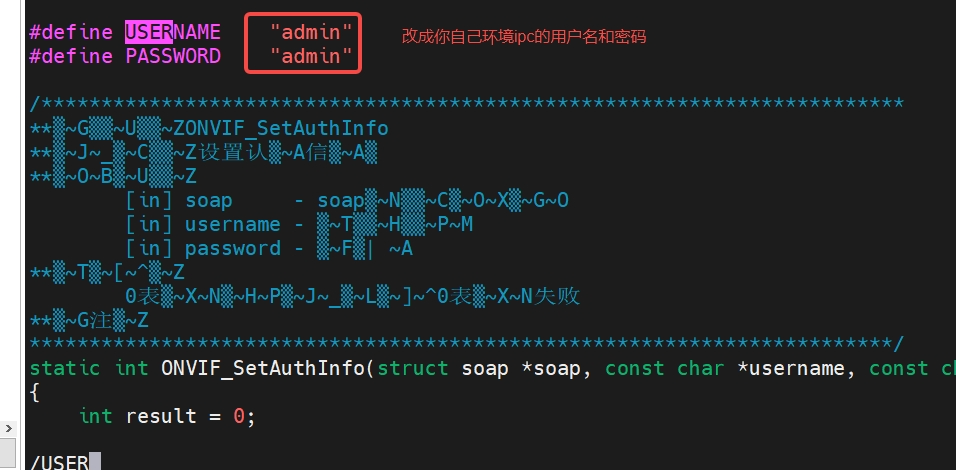
./ONVIF_Discovery- • Note: If you encounter authentication failure errors, as shown in the figure below, check if the username and password in the source code are correct:
 Modify the username or password in main.cpp to the correct value:
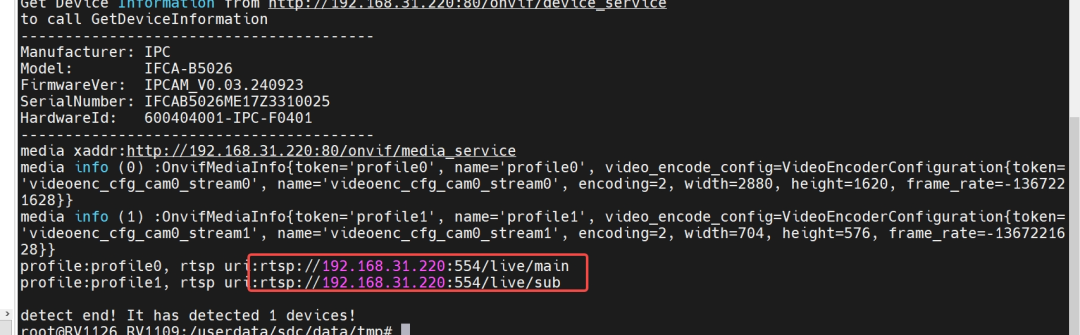
 After recompiling and deploying, it should successfully retrieve the IPC’s RTSP address: