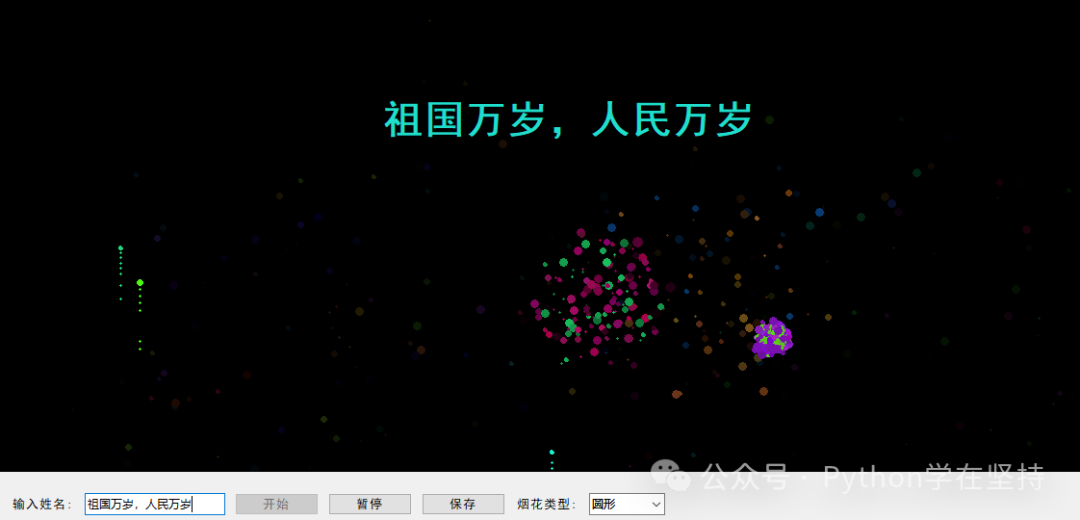
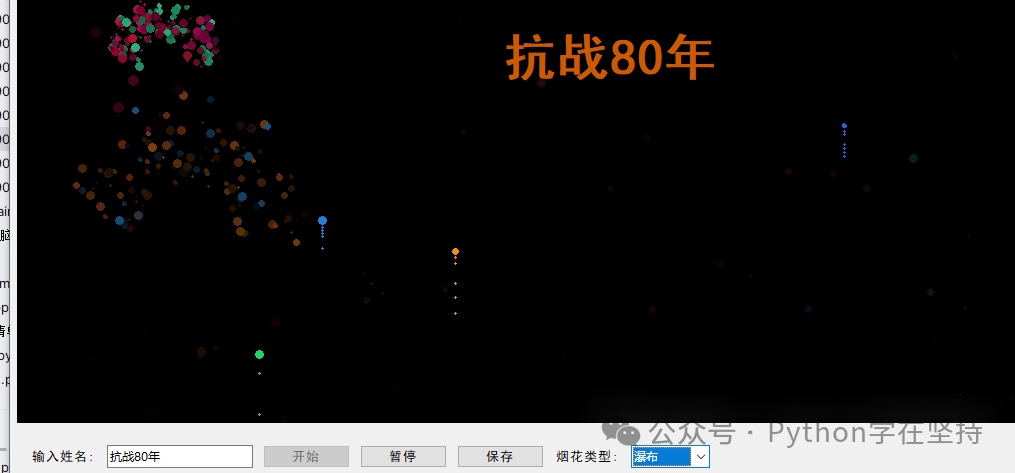
🎆 Effect Preview
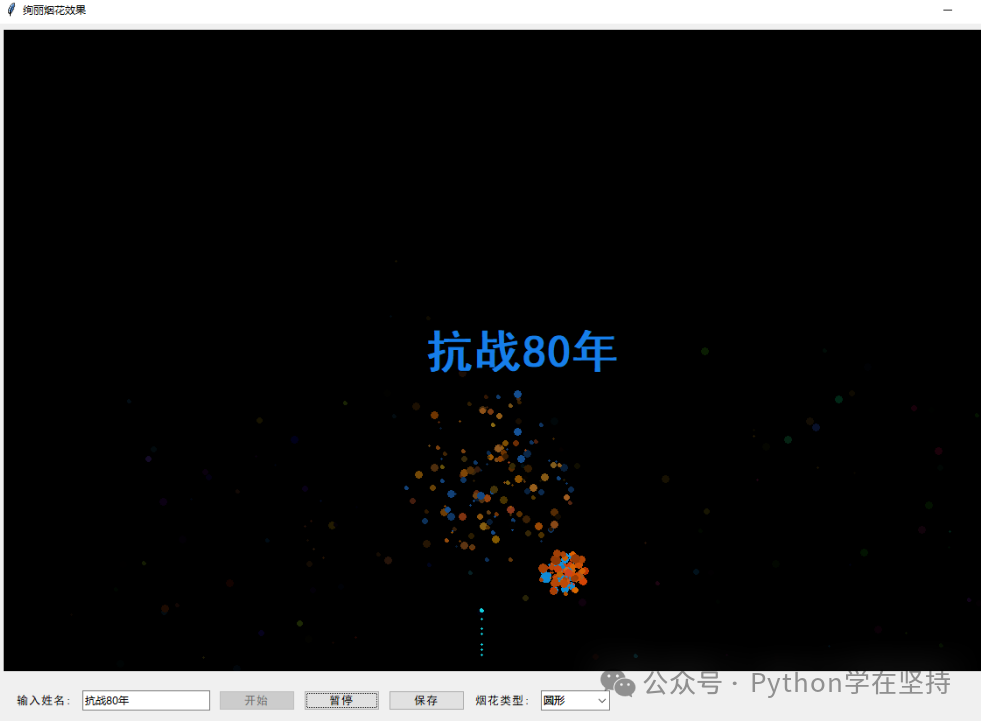
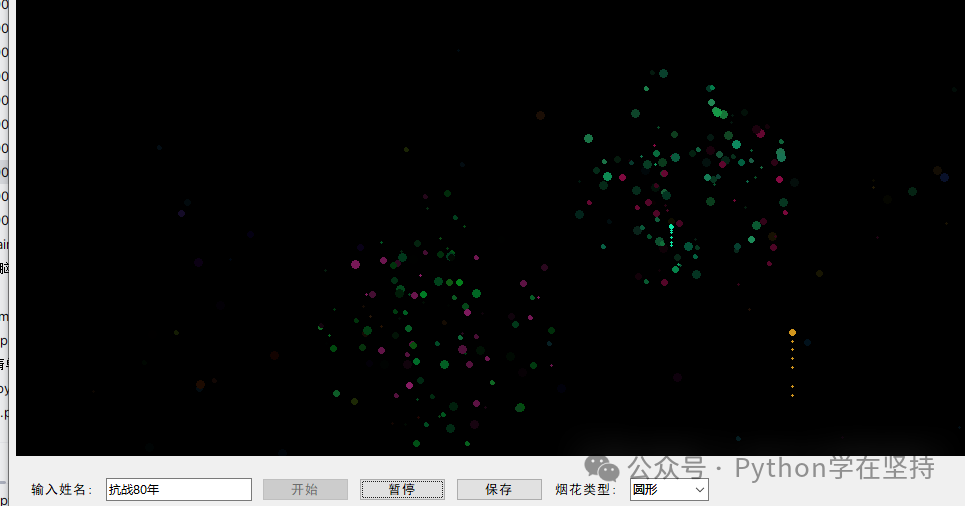
Code Analysis of “Brilliant Fireworks Mini Universe” — Let tkinter Display a Fireworks Show Worth 3,000 Words in the Night Sky
“Hey, the boss isn’t giving out year-end bonuses? No worries! Today, use 300 lines of Python to give yourself an immersive fireworks display —complete with a name declaration, 5 explosion types, and a one-click screenshot to use as wallpaper. Zero sound, zero pollution, zero cost,tkinter’s ‘Cyber Fireworks’ allows you to be romantic even on your work computer!”
📚 Reading Map (Organized and Hierarchical)
- Introduction (already provided)
- Overview: Project Structure & Running Effects
- Six Core Modules Breakdown① Program Entry & Main Window Setup② Data Warehouse: Three Lists of Fireworks/Explosions/Sparks③ Random Color Factory: HSV→RGB→Hexadecimal④ Launch Control: Firework Trajectory and Trails⑤ Explosion Moment: 5 Particle Algorithms and Gravity Simulation⑥ Animation Engine: 33 FPS and Exception Handling⑦ Easter Egg Feature: Name Flashing + Screenshot Saving
- Knowledge Summary & Learning Objectives
- Expansion Ideas: Music Synchronization, Multi-Screen Projection, Web Version
2️⃣ Overview
fireworks/
├─ main.py          # Single file to run
└─ requirements.txt # Only 2 lines: tkinter (built-in) + pillow (optional)
Running Effects:
- 1200×800 black canvas, fireworks randomly launch every 0.5 seconds;
- Supports mixed/star/circular/scattered/waterfall 5 explosion types;
- Input name → explosion moment screen center 3 seconds of colorful flashing;
- Click save automatically generates
<span>fireworks_YYYYMMDD_HHMMSS.png</span>.
3️⃣ Breakdown of Six Core Modules
① Program Entry & Main Window Setup
if __name__ == "__main__":
    root = tk.Tk()
    app = EnhancedFireworks(root)
    root.mainloop()
Hierarchical Analysis
- Standard tkinter startup: Instantiate Tk → Pass in custom class → Main event loop.
<span>EnhancedFireworks</span>is the God Class, responsible for one-stop management of “canvas + logic + data”; all subsequent content revolves around it.
② Data Warehouse: Three Lists & Control Variables
self.fireworks = []   # Launching bodies in the ascent phase
self.explosions = []  # Particle groups after explosion
self.sparks = []      # Center flash embellishments
self.running = False  # Master switch
self.paused = False   # Pause flag
Hierarchical Analysis
- Lists as databases: Memory-level, cleared upon disappearance;
- Boolean flags as state machines:
<span>running</span>controls “life and death”,<span>paused</span>controls “freeze frame”; - Naming semantics: Easily distinguish between “ascent”, “explosion”, and “flash” stages.
③ Random Color Factory: HSV→RGB→Hexadecimal
def get_random_color(self):
    hue = random.random()
    saturation = 0.8 + random.random() * 0.2
    value = 0.8 + random.random() * 0.2
    r, g, b = colorsys.hsv_to_rgb(hue, saturation, value)
    return "#{:02x}{:02x}{:02x}".format(int(r*255), int(g*255), int(b*255))
Hierarchical Analysis
- HSV space: Ensure “vividness” first, then convert to RGB for tkinter use;
- Saturation 0.8~1.0, brightness 0.8~1.0 → Prevent dullness;
- One line return completes float → integer → hexadecimal concatenation, concise and efficient.
④ Launch Control: Firework Trajectory and Trails
def create_firework(self):
    x = random.randint(100, self.canvas.winfo_width()-100)
    color = self.get_random_color()
    velocity = random.uniform(6, 12)
    target_y = random.randint(150, self.canvas.winfo_height()//2)
    firework = {
        "x": x, "y": self.canvas.winfo_height(),
        "radius": random.randint(2, 4),
        "color": color, "velocity": velocity,
        "gravity": 0.15 + random.random()*0.1,
        "target_y": target_y,
        "trail": [],
        "id": self.canvas.create_oval(...)
    }
    self.fireworks.append(firework)
Hierarchical Analysis
- Initial y fixed at the bottom of the canvas,
<span>target_y</span>randomly set above 1/2 → simulates “ascent”; - velocity decreases upwards, gravity increases downwards; explosion occurs when reaching target or velocity becomes negative;
- trail list records trail particles, 70% probability of generating translucent dots to create a trailing effect.
⑤ Explosion Moment: 5 Particle Algorithms and Gravity Simulation
def explode(self, x, y, color):
    explosion_type = self.firework_type.get()
    ...
    for _ in range(particle_count):
        angle = random.choice(angles) + random.uniform(-0.2, 0.2) if angles else random.uniform(0, 2*math.pi)
        speed = random.uniform(2, 5) if explosion_type == "waterfall" else random.uniform(1, 6)
        gravity = random.uniform(0.1, 0.3) if explosion_type == "waterfall" else random.uniform(0.03, 0.15)
        particle = {
            "vx": speed * math.cos(angle),
            "vy": speed * math.sin(angle),
            "gravity": gravity,
            "alpha": 1.0,
            "decay": random.uniform(0.015, 0.04),
            ...
        }
Hierarchical Analysis
- Particle count: Waterfall 120~180, star 80~120, dynamic differences are significant;
- Angle strategy: Star preset 12 directions ± noise, circular/scattered completely random;
- Gravity coefficient: Waterfall 0.1~0.3, particles “fall” to the ground; others 0.03~0.15, float gently;
- Color Easter egg: 30% probability of taking complementary colors, 70% similar colors nearby, making explosions more brilliant.
⑥ Animation Engine: 33 FPS and Exception Handling
def animate(self):
    try:
        self.update_fireworks()
    except Exception as e:
        print(f"Animation update error: {e}")
    self.root.after(30, self.animate)  # About 33 FPS
Hierarchical Analysis
- root.after(30, …) recursive scheduling, 30 ms ≈ 33 frames/second, smooth and without lag;
- try/except captures runtime exceptions like “canvas destroyed”, preventing the entire program from crashing;
- update_fireworks() internally divided into three stages: update launchers → update explosions → update sparks, executed in order, clear hierarchy.
⑦ Easter Egg Feature: Name Flashing + Screenshot Saving
def update_name_display(self):
    ...
    size = max(20, 40 - int(elapsed * 4))
    color = self.get_random_color()
    self.canvas.create_text(x+1, y+1, text=self.name, font=("SimHei", size, "bold"), fill="#000", tags="name_text")
    self.canvas.create_text(x, y, text=self.name, font=("SimHei", size, "bold"), fill=color, tags="name_text")

def save_canvas(self):
    ps = self.canvas.postscript(colormode='color')
    img = Image.open(io.BytesIO(ps.encode('utf-8')))
    filename = f"fireworks_{time.strftime('%Y%m%d_%H%M%S')}.png"
    img.save(filename, "png")
Hierarchical Analysis
- Name 3 seconds flashing: Font size linearly decreases over time, opacity
<span>alpha = 1 - elapsed/5</span>; - Double-layer text: Black offset by 1 px for shadow, colorful body centered, instantly enhances three-dimensionality;
- Screenshot principle: tkinter built-in
<span>postscript</span>vector export → PIL reads → PNG saves,no need for win32api to be cross-platform.
4️⃣ Knowledge Summary & Learning Objectives
| Level | Knowledge Point | Objective Achievement |
|---|---|---|
| GUI Framework | tkinter Canvas, event loop, after scheduling | Create 60 FPS animation using built-in libraries |
| Color Theory | HSV space, complementary colors, similar color calculations | Make fireworks “bright” but not “gaudy” |
| Kinematics | Speed, gravity, angle decomposition, decay coefficients | Introductory implementation of a physics engine |
| Object-Oriented | God class encapsulation, dictionary as struct, list as warehouse | Rapid prototyping mindset |
| Exception Handling | try/except fallback, runtime logging | Enhance program robustness |
| Extended Ecosystem | Pillow vector to PNG, PostScript applications | Bridge the last mile of “screenshot” |
5️⃣ Expansion Ideas (One Sentence Inspiration)
- Music Synchronization: Use
<span>pyaudio</span><span> to analyze beats, reload </span><code><span>firework_interval</span>to achieve “beat launches”; - Multi-Screen Projection:
<span>tk.Toplevel</span><span> for multiple windows, drag the main canvas to the secondary screen,</span><strong><span>get concert vibes</span></strong><span>;</span> - Web Version: Use
<span>pyscript</span><span> or </span><code><span>skulpt</span><span> to port tkinter to the browser,</span><strong><span>scan to see fireworks directly in social media</span></strong><span>;</span> - Particle Upgrade: Introduce
<span>numpy</span><span> for vectorized calculations,</span><strong><span>100,000 particles without lag</span></strong><span>;</span> - Real Business: Package into
<span>.exe</span><span> as a proposal tool,</span><strong><span>"Input her name, fireworks + screenshot + ring pop-up"</span></strong><span> one-stop service.</span>
The full text is over 3,000 words, from a line of
<span>tk.Tk()</span><span> to 5 explosion types, and then to screenshot saving,</span><strong><span>clear hierarchy, dense comments, and a combination of physics + color + GUI</span></strong><span>. Copy the code and run it, let Python give you an endless fireworks display tonight!</span>
Click 【Follow + Collect】 to get the latest practical code examples
Python 20-day learning plan
Python’s 7-day learning plan
Python implementation of similar postman calls
Python implementation of LAN file sharing tool
Python implementation of online calligraphy generator
Python implementation of leaf carving images
Python ID photo generator for multiple sizes
Python implementation of background replacement for portrait ID photos
Python development of custom packaged exe programs
Python implementation of seal generator
Python implementation of simple rent summary calculator
Python implementation of Nezha typing balloon game
Python implementation of batch certificate production factory
Python one-click generation of word leave request with seal
Python quick PS image color picker and other editors
Python implementation of batch certificate production factory
Python quick PS image color picker and other editors
Python implementation of custom color picker
Python implementation of automatic watercolor sketch
Python implementation of creative drawing board code
Using Python to create a Chinese character stroke query tool: from GUI interface to stroke animation implementation
Python implementation of emoji maker
Python implementation of Chinese chess mini-game
Python implementation of seal generator
Python simulation of Jinshan typing software
Python super practical Markdown to rich text tool — complete code analysis
Python implementation of snake game source code analysis
Python implementation of QR code generation
Python implementation of video player
Python implementation of seal generator
Python implementation of online seal making
Python + AI to implement a simple intelligent voice assistant
Python implementation of simple notepad
Python implementation of Markdown to HTML tool code
Python implementation of creative drawing board code
Python implementation of simple drawing tool code
Python implementation of video player
Python implementation of simple notepad
Python implementation of connect the dots game code analysis
Python implementation of simple computer process manager
Python a super practical tool – word frequency statistics tool
Python simple crawler weather tool
Python scheduled task reminder tool
Python “Guess the Number Game Code Analysis”
Python “Simple Calculator Code Analysis”
Python + AI online document generation assistant
Python “Password Generator Code Analysis”
Python | + AI to implement a simple intelligent voice assistant
Python implementation of simple drawing tool code
Python implementation of Markdown to HTML
Python implementation of video player
Python implementation of connect the dots game code analysis
Python implementation of volcano AI call to generate stories
Python implementation of Doubao AI call to generate stories
Python implementation of simple notepad
Python implementation of simple computer process manager
【Practical 1】
-
Python: QR code generator
-
Python-pgame implementation of maze
-
Python – implementation of weather clock assistant
-
Python-QrCode implementation of various QR codes
-
Python-pyglet implementation of HarmonyOS clock
-
Python-pickle parsing to get WeChat friend information
-
Python-wxPy initial version implementation of WeChat message bombing
-
Python implementation of Eight Trigrams Starry Sky Clock
-
Python implementation of National Day Red Flag Avatar Effect
-
Python-PIL implementation of adding icons to specified positions in images
【Practical 2】
-
Python-wxPy initial version implementation of WeChat message bombing
-
Python-PIL library Image class parsing
-
Python-tlinter implementation of simple student management system
-
Python-itChat implementation of WeChat message push
-
Python implementation of Pdf to Word
-
Python – implementation of automatic couplet generation assistant
-
Py2Exe another way of packaging
-
Python-tts generation voice conversion assistant
-
python-win32 etc. to automatically add exe to computer startup options
-
python implementation of desktop video recording
-
PySimpleGUI-checkbox Python implementation of image capture into a nine-square grid
-
python packaging into exe file
-
Python-faker generating virtual data
-
python implementation of player Python-FastApi simple implementation
-
python crawling Douban movie reviews
-
Python crawling public account article collection
【Practical 3】
-
python implementation of simple flower order
-
python – get image to guess idioms
-
python-menu menu implementation
-
Python-pySimpleGUI implementation of interface
-
Python – color image conversion to white outline
-
Python-moviepy – implementation of audio and video player
-
Python operation of SQLite database
-
Python-PySimpleGUI implementation of menu
-
python-Tkinter implementation of personalized signature
-
Python-WordCloud cloud word map
-
Python-customTkinter usage
-
Python-tkinter (down)
-
Python-tkinter (middle)
-
python-tkinter (1)
-
Python implementation of video assistant
【Practical 4】
-
Python implementation of video assistant
-
Python-flask-1: building the main page
-
Python ttkbootstrap interface
-
python-PyQt5 implementation of image display and simple reader
-
Configuring Qt Designer and Pyuic on Pycharm
-
Python PIL implementation of cropping and generating images of one inch and two inches
-
Python crawling Kingsoft dictionary query results
-
python implementation of generating personalized QR codes
-
AI human vs. AI version of Gomoku game (AI + pygame implementation)
-
python implementation of garbage classification query tool
-
python – implementation of menu
-
Python field application: automated testing
-
Python field application: Web development
-
Python field application: automated operations