1. Introduction to HTTP and HTTPS
HTTP (HyperText Transfer Protocol) is a stateless communication protocol commonly used for transmitting hypertext (such as HTML pages) between clients (like browsers) and servers. However, it is merely a one-way communication protocol, and data is not encrypted during transmission, making it susceptible to man-in-the-middle attacks. Stateless means it cannot retain information from each submission; if a user sends a new request, the server cannot determine if it is related to the previous request.
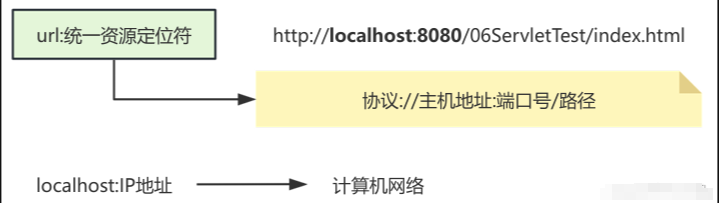
HTTPS (HyperText Transfer Protocol Secure) adds an encryption layer on top of HTTP, using SSL/TLS protocols to secure data transmission. It can be understood as an “upgraded version” of HTTP, providing encrypted protection to make data transmission more secure.
| Feature | HTTP | HTTPS |
| Security | No encryption, vulnerable to attacks | Encrypted transmission, high security |
| Port Number | Default port is 80 | Default port is 443 |
| Performance | Faster (no encryption overhead) | Slower (encryption/decryption incurs some overhead) |
| Certificate | No certificate required | SSL/TLS certificate required |
| Browser Behavior | No “secure” indicator | Displays a lock icon, users feel secure |
2. How Internet Messages are Transmitted
In the internet, information transmission resembles a complex postal process, where messages need to pass through a series of “post offices” (i.e., routers) to gradually reach the recipient. To make this process more logical, we can compare it to sending a package.
1. Path of Internet Communication
1. Accessing a Website
Access the website www.example.com. This URL is not a unique address on the internet; it is merely a more memorable string. To locate the actual address of the website, one must use its IP address. This is akin to trying to find a friend’s address when you only know their name; you need to look it up in a phone book (similar to DNS resolution) to find their specific address (IP address).
2. Browser Sends Request
After entering the URL in the browser, it initiates a request that includes the information it wants to access. For example, the HTTP request header may contain the page path, browser type, language, etc. This is like submitting a package to the post office, with the package containing the desired content (i.e., request information).
3. DNS Resolution
Since IP addresses are hard to remember, DNS (Domain Name System) serves to convert easy-to-remember domain names (like www.example.com) into computer-understandable IP addresses (like 192.168.1.1). This is achieved by querying the DNS server.
4. Role of Routers
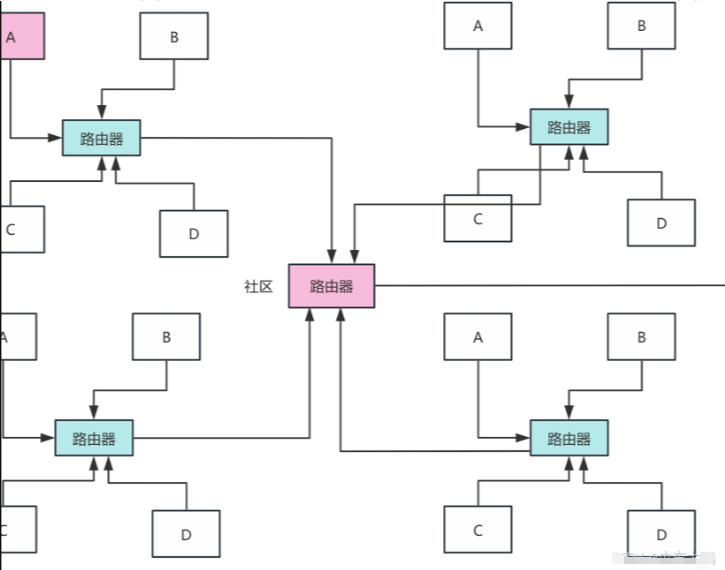
Once the correct IP address is obtained, the message is forwarded through a series of routers (which act like postal workers, responsible for delivering packages between various “post offices”) to the target server. Each router decides where to forward the package based on the information received. These routers identify each other using MAC addresses, just as each post office has an address and a “postal worker”.
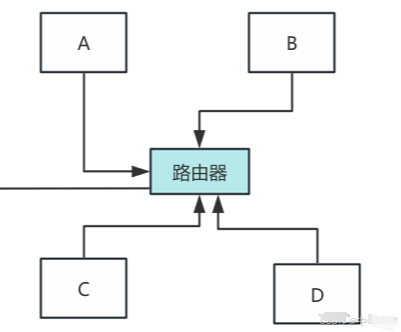
During this process, the MAC address serves as a unique identifier for each network device (such as routers, computers, etc.). MAC addresses typically function within a local area network, while data packets on the internet rely on IP addresses for forwarding.
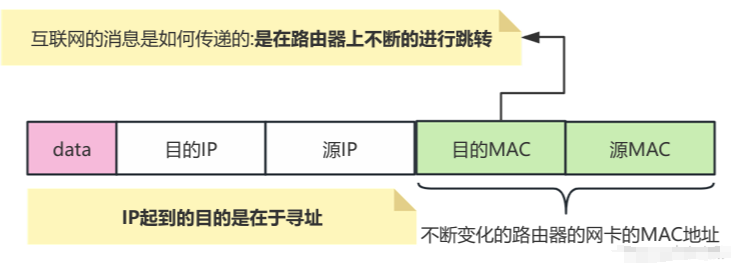
For instance, when your package arrives at a router (network node) and moves to the next node, the “recipient address” (i.e., MAC address) changes. With each router it passes, the “address” on the package updates to the current router’s MAC address until it finally reaches the target server.
5. Target Server Responds to Request
When the data packet finally reaches the target server, the server processes your request (for example, returning a webpage, image, or file). The server selects the correct data to return based on the request information, similar to how a post office hands over a package to the recipient.
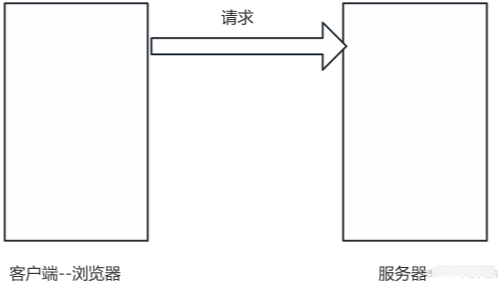
6. Response is Sent Back
Once the target server generates a response, it sends it back to the browser via the same path as the request. Due to the role of routers and intermediate devices, the data packet will still update its MAC address and other information during routing, but it will ultimately reach the browser correctly, displaying the webpage content.
2. Role of IP Address and MAC Address
1. IP Address
It is the unique address of each network host, primarily used for addressing, allowing data packets to find their destination. You can think of the IP address as a “mailing address” that helps routers know where to send the data.
2. MAC Address
It is a physical address of hardware devices (like network cards) used for communication between devices within a local area network. It can be understood as the device’s “identity card”; each device has a unique MAC address.
3. DNS Resolution
People use domain names instead of IP addresses mainly because domain names are easier to remember. However, computers can only find the target server via IP addresses, so DNS (Domain Name System) is needed to convert domain names into IP addresses.
3. Port Numbers
Network cards have many software for network communication. When data frames arrive at the network card, they are distinguished by port numbers to identify different software or processes; the port number is used to determine the destination program for the data.
| Service Type | Default Port Number |
| HTTP | 80 |
| HTTPS | 443 |
| FTP | 21 |
| MySQL | 3306 |
| SSH | 22 |
4. HTTP Protocol
HTTP (Hypertext Transfer Protocol) is a stateless request-response protocol used for communication between clients (usually browsers) and servers. It is one of the most fundamental and commonly used protocols on the internet. The HTTP protocol plays a core role in web browsing, serving as the language for data exchange between browsers and servers.
1. What is Hypertext
“Hypertext” refers to the content on webpages, typically presented in HTML (Hypertext Markup Language) format. HTML is a markup language used to describe the structure of webpages; therefore, the HTTP protocol is often used to transmit HTML files, but it also transmits other formats such as images, videos, JSON data, etc.
2. HTTP Requests and Responses
The HTTP protocol exchanges data through requests and responses. The client sends a request to the server, and the server processes the request and returns a response.
1. HTTP Request
The client (such as a browser) initiates a request to the server. Typically, the client does not actively send requests to the server; instead, requests are generated by user-triggered actions (such as clicking links, submitting forms, etc.). Each HTTP request consists of three main parts:
Composition of the Request
(1) Request Line:
Request Method (GET, POST, PUT, DELETE, etc.)
Request Target (e.g., /index.html)
HTTP Version (e.g., HTTP/1.1)
(2) Request Header:
The request header contains relevant information about the client. Common request headers include:
Accept-Encoding: Specifies the encoding methods the client can accept, such as gzip, deflate, used to compress response content.
Host: Specifies the hostname of the server, usually the domain name of the website (e.g., www.baidu.com).
User-Agent: Specifies the type of browser making the request, such as Mozilla/5.0.
Cookie: Cookie information saved by the client, used to track user status.
(3) Request Body:
The request body contains the actual data of the request, usually used for POST or PUT requests to send form data or files. GET requests generally do not have a request body.
GET /index.html HTTP/1.1
Host: www.example.com
User-Agent: Mozilla/5.0
Accept-Encoding: gzip, deflate, br
This request means: the client requests the /index.html page on the server using the GET method, with the HTTP/1.1 protocol, and informs the server that the browser type is Mozilla/5.0, supporting gzip, deflate, br, and other compression methods.
Request Methods
GET: Used to request a specified resource, with data passed through URL parameters. Suitable for querying data.
POST: Used to submit data to the server. Suitable for submitting forms, file uploads, etc.
PUT: Used to update a specified resource, usually with a request body.
DELETE: Used to delete a specified resource.
GET Request
Parameters are passed through the URL, separated by ?, and multiple parameters are separated by &; it is also the default submission method for forms.
GET transmits a smaller amount of data, mainly due to URL length limitations.
GET will display data in the URL, which is not secure.
GET requests are generally used to directly retrieve data, improving query speed.
GET is side-effect free, so it can be cached, bookmarked, and shared.
POST Request
POST data is within the request body, making it relatively secure, but not absolutely secure.
POST has no size limit for uploaded data; it can be used for file uploads and downloads. POST is suitable for create, update, and delete operations.
2. HTTP Response
After the server receives the client’s request, it returns a response based on the request content. An HTTP response typically includes the following parts:
Composition of the Response
(1) Response Status Line:
HTTP Version (e.g., HTTP/1.1)
Status Code (e.g., 200 OK, 404 Not Found, 500 Internal Server Error, etc.)
Status Description (a brief textual description)
(2) Response Header:
The response header contains some metadata about the server and the returned data:
Content-Type: Specifies the type of response data, such as text/html, application/json.
Content-Length: Length of the response content.
Set-Cookie: Cookies set by the server for the client to maintain state.
(3) Response Body:
The response body contains the actual response data, such as HTML files, JSON data, or images.
Response Status Codes
200 OK: Request succeeded, server successfully returned data.
400 Bad Request: Request has syntax errors, server cannot understand.
404 Not Found: The requested resource does not exist.
405 Method Not Allowed: Request method not supported by the server.
500 Internal Server Error: Internal server error, unable to process the request.
502 Bad Gateway: Server received an invalid response from an upstream server while acting as a gateway or proxy.
HTTP/1.1200 OK
Content-Type: text/html
Content-Length: 1234

<html>
<body>
<h1>Welcome to Example!</h1>
</body>
</html>
In this response, the server informs the client that the /index.html page has been successfully returned, and the response content is in HTML format, with a length of 1234 bytes, containing the webpage content.
5. HTTPS
To address the security issues of the HTTP protocol, HTTPS (Hypertext Transfer Protocol Secure) was introduced. HTTPS adds an encryption layer on top of HTTP, using SSL (Secure Sockets Layer) or TLS (Transport Layer Security) to encrypt data. Through the HTTPS protocol, data is encrypted during transmission, ensuring not only the confidentiality of the data (preventing data theft) but also the integrity of the data (preventing data tampering during transmission).
1. Encryption Methods of HTTPS
1. Symmetric Encryption
A secret key is generated, and the same key is used for encryption and decryption. Symmetric encryption is fast, but the security of the key is relatively low; if the key is stolen during transmission, an attacker can easily decrypt the data.
2. Asymmetric Encryption
Public and private keys are generated; data encrypted with the public key requires the private key for decryption, and data encrypted with the private key requires the public key for decryption. The processing speed is relatively slow, but the security is higher.
2. Encryption Process of HTTPS
1. Handshake Phase:
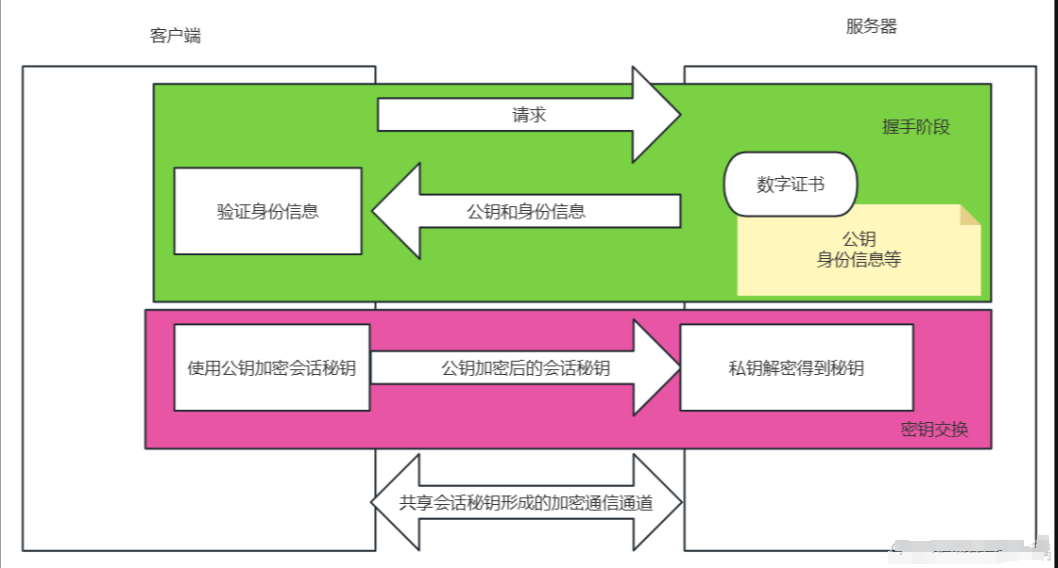
Initially, a series of encrypted handshakes occur between the client and server. When the client requests the server, the server returns a digital certificate containing the public key and server identity information. The client verifies the legitimacy of the certificate to confirm the trustworthiness of the server’s identity.
2. Key Exchange:
During the handshake phase, the client and server use asymmetric encryption to exchange keys. The client encrypts the generated “session key” (symmetric key) with the server’s public key and sends the encrypted session key to the server. The server decrypts the session key using its private key. This establishes an encrypted communication channel between the client and server, allowing them to use the session key for subsequent data encryption and decryption.
3. Data Encryption Transmission Phase:
During subsequent data transmission, the client and server use the shared symmetric key for encryption and decryption operations. Due to the efficiency of symmetric encryption, data transmission is relatively fast.
3. Digital Certificates
To prevent third-party attackers from impersonating servers for phishing attacks, HTTPS uses digital certificates to verify the server’s identity. A digital certificate is like a “ID card” for a website, issued by a Certificate Authority (CA), containing the server’s public key and identity information.
Composition of the Certificate
-
Information about the certificate holder (such as company name, website domain, etc.)
-
Public Key
-
Information about the Certificate Authority (CA)
-
Certificate Validity Period
-
Digital Signature (ensures the integrity of the certificate, preventing tampering)
Certificate Authorities (CAs) are recognized authoritative institutions by governments worldwide, responsible for issuing and verifying the legitimacy of certificates. When a client accesses an HTTPS website, the browser verifies the certificate’s validity, ensuring that it is issued by a trusted CA and has not expired.
Certificate Verification Process
When a client accesses an HTTPS website, it first receives the digital certificate sent by the server. The client checks the certificate’s validity and confirms its legality with the issuing authority (CA). If the certificate is valid, the client extracts the public key to encrypt the generated session key and sends the encrypted key to the server.
6. Cookies and Sessions
1. Cookies
Cookies are small files stored in the client’s browser to save user state information. Since the HTTP protocol is stateless, meaning each request cannot automatically carry the previous state information, cookies are needed to maintain state.
1. Characteristics of Cookies
-
Stored on the client, easily tampered with or stolen.
-
Can set expiration time.
-
Sent with each request, which may affect request performance.
2. Sessions
Sessions are user session information stored on the server. Each client is assigned a unique session ID when accessing the server. This ID is usually stored in the client’s cookies, and when the client requests again, the browser automatically sends this session ID, allowing the server to find the corresponding session information.
1. Characteristics of Sessions
-
Stored on the server, relatively more secure.
-
Requires the client’s cookies to maintain the session.
-
Not exposed to the client, preventing tampering.
3. Comparison of Cookies and Sessions
| Feature | Cookie | Session |
| Storage Location | Stored in the client browser | Stored on the server |
| Security | Relatively insecure, easily tampered with or stolen | Relatively secure, data stored on the server, client only has Session ID |
| Capacity | Typically, each cookie is 4KB | Limited by server resources, generally larger |
| Lifetime | Can set expiration time, automatically deleted after expiration | Session data lost when the session ends or the browser closes |
| Stored Content | Can store a small amount of information (like user preferences, login information, etc.) | Usually stores more important user information, such as user identity, shopping cart, etc. |
| Data Transmission | Sent with each request to the server | Only sends Session ID with each request (usually stored in cookies) |
| Performance | Sending cookies with each request may increase network load | Better performance, only transmits Session ID, data stored on the server |
| Cross-Domain Issues | Cannot be used across domains; cookies cannot be shared under different domain names | Requires special handling for cross-domain (e.g., through shared Session ID) |
| Storage Size Limit | Up to 20 cookies per domain, each cookie 4KB | No hard size limit, but limited by server memory |
| Common Uses | User preferences, user login status, tracking user behavior, etc. | User session management, user identity verification, etc. |
7. Summary of HTTP and HTTPS
| Feature | HTTP | HTTPS |
| Full Name | Hypertext Transfer Protocol | Hypertext Transfer Protocol Secure |
| Protocol Type | Unencrypted protocol | Encrypted protocol |
| Security | Insecure, data transmitted in plaintext, vulnerable to man-in-the-middle attacks | Secure, data transmitted through encryption, preventing data theft or tampering |
| Encryption Method | No encryption, no protection during data transmission | Uses SSL/TLS protocols to encrypt data |
| Port Number | Uses port 80 | Uses port 443 |
| Identity Verification | No identity verification | Provides identity verification through digital certificates to ensure server identity |
| Data Integrity | Data easily tampered with during transmission | Data is encrypted during transmission, ensuring integrity and preventing tampering |
| Performance | Higher performance due to no encryption/decryption process | Lower performance due to encryption/decryption, but the encryption algorithms used generally do not affect normal usage |
| Data Transmission Method | Plaintext data transmission | Encrypted data transmission |
| Applicable Scenarios | Suitable for non-confidential content, such as public information, non-sensitive data | Suitable for content requiring confidentiality and secure transmission, such as login information, payment information, etc. |
| Browser Display | URL starts with http:// | URL starts with https:// and usually has a lock icon indicating security |
| Digital Certificate | No digital certificate required | Requires a digital certificate issued by a CA to verify server identity |
| Trustworthiness | Cannot verify the true identity of the website, easily forged by phishing sites | Provides trusted identity verification, ensuring users access legitimate websites |
Link:https://blog.csdn.net/weixin_74814027/article/details/145933302?spm=1001.2014.3001.5502
(Copyright belongs to the original author, please delete if infringing)
WeChat group
WeChat group

To facilitate better communication regarding operation and maintenance and related technical issues, a WeChat group has been created. Those who wish to join can scan the QR code below to add me as a friend (note: join group).

Blog
Blog

CSDN Blog: https://blog.csdn.net/qq_25599925

Juejin Blog: https://juejin.cn/user/4262187909781751

Knowledge Planet: https://wx.zsxq.com/group/15555885545422

Long press to recognize the QR code to visit the blog website for more quality original content.