Detailed Explanation of HTTP Protocol: The Communication Magic Behind the Web
What is HTTP?
HTTP (HyperText Transfer Protocol) is one of the most commonly used application layer protocols on the Internet, forming the foundation of the World Wide Web. Every time you enter a URL, click a link, or submit a form in your browser, the HTTP protocol works behind the scenes to ensure that information can be transmitted from the server to your device.
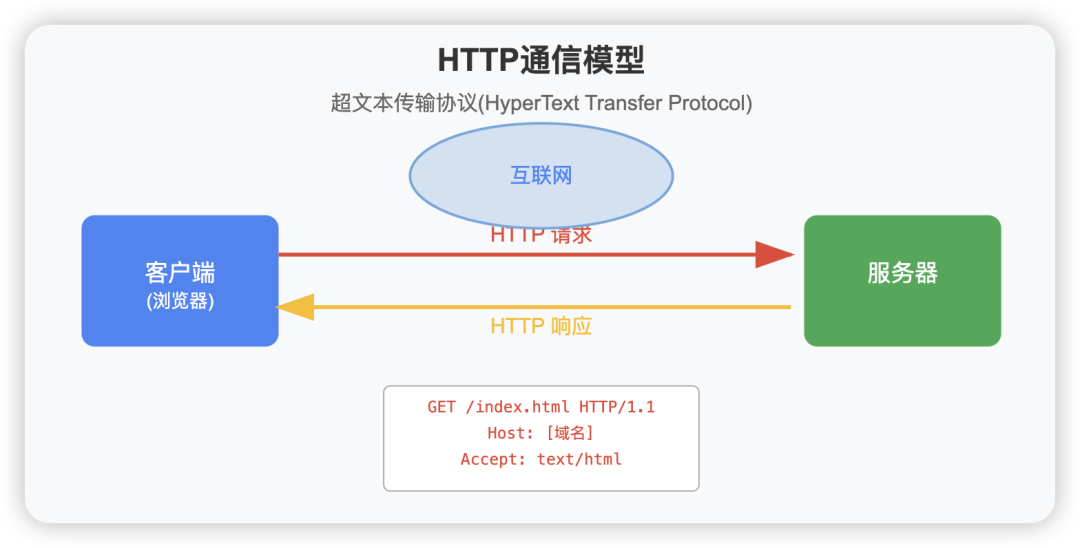
HTTP is a client-server model protocol, which means:
- • Client (usually a web browser) sends requests
- • Server receives requests and returns responses
How HTTP Works
Basic Communication Process
The communication process of HTTP can be summarized in the following steps:
- 1. Client Initiates Request: The browser (client) sends an HTTP request to the server
- 2. Server Processes Request: The server receives and processes this request
- 3. Server Returns Response: The server sends an HTTP response to the client (including status code and requested resource)
- 4. Client Processes Response: The browser receives the response and displays the content
HTTP Request Methods
HTTP defines several request methods to indicate the operations performed on resources on the server:
| Method | Description | Common Uses |
| GET | Request a specified resource | Retrieve web pages, images, etc. |
| POST | Submit data to a specified resource | Submit forms, upload files |
| PUT | Upload resource to a specified location | Update resource |
| DELETE | Delete specified resource | Remove resource |
| HEAD | Similar to GET, but only requests headers | Test link validity |
| OPTIONS | Returns the HTTP methods supported by the server | CORS preflight requests |
| PATCH | Partially modify a resource | Partially update resource |
HTTP Message Structure
HTTP Request Structure
An HTTP request consists of three parts:
- 1. Request Line: Contains the HTTP method, URL, and HTTP version
- 2. Request Headers: Contains additional information about the request
- 3. Request Body (optional): Contains the data being sent, such as form data
GET /index.html HTTP/1.1
Host: [domain]
User-Agent: Mozilla/5.0
Accept: text/html
HTTP Response Structure
An HTTP response also consists of three parts:
- 1. Status Line: Contains the HTTP version, status code, and status message
- 2. Response Headers: Contains additional information about the response
- 3. Response Body: Contains the actual data returned by the server
HTTP/1.1 200 OK
Date: Mon, 23 May 2022 22:38:34 GMT
Content-Type: text/html; charset=UTF-8
Content-Length: 138
&lt!DOCTYPE html&lt>
&lthtml&lt>
&lthead&lt>
&lttitle&lt>Page Title&lt/title&lt>
&lt/head&lt>
&ltbody&lt>
&lth1&lt>Hello, World!&lt/h1&lt>
&lt/body&lt>
&lt/html&lt>HTTP Status Codes
HTTP status codes are numeric codes that indicate the response status of the server to the client’s request, divided into five categories:
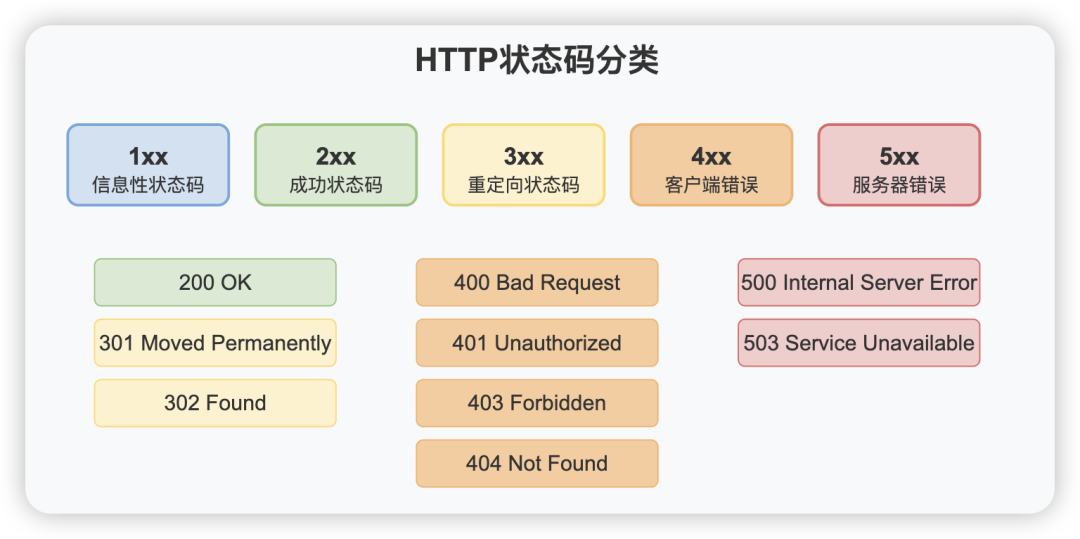
| Status Code Range | Category | Description |
| 1xx | Informational Status Code | Request received, continuing process |
| 2xx | Successful Status Code | Request successfully received, understood, accepted |
| 3xx | Redirection Status Code | Further action needed to complete the request |
| 4xx | Client Error Status Code | Request contains syntax error or cannot be completed |
| 5xx | Server Error Status Code | Error occurred on the server while processing the request |
Common HTTP Status Codes
- • 200 OK: Request successful
- • 301 Moved Permanently: Resource permanently moved to a new location
- • 302 Found: Resource temporarily moved to a new location
- • 400 Bad Request: Server cannot understand the request
- • 401 Unauthorized: Authentication required
- • 403 Forbidden: Server refuses request
- • 404 Not Found: Requested resource does not exist
- • 500 Internal Server Error: Internal server error
- • 503 Service Unavailable: Server temporarily unavailable
Evolution of HTTP Versions
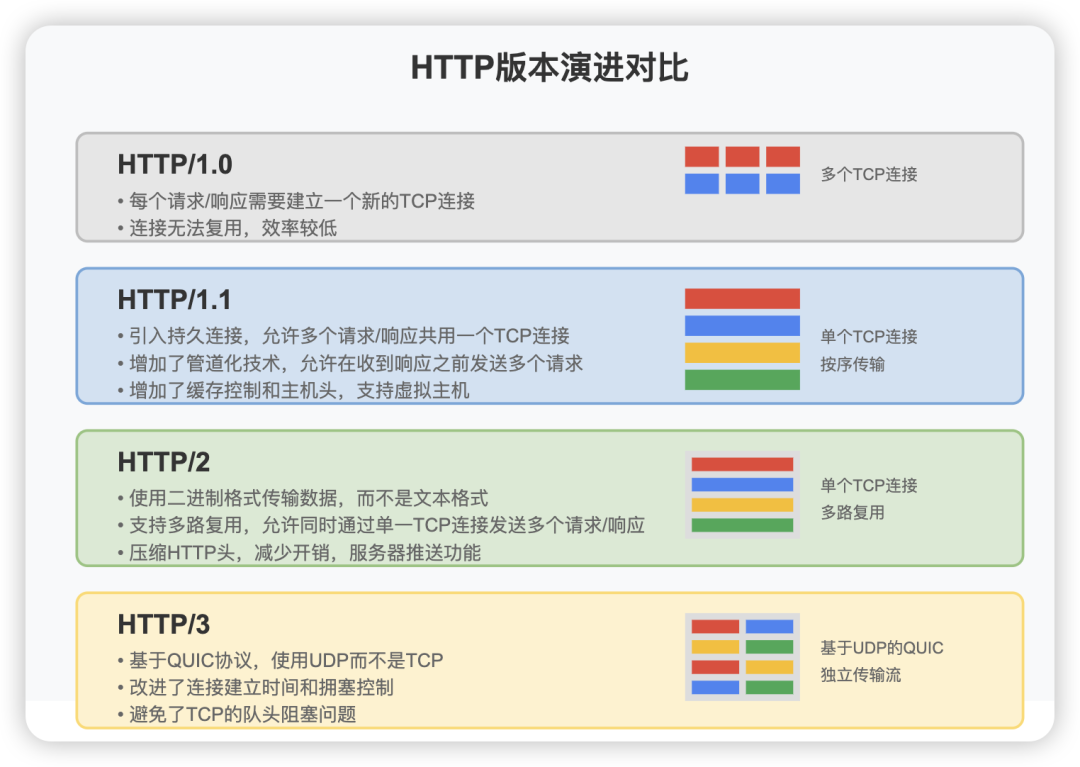
HTTP/1.0
One of the original versions of HTTP, where each request/response required establishing a new TCP connection, which was inefficient.
HTTP/1.1
- • Introduced persistent connections, allowing multiple request/response pairs to share a single TCP connection
- • Added pipelining, allowing multiple requests to be sent before receiving a response
- • Introduced cache control mechanisms
- • Introduced the Host header, supporting virtual hosting
HTTP/2
- • Uses binary format for data transmission instead of text format
- • Supports multiplexing, allowing multiple requests/responses to be sent simultaneously over a single TCP connection
- • Compresses HTTP headers to reduce overhead
- • Server push, allowing the server to send data before the client requests it
HTTP/3
- • Based on the QUIC protocol, using UDP instead of TCP
- • Improved connection establishment time
- • Better congestion control and packet recovery
- • Avoids TCP head-of-line blocking issues
Secure Version of HTTP: HTTPS
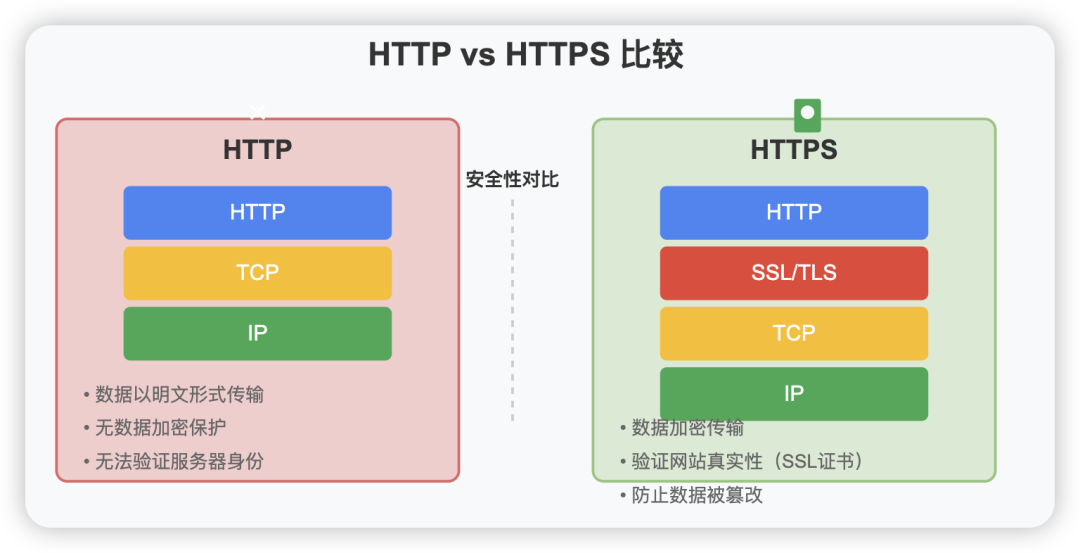
HTTPS (HTTP Secure) is the secure version of HTTP, which adds a layer of encryption (SSL/TLS) between HTTP and TCP, providing:
- • Data Encryption: Prevents data from being eavesdropped
- • Data Integrity: Prevents data from being tampered with
- • Authentication: Confirms the true identity of the website
HTTPS Workflow:
- 1. The client sends a request to the server
- 2. The server sends its SSL certificate
- 3. The client verifies the certificate
- 4. The client and server negotiate encryption algorithms and keys
- 5. Secure communication using the encryption key
HTTP and Web Applications
RESTful API
REST (Representational State Transfer) is an architectural style for distributed system communication using HTTP, utilizing HTTP methods to perform different operations:
- • GET: Retrieve resources
- • POST: Create resources
- • PUT: Update resources
- • DELETE: Remove resources
HTTP Cookies
Cookies are small pieces of text sent by the server to the user’s browser and stored for:
- • Session management: such as user login status, shopping cart, etc.
- • Personalization: user preferences, themes, etc.
- • Tracking: recording and analyzing user behavior
Cache Mechanism
HTTP caching reduces latency and network traffic by reusing previously retrieved resources, improving performance:
- • Browser cache: stored locally on the user’s device
- • Proxy cache: located between the client and server
- • Controlled through headers like Cache-Control, ETag, etc.
Conclusion
As the foundational protocol of the Internet, HTTP has developed and improved over the years, becoming an important bridge connecting global information. Understanding how HTTP works helps us better comprehend the operation of the Internet and provides foundational knowledge for web development and optimization. With the continuous evolution of Internet technologies, the HTTP protocol will continue to evolve, providing more efficient and secure communication experiences.