Overview of the HTTP Protocol
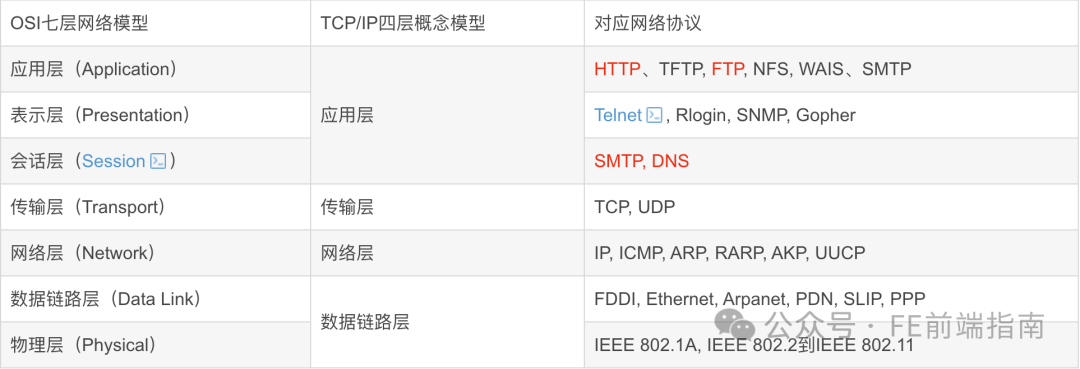
OSI Model
Open Systems Interconnection Model (English: OpenSystemsInterconnection Model, abbreviated as OSI; commonly referred to as OSI Model) is a conceptual model proposed by the International Organization for Standardization, which attempts to create a standard framework for interconnecting various computers into a network worldwide. It is defined in ISO/IEC 7498-1.
This model divides the data flow in communication systems into seven layers, from the highest layer representing distributed application data to the physical implementation of data transmission across communication media. Each intermediate layer provides functionality to the layer above it, while its own functionality is provided by the layer below it. The categories of functionality are implemented in software through standard communication protocols. Among these, layers 1 to 4 are related to network communication technologies, while layers 5 to 7 are related to user applications.
HTTP Protocol
Overview
Hypertext Transfer Protocol (HTTP) is an application layer protocol used for transmitting hypermedia documents (such as HTML). It is designed for communication between web browsers and web servers but can also be used for other purposes. HTTP follows the classic client-server model, where the client opens a connection to make a request and then waits to receive a response from the server. HTTP is a stateless protocol, meaning that the server does not retain any data (state) between two requests.
How It Works
The HTTP protocol defines how web clients request web pages from web servers and how servers deliver web pages to clients. The HTTP protocol adopts a request/response model. The client sends a request message to the server, which includes the request method, URL, protocol version, request headers, and request data. The server responds with a status line, which includes the protocol version, success or error code, server information, response headers, and response data.
- Client connects to the web browser
- An HTTP client, usually a browser, establishes a TCP socket connection with the HTTP port of the web server (default is 80).
- TCP connection (three-way handshake and four-way handshake)
- Send HTTP connection
- Through the TCP socket, the client sends a text request message to the web server.
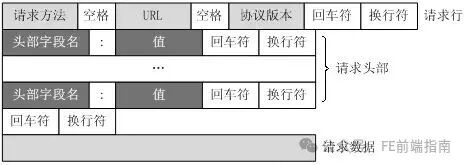
- A request message consists of four parts: request line, request headers, an empty line, and request data.
- Server accepts the request and returns an HTTP response
- The web server parses the request and locates the requested resource. The server writes a copy of the resource to the TCP socket for the client to read.
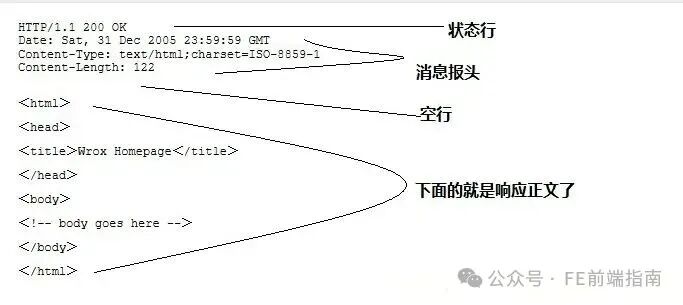
- A response consists of four parts: status line, response headers, an empty line, and response data.
- Release TCP connection
- If the connection mode is close, the server actively closes the TCP connection, and the client passively closes the connection, releasing the TCP connection; if the connection mode is keepalive, the connection will be maintained for a period, during which it can continue to receive requests;
- Client browser parses HTML content
- The client browser first parses the status line to check the status code indicating whether the request was successful. It then parses each response header, which informs how many bytes of HTML document and the character set are included. The client browser reads the response data HTML, formats it according to HTML syntax, and displays it in the browser window.
Process of Browser Parsing Requests
- The browser requests the IP address corresponding to the domain name in the URL from the DNS server;
- After resolving the IP address, it establishes a TCP connection with the server based on that IP address and the default port 80;
- The browser sends an HTTP request to read the file (the part of the URL after the domain name), which is sent as the third message of the TCP three-way handshake;
- The server responds to the browser’s request and sends the corresponding HTML text back to the browser;
- Release the TCP connection (four-way handshake);
- The browser displays the content of the HTML text;
Please open in the WeChat client
Message Structure
A request consists of four parts: request line, request headers, an empty line, and request data.
HTTP responses also consist of four parts: status line, message headers, an empty line, and response body.
Request Methods and Status Codes
Request Methods
<span><span>GET</span></span>method requests a representation of a specified resource, using<span><span>GET</span></span>requests should only be used to retrieve data.<span><span>HEAD</span></span>method requests a response identical to that of a<span><span>GET</span></span>request, but without the response body.<span><span>POST</span></span>method is used to submit an entity to the specified resource, typically resulting in a change in state or side effects on the server.<span><span>PUT</span></span>method requests to replace all current representations of the target resource with the payload.<span><span>DELETE</span></span>method deletes the specified resource.<span><span>CONNECT</span></span>method establishes a tunnel to the server identified by the target resource.<span><span>OPTIONS</span></span>method is used to describe the communication options for the target resource.<span><span>TRACE</span></span>method performs a message loop-back test along the path to the target resource.<span><span>PATCH</span></span>method is used to apply partial modifications to a resource.
Status Codes
- 1xx: Informational – indicates that the request has been received and is continuing to process
- 2xx: Success – indicates that the request has been successfully received, understood, and accepted
- 3xx: Redirection – further action must be taken to complete the request
- 4xx: Client Error – the request has syntax errors or cannot be fulfilled
- 5xx: Server Error – the server failed to fulfill a valid request
Difference Between GET and POST
- GET is harmless when the browser goes back, while POST will resubmit the request.
- GET requests are actively cached by the browser, while POST is not unless manually set.
- GET requests can only be URL-encoded, while POST supports multiple encoding methods.
- GET request parameters are fully retained in the browser history, while POST parameters are not retained.
- GET requests have a length limit on parameters transmitted in the URL, while POST does not.
- For parameter data types, GET only accepts ASCII characters, while POST has no restrictions.
- GET is less secure than POST because parameters are directly exposed in the URL, so it should not be used to transmit sensitive information.
- GET parameters are passed through the URL, while POST is placed in the request body.
Simple Requests and Complex Requests
Simple Requests
Some requests do not trigger a CORS preflight request. In the deprecated CORS specification, such requests are referred to as simple requests
Simple requests refer to requests that only use information in the HTTP header (such as GET, POST, etc.) and do not use special HTTP header fields.
Simple requests do not trigger preflight requests and can be sent directly to the server for processing.
For <span><span>simple requests</span></span>, such as using GET or POST methods without custom request headers, the browser will automatically add the Origin header. When sending cross-origin requests, the server can authorize through the Access-Control-Allow-Origin header. In this case, cross-origin requests will be allowed by the browser without needing a preflight request.
The conditions for triggering simple requests are as follows:
- The request method can only be GET, POST, or HEAD.
- The content of the request header can only be Accept, Accept-Language, Content-Language, Content-Type (and the value can only be application/x-www-form-urlencoded, multipart/form-data, or text/plain), and Range.
- The request does not use ReadableStream.
- If the request is made using the XMLHttpRequest object, no event listeners are registered on the returned XMLHttpRequest.upload object property; that is, given an XMLHttpRequest instance
<span><span>xhr</span></span>, no call to<span><span>xhr.upload.addEventListener()</span></span><code><span><span> to listen for the upload request.</span></span>
Complex Requests (Preflight Requests)
Non-simple requests are complex requests. Complex requests can also be referred to as requests that require a preflight request before the actual request is made.
The conditions for complex requests do not meet those for simple requests, so a preflight request must be sent. A preflight request is an HTTP OPTIONS request used to notify the server of the parameters and characteristics of the actual request the client wishes to send. The server will return a response with the Access-Control-Allow-Origin header to inform the client whether the actual request is allowed. If allowed, the client will send the actual request.
<span><span>Preflight requests</span></span> will carry some custom header information, such as Access-Control-Request-Method, Access-Control-Request-Headers, etc., to inform the server of the permissions needed for the actual request. Upon receiving the preflight request, the server can return the corresponding response header information based on the information in the preflight request, indicating whether cross-origin requests are allowed.
It is important to note that the response to a preflight request will be cached by the browser, so that when the same complex request is sent again, the cached response will be used directly without sending a preflight request again.
Preflight Requests and Redirection
Not all browsers support redirection of preflight requests. If a preflight request is redirected, some browsers will report an error.
For browsers that do not support preflight requests, one can
- Make a simple request (using Fetch API’s Response.url or XMLHttpRequest.responseURL) to determine what address the actual preflight request would return.
- Make another request (the actual request), using the URL obtained in the previous step through
<span><span>Response.url</span></span>or<span><span>XMLHttpRequest.responseURL</span></span>.
Preflight Requests and Credentials
CORS preflight requests cannot include credentials. The response to a preflight request must specify <span><span>Access-Control-Allow-Credentials: true</span></span> to indicate that credentials can be carried for the actual request.
For requests with credentials, the server must not set the value of <span><span>Access-Control-Allow-Origin</span></span> to “<span><span>*</span></span>“. This is because the request headers carry <span><span>Cookie</span></span><span><span> information, and if the value of </span></span><code><span><span>Access-Control-Allow-Origin</span></span><span><span> is "</span></span><code><span><span>*</span></span><span><span>", the request will fail. Setting the value of </span></span><code><span><span>Access-Control-Allow-Origin</span></span><span><span> to </span></span><code><span><span>http://foo.example</span></span><span><span> (the request origin) will allow the request to succeed.</span></span>
URL and URI
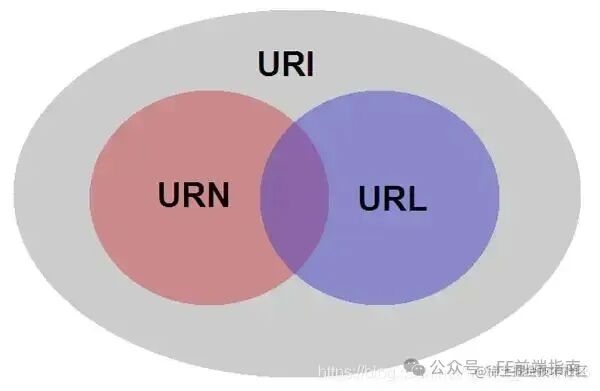
- URI: Universal Resource Identifier
- URI is a compact string used to identify an abstract or physical resource, through which a unique resource can be accessed.
- The “resource” here refers to every available resource on the web, such as HTML documents, images, video clips, programs, etc., all of which can be uniquely identified by a URI string, with specific identification rules determined by us. In reality, resources can be likened to unique people, animals, or objects, while URI is similar to an ID card or DNA (it must be unique, allowing any rules).
- URL: Universal Resource Locator
- URL is a string that identifies a resource by location, which is the main access mechanism for web resources.
- A standard URL must include: protocol, host, port, path, parameter, anchor, for example, animal address protocol://earth/china/zhejiang province/hangzhou city/xihu district/some university/14 dormitory building/525 dormitory/zhang san.person, thus locating the resource by its location.
- It can be seen that URL determines a resource by location, thus URL is a subset of URI, or URL is a way of implementing URI!
- URN: Universal Resource Name
- Identifies a resource by a unique name or ID within a specific namespace. The ID card and DNA mentioned above are similar to URN.
Characteristics of HTTP
In summary:
- Simple and Fast: When a client requests a service from a server, it only needs to send the request method and path. Common request methods include GET, HEAD, and POST. Each method specifies a different type of interaction between the client and server. Due to the simplicity of the HTTP protocol, the size of HTTP server programs is small, thus communication speed is fast.
- Flexible: HTTP allows the transmission of any type of data object. The type being transmitted is marked by Content-Type.
- Connectionless: Connectionless means that each connection only handles one request. After the server processes the client’s request and receives the client’s response, it disconnects. This method can save transmission time.
- Stateless: The HTTP protocol is stateless. Stateless means that the protocol has no memory capability for transaction processing. The lack of state means that if subsequent processing requires previous information, it must be retransmitted, which may increase the amount of data transmitted with each connection. On the other hand, when the server does not need prior information, its response is faster.
- Supports B/S and C/S models.
Development of the Protocol
HTTP/0.9
Only the GET command, no HEADER or other descriptive data information
HTTP/1.0
Added many commands, such as POST, PUT, etc.
Added status codes and HEADER related information
Added caching
HTTP/1.1
Persistent connections, TCP connections will not be closed
Added pipelining, allowing multiple HTTP requests to be sent within the same TCP connection, but serially.
Added the host header, allowing multiple web services to run simultaneously on the same physical server.
HTTP/2
Header Compression
In HTTP/2.0, the HPACK (HTTP/2 header compression algorithm) compression format is used to encode the transmitted headers, reducing the size of the headers. An index table is maintained at both ends to record previously seen headers, allowing for the transmission of previously recorded header keys during the transmission process, enabling the receiving end to find the corresponding values.
Push Functionality
When requesting HTML, the server can actively push the CSS and JS files referenced in the HTML to the client, allowing the sending of HTML, CSS, and JS to occur in parallel rather than serially, significantly improving overall transmission efficiency and performance.
In HTTP/2.0, the server can send multiple responses to a client’s request. If a request is sent from your homepage, the server may respond with the homepage content, logo, and stylesheet because it knows the client will need these items. This not only reduces redundant data transmission steps but also speeds up page response time, enhancing user experience.
Disadvantages of pushing: All pushed resources must comply with the same-origin policy. In other words, the server cannot arbitrarily push third-party resources to the client; it must be confirmed by both parties.
Binary Framing
All transmitted data will be segmented and encoded in binary format.
Multiplexing
HTTP messages are broken down into independent frames without destroying the semantic meaning of the messages, interleaved and sent out, and reassembled on the other end based on stream identifiers and headers. This technology can avoid the head-of-line blocking problem of older HTTP versions, greatly improving transmission performance.
In HTTP/1.x, we often used sprite images and multiple domain names to optimize because browsers limited the number of requests under the same domain. When a page needs to request many resources, head-of-line blocking can cause resources to wait for other resource requests to complete before continuing to send.
In HTTP/2.0, based on the binary framing layer, HTTP/2.0 can send requests and responses simultaneously on a shared TCP connection. HTTP messages are broken down into independent frames without destroying the semantic meaning of the messages, interleaved and sent out, and reassembled on the other end based on stream identifiers and headers. This technology effectively solves the head-of-line blocking problem of older HTTP versions, greatly improving transmission performance.
- Fair Multiplexing (e.g., two progressive JPEGs): 12121212
- Weighted Multiplexing (2 is twice 1): 22122122121
- Reverse Order Scheduling (e.g., 2 is the resource pushed by the key server): 22221111
- Partial Scheduling (stream 1 is aborted and not fully sent): 112222
HTTP/3
Protocols below HTTP/3 will have head-of-line blocking issues
Head-of-Line Blocking
HTTP/1.1 is a plaintext protocol that only attaches headers to the front of the payload. It does not further distinguish between individual (large block) resources and other resources.Compared to HTTP/1.0, the main improvement of HTTP/1.1 is the introduction of persistent connections (keep-alive). HTTP/1.1 allows the use of request pipelining on persistent connections, which is another performance optimization relative to persistent connections.
Request pipelining means that multiple requests can be queued before the HTTP response arrives. When the first HTTP request flows to the server, the second and third requests can also start sending. In high-latency network conditions, this can reduce network round-trip time and improve performance. However, there are certain limitations and requirements for pipelined connections, one of which is that the server must return HTTP responses in the same order as the requests. This means that if a response is delayed, subsequent responses will also be delayed until the head-of-line response is delivered. This is known as HTTP head-of-line blocking.
The problem of HTTP head-of-line blocking has been effectively solved in HTTP/2. HTTP/2 discards the pipelining method and innovatively introduces concepts such as frames, messages, and data streams. Clients and servers can break down HTTP messages into independent frames that can be sent out of order and then reassembled on the other end. Since there is no order, blocking is not required, effectively solving the HTTP head-of-line blocking problem. However, HTTP/2 still suffers from TCP head-of-line blocking issues because HTTP/2 relies on the TCP protocol for implementation. During TCP transmission, data is split into ordered packets, which are transmitted over the network to the receiving end, where they are reassembled in order. If one of the packets does not arrive in order, the receiving end will keep the connection open waiting for the packet to return, causing subsequent requests to be blocked. This is known as TCP head-of-line blocking.
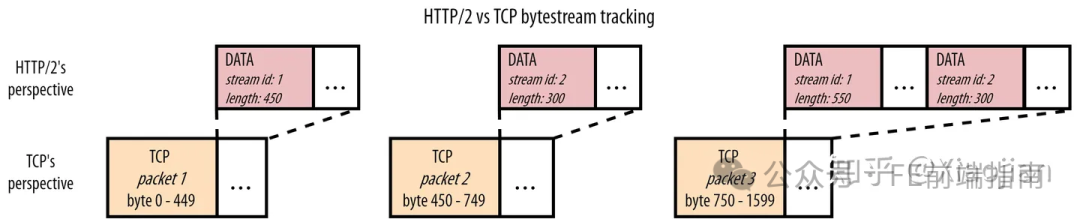
If TCP packet 2 is lost in the network, but packets 1 and 3 have arrived, what happens? Remember, TCP does not know it is carrying HTTP/2; it only knows it needs to deliver data in order. Therefore, it knows the content of packet 1 can be safely used and will pass that content to the browser. However, it finds a gap between the bytes in packet 1 and the bytes in packet 3 (where packet 2 should be), so it cannot pass packet 3 to the browser. TCP will keep packet 3 in its receive buffer until it receives a retransmission of packet 2 (which requires at least one round trip to the server), after which it can deliver both packets to the browser in the correct order. In other words:Lost packet 2 causes head-of-line blocking (HOL blocking) for packet 3!
You may not be clear why this is a problem, so let’s delve deeper into the actual content of TCP packets in the HTTP layer. We can see that TCP packet 2 only carries data for stream id 2 (the CSS file), while packet 3 carries data for both stream 1 (the JS file) and stream 2. At the HTTP level, we know these two streams are independent and are clearly described by data frames (DATA frame). Therefore, theoretically, we could perfectly deliver the data in packet 3 to the browser without waiting for packet 2 to arrive. The browser would see the data frame for stream id 1 and be able to use it directly. Only stream 2 would have to be suspended, waiting for the retransmission of packet 2. This would be more efficient than the TCP way, which ultimately blocks both streams.
Another example is if packet 1 is lost, but packets 2 and 3 are received. TCP will again block packets 2 and 3, waiting for 1. However, we can see that at the HTTP/2 level, the data for stream 2 (the CSS file) is fully present in packets 2 and 3, and does not need to wait for the retransmission of packet 1. The browser could perfectly parse/process/use the CSS file but is stuck waiting for the retransmission of the JS file. TCP’s ignorance of the independent streams in HTTP/2 means that TCP layer head-of-line blocking (due to lost or delayed packets) ultimately leads to HTTP head-of-line blocking!
HTTP/1.1’s pipelined persistent connections also allow the same TCP link to be used by multiple HTTP requests, but HTTP/1.1 specifies that a domain can have six TCP connections. In HTTP/2, the same domain only uses one TCP connection.
Therefore, in HTTP/2, the impact of TCP head-of-line blocking is greater because the multiplexing technology of HTTP/2 means that multiple requests are actually based on the same TCP connection. If one request causes TCP head-of-line blocking, then multiple requests will be affected.
So why still use 2.0?
Although packet loss does occur on the network, it is relatively rare. Especially in wired networks, the packet loss rate is only 0.01%. Even in the worst cellular networks, you rarely see a packet loss rate higher than 2%. This, combined with the fact that packet loss and jitter (variations in network delay) are usually bursty. A packet loss rate of 2% does not mean that 2 packets are always lost out of every 100 packets (for example, packets 42 and 96).
Here, we also need to introduce the concept of RTT. Network delay is also known as RTT (Round Trip Time). It refers to the time it takes for a request to send a data packet from the client browser to the server and then receive a response data packet from the server. RTT is an important indicator of network performance. The three-way handshake process of TCP requires three interactions between the client and server, which means it consumes 1.5 RTT. Additionally, if a secure HTTPS protocol is used, it also requires the TLS protocol for secure data transmission, which consumes another RTT (the handshake mechanism of different versions of TLS varies, and here we calculate based on the minimum consumption). Therefore, the frequent TCP connections of HTTP/1.0 also consume a lot of network resources.
Returning to TCP head-of-line blocking. Due to the “protocol rigidity” of 2.0, HTTP/3 chooses a new technical solution based on UDP, called QUIC. The solution is simple: we just need to let the transport layer know about different, independent streams! This way, if data from one stream is lost, the transport layer itself knows it does not need to block other streams. Making QUIC aware of different streams is very simple. QUIC is inspired by the framing approach of HTTP/2 and adds its own frames; in this case, stream frames. The stream id, which was previously in the DATA frame of HTTP/2, is now moved down to the transport layer’s QUIC stream frame. This also explains why we need a new version of HTTP to use QUIC: if we only run HTTP/2 on top of QUIC, we would have two (potentially conflicting) “stream layers”. Instead, HTTP/3 removes the concept of streams from the HTTP layer (its data frames do not have stream ids) and reuses the underlying QUIC streams.
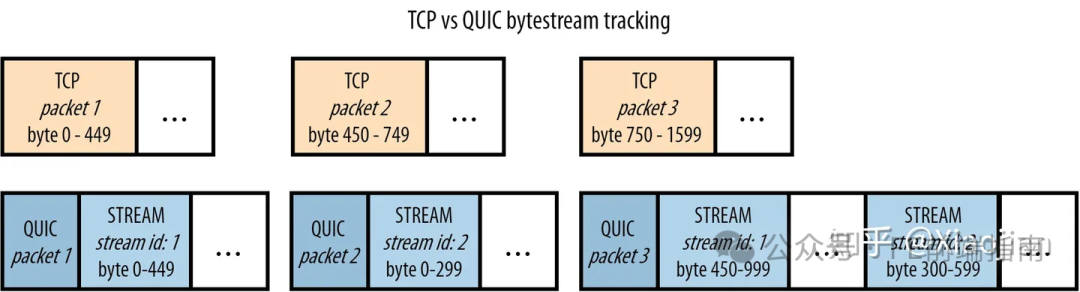
Similar to the data frames of HTTP/2, QUIC’s stream frames track the byte ranges of each stream. This is different from TCP, which simply appends all stream data into a large blob. As before, let’s consider what happens if QUIC packet 2 is lost while packets 1 and 3 arrive. Similar to TCP, the data in packet 1 for stream 1 can be directly passed to the browser. However, for packet 3, QUIC can be smarter than TCP. It looks at the byte range of stream 1 and finds that this stream frame completely follows the first stream frame of stream id 1 (byte 450 follows byte 449, so there are no gaps in the data). It can immediately provide this data to the browser for processing. However, for stream id 2, QUIC does see a gap (it has not yet received bytes 0-299, which are in the lost QUIC packet 2). It will hold that stream frame until the retransmission of QUIC packet 2 arrives. Again, comparing it to TCP, the latter would also keep the data for stream 1 in packet 3!
A similar situation occurs in another scenario where packet 1 is lost, but packets 2 and 3 arrive. QUIC knows it has received all expected data for stream 2 and will pass it to the browser, only holding stream 1. We can see that in this example, QUIC has indeed solved TCP’s head-of-line blocking!
However, this approach has several important consequences. The most significant is that QUIC data may no longer be sent to the browser in the exact same order as when sent. For TCP, if you send packets 1, 2, and 3, their contents will be sent to the browser in exactly the same order (this is the first reason for head-of-line blocking). However, for QUIC, in the second example above, when packet 1 is lost, the browser first sees the content of packet 2, then the last part of packet 3, then the retransmission of packet 1, and finally the first part of packet 3. In other words:QUIC maintains order within a single resource stream but no longer across individual streams.
Thus, QUIC does not completely solve the blocking problem; it merely balances between preventing head-of-line blocking and resource loading performance.
Characteristics of HTTP/3
- Based on QUIC protocol: HTTP/3.0 uses the UDP-based QUIC protocol to transmit data, which can provide faster connection establishment and transmission speeds compared to TCP, reducing network latency and packet loss rates.
- More thorough resolution of head-of-line blocking (HOL) issues, allowing different streams to be transmitted independently and without interference.
- Integrated TLS encryption: HTTP/3.0 integrates TLS encryption to protect the security of network transmission.
- 0-RTT connections: HTTP/3.0 supports 0-RTT connections, allowing clients to send requests to servers without establishing a connection, further reducing network latency and page load times.
- Connection persistence during network switching:
- In the current mobile application environment, users’ networks may frequently switch, such as when leaving the office or home, disconnecting WiFi, and switching to 3G or 4G. Based on TCP protocols, due to the change in IP after switching networks, previous connections cannot be maintained. However, the UDP-based QUIC protocol can internally build a different connection identification method than TCP, allowing the connection with the server to be restored after the network switch.
How UDP Ensures Connection Reliability
- Forward Error Correction (FEC): HTTP/3.0 uses FEC technology to correct packet loss, meaning that while sending data packets, some redundant data is also sent, which the receiver can use to restore lost packets, thus improving data reliability.
- Retransmission Mechanism: HTTP/3.0 implements its own retransmission mechanism in the QUIC protocol, meaning that when packet loss or damage occurs, retransmission will occur to ensure reliable data transmission.
- Congestion Control: HTTP/3.0 implements its own congestion control mechanism based on the QUIC protocol, which can adaptively adjust the data transmission rate according to network conditions to avoid network congestion and packet loss.
HTTP and HTTPS
HTTPS: is a secure version of HTTP, aimed at security, meaning that SSL is added to HTTP. The security foundation of HTTPS is SSL, so the details of encryption need to be based on SSL.SSL (Secure Sockets Layer) is a security protocol designed to ensure the security and integrity of data transmission. TLS (Transport Layer Security) is a non-proprietary version of SSL. SSL operates between the application layer and the transport layer. It deals with data streams, and the encryption algorithm is RC4 (symmetric encryption).
- HTTPS protocol requires applying for a certificate from a CA, and generally, there are few free certificates, so a certain fee is required.
- HTTP is a hypertext transfer protocol, and information is transmitted in plaintext, while HTTPS is a secure SSL encrypted transmission protocol.
- HTTP and HTTPS use completely different connection methods and ports; the former uses port 80, while the latter uses port 443.
- HTTP connections are simple and stateless; the HTTPS protocol is built on SSL + HTTP, allowing for encrypted transmission and identity authentication, making it more secure than HTTP.
SSL and TSL
Transport Layer Security Protocol (English: Transport Layer Security, abbreviated as TLS) was formerly known as Secure Sockets Layer (English: Secure Sockets Layer, abbreviated as SSL) is a security protocol aimed at providing security and data integrity for internet communications.
SSL includes a record layer and a transport layer; the record layer protocol determines the encapsulation format of transport layer data. The transport layer security protocol uses X.509 authentication, followed by asymmetric encryption algorithms to authenticate the identities of the communicating parties, and then exchange symmetric keys as session keys. This session key is used to encrypt the data exchanged between the two communicating applications, ensuring confidentiality and reliability of communication, preventing eavesdropping by attackers between client and server applications.
The advantage of the TLS protocol is that it is decoupled from higher-level application layer protocols (such as HTTP, FTP, Telnet, etc.). Application layer protocols can transparently run on top of the TLS protocol, which negotiates and authenticates the establishment of the encrypted channel. The data transmitted by application layer protocols is encrypted when passing through the TLS protocol, thus ensuring the privacy of communication.
The TLS protocol is optional and must be configured on both the client and server to use. There are mainly two ways to achieve this: one is to use a unified TLS protocol port (for example, port 443 for HTTPS); the other is for the client to request the server to connect to TLS using a specific protocol mechanism (for example, STARTTLS commonly used in email). Once both the client and server agree to use the TLS protocol, they negotiate a stateful connection for data transmission through a handshake process. During the handshake, the client and server negotiate various parameters for establishing a secure connection:
TLS provides authentication, encryption, and integrity for applications such as HTTP on the internet, based on a public key infrastructure. This is because public key infrastructure is widely used in commercial operations. The design of the TLS protocol allows for the prevention of eavesdropping, interference, and message forgery in master-slave architecture application communications.
TLS includes several basic stages:
- Negotiation of supported TLS versions and supported cipher suites.
- Asymmetric key-based authentication, usually based on PKI certificate authentication. The server sends its X.509 certificate to the client, which verifies the server’s identity. If the server needs to verify the client’s certificate, the client may send its certificate to the server. Typically, only the server is verified, not the client.
- Symmetric key-based data encryption. The client generates a random number as the session key and encrypts the session key using the server’s public key (the server’s public key is in the server certificate), and then sends the encrypted session key to the server. The server decrypts the session key using its private key. Finally, this session key is used to encrypt data. TLS can also use pre-shared keys (PSK) as symmetric keys.
In the second step of asymmetric encryption-based authentication, there may be a man-in-the-middle attack situation, requiring the introduction of message digests (using both parties’ public and private keys) and CA certificates to resolve.
Please open in the WeChat client