
How can I log into the Huawei router settings interface via http://192.168.3.1? How do I set up the Huawei router backend through http://192.168.3.1?
Answer: The default login IP address for Huawei and some Honor series routers is 192.168.3.1 or http://192.168.3.1, not the “http//:www192.168.3.1” or “http//192.168.3.1” mentioned in the question. The IP addresses are correct, but the error lies in the protocol symbols and the added www.
This article will not only share solutions for when the Huawei router login address is inaccessible but also provide a tutorial on how to set up the Huawei router for your reference.
1. Resolving Huawei Router Settings Login Issues
1. Not Connected to the 192.168.3.1 Network
It is essential to confirm whether your computer or phone is connected to the Huawei router’s network. For instance, your phone must be connected to the WiFi of the router you want to log into; your computer must be connected to the LAN port or WiFi of the router being debugged (laptops have WiFi).
Solution:
Check if your phone or computer is connected to the Huawei router’s WiFi. This may seem like a simple issue, but it can easily lead to misunderstandings.
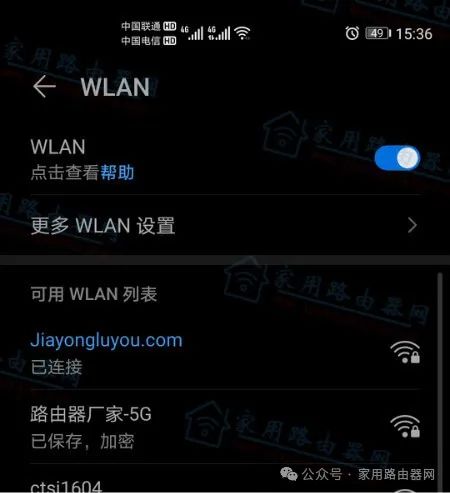
Connect to the router’s WiFi (configured)
2. Phone Has 4/5G and WLAN+ Services Enabled
Phones with Android 10 or above support the WLAN+ feature, which automatically switches the internet from the router’s WiFi to the phone’s 4/5G network when there are issues with the router’s network.
Solution:
Follow the operating path for Android phones:【Settings】—【WLAN】– More WLAN Settings — Disable WLAN+ service, and also turn off mobile data..
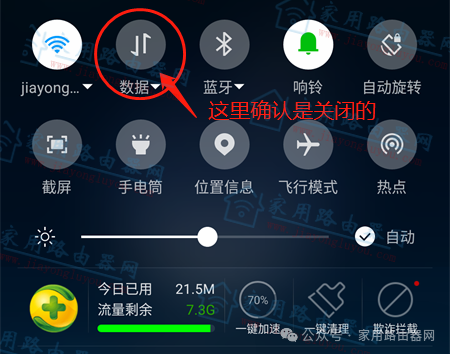
Ensure mobile 4G data is turned off
3. Incorrect Input of 192.168.3.1 Address
Many users easily confuse IP addresses, such as writing 192.168.3.1 as:
192.186.3.1
www.192.168.3.1
http192.168.3.1
etc.
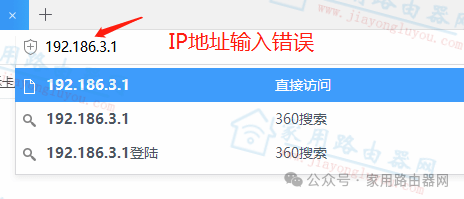
Incorrect IP address input for 192.168.3.1 – Desktop
Error Description: The second digit of 192.168.3.1 was incorrectly written as 186
4. Incorrect Location for Inputting 192.168.3.1
Although browsers have desktop and mobile versions, there are subtle differences between the “search box” and the “address bar.” Normally, the IP address should be entered into the address bar; however, many users mix the search box and address bar.
Solution:
The following images demonstrate the correct and incorrect input locations for both desktop and mobile versions. A checkmark indicates the input location is correct, while a cross indicates it is incorrect.
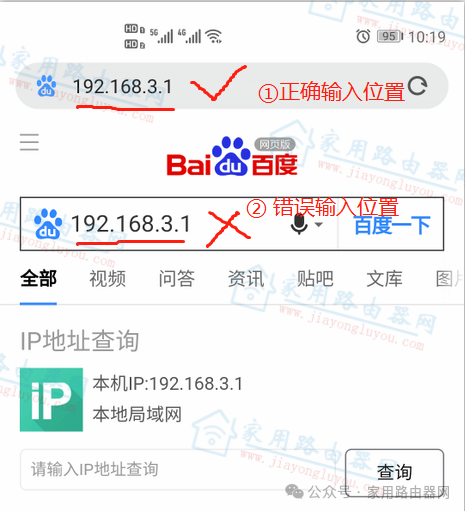
Correct input location for 192.168.3.1 – Mobile
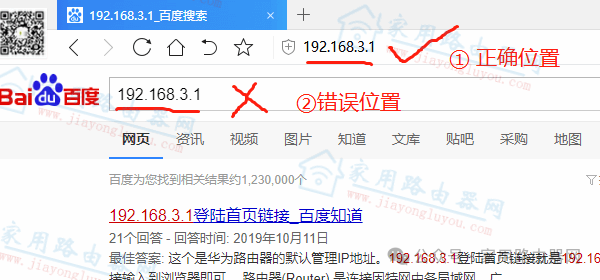
Correct input location for 192.168.3.1 – Desktop
5. Incorrect Method to Open 192.168.3.1
This point is somewhat similar to point 4. After entering 192.168.3.1, desktop browsers require pressing the “Enter” key on the keyboard, while mobile users must click the “Visit”/“Go” button (the definition varies by mobile browser brands) to open 192.168.3.1, rather than clicking on various prompts related to 192.168.3.1 below the input box.
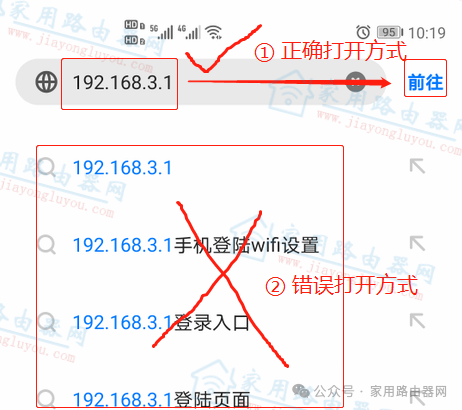
Correct method to open 192.168.3.1 – Mobile
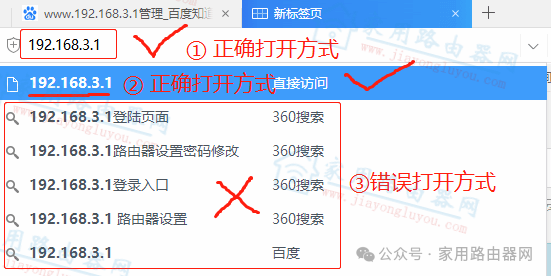
Correct method to open 192.168.3.1 – Desktop
6. Other Solutions
Other solutions mainly involve resetting the Huawei router and then reconfiguring it. Generally, after resetting, the Huawei router will automatically redirect to the settings page when connected to WiFi, allowing you to modify relevant WiFi information and login passwords.
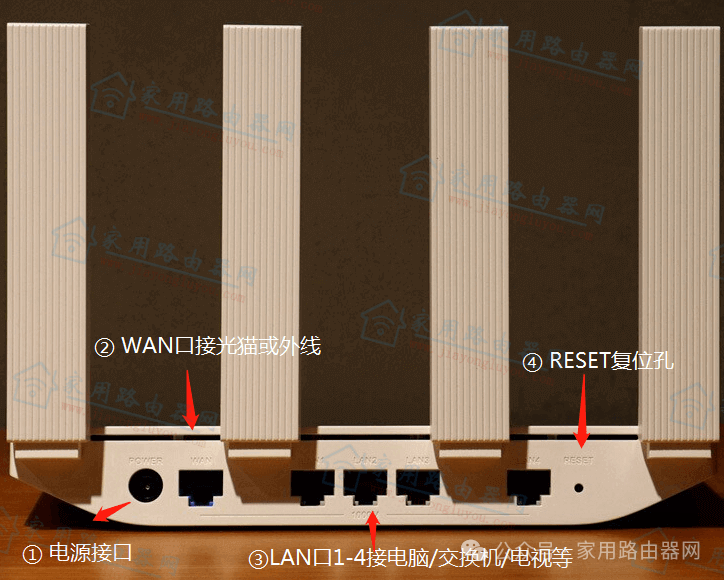
Illustration of Huawei/Honor router ports
2. Resolving Huawei Router Installation Issues
This article uses the Huawei AX3 series WiFi6 router as an example to share a video tutorial on setting up the Huawei router:
https://www.bilibili.com/video/BV1uy4y1k7MD
(The original link at the end of this article leads directly to the video tutorial)
Small Knowledge at the End:
For Huawei routers, the overall cost-performance ratio is very high, and if it weren’t for chip sanctions, it would develop even more rapidly.