HTTP Message
HTTP messages are the basic units of communication in HTTP, which can be divided into HTTP request messages and HTTP response messages.
1. HTTP Request Message
HTTP request messages are the data format used by clients to send requests to servers, encompassing various information about the request so that the server can understand the client’s needs and respond accordingly.HTTP request messages consist of four parts: the request line, request headers, an empty line, and an optional request body.HTTP request messages have a basic structure as shown in Figure 1.
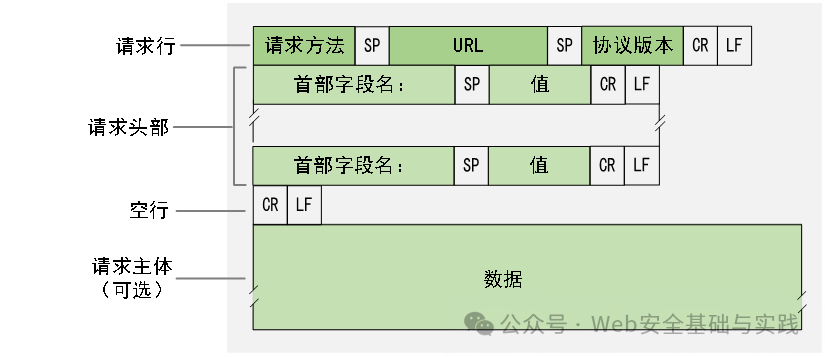
Figure1 Basic Structure of HTTP Request Message
In the above structure, SP represents a space character, CR represents a carriage return, LF represents a line feed. The request line includes the request method, URL and HTTP protocol version. The request headers present additional information about the request in key-value pairs. The empty line separates the request headers from the request body. The request body contains data to be sent to the server, such as form data or files. An example is shown in Figure 2.
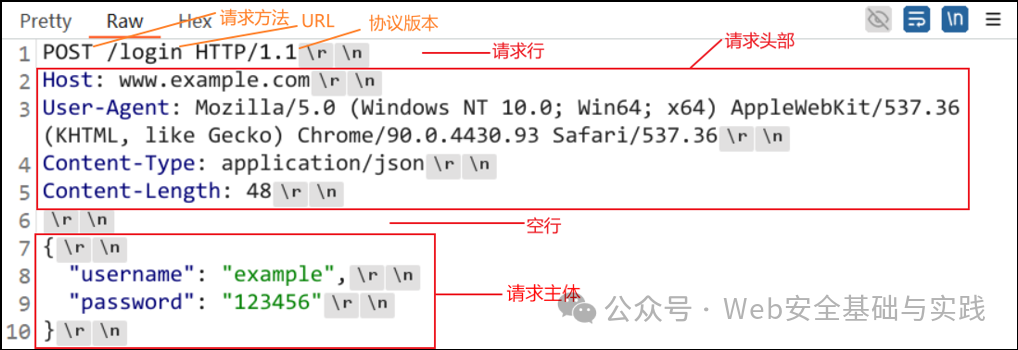
Figure2 Example of HTTP Request Message
The above example shows a login request sent using the POST method to the hostname www.example.com, with the resource path /login. The request headers contain detailed information about the request, such as the User-Agent field indicating the name and version of the client application making the request, and the Content-Type field indicating the data type and format of the request body. The request body transmits username and password data in JSON format.
2. Common Request Methods
HTTP/0.9 defined the GET method.
HTTP/1.0 introduced two new request methods: HEAD and POST.
HTTP/1.1 added five new request methods: PUT, DELETE, CONNECT, OPTIONS and TRACE.
Common request methods are shown in Table 1.
Table1 Common Request Methods
|
Request Method |
Description |
Common Scenarios |
|
GET |
Used to retrieve data from the server, with request parameters appended to the URL. |
Requests for resources, such as retrieving web pages, images, etc. |
|
POST |
Used to submit data to the server, with request parameters included in the request body |
Submitting form data, creating new resources, etc. |
|
PUT |
Used to update resources on the server, storing the request data at the specified URL. If the URL exists, the resource is updated; if it does not exist, a new resource is created. |
Requests to update resources, such as updating text files, images, etc. |
|
DELETE |
Used to delete specified resources from the server |
Requests to delete resources, such as deleting files, records, etc. |
|
HEAD |
Similar to GET, but the server only returns the header information of the response |
Checking if a resource exists, obtaining metadata about the resource, etc. |
|
OPTIONS |
Used to request communication options for the target resource. The server informs the client of the allowed request methods, header fields, etc. |
Obtaining communication options for the target resource, such as Cross-Origin Resource Sharing, etc. |
|
CONNECT |
Used to establish a network connection, typically for proxy servers, indicating that the server should establish a direct connection with the client for tunneling communication |
Establishing network connections, typically for proxy servers |
3. HTTP Response Message
HTTP response messages are the server’s replies to client requests, encompassing information about the request processing results.HTTP response messages consist of four parts: the status line, response headers, an empty line, and the response body, with all fields encoded in ASCII format.
HTTP response messages have a basic structure as shown in Figure 3.
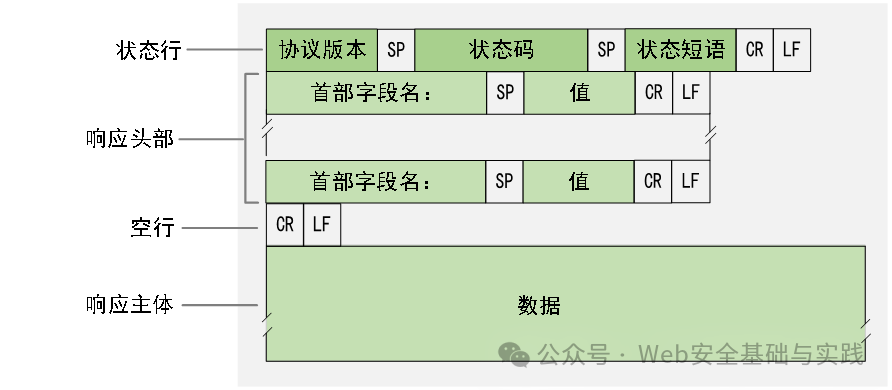
Figure3 Basic Structure of HTTP Response Message
In the above structure, the status line includes the HTTP protocol version, status code, and status phrase. The response headers present additional information about the response in key-value pairs. The empty line separates the response headers from the response body. The response body contains the data returned by the server to the client, as shown in Figure 4.
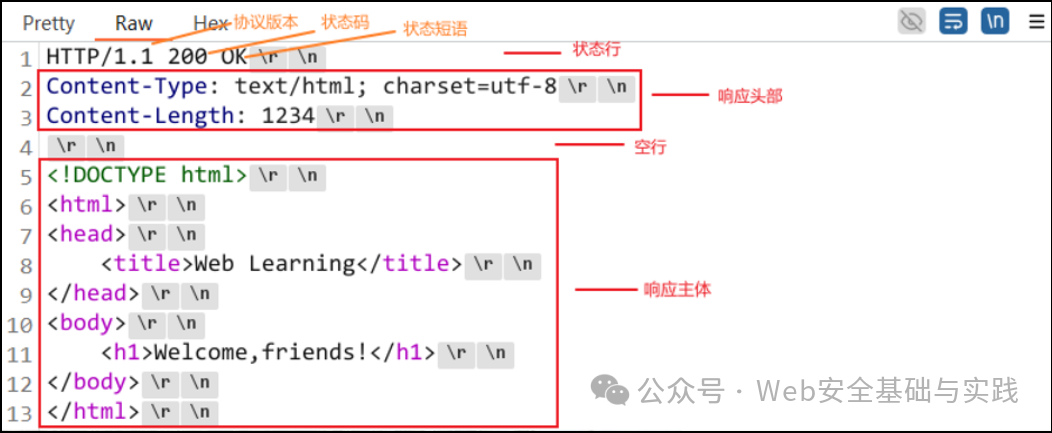
Figure4 Example of HTTP Response Message
The above example shows an HTTP response message with a status code of 200, where the response headers contain information about the response, such as Content-Type and Content-Length. The response body contains the data returned by the server to the client, which in this example is a segment of HTML source code.
4. Response Status Codes
HTTP response status codes are three-digit codes returned by the server after processing client requests, indicating the result of the request processing.HTTP status codes are categorized into different groups based on their meanings, with the first digit defining the type of response, divided into a total of 5 categories, as shown in Table 2.
Table2 5 Categories of Response Status Codes
|
Status Code |
Category |
Description |
|
1xx |
Informational Response |
Indicates that the request has been received and is being processed |
|
2xx |
Successful Response |
Indicates that the request has been received and successfully processed |
|
3xx |
Redirection Message |
Indicates that further action is needed to complete the request |
|
4xx |
Client Error Response |
Indicates that there is a syntax error in the request or the request cannot be completed |
|
5xx |
Server Error Response |
Indicates that an error occurred on the server while processing the request |
Common response status codes are shown in Table 3.
Table3 Common Response Status Codes
|
Status Code |
Status Phrase |
Description |
|
100 |
Continue |
The client should continue its request |
|
200 |
OK |
Request succeeded, server returned data normally |
|
201 |
Created |
The request has been successfully processed, and a new resource has been created |
|
202 |
Accepted |
The server has accepted the request but has not yet processed it |
|
301 |
Moved Permanently |
The requested resource has been permanently moved to a new URI (Uniform Resource Identifier) |
|
302 |
Found |
The requested resource is temporarily responding from a different URI, but the requester should continue to use the original URI for requests |
|
304 |
Not Modified |
The requested resource has not been modified, and no resource will be returned at this time; the client can directly use the cached version |
|
400 |
Bad Request |
There is a syntax error in the request message or the request is unrecognized |
|
401 |
Unauthorized |
The request requires user authentication |
|
403 |
Forbidden |
The server refuses to execute the request |
|
404 |
Not Found |
The server cannot find the requested resource |
|
500 |
Internal Server Error |
The server encountered an internal error and could not complete the request |
|
502 |
Bad Gateway |
The server acting as a gateway or proxy received an invalid response from the upstream server while attempting to fulfill the request |
|
503 |
Service Unavailable |
The server is currently unable to handle the request, usually due to temporary maintenance or overload |
|
504 |
Gateway Timeout |
The server acting as a gateway or proxy failed to receive a timely response from the upstream server while attempting to fulfill the request |
These status codes are an important part of HTTP, providing clients with detailed information about the request processing results, including success, redirection, client errors, and server errors.
HTTPS
HTTP as the backbone protocol of the Internet ensures fast and efficient transmission of network data, but it also has the following security issues:
(1) Plaintext Transmission:HTTP messages are transmitted in plaintext over the network, lacking encryption protection, which may expose sensitive data such as user passwords, credit card information, etc. For example, in the Windows 7 target machine (part of the target environment provided in this textbook, see Chapter 4) using DVWA for login, as shown in Figure 5. During transmission, intercepting HTTP messages allows viewing detailed information about the data packets, as shown in Figure 6.
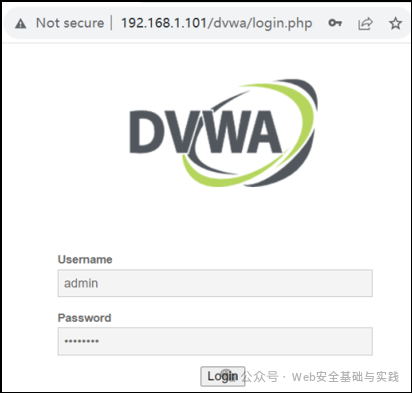
Figure5 DVWA User Login
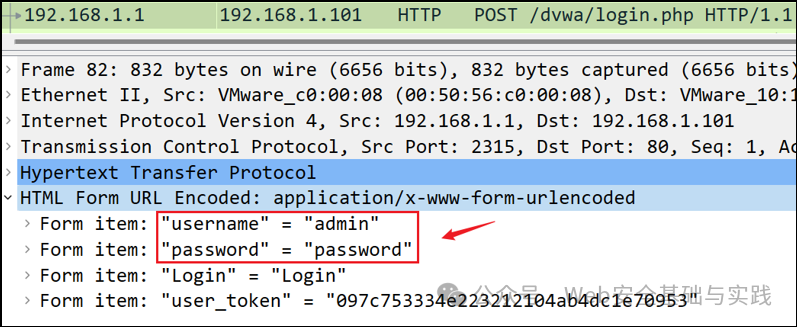
Figure6 HTTP Message Leaking Sensitive Information
(2) Lack of Authentication:HTTP does not include an authentication mechanism, making it impossible to verify the identity of the client, meaning anyone can impersonate a legitimate client to send requests to the server, potentially leading to phishing attacks, fraudulent transactions, and other security issues.
(3) Lack of Data Integrity Protection:HTTP lacks a data integrity protection mechanism, which cannot guarantee that data is not tampered with during transmission, meaning attackers can modify data within HTTP messages.
In light of the security issues present in HTTP, in 1994, Netscape proposed HTTPS.HTTPS is a transmission protocol for secure communication over computer networks, built on top of HTTP, utilizing the SSL/TLS protocol to establish a secure channel for encrypting data packets and providing authentication, thereby protecting the privacy and integrity of communication data.
HTTPS ensures the security of data transmission through a combination of symmetric and asymmetric encryption techniques, with the specific process as follows:
(1) Handshake Phase: The client and server perform a handshake using asymmetric encryption. The client generates a symmetric key and encrypts it using the server’s public key. Upon receiving the encrypted symmetric key, the server decrypts it using its private key to obtain the key. This process ensures the secure exchange of the symmetric key.
(2) Data Transmission Phase: Once the symmetric key exchange is successful, subsequent data transmission will use symmetric encryption. Symmetric encryption is fast and efficient, making it suitable for large-scale data encryption transmission.
(3) Data Integrity Verification:SSL/TLS protocol not only provides data encryption but also uses Message Authentication Code (MAC) to ensure data integrity and verify the authenticity of the data, thus preventing data from being tampered with during transmission.
(4) Server Authentication:HTTPS verifies the identity of the server through SSL/TLS certificates. The client checks the server’s SSL/TLS certificate to ensure it is connecting to the expected server, effectively preventing man-in-the-middle attacks. SSL/TLS certificates are typically issued by trusted Certificate Authorities (CA), ensuring the credibility of the certificate.
Through the above processes, HTTPS achieves encrypted transmission, integrity verification, and authentication, ensuring the security of network communication.
Today, HTTPS has become an important part of network security, especially in areas involving sensitive information transmission, such as Internet financial transactions and user privacy protection. With the increasing awareness of network security, HTTPS has transitioned from a recommended measure to a standard configuration for many websites. Supported by security technologies such as the SSL/TLS protocol, HTTPS can ensure the security of data transmission in insecure network environments, preventing data from being intercepted and tampered with.
Comparison of HTTP and HTTPS is shown in Table 4.
Table4 Comparison of HTTP and HTTPS
|
Feature |
HTTP |
HTTPS |
|
Default Port |
80 |
443 |
|
Security |
No encryption, data transmitted in plaintext, vulnerable to man-in-the-middle attacks |
Uses SSL/TLS protocol for encryption, providing secure communication, verifying identity through digital certificates, preventing man-in-the-middle attacks |
|
Data Integrity |
Does not provide data integrity protection |
Uses encryption algorithms to protect data integrity |
|
Encryption Method |
None |
Uses a combination of symmetric and asymmetric encryption |
|
Certificate |
Not required |
Requires a digital certificate issued by a certificate authority |
|
URL Identifier |
Starts with “http://“ |
Starts with “https://“ |
|
Response Efficiency |
Typically faster than HTTPS due to no encryption/decryption involved |
May be slightly slower than HTTP due to encryption/decryption processes |
– END –