Understanding constants and their use in PLC programming is crucial for professionals working with S7 controllers. This article will provide you with the necessary knowledge and skills to utilize constants in PLC programs according to your needs.
As a practitioner aiming for proficiency, you should learn about the types of constants to enhance program readability and code comprehension. For example: typed and untyped constants, boolean constants, and symbolic constants. Additionally, you will discover the importance of constant declarations and the data types they allow, thus becoming an expert in this field.
Prerequisites To learn this tutorial, you need:
-
To have TIA Portal software installed on your computer. Although this tutorial uses version 16, other versions of TIA Portal are also compatible.
-
To understand data blocks (DBs).
-
To understand the creation of SCL blocks.
Basics of Constants During program execution, constants assume unchangeable values, representing fixed data. When the program runs, constants can be accessed by different program elements. However, they retain their immutable nature. The value of a constant is represented by a symbol predefined by its data type and format. There is a recognized contrast between typed and untyped representations.
Typed and Untyped Constants When using untyped representation, you simply enter the constant value without specifying its associated data type. The data type assignment for untyped constants occurs only during their first logical or arithmetic operation. In Figure 1.1, you can observe an example depicting the use of untyped representation.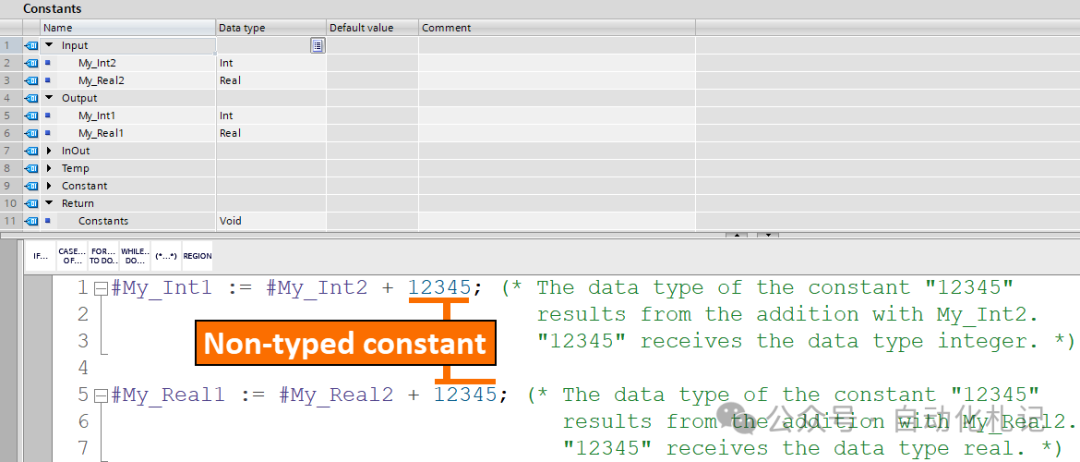
In typed representation, you include the data type along with the constant value for explicit specification. In Figure 1.2, you can observe an example depicting the use of typed representation.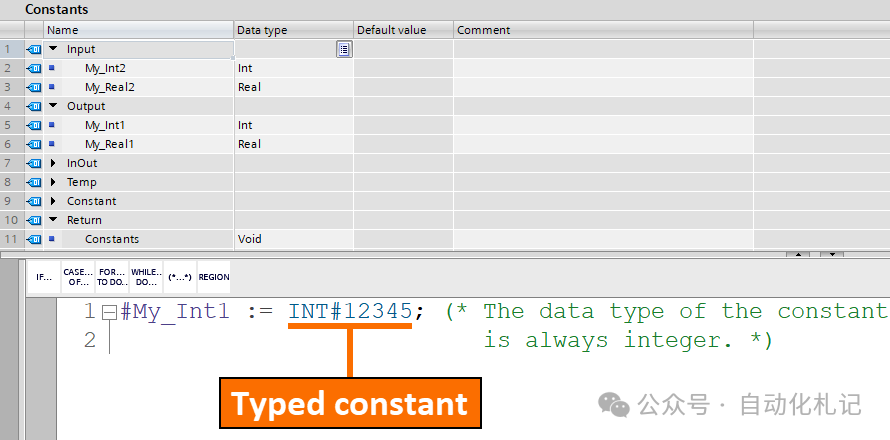
Boolean Constants in FBD and LAD Programming Consider firmware version 1.8 or higher for S7-1500 series CPUs and firmware version 4.0 or higher for S7-1200 series CPUs. These are the only CPUs that allow boolean constants to be used as instruction inputs in FBD and LAD.
But what about earlier firmware versions? Only function blocks (FB) within instructions allow the use of boolean constants. The identification of these instructions is based on the appearance of the “call options” dialog box. When these instructions are inserted into the network, this dialog box opens. It is necessary to exclude the use of boolean constants as inputs for instructions that do not belong to the aforementioned categories.
Boolean constants are not allowed in S7-300 and 400 PLCs.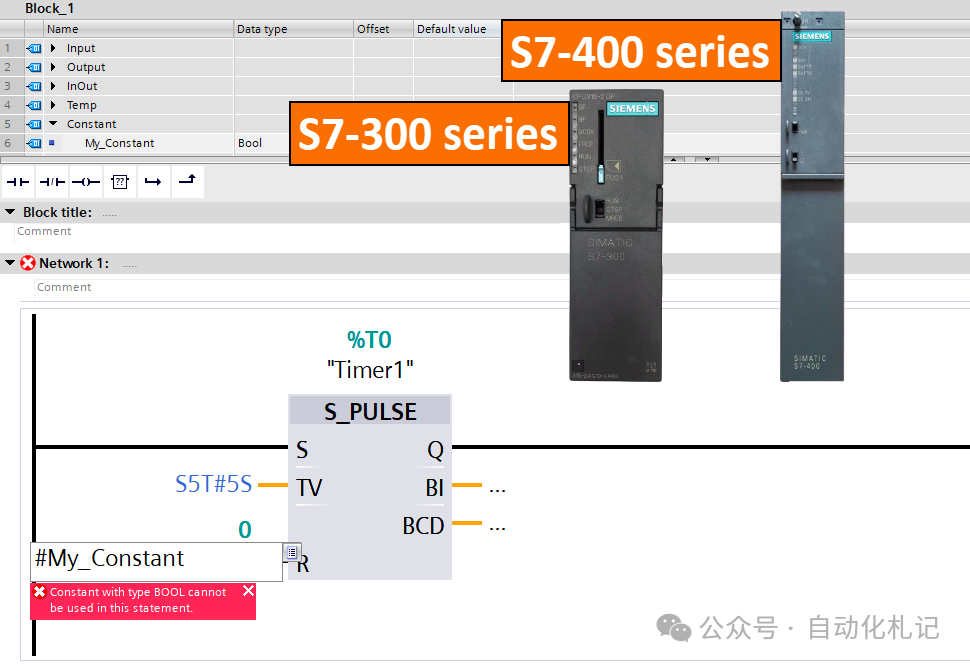
Symbolic Constants You have the opportunity to assign symbolic names to constants. This allows you to reference the constant value by a name chosen in the program. Following this approach can enhance the readability and maintainability of the program. The importance becomes clear when constant values need to be changed. It ensures efficient code understanding and seamless updates.
When constructing symbolic constants, they consist of the following elements:
- • Name
- • Data Type: The presence of a data type is a fixed characteristic of symbolic constants. Untyped representation is not allowed for declaring symbolic constants.
- • Constant Value: The constant value of a symbolic constant can be chosen from the entire range of values allowed by the specified data type. For this, you should be familiar with the different data types in Siemens PLC programming.
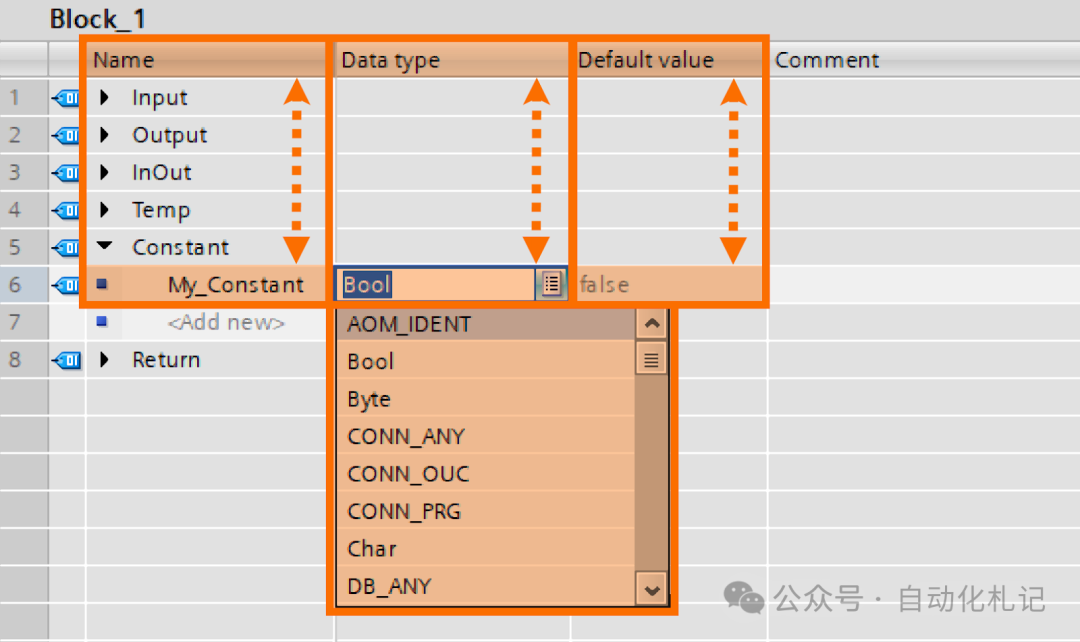
Constant Declarations From one perspective, you can consider two types of constants:
- • Global Constants: These constants are universally applicable to all CPU parts.
- • Local Constants: These constants are limited to specific blocks and have no effect externally.
The distinction between global and local constants is significant, with the following differences:
- • Scope of Validity: The scope of validity for global constants extends throughout the entire CPU. Additionally, their names are uniquely identified within the CPU. Local constants are only valid within their declaring block. Furthermore, their names are unique only within that block.
- • Valid Character Options: In the names of both global and local constants, the use of numbers, letters, and special characters is allowed and considered valid.
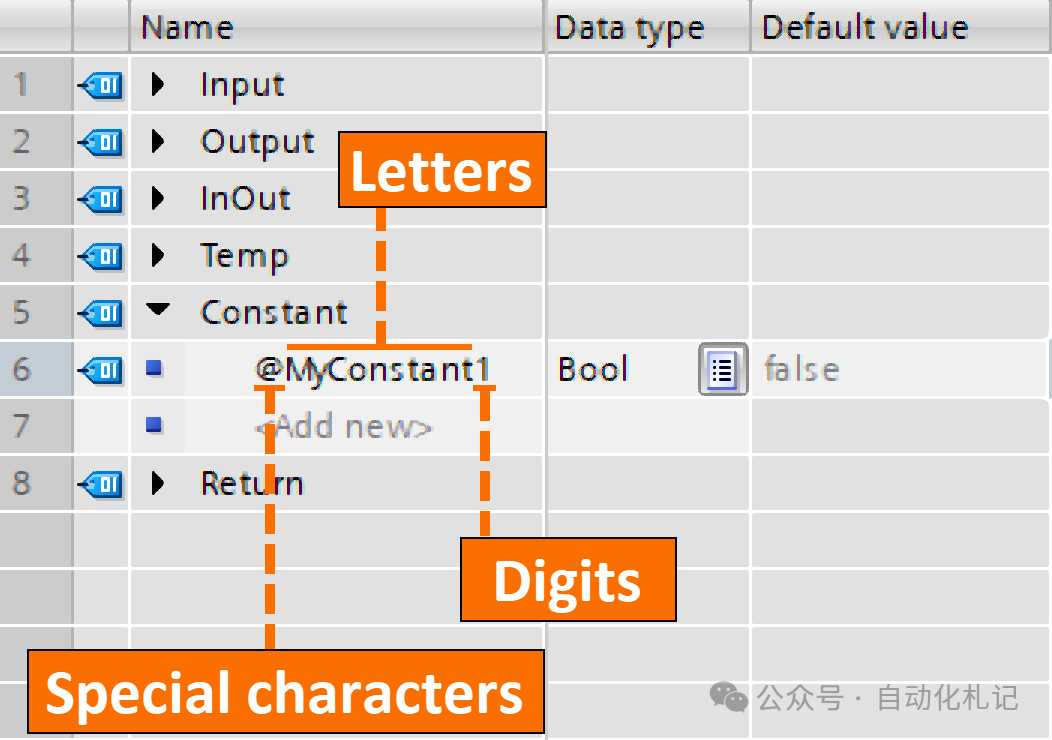
- • Declaration Location: In the PLC tag table, global constants are defined only in the specified “User Constants” tab. The definition of local constants occurs in the block interface.
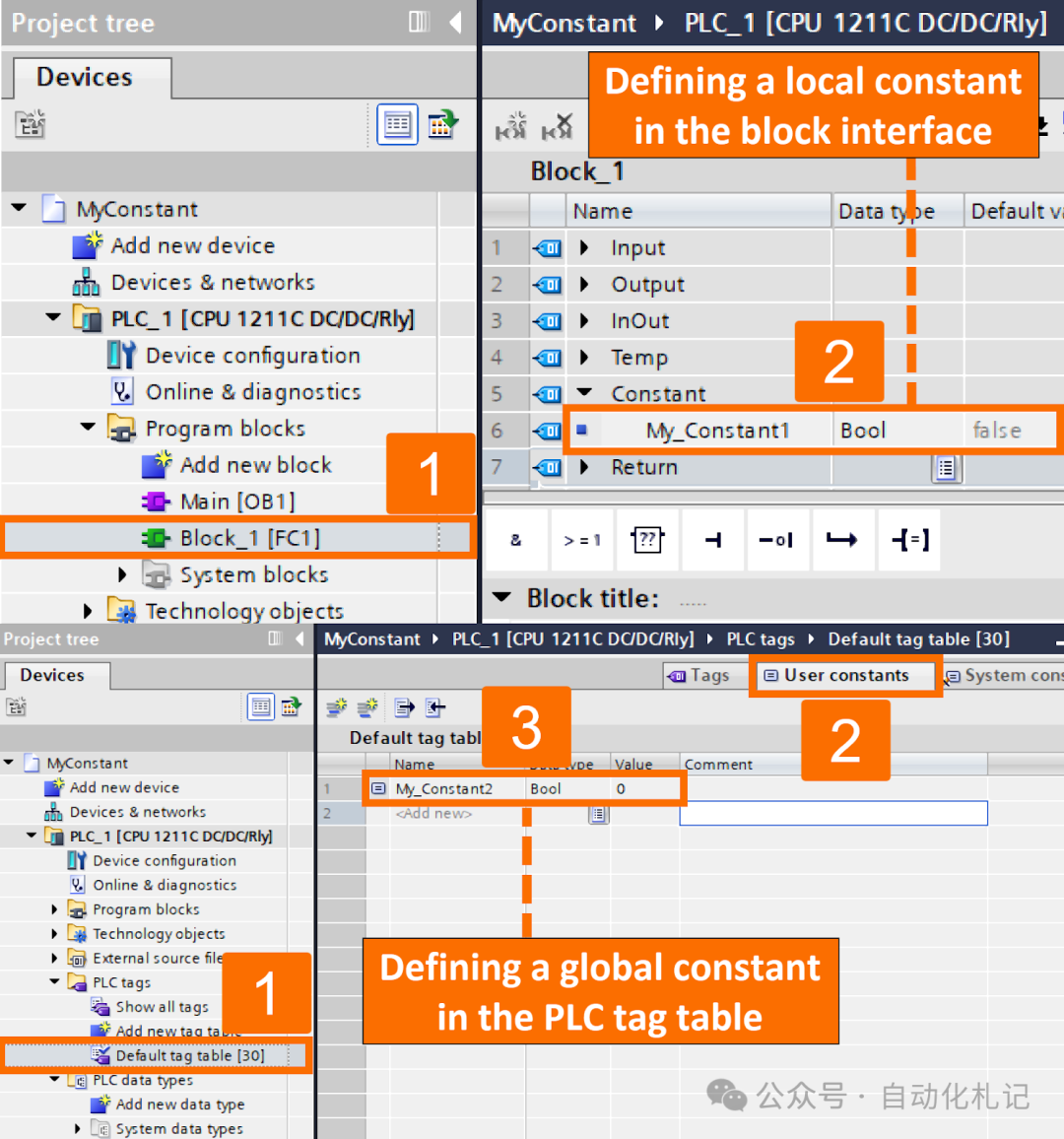
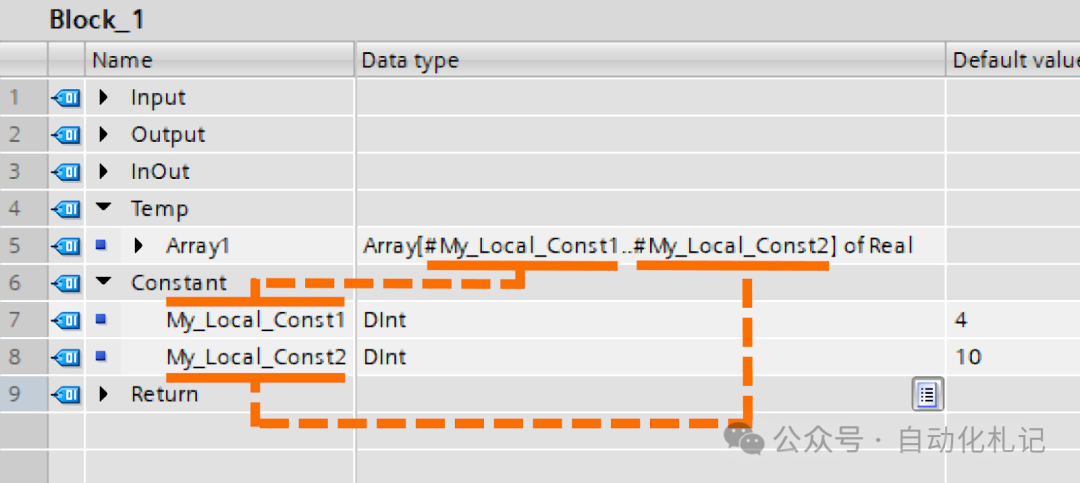
- • Visual Representation: The display of global constants includes the use of quotes to represent them. For example: “My_Constant2”. The representation of local constants involves using a hash as a prefix. For example: #My_Constant1.
Assuming you have a local constant and a global constant with the same symbolic name. Once you use this doubly specified name as the default value for a tag, a conflict will arise. In this case, the local constant will automatically be used as the default selection.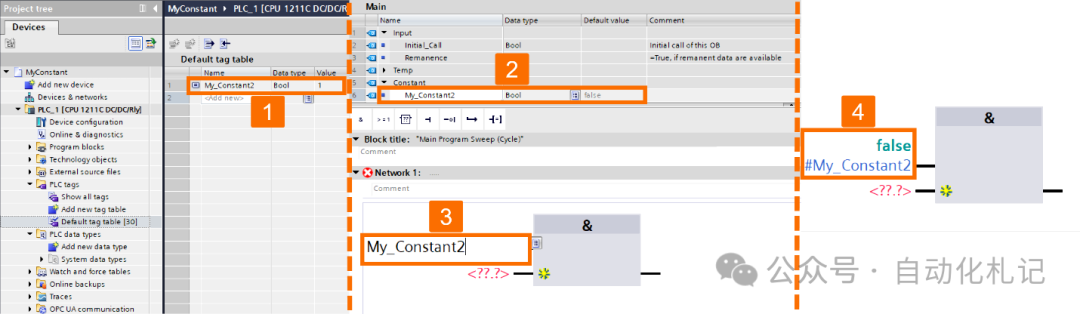
Challenges of Downloading Constant Declarations When a program is downloaded to S7-300 and 400 CPUs, constant declarations (including local and global) are not included in the transfer. When you transfer the program from the device, constant declarations may no longer be available for reference or use. What happens if you define and use constant values in the program, such as assigning constant values to variables? After downloading, the actual constant declarations will not be available in the PLC. The constant values will still exist and can be used in the program. However, the original constant declarations will not be accessible in the PLC’s memory.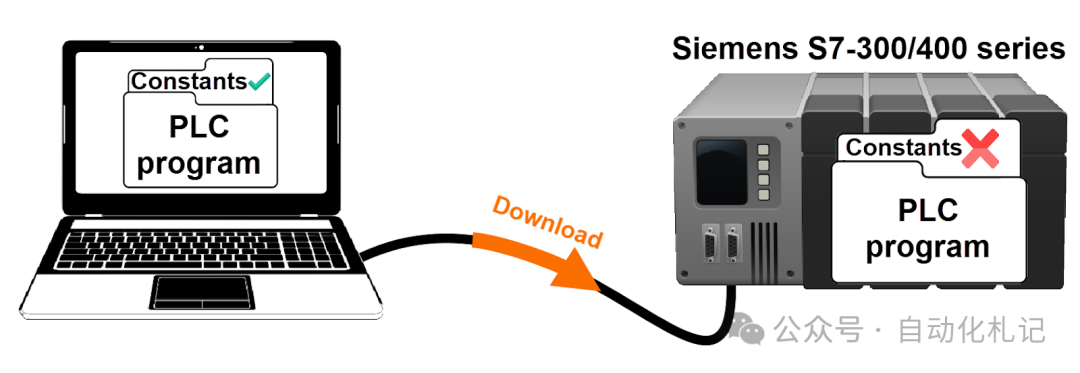
Allowed Data Types for Constants There are no restrictions on the data types that can be used for constants, including basic types and derived types:
- • Binary representation of numbers
- • Bit strings
- • Integers
- • Floating-point format representation of numbers
- • Timers
- • Date and time
- • Strings All general rules for managing type conversions (explicit and implicit) apply in this context.
STEP 7 always selects the data type that provides the highest achievable precision in all cases. What happens if the data type of the constant cannot be explicitly defined in the expression? The CPU defaults to using the highest precision data type available. Consider the expression presented in Figure 6.1. It shows the combination of an integer tag with an untyped constant in floating-point format. In S7-300 and 400 series, the calculation on the right side of the assignment is performed using real number format.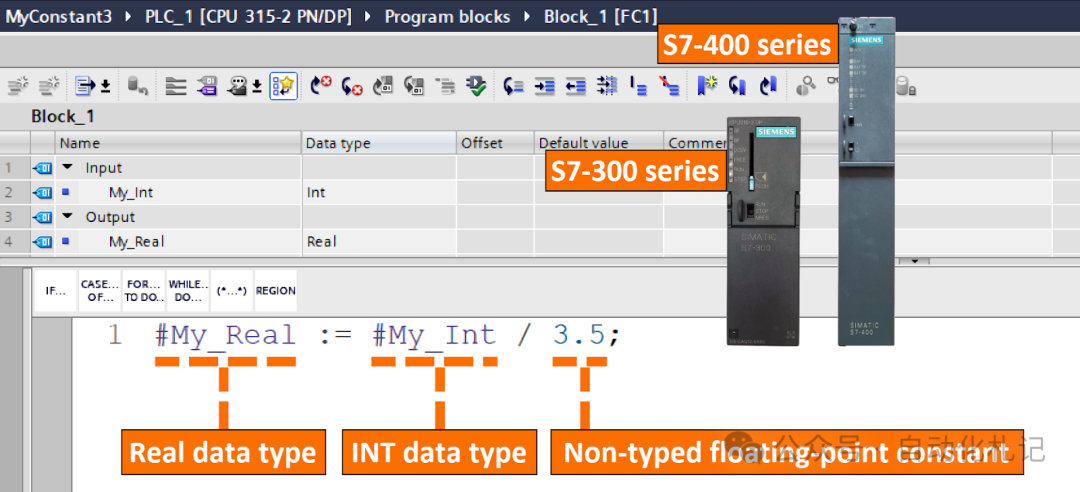
In the S7-1200 and 1500 series, calculations are performed using the LReal data type for the highest possible precision. Therefore, in this case, assigning to a Real tag will be considered invalid or may trigger a warning.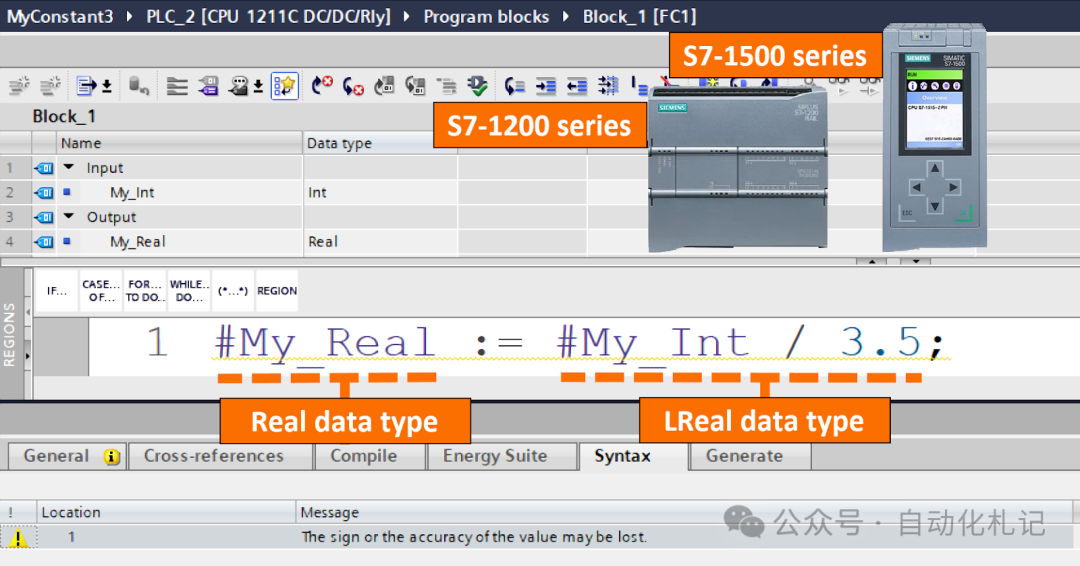
It is recommended to use typed representation to provide an accurate definition of the data type associated with constants. To better understand it, please refer to the expression presented in Figure 6.3.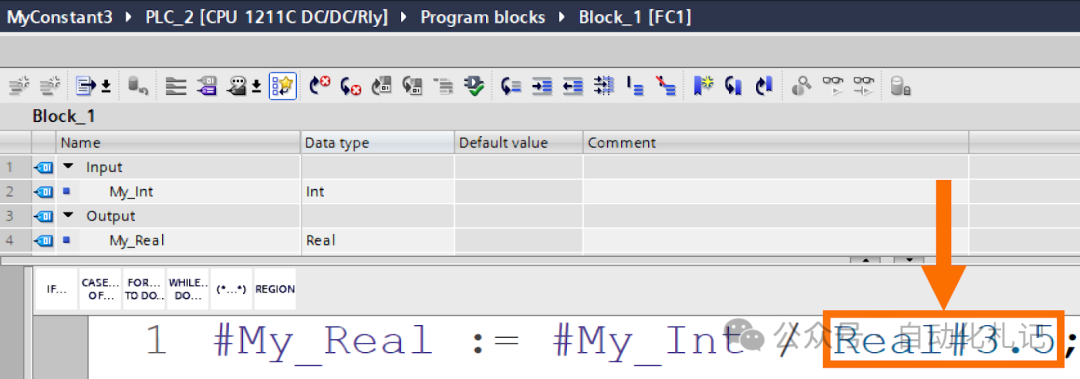
Instances of Constant Usage
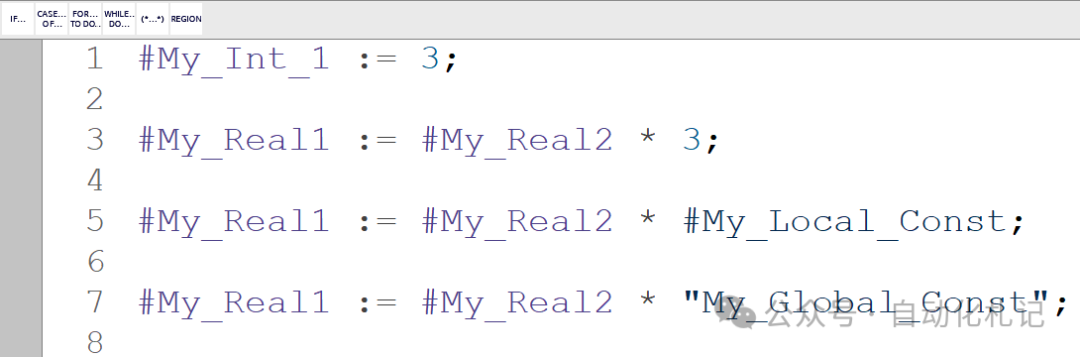
- • Used in Assignments, Instructions, and Expressions: In the context of instructions or assignments, constants can serve as valid substitutes for tags. In the SCL domain, you can also use constants in expressions. However, since constants cannot be explicitly written, their use is limited to input values. Figure 7.1 provides a visual representation of examples highlighting the potential uses of constants.
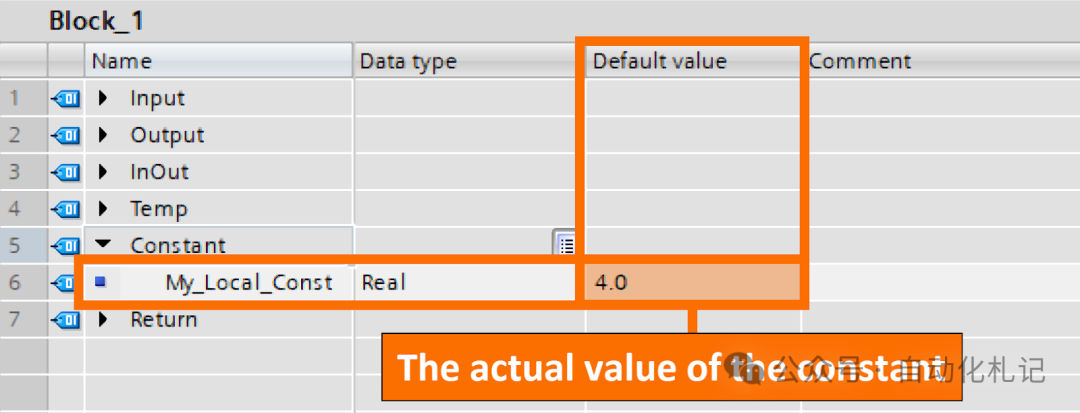
- • Used as Default Values: When assigning default values to tags, constants can be used for this purpose. To do this, enter the specific value or the symbolic name of the constant in the designated “Default Value” column provided in the block interface. One way to ensure compatibility is that the data type of the constant must match the data type of the tag. Alternatively, the data type of the constant should be convertible to the data type of the tag through implicit conversion, as confirmed by IEC checks.
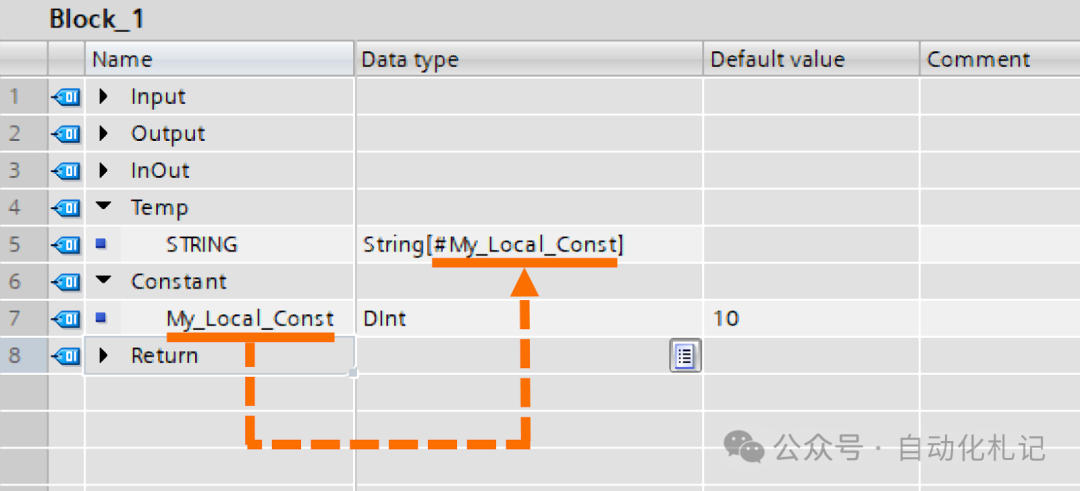
- • Used as Maximum String Length: When determining the maximum length of a string, you can use local or global constants with the following data types: INT, SINT, LINT, DINT, ULINT, UDINT, and UINT. Figure 7.3 provides an example demonstrating the use of constants as the maximum length of a STRING.
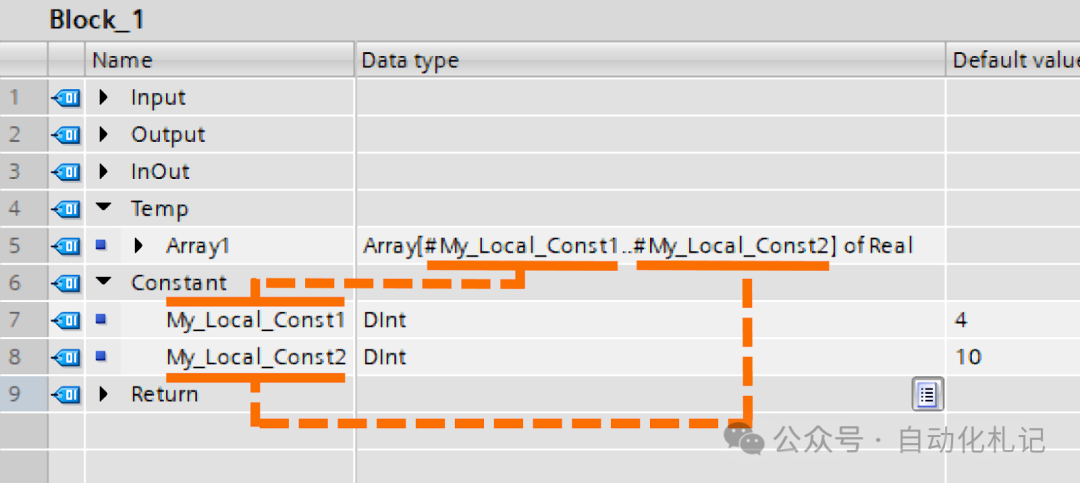
- • Used as Array Limits: When determining array limits, you can use local or global constants with the following data types: INT, SINT, LINT, DINT, ULINT, UDINT, and UINT. Figure 7.4 shows an example demonstrating the use of constants as array limits.
Conclusion Through this learning, you have grasped the basics of constants, familiarized yourself with the two predefined representations of constants: typed and untyped. You have understood the challenges of implementing boolean constants in S7-PLCs with different firmware, clarified the elements that constitute symbolic constants, and why to use these constants. Additionally, you have mastered the definitions of local and global constants and the main differences between these two types.
Follow Us Automation Notes, focusing on sharing in the field of industrial automation and PLC.