The Huichuan iFA Evolution all-scenario intelligent industrial control software platform was launched in February 2025.Today, I will share how to build a Huichuan PLC simulation environment based on iFA and conduct PLC communication testing.
Creating a Project
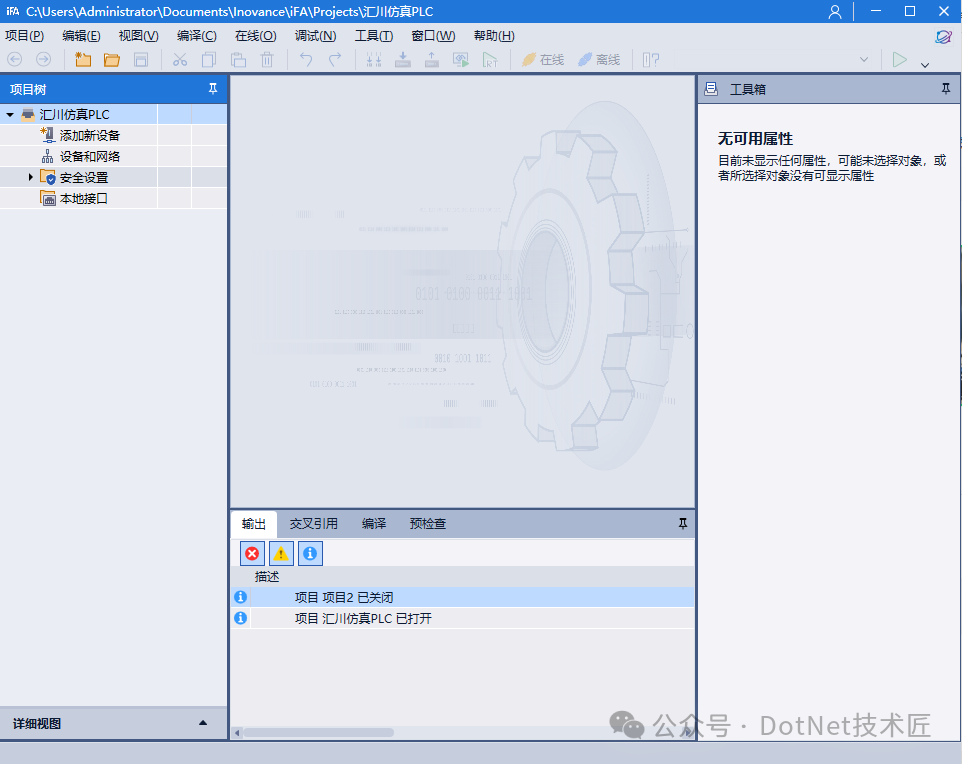
First, create a new project through iFA, with a custom name.
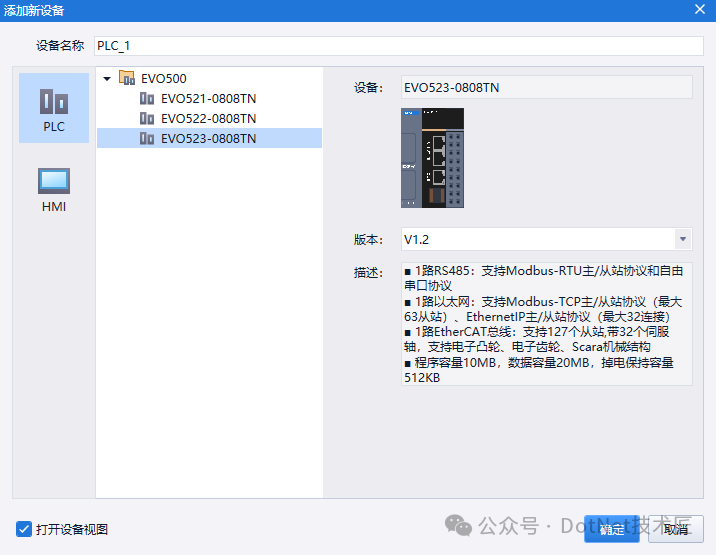
Then add a new device, selecting a PLC model, with no specific requirements for the PLC model.
A PLC project has now been created.
Network Card Settings
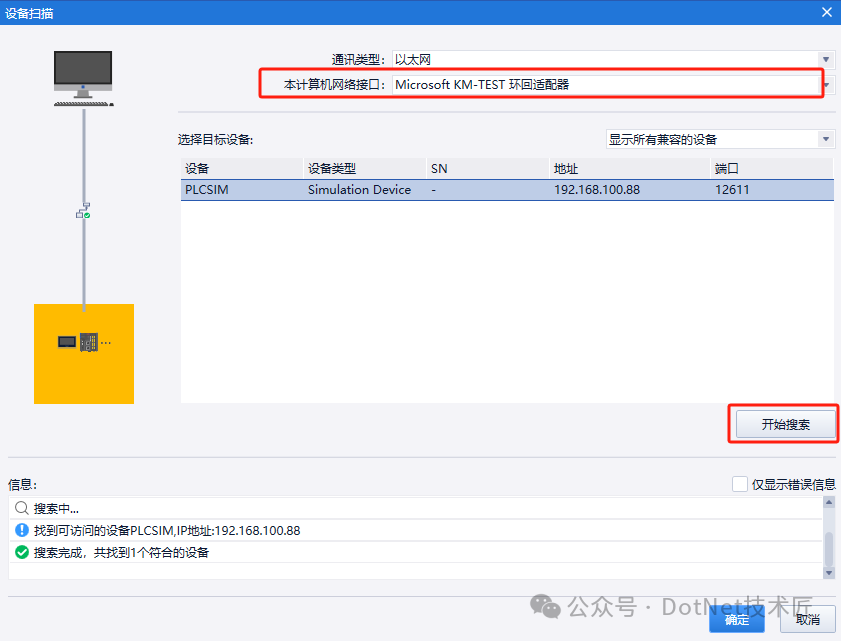
Before downloading the PLC program, we need to prepare a network card, which is a virtual network card. We can obtain the network card in the following three ways.1. Using the virtual machine’s network card: If a virtual machine is installed on the computer, an additional virtual network card will be available for use.2. Manually create a virtual network card: I will write out the specific method separately.3. Using Siemens’ network card: If we have installed PLCSIM Advanced, an additional virtual network card will also be available on the computer.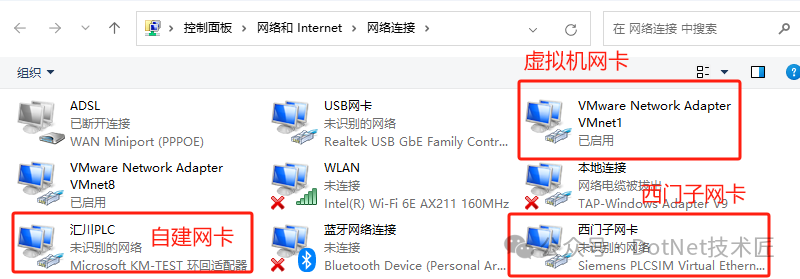 We can choose any network card; here, we will use a self-created network card as an example. The network card type is Microsoft KM TEST Loopback Adapter, and this name should be remembered as it will be used later when downloading the program.Here, I set the IP to 192.168.100.88, as shown below: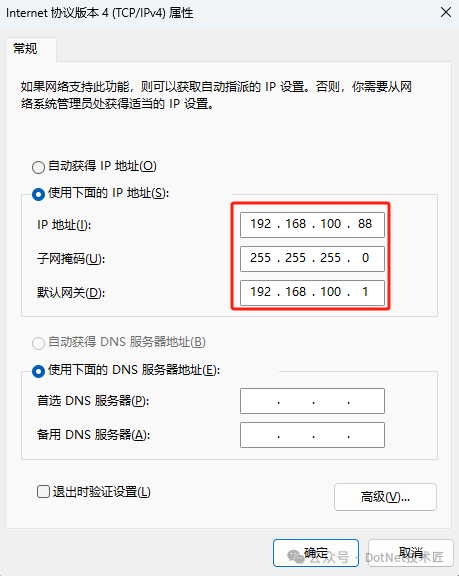
Downloading the PLC Program
First, we open iFA and click Start Simulation.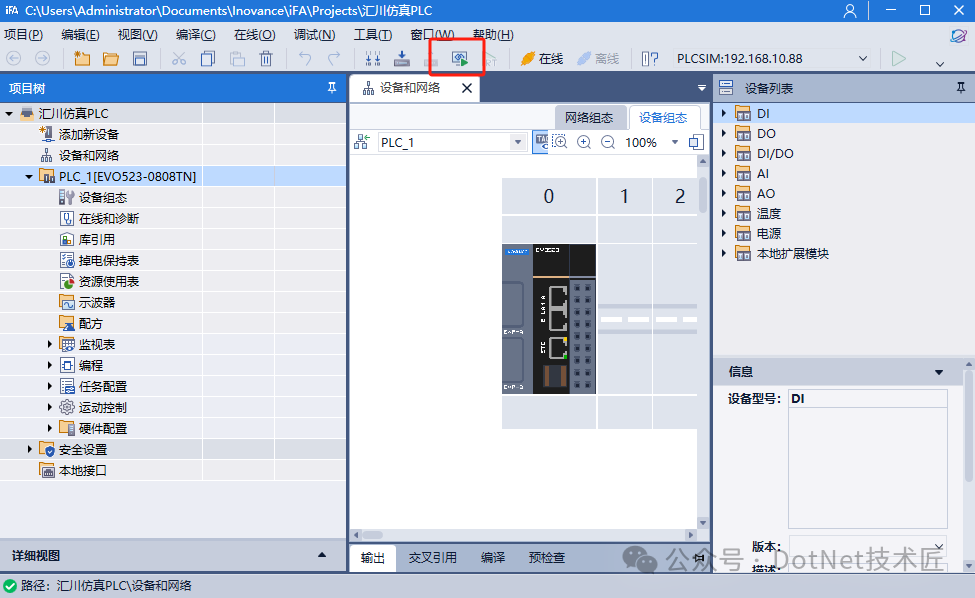
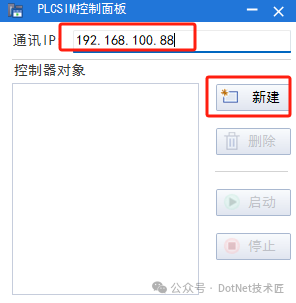
1. We set the simulation IP address to be consistent with the network card IP and click New:
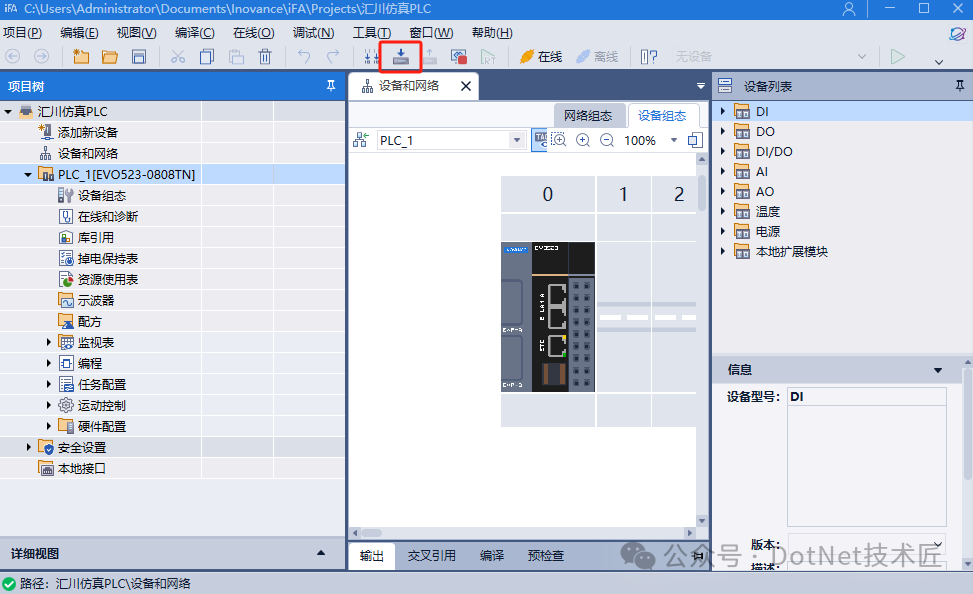
2. Return to iFA and click the Download button in the toolbar, as shown below:
3. In the pop-up device scanning window, select the type of network card and click Start Search, and the device can be found:
4. After clicking OK, you can proceed to download the PLC program. In the download window, click Load:
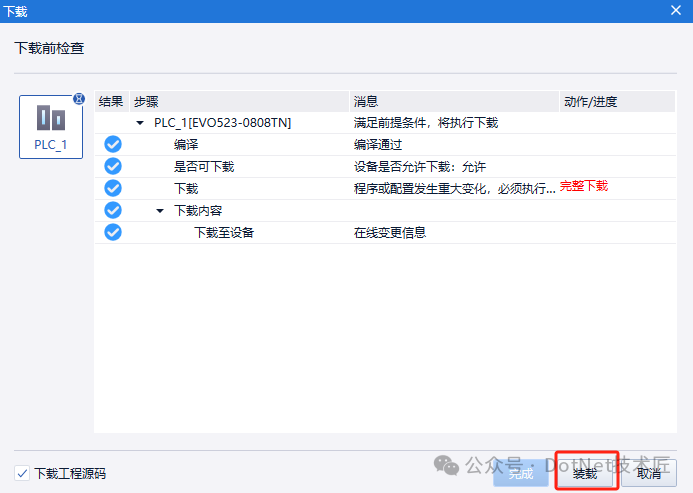
5. This completes the download of the PLC program:
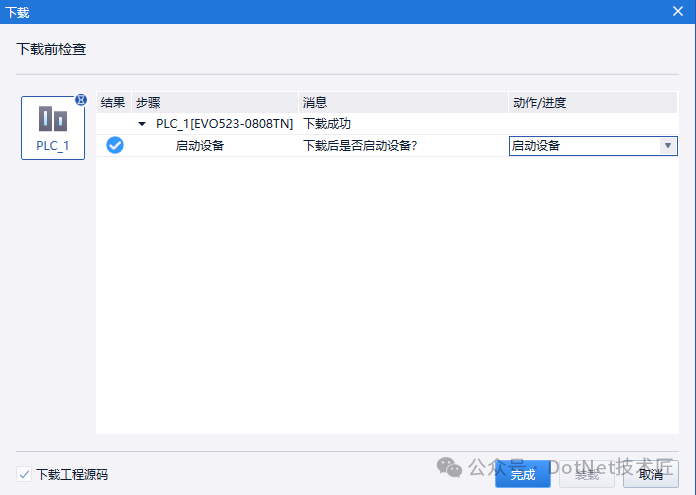
ModbusTCP Communication
Next, we will test ModbusTCP communication. The default PLC program does not support ModbusTCP communication, so we need to add a ModbusTCPSlave module.1. Open the iFA program interface and find LAN1 (EtherNet) under Hardware Configuration.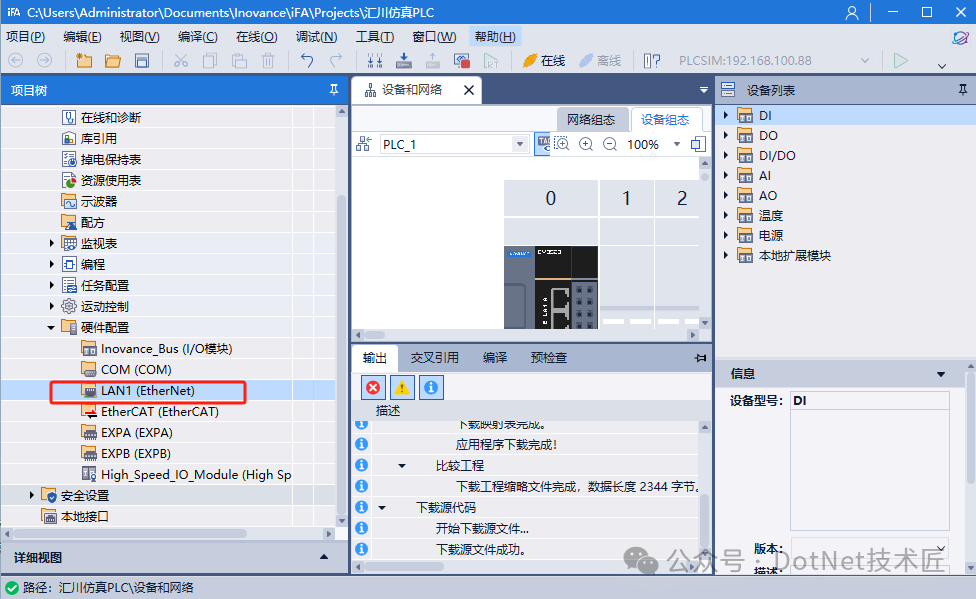 2. Right-click on LAN1, add a device, and we can see some expansion modules. Select ModbusTCPSlave and click Add Device.
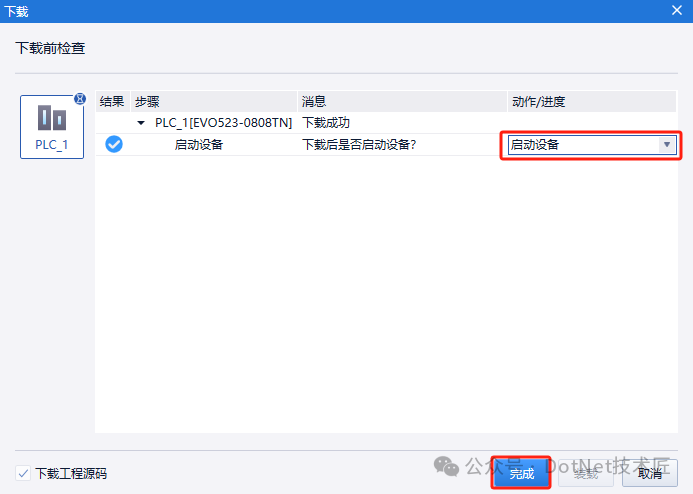
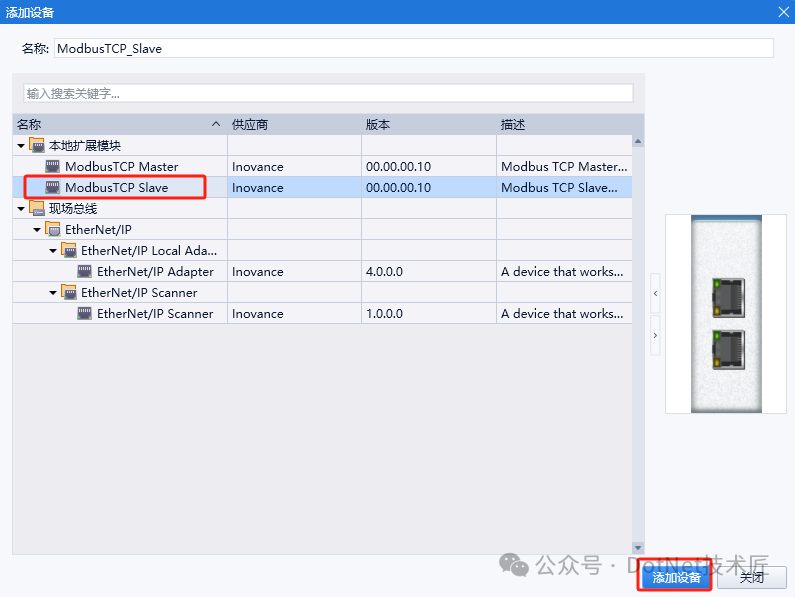 3. After adding the ModbusTCPSlave module, the PLC program needs to be downloaded again. After downloading, restart the device.
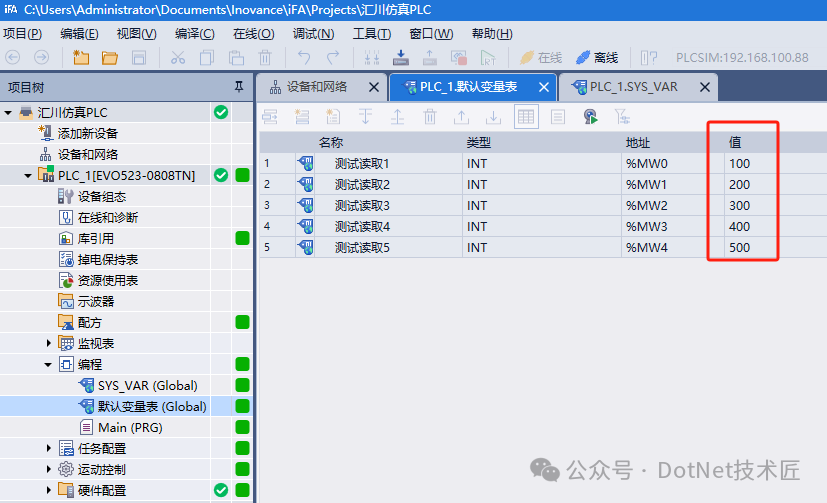
 4. To test variable reading, we create some variables %MW0-%MW4 and assign values from 100 to 500.
 5. We check the ModbusTCP address mapping table of the Huichuan PLC, as shown below:
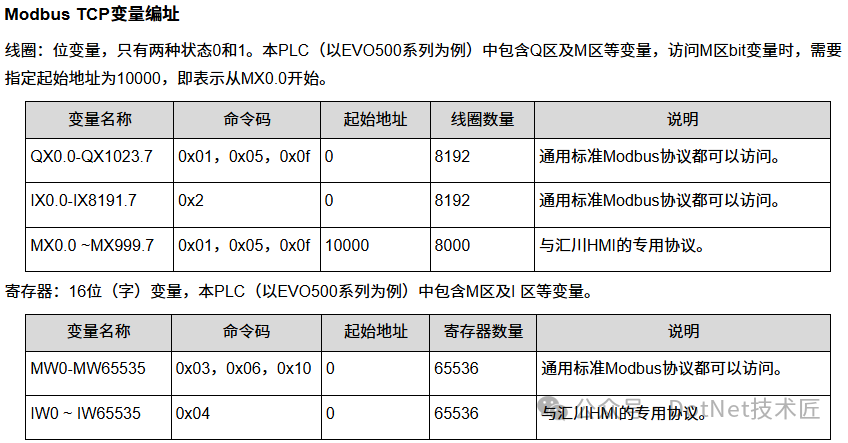 6. As shown in the figure, %MW0-%MW4 are mapped to the first five holding registers starting from 0, so we can read the PLC data using ModbusPoll software.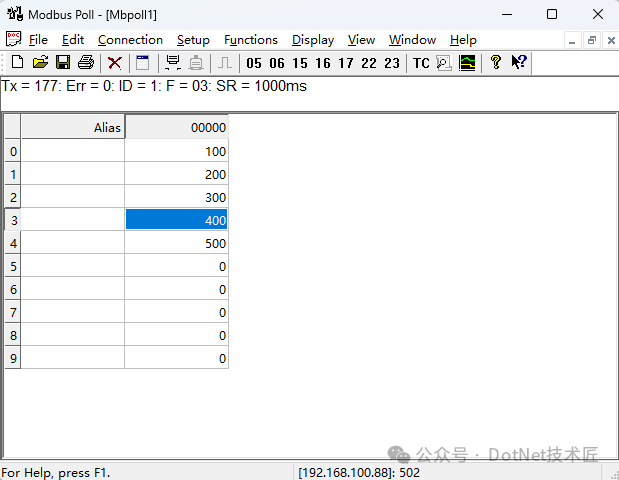
Other Communications
The Huichuan PLC simulation supports not only ModbusTCP but also EIP, OPCUA, and even EtherCAT.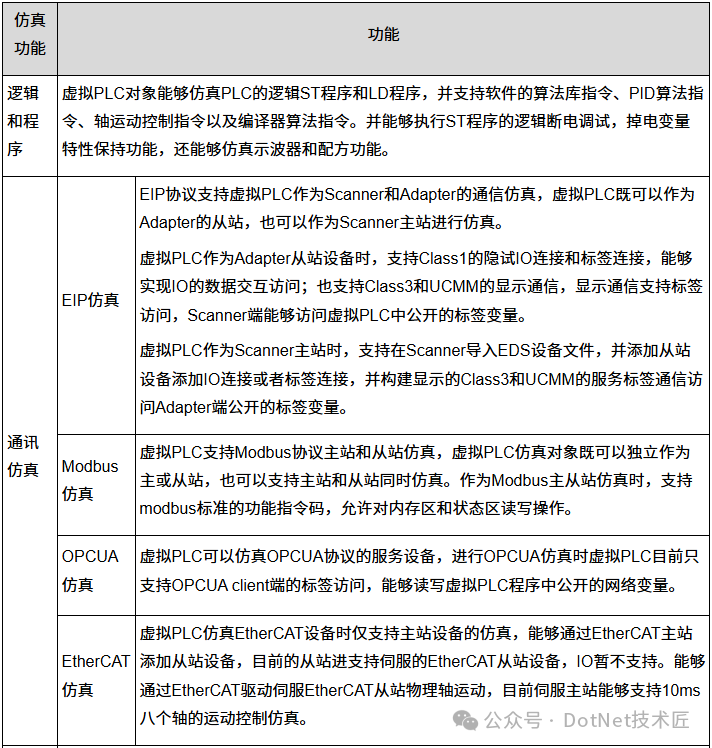 We will test other communication methods when we have time.FinallyIf you find this article helpful, please give it a thumbs up to support! Your support is my motivation to continue sharing knowledge. If you have any questions or need further assistance, feel free to leave a message. You can also join the WeChat public account[DotNet Technology Craftsman] community to exchange ideas with other technology enthusiasts and grow together!
Author: Little Code Craftsman
Source: gitee.com/smallcore/DotNetCoreDisclaimer: Online content is for learning purposes only, respecting copyright. Please delete if infringing, apologies and thanks!ENDFacilitating communication, resource sharing, and mutual growthA pure technical exchange group, if you want to join, please scan the code and note【Join Group】

Recommended ReadingWinForm + SunnyUI and MQTTnet to achieve an intelligent visualization fire alarm linkage large screen systemIndustrial Automation Practice: Development of a Weighing Machine Based on .NET + ModBus RTU ProtocolWinForm based on SunnyUI + PCLSharp machine vision welding system.NET 9 + WPF + Halcon to build an industrial vision process framework: from architectural design to practical implementationWinForm high-resolution screen adaptation problem? A powerful control adaptive scaling toolAn open-source lightweight WinForm image processing tool, easily extract main colors, apply filters, and recolorCross-platform industrial vision image analysis tool based on .NET 6 + OpenCVSharpVisual inspection in the field of industrial control under the WinForm frameworkWPF electric meter data acquisition system development: CommunityToolkit.Mvvm and Prism architecture comparison practiceLightweight and efficient inventory management system based on .NET 8 + React (front-end and back-end separation)WPF real-time industrial monitoring large screen: ModBus protocol integration and borderless dynamic visualization solutionC#/.NET August technical review: WPF/WinForm, machine vision, and industrial upper computer practiceGraphical operation of Windows services? This open-source tool has achieved it.NET 9.0 a reusable WPF interface frameworkStep-by-step guide to designing WinForm high DPI compatible programs, saying goodbye to blurry fonts and chaotic controls
WPF + MVVM self-service inspection report printer multi-framework implementation
Why does .NET have a very large memory footprint?
Building an enterprise-level WinForm framework from scratch: integrating SunnyUI controls and SqlSugar ORMC# deployment Yolov8 full strategy: OpenVINO and TensorRT dual-engine accelerationWPF a universal embedded measurement and control upper computer (flexible configuration without repetition)C# what has amazed you?Which performs better, Avalonia UI or Electron?C# + Halcon modular industrial vision general image processing tool (practical, efficient, full-scene coverage)Open-source industrial-grade WPF data large screen: practical project based on MVVM + HandyControlIs the future of C# Avalonia?How to create beautiful interfaces in C# desktop applications?Free and open-source! A simple and easy-to-use Android screen projection tool based on WPF + ScrcpyHandwritten WinForm chart control: no dependencies, supporting curves, pie charts, point charts, and object line charts, etc.How to choose an enterprise-level desktop architecture, MFC, WinForm, or WPF? A clear explanation in one articleWinForm control automatic scaling algorithm: simple implementation of adaptive window sizeWPF and WinForm: the future battle on the .NET platform, who will win? (Vote)Recommended content: five powerful .NET open-source workflow systems, ready to useFull-stack .NET low-code engine: permissions, workflows, API dynamic generation, open-source and ready to useA lightweight ERP inventory management system based on .NET: scan code for storage, order to label, direct to delivery.NET 8 + Vue 3 intelligent factory MES rapid development framework: device monitoring, data large screen full coverageC# + OpenCvSharp to achieve low-cost open-source monocular structured light 3D scanning.NET 9 + React dynamic routing + RBAC permission practical based on DDD architectureEnterprise-level WinForm rapid development framework based on SunnyUI, ready to use!No hardware solution! A camera scanning tool based on .NET (supports enter/continuous scanning)Industrial-grade MES system development WPF + MVVM from entry to practical (full source code/collection version)
Commonly used control libraries in industrial C#
How to easily achieve auto-start for industrial upper computer programs in C#
Should I choose Halcon or OpenCV for industrial vision development in C#?
How to learn upper computer development in C#? Suggestions for automation engineers
.NET desktop application (WPF/WinForm) efficient auto-update solution
Quickly develop an AntdUI style WinForm general backend framework with one line of code
WinForm + SQL Server + Modbus to achieve warehouse temperature control upper computer system development
A multifunctional tool developed in WinForm: serial communication, encryption and decryption, image conversion, and other functions
.NET open-source free, powerful chart library ScottPlot (universal for WinForm/WPF)
C# + OpenCvSharp common image processing example set for industrial vision (ready to use, with source code)
If you found it beneficial, please share it to benefit more people
Follow “DotNet Technology Craftsman“, to enhance technical strength together
 Collect
 Like
Like Share
Share Looking