Recently, the entire internet has been buzzing about how powerful the Gemini3 Pro model is. As a public account focused on industrial control and AI, we naturally won’t miss this wave of experience.
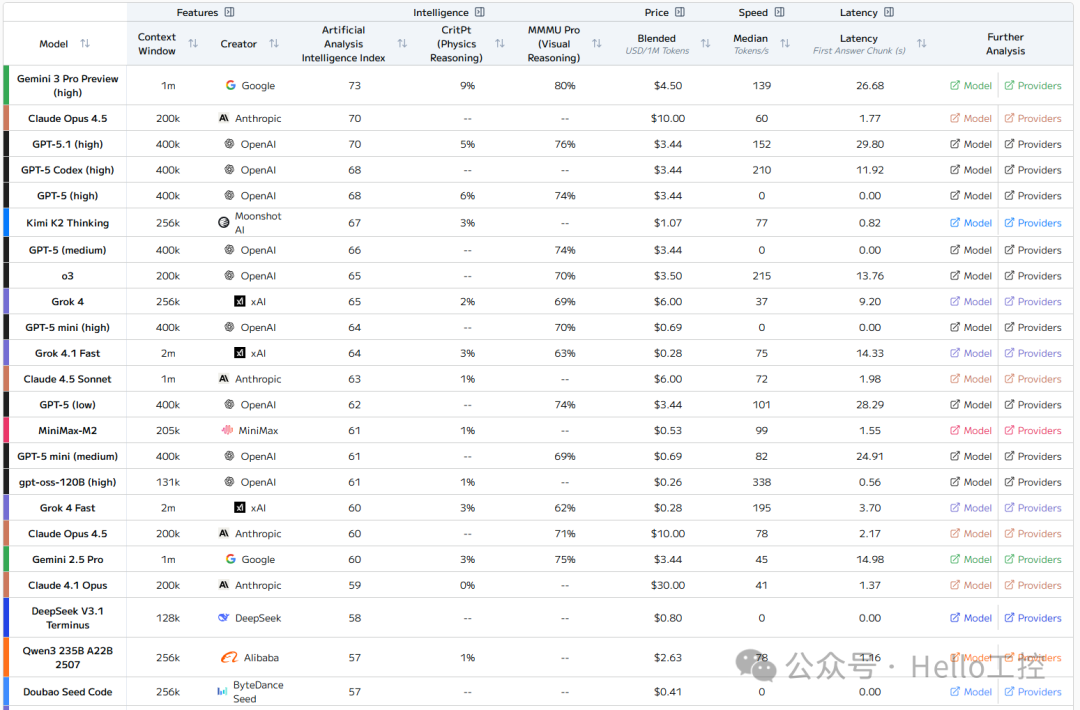
From the AI ranking perspective, it has already climbed to the top:

The various scoring data is also impressive:
What we are more concerned about is: how is the PLC programming capability of Gemini 3 Pro? Is it better than before?
However, in China, even Google is inaccessible, so many friends might find this challenging, and I am no exception. If anyone has good free and stable resources, please feel free to share in the comments.

With a VPN, although I can log in, there are still regional restrictions.
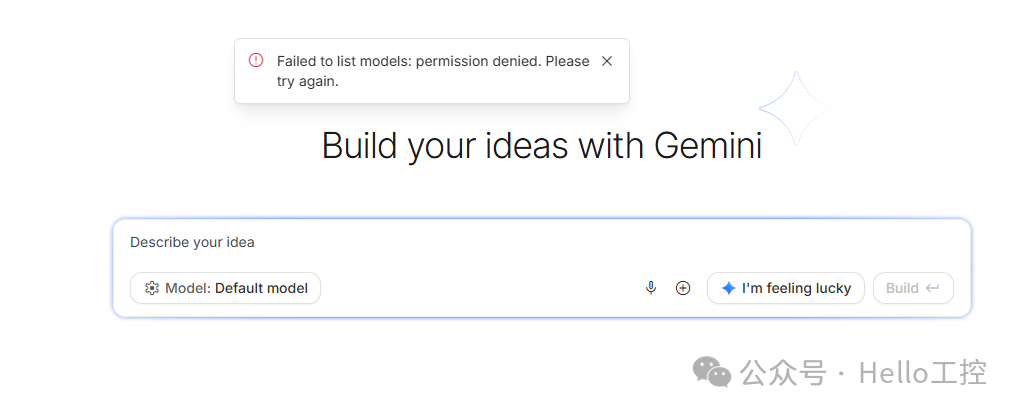 I checked the area below, and it cannot be used directly.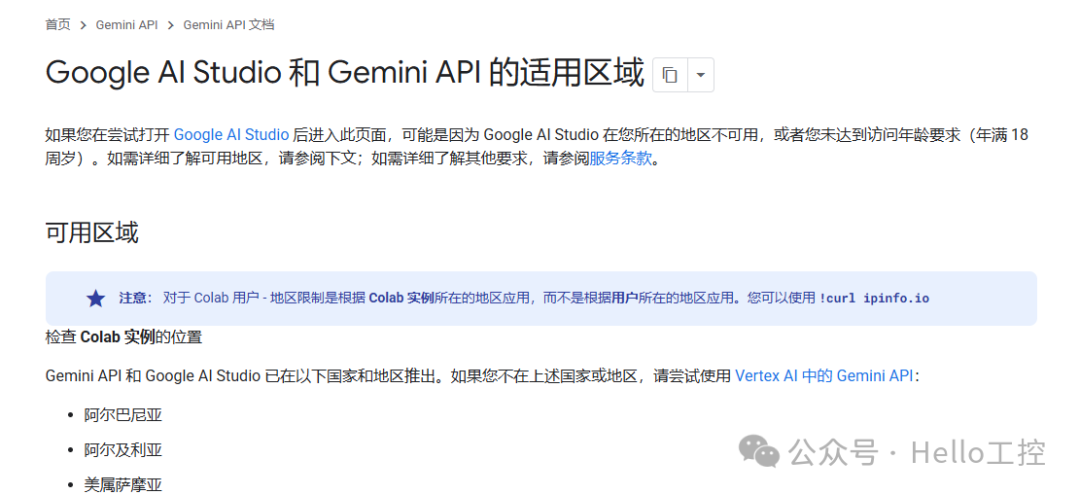
Of course, I saw the prompt that Vertex AI can be used for testing:
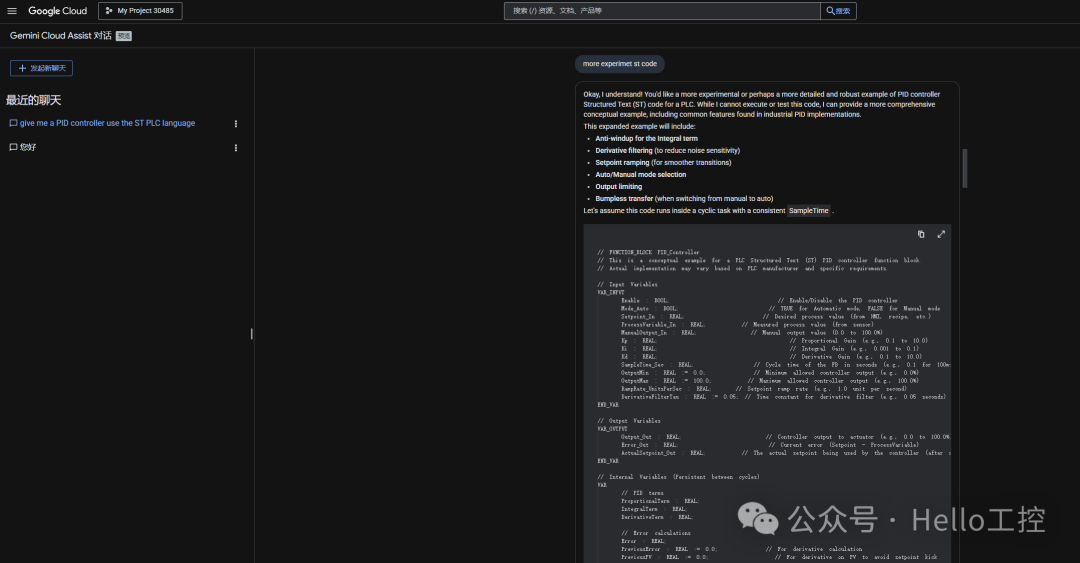
The prompt says that Chinese input is not supported, okay! I later switched to the following method, testing the AI’s programming capability through openrouter:
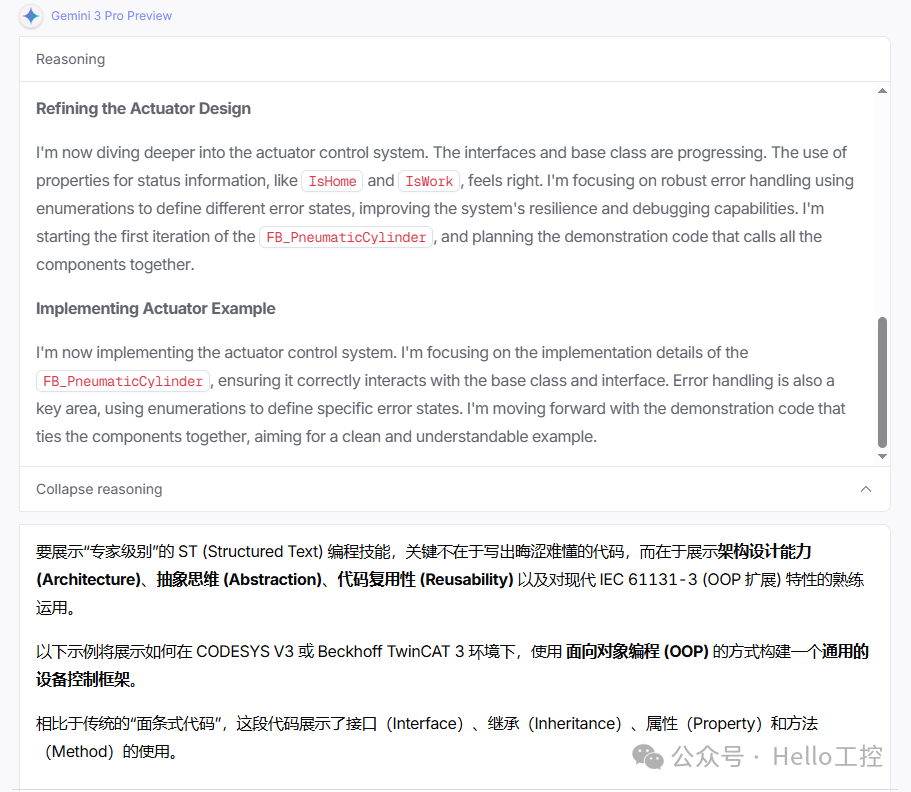
To demonstrate “expert-level” ST (Structured Text) programming skills, the key is not to write obscure code, but to showcase architecture design ability (Architecture), abstraction (Abstraction), code reusability (Reusability), and proficiency in modern IEC 61131-3 (OOP extensions) features.
The following example will demonstrate how to build a generic device control framework using object-oriented programming (OOP) in CODESYS V3 or Beckhoff TwinCAT 3 environment.
Compared to traditional “spaghetti code”, this code demonstrates the use of interfaces (Interface), inheritance (Inheritance), properties (Property), and methods (Method).
Scenario Objective
Build a generic cylinder/actuator control system.
- Define Standards: All actuators must adhere to a unified interface (whether pneumatic, hydraulic, or electric).
- Base Class Encapsulation: Encapsulate common timeout detection, state machine logic, and error handling.
- Specific Implementation: This is a specific dual electric control cylinder, requiring only a small amount of hardware mapping code.
1. Define Interface (I_Actuator)
Expert Perspective: Use interfaces to achieve “polymorphism”. The main program does not need to know what type of cylinder it is, just that it can <span><span>MoveWork</span></span> and <span><span>MoveHome</span></span>.
INTERFACE I_Actuator(* Public methods and properties exposed for external calls *)METHOD MoveWork : BOOLEND_METHODMETHOD MoveHome : BOOLEND_METHODMETHOD ResetError : BOOLEND_METHODPROPERTY ErrorID : UDINT END_PROPERTYPROPERTY IsBusy : BOOL END_PROPERTYPROPERTY IsAtWork : BOOL END_PROPERTYPROPERTY IsAtHome : BOOL END_PROPERTY2. Define Abstract Base Class (FB_ActuatorBase)
Expert Perspective: Utilize <span>ABSTRACT</span> and <span>EXTENDS</span>. This is the core part, handling timers, state transitions, and error logic. Subclasses do not need to rewrite these common logics.
FUNCTION_BLOCK ABSTRACT FB_ActuatorBase IMPLEMENTS I_ActuatorVAR (* State machine enumeration *) _eState : (IDLE, MOVING_WORK, MOVING_HOME, ERROR) := IDLE; (* Internal variables, prefixed with an underscore *) _fbTimeoutTimer : TON; _tTimeoutLimit : TIME := T#5S; _nErrorID : UDINT := 0;END_VAR(* === Interface property implementation (read-only) === *)PROPERTY ErrorID : UDINT GET ErrorID := _nErrorID; END_GETEND_PROPERTYPROPERTY IsBusy : BOOL GET IsBusy := (_eState = MOVING_WORK) OR (_eState = MOVING_HOME); END_GETEND_PROPERTY(* === Abstract methods (subclasses must implement specific hardware read/write) === *)(* Subclass used to set physical outputs *)METHOD PROTECTED ABSTRACT SetOutputs VAR_INPUT bWorkCmd : BOOL; bHomeCmd : BOOL; END_VAREND_METHOD(* Subclass used to read physical feedback *)METHOD PROTECTED ABSTRACT ReadInputsEND_METHOD(* === Core logic periodic call method === *)METHOD PUBLIC Execute (* Read the sensor states mapped by the subclass *) ReadInputs(); (* State machine logic *) CASE _eState OF IDLE: _fbTimeoutTimer(IN := FALSE); MOVING_WORK: SetOutputs(TRUE, FALSE); _fbTimeoutTimer(IN := TRUE, PT := _tTimeoutLimit); (* Use THIS^ to access states obtained through interface/virtual methods *) IF THIS^.IsAtWork THEN _eState := IDLE; ELSIF _fbTimeoutTimer.Q THEN _nErrorID := 101; (* For example: action timeout *) _eState := ERROR; END_IF MOVING_HOME: SetOutputs(FALSE, TRUE); _fbTimeoutTimer(IN := TRUE, PT := _tTimeoutLimit); IF THIS^.IsAtHome THEN _eState := IDLE; ELSIF _fbTimeoutTimer.Q THEN _nErrorID := 102; _eState := ERROR; END_IF ERROR: SetOutputs(FALSE, FALSE); (* Safety protection *) END_CASEEND_METHOD(* === Interface method implementation === *)METHOD MoveWork : BOOL IF _eState <> ERROR THEN _eState := MOVING_WORK; MoveWork := TRUE; END_IFEND_METHODMETHOD MoveHome : BOOL IF _eState <> ERROR THEN _eState := MOVING_HOME; MoveHome := TRUE; END_IFEND_METHODMETHOD ResetError : BOOL _nErrorID := 0; _eState := IDLE; ResetError := TRUE;END_METHOD3. Specific Implementation Class (FB_PneumaticCylinder)
Expert Perspective: The specific business logic is very clean. Developers only need to focus on IO mapping without worrying about how the timeout timer is written, as the base class has already handled it.
FUNCTION_BLOCK FB_PneumaticCylinder EXTENDS FB_ActuatorBaseVAR_INPUT bSensorWork : BOOL; (* Physical input *) bSensorHome : BOOL;END_VARVAR_OUTPUT bValveWork : BOOL; (* Physical output *) bValveHome : BOOL;END_VAR(* === Implement abstract properties of the base class === *)PROPERTY IsAtWork : BOOL GET IsAtWork := bSensorWork; END_GETEND_PROPERTYPROPERTY IsAtHome : BOOL GET IsAtHome := bSensorHome; END_GETEND_PROPERTY(* === Implement abstract methods of the base class === *)METHOD PROTECTED SetOutputs VAR_INPUT bWorkCmd : BOOL; bHomeCmd : BOOL; END_VAR (* Specific hardware logic, for example, here is dual electric control *) bValveWork := bWorkCmd; bValveHome := bHomeCmd;END_METHODMETHOD PROTECTED ReadInputs (* If complex filtering or debouncing is needed, write it here *) ;END_METHOD4. Main Program Call (Main)
Expert Perspective: The main program is extremely concise. Using arrays or interface lists can easily manage 100 cylinders in bulk.
PROGRAM MAINVAR (* Instantiate specific cylinder *) fbCylinderA : FB_PneumaticCylinder; (* Define test variables *) bUserBtnExtend : BOOL; bUserBtnRetract : BOOL; bUserBtnReset : BOOL; (* Interface pointer for demonstrating polymorphism *) iMyActuator : I_Actuator; END_VAR(* 1. Hardware IO mapping (simulation) *)fbCylinderA.bSensorWork:= HwInputs.I0_0;fbCylinderA.bSensorHome:= HwInputs.I0_1;(* 2. Logic control - operate through interface, achieving decoupling *)iMyActuator := fbCylinderA; (* Assign specific instance to interface *)(* At this point, we only operate through iMyActuator, without caring whether it is dual electric control or single electric control *)IF bUserBtnExtend THEN iMyActuator.MoveWork();END_IFIF bUserBtnRetract THEN iMyActuator.MoveHome();END_IFIF bUserBtnReset THEN iMyActuator.ResetError();END_IF(* 3. Periodically execute core logic *)(* Note: Must call the instance's Execute method to drive the internal state machine *)fbCylinderA.Execute();(* 4. Output mapping *)HwOutputs.Q0_0:= fbCylinderA.bValveWork;HwOutputs.Q0_1:= fbCylinderA.bValveHome;Of course, in the end, I also elaborated on myself, proving my expert-level programming skills!
Why does this code demonstrate expert-level skills?
- Decoupling: The main logic controls the device through the
<span><span>I_Actuator</span></span>interface. If in the future you need to replace the cylinder with a servo motor push rod, you only need to create a new<span><span>FB_ServoPusher</span></span>implementing that interface, and the control logic of the main program (buttons, state transitions) will not need to change a single line of code. - Encapsulation:
<span><span>_eState</span></span>,<span><span>_fbTimeoutTimer</span></span>and other variables are hidden inside the base class, preventing external modification, ensuring system robustness. Interaction can only occur through methods like<span><span>MoveWork()</span></span>. - Maintainability: If you want to modify the timeout logic for all cylinders, you only need to change one place in
<span><span>FB_ActuatorBase</span></span>, and the logic for all cylinders in the factory will automatically update. - Clean Code: There are no large amounts of
<span><span>IF..THEN..ELSE</span></span>nesting, the state machine is clear, and the logic layers are distinct (hardware layer -> driver layer -> business layer).
Well, as for how the code actually performs, I leave it to my PLC colleagues to judge! Any thoughts are welcome for discussion in the comments!

- 【Video Course】Introduction to Codesys V3.5 Series(160 people have learned)
- 【Video Course】Basics of Codesys SoftMotion Control(49 people have learned)
- 【Video Course】Codesys SoftMotion Electronic Gear Course(19 people have learned)
- 【Video Course】Codesys SoftMotion Electronic Cam Course(16 people have learned)
- 【Video Course】Creating Custom Libraries in Codesys(26 people have learned)
-
Efficient, Real-time, Flexible: In-depth Analysis of EtherCAT Bus Technology (Final Part)
-
Comprehensive Analysis of RS232, RS422, and RS485 Serial Communication Technology (Final Part)
-
Comprehensive Analysis of Modbus Protocol (Final Part)
-
Comprehensive Analysis of Profibus Technology (Final Part)
-
Comprehensive Analysis of Profinet Technology (Final Part)
-
Comprehensive Analysis of EtherNet/IP Technology (Final Part)
-
Comprehensive Analysis of CAN and CANopen Bus Technology (Final Part)
-
Comprehensive Analysis of OPC UA Communication Technology (Final Part)

——–END——–
 Please share and “like” this article if you enjoyed it!