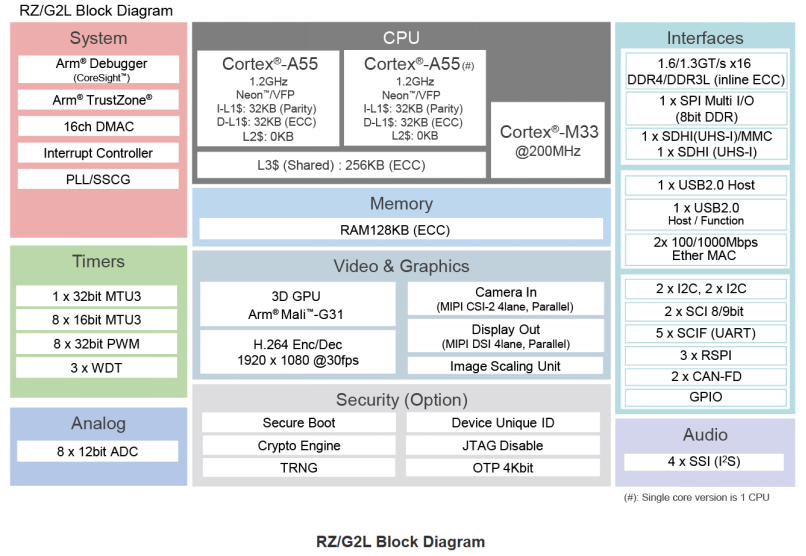
The RZ/G2L microprocessor is equipped with a Cortex®-A55 (1.2 GHz) CPU, a 16-bit DDR3L/DDR4 interface, a 3D graphics acceleration engine with Arm Mali-G31, and a video codec (H.264). Additionally, this microprocessor features a variety of interfaces such as camera input, display output, USB 2.0, and Gigabit Ethernet, making it particularly suitable for entry-level industrial human-machine interfaces (HMIs) and embedded devices with video capabilities.
In the development work of the RZ/G2L, users often express the need to compile the Bootloader separately. To meet user needs, this article will introduce a method for compiling the Bootloader separately on the RZ/G2L, independent of Yocto, allowing for quick and convenient generation of Bootloader files.
First, let’s introduce the standard Bootloader startup process for the RZ/G2L, as shown in the figure below:
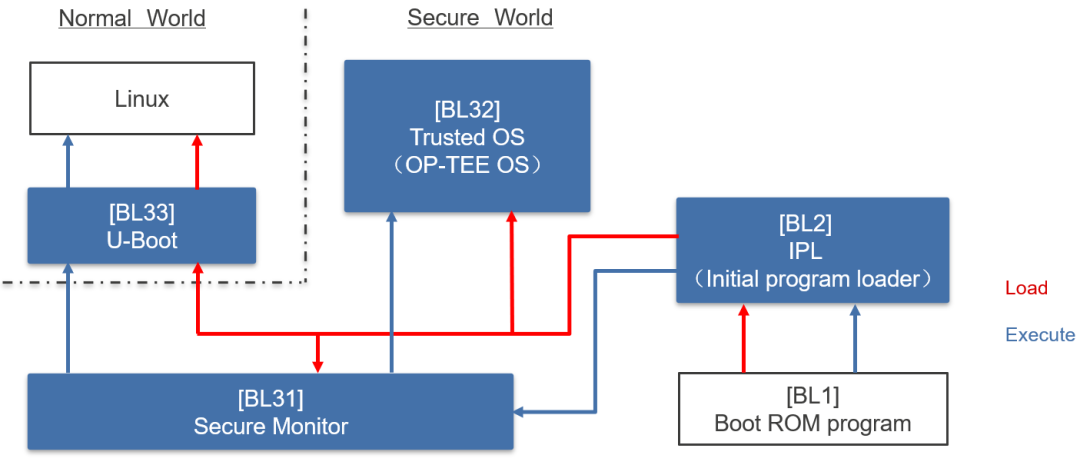
In the above process, BL1 is a piece of boot loading code embedded in ROM, used to boot BL2 and perform security verification; BL2 mainly completes some platform-related initializations, such as DDR initialization; BL31 is the persistent trusted firmware responsible for system security services and switching between Secure World and Normal World; BL32 includes a trusted secure OS (such as OP-TEE OS) and secure applications; BL33 is non-secure firmware, typically U-Boot.
For the Secure version of the RZ/G2L, the Bootloader includes BL1, BL2, BL31, BL32, and BL33. For the Non-Secure version of the RZ/G2L, the Bootloader includes BL1, BL2, BL31, and BL33. This article focuses only on the Non-Secure version of the RZ/G2L EVK, hereinafter referred to simply as RZ/G2L.
For the RZ/G2L, the Bootloader files that users can modify and recompile include trusted-firmware-a (TF-A) and U-Boot.
Next, obtain the Bootloader source code from GitHub.
Get TF-A source code:
Swipe left and right to view the complete content
git clone https://github.com/renesas-rz/rzg_trusted-firmware-acd rzg_trusted-firmware-agit checkout v2.6/rzcd ..Get U-Boot source code:
Swipe left and right to view the complete content
git clone https://github.com/renesas-rz/renesas-u-boot-cipcd renesas-u-boot-cip/git checkout v2021.10/rzcd ..💡 Note
This article uses version v2.6 of TF-A and version v2021.10 of U-Boot as examples. Customers should ensure to synchronize the TF-A and U-Boot versions used with the VLP version in actual use.
Get automation scripts for building TF-A and U-Boot:
Swipe left and right to view the complete content
wget https://raw.githubusercontent.com/renesas-rz/rzg2_bsp_scripts/master/build_scripts/build_common.shwget https://raw.githubusercontent.com/renesas-rz/rzg2_bsp_scripts/master/build_scripts/build_tfa.shwget https://raw.githubusercontent.com/renesas-rz/rzg2_bsp_scripts/master/build_scripts/build_uboot.shwget https://raw.githubusercontent.com/renesas-rz/rzg2_bsp_scripts/master/build_scripts/build.shchmod +x *.shAmong them, build.sh provides the entry for building each image, build_common.sh is used to set common configuration items, build_tfa.sh is for building TF-A, and build_uboot.sh is for building U-Boot.
After obtaining the source code and the scripts for building, you can proceed with the compilation.
Run the script
Set the corresponding board information and the cross-compilation toolchain to be used:
./build.sh s
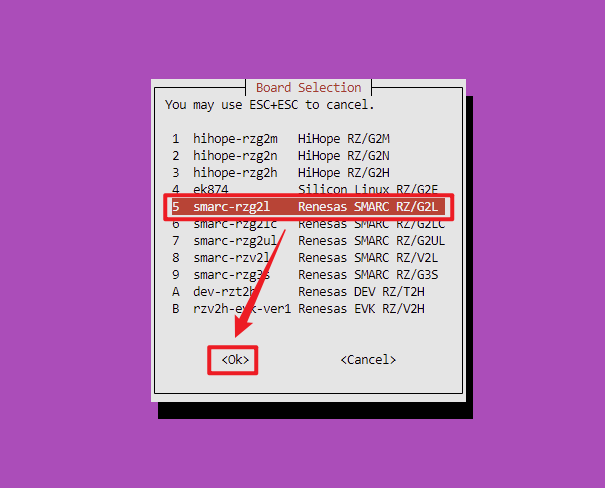
Complete the corresponding configuration in the interface below
-
Set the board model, select “5 smarc-rzg2l Renesas SMARC RZ/G2L”
-
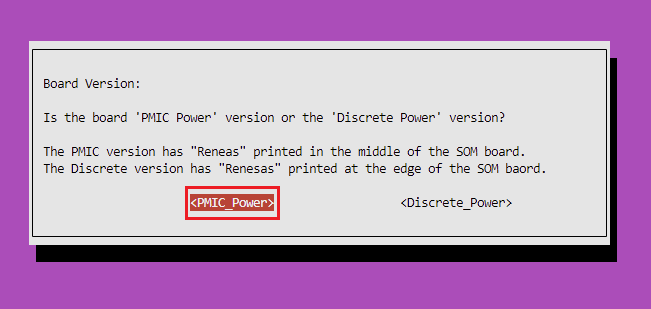
Set the version of the RZ/G2L board, which is divided into PMIC_Power and Discrete_Power versions, here select “PMIC_Power”.
-
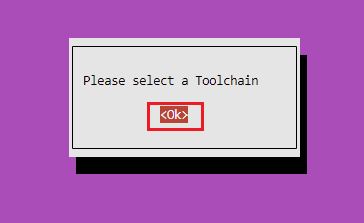
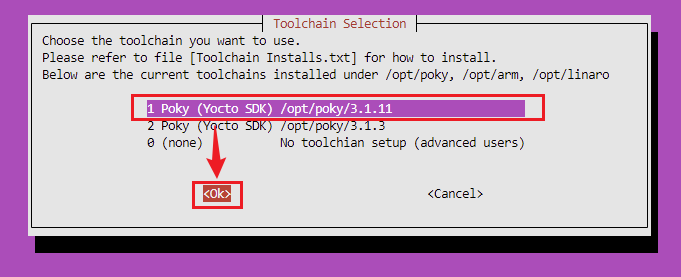
Set the cross-compilation toolchain, here select “1 Poky (Yocto SDK) /opt/poky/3.1.11”.
💡 Note
Before compiling, please ensure that the cross-compilation toolchain exists on the Host PC. If not, refer to section 7.1.1 of the document “SMARC EVK of RZ/G2L, RZ/G2LC and RZ/G2UL Linux Start-up Guide”How to extract SDK, and install the cross-compilation toolchain.
Run the script to build U-Boot
./build.sh u
Run the script to build TF-A
./build.sh t
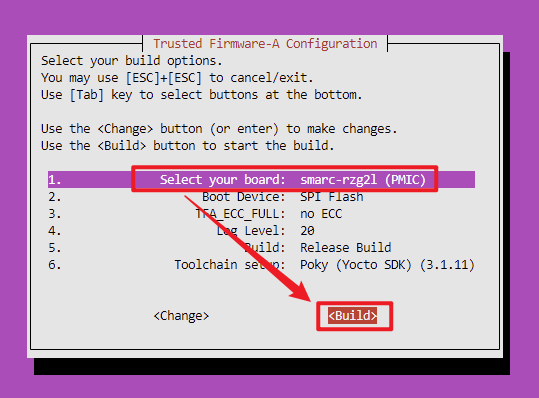
Compilation completed, the generated products are located in the output_smarc_rzg2l path
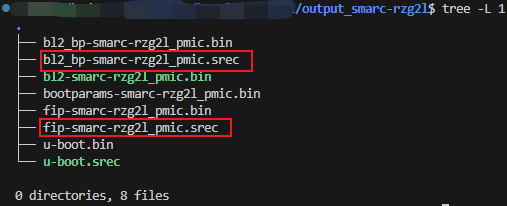
Among them, bl2_bp-smarc-rzg2l_pmic.srec and fip-smarc-rzg2l_pmic.srec are the Bootloader files that need to be flashed.
💡 Note
Each time U-Boot is modified, in addition to recompiling U-Boot, TF-A must also be recompiled, as TF-A needs to include U-Boot output file information; otherwise, U-Boot cannot start normally.
This is the method for separately compiling the Bootloader for the RZ/G2L.
For methods to flash the Bootloader files, please refer to section 4.4 of the documentSMARC EVK of RZ/G2L, RZ/G2LC,RZ/G2UL Linux Start-up Guide Rev.1.06 titled Write the Bootloader.(You can copy the link below into your browser or scan the QR code to view)
SMARC EVK of RZ/G2L, RZ/G2LC, RZ/G2UL Linux Start-up Guide Rev.1.06
https://www.renesas.com/en/document/gde/smarc-evk-rzg2l-rzg2lc-rzg2ul-linux-start-guide-rev106?r=1467981
For more detailed usage methods, please refer to the following websites:
Renesas Official Website
https://www.renesas.cn/cn/zh/products/microcontrollers-microprocessors/rz-mpus/rzg2l-getting-started
RZ Product WIKI Website
https://renesas.info/wiki/Main_Page
Recent Events Overview
1
RA6E2 Development Board Evaluation Activity Candidate List Announced!
——📣 Submit reports for extra gifts! Submission deadline is August 18
2
RA0E2 Development Board Evaluation | Candidate List Announced, Evaluation Task Officially Started!
——🎉 Hurry to participate, report submission deadline is August 6
3
Answer questions to win gifts | Summer Fun Knowledge Quiz Activity Launched!
——🚨 Activity ends on July 10
4
See you in Shenzhen next week | Renesas Industrial Functional Safety Technology Seminar Open for Registration
——Register for gifts, Shanghai event on July 11

Need Technical Support?
If you have any questions while using Renesas MCU/MPU products, you can scan the QR code below or copy the URL into your browser to enter theRenesas Technical Forum to find answers or get online technical support.
https://community-ja.renesas.com/zh/forums-groups/mcu-mpu/
1
END
1
Recommended Reading
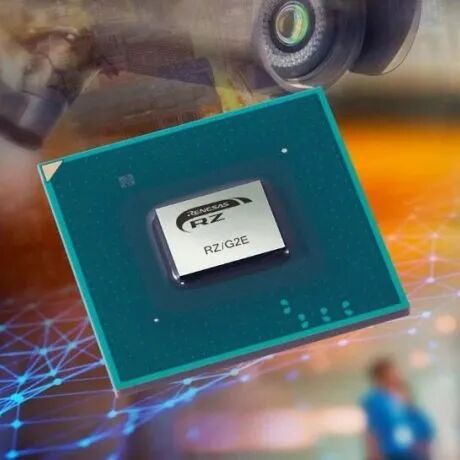
Product Introduction | RZ/G2 Series MPU
New Product Launch | Renesas Ecosystem Partner Meil Electronics, Launching RZ/G2UL Core Board, Supporting Industrial 4.0 Development!

Written at the Renesas Electronics 2023 Industrial Summit (3) Partner Solutions Sharing – Part Two