Click the blue text above to follow us
WeChat Official Account:OpenCV Academy
Follow us for more knowledge on computer vision and deep learning
Introduction to the Padim Model
The Padim model primarily generates feature vectors from a series of normal samples using a CNN network, calculates multiple variance Gaussian matrices of the feature vectors, and obtains the feature data distribution of normal samples. It then computes the Mahalanobis distance between the feature vector of the input sample image and the training-generated feature data distribution, thus achieving anomaly detection and localization.
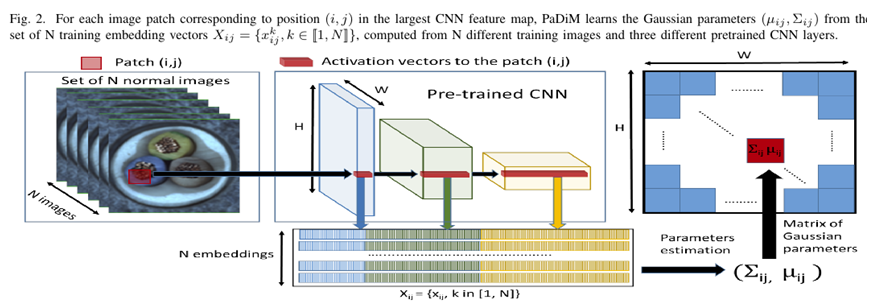
PadimModel Training and ExportSupports ONNXformat orOpenVINOformat, please refer to the article below.
[Engineering Practice] Anomalib Anomaly Detection from Training to Deployment
TensorRT Inference Steps
TensorRT is more concise and user-friendly compared to previous versions of the C++ SDK, and it supports dynamic modification of input dimension parameters.
Loading the Model and Creating the Execution Engine
this->runtime = createInferRuntime(gLogger);assert(this->runtime != nullptr);this->engine = this->runtime->deserializeCudaEngine(trtModelStream, size);assert(this->engine != nullptr);this->context = engine->createExecutionContext();assert(this->context != nullptr);delete[] trtModelStream;Image Preprocessing and Inference
cv::Mat blob = cv::dnn::blobFromImage(image, 1 / 255.0, cv::Size(this->input_w, this->input_h), cv::Scalar(0, 0, 0), true, false);cudaMemcpyAsync(buffers[0], blob.ptr<float>(), 3 * this->input_h * this->input_w * sizeof(float), cudaMemcpyHostToDevice, stream);// Inferencecontext->executeV2(buffers);Getting Input and Output Data Dimensions for Inference
// Get input dimension informationthis->input_h = inputDims.d[2];this->input_w = inputDims.d[3];printf("inputH : %d, inputW: %d \n", this->input_h, this->input_w);// Get output dimension informationthis->output_h = outDims3.d[2];this->output_w = outDims3.d[3];std::cout << "out data format: " << this->output_h << "x" << this->output_w << std::endl;Code Demonstration
For anomaly detection models such as PatchCore, Padim, and EfficientAD, I have implemented a class wrapper that allows for the deployment of anomaly detection models with just a few lines of code. The calling code is as follows:
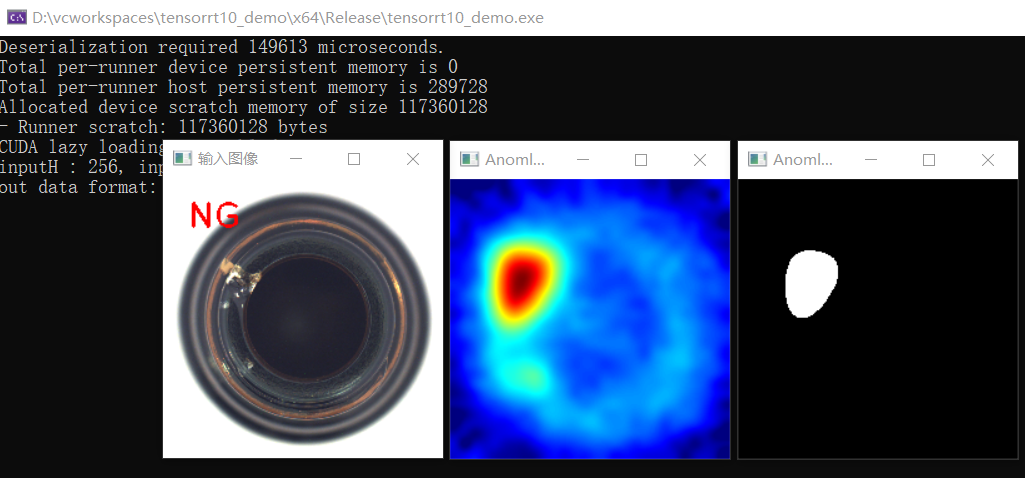
std::shared_ptr<AnomalyDetector> detector(new AnomalyDetector());detector->initConfig("D:/TensorRT-10.8/bin//model.engine", 256, 256, 0.5);cv::Mat image = cv::imread("D:/python/yolov5-7.0/breaksmall.png");detector->detect(image);//cv::imshow("Input Image", image);cv::waitKey(0);cv::destroyAllWindows();The results are as follows:
 Learn TensorRT 10Deep Learning Model Deployment DevelopmentScan the code to view directly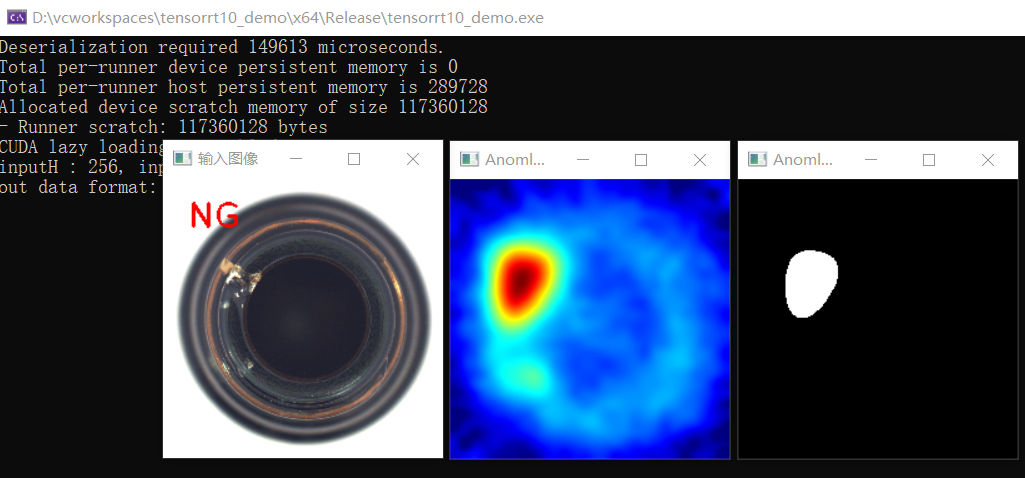
Essential skills for upper computer and machine vision developers
Systematically master OpenCV C# SDK and workflow engine development. The course includes dozens of common machine vision cases implemented with OpenCV, with over 3000+ lines of code, and all materials, including slides and code, are available for download. Q&A support is provided! Purchase now to get group buying discounts:

Recommended Reading
OpenCV 4.8 + YOLOv8 Object Detection C++ Inference Demonstration
ZXING + OpenCV to Create Open Source Barcode Detection Application
Strategy | A Good Method to Learn Deep Learning in Just Three Months
Three Lines of Code to Implement TensorRT 8.6 C++ Deep Learning Model Deployment
Practical | YOLOv8 + OpenCV for DM Code Positioning Detection and Analysis
Object Detection Bounding Box Loss – From IOU to ProbIOU
Must-See for Beginners | Five Misconceptions in Learning Deep Learning