1208 – Spiral Matrix
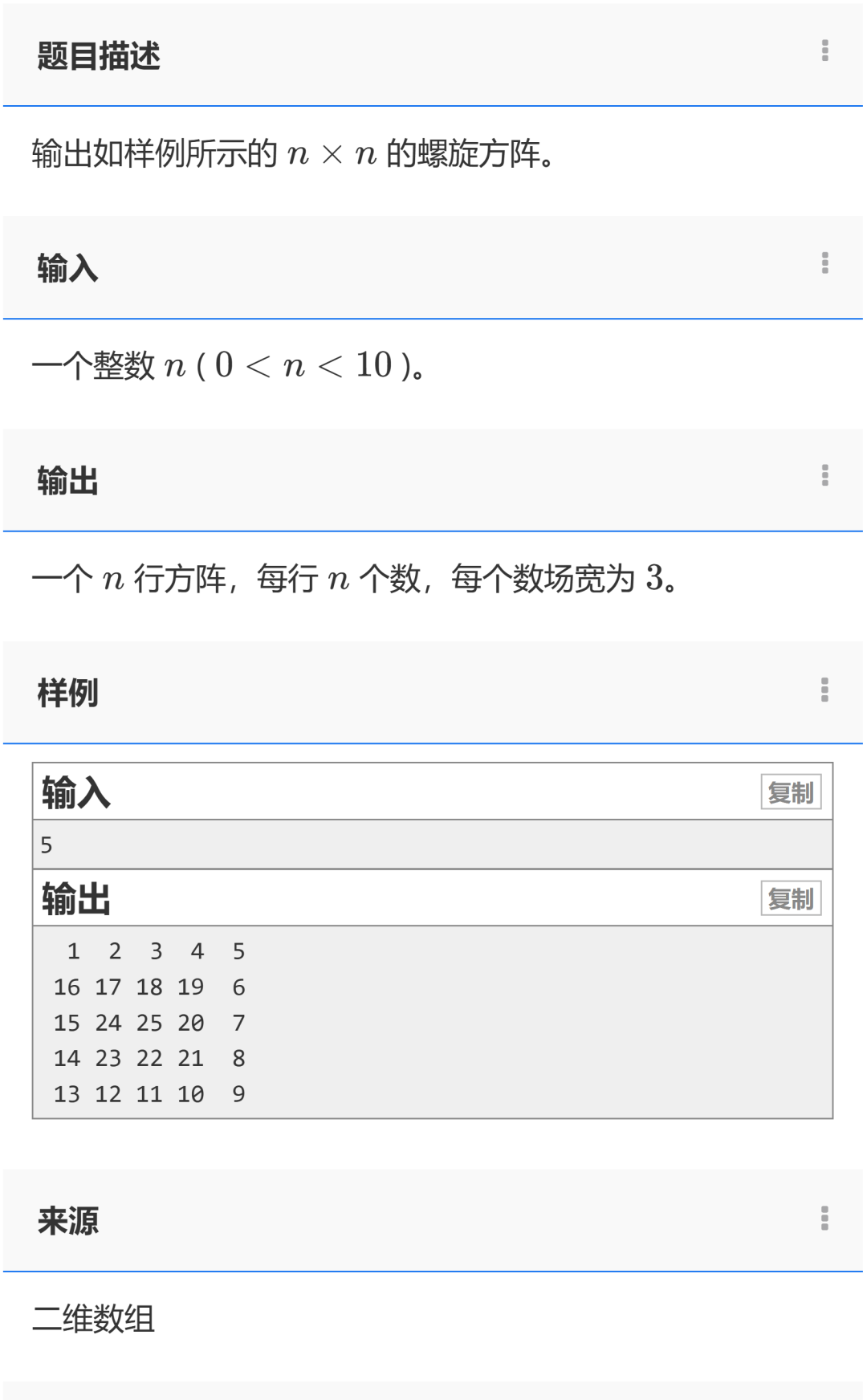
Spiral Matrix Program Development Approach
The spiral matrix program is designed to generate and output a spiral-shaped numerical matrix. Below, I will explain the development approach of this program in detail to help beginners understand.
Program Objective
Create an n×n matrix where the numbers from 1 to n² are arranged in a spiral order.
Core Approach
-
Initialization: Create an n×n two-dimensional array (matrix) and initialize it to 0.
-
Boundary Control: Use four variables (top, bottom, left, right) to track the current boundaries that need to be filled.
-
Loop Filling: Fill the numbers in the order of “right → down → left → up”, adjusting the corresponding boundary after filling in each direction.
-
Output Result: Use formatted output to ensure number alignment.
Implementation Details
-
Use a while loop to continue filling until all boundaries converge.
-
Each loop handles four directions:
-
Fill the top row from left to right.
-
Fill the right column from top to bottom.
-
Fill the bottom row from right to left (if there are still rows to fill).
-
Fill the left column from bottom to top (if there are still columns to fill).
-
Use setw(3) to ensure each number occupies a width of 3 characters for alignment.
Reference Code
#include<bits/stdc++.h>  // Include common standard libraries
using namespace std;
/*1208 - Spiral Matrix*/
int main(){
    int n, a[10][10] = {0}; // Define matrix size n and a 10x10 matrix (initialized to 0)
    int num = 1; // Starting number is 1
    cin>>n; // Input matrix size n
    // Initialize four boundaries: top boundary, bottom boundary, left boundary, right boundary
    int top = 0, bottom = n - 1, left = 0, right = n - 1;
    // Continue looping while the top and bottom boundaries and left and right boundaries do not cross
    while (top <= bottom && left <= right) {
        // Fill the top row from left to right
        for (int i = left; i <= right; ++i) {
            a[top][i] = num++; // Assign value and increment number
        }
        top++; // Move the top boundary down one row
        // Fill the right column from top to bottom
        for (int i = top; i <= bottom; ++i) {
            a[i][right] = num++;
        }
        right--; // Move the right boundary left one column
        // Fill the bottom row from right to left (ensure there are still rows to fill)
        if (top <= bottom) {
            for (int i = right; i >= left; --i) {
                a[bottom][i] = num++;
            }
            bottom--; // Move the bottom boundary up one row
        }
        // Fill the left column from bottom to top (ensure there are still columns to fill)
        if (left <= right) {
            for (int i = bottom; i >= top; --i) {
                a[i][left] = num++;
            }
            left++; // Move the left boundary right one column
        }
    }
    // Output the result matrix
    for (int i = 0; i < n; ++i) {
        for (int j = 0; j < n; ++j) {
            cout << setw(3) << a[i][j]; // Each number occupies 3 characters width
        }
        cout << endl; // New line after each row
    }
    return 0;
}
Program Documentation
Program Overview
This program is a tool for generating spiral matrices. The user inputs an integer n (n<10), and the program generates an n×n matrix where the numbers from 1 to n² are arranged in a spiral order.
Detailed Explanation
1. Header Files
cpp
#include<bits/stdc++.h>
using namespace std;-
<span>#include<bits/stdc++.h></span>is a header file that includes all standard libraries, simplifying programming. -
<span>using namespace std</span>allows direct use of functions and objects from the standard library, such as cout, cin, etc.
2. Main Function
cpp
int main(){-
This is the entry point of the program, where all code is executed.
3. Variable Declaration
cpp
int n, a[10][10]={0};
int num = 1;-
<span>n</span>: The size of the matrix input by the user. -
<span>a[10][10]</span>: A 10×10 two-dimensional array, initialized to all 0s. -
<span>num</span>: The current number to be filled in the matrix, starting from 1.
4. Input Handling
cpp
cin>>n;-
Get the matrix size n from the user.
5. Boundary Initialization
cpp
int top = 0, bottom = n - 1, left = 0, right = n - 1;-
Define four boundary variables, initially:
-
The top boundary (top) is the 0th row.
-
The bottom boundary (bottom) is the n-1 row.
-
The left boundary (left) is the 0th column.
-
The right boundary (right) is the n-1 column.
6. Spiral Filling Loop
cpp
while(top <= bottom && left <= right){-
Loop condition: Continue looping while the top and bottom boundaries do not meet and the left and right boundaries do not meet.
6.1 Fill the Top Row from Left to Right
cpp
for(int i = left; i <= right; ++i){
    a[top][i] = num++;
}
top++;-
Fill the current top row from the left boundary to the right boundary.
-
After filling, move the top row down one row.
6.2 Fill the Right Column from Top to Bottom
cpp
for(int i = top; i <= bottom; ++i){
    a[i][right] = num++;
}
right--;-
Fill the current right column from the new top row to the bottom row.
-
After filling, move the right column left one column.
6.3 Fill the Bottom Row from Right to Left
cpp
if(top <= bottom){
    for(int i = right; i >= left; --i){
        a[bottom][i] = num++;
    }
    bottom--;
}-
Check if there are still rows to fill (top <= bottom).
-
Fill the current bottom row from the right boundary to the left boundary.
-
After filling, move the bottom row up one row.
6.4 Fill the Left Column from Bottom to Top
cpp
if(left <= right){
    for(int i = bottom; i >= top; --i){
        a[i][left] = num++;
    }
    left++;
}-
Check if there are still columns to fill (left <= right).
-
Fill the current left column from the new bottom row to the top row.
-
After filling, move the left column right one column.
7. Output Result
cpp
for(int i = 0; i < n; ++i){
    for(int j = 0; j < n; ++j){
        cout << setw(3) << a[i][j];
    }
    cout << endl;
}-
Use nested loops to traverse the matrix.
-
<span>setw(3)</span>sets the output width to 3 characters, ensuring number alignment. -
New line after completing each row output.
Example Run
Input: 3 Output: 1 2 3 8 9 4 7 6 5
Learning Points
-
Usage and initialization of two-dimensional arrays.
-
Loop control and boundary management.
-
Formatted output (usage of setw).
-
Implementation approach of the spiral filling algorithm.
This program demonstrates how to achieve complex filling patterns through boundary variable control and loops, making it an excellent example for learning algorithms and array operations.