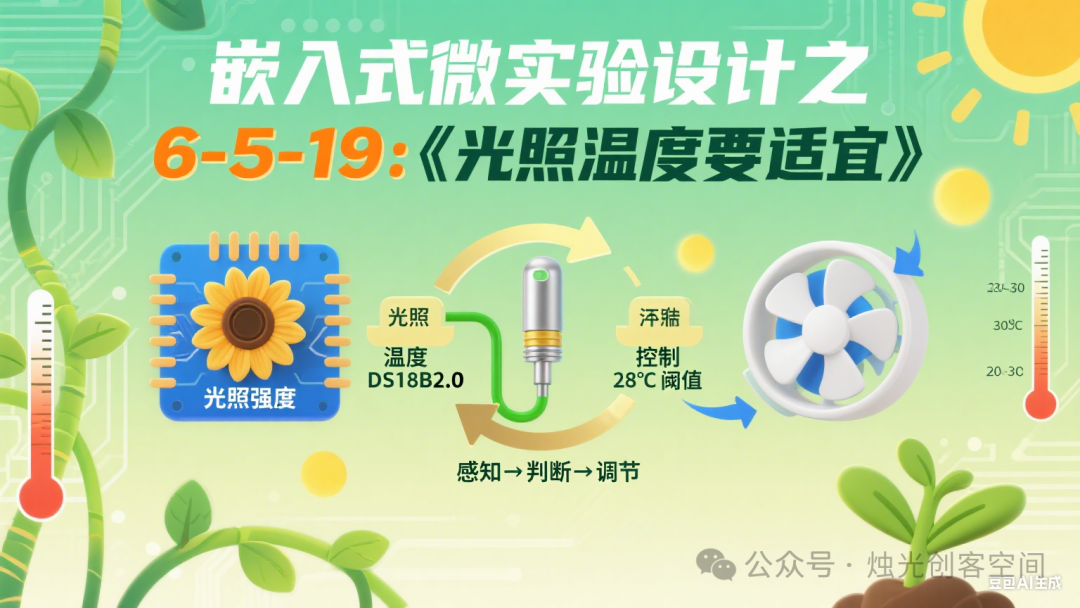
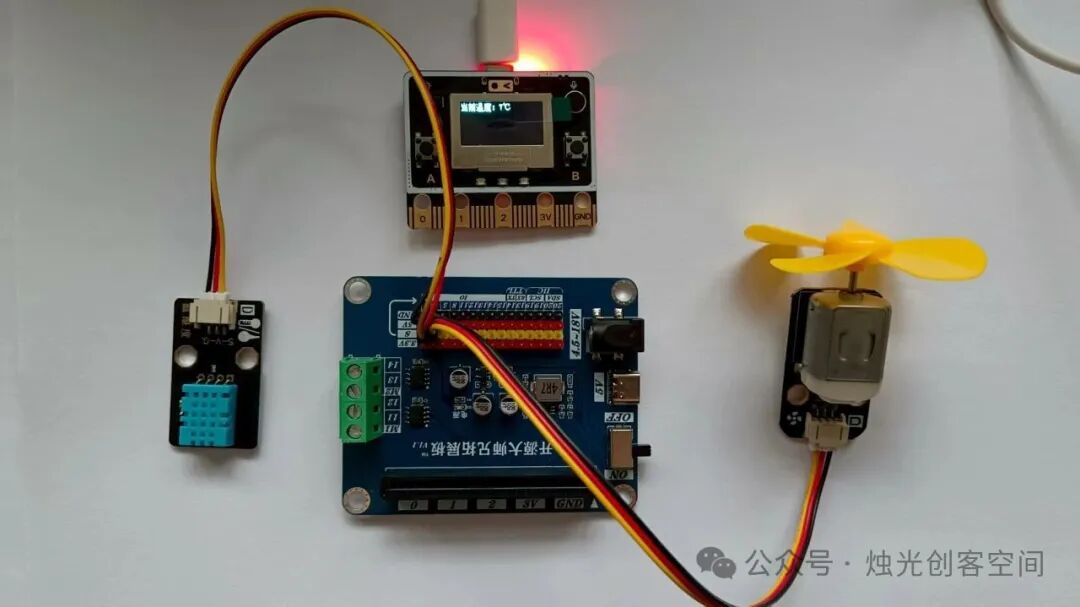
 Grade 6 Unit 5 “Intelligent Planting Methods”“Unit Teaching Design Framework1. Unit ThemeControl Systems in Intelligent Planting (This unit consists of lessons 16-19, focusing on “Exploring Intelligent Greenhouses, Designing Planting Gardens, Soil Moisture Control, and Adjusting Light and Temperature”. The core is to understand the collaborative working principles of multiple subsystems in intelligent planting, master the application of closed-loop control in environmental regulation, and cultivate system design and practical skills.)2. Context Creation“Campus Intelligent Planting Garden Designer” Project The overarching context is to “design and optimize the campus intelligent planting garden to achieve automatic adjustment of the plant growth environment”: from exploring the subsystems of intelligent greenhouses, to planning the hardware and functions of the planting garden, to specifically controlling soil moisture, light, and temperature, ultimately completing the design and simulation operation of a small intelligent planting system, forming a complete practical chain of “exploration – design – control – optimization”.Lesson 19 “Appropriate Lighting and Temperature”“Embedded Micro-Experiment Design1. Micro-Experiment Design(1) Define Experiment Objectives Based on the core content of Grade 6 Unit 5 Lesson 19 “Temperature Control System”, set the experiment objectives:1. Understand the components of a simple temperature control system: DS18B20 temperature sensor (input), Source Master board (control core), cooling fan (output), and be able to describe the function of each component.2. Understand the control function of thresholds: be able to determine the temperature threshold through experiments, mastering the logical rules of “if temperature exceeds threshold → start fan, if below threshold → stop fan”.3. Experience the characteristics of closed-loop control: through real-time feedback of temperature data from the sensor, the system automatically adjusts the fan state to stabilize the temperature, deepening the understanding of the “detection-comparison-adjustment” closed-loop process.(2) Design Experiment Tasks Based on the logic of “temperature collection → threshold judgment → closed-loop adjustment”, design two progressive tasks:1. Basic Task: Connect the DS18B20 temperature sensor to the Source Master board, read the real-time temperature of the environment/simulated scene (continuous variable), display the value on the OLED screen, and observe the characteristics of temperature changes with the environment (e.g., room temperature, differences when close to a heat source).2. Advanced Task: Determine the temperature threshold through experiments (e.g., 28°C), program to implement closed-loop control: when temperature > 28°C, start the cooling fan and display “Fan started, cooling down” on the screen; when temperature ≤ 28°C, stop the cooling fan and display “Temperature suitable, fan stopped”, verifying the system’s automatic adjustment capability.(3) Prepare Experiment Resources Hardware: Source Master board (including OLED screen, GPIO interface), DS18B20 temperature sensor (with Dupont wire), 5V small cooling fan (can be directly driven by the Source Master board GPIO), simulated scene (e.g., a plastic box with a small heat source, containing a temperature sensor probe), USB data cable.
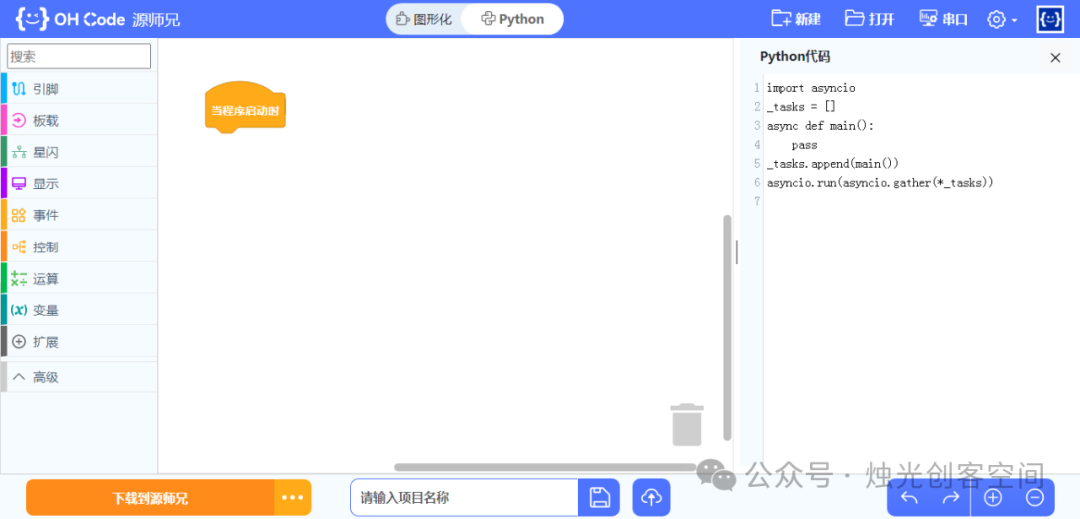
 Software: Source Master ohcode graphical programming environment (including blocks for “reading temperature sensor”, “conditional judgment”, “controlling GPIO output”).
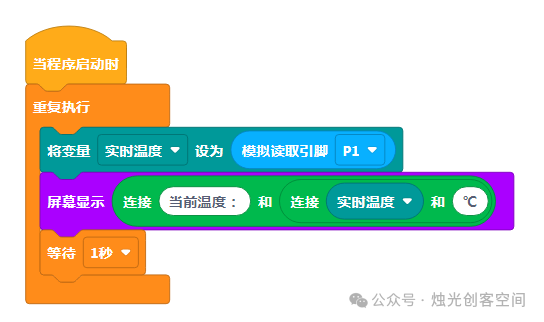
 Materials: Temperature data recording sheet (refer to the format of “Learning Activity 3 Data Recording Sheet” in the reference document), threshold determination example diagram, closed-loop control flowchart.(4) Experiment Implementation (20 minutes)1. Basic Task Operation (8 minutes) Connect devices: Connect the VCC of the DS18B20 sensor to the Source Master board 3.3V, GND to GND, DATA to GPIO P1 (digital pin). Programming to read and display: Drag the “infinite loop” block, add “read DS18B20 temperature (P1 pin)”, and store the value as “real-time temperature”. Add the block “OLED display ‘Current temperature: [real-time temperature] °C'” and set the refresh interval to 1 second.
 Operation: Place the sensor probe into the simulated scene (e.g., room temperature environment, near a small lamp heat source), record the temperature values for “room temperature state”, “near the small lamp (simulated heating)”, and “away from the heat source (natural cooling)”, observe the characteristics of continuous variable changes, and fill in the basic data recording sheet.2. Advanced Task Operation (12 minutes) Step 1: Determine the temperature threshold Guide students to hypothesize a threshold (e.g., 28°C), change the environmental temperature (e.g., use a small lamp to heat, turn off the lamp to cool), observe the critical temperature for “fan start/stop”, and finally determine a reasonable threshold (e.g., actual measurement is 27.8°C, rounded to 28°C). Step 2: Program to implement closed-loop control Wiring instructions: Connect the positive terminal of the 5V small cooling fan to the Source Master board GPIO P2 (digital pin), and the negative terminal to the Source Master board GND. Programming logic (reference document algorithm): In the infinite loop, first read “real-time temperature” and display; Add conditional judgment: “If [real-time temperature > 28°C]” → output high level on Source Master board P2 pin (start fan), OLED displays “Fan started, cooling down”; “Otherwise” → output low level on P2 pin (stop fan), OLED displays “Temperature suitable, fan stopped”.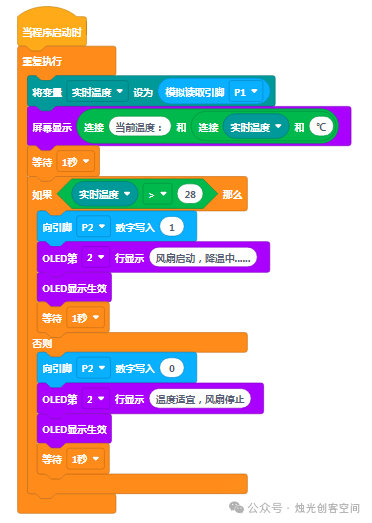
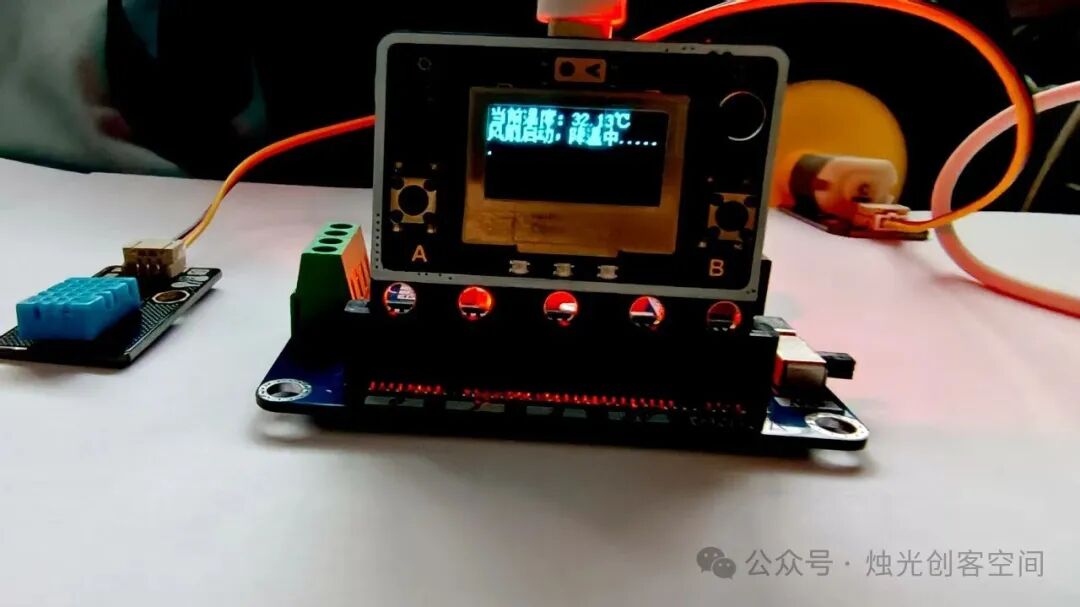 Step 3: Test verification Use a small lamp to raise the simulated scene temperature to 29°C, observe whether the fan starts and whether the temperature gradually decreases; When the temperature drops to 28°C, observe whether the fan automatically stops, record the temperature changes throughout the adjustment process, and verify the closed-loop control effect.(5) Result Recording and Analysis Students fill out the “Simple Temperature Control System Experiment Record Sheet”:
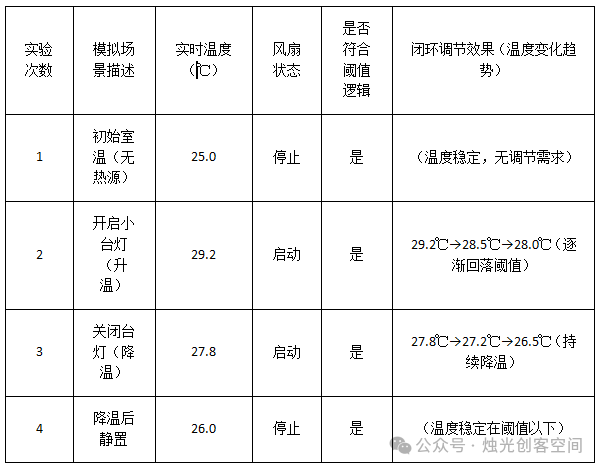 Group discussion: “Why can the fan automatically stop when the temperature meets the standard?” – Summarize the core of closed-loop control: the sensor provides real-time feedback of temperature (input), compares with the threshold (calculation), adjusts the fan state (output), forming a “feedback loop” to maintain stable temperature.(6) Summary and Extension Teacher guides the summary: The simple temperature control system achieves automatic adjustment through “DS18B20 collecting temperature → Source Master board judging threshold → controlling cooling fan”, reflecting the characteristics of closed-loop control “with feedback, can stabilize”; the threshold setting needs to consider actual needs (e.g., the cooling threshold in summer can be set lower). Extension task: Research to determine the suitable working temperature for computer CPUs (e.g., below 50°C), modify the program threshold and test, observe whether the system can maintain that temperature range, and think about the differences with this experiment.2. Micro-Experiment Activity Design Sheet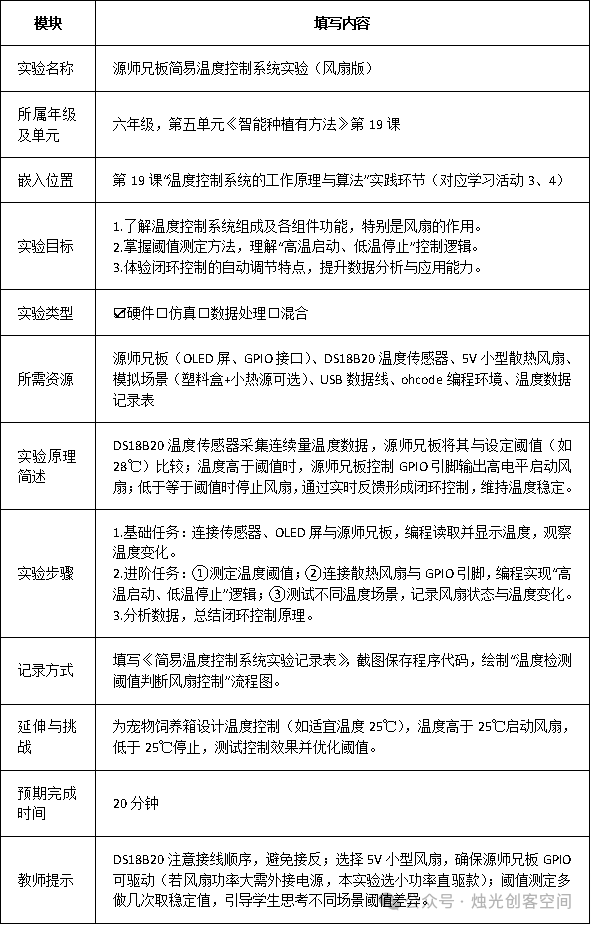
Previous Exciting Articles:
[AI Empowering Teaching] 23: Doubao Super Creative 2.0, Stunning Your Batch Generation
[AI Empowering Teaching] 22: AI Unlocks Math Magic for Kids: A Research Learning Journey from 4×4 Grids to Cognitive Leap
[AI Empowering Teaching] 21: A Different Approach, Generating Audio for Three-Person Same-Class Differentiated Activities
[AI Empowering Teaching] 20: AI Podcast Teaching Guide: A Versatile Assistant from Lesson Preparation to Home-School Communication
[AI Empowering Teaching] 19: AI Creates Subject-Specific Rewards, Making Kids Love Your Classroom
[AI Empowering Teaching] 18: AI Prompt List, Helping Improve the Quality and Efficiency of Party Building Materials
[AI Empowering Teaching] 17: When AI Meets Andersen: Unlocking the Magic of Fully Automatic Bilingual Picture Books
[AI Empowering Teaching] 16: AI Generates Historical Figures Biography Videos, Making Students Love Middle School History[AI Empowering Teaching] 15: AI Assists in College and Major Selection During Volunteer Filling[AI Empowering Teaching] 13: Nezha’s Transformation from “Demon Child” to “Good Student” – An AI Transformation Guide![AI Empowering Teaching] 11: AI Aids in English Memory, Easily Mastering a Whole Book of Words in 30 Days[AI Empowering Teaching] 10: AI Empowers Traditional Cultural Education: From Generating Tools Practice to New Paths of Cultural Dissemination[AI Empowering Teaching] 6: AI Assists in Writing Classroom Analysis Reports[AI Empowering Teaching] 5: AI Assists in Primary School Science and Junior High Information Technology Experiment Teaching[AI Empowering Teaching] 3: AI Assists in Assigning and Grading Layered Homework in Primary School Mathematics[AI Empowering Teaching] 2: DeepSeek Assists in Designing Activities for Telling Chinese Stories in English[AI Empowering Teaching] 1: DeepSeek Combined with Traditional Art Activities Design in Rural Primary Schools [Candlelight Maker Space]