Why Use Mac for C++? To Focus
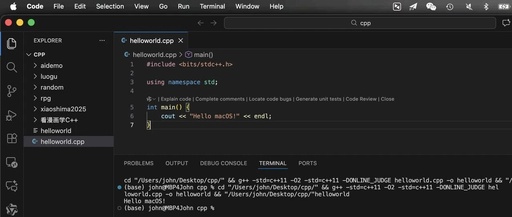
Why Use Mac for C++? To Focus

👆Click the aboveblue text, follow me. “This article has 3720 words, expected reading time is 10 minutes”Hi, I am Chen Zhongyong, Teacher Chengmu.Middle-aged entrepreneur, education consultant, children’s programming coach,artificial intelligence lecturer, and father of Xiaoyu.Written for all parents and teachers who hope to help children smoothly enter the world of programming.01|Why did I choose macOS … Read more


Experiencing macOS on Linux Using VM

Experiencing macOS on Linux Using VM

âťť This article details the complete process of successfully installing and running macOS Catalina in an Ubuntu 24.04 LTS environment, based on the QEMU/KVM and macOS-Simple-KVM projects. The focus is not on repeating the project documentation but on analyzing the key issues encountered during the actual setup and their solutions. 1. Basic Environment Preparation and … Read more

Essential Command Line Tools for Linux/macOS: 10 Modern Replacements for Outdated Commands

Essential Command Line Tools for Linux/macOS: 10 Modern Replacements for Outdated Commands

Table of Contents: 1. Why Discuss Modern CLI Tools? 2. Storage and Disk Management 1. Replacement for df: View Disk Space Usage → duf 2. Replacement for du: View Directory or File Size → ncdu 3. Replacement for find: Search for Files and Directories → fdfind 3. System Monitoring and Process Management 1. Replacement for … Read more

Innovative Uses for Mac: Practical Guide to Building a Home Server with macOS

Innovative Uses for Mac: Practical Guide to Building a Home Server with macOS

Table of Contents: 1. Advantages of Using macOS as a Home Server 2. Basic Environment Setup 1. Installing Homebrew Package Manager (Core Software Installation Source) 2. Enabling Screen Sharing 3. Enabling Remote Login 3. Recommended Core Services 1. File Sharing/Private Cloud 2. Media Center 3. Download Management 4. Notes and Documents 5. Database 6. System … Read more

Don’t Panic About Forgetting Your Wi-Fi Password! Quick Recovery of Passwords on Windows/Linux/macOS

Don't Panic About Forgetting Your Wi-Fi Password! Quick Recovery of Passwords on Windows/Linux/macOS

Have you ever forgotten the password you set after connecting to Wi-Fi for months? In fact, your device automatically stores all previously connected Wi-Fi passwords, which is why it can reconnect to the network automatically. This article will introduce how to explore the saved passwords of any network you have previously connected to on Windows, … Read more

Guide to Connect Apple Devices to eduroam Wi-Fi

Guide to Connect Apple Devices to eduroam Wi-Fi

2024 UNNC IT Services IT Guide for New Students @2024 Wi-Fi (eduroam) Connection Guide – Apple Devices IT Services “ In today’s digital society, the first thing to do upon entering UNNC is to connect to the campus network! This guide introduces how to connect to eduroam on iOS and macOS. ” iOS macOS 01 … Read more

App Virtualization on Mac: Running Software Seamlessly

App Virtualization on Mac: Running Software Seamlessly

If an app does not have an official version for the Mac platform and we cannot do without it, using a virtual machine is a good solution. For more information, refer to “One Machine, Multiple Worlds: A Comprehensive Review of Mac Virtualization Tools that Easily Run Windows/Linux and Break System Barriers!” However, running a virtual … Read more

Cangjie Language Version of SimpleHttpServer Updated to Support macOS!

Cangjie Language Version of SimpleHttpServer Updated to Support macOS!

On July 19, 2025, I released version V1.0.0 of the Cangjie Language version of SimpleHttpServer, contributing to the ecosystem of domestic programming languages. It is open-source and free!At that time, it only supported Windows. After a month of hard work, on August 18,SimpleHttpServer achieved support for macOS! Since Cangjie has only released a version for … Read more

IoT Video Streaming Series | Practical Streaming with USB Camera on macOS

IoT Video Streaming Series | Practical Streaming with USB Camera on macOS

Objective: Stream from a USB camera to ZLMediaKit on macOS, covering environment setup, device recognition, streaming commands, and playback verification. 1. Environment Setup 1.1 Install ffmpeg Due to compatibility issues between macOS 15 pre-release and Homebrew, it is recommended to download the official precompiled version directly: # Download the official precompiled version curl -L -o … Read more