👆Click the aboveblue text, follow me.
“This article has 3720 words, expected reading time is 10 minutes”Hi, I am Chen Zhongyong, Teacher Chengmu.Middle-aged entrepreneur, education consultant, children’s programming coach,artificial intelligence lecturer, and father of Xiaoyu.Written for all parents and teachers who hope to help children smoothly enter the world of programming.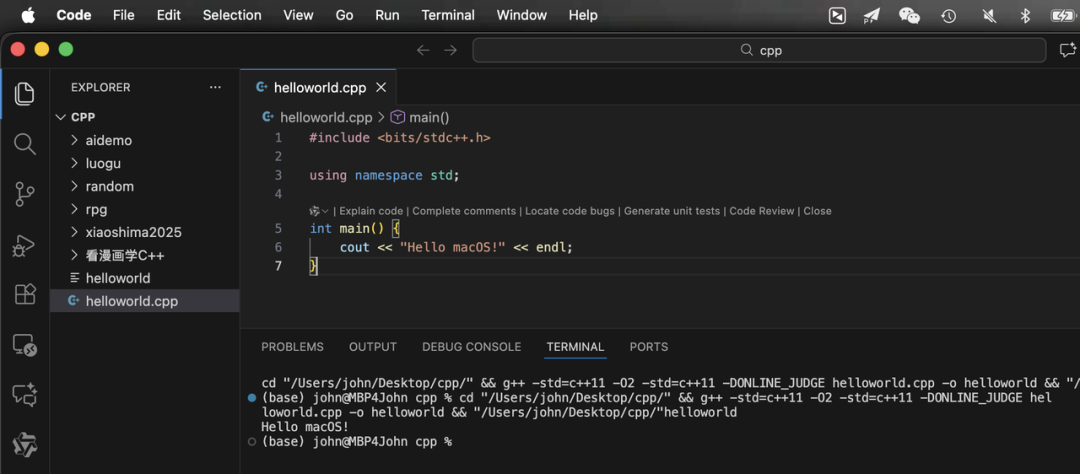 01|Why did I choose macOS for the C++ environment for children?In the past, I was used to teaching C++ with Windows + Dev C++.But when it came to preparing the introductory course for Xiaoyu, I began to seriously consider a question:What does a child need most when writing code for the first time?After thinking it over, the answer is actually very simple:The child needs: a quiet, clean, and undisturbed learning environment.And the characteristics of macOS happen to fit this point:
- The system interface is clean, without messy ads
- It does not interrupt the child with various antivirus or update prompts
- It is not easy to mistakenly install strange software
- The operating logic is unified, making it easier for children to get started
- When you open the computer, it is a clean desktop
For a child like Xiaoyu, a computer that “does not disturb her” is a gentle companion in itself.To help her take the “first step in programming” in such an environment,I decided to set up a C++ environment suitable for learning on macOS 26.1 + VSCode 1.106.1. This article is a complete record of this process.02|Why is the learning environment for Xiaoyu fundamentally different from macOS?The official environment for Xiaoyu / GESP is mostly:
- GNU g++
- able to use <bits/stdc++.h>
- C++98/11
- Linux OJ evaluation
While macOS provides by default:
- clang / clang++
- does not include <bits/stdc++.h>
- and is not completely consistent with GNU in some details
If these differences are not handled well, it is easy to encounter:
- Code runs on Mac but fails on OJ
- A line in the textbook #include <bits/stdc++.h> shows a red line directly on Mac
- What the teacher says does not match what the child runs, leading to a very poor experience
Therefore, the goal of this configuration has two points:① To closely align with Xiaoyu’s usage habits② To maintain the simplicity and stability of macOS, allowing the child to focus on learning03|Establishing the “system foundation”: Xcode Tools + HomebrewTo write C++ on Mac, two things need to be prepared at the system level.① Install Command Line Tools
xcode-select --installThis is the basic compilation tool provided by Mac, which includes clang.② Install Homebrew
/bin/bash -c "$(curl -fsSL https://raw.githubusercontent.com/Homebrew/install/HEAD/install.sh)"It can also be used to install other development tools later.At this point, the system foundation is complete.04|Why choose VSCode? It is the most suitable for childrenThere are many C++ development tools available on the market, such as:
- Xcode: too heavy, complex interface, not suitable for elementary school students
- CLion: powerful features, but complex configuration
- Dev C++: no Mac version
VSCode’s characteristics are just right for teaching scenarios and children:
- Small size, fast startup
- Simplified interface, not intimidating
- Rich plugins, can be expanded as needed
- Can accommodate both “classroom demonstration + home practice” scenarios
As long as a few plugins are configured, VSCode can become a very friendly “Xiaoyu C++ learning environment”.05|Three major plugins: making it easy for children to write code① C/C++ (Microsoft)This is the basic plugin for writing C++ in VSCode.It is responsible for:
- Intelligent completion
- Jump to definition
- Syntax highlighting
- Error prompts
It is almost “essential”.② C/C++ Extension PackThis is a “packaged plugin”.Installing it can complete common C/C++ plugins at once, making it very suitable for parents and teachers to deploy with one click.③ Code Runner: the child’s favorite “one-click run”This is the most child-friendly plugin in this environment.Its benefits are:
- No need to write complex configurations
- No need to open the terminal to type commands
- Just right-click “Run Code” and the code can run
- Can also run with a shortcut key
For children like Xiaoyu, saying “press this shortcut key to see the result” is much more effective than explaining what “compilation, linking, and executable files” are.06|Attempting to install g++: the conclusion is completely unusableTo get closer to the official environment of Xiaoyu, I initially tried to operate in the traditional way:
brew install gccThe installation process went smoothly, and the version number looked normal. But when I actually used g++ to compile a C++ program, I immediately encountered serious errors:
ld: unsupported tapi file type '!tapi-tbd'
in YAML file '.../libSystem.tbd'
collect2: error: ld returned 1 exit status
This means:
- The underlying system SDK structure of macOS 26.1 has changed
- g++ installed by Homebrew cannot link properly with the system libraries
- This is a “system-level” issue, not just a matter of setting the wrong command
In the end, I drew three very clear conclusions:① g++ can indeed be installed via brew, and it seems fine on the surface② But once used to compile programs, it will report errors due to system linking failures, making it completely unusable③ Since it cannot compile stably, it cannot be used as a daily environment for Xiaoyu’s learningIn other words:On macOS 26.1, continuing to mess with g++ is meaningless; the learning environment must be built on clang++.The next step is to ensure stability while making clang++ as close to Xiaoyu’s habits as possible.07|Final solution: clang++ + bits/stdc++.h + Code RunnerConsidering stability, usability, and teaching scenarios, I finally chose this combination:
- Compiler: use the system’s built-in clang++
- Header file: manually add <bits/stdc++.h>
- Running method: completely handled by Code Runner
This way, there is no need to touch the underlying configuration of VSCode, and no need to write tasks.json, the child just needs to write code and press keys to run.08|Do not change VSCode configuration, just adjust Code RunnerIt is particularly emphasized that “do not adjust VSCode configuration, just change Code Runner“, which is very friendly for children—less complexity means less chance of errors.The following steps are the “key operations” of this solution.① Open Code Runner’s JSON configuration
- Open VSCode
- Press Command + , to open settings
- Enter in the search bar:code runner
- Click “Open Settings (JSON)” in the upper right corner to enter settings.json
We only need to change a few fields related to Code Runner.② Let Code Runner use clang++ to compile C++Add (or modify) this section in settings.json:
"code-runner.executorMap": {
    "cpp": "cd $dir && clang++ -std=c++11 $fileName -o $fileNameWithoutExt && ./$fileNameWithoutExt"
}
This means:
- First, enter the directory where the current code is located
- Use clang++ -std=c++11 to compile the current file
- Generate an executable program with the same name as the file
- Automatically run after successful compilation
For children, they just need to know:After writing, press the shortcut key, and the program will automatically compile and run.③ Two small settings to enhance the running experienceContinue to add two lines in settings.json:
"code-runner.runInTerminal": true,
"code-runner.saveFileBeforeRun": true
The meanings are:
- runInTerminal: true allows the program to run in the terminal of VSCode, so the child can see the input and output without it flashing by.
- saveFileBeforeRun: true automatically saves the file before running, avoiding confusion of “modified but not saved, yet running old code”.
In this way, even if they do not understand the principles of compilation, children can smoothly complete the full cycle of “writing code → running → seeing results”.09|Children need not the most complex environment, but the most stable experienceFrom the initial installation of Homebrew, to repeatedly testing g++, and finally returning to clang++ with Code Runner, I have increasingly confirmed a fact:
- Children do not need the most professional engineering toolchain
- They do not need an environment identical to that of backend engineers
- What children truly need is aclean, stable, easy-to-use, and error-free learning environment
In this solution:
- macOS provides a quiet, clean, and undisturbed background
- VSCode offers a refreshing and consistent coding interface
- Code Runner takes over all the complexities of “compilation + running”.
- Children only need to:focus on the code itself
The more stable the environment, the easier it is for children to enter a “flow state”.10|In conclusion: For the sake of children’s focus, I am willing to put in more effortThis article superficially discusses compilers, plugins, and configuration files, but behind it is a very simple idea:I hope that when Xiaoyu opens the computer, she sees a world suitable for learning.No pop-ups, no disturbances, no inexplicable errors.She just needs to quietly type each line of code and see them turn into real running results on the screen.If I need to step on more pits and spend a few more nights for this, it is actually worth it.A stable and friendly learning environment is a gift of patience and love for children.I also hope this record can help those preparing for Xiaoyu’s C++ learning.This article was assisted in polishing and improving by Chengmu’s AI assistant, Xiaowu.
★ You might also like
1024 Programmer’s Day Special Edition丨Half an hour a day, accompany your child to learn to run their own code
First-class parents choose teachers, second-class parents choose brands
Foreword: When AI enters the classroom, we need “humans” even more
DevFest 2025 AI Learning Assistant Workshop
★ About Chengmu
Originally named Chen Zhongyong, styled Xinman, known as Chengmu, the principal of the Master Code Zhangjiang campus. An 80s entrepreneur, education consultant, artificial intelligence lecturer, children’s programming coach, and member of the Zhangjiang Volunteer Association. Graduated with a bachelor’s degree in Electronic Information Science and Technology from Nanjing University of Posts and Telecommunications, and a master’s degree in Software Engineering from Huazhong University of Science and Technology. A senior programmer, system analyst, senior digital transformation planner, and psychological counselor; researcher at the Urban Risk Management Research Institute of Tongji University, formerly director of the Data Analysis Department; member of the Artificial Intelligence Special Committee of the Shanghai Computer Society; over 20 years of programming experience, over 15 years of experience in mentoring interns and team building, and over 13 years of entrepreneurial experience; a serial entrepreneur who has led dozens of startup projects in big data, e-government, e-commerce, artificial intelligence, and cloud computing; enjoys sharing technology and has rich teaching experience.
↓ Like, share, and feel free to give a thumbs up ↓