If you don’t want to miss my updates, remember to check the public account in the upper right corner and set it as a star, take down the stars and give them to me.


The Raspberry Pi, the leader in open-source hardware, if anyone disagrees, let’s have abattle in the comments.
These boards all come from the Raspberry Pi family; what are their differences? Today, a video will clarify this.
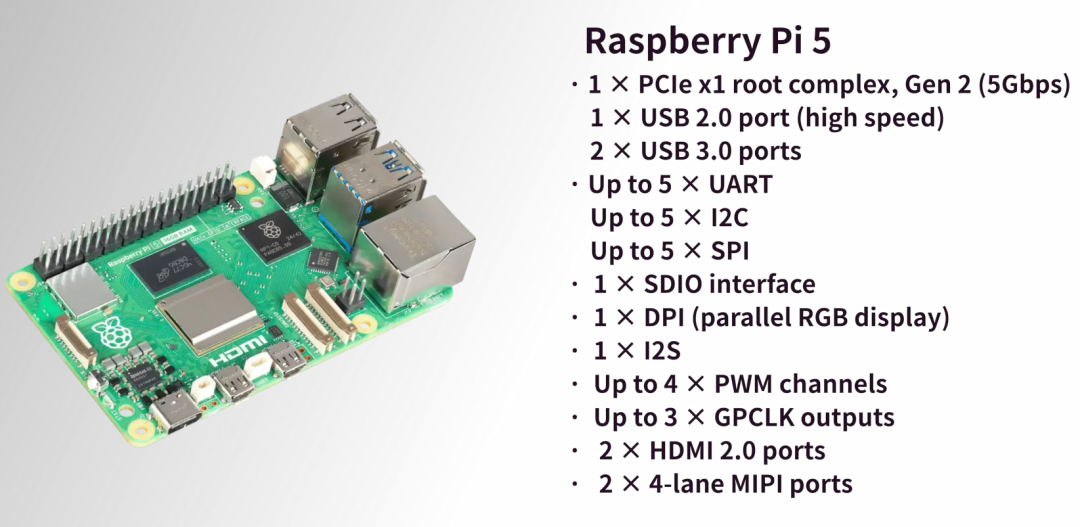
First, let’s talk about the most familiar and widely used Raspberry Pi single-board computer, the latest product is the Raspberry Pi5, which is considered the flagship product of Raspberry Pi. Since it is a single-board computer, it integrates various hardware, communication interfaces, and a completeLinux operating system. A search on open-source websites reveals a plethora of projects developed using Raspberry Pi; we have previously used Raspberry Pi for many practical projects. As a side note, compared to similar development boards, it retains its value well!
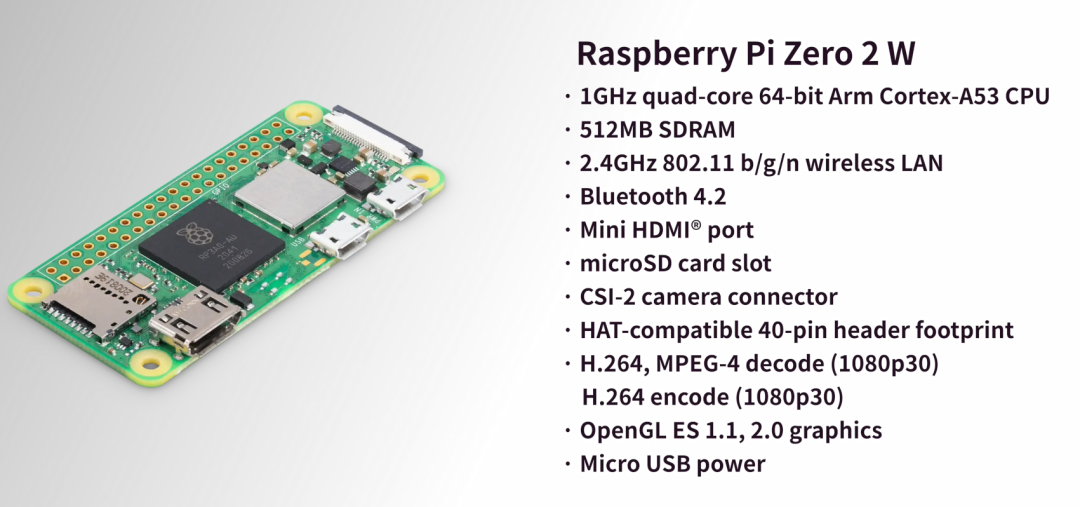
Next, we have theZero series. Don’t be fooled by the small size of theZero series; it has a completeLinux operating system and basic interfaces, and it has a significant feature: low power consumption and low price. The latest model is theZero 2W, which comes withwifi and Bluetooth functionality. Therefore, we can understand theZero series as an economical and minimalist development board launched by Raspberry Pi for cost-sensitive applications.
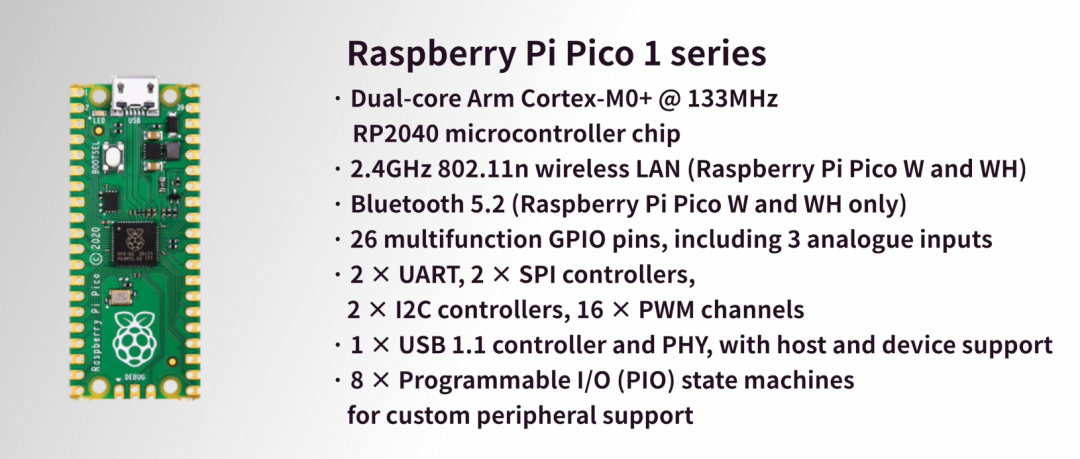
More streamlined thanZero is thePico series, which is different from the previous two; it belongs to the microcontroller development board category and is a lower-level application product launched by Raspberry Pi,RP2040,ARM Cortex-M0+ dual-core, suitable for real-time control and lightweight embedded projects.
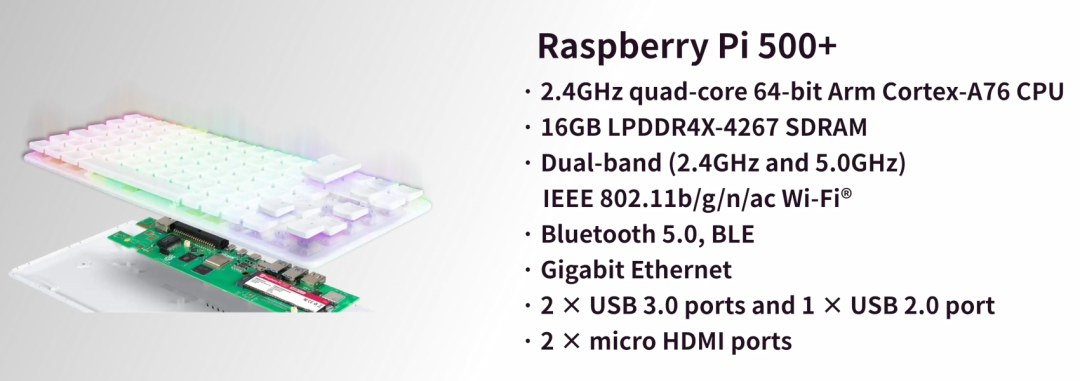
The next series I will discuss does not have a physical product; it is the Raspberry Pi keyboard computing series, with the latest500 and the Raspberry Pi5 using the same chip, integrating single-board computer hardware into a compact keyboard shell. It looks just like a keyboard; plug in the power and display, and it becomes a portable computer. I haven’t bought it and don’t quite understand who would buy it.
Finally, we have the Raspberry Pi Compute Module series, which is characterized by being designed specifically for embedded and industrial applications. The hardware is the same as the corresponding single-board computer, for example, theCM5 and the Raspberry Pi5 are from the same chip series. The Compute Module is characterized by its smaller size and lack of onboard interfaces, requiring connection to a separate baseboard. This allows for custom baseboard design, facilitating hardware integration, and this module provides users with greater hardware openness.
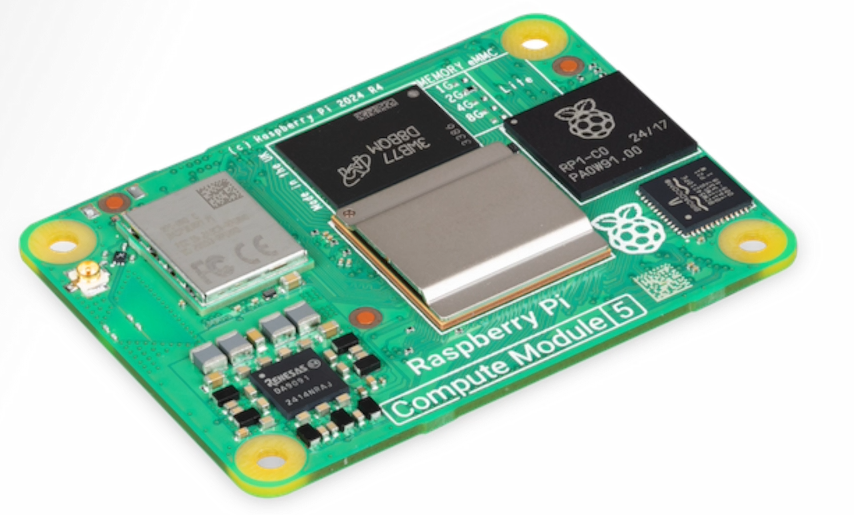
This Compute Module, theCM0, was just launched in September of this year and is the smallest industrial computing module in Raspberry Pi’s history. It is a product exclusively launched in China, developed by Shanghai Jingheng, produced in China, specifically to meet the Chinese market. BeforeCM0, there were already products likeCM3, CM4, CM5, and their performance is consistent with Raspberry Pi3, 4, 5.
Why was only thisCM0 suddenly released?
To understand this question, we need to dig into its performance, positioning, and market.
First, in terms of size, as mentioned earlier, it is the smallest product from Raspberry Pi, measuring only39*33mm, while the previousCM4, CM5 measured55*40mm. In comparison, theCM0 is indeed small.
Looking at the resources on theCM0 module, the processor is theRP3A0 system-on-chip, which shares the same origin and core as the Raspberry PiZero 2W. Although its performance is not on the same level as the Raspberry Pi5 orCM5, it still holds its own with4 A53 cores, a clock speed of1GHz, and it also includes aGPU andVPU, along with512MB ofLPDDR2 memory. Additionally, it has onboardeMMC and awifi module. In terms of power consumption, it consumes2.4w at full load and0.5w when idle. If it can truly achieve these figures, it would be among the lowest in the industry. In scenarios requiring ultra-low power consumption with some computational capability, theCM0 is very suitable.
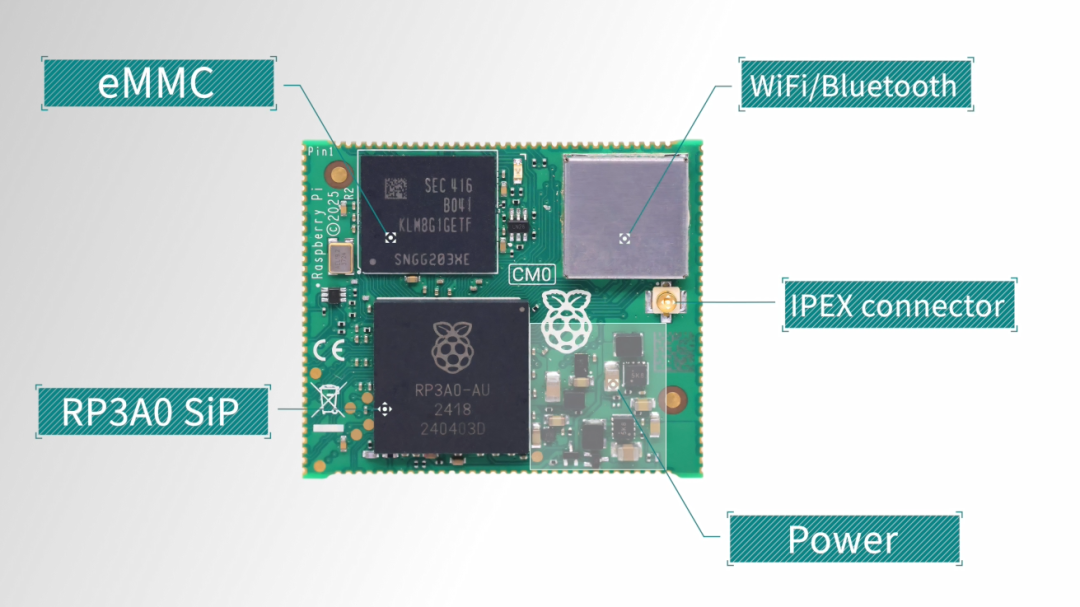
TheCM0 uses a stamp hole package, exposing all functional pins, making it easy to solder onto any baseboard, which is very suitable for high-density integration scenarios, facilitating mass production at a low cost.
Therefore, it is clear that theCM0 is not intended to replace any existing product but is aimed at specific scenarios, such as low-cost IoT gateways, edge data collection, automation control, etc.
Since we are talking about applications, we need to conduct some tests.
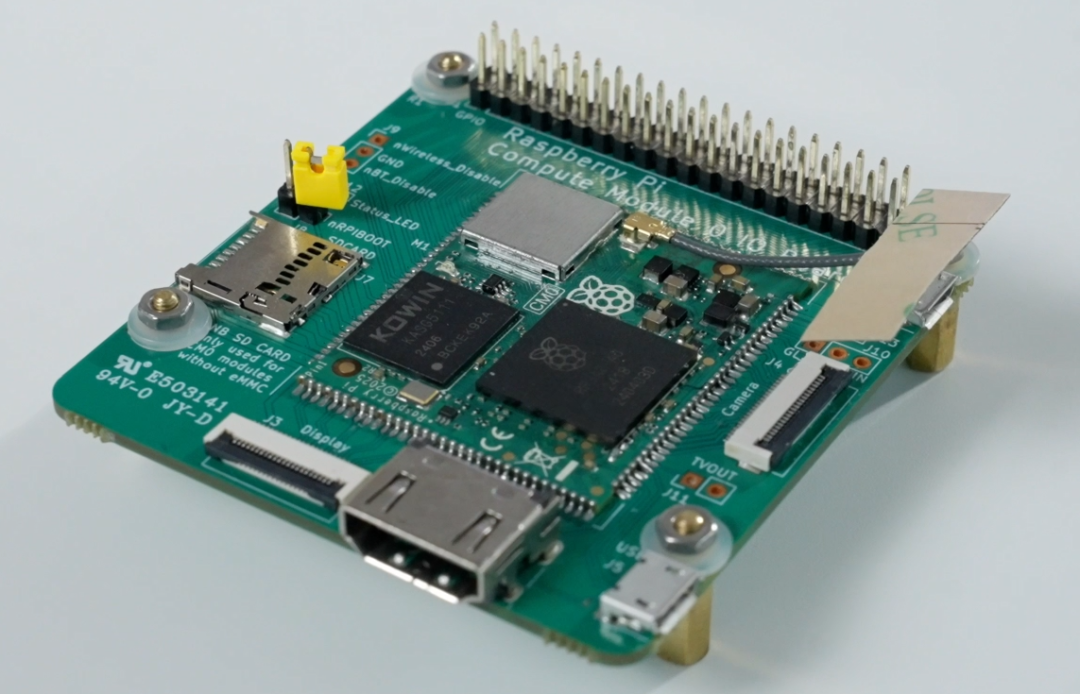
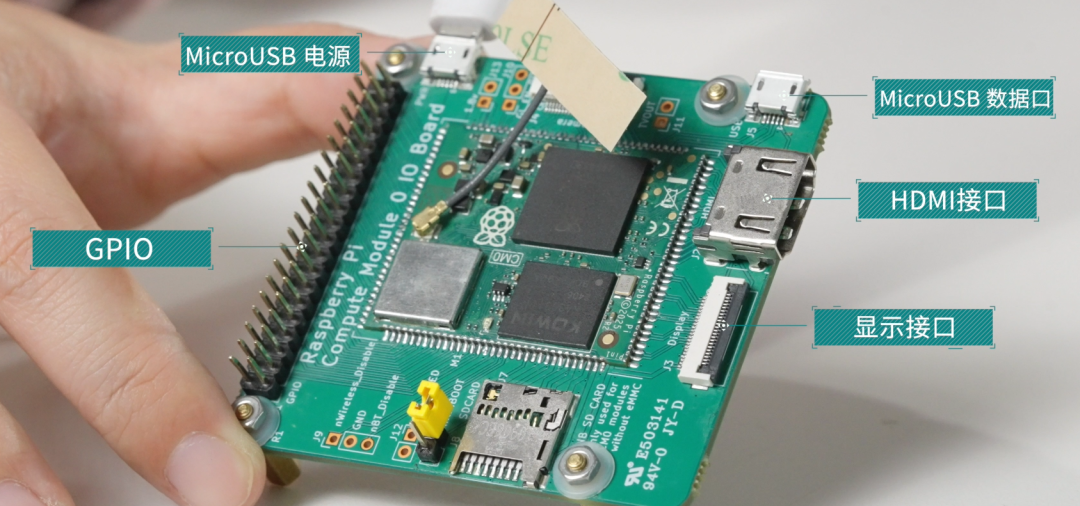
ThisCM0 has been soldered onto a baseboard, which has quite a few resources, includingGPIO ports, twoMicroUSB ports for power and data, anHDMI interface, a display interface, and theeMMC andwifi of theCM0 can be optional, so there is also anSD card slot. The LED indicator on the board has not been soldered; the official product should have it soldered, as they wouldn’t skimp on these2 LED lights.
First, we will burn the system and perform a boot test. The process of burning theeMMC and theSD card has some differences. You need to short-circuit theRPIBOOT with a jumper cap, then connect it to theUSB interface of the board. Open the installedrpiboot tool, and it will automatically assign a drive letter to theeMMC. Once the drive letter assignment is complete, a drive letter will pop up in the lower right corner of the computer. Then openSD Card Formatter, select the corresponding drive letter, format it, and finally openRaspberry Pi Imager to start burning the system.
After the system is burned, useSSH to enter the system, then configureVNC, and you can use remote desktop. Since theCM0 only has512MB of memory, using the desktop version is quite sluggish, so subsequent operations will be tested using the command line.
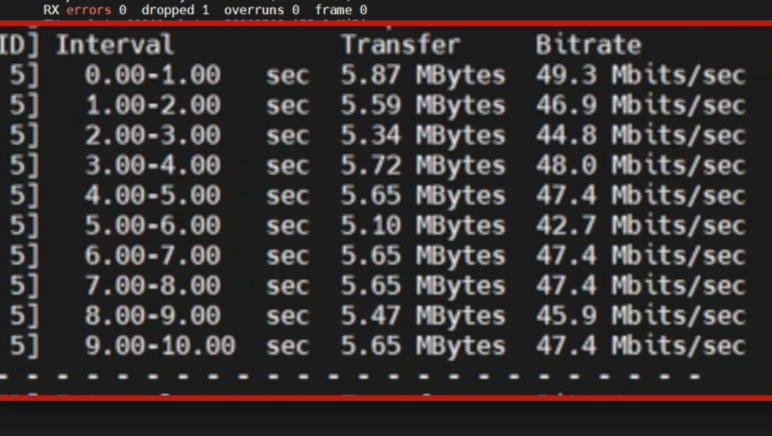
Next, we tested the network usingIPerf3, and the WiFi speed was46Mbits/sec, which is below 100 Mbps, indicating a slow network speed. To improve network speed, we need to expand usingUSB, but there is a drawback here; currently, we are only usingUSB to expandwifi, and if we want to expand other functionalities throughUSB, the real-time performance may be compromised.
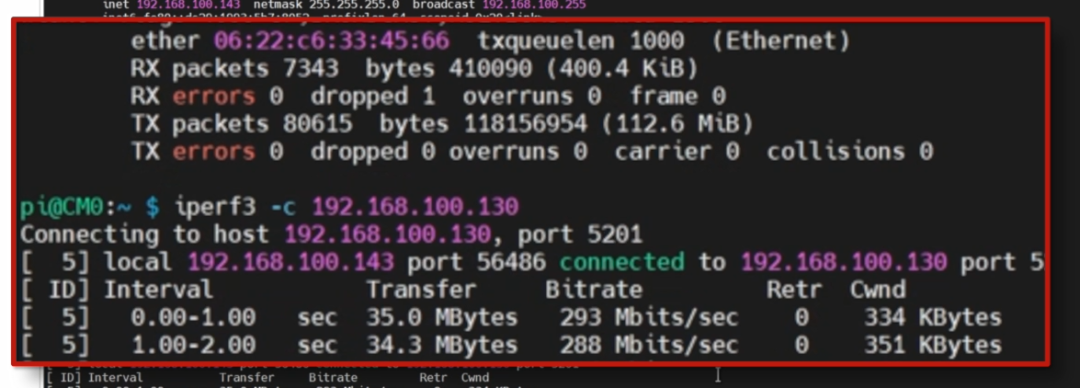
By using an adapter to connect thisUSB gigabit network card, we disconnected theWiFi and tested through a wired network, achieving a connection speed of285Mbits/sec, which falls within the300M bandwidth range, indicating a relatively fast speed.
As mentioned earlier, this module is primarily designed for industrial low-power and low-cost applications, which inevitably require communication, such as the most commonly usedRS485 andCAN. Therefore, we also tested the communication capabilities of theCM0 using industrial expansion boards forCAN andRS485, and both RS485 communication and CAN communication worked without issues.
In conclusion, from hardware features to practical testing, the Raspberry Pi CM0 clearly demonstrates its positioning as a core member of the Compute Module series. It is not designed as a “plug-and-play toy” for ordinary DIY enthusiasts but focuses on providing a “customized computing power solution” for industrial low-power and low-cost scenarios. From the user experience perspective, theCM0 also balances “professionalism” and “ease of use”. Although theeMMC burning process differs slightly from traditionalSD card processes, it can be completed using therpiboot tool for drive letter assignment. Subsequent system configuration is consistent with regular Raspberry Pi products. Even though the512MB memory limits the smoothness of the desktop version, it can fully support lightweight tasks such as industrial control and data collection in command line mode. With its characteristics of “small size, high flexibility, and strong adaptability”, it provides a cost-effective choice for industrial embedded projects, large-scale IoT deployments, and low-cost dedicated device development.
Returning to the beginning, we see so many Raspberry Pi products. With the variety of products available, mentioning Raspberry Pi no longer only evokes the notion of it being a maker’s toy. With a good ecosystem and competitive pricing, I believe Raspberry Pi products still hold significant advantages in commercial applications.
END Recommended Reading: Project Sharing | Electrical Competition Series | Artificial Intelligence | Graduate School Entrance Exam Essential Knowledge Points | Graduation Design | Switching Power Supply | Job Seeking We are Nimo, the founder of Darwin, a sister who only talks about technology and not flirting. The Darwin online education platform aims to serve professionals in the electronics industry, providing skill training videos covering popular topics in various subfields, such as embedded systems, FPGA, artificial intelligence, etc. We tailor layered learning content for different groups, such as common knowledge points, disassembly evaluations, electrical competitions/intelligent vehicles/graduate school entrance exams, etc. Welcome to follow us. Official website: www.darwinlearns.com Bilibili: Darwin