Produced by | Fuxin Microelectronics

Overview of Virtualization
1.1 Motivation and Benefits
Virtualization is a widely used technology that underpins almost all modern cloud computing and enterprise infrastructure. Developers can run multiple operating systems on a single machine based on virtualization capabilities, allowing software testing without the risk of damaging the main computing environment. Virtualization brings many features to chips and infrastructure, including good isolation, accessibility of different resources, workload balancing of the same resource, and isolation protection.
For automotive chips, especially cockpit domain SoCs, the current trend is to save costs by increasing integration, thus integrating multiple operating systems corresponding to physical resources on the same SoC chip, which need to coexist securely in a virtualized environment. Specifically, the requirements and challenges faced by automotive SoC virtualization include:
- Isolation between at least three domains with different safety requirements and heterogeneous operating systems: a safety island running an RTOS that meets ASIL-D safety level requirements, a cluster domain running QNX or lightweight Linux that meets ASIL-B safety level requirements, and an infotainment domain running Android or Harmony OS.
- Accessibility and workload balancing of critical resources, including memory, CPU working threads, etc., especially when GPUs or NPUs handle huge workloads. Under power constraints and memory capacity limitations, resource availability and flexibility must be dynamically ensured through virtualization.
1.2 Introduction to Hypervisor
The hypervisor is the core supporting component for virtualization. It is primarily responsible for handling virtual machine traps and managing actual physical resources. Hypervisors can be broadly divided into two categories:
- Native standalone hypervisors, generally referred to as Type 1 hypervisors. These hypervisors run with the highest privileges, controlling and managing all physical resources. During the operation of this type of hypervisor, resource management and scheduling functions related to each virtual machine can be offloaded to the operating system of that virtual machine, allowing the hypervisor to focus on virtualization-related functionalities. Typical examples include QNX Hypervisor and Xen Hypervisor.
-
Hosted OS with hypervisor extensions, generally referred to as Type 2 hypervisors, where basic management functions can be implemented through the host operating system, and the hypervisor extension focuses solely on virtualization support, cooperating with the host operating system to achieve virtualization functionalities. A typical example is Linux KVM.
Corresponding to the ARM exception handling architecture, typically, the application or user space of the virtual machine operating system is at the EL0 security level. The kernel space of the virtual machine operating system is at the EL1 security level. To support virtualization extensions, the EL2 security level is introduced. The specific security level breakdown is shown in the following:
- For Type 1 hypervisors: the user space of the virtual machine operating system is at the EL0 security level, the kernel space of the virtual machine operating system is at the EL1 security level, and the standalone hypervisor is at the EL2 security level.
- For Type 2 hypervisors: the user space of the virtual machine operating system and the host operating system are both at the EL0 security level, the kernel space of the virtual machine operating system is at the EL1 security level, and the kernel space of the host operating system with hypervisor extensions is at the EL2 security level.
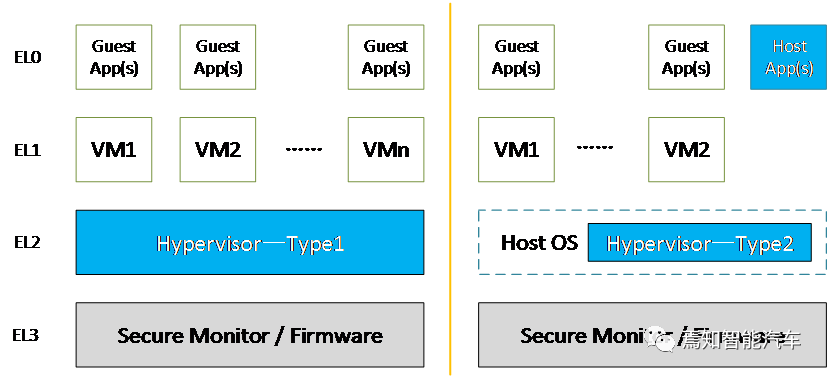 Figure 1. Types of Hypervisors and Corresponding ARM Exception Levels
Without loss of generality, the following chapters will use the QNX Hypervisor-related software implementation and ARMv8.0 architecture-based hardware implementation as typical examples to introduce the main issues and solutions of current virtualization. Based on the functional division of virtualization scenarios, the current mainstream cockpit SoC virtualization can be roughly divided into three categories:
- CPU virtualization for VM management and execution;
- Memory virtualization for memory space separation and management;
- Device virtualization for device configuration and management.

-
CPU Virtualization
2.1 Overview of CPU VirtualizationCPUs or processors can provide the abstraction of virtual processors for VMs and execute the corresponding instructions of specific VMs. Typically, the hypervisor runs directly on the physical CPUs, occupying physical resources and directly using the physical CPU’s ISA. Meanwhile, the virtual machine operating system occupies related resources and executes related instructions based on the abstraction of virtual processors, which can also directly use physical CPU resources and ISA in most scenarios, except for actions requiring higher privileges.The cooperation and management of the hypervisor and VMs are achieved through the virtual machine trap mechanism, which typically occurs when the VM or application needs higher privileges to execute. In the ARM architecture, as described above, the exception handling levels for virtualization, VMs and applications can have up to EL1 privileges, thus triggering a virtual machine trap for instructions not permitted to execute. The detailed process is as follows:
- Usually, the VM runs its instructions on a physical CPU, just as if it were running without a hypervisor;
- When the virtual machine operating system or application attempts to execute an instruction beyond its execution privileges, a virtual machine trap occurs, and the virtual machine operating system performs a context switch to the hypervisor program;
-
Upon the virtual machine trap, the hypervisor takes over the context, saves the virtual machine’s context, and then processes the task initiated by the virtual machine operating system;
-
When the hypervisor completes the task, it restores the VM’s context and hands execution back to the VM.
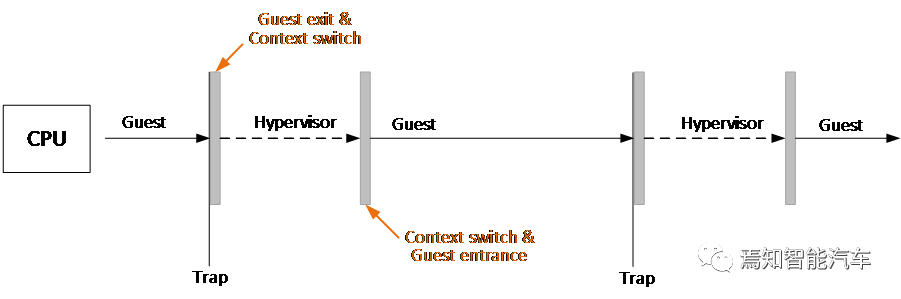 Figure 2. Virtual Machine Trap Mechanism and Processing FlowThe virtual machine abstraction and trap handling mechanism will be further introduced in the subsequent sections on QNX Hypervisor and ARM architecture.
2.2 QNX VM and vCPU Support
The detailed hierarchy of resources and components in the QNX Hypervisor software architecture is shown in the following figure. From the perspective of the hypervisor as an operating system, each VM needs to register in the hypervisor’s user space by instantiating a qvm process. When configuring a VM, a corresponding qvm process will be created and configured according to specifications to specify the components of that VM, including virtual CPUs (vCPUs), virtual devices, memory management page table configurations, etc.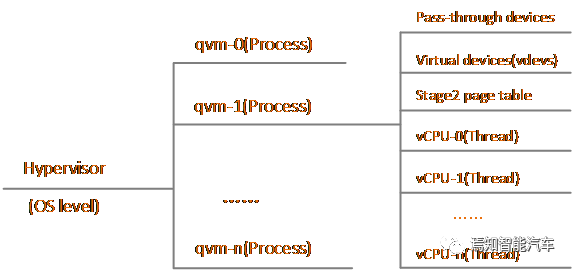 Figure 3. Resource Hierarchy of QNX HypervisorDuring the normal operation of the hypervisor, the qvm process instance needs to perform the following operations:
- Capture access attempts from the virtual machine and determine the appropriate handling based on the type;
- Save the VM’s context before switching the physical CPU;
- Restore the VM’s context before re-executing the VM on the physical CPU;
- Handle virtualization-related faults;
-
Execute maintenance tasks required to ensure the integrity of the virtual machine.
When a qvm process is instantiated, multiple vCPU threads, a list of virtual devices, and Stage 2 page tables are instantiated within the process, used for application thread abstraction, virtual device abstraction, and memory virtualization abstraction, respectively. For vCPU abstraction, the QNX Hypervisor follows a priority-based vCPU sharing model, where priorities include the qvm process priority and vCPU thread priority. In the hypervisor’s operational rules, the relative priority of qvm processes and the priority of vCPU scheduling threads within the qvm process hierarchically determine which vCPU can access the physical CPU. However, the content and data running in the VM are completely opaque to the hypervisor. The hypervisor only ensures that when sharing the physical CPU based on the vCPU’s priority and scheduling strategy, higher-priority vCPUs will always preempt lower-priority vCPUs. The virtual device list and Stage 2 page tables will be introduced in subsequent chapters.
2.3 ARM VM and vCPU Support
The trap mechanism in the ARM architecture is achieved through exception handling. As mentioned above, the applications or user spaces of the guest operating systems are at the EL0 security level. The kernel space of the guest operating system is at the EL1 security level. The hypervisor operates at the EL2 security level. As shown in the left diagram, when a VM or application instruction exceeds the EL1 security level, an exception is raised to the EL2 level hypervisor for handling, which then returns to the VM at the EL1 security level through context switching.The right diagram illustrates a CPU capturing the WFI processing. Executing a Wait For Interrupt (WFI) instruction typically puts the physical CPU into a low-power state. By asserting the TWI signal, if HCR_EL2.TWI==1, executing WFI at EL0 or EL1 will cause an exception and trap to EL2. In this example, the VM would typically execute WFI in an idle loop, and the hypervisor can capture this trap and schedule a different vCPU instead of directly entering a low-power state.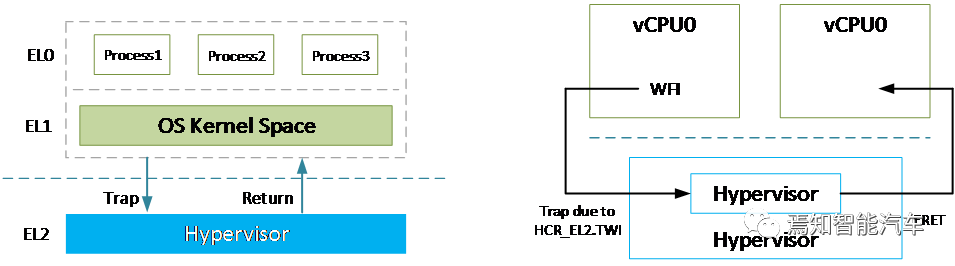 Figure 4. Trap Mechanism and WFI Trap ExampleIn the ARM architecture, vCPU generally represents a virtual processing unit, with each vCPU requiring an instantiated vCPU thread in the hypervisor. The VM corresponds to the instantiated qvm process in the hypervisor, which will contain one or more vCPU threads.
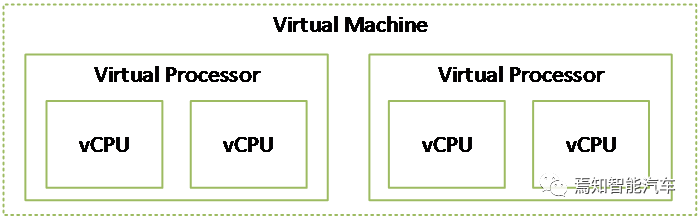 Figure 5. ARM Virtual Machine and Virtual Processor Hierarchy
Memory Virtualization
3.1 Overview of Memory Virtualization
Memory virtualization, in conjunction with CPU virtualization, can ensure that all VMs have independent memory spaces and are strictly isolated according to privileges. The key requirement for memory virtualization is address management, controlling each VM’s access to physical memory based on context.Memory virtualization is typically achieved in conjunction with memory allocation and release management. From a hardware implementation perspective, typical memory virtualization is achieved through controlling two levels of address translation. The memory allocation and release mechanisms of the hypervisor and VMs are similar to those in typical operating systems, using hierarchical page tables for memory management.3.2 ARM Memory Management SystemThe ARM architecture employs a two-level address translation mechanism based on page tables. Typically, the first-level translation converts virtual addresses (VA) to intermediate physical addresses (IPA), which is managed and controlled by the operating system. The second-level translation converts intermediate physical addresses (IPA) to physical addresses (PA), which is managed and controlled by the hypervisor. These two stages of translation are independent of each other, as shown in the following figure, where continuous virtual page addresses can map to discrete addresses in intermediate physical pages, and discrete intermediate physical page addresses can map to continuous physical page addresses.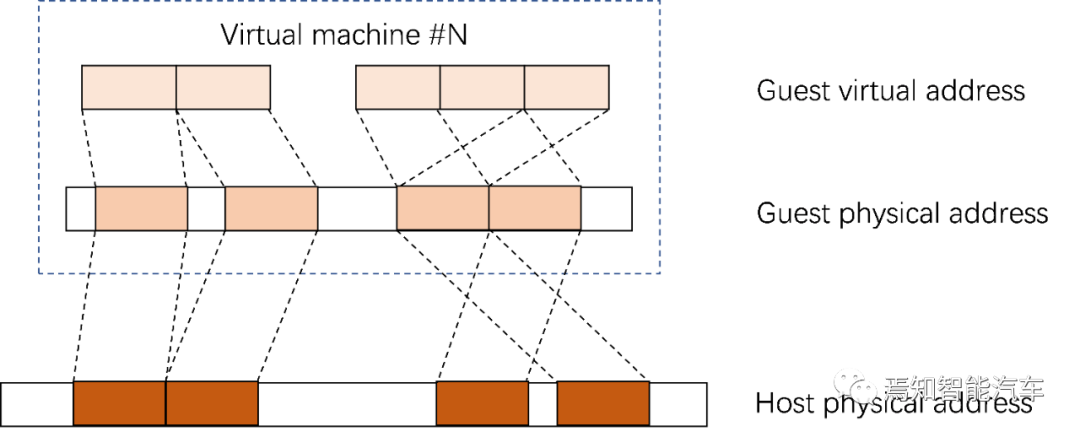 Figure 6. Two-Level Address Translation MechanismThe following diagram shows a typical two-level address space in the ARMv8 architecture. The virtual address spaces include:
-
The virtual memory mapping space of the virtual machine operating system located in non-secure EL0/EL1;
-
The virtual memory mapping space of the hypervisor located in non-secure EL2;
- The virtual memory mapping space of the secure monitor located in EL3.
These virtual address spaces are independent of each other, and each memory space has its own configuration and page tables. The illustrated two-level page tables can comprehensively support memory virtualization functions, where the Stage 1 virtual machine operating system page table can convert virtual addresses to intermediate physical addresses, including serial port device addresses, memory addresses, and storage device addresses, while the Stage 2 virtualization page table, combined with the hypervisor page table and secure monitor page table, can convert intermediate physical addresses to valid physical addresses.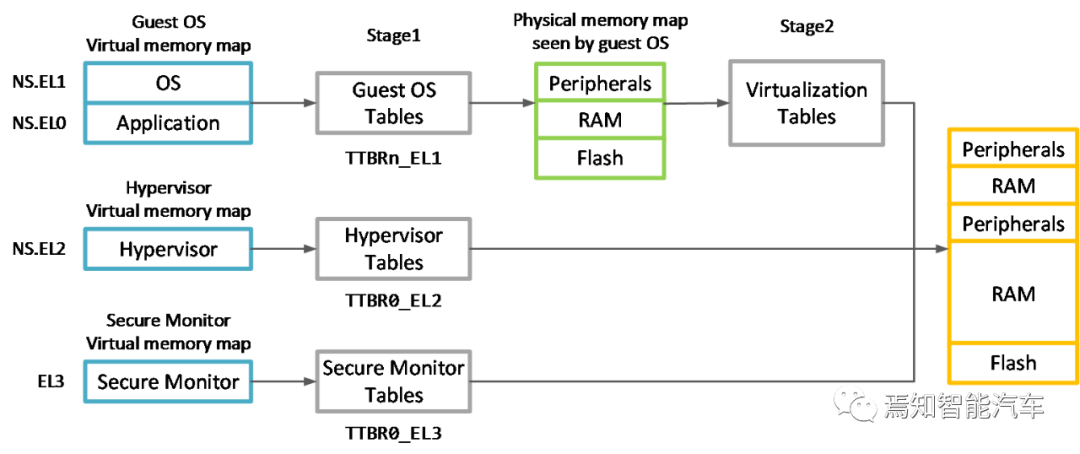 Figure 7. Typical Two-Level Address Space in ARMv8In the AArch64 architecture, physical addresses are typically 48 bits, and page table sizes are usually 4KB or 64KB. To avoid excessive page table space, a four-level page table division is typically used, querying page table entries according to address segments. The following diagram illustrates a four-level page table and the first-level address translation example, which will not be elaborated further in this paper.
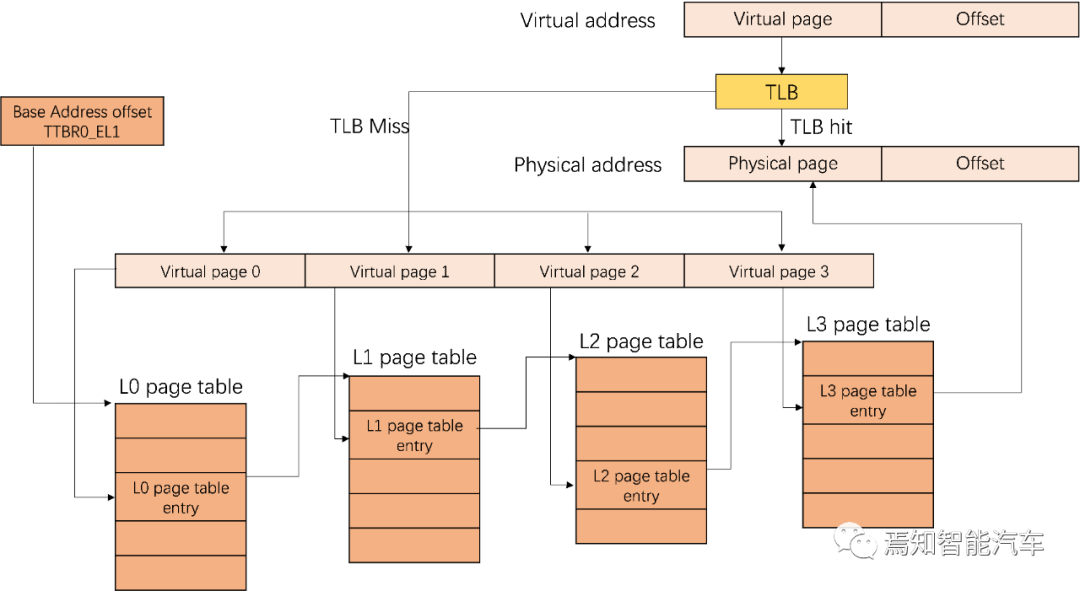 Figure 8. AArch64 Four-Level Page Table and First-Level Address Translation Example
Device Virtualization
4.1 Overview of Device Virtualization
The concept of devices in virtualization can be summarized as accessible memory devices in the system, excluding the processors running the hypervisor and VMs. In cockpit chips, typical device types can be summarized as:
-
Software-emulated virtualized devices: capturing native drivers through software emulation or hardware virtualization, and then simulating the behavior of virtual devices within the hypervisor, with all VMs interacting with the device through hypervisor traps;
-
Para-virtualized devices: simulating an actual physical device for all VMs, allowing all VMs to interact with the device through a single trap for batch processing calls;
-
Pass-through devices: completely exclusive to a specific VM in the virtualized environment;
-
Shared devices: can be used by one VM or by one or more VMs and the hypervisor itself.
The following chapters will detail the specific implementation of device virtualization in the QNX Hypervisor and the support for device virtualization in the ARM architecture.
4.2 QNX Device Virtualization Support
Devices in the QNX Hypervisor can be categorized as:
- Physical devices, including pass-through devices and shared devices;
-
Virtual devices, including fully virtualized and para-virtualized devices.
As mentioned earlier, when configuring and instantiating a qvm process for VMs, the physical devices and virtual devices (vdevs) need to be assigned to the qvm process and VMs. The following diagram illustrates the support for different types of device virtualization in the QNX Hypervisor.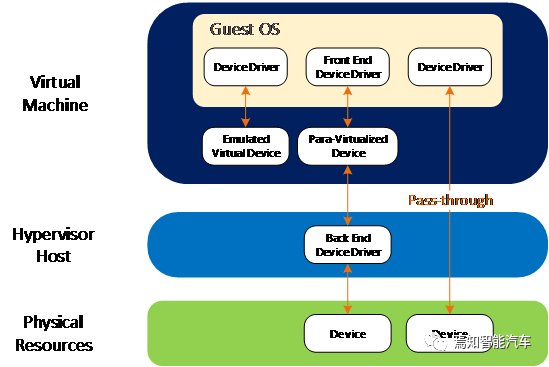 Figure 9. Device Virtualization Support in QNX HypervisorFor pass-through devices, the VM has direct and exclusive access, and the hypervisor host will be bypassed. The drivers for these devices will also be owned directly by the VM. For pass-through devices, the hypervisor only needs to route interrupts from the physical device directly to the corresponding VM and pass all signals from the VM directly to the device. All interactions occur between the VM and the device. The hypervisor needs to identify and allow interrupts from the device and signals from the VM. Typical examples of pass-through devices include PCIe, Ethernet, etc.For shared devices, these can be used by multiple guests, with shared memory being a typical example. The QNX Hypervisor supports two different types of device sharing: referred sharing and mediated sharing:
-
Referred sharing: the shared device is assigned as a pass-through device to a specific VM, which also manages the driver for that device, while other authorized VMs access the device through the virtual device.
-
Mediated sharing: all authorized VMs access the device through the virtual device, with the hypervisor controlling the device and managing the driver.
For virtual devices, the QNX Hypervisor supports both fully virtualized and para-virtualized devices to isolate direct communication between physical devices in the system:
-
Fully virtualized devices/software-emulated virtual devices: simulate actual physical devices for VMs. When using such devices, VMs do not need to know they are running in a virtualized environment. Depending on the type of physical device, fully virtualized devices may handle all transactions themselves or act as intermediaries between the VM and the actual physical device. Typical examples include interrupt controllers (GIC), timers, etc.
-
Para-virtualized devices: compared to fully virtualized devices, para-virtualized devices can improve efficiency through batch processing for a single exception trap, while fully virtualized devices would cause an exception trap for each individual process. The QNX Hypervisor supports para-virtualized devices based on the VirtIO 1.0 standard, including typical block devices, I/O devices, consoles, GPUs, DPUs, ISPs, etc.
4.3 ARM Device Virtualization Support
The ARM architecture provides multi-faceted support for device virtualization, with the main mechanisms including the System Memory Management Unit (SMMU) and the General Interrupt Controller (GIC) with virtualization support.For devices in SoC systems other than processors, especially DMA controllers or devices with DMA controllers, when allocated by a guest OS in a virtualization scenario, address translation and OS-level memory protection can be ensured through the SMMU. The left diagram shows the view of a DMA controller in the operating system without virtualization support. The DMA controller will be programmed via a driver in the kernel space of the host OS, which will configure the DMA with physical addresses based on the MMU unit. However, in a virtualization environment, the pass-through DMA for a specific VM can only be configured with intermediate physical addresses based on the first-level MMU for that VM. Therefore, the right diagram shows the SMMU used for virtualization support for this DMA controller, which can be configured in the VM with IPA. All memory accesses can be translated from IPA to PA by the SMMU programmed by the hypervisor host to ensure that both the VM and DMA operate based on IPA for a unified view.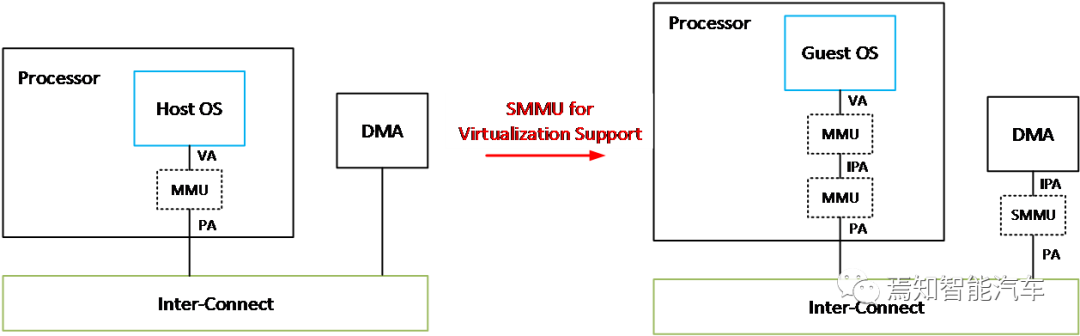 Figure 10. SMMU Support for Device Virtualization in ARM ArchitectureStarting from Arm GICv2, the GIC can signal both physical and virtual interrupts by providing a physical CPU interface and a virtual CPU interface, as shown in the following diagram. These two interfaces are identical, except that one signals physical interrupts while the other signals virtual interrupts. The hypervisor can map the virtual CPU interface to a VM, allowing software in that VM to communicate directly with the GIC. The advantage of this approach is that the hypervisor only needs to set up the virtual interface and does not need to emulate it. This reduces the number of times execution needs to be trapped to EL2, thereby reducing the overhead of virtualizing interrupts.
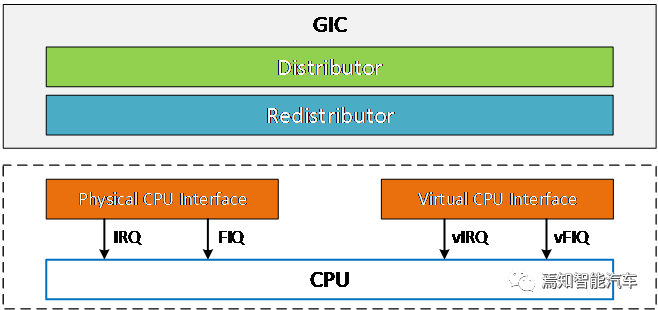 Figure 11. GIC Support for Device Virtualization in ARM Architecture
Conclusion
Virtualization is rapidly becoming a critical technology in the software architecture of modern vehicles, especially as cockpit SoCs face challenges of safety isolation, flexibility, and high utilization. The cooperation of hypervisor software with hardware virtualization extensions can make the virtualization features in cockpit scenarios more efficient and secure.About Fuxin MicroelectronicsFuxin Microelectronics: Fuxin Microelectronics is an advanced technology company established by the Fortune Global 500 company Fosun Group. Rooted in an innovation-driven culture, Fuxin Microelectronics aims to change the way people live, work, learn, and entertain through technological innovation. The company aims to become a world-leading provider of high-performance computing solutions in the era of smart mobility, dedicated to providing solutions based on high-performance chips for automotive electronics, artificial intelligence, general computing, and other fields.Currently, it mainly engages in the research and development of automotive intelligent cockpit and ADS/ADAS chips, leveraging leading chip design capabilities and artificial intelligence algorithms to drive innovation in the automotive industry and enhance people’s travel experiences. In the era of smart mobility, chips are the brain of vehicles. The Fosun Smart Mobility Group has built a comprehensive smart mobility ecosystem, with Fuxin Microelectronics serving as the foundational platform for general high-performance computing and artificial intelligence computing. Fuxin Microelectronics is committed to enhancing customer experience, continuously improving computing power through advanced packaging, advanced processes, and solutions in the post-Moore’s Law era, and facing the new era of automotive intelligence together with partners.References:[1]https://www.qnx.com/developers/docs/7.0.0/#com.qnx.doc.hypervisor.nav/topic/bookset.html[2]https://blackberry.qnx.com/content/dam/qnx/products/hypervisor/hypervisorAutomotive-ProductBrief.pdf[3] https://developer.arm.com/documentation/102142/0100[4] https://developer.arm.com/documentation/101811/0102/[5] http://xhypervisor.org/[6] Garrido, José & Schlessinger, Richard. (2007). Principles of Modern Operating Systems.[7] https://docs.oasis-open.org/virtio/virtio/v1.1/csprd01/virtio-v1.1-csprd01.html