
University IT News

1. Platform Overview
The cloud computing application virtualization platform is built and maintained by the Network and Information Management Center. It utilizes modern network technology and cloud computing technology to install teaching, research, and office application software for teachers and students on high-performance servers in the school’s data center, providing a virtual runtime environment for applications through the network. This will profoundly impact how teachers and students use computer software, bring great convenience, save costs, and also mark an important step forward in the school’s software legalization efforts.
Our application virtualization platform has introduced the application virtualization system from Go-Global, a company in the United States, which can support 1000 users online simultaneously. It is installed on 8 high-performance servers with four-way 40 cores, creating a fast, efficient, secure, and practical support platform. The application virtualization platform has deployed the large general-purpose mathematical software MATLAB v2014B from Mathworks; the Microsoft Office 2013 suite; molecular simulation software Gaussian16W, ChemBioOffice 2014, and Materials Studio client (restricted to relevant colleges and research groups according to software licensing); and the work environment for the school information portal’s document publishing, maintenance, and browsing, mainly used to resolve compatibility issues of office suite versions for document publishing in various departments.
Our application virtualization platform is open for free to faculty and graduate students of Guizhou University. Undergraduates can apply for usage through their instructors due to course teaching needs, providing approved student ID numbers, names, and phone numbers, which will be centrally managed by the Network and Information Management Center.
2. Usage Instructions
The usage instructions for the Guizhou University application virtualization platform are as follows:
1. Register an account: Users without a Guizhou University electronic identity account can register at the unified user management platform https://um.gzu.edu.cn. Log in with the information portal username and password, select registration, and activate the virtual application user by clicking on start registration. If prompted ‘Password complexity not sufficient: requires a string of more than 8 digits and letters (including upper and lower case)’, you need to modify the information portal password. You can return to the function list to select modify password and click to start modifying; the password must include uppercase letters, lowercase letters, and numbers.
2. Download and install the Go-Global client. The GO-Global platform supports multiple operating systems including Windows, Android, Apple iOS, MAC OS, and Linux. Windows, Android, MAC OS, and Linux users can download the client from http://icc.gzu.edu.cn/vapp/resources/supports.html; Apple iOS users can search for GO-Global in the Apple App Store to download and install. On Windows, when installing the Go-Global client, two modes will be generated on the desktop: Go-Global High-Speed Mode and Go-Global True Color Mode. If high image quality is required, you can select True Color Mode;
3. For the first time on Windows, run the Go-Global client as an administrator and set up a virtual disk, which can be used for file upload and download between the application virtualization platform server and your local computer. The virtual disk can be a disk partition on the local computer or a folder within a disk partition (the path cannot contain Chinese characters). The new volume (X:) on the local computer will be the virtual disk, while the application virtualization platform server will show as Client X (X:); the system will also configure a 2GB network disk for each user (displayed on the server side as username(\\172.17.8.9\UserDisk)(Z:)), used for temporary file storage.
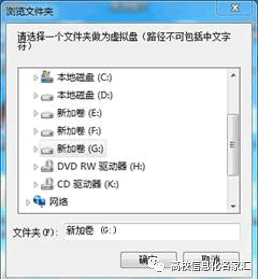
4. Enter the domain name (Host Address), refer to http://icc.gzu.edu.cn/vapp/resources/resources2.html for specific applications, and enter the corresponding Host Address as needed and confirm;
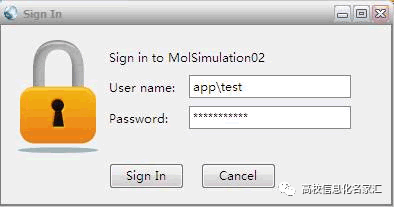
5. Enter the username and password. The application virtualization platform uses domain management, and the username must be prefixed with the management domain name app (for example, if the username is test, enter app\test in the User name field). As shown in the figure below, click the Sign In button to log in to the application virtualization platform.
Source: Guizhou University Network and Information Management Center
Welcome to follow the official WeChat account of the “University IT Experts Exchange Community”.

The University IT Experts Exchange Community (EDUITS) is a one-stop service platform for IT news in universities across the country, founded by a team of industry experts from Beijing Zhangyun Technology Co., Ltd., aimed at disseminating information on: “Smart Campus | Cloud Computing | Network Security News, Industry Policies, Conference Exchanges, Expert Papers, Hot Technologies, Application Scenarios, Products, and Solutions”.Contact: University IT Experts Exchange Community – Admin WeChat: Zyunits
—End—
About Us Disclaimer