Click the blue text to follow us Introduction
What are internet speed, bandwidth, and broadband? What are their intrinsic relationships?
How has Wi-Fi technology developed? What are the differences between the latest Wi-Fi 6 and Wi-Fi 7, and which is better?
This article will help you understand.
01Internet Speed, Bandwidth, and Broadband – Clarifying the Concepts
First, we need to clarify the three most easily confused concepts.
01 What is Internet Speed?
When we talk about “internet speed,” we refer to therate at which data is transmitted over the network. Just like a car’s speed is measured in “kilometers per hour,” internet speed is usually measured in “bits per second” (unit: bit/s, commonly written as bps, bit per second). Since the bit (bit) unit is very small, we often use megabits per second (Mbps) to represent it.
Important distinction: Please note the difference between bits (bit) and bytes (Byte). 1 Byte = 8 bits.This is very important! When we download files using software like Thunder or Steam, the speed unit displayed by the software is MB/s (megabytes per second). Meanwhile, the “100M, 500M broadband” promoted by operators is measured in Mbps (megabits per second).
Conversion relationship: Therefore, theoretically, the maximum download speed of “100M broadband” is `100 Mbps ÷ 8 = 12.5 MB/s`.This means that downloading a 1GB (approximately 1024MB) movie would ideally take about `1024 ÷ 12.5 ≈ 82 seconds`.
Doesn’t 12.5MB/s seem like a decent speed?
Why can’t a home network even reach 100M broadband?
This requires understanding that network download speed is actually influenced by many factors.
The main influences are:
① The bandwidth provided by the operator. Home broadband access is rented, not dedicated, so network fluctuations can be significant. For example, if you purchase a 1000M broadband, you are actually renting a gigabit broadband line, which first has line loss, and there are other tenants sharing the bandwidth with you. The more users there are, the less bandwidth you get, which means that the more users there are, the fewer times the operator responds to your requests, resulting in insufficient bandwidth. Of course, there is also the situation where the operator does not provide you with the corresponding bandwidth, for example, you bought gigabit, but actually got 500M or 300M, etc. This can also be tested using network speed testing tools;
② The bandwidth limitation of the server on the other end. Currently, data transmission on the internet is primarily in a client-server model, meaning that when you download something, there is a server uploading data. Therefore, if your download is slow, it may also be due to slow uploads. Of course, the data has to travel through many nodes, and if any node is slow, it can also lead to slow downloads.
Here’s a little trick for testing: Friends who play Tencent games may have noticed how fast the game update process is.
02 What is Bandwidth?
“Bandwidth” is a very vivid term. You can think of it as the diameter of a water pipe. The thicker the pipe, the more water can flow through at the same time.Bandwidth refers to the maximum data transmission rate that a network channel can carry, which is the theoretical maximum width of that “water pipe.” Therefore, bandwidth determines the theoretical upper limit of your internet speed. When we say 100M, 500M, we are actually referring to “bandwidth” of 100Mbps, 500Mbps.
03 What is Broadband?
“Broadband” is a relatively historical concept. In the early days, people accessed the internet via dial-up through telephone lines, with speeds only in the tens of Kbps, referred to as “narrowband.” Later, technologies emerged that provided greater bandwidth (such as ADSL and fiber optics), far exceeding narrowband, hence the term “broadband” was coined. Today, broadband typically refers to the overall internet service you purchase from an operator (such as China Telecom, Unicom, or Mobile), which includes bandwidth size, IP address, various service protocols, etc. In simple terms, bandwidth is the core technical parameter of broadband.
02Differences in Experience and Selection of Home Broadband
Now let’s talk about the differences in “usage standards” and real experiences of different bandwidths like 100M, 500M, and 1000M (1G). The “standards” here are not official regulations but are recommendations based on typical usage scenarios.
01 100M Broadband (Bandwidth approximately 100Mbps)
(1)Applicable households: Small families of 1-2 people or single apartments.
(2)Usage scenarios: This is currently the basic entry-level option. It is sufficient for daily web browsing, 720P/1080P HD video playback, social chatting, and occasionally playing non-competitive online games. If one person is watching a video while another is browsing on their phone, there will generally be no pressure.
(3)Experience bottlenecks: When multiple people engage in high-bandwidth activities simultaneously, it can become very stressful. For example, if one person is watching streaming on a 4K TV while another is downloading a large file or playing an online game, the video may buffer, and the game may experience latency spikes (lag).
02 500M Broadband (Bandwidth approximately 500Mbps)
(1)Applicable households: Mainstream families of 3-4 people, currently the sweet spot for cost-effectiveness and experience.
(2)Usage scenarios: Can easily handle multiple devices online simultaneously. It can support the whole family watching 4K ultra HD videos on different devices while someone else is downloading files or playing large online games, with almost no interference between them. Even with more smart home devices, it can still handle the load.
(3)Experience improvement: The most noticeable improvement is the leap in download speed. Downloading a large game of several tens of GB can take only a few minutes instead of several hours, and daily system updates and application downloads are basically “instant.”
03 1000M Broadband (Bandwidth approximately 1000Mbps / 1Gbps)
Currently, most operators provide gigabit broadband!!!
(1)Applicable households: Heavy internet users, tech enthusiasts, multiple roommates, or small studios.
(2)Usage scenarios: This is already at a level of overcapacity for most ordinary families, where the daily usage experience may differ little from 500M. Its value lies in: extreme download experiences (downloading a Blu-ray movie in a few minutes), frequent and fast backups of large amounts of data to the cloud (like NAS), and extreme scenarios with multiple 8K streaming devices at home.
(3)Important reminder: To truly experience the power of 1000M broadband, all your internal devices must meet gigabit standards (if not, the speed will automatically sync to the slower device), including: a gigabit-capable optical modem, Wi-Fi 6 or higher wireless router, and the computer’s network card and hard drive (high-speed SSD). Any bottleneck in the chain will prevent speed from increasing.
03The Evolution of Wi-Fi Technology: Focus on Wi-Fi 6 and Wi-Fi 7
Having high-speed broadband is not enough; distributing that high-speed network wirelessly to each device relies on Wi-Fi technology. Here, we focus on the latest two.
01 Wi-Fi 6 (802.11ax)
Wi-Fi 6 is currently the absolute mainstream and preferred choice. It is not only designed to increase speed but also to enhance efficiency and stability when multiple devices are connected.
Core technical advantages:
(1)OFDMA: Like a bus carrying multiple passengers (data) instead of multiple taxis carrying one passenger each. This greatly improves efficiency and reduces latency when multiple devices are online simultaneously. This is the most important improvement for gaming and video conferencing.
(2)MU-MIMO: Allows the router to communicate with multiple devices simultaneously rather than in a queue. Wi-Fi 6 supports both uplink and downlink MU-MIMO.
(3)Target Wake Time (TWT): Allows devices to negotiate with the router when to wake up to send and receive data, significantly reducing power consumption and greatly improving the battery life of mobile devices like phones and laptops.
Disadvantages: Its performance can still be affected in environments with strong signal interference.
02 Wi-Fi 7 (802.11be)
Wi-Fi 7 is the latest Wi-Fi technology, representing a true next-generation leap, designed to meet the extreme applications of upcoming 8K video, VR/AR, and the metaverse.
Core technical advantages:
(1)Wider channels: The channel width has been significantly increased from 160MHz to 320MHz, equivalent to expanding a road from 8 lanes to 16 lanes, directly doubling the speed.
(2)Multi-Link Operation (MLO): This is a revolutionary technology. It allows devices to transmit data simultaneously across three frequency bands: 2.4GHz, 5GHz, and 6GHz. This not only increases speed but also provides significant stability. If one frequency band is interfered with, data will automatically be transmitted seamlessly through other bands, with almost no noticeable lag.
(3)Higher-order modulation: More data can be encoded in a single transmission, with theoretical speeds reaching 46Gbps, more than four times that of Wi-Fi 6.
Disadvantages: Currently very expensive. Routers and terminal devices (phones, computers) that support Wi-Fi 7 are costly. A gigabit or even higher-speed broadband is required to unleash its power. The current application ecosystem has not fully caught up, making it a “future-proof” investment for most people.
04How to Choose Wi-Fi Versions When Buying a Computer?
For the vast majority of consumers, when purchasing a new computer (laptop/motherboard), follow these principles:
01 Current minimum standard: Must choose models that support Wi-Fi 6
Wi-Fi 6 is now standard for mid-range and higher devices. It ensures you have the best network experience for the next few years, especially in households with increasing numbers of devices, where its multi-device management capability is crucial. Avoid any models that only support the outdated Wi-Fi 5 (802.11ac).
02 If budget allows and you seek cutting-edge: Consider Wi-Fi 7
If you plan to use this computer for many years (like 4-5 years) and have a sufficient budget, choosing a computer that supports Wi-Fi 7 can be seen as a “future investment.” Although you may not need all the features now, in a year or two, when Wi-Fi 7 routers become widespread and network application demands increase, your device will be ready without needing replacement. This is especially worth considering for high-end gaming laptops and content creation workstations.
03 Don’t overthink it; Wi-Fi 6 is completely sufficient for now
Even if you buy a Wi-Fi 7 computer, if your home still uses a Wi-Fi 5 or Wi-Fi 6 router, you won’t enjoy any new features of Wi-Fi 7. (It will automatically sync to the lower version protocol) Therefore, for most people, ensuring the computer has Wi-Fi 6 is a more practical and cost-effective choice. Spending your budget on CPU, GPU, memory, and other components that directly impact performance usually yields a higher return.
05Conclusion
Understanding the differences between internet speed, bandwidth, and broadband can help you comprehend the operator’s packages. Gigabit broadband is now basically widespread. The key to wireless experience lies in the Wi-Fi technology of routers and terminal devices. Choosing Wi-Fi 6 for computers at this stage is a rational and optimal choice for ensuring experience, while Wi-Fi 7 is a luxury investment for tech enthusiasts and future-proofing.
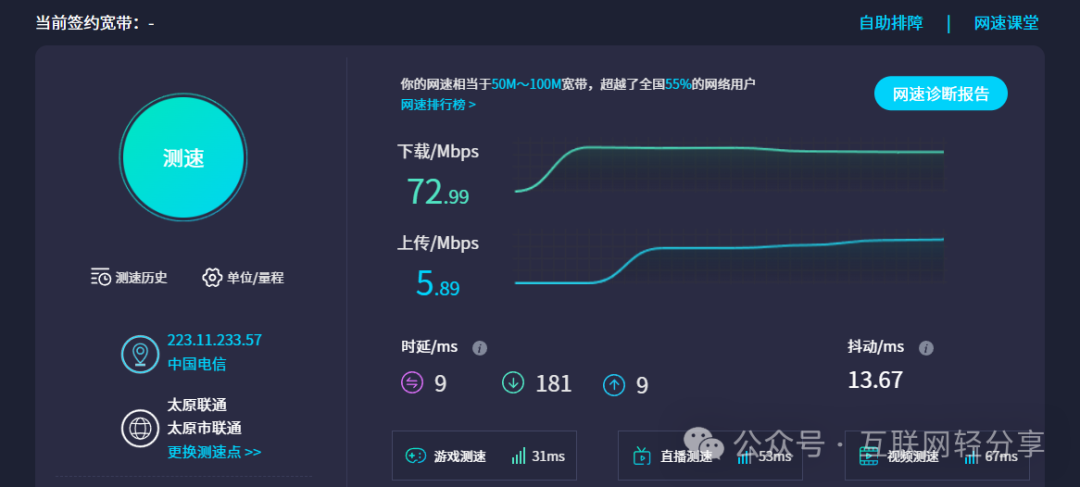
Appendix: Internet speed test link!!! https://www.speedtest.cn/
What are your views on broadband, bandwidth, and Wi-Fi technology? Feel free to leave comments in the discussion section!!!
END