School is about to start, and as an educator, one cannot avoid writing the “three major documents,” among which the most complex is the lesson plan.The content of the lesson plan includes: teaching objectives, key teaching points, tutorial process, ideological elements, homework, reflections, and so on. Moreover, it needs to be deeply integrated with the teaching materials, making each writing session a headache for teachers.Although many clever professors have thought of using AI to assist in writing, the content generated by AI still needs to be copied into Word, and the formatting must be unified, which is evidently still quite troublesome.Therefore, many senior professors have turned to Teacher Xiao to discuss convenient ways to edit lesson plans, considering that these professors have long focused on research work and competitions. Today, we will explore how to make lesson plan editing more convenient.For those who want to learn, you first need to have a certain level of foundational knowledge. Please refer back to “Automating Office Tasks with Python: Template-Based Word Generation using docxtpl” where Recursive Cat briefly introduced the method of generating Word documents using the docxtpl library. We will reuse this method in our article, only modifying the template and utilizing more AI tools to achieve our goals, as detailed below:First, we need to determine the format of the template, the position of the placeholders, and the font format of the placeholders. Each school uses a different lesson plan template; below is an example lesson plan template: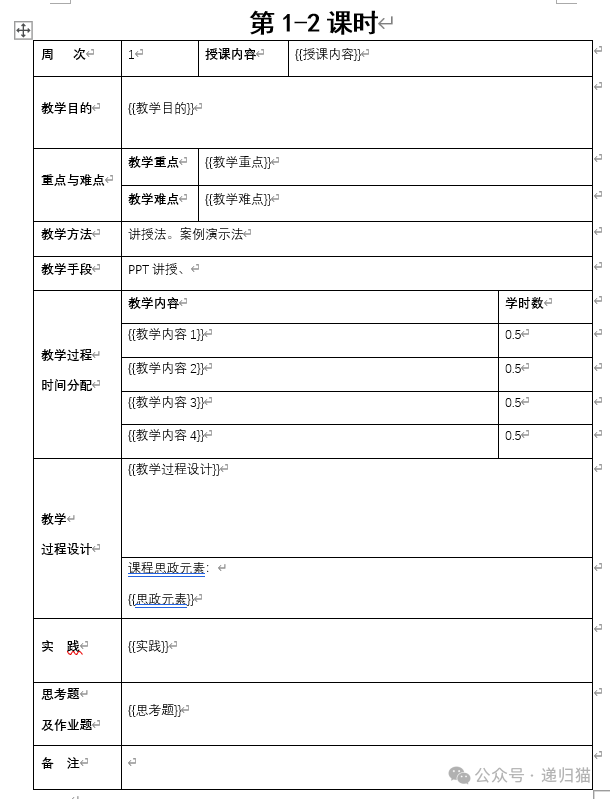 Next, we start writing the Python code. We create a Python file named day06.py (any reasonable name will do). In the project root directory, create a Word template file named lesson_plan_test.docx. The file structure is as follows:
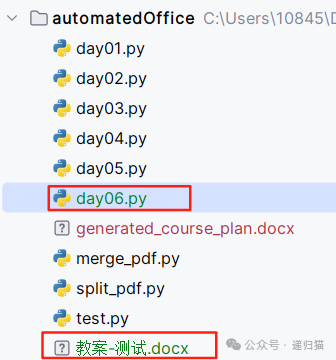 The test code in day06 is as follows:
from docxtpl import DocxTemplate
# Course data (fill in according to actual needs)
course_data = {
    "授课内容": "本周学习网络需求分析方法",
    "教学目的": "掌握网络需求分析的步骤和工具",
    "教学重点": "需求调研方法",
    "教学难点": "复杂网络环境下的需求分析",
    "教学内容1": "收集需求",
    "教学内容2": "需求分析",
    "教学内容3": "案例设计",
    "教学内容4": "设施工程",
    "教学过程设计": "1. 导入案例\n2. 讲解需求分析流程\n3. 分组讨论",
    "思政元素": "工匠精神:强调需求分析的严谨性",
    "实践": "机房实操",
    "思考题": "完成校园网需求分析报告"
}
# Load the template file
doc = DocxTemplate("lesson_plan_test.docx")  # Please replace with the actual template path
# Render the template
doc.render(course_data)
# Save the generated file
doc.save("generated_course_plan.docx")
After running day06, a generated_course_plan.docx file will be created, with the following content: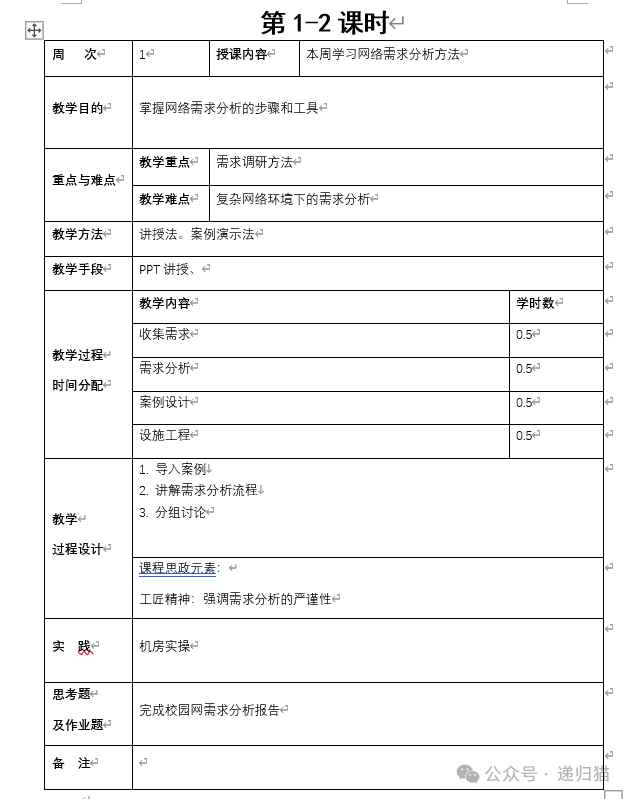 Smart as you are, you have already noticed that the content in the code has been completely copied into the lesson_plan_test.docx template file.However, there is still a major issue: we have only generated content for 2 class hours, and the content in the lesson plan is just test data. Ultimately, we need 64 class hours.Stay tuned to “Recursive Cat” for the next issue: using AI tools to split a course into class hours and generating the course_data data source from the split teaching content.Tips: The source code has been uploaded to Gitee (the code is all yours ❥(^_-))
 Source code address:
https://gitee.com/xiaoly111/recursiveCat/blob/master/automatedOffice/day06.py