Reprint please indicate the source
This article mainly introduces the solutions related to CAN/CANopen/J1939 protocols in the SIMATIC product family.
CAN protocol originated in the automotive industry, and in the industrial field, especially the CANopen protocol based on CAN, has many applications in some drive control areas. SAE J1939 protocol is based on CAN as the underlying protocol, used in large trucks and heavy machinery vehicle applications.
The application areas of CAN/CANopen include:
-
Mechanical engineering, automotive
-
AGV, logistics
-
Wind power
-
Packaging…
Siemens products that support CAN/CANopen mainly includeET 200SP CM CAN and PN/CAN Link module, both support the following modes:
- CAN transparent (2.0 A/B)
- CANopen Manager
- CANopen Slave
In addition, the new version of the firmware also supports “simple slave function“, through which the CAN module can work with CANopen devices that do not fully comply with the CANopen standards set by the CiA group.ET 200SP CM CAN module is based on the ET 200SP, the CM CAN communication module is installed on the ET 200SP site, and can communicate with the PLC controller through PROFINET, or directly installed behind the ET 200SP CPU to work; downwards connect to the CAN/CANopen network.
As a CANopen manager, it supports up to 60 CAN nodes in the CANopen network.
ET 200SP CM CAN connection schematic: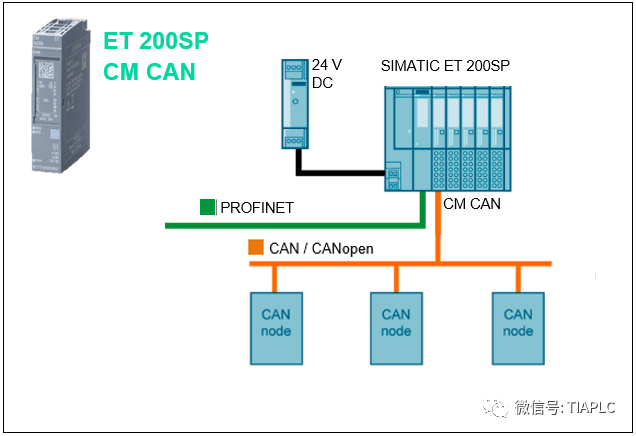
ET 200SP CM CAN order number:
6ES7137-6EA00-0BA0
Configuration routines and manuals:
https://support.industry.siemens.com/cs/us/en/view/109779316 Chinese manual: https://support.industry.siemens.com/cs/ww/en/view/109778981/zhPN/CAN LINK module
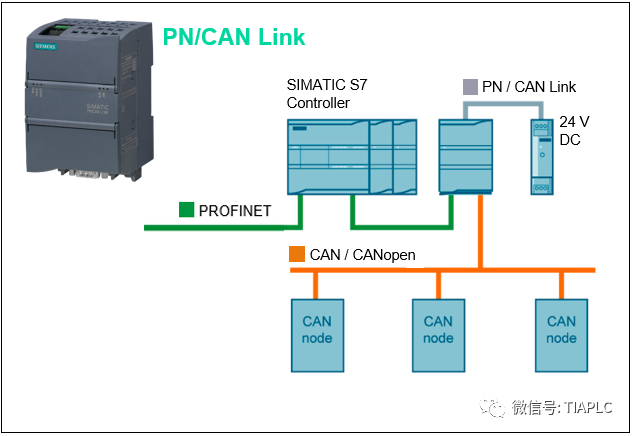
SIMATIC PN/CAN LINK serves as a gateway to connect the PROFINET network to the CAN or CANopen fieldbus for data exchange.
PN/CAN Link communicates with the upper PLC controller as an IO device, connects downwards to the CAN/CANopen network, allowing users to communicate with up to 126 CAN nodes. PN/CAN LINK integrates an internal PROFINET switch, allowing it to be seamlessly integrated into the PROFINET network. Through TIA Portal programming, it supports:
-
SIMATIC S7-1200/1500
- ET 200SP CPU
- OpenController controller
PN/CAN Link connection schematic:
PN/CAN Link product order number:
-
Standard version
6BK1620-0AA00-0AA0
-
SIPLUS extreme version
6AG1620-0AA00-7AA0
-
SIPLUS extreme rail version
6AG2620-0AA00-4AA0
(SIPLUS: supports applications in extreme environments)
Configuration routines and manuals:
https://support.industry.siemens.com/cs/ww/en/view/109751077 Chinese manual: https://support.industry.siemens.com/cs/ww/en/view/109746744/zhPN/J1939 Link module
PN/J1939 Link module is a compact gateway that connects PROFINET and SAE J1939 bus. PN/J1939 Link communicates with the upper PLC controller as an IO device, connects downwards to the J1939 bus.
PN/J1939 Link represents an ECU (Electronic Control Unit) and contains a CA (Controller Application):
-
Can access up to 30 ECUs on the J1939 network
- Can access up to 253 CAs on the J1939 network
PN/J1939 Link is 70mm wide, installed on a standard rail, connects to PROFINET via RJ45; connects to the SAE J1939 bus via sub D9 (female). PN/J1939 Link connection schematic: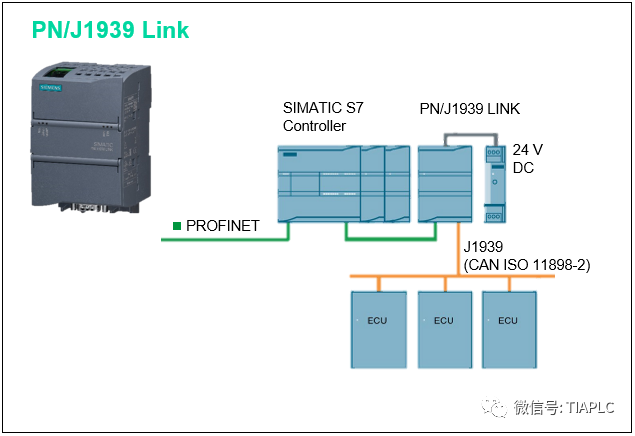
Connect PROFINET to the J1939 network through PN/J1939 Link. The cyclic data exchange between PN/J1939 Link and PLC is done through IO images, while non-cyclic data can be accessed through read and write data records.
Programming is done through TIA Portal, with corresponding GSDML for configuration, supporting SIMATIC S7-1200/1500, ET 200SP CPU, OpenController controller.
PN/J1939 Link product order number:
-
Standard version
6BK1623-0AA00-0AA0
-
SIPLUS extreme rail version
6AG2623-0AA00-4AA0
(SIPLUS: supports applications in extreme environments)Configuration routines and manuals:https://support.industry.siemens.com/cs/ww/en/view/109760972 Chinese manual: https://support.industry.siemens.com/cs/ww/en/view/109763437/zh
Selected past issues

- Siemens S7-300 is going to be discontinued, can it still be purchased?
- Detailed explanation of the TIA Portal basic control library (LBC)
-
TIA Portal basic control library (LBC) upgrade V1.1 (added screen library)
-
Explanation of the Siemens product qualification certificate
-
Collection of frequently asked questions about Siemens TIA Portal
- Siemens Chinese version of the “Program Design Specification Guide” officially launched
- Siemens “Program Design Specification Guide” free video tutorial
- Siemens standard machine project, one project suitable for all models
- Introduction to Siemens SIMATIC ET 200 series IO modules
- Introduction to Siemens S7-1500 redundant systems
- Siemens software manual downloads, problem inquiries, and other nanny-level tutorials
- Quick download of Siemens product CAx files