
AgentKit is an OpenAI toolkit that integrates ChatGPT agents into web applications. It includes core APIs, SDKs, builders, connectors, ChatKit, and evaluation and safety features. It aims to simplify the development, deployment, and enhancement of AI agents, making AI assistants actionable.
Translated from:How OpenAI’s AgentKit Embeds ChatGPT Into Any Website[1]
Author: Janakiram MSV
AgentKit[2] is a comprehensive toolkit that allows developers to integrate ChatGPT-powered agents into websites and applications. It was launched at the OpenAI Developer Day 2025[3] as a means to build AI agents that can not only chat but also browse, make API calls, and complete multi-step tasks.
Essentially, AgentKit provides the architecture and building blocks needed to embed ChatGPT-based assistants directly into your products. This article delves into the architecture of AgentKit, including its core components, and demonstrates how it enables seamless integration of ChatGPT-like functionalities into any website.
Foundation of OpenAI AgentKit
The core of AgentKit is built on a robust foundation consisting of two main backend components: Response API[4] and Agent SDK[5]. Together, they form the engine that drives all AgentKit functionalities:
Response API: Handles structured outputs and OpenAI’s function calling interface (i.e., tool usage). When an agent needs to use external tools or APIs, the Response API formats the request, executes the function call, and returns the result in a structured format that the agent can understand. This eliminates the need for developers to parse outputs or manually handle tool integration errors.
Agent SDK: Provides the runtime and orchestration layer for agents. It manages multi-turn conversation states, executes multi-step tool calls in sequence, handles retries and errors, and enforces the control flow logic of the agent. This SDK allows agents to maintain memory and reasoning across different steps without requiring developers to write boilerplate code to link prompts or track context. The Agent SDK can be used directly in code for full control or accessed through higher-level tools like visual builders.
In practice, the combination of the Response API and the Agent SDK means developers do not have to reshape the underlying infrastructure for conversation management or tools.
All other functionalities in AgentKit are built on top of these two layers. In fact, this architecture means developers do not have to reshape the underlying infrastructure for conversation management or tools—these features are available out of the box. AgentKit workflows can be defined visually or through code, with the platform handling streaming responses, state, and tool orchestration behind the scenes. This architecture accelerates development by addressing common agent patterns and enhances reliability by providing a tested runtime with built-in error handling and safety checks.
Safety and guardrails are also an integral part of the AgentKit architecture. The platform includes input validation, output filtering, and personally identifiable information (PII) masking features to prevent malicious prompts and sensitive data leaks. These guardrails act as a security layer around the agent, scanning the content entering and leaving the model. While not foolproof, they significantly reduce the risk of deploying AI agents on real user data by blocking jailbreak attempts and removing private information from logs. Developers can adjust the strictness of the guardrails based on use cases. For example, tightening restrictions for financial chatbots while relaxing them for less sensitive internal tools. This security-first design ensures that embedded ChatGPT agents operate responsibly within websites and applications.
Components of AgentKit
AgentKit provides a set of modular components that work together, allowing you to quickly build, deploy, and embed ChatGPT-powered agents. These components abstract common functionalities—such as building conversation flows or connecting to data sources—so you can focus on your use case logic rather than the infrastructure.
Here are the core components and their functionalities:
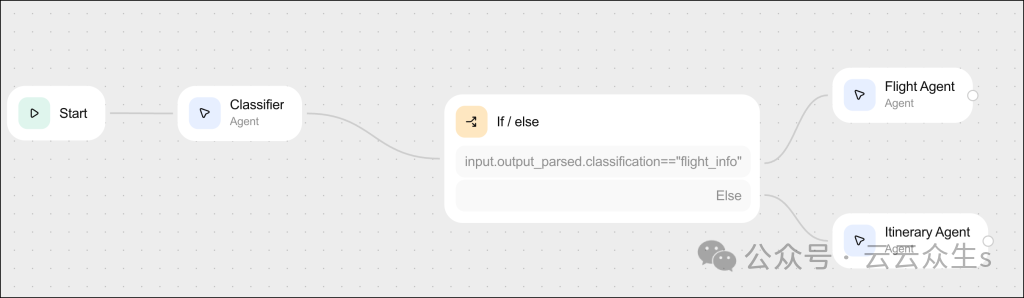
Agent Builder: A visual workflow editor for designing the logic and conversation flows of agents. Developers do not need to write orchestration code but can drag and drop nodes representing prompts, tool calls, branches, and other actions onto a canvas. You connect nodes to define the decision logic of the agent and configure parameters for each node. The Agent Builder supports version control and preview runs, meaning you can safely iterate on the design of the agent. You can test new workflow versions without affecting production and even export the visual flow as code when you are ready to fine-tune or extend it in your own codebase. This visual approach significantly accelerates the prototyping of complex multi-step agents, making it easier for both developers and non-developers to collaborate on agent logic.
[6]
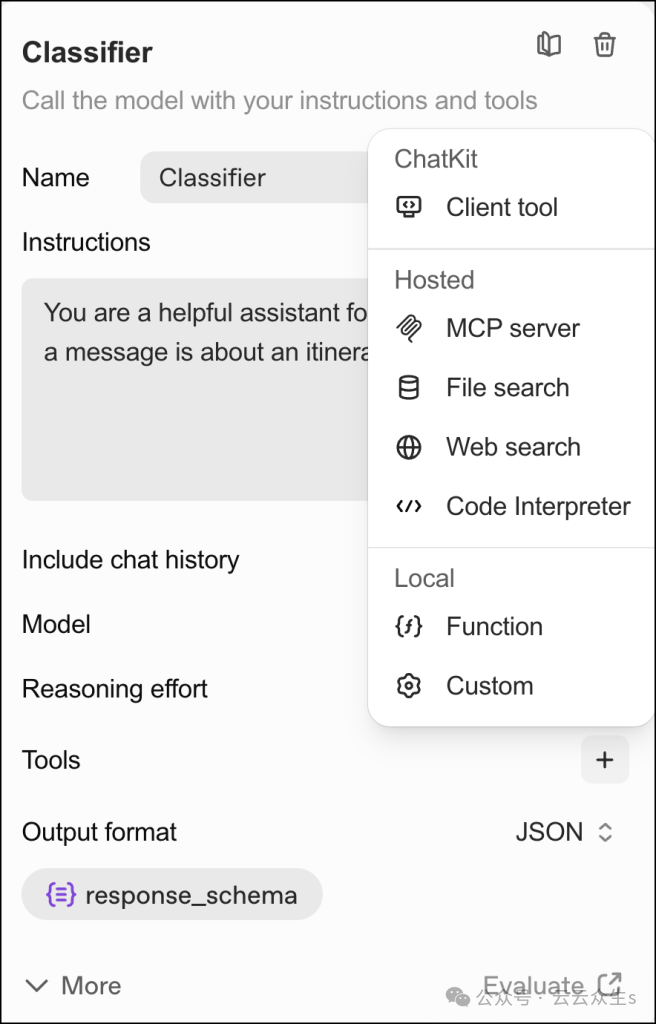
Connector Registry: A library of pre-built integrations for connecting agents to external systems and APIs. Real-world agents often need to fetch data or trigger actions from other services such as databases, SaaS applications, and internal APIs. The Connector Registry provides out-of-the-box connectors for common services like Dropbox, Google Drive, SharePoint, and Microsoft Teams.
Each connector is pre-coded to handle authentication, API calls, rate limiting, and errors, allowing you to select a connector, configure permissions, and insert it into your workflow without writing custom integration code. This central registry allows administrators to manage data access in one place—you can control which connectors are enabled, securely manage credentials, and monitor usage centrally. If the required integration is not available, developers can create custom connectors that conform to the same interface and share them across projects. The Connector Registry simplifies the process of connecting your ChatGPT agent to the rest of your tech stack, which is a key capability for embedding agents into real business workflows.
[7]
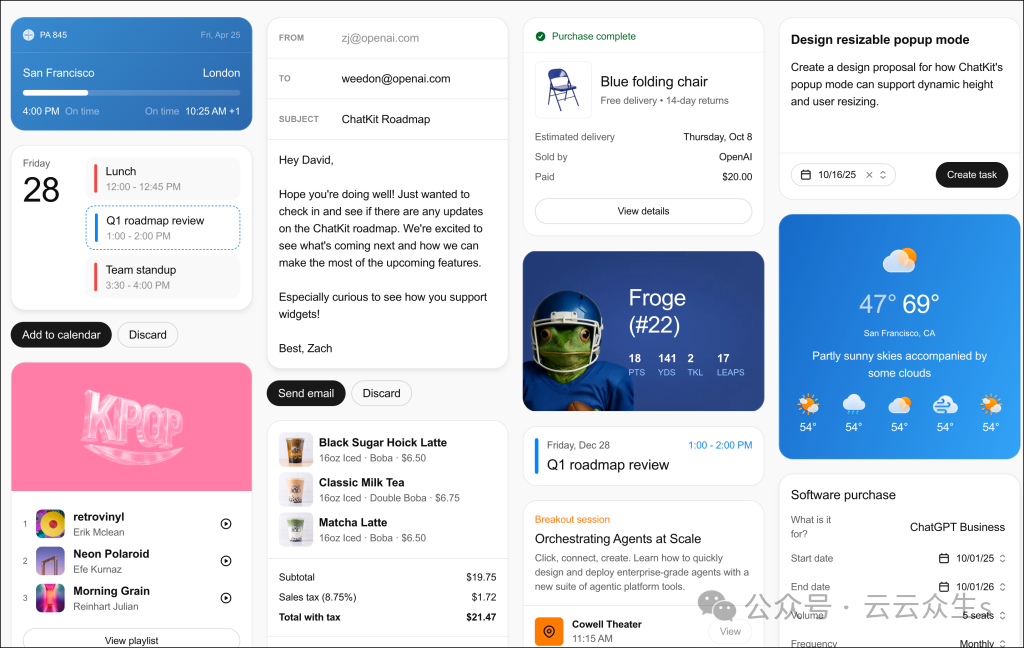
ChatKit: An embeddable chat user interface toolkit for deploying the frontend of agents on your website or application. ChatKit handles the entire chat interface—message display, streaming responses, user input boxes, conversation history, etc.—so you do not have to build a chat user interface from scratch. Developers simply place the ChatKit component and point it to the agent’s API endpoint to instantly get a ChatGPT-style assistant in their products. This means you can embed ChatGPT-powered assistants directly into any website or application with minimal effort.
The appearance of ChatKit is highly customizable, allowing you to match the design of the widget with your website’s branding (colors, fonts, layout). Under the hood, it uses WebSocket to stream responses token by token for a smooth, interactive experience. By using ChatKit, developers can embed ChatGPT-style assistants into websites and applications, ensuring the same AI experience follows users wherever they work.
In short, ChatKit enables ChatGPT integration on any website by providing a ready-made chat interface. Developers just need to embed it and let it communicate with your AgentKit backend. This significantly reduces frontend development time (saving “weeks” of work in building a real-time chat user interface from scratch). If needed, teams can still build custom interfaces for unique use cases, but ChatKit covers most conversational agent scenarios.
[8]
Evaluation and Tracking Tools: Building AI agents is an iterative process, and AgentKit includes tools for evaluating and debugging agent performance. The platform allows you to create evaluation datasets (a collection of test queries and expected answers or results) and run your agents against them to measure accuracy, response quality, and other metrics. It supports custom “scorers”—automated checks or manual review functions—to assess the correctness, relevance, and safety of agent responses. This helps identify where agents may go wrong.
AgentKit also provides tracking logs for each conversation, showing the step-by-step reasoning process of the agent: what tools it tried, what data it received, and how it decided on the next step. Tracking scores allow developers to inspect and debug complex multi-step workflows by replaying what the agent “thought” at each step. These evaluation and tracking features are crucial when embedding ChatGPT agents into production websites. They provide developers with visibility into agent decision-making and a systematic way to improve it. In fact, AgentKit can even automatically suggest prompt improvements based on evaluation feedback, accelerating the refinement cycle of the agent.
AgentKit supports continuous improvement of agents through feedback.
Reinforcement Learning and Improvement Loops: In addition to single evaluations, AgentKit also supports continuous improvement of agents through feedback. Developers can define reward functions or custom success metrics and use them to fine-tune the behavior of agents over time. This reinforcement tuning mechanism uses feedback signals to adjust the agent’s strategy.
AgentKit provides the infrastructure to collect real user feedback, log interactions, and perform iterative retraining without building separate pipelines. While developers must carefully define what “good” behavior means, this loop allows embedded agents to become smarter and more suited to your domain as they interact with users. In fact, agents on your website can gradually learn to handle user queries more accurately by incorporating feedback, all managed through AgentKit’s tools.
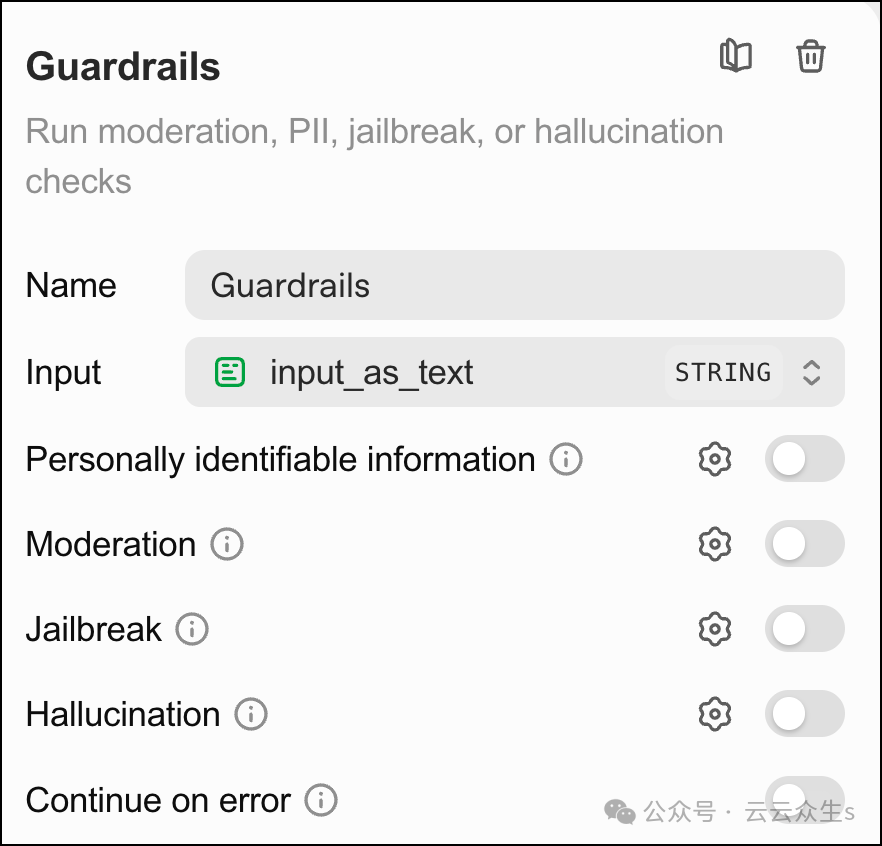
Built-in Guardrails: As mentioned earlier, safety features are core components. AgentKit integrates OpenAI guardrails (an open-source safety library) directly into agents, providing configurable policies for content filtering and safe operations. You can enable guardrails to automatically check for disallowed content or patterns attempting to deceive the AI in user inputs and similarly clean the agent’s outputs.
Options are available to mask personal data, prevent specific tool usage (e.g., restricting agents to read-only data rather than deleting it), and require manual approval for high-risk operations. These guardrails can be customized per workflow and help ensure that embedded ChatGPT agents operate within acceptable bounds, providing reliable assistance without going rogue. For example, a customer support bot may have strict filters to avoid providing financial advice or leaking account details, while an internal research bot may be allowed more freedom. By bundling guardrail features, AgentKit saves developers the hassle of implementing their own safety checks and enables them to deploy agents with greater confidence.
[9]
Component Collaboration
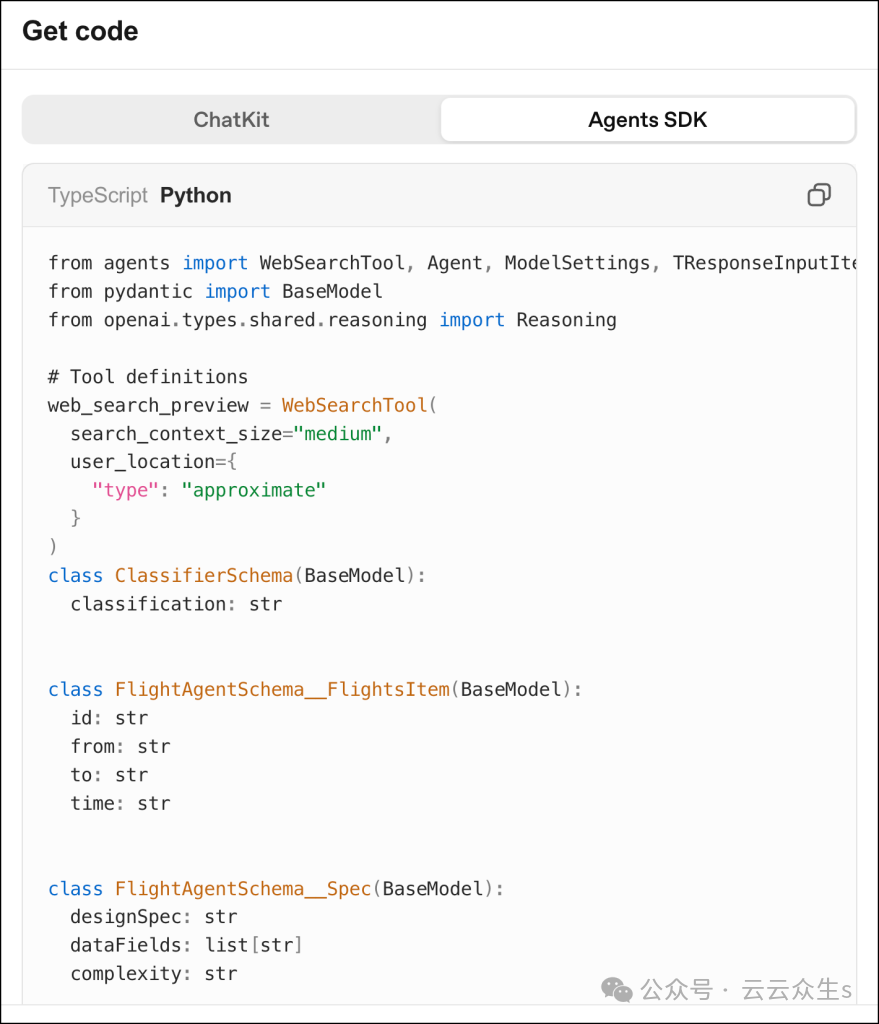
All these components work together. When you use AgentKit to embed ChatGPT into a website, you use the Agent Builder (or code) to define what the agent should do, use connectors to link the agent to the external data/services it needs, use ChatKit to place a chat interface on your website for users to interact with the agent, and use evaluation/monitoring to track and improve the agent’s performance.
The heavy lifting—such as managing conversation states or calling GPT-4/GPT-5 under the hood—is handled by the Response API and Agent SDK foundation, allowing you to focus on building functionality rather than the underlying implementation.
[10]
Conclusion
OpenAI’s AgentKit represents a significant step towards making ChatGPT-style AI ubiquitous in everyday software. Its architecture abstracts the heavy lifting of building AI agents into a platform that developers can easily integrate into their products.
The core components—such as the Agent Builder, Connector Registry, and ChatKit—provide a high-level toolkit for designing what agents should do and deploying them to any website or application with minimal custom code. Real-world use cases show that companies are using AgentKit to create agents that automate customer support, enhance productivity tools, and streamline business processes by embedding ChatGPT’s capabilities where users need them.
For developers, AgentKit offers a faster, more reliable path from idea to production-ready AI agents, effectively making ChatGPT a useful, actionable assistant within your website or application. With built-in evaluation and improvement loops, these agents can continuously enhance, making the prospect of having an AI assistant on every website not just hype, but a reality achievable with the right tools.
Reference Links
<span>[1]</span> How OpenAI’s AgentKit Embeds ChatGPT Into Any Website:https://thenewstack.io/how-openais-agentkit-embeds-chatgpt-into-any-website/<span>[2]</span>AgentKit:https://openai.com/index/introducing-agentkit/<span>[3]</span>OpenAI Developer Day 2025:https://openai.com/devday/<span>[4]</span>Response API:https://platform.openai.com/docs/api-reference/responses<span>[5]</span>Agent SDK:https://platform.openai.com/docs/guides/agents-sdk<span>[6]</span>:https://cdn.thenewstack.io/media/2025/10/c505fe83-agent-kit-0-1024×298.png<span>[7]</span>:https://cdn.thenewstack.io/media/2025/10/73036d36-agent-kit-1-656×1024.png<span>[8]</span>:https://cdn.thenewstack.io/media/2025/10/067dfc3a-agent-kit-2-1024×648.png<span>[9]</span>:https://cdn.thenewstack.io/media/2025/10/7999f7c2-agent-kit-3.png<span>[10]</span>:https://cdn.thenewstack.io/media/2025/10/4c28413e-agent-kit-4-879×1024.png