Using multi-agent collaboration to construct research and design projects is already a mature technology. Recently, Tiger Sir utilized relevant technologies to create his own AI world. Below, we will analyze this framework in detail from an engineering practice perspective. The overall framework is built using a microservice containerized deployment method that separates the front and back end, integrating research and design into a SaaS software platform.Front-end Page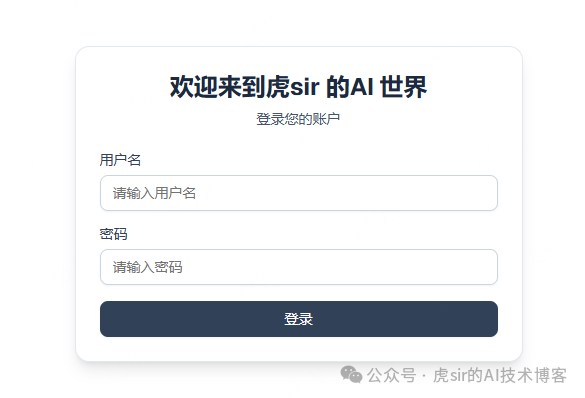 The administrator manages different user login permissions, and ordinary users can log in using their username and password.After logging in, users enter the chat page:
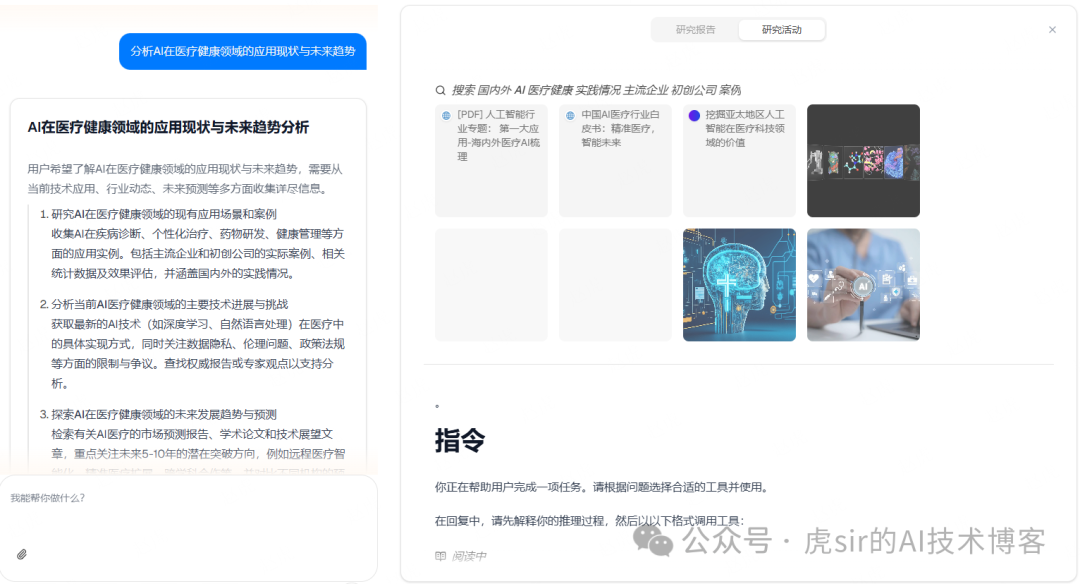
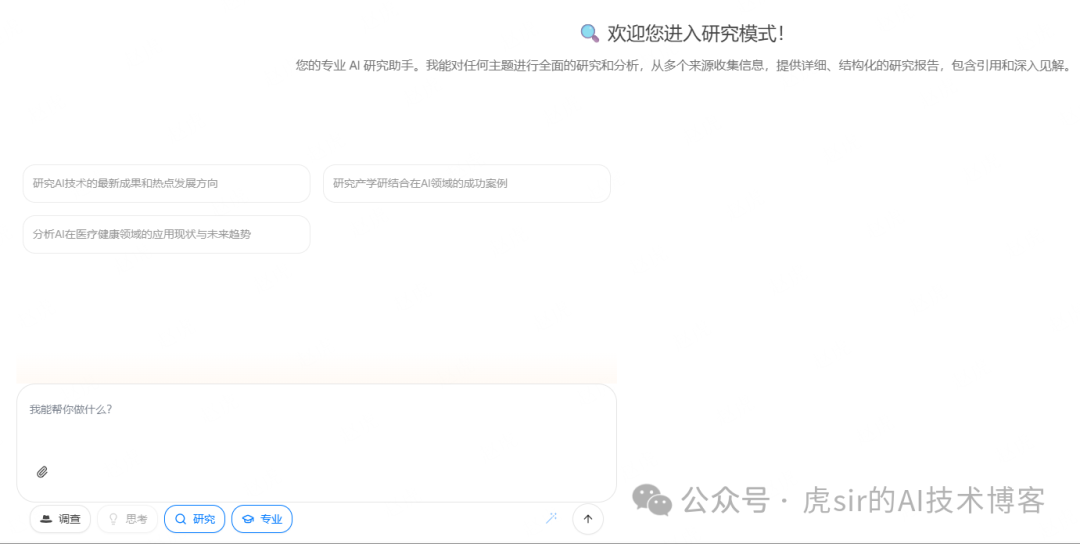 Once in the chat page, users can engage in knowledge Q&A tasks with the backend’s large model, supporting attachment parsing, research, and professional design role assignments.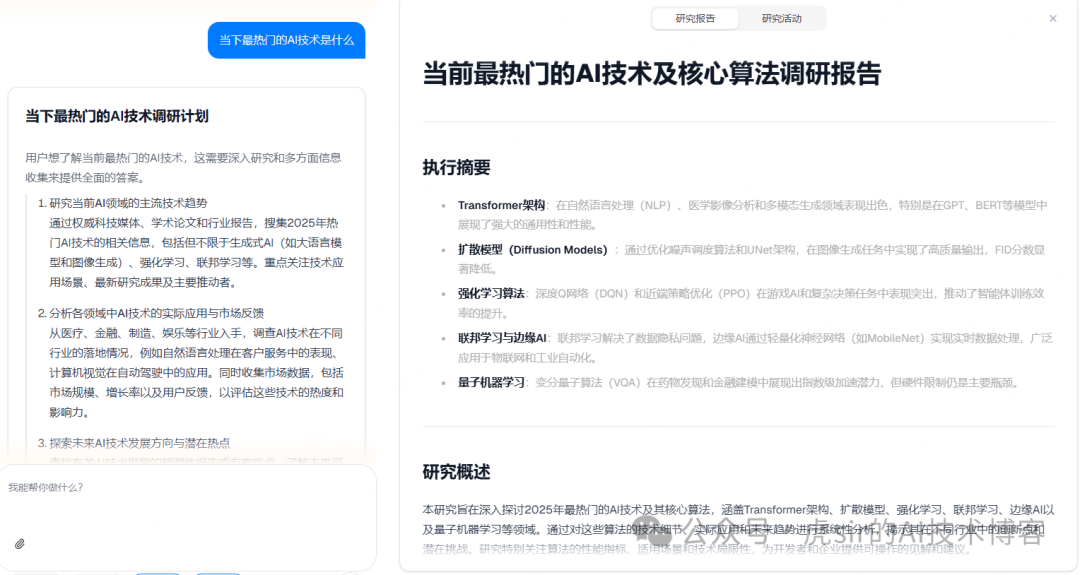
 System Overview1. Project Positioning
A research, design, and evaluation platform based on multi-agent collaboration, focusing on system solution design and feasibility analysis for AI engineering applications.
2. Core Technology Stack
Backend: FastAPI + LangGraph + LangChain
Frontend: Next.js 15 + React 19 + TypeScript
AI Models: Supports various LLMs (OpenAI, DeepSeek, Google Gemini, Tongyi Qianwen, etc.)
Database: SQLite (User Management) + Vector Database (Milvus/RAGFlow/VikingDB)
Workflow Engine: LangGraph (State Graph Orchestration)
Protocol Support: MCP (Model Context Protocol)
3. System Scale
Backend Code: ~50+ modules
Frontend Code: Next.js application
Number of Agents: 6 professional agents
Supported Work Modes: Research mode, Design mode
Architecture Analysis
1. Overall Architecture Design (Layered Architecture)
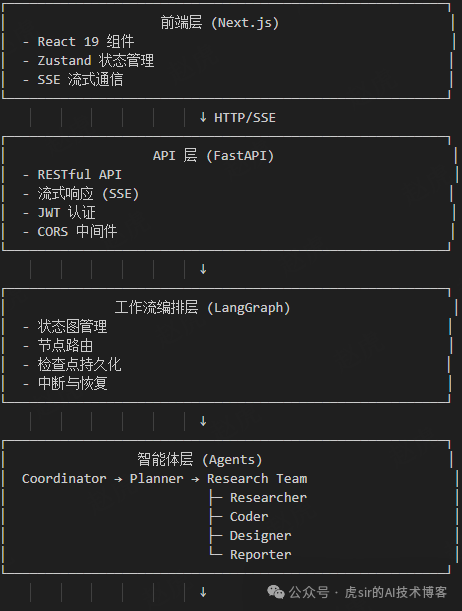
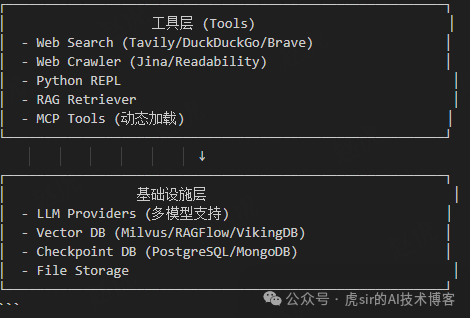
2. Core Design Patterns
a. State Machine Pattern
Using LangGraph’s StateGraph to manage workflows
State Definition: `State(MessagesState)` extension
Node Transition: Conditional edges + Fixed edges
State Persistence: Checkpointer mechanism
b. Chain of Responsibility Pattern
Coordinator → Planner → Research Team → Reporter
Each agent handles specific responsibilities
Control flow is passed through Command objects
c. Strategy Pattern
Multiple search engine strategies (Tavily/DuckDuckGo/Brave/ArXiv/Wikipedia)
Multiple RAG provider strategies (Milvus/RAGFlow/VikingDB)
Multiple LLM provider strategies
d. Factory Pattern
`create_agent()`: Agent factory
`get_llm_by_type()`: LLM factory
`build_retriever()`: RAG retriever factory
`get_web_search_tool()`: Search tool factory
e. Decorator Pattern
`create_logged_tool()`: Adds logging functionality to tools
Unified wrapping and monitoring of tool calls
f. Observer Pattern
SSE streaming response mechanism
Frontend subscribes to backend event streams
Real-time UI state updates
3. Agent Architecture
1. Agent Role Definitions
a. Coordinator
– Responsibilities: Understand user needs and determine if research is needed
– Tools: `handoff_to_planner` (handoff tool)
– Decisions: Simple greeting vs research task vs decline request
– Output: Research topic + language locale settings
b. Planner
– Responsibilities: Develop detailed research/design plans
– Input: User needs + background research results
– Output: `Plan` object (containing multiple Steps)
– Features: Supports deep thinking mode (Reasoning Model)
– Iteration: Supports plan revisions and human feedback
c. Researcher
– Responsibilities: Information collection and synthesis analysis
– Tools: web_search, crawl_tool, local_search_tool, MCP tools
– Output: Structured research report (Markdown)
– Characteristics: Emphasizes citation sources, avoids inline citations
d. Coder
– Responsibilities: Data processing and mathematical calculations
– Tools: python_repl_tool
– Output: Calculation results and analysis
– Applications: Financial analysis, statistical calculations, data processing
e. Designer
– Responsibilities: System design
– Tools: python_repl_tool, web_search, crawl_tool
– Output: Technical solutions + calculation results + economic analysis
– Professional fields:
– Security system design
– Financial system design
– Electrical system design
– Economic evaluation
– Compliance analysis
f. Reporter
– Responsibilities: Generate final reports
– Input: All observations
– Output: Complete research/design report
– Supports various report styles (academic/marketing)
– Features: Configurable detail level (basic/standard/comprehensive)
2. Agent Collaboration Mechanism
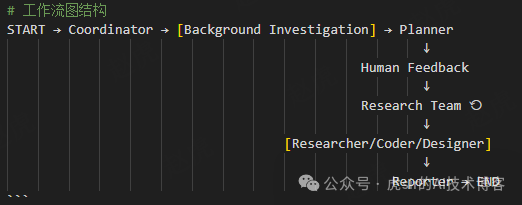
Collaboration Features:
1. Sequential Execution: Coordinator → Planner → Research Team → Reporter
2. Loop Execution: Research Team internally loops through unfinished steps
3. Conditional Routing: `continue_to_running_research_team()` routes based on step type
4. Human Intervention: Human Feedback node supports plan review
5. State Sharing: Context is shared through State objects
3. Data Flow Architecture
Request Processing Flow
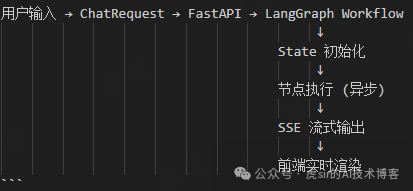
Status Management
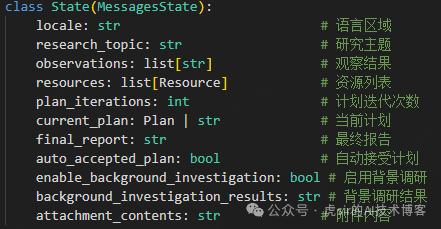
Status Features
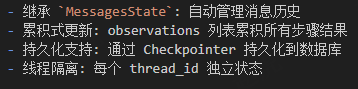
Configuration Management Structure
1. Multi-layer Configuration System
# Configuration Priority (from high to low)
1. RunnableConfig.configurable (runtime configuration)
2. RunnableConfig (top-level configuration)
3. conf.yaml (YAML configuration file)
4. Environment Variables (.env)
5. Default Values
2. Configuration Class Design
@dataclass(kw_only=True)class Configuration: resources: list[Resource] attachments: list[Attachment] max_plan_iterations: int = 1 max_step_num: int = 3 max_search_results: int = 3 mcp_settings: dict = None report_style: str = ReportStyle.ACADEMIC.value enable_deep_thinking: bool = False work_mode: str = WorkMode.RESEARCH.value report_detail_level: str = "comprehensive"LLM Management Architecture
1. Multi-model Support
LLMType = Literal["basic", "reasoning", "vision", "code"]
# Model MappingAGENT_LLM_MAP = {    "coordinator": "basic",    "planner": "basic",      # Can switch to reasoning    "researcher": "basic",    "coder": "basic",    "designer": "basic",    "reporter": "basic",}
2. LLM Provider Adaptation
– OpenAI / Azure OpenAI
– DeepSeek (Reasoning Model)
– Google Gemini (AI Studio)
– Tongyi Qianwen (DashScope)
– Custom OpenAI compatible endpoints
3. LLM Caching Mechanism
_llm_cache: dict[LLMType, BaseChatModel] = {}
def get_llm_by_type(llm_type: LLMType) -> BaseChatModel:    if llm_type in _llm_cache:        return _llm_cache[llm_type]    # Create and cache
Tool System Architecture
1. Built-in Tools
– **Search Tools**: Tavily, DuckDuckGo, Brave, ArXiv, Wikipedia
– **Crawling Tools**: Jina Client, Readability Extractor
– **Execution Tools**: Python REPL (sandbox environment)
– **Retrieval Tools**: RAG Retriever (local knowledge base)
2. MCP Tool Integration
# MCP Configuration Structuremcp_settings = { "servers": { "server_name": { "transport": "stdio", "command": "uvx", "args": ["mcp-package"], "enabled_tools": ["tool1", "tool2"], "add_to_agents": ["researcher", "coder"] } }3. MCP Features
– Dynamic tool loading
– Multi-server support
– Selective tool enabling
– Agent-level tool allocation
4. Tool Log Analyzer
def create_logged_tool(tool_class): """Adds logging functionality to tools""" # Wrap tool calls # Log inputs and outputs # Error handlingAlgorithm Analysis
1. Plan Generation Algorithm
a. Plan Generation Process
def planner_node(state: State, config: RunnableConfig):    # 1. Context evaluation    has_enough_context = assess_context(state)
    # 2. If context is insufficient, generate steps    if not has_enough_context:        steps = generate_steps(            max_steps=max_step_num,            analysis_framework=ANALYSIS_FRAMEWORK        )
    # 3. Plan validation    plan = Plan(        locale=locale,        has_enough_context=has_enough_context,        thought=thought,        title=title,        steps=steps    )
    # 4. Iteration control    if plan_iterations >= max_plan_iterations:        return Command(goto="reporter")
    return Command(goto="human_feedback" or "reporter")
b. Step Type Classification Algorithm
class StepType(str, Enum):    RESEARCH = "research"      # Information collection    PROCESSING = "processing"  # Data processing    DESIGN = "design"          # Engineering design
# Step routing algorithmdef continue_to_running_research_team(state: State):    current_plan = state.get("current_plan")
    # Find the first unfinished step   for step in current_plan.steps:        if not step.execution_res:            if step.step_type == StepType.RESEARCH:                return "researcher"            elif step.step_type == StepType.PROCESSING:                return "coder"            elif step.step_type == StepType.DESIGN:              return "designer"
   return "planner"  # All steps completed, return to planner
c. Algorithm Characteristics
– Greedy strategy: Sequentially execute steps without backtracking
– Type-driven: Select agents based on step type
– State check: Determine completion status through `execution_res`
– Loop termination: Exit loop after all steps are completed
2. Information Retrieval Algorithm
a. RAG Retrieval Process
def retriever_tool(query: str, resources: List[Resource]):    # 1. Vectorize query    query_embedding = embed_query(query)
    # 2. Similarity search    results = vector_db.similarity_search(        query_embedding,        k=top_k,        filter=resource_filter    )
    # 3. Reordering (optional)    ranked_results = rerank(results, query)
    # 4. Format output    return format_results(ranked_results)
b. Web Search Strategy
# Tavily search configurationLoggedTavilySearch( max_results=max_search_results, include_raw_content=True, include_images=True, include_image_descriptions=True, include_domains=include_domains, # Whitelist exclude_domains=exclude_domains, # Blacklist)Search Optimization:
– Domain filtering: Improves result quality
– Raw content: Retains complete information
– Image support: Multimodal content
– Result limitation: Controls information volume
c. Streaming Response Algorithm
1. SSE Streaming
async def _astream_workflow_generator():    async for agent, _, event_data in graph.astream(        workflow_input,        config=workflow_config,        stream_mode=["messages", "updates"],        subgraphs=True,    ):        # Process message chunks        if isinstance(event_data, AIMessageChunk):            yield _make_event("message_chunk", event_data)
        elif event_data.tool_calls:            yield _make_event("tool_calls", event_data)
        # Handle interruptions        elif "__interrupt__" in event_data:            yield _make_event("interrupt", event_data)
Streaming Features:
– Incremental transmission: Send in chunks to reduce latency
– Event classification: message_chunk, tool_calls, interrupt
– Subgraph support: Supports nested workflows
– Error handling: Exception capture and safe degradation
d. Attachment Processing Algorithm
1. Attachment Content Extraction
def process_attachments(configurable, state: State) -> str:    # 1. Check cache    if state.get('attachment_contents'):        return state.get('attachment_contents')
    # 2. Iterate through attachments    for attachment in attachments:        # 3. Process based on type        if attachment.type.startswith('text/'):            content = read_text_file(attachment.url)        elif attachment.type == 'application/pdf':            content = extract_pdf_text(attachment.url)        elif attachment.type.startswith('image/'):            content = describe_image(attachment.url)
        # 4. Format         attachment_texts.append(format_content(content))
     # 5. Cache result    result = "\n\n".join(attachment_texts)    state['attachment_contents'] = result    return result
Processing Strategy:
– Lazy loading: Process on first access
– Caching mechanism: Avoids duplicate processing
– Type adaptation: Different processing for different file types
– Encoding fault tolerance: UTF-8 fails, try GBK
e. JSON Repair Algorithm
1. JSON Output Repair
def repair_json_output(json_str: str) -> str:    # 1. Remove Markdown code block markers    json_str = re.sub(r'^```json\s*', '', json_str)    json_str = re.sub(r'\s*```$', '', json_str)
    # 2. Use json-repair library to repair    from json_repair import repair_json    repaired = repair_json(json_str)
    # 3. Validate repair result    json.loads(repaired)  # Throws exception if still invalid
    return repaired
Repair Capabilities:
– Removes excess Markdown markers
– Repairs missing quotes
– Repairs trailing commas
– Repairs mismatched brackets
f. Tool Call Cleanup Algorithm
1. Parameter Cleanup
def sanitize_args(args): """Cleans tool call parameters, removes sensitive information""" if isinstance(args, dict): sanitized = {} for key, value in args.items(): # Recursively clean nested structures if isinstance(value, (dict, list)): sanitized[key] = sanitize_args(value) # Clean sensitive fields elif key.lower() in ['password', 'api_key', 'token']: sanitized[key] = "***" else: sanitized[key] = value return sanitized elif isinstance(args, list): return [sanitize_args(item) for item in args] return argsg. Prompt Template Algorithm 1. Template Rendering
def apply_prompt_template(template_name: str, state: dict, config: Configuration):    # 1. Load template file    template_path = f"prompts/{template_name}.md"    template_content = load_template(template_path)
    # 2. Prepare context variables    context = {        "CURRENT_TIME": datetime.now().isoformat(),        "locale": state.get("locale", "en-US"),        "work_mode": config.work_mode,        "max_step_num": config.max_step_num,        "resources": state.get("resources", []),        "report_style": config.report_style,        "report_detail_level": config.report_detail_level,    }
    # 3. Jinja2 rendering    from jinja2 import Template    template = Template(template_content)    rendered = template.render(**context)
    # 4. Convert to message format    messages = [{"role": "system", "content": rendered}]    messages.extend(state.get("messages", []))
    return messages
Template Features:
– Conditional rendering: {% if work_mode == “research” %}
– Loop rendering: {% for resource in resources %}
– Variable replacement: {{ CURRENT_TIME }}
– Multi-language support: Dynamically adjusts based on locale
4. Workflow Analysis1. Research Mode Process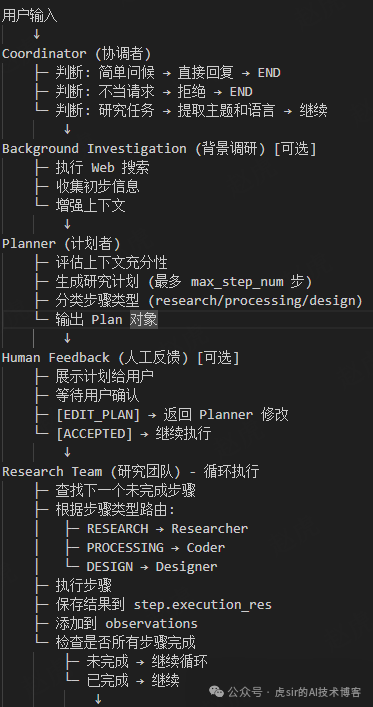
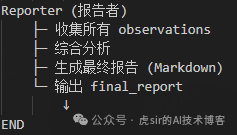 2. Design Mode Process
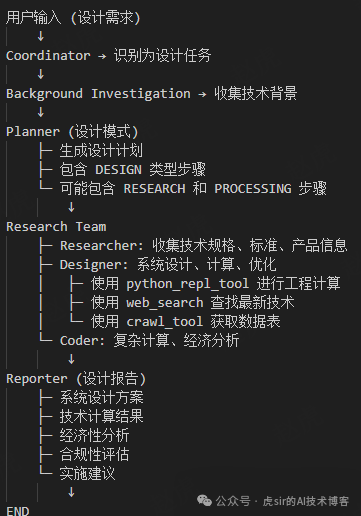 3. Key Subprocessesa. Researcher Execution Process
async def researcher_node(state: State, config: RunnableConfig):    # 1. Prepare input    current_step = find_current_step(state)    agent_input = {        "messages": [            HumanMessage(f"Research Topic: {plan_title}"),            HumanMessage(f"Current Step: {current_step.title}"),            HumanMessage(f"Description: {current_step.description}"),        ]    }
    # 2. Add attachment content    if state.get('attachment_contents'):        agent_input["messages"].append(            HumanMessage(f"Attachment Information: {attachment_contents}")        )
    # 3. Add completed steps    for completed_step in completed_steps:        agent_input["messages"].append(            HumanMessage(f"Completed: {completed_step.execution_res}")        )
    # 4. Configure tools    tools = [web_search, crawl_tool]    if resources:        tools.insert(0, local_search_tool)         # 5. Load MCP tools    if mcp_servers:        mcp_tools = await load_mcp_tools(mcp_servers)        tools.extend(mcp_tools)
    # 6. Create agent    agent = create_react_agent(        name="researcher",        model=get_llm_by_type("basic"),        tools=tools,        prompt=researcher_prompt    )
    # 7. Execute agent    result = await agent.ainvoke(        agent_input,        config={"recursion_limit": 25}    )
    # 8. Extract results    response_content = result["messages"][-1].content
    # 9. Update state    current_step.execution_res = response_content    observations.append(response_content)
    # 10. Return command    return Command(        update={            "messages": [HumanMessage(response_content, name="researcher")],            "observations": observations,        },        goto="research_team"    )
b. Designer Execution Process
async def designer_node(state: State, config: RunnableConfig):    # 1. Prepare design tools    tools = [        python_repl_tool,      # Engineering calculations        web_search,            # Technical search        crawl_tool,            # Specification acquisition    ]
    # 2. Add local resource retrieval     if resources:        tools.insert(0, local_search_tool)
    # 3. Execute design task    # (Similar to researcher_node, but using designer prompt)
    # 4. Design output includes:    #    - System architecture    #    - Technical calculations    #    - Component selection    #    - Economic analysis    #    - Compliance assessment
c. Reporter Generation Process
def reporter_node(state: State, config: RunnableConfig):    # 1. Collect all observations    observations = state.get("observations", [])    current_plan = state.get("current_plan")
    # 2. Prepare report input    input_messages = [        HumanMessage(f"Research Requirement: {current_plan.title}"),        HumanMessage(f"Description: {current_plan.thought}"),    ]
    # 3. Add attachment information    if attachment_contents:        input_messages.append(            HumanMessage(f"Attachment Information: {attachment_contents}")        )
    # 4. Add all observations    for observation in observations:        input_messages.append(               HumanMessage(f"Observation Result: {observation}")        )
    # 5. Add report format requirements    input_messages.append(        HumanMessage("""        Important Note:        - Create a detailed and comprehensive report        - Use Markdown tables extensively        - Include quantitative data and statistics        - Citations should be listed at the end in the Key Citations section        - Do not inline citations        """)    )        # 6. Apply report template    messages = apply_prompt_template("reporter", input_messages, config)
    # 7. Call LLM to generate report    response = get_llm_by_type("reporter").invoke(messages)
    # 8. Return final report    return {"final_report": response.content}
Data Flow Transfer1. Message Transfer
User message → State.messages
↓
Coordinator → Adds coordinator message
↓
Planner → Adds planner message (Plan JSON)
↓
Researcher → Adds researcher message (Research results)
↓
Coder → Adds coder message (Calculation results)
↓
Designer → Adds designer message (Design plan)
↓
Reporter → Adds reporter message (Final report)
↓
Frontend displays complete conversation history
2. Observation Result Transfer
Researcher.execution_res → observations[0]
Coder.execution_res → observations[1]
Designer.execution_res → observations[2]
↓
Reporter integrates all observations
↓
Generates final_report
3. Attachment Content Transfer
User uploads attachment → Attachment object
↓
process_attachments() → Extract text content
↓
state[‘attachment_contents’] → Cache
↓
Passed to all agents (Coordinator, Planner, Researcher, Designer, Reporter)
↓
Agents reference attachment content in analysis
4. Error Handling Processa. LLM Call Failure
try: response = llm.invoke(messages)except Exception as e: logger.error(f"LLM call failed: {e}") # Retry mechanism (max_retries=3) # Degradation strategy # Return error messageb. Tool Call Failure
try: result = tool.invoke(input)except Exception as e: logger.error(f"Tool call failed: {e}") # Return error information to agent # Agent can choose other tools or strategiesc. JSON Parsing Failure
try: plan = json.loads(response)except json.JSONDecodeError: # Attempt to repair JSON repaired = repair_json_output(response) plan = json.loads(repaired)d. Plan Iteration Limit Exceeded
if plan_iterations >= max_plan_iterations: logger.warning("Max plan iterations reached") return Command(goto="reporter") # Directly generate report5. Advantages Analysisa. Architectural Advantages1. Modular Design
– Clear layered architecture (frontend/API/workflow/agents/tools/infrastructure)
– High cohesion and low coupling module division
– Easy to maintain and extend
Embodiment:
backend/
├── agents/ # Agent layer
├── graph/ # Workflow layer
├── tools/ # Tool layer
├── llms/ # LLM layer
├── rag/ # RAG layer
└── server/ # API layer
2. Strong Scalability
Advantages:
– Factory pattern supports dynamic addition of new agents
– Strategy pattern supports switching between different implementations
– MCP protocol supports dynamic loading of external tools
Example:
# Adding a new agent only requires:1. Create a prompt file: prompts/new_agent.md2. Add node function: graph/nodes.py3. Register in the graph: graph/builder.py4. Configure LLM mapping: config/agents.py3. Elegant State Management
Advantages:
– State graph management based on LangGraph
– Automatic message history management (MessagesState)
– Supports state persistence and recovery
– Thread isolation ensures concurrent safety
Features:
# State automatically accumulatesState.messages  # Automatically manages conversation historyState.observations  # Accumulates all step results
# Checkpoint persistencecheckpointer = AsyncPostgresSaver(conn)graph.checkpointer = checkpointer
4. Good Streaming Response Experience
Advantages:
– SSE real-time streaming
– Incremental rendering reduces perceived latency
– Supports visualization of the thinking process
– Real-time feedback on tool calls
User Experience:
– See the agent’s “thinking” process
– Real-time visibility of searches and tool calls
– Word-by-word display of report generation
– Support for interruption and recovery
b. Functional Advantages:
1. Multi-Agent Collaboration
Advantages:
– Clear professional division of labor (research/coding/design/reporting)
– Mature collaboration mechanism (sequential + loop + conditional routing)
– Sufficient context sharing (State + observations)
Collaboration Effect:
– Researcher collects information → Coder analyzes data → Designer designs solutions → Reporter integrates reports
– Each agent focuses on their own field
– Results accumulate to form a complete solution
2. Rich Tool Ecosystem
Advantages:
– Built-in various search engines (Tavily/DuckDuckGo/Brave/ArXiv/Wikipedia)
– Supports Python code execution (data analysis/calculations)
– RAG retrieval support (local knowledge base)
– MCP protocol extension (infinite possibilities)
Tool Matrix:
Researcher: web_search + crawl_tool + local_search + MCP tools
Coder: python_repl_tool
Designer: python_repl_tool + web_search + crawl_tool + local_search
Reporter: (pure LLM generation)
3. Multi-Model Support
Advantages:
– Supports mainstream LLM providers
– Supports reasoning models (DeepSeek Reasoner)
– Supports visual models (multimodal)
– Supports code models (professional programming)
Flexible Configuration:
“`yaml
BASIC_MODEL: gpt-4o
REASONING_MODEL: deepseek-reasoner
VISION_MODEL: gpt-4-vision
CODE_MODEL: claude-3-opus
“`
4. High Report Quality
Advantages:
– Structured report templates (academic/marketing style)
– Configurable detail level (basic/standard/comprehensive)
– Mandatory use of tables to present data
– Citation norms (listed at the end)
– Supports images and visualizations
Report Features:
– Executive Summary (Key Findings)
– Detailed Analysis (In-depth Analysis)
– Extended Analysis (Extended Analysis)
– Key Citations (Citation Sources)
5. Technical Advantages:
1. Asynchronous Architecture
Advantages:
– FastAPI asynchronous API
– LangGraph asynchronous workflows
– Asynchronous tool calls
– High concurrency support
Performance Improvement:
async def researcher_node():    result = await agent.ainvoke()  # Asynchronous execution
async for event in graph.astream():  # Asynchronous streaming    yield event
2. Flexible Configuration
Advantages:
– Multi-layer configuration system (runtime/YAML/environment variables)
– Clear configuration priority
– Supports dynamic configuration (MCP)
– Environment isolation (.env)
Configuration Hierarchy:
RunnableConfig.configurable (highest priority) ↓RunnableConfig ↓conf.yaml ↓Environment Variables (.env) ↓Default Values (lowest priority)3. Comprehensive Error Handling
Advantages:
– Multi-layer exception capture
– JSON repair mechanism
– Retry mechanism (max_retries)
– Degradation strategy
Fault Tolerance Example:
try: plan = json.loads(response)except json.JSONDecodeError: repaired = repair_json_output(response) plan = json.loads(repaired)4. Logging and Monitoring
Advantages:
– Structured logging
– Tool call logs
– Debug mode support
– Performance monitoring points
Log Decorator:
LoggedTavilySearch = create_logged_tool(TavilySearch)# Automatically logs inputs, outputs, and execution time5. Security Considerations:
Advantages:
– JWT authentication mechanism
– Parameter cleanup (sanitize_args)
– CORS configuration
– MCP sandbox isolation
– Optional disabling of Python REPL
Security Measures:
# Clean sensitive parametersdef sanitize_args(args):    if key.lower() in ['password', 'api_key', 'token']:        sanitized[key] = "***"
# MCP configuration switchENABLE_MCP_SERVER_CONFIGURATION=false
# Python REPL switchENABLE_PYTHON_REPL=false
6. User Experience Advantages:
1. User-Friendly Interaction
– Supports human feedback (plan review)
– Interruption and recovery mechanism
– Real-time progress display
– Multi-language support (Chinese and English)
Interaction Process:
“`
User Input → Generate Plan → Display to User → User Confirmation/Modification → Execute
“`
2. Attachment Support
Advantages:
– Supports various file types (text/PDF/images)
– Automatic content extraction
– Caching mechanism avoids duplicate processing
– Agents automatically reference attachment content
Attachment Process:
“`
Upload Attachment → Extract Content → Cache to State → Pass to All Agents
“`
3. Multiple Output Formats
Advantages:
– Markdown reports
– PDF export
– PPT generation
– Streaming text
Export Functions:
POST /api/report/pdf # PDF reportPOST /api/ppt/generate # PPT presentationPOST /api/prose/generate # Creative writing4. Command Line Support
Advantages:
– Interactive mode (built-in questions)
– Direct query mode
– Rich command line parameters
– Debug mode
CLI Usage:
python main.py --interactivepython main.py "Research Question"python main.py --debug --max_step_num 55. Development Experience Advantages:
1. Code Quality
Advantages:
– Complete type annotations (Python 3.12+)
– Standardized docstrings
– Unified code formatting (Ruff)
– Test coverage (pytest)
Example:
async def researcher_node( state: State, config: RunnableConfig) -> Command[Literal["research_team"]]: """Research node for conducting research"""2. Clear Project Structure:
Advantages:
– Reasonable directory organization
– Consistent naming conventions
– Clear division of responsibilities
– Easy navigation
Directory Structure:
backend/├── agents/ # Agent creation├── graph/ # Workflow definition├── prompts/ # Prompt templates├── tools/ # Tool implementations├── llms/ # LLM management└── server/ # API service3. Dependency Management
Advantages:
– Uses uv package manager (fast)
– Standardized pyproject.toml
– Dependency version locking
– Optional dependency groups (dev/test)
Dependency Configuration:
“`toml
[project.optional-dependencies]
dev = [“ruff”, “langgraph-cli”]
test = [“pytest”, “pytest-cov”]
“`
4. Easy Deployment
Advantages:
– Docker support
– Docker Compose one-click startup
– Environment variable configuration
– Multiple deployment methods
Deployment Options:
docker-compose up -d # Docker deploymentpython server.py # Local deploymentlanggraph up # LangGraph Cloud6. Disadvantages Analysis
1. Architectural Disadvantages:
a. Tight Coupling Issues
– Agents are tightly coupled with the tool layer
– Configuration system is scattered across multiple files
– Too many fields in the state object
Impact:
# Agents directly depend on specific tools.tools = [get_web_search_tool(), crawl_tool, python_repl_tool]
# Configuration is scatteredconfig/agents.py  # Agent configurationconfig/tools.py   # Tool configurationconfig/configuration.py  # General configurationconf.yaml  # YAML configuration.env  # Environment variables
2. Lack of Abstraction Layer
Issues:
– No unified agent interface
– Tool interfaces are not unified
– Lack of service layer abstraction
Example:
# Each node function implements similar but repetitive logicasync def researcher_node(): # Prepare input # Configure tools # Create agent # Execute # Update stateasync def coder_node(): # Almost identical logic3. Complex State Management
Issues:
– State object has too many fields (10+ fields)
– State update logic is scattered
– Lack of state validation
State Fields:
class State(MessagesState): locale: str research_topic: str observations: list[str] resources: list[Resource] plan_iterations: int current_plan: Plan | str final_report: str auto_accepted_plan: bool enable_background_investigation: bool background_investigation_results: str attachment_contents: str4. Performance Disadvantages
1. Low Efficiency of Serial Execution
Issues:
– Steps are executed sequentially, with no parallelism
– Multiple RESEARCH steps cannot be executed simultaneously
– Accumulated waiting time
Process:
Step 1 (RESEARCH) → Wait 30s
↓
Step 2 (RESEARCH) → Wait 30s
↓
Step 3 (PROCESSING) → Wait 10s
Total: 70s
Improvement Space:
Step 1 (RESEARCH) ┐
Step 2 (RESEARCH) ├─ Parallel Execution → 30s
Step 3 (RESEARCH) ┘
↓
Step 4 (PROCESSING) → 10s
Total: 40s (saves 30s)
2. High Overhead of LLM Calls
Issues:
– Each agent independently calls LLM
– No response caching
– Repeated context passing
Call Counts:
Coordinator: 1 time
Planner: 1-N times (iterations)
Researcher: N times (per step)
Coder: M times (per step)
Designer: K times (per step)
Reporter: 1 time
Total: 3 + N + M + K times
3. High Memory Usage
Issues:
– Complete message history is stored in memory
– All attachment content is loaded
– Accumulated observation results
Memory Growth:
State.messages # All conversation historyState.observations # All step resultsState.attachment_contents # All attachment content# Long conversations may lead to memory overflow4. Unoptimized Database Queries
Issues:
– RAG retrieval does not have batch queries
– Frequent checkpoint writes
– Lack of query caching
7. Conclusion
Core Advantages
1. Mature multi-agent architecture: Clear professional division, smooth collaboration
2. Powerful tool ecosystem: Search, crawling, code execution, RAG, MCP
3. Flexible configuration system: Multi-layer configuration, multi-model support
4. Excellent user experience: Streaming response, real-time feedback, multi-language
5. Professional domain capabilities: Photovoltaic energy storage system design
Main Challenges
1. Performance bottlenecks: Serial execution, high LLM call overhead
2. Architectural coupling: Lack of abstraction layer, code duplication
3. Functional limitations: Plan generation is not intelligent enough, weak error recovery
4. Security risks: Python REPL sandbox is not perfect5. Maintainability: Low test coverage, incomplete documentation
How to build multi-agent coordination for engineering construction: Reference
Agent Design Patterns: Agentic Design Patterns
Reply “Join Group” to enter the AI learning group with Tiger Sir: